

The Product Demo Checklist That Actually Closes Deals
Your SE just pinged you: "What's this demo about?" The call is in 20 minutes. The prospect's pain points are buried in a Slack thread from last Tuesday, the demo environment still has fake data from the last call, and you're not sure the calendar invite reached the right person.
This product demo checklist exists so that never happens again.
It covers four phases - align, prepare, execute, follow up - with 15 numbered steps and funnel benchmarks so you can spot exactly where your demos break down. Whether you're running a SaaS demo checklist for your own platform or building a vendor demo checklist to evaluate someone else's tool, the same structure applies.
Know Your Benchmarks First
Before you optimize anything, know where the leaks are. RevenueHero benchmarks the inbound demo request funnel from request through to booked meeting, while First Page Sage provides broader B2B SaaS funnel benchmarks including SQL-to-Closed rates.
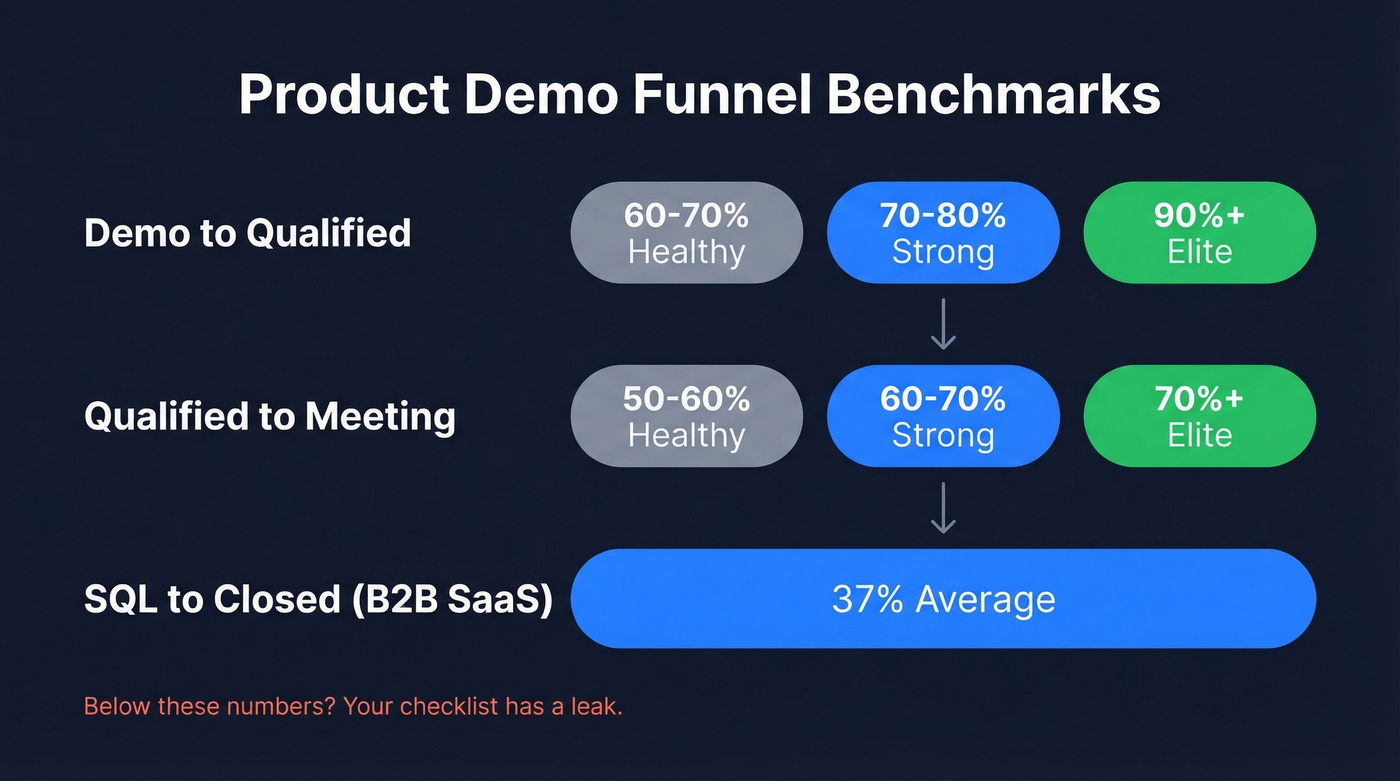
| Funnel Stage | Healthy | Strong | Elite |
|---|---|---|---|
| Demo → Qualified | 60-70% | 70-80% | 90%+ |
| Qualified → Meeting | 50-60% | 60-70% | 70%+ |
| SQL → Closed (B2B SaaS) | 37% avg | - | - |
Below these numbers? Your checklist has a leak. The phases below are ordered so you can diagnose where.

Step 8 on your checklist - verifying contact data - is the one most teams skip and the one that tanks demos before they start. Prospeo finds and verifies emails in real time with 98% accuracy, so your calendar invite actually reaches the decision-maker. No bounced invites, no ghosted meetings.
Stop prepping demos for prospects who never get the invite.
The 15-Step Checklist
Phase 1 - Internal Alignment
Here's the thing: if your AE can't state the demo's purpose in one sentence, postpone it.
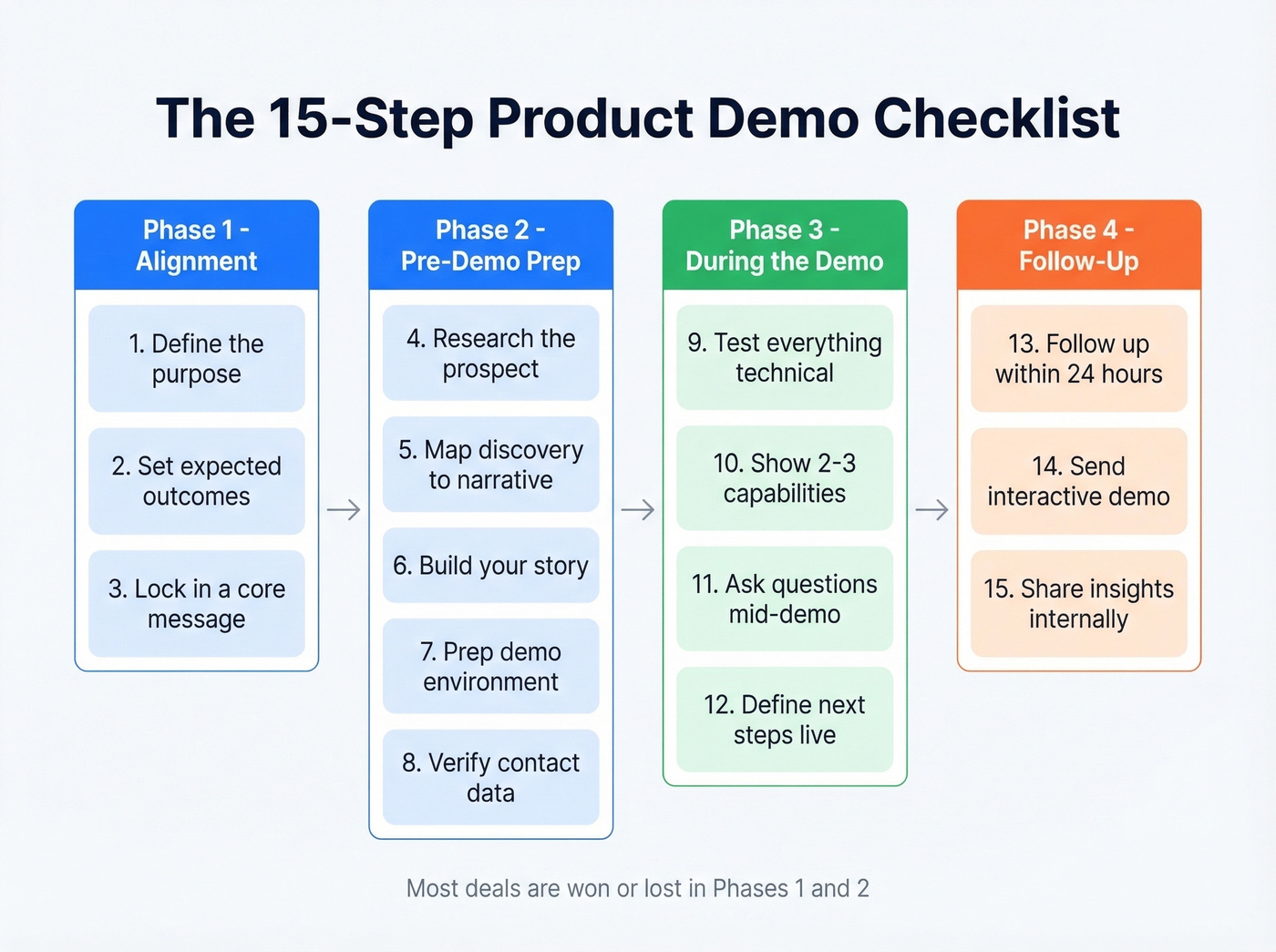
☐ 1. Define the purpose. What specific outcome does this demo advance? Not "show the product" - that's a vibe, not a goal. 91% of buyers are already familiar with your product when they get on a sales call. They need proof you solve their problem, not a feature tour.
☐ 2. Set expected outcomes. Define both the minimum success (prospect agrees to a technical deep-dive) and the best case (verbal commitment to a POC). Writing both down forces clarity.
☐ 3. Lock in a single core message. One sentence the buyer can repeat to their boss after the call. If you can't write it, you aren't ready. If you need help tightening it, borrow from these sample elevator pitches.
Phase 2 - Pre-Demo Prep
This is where most demos are won or lost. We've watched reps spend 45 minutes prepping a demo environment and zero minutes verifying the prospect's email actually works. Don't be that rep.
☐ 4. Research the prospect deeply. Company, attendees, pain points, recent earnings calls, job postings, tech stack, prior conversations. A practitioner checklist that keeps circulating on r/sales puts it simply: email the prospect in advance to learn their main pain point. Don't guess. (If you’re rebuilding your outbound motion, start with these sales prospecting techniques.)
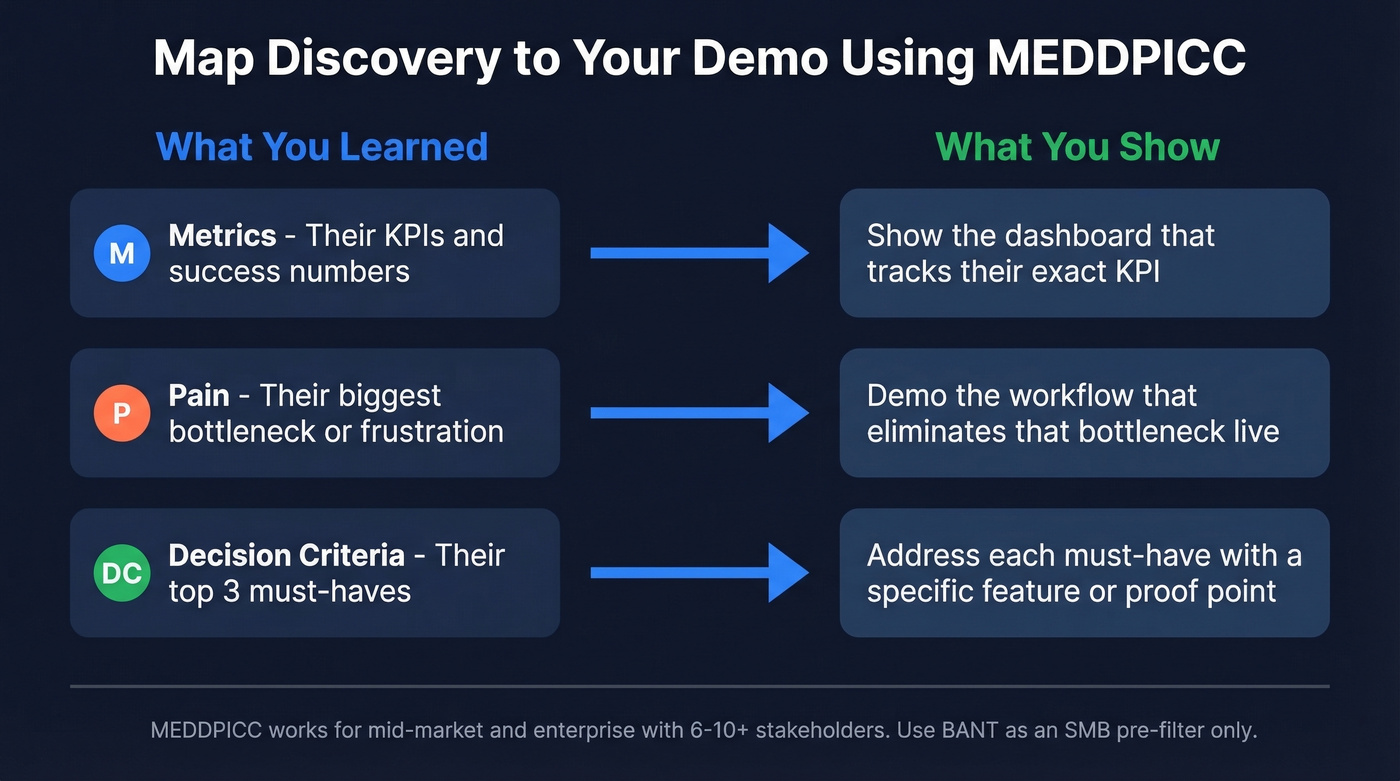
☐ 5. Map discovery to your demo narrative. Use MEDDPICC to bridge what you learned and what you show:
- Metrics → show the dashboard that tracks their KPI
- Pain → demonstrate the workflow that eliminates their bottleneck
- Decision Criteria → address their top three must-haves
For mid-market and enterprise deals with 6-10+ stakeholders, MEDDPICC gives you structure. BANT works as an SMB pre-filter, but it won't carry a complex deal. (If you want a deeper qualification framework, see MEDDIC sales qualification.)
☐ 6. Build your story, not your feature list. Structure the demo as hero (your buyer) → their pains → transformation → benefits. Benefits over features, always. The best demo decks we've reviewed spend 60% of their time on the buyer's world and 40% on the product - not the other way around. If your deck needs a rebuild, use a sales deck storytelling framework.
☐ 7. Prep your demo environment. Believable data, correct feature flags, no "test account" labels on screen. We've seen demos derail because sample data showed a competitor's name. Build a dedicated demo org with industry-relevant seeded data and keep a pre-recorded walkthrough on a second device as backup. (More tactical guidance: software demo tips.)
☐ 8. Verify your contact data. This is the step most checklists skip, and it's the one that kills demos before they start. Bounced calendar invites and dead phone numbers mean your prospect never sees the meeting. Run your prospect list through Prospeo's email finder before scheduling - it verifies emails in real time with 98% accuracy, so your invite actually reaches the right person. If you’re troubleshooting deliverability, start with email bounce rate.

Phase 3 - During the Demo
☐ 9. Test everything technical. Internet, conferencing tool, screen share permissions, integrations you plan to show live. A full trial run the morning of isn't paranoia - it's professionalism. If anything fails, execute the backup plan you built in step 7.
☐ 10. Show two to three capabilities, not fifteen. A confused mind always says no. Map your demo to the two or three pain points you confirmed in discovery. If you didn't confirm pain points, you skipped Phase 2 - go back. (If your discovery is weak, fix it with better discovery questions.)
☐ 11. Ask questions mid-demo. The reps who monologue for 30 minutes and then ask "any questions?" are the same reps wondering why deals stall. Try "How does this compare to your current workflow?" instead. It invites dialogue. "So you can see why this is better, right?" invites a polite nod and a ghosted follow-up.
☐ 12. Define next steps before you hang up. Never end a demo without a calendar hold for the next meeting. "We'll follow up with next steps" is how deals die in pipeline limbo. If you need copy you can reuse, pull from these sales follow-up templates.
Phase 4 - Post-Demo Follow-Up
☐ 13. Follow up within 24 hours. 90% of buyers respond within two days of their most recent message. Wait a week and you're competing with whatever shiny thing landed in their inbox. Recap challenges discussed, objectives agreed on, and the specific next step.
☐ 14. Send an interactive demo as a leave-behind. This is the move that separates good follow-up from great. Website conversion hits 24.35% with an interactive demo versus 3.05% without one. Keep the flow to 5-13 steps - your champion will forward it internally, and it needs to land without you in the room.
☐ 15. Share insights internally. Document questions asked, objections raised, features that resonated, and next steps agreed. Share with your SE, CS team, and product. The teams that skip this step re-discover the same objections six months later.
Let's be honest about where most playbooks go wrong: they obsess over what happens during the call. In our experience, the alignment and prep phases determine the outcome before anyone shares a screen. If you're losing deals after "great demos," your Phase 1 is broken. (To diagnose where deals stall, audit your pipeline health.)
Your demo checklist is only as strong as the data feeding it. Bounced emails and wrong numbers mean Phase 2 prep was wasted. Prospeo gives you 143M+ verified emails and 125M+ mobile numbers on a 7-day refresh cycle - at $0.01 per email. Your prospects show up because your data is current.
Close more demos by reaching the right people first.
Demo Types by Buyer Stage
Your checklist weight shifts depending on which format you're running. Teams evaluating new tools often adapt this same framework into a vendor demo checklist - flipping the perspective so the buyer scores each vendor against consistent criteria.

| Demo Type | Stage | Checklist Focus |
|---|---|---|
| Self-Guided / Interactive | Top of funnel | Phase 2 heavy |
| First Demo ("Harbor Cruise") | Early interest | Phase 1-2 heavy |
| Persona Demo | Mid-funnel | Phase 2-3 balanced |
| Custom SE Demo | Late-stage | Phase 3 precision |
| POC | Pre-close | Phase 3-4 rigor |
Skip the self-guided format if your product requires heavy configuration to show value - you'll just confuse people without a guide. For complex enterprise tools, jump straight to the persona demo or custom SE demo and invest your time in Phase 2 prep instead.
FAQ
How long should a demo be?
15-25 minutes for a first demo. Custom SE demos can run longer, but the principle holds: if you can't make your case in 20 minutes, you're showing too many features. Cut ruthlessly and let discovery guide what stays.
What's a good demo-to-close rate?
Demo-to-qualified should hit 60-70%, qualified-to-meeting 50-60%, and B2B SaaS SQL-to-closed averages around 37%. If you're below these benchmarks, audit your checklist phases in order - alignment issues cascade downstream into every later stage.
How do I make sure the prospect actually shows up?
Verify their email before sending the invite so the calendar hold actually lands. Send a reminder one hour before with a clear agenda, and include the meeting's purpose and expected outcome in the invite itself. It sounds basic, but no-shows drop dramatically when the invite contains a specific reason to attend rather than a generic "Product Demo" subject line.
Can I use this as a SaaS demo checklist?
Yes - the 15 steps were built around SaaS sales motions: discovery-driven narratives, live environment prep, and interactive leave-behinds. Adjust the demo type table above to match your funnel stage and deal complexity, and you've got a ready-made SaaS demo checklist.