

Virtual Sales Presentation Tips That Close Deals (2026)
Three minutes into your demo, the prospect's eyes drift. They're reading Slack, checking email, scrolling their phone below the camera frame. You've lost them - and you haven't even gotten to pricing.
Most virtual sales presentation tips obsess over lighting and camera angles. That's table stakes. The real gap is structure and follow-up, which is where deals actually get won or lost. 71% of buyers prefer independent research over talking to a rep, so your presentation isn't an introduction. It's a closing argument for the 17% of buying time they'll spend with you.
What You Need (Quick Version)
- Follow the Hook - Problem - Solution - Proof - Differentiation - Investment - Next Steps framework
- Keep slides to 9 words or fewer - you're presenting on a laptop, not a conference stage
- Interact every 3-5 minutes; silence is death on video
- The presentation is a minority of the deal - follow-up does the heavy lifting
The 7-Step Presentation Framework
Most presentations fail because they're organized around what the rep wants to say, not what the buyer needs to hear. This 7-step structure fixes that.
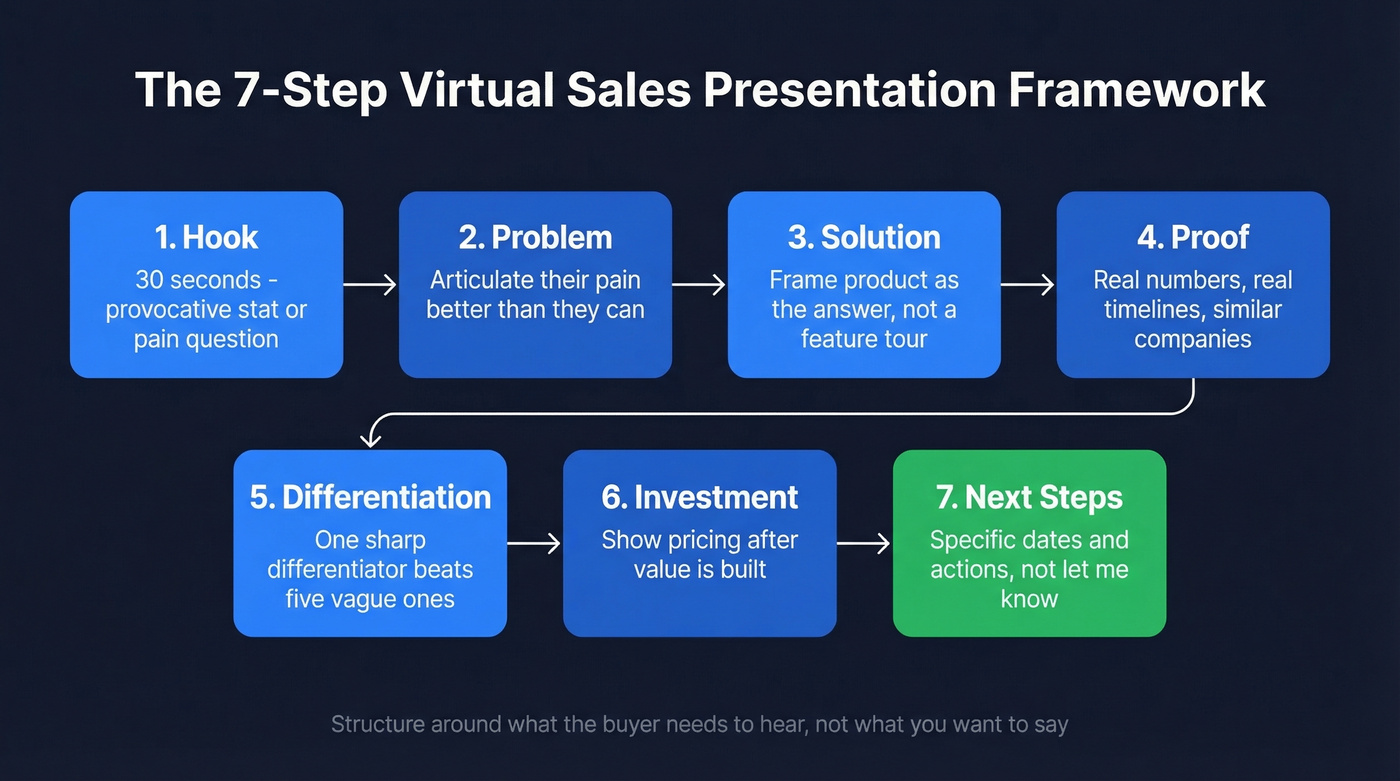
- Hook - You've got 30 seconds. Open with a provocative stat, a customer result, or a question that names their specific pain. Never start with your company history.
- Problem - Articulate the problem better than they can. If they're nodding, you've earned credibility.
- Solution - Now introduce your product. Frame it as the answer to the problem you just described, not a feature tour.
- Proof - "Company X reduced churn by 18% in 90 days" beats "our customers love us." Use similar-company case studies with real numbers and timelines.
- Differentiation - One sharp differentiator lands harder than five vague ones.
- Investment - Don't hide pricing. By now, you've built enough value to anchor the number (and it helps to understand the psychology of an anchor in negotiation).
- Next Steps - "I'll send the proposal by Thursday, and we'll reconvene with your VP on Monday" is a close. "Let me know if you have questions" is a surrender.
Some reps skip slides entirely and run dialogue-first demos. That works for discovery calls, but for a multi-stakeholder presentation, you need visual anchors that people can reference after you hang up (useful if you're building a repeatable digital sales room).
Slide Design for a Laptop Screen
Here's the thing: your slides were designed for a projector. On a 13-inch screen, that's a disaster. The Forbes guideline of 9 words or fewer per slide sounds extreme until you try it - suddenly your font size jumps and your prospect actually reads what's on screen.
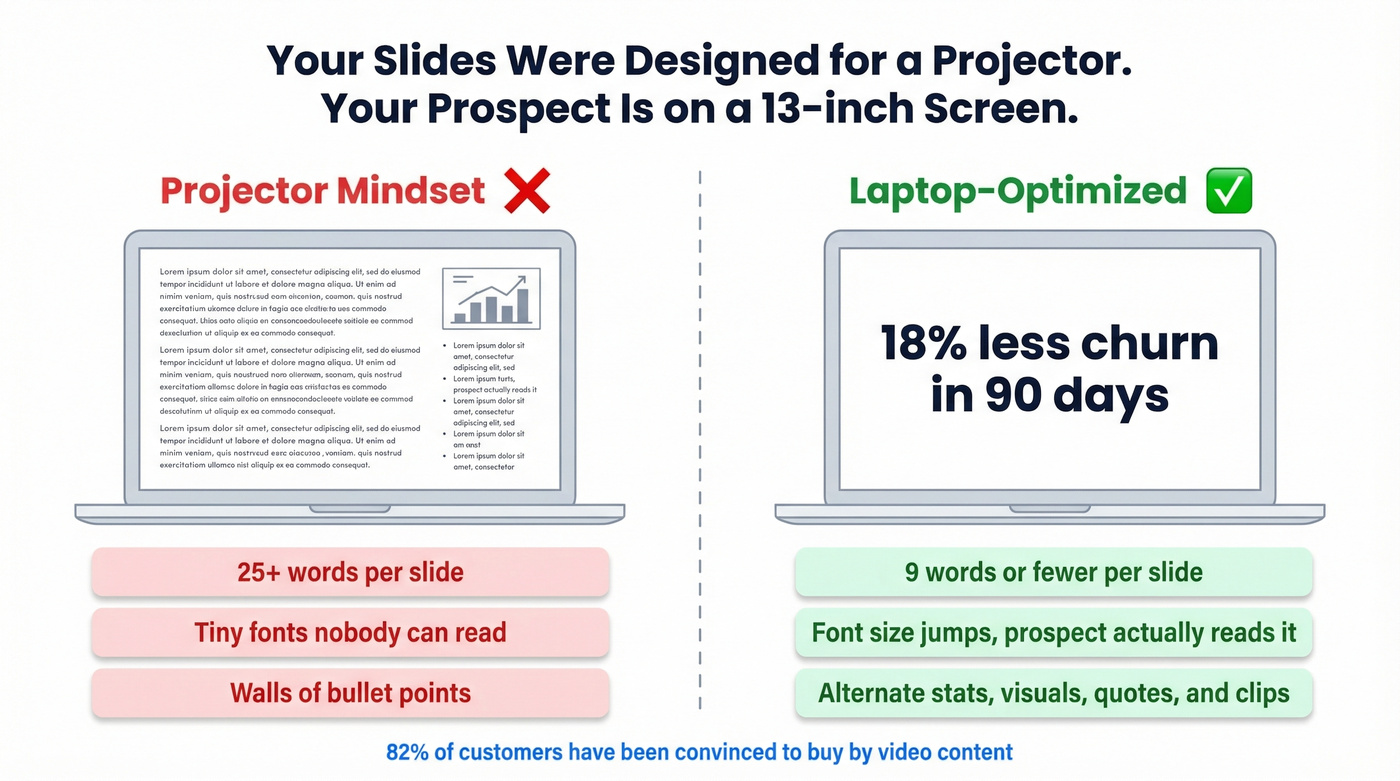
Vary your layouts. Alternate between a stat slide, a visual, a customer quote, and a short clip. Video has convinced 82% of customers to buy products and services, which explains why a 30-second customer testimonial outperforms three bullet-point slides every time. Try the "show-then-remove" technique: display a slide briefly, ask a question about it, then go back to camera. It forces attention. Whenever possible, overlay your camera on the slides so your face stays visible.
Nonverbal Communication on Camera
Stay full-camera for the first 2-3 minutes before sharing slides. Your face builds trust faster than any deck, and virtual selling nonverbal communication carries more weight than most reps realize - the camera compresses your expressiveness into a tiny rectangle.
Sit roughly 15-20 inches from the camera. Close enough to feel personal, far enough to avoid the interrogation-room effect. Use hand gestures deliberately; they restore energy the camera naturally flattens. Lead with higher energy than feels natural. We've watched reps transform their close rates just by dialing up 20% from their "normal" energy - it feels weird at first, but on camera it reads as engaged rather than manic.
Don't read from notes or slides. Eye contact breaks are invisible in a boardroom but painfully obvious on Zoom. Look at the lens, not the screen, especially when making your key value statement (more remote sales meeting tips help here).

You just nailed the 7-step framework. But 6-8 decision-makers need to see your follow-up - and bounced emails kill deals silently. Prospeo delivers 98% email accuracy with a 7-day refresh cycle, so your recap lands in every stakeholder's inbox, not their spam folder.
Stop losing deals to bad contact data after flawless presentations.
Engagement Tactics That Prevent Drift
Talk for more than five minutes without interaction and people drift. Build in a touchpoint every 3-5 minutes - not constant polls, but deliberate moments of participation (this is also a core part of strong sales communication).
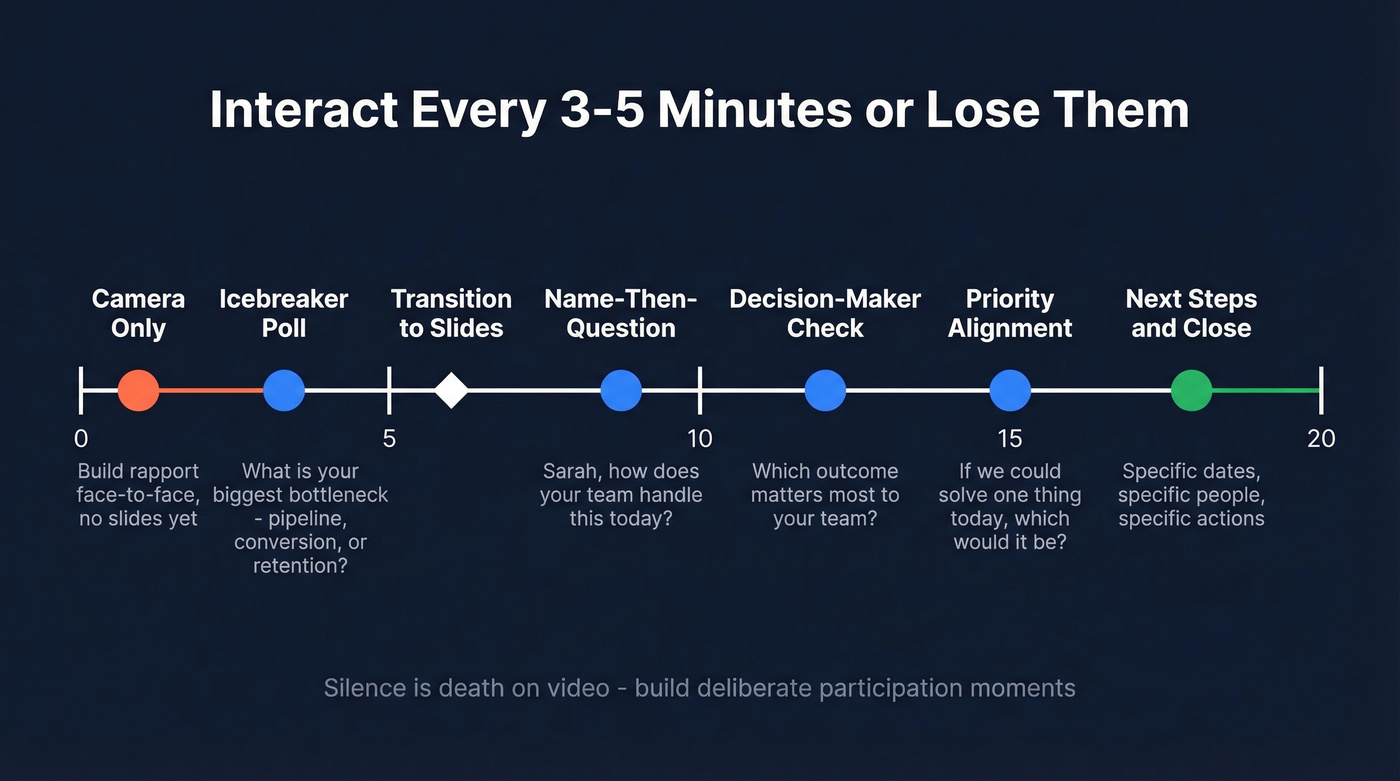
Three poll prompts that consistently work: an icebreaker at minute 2 ("What's your biggest bottleneck - pipeline, conversion, or retention?"), a decision-maker check mid-presentation ("Which outcome matters most to your team?"), and a priority alignment before pricing ("If we could solve one thing today, which would it be?"). Use the name-then-question technique. "Sarah, how does your team handle this today?" It's harder to multitask when someone says your name out loud.
Schedule for Higher Close Rates
GetAccept's data shows Tuesday presentations run about 20% higher success rates than the weekly average, and calls between 9-10 a.m. convert 45% better. In our experience, the Tuesday morning slot consistently outperforms - we've seen teams restructure their entire demo calendar around it (especially when paired with a tighter sales process optimization).
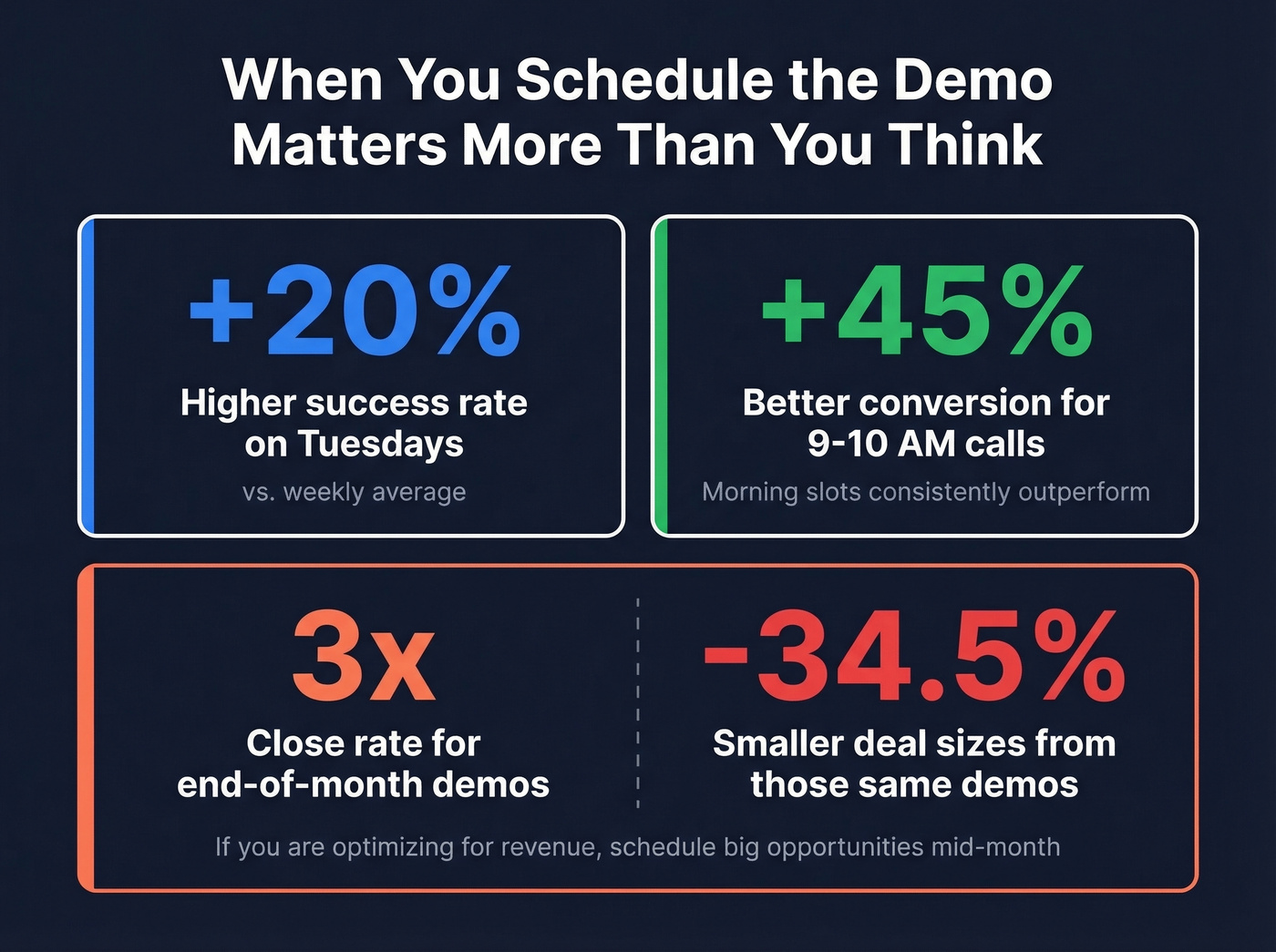
One trap worth flagging: end-of-month demos close at 3x the normal rate, but deal sizes shrink by 34.5%. If you're optimizing for revenue rather than volume, schedule your biggest opportunities mid-month.
Tools Worth Using
| Tool | Best For | Price |
|---|---|---|
| Pitch | Sales decks + analytics | Free; paid ~$8-20/user/mo |
| Alai | Fast, sharp slide design | Free; paid ~$10-30/mo |
| Gamma | Async-shareable decks | Free (400 credits) |
| Loom | Video follow-ups | Free; paid ~$10-15/user/mo |
| Canva Pro | Slide templates | $12.95/user/mo |
Pitch is the standout for sales teams - its engagement analytics show exactly which slides prospects spent time on and which they skipped, so you can tailor your follow-up accordingly. In a popular r/powerpoint tool roundup, Pitch and Alai were top picks for sales-specific decks. If your team lives in Google Slides, Plus AI is the better add-on choice. Skip Beautiful.ai if you want modern templates, and skip SlidesAI if you don't want to spend half your time on manual cleanup.
After the Call: Follow-Up That Sells
The average B2B deal involves 6-8 decision-makers. You just presented to one or two. The real selling happens in rooms you're not in.
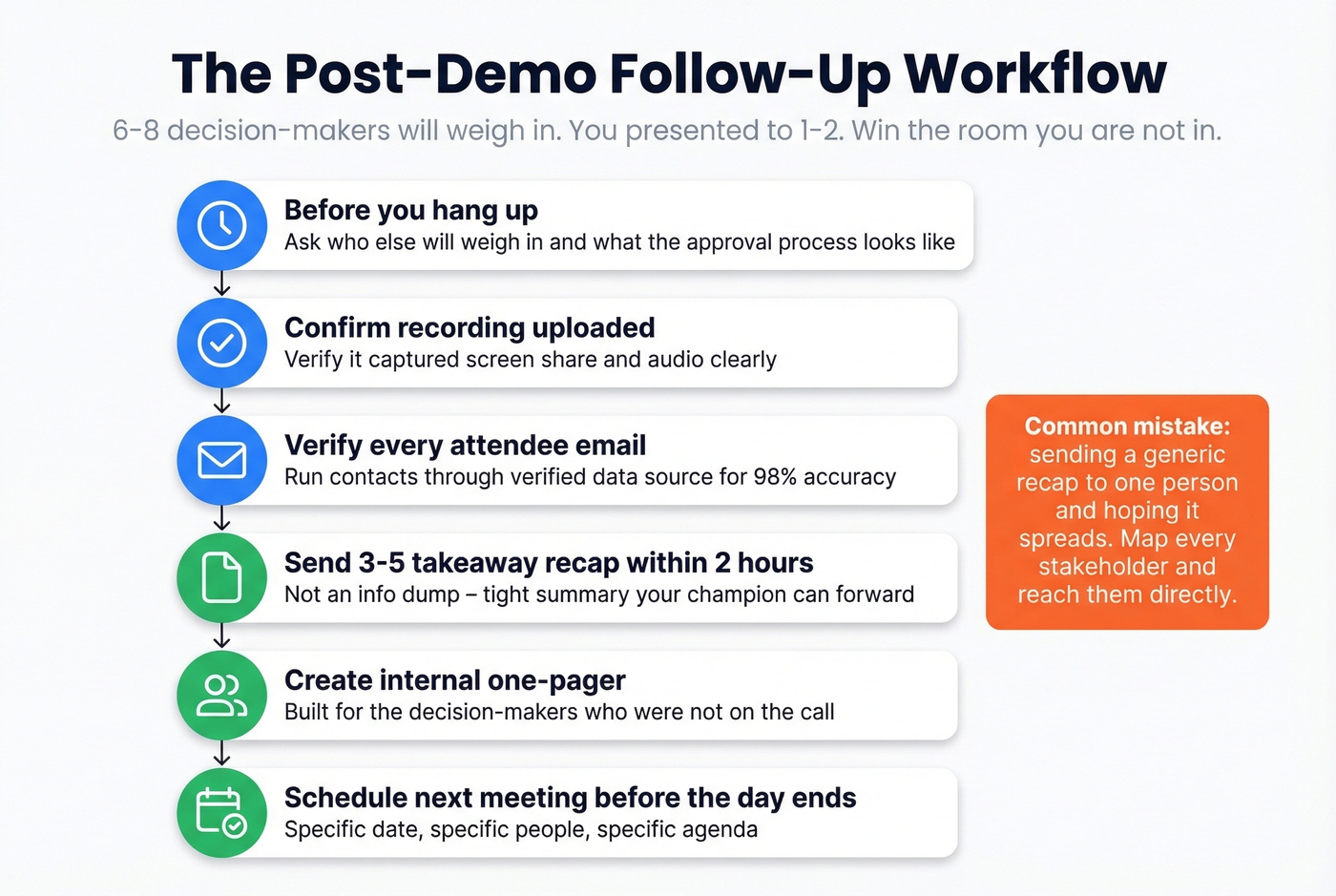
Before you hang up, ask two questions: "Who else will weigh in?" and "What does your approval process look like?" Then send a 3-5 takeaway recap - not an info dump. Map next steps with specific dates, anticipate blockers, and send an internal one-pager your champion can forward to the people who weren't on the call. Confirm the recording uploaded, verify every attendee's email, send the recap within two hours, and schedule the next meeting before the day ends (use these sales follow-up templates to speed it up).
But champion enablement only works if your emails actually land. Before your next pitch, run your prospect list through Prospeo's email finder - 98% accuracy on a 7-day refresh cycle means you're reaching actual inboxes, not bouncing into the void. We've seen reps increase their callback rate just by switching from info-dump follow-ups to tight recaps sent to verified addresses (and improving email deliverability end-to-end).
Your champion wants to forward that one-pager - but you need verified emails for every decision-maker in the room. Prospeo's Chrome extension finds verified emails and direct dials from any LinkedIn profile or company site in one click, giving you 50+ data points per contact.
Reach every stakeholder before the next meeting, starting at $0.01 per email.
FAQ
How long should a virtual sales presentation be?
Aim for 15-25 minutes including Q&A. Front-load your strongest proof in the first 5 minutes and leave at least 5 for discussion. A tight 18-minute presentation with great Q&A beats a 45-minute marathon every single time.
Should I use slides or go camera-only?
Start camera-only for 2-3 minutes to build rapport, then transition to slides. If a slide adds nothing beyond what you're saying out loud, cut it. Fewer slides with more impact always wins.
What's the best platform for virtual sales presentations?
Use whatever your prospect uses - platform choice rarely decides the deal. What matters is testing your setup beforehand: screen share behavior, audio quality, and recording permissions all vary by platform. Do a dry run the morning of.
How do I make sure follow-up emails reach decision-makers?
Use a verified data source before sending anything. Prospeo covers 143M+ verified addresses at 98% accuracy, so your recap lands in real inboxes instead of bouncing. Pair that with a concise 3-5 point summary sent within two hours of the call.