


7 Best Open Tech Explorer Alternatives in 2026
Open Tech Explorer is free, community-driven, and genuinely useful for quick tech stack lookups. It's also limited in ways that matter once you're doing this at scale - patchy coverage, no accuracy validation, Chrome-only. Here are seven alternatives worth your time, sorted by what you actually need them for.
Why Look Beyond Open Tech Explorer?
Open Tech Explorer's biggest strength is also its biggest constraint: the dataset depends entirely on community contributions. As users browse with the Chrome extension installed, technology metadata feeds back into a shared database. That's clever. But coverage falls apart for less-visited sites, and there's no independent verification layer checking whether the data is right.
The zero-key, zero-limit API is a nice touch for developers. If you need reliable detection across thousands of domains - or you want to go from "this company uses Shopify" to "here's the CTO's verified email" - you'll hit a wall fast.
Our Picks (TL;DR)
| Need | Pick |
|---|---|
| Tech stack data to verified prospect lists | Prospeo |
| Maximum technology coverage at scale | BuiltWith |
| Best free browser extension | WhatRuns |
| Best paid extension UX | Wappalyzer |
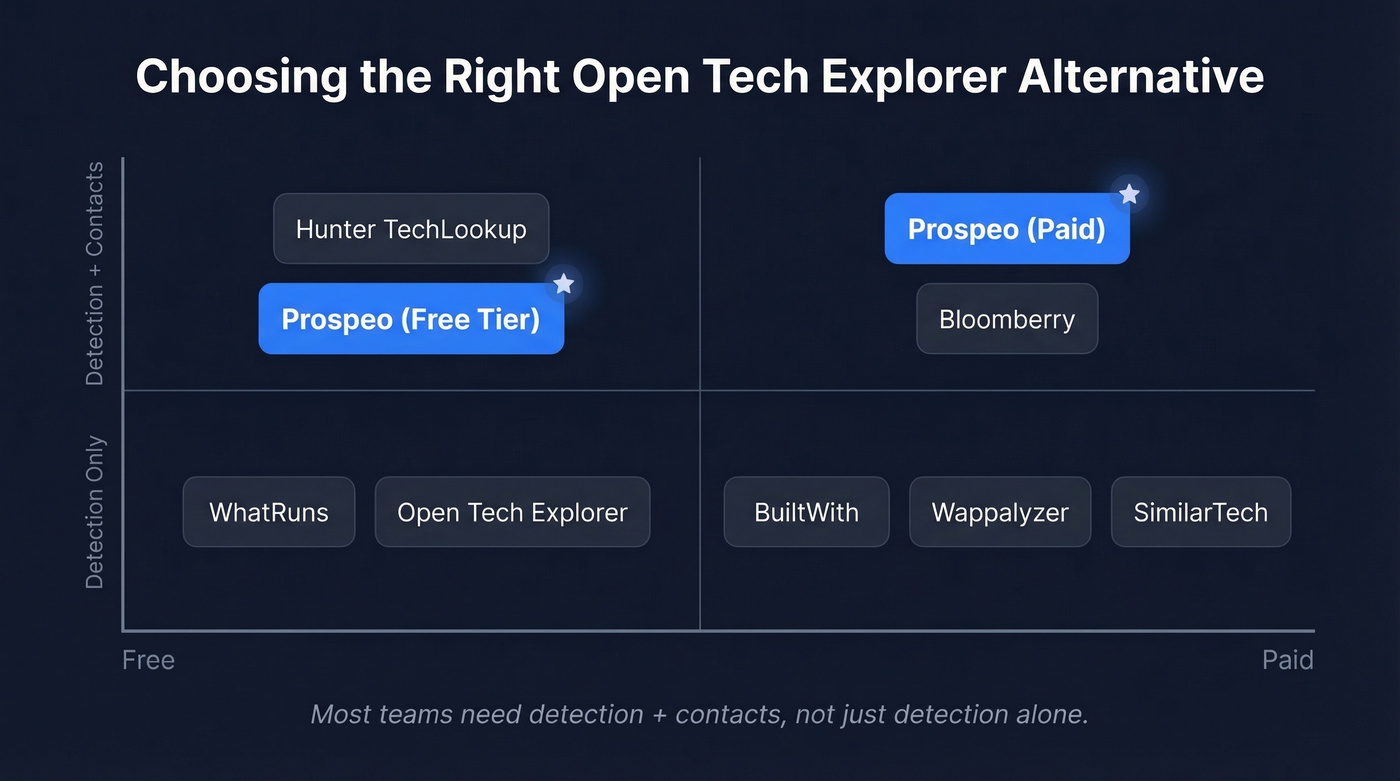

Open Tech Explorer tells you what companies use. Prospeo tells you who to call. Search by 3,000+ technologies, then export verified contacts - 98% email accuracy, 125M+ mobiles, refreshed every 7 days. No stitching tools together.
Go from tech stack lookup to prospect list in one step.
Quick Comparison
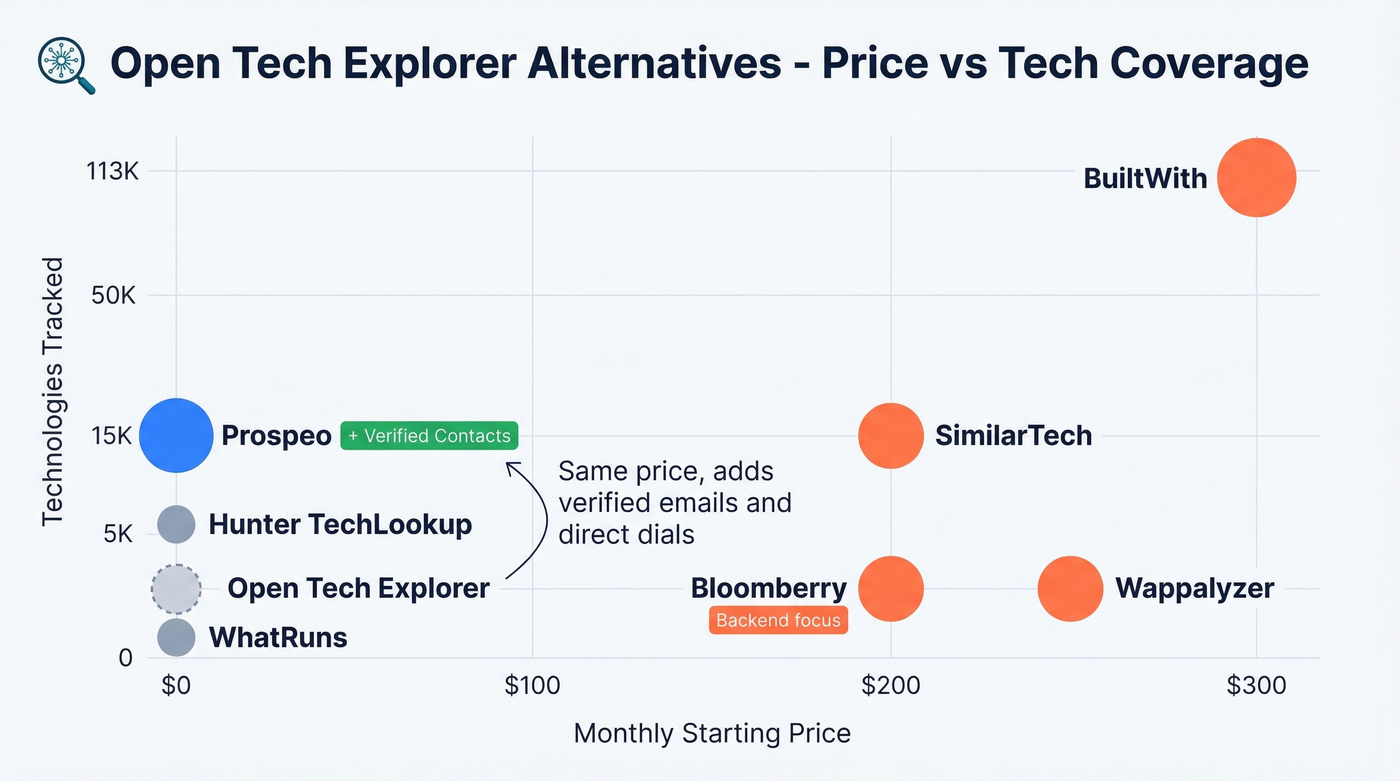
| Tool | Starting Price | Tech Tracked | Key Strength | Best For |
|---|---|---|---|---|
| Prospeo | Free (~$0.01/email) | 3,000+ | Verified contacts | Tech-triggered outbound |
| BuiltWith | $295/mo | 113,027 | Domain scale | Enterprise intel |
| Wappalyzer | Free / $250/mo | 3,000+ | Extension UX | Quick lookups |
| SimilarTech | $200/mo | 15,000+ | Market trends | Competitive intel |
| WhatRuns | Free | Client-side only | Zero cost | Casual checks |
| Bloomberry | $199/mo | CRM/ERP/DevOps | Non-web detection | Infrastructure sales |
| Hunter TechLookup | Free | 4.5M domains | List exports | Free prospecting |
Top Open Tech Explorer Alternatives
Prospeo - Tech Stack Intelligence + Verified Contacts
Most tech stack tools tell you what a company uses. Prospeo tells you who to contact - with a verified email and direct dial. That's the gap, and it's a big one.
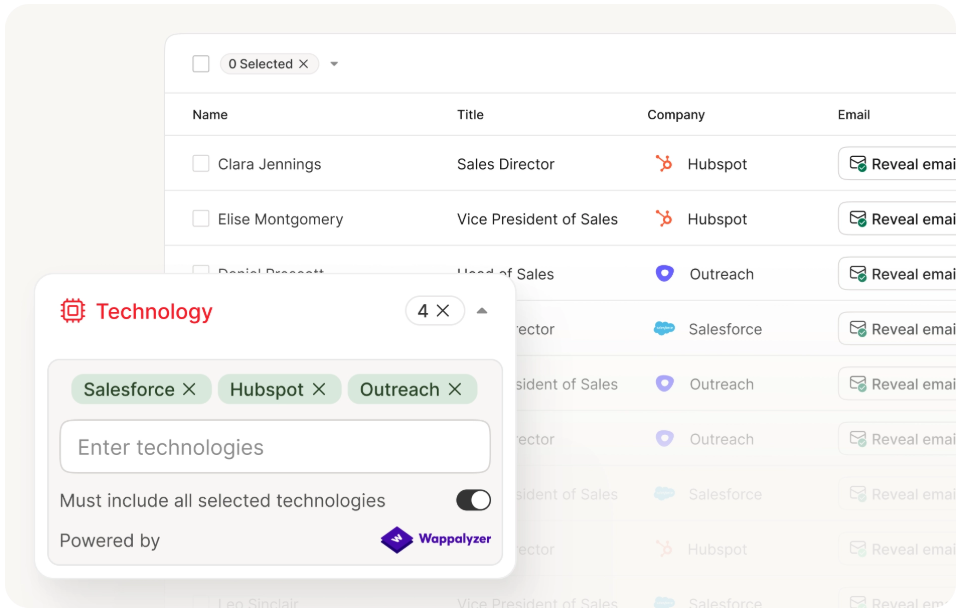
Prospeo includes technographic filters powered by Wappalyzer technology data and live job posting signals. Search for companies running a specific stack, then export verified contacts - 98% email accuracy, 125M+ verified mobiles, all refreshed every 7 days. With 30+ search filters including buyer intent, headcount growth, and funding data, you're not just finding tech stacks. You're building targeted prospect lists ready for outbound.
Use it if you're doing tech-triggered outreach. You shouldn't need two separate tools to find companies using Shopify and then track down the CTO's email. Prospeo collapses that into one step, starting free with 75 emails and 100 Chrome extension credits per month.
Skip it if all you need is a passive browser extension for casual site checks - WhatRuns or Wappalyzer's free tier will handle that.
BuiltWith - The Enterprise Standard
Use it if you need the deepest technology dataset available. 414M domains indexed, 113,027 technologies tracked, and extensive historical data. Nothing else comes close on raw coverage.

Skip it if you're price-sensitive or need clean exports. Basic starts at $295/mo and only covers 2 technologies with 2,000 domain uploads. Pro ($495/mo) unlocks unlimited tech but caps uploads at 20,000. Team ($995/mo) removes most limits. For individual lookups only, BuiltWith Advanced runs $144/year.
The G2 consensus (4.3/5, 62 reviews) praises the data but flags messy CSV exports. And one Reddit user in r/coldemail spent weeks stuck in BuiltWith's ID verification just to pay - with support going dark. That's a frustrating experience when you're trying to move fast on a campaign.
Wappalyzer - Best Extension UX
Use it if you want the best browser extension experience for real-time tech detection. G2 rates it 4.7/5 (55 reviews). In a 500-site test, Wappalyzer hit ~94% for React detection versus BuiltWith's ~87%, catching 47 Next.js implementations BuiltWith missed entirely.
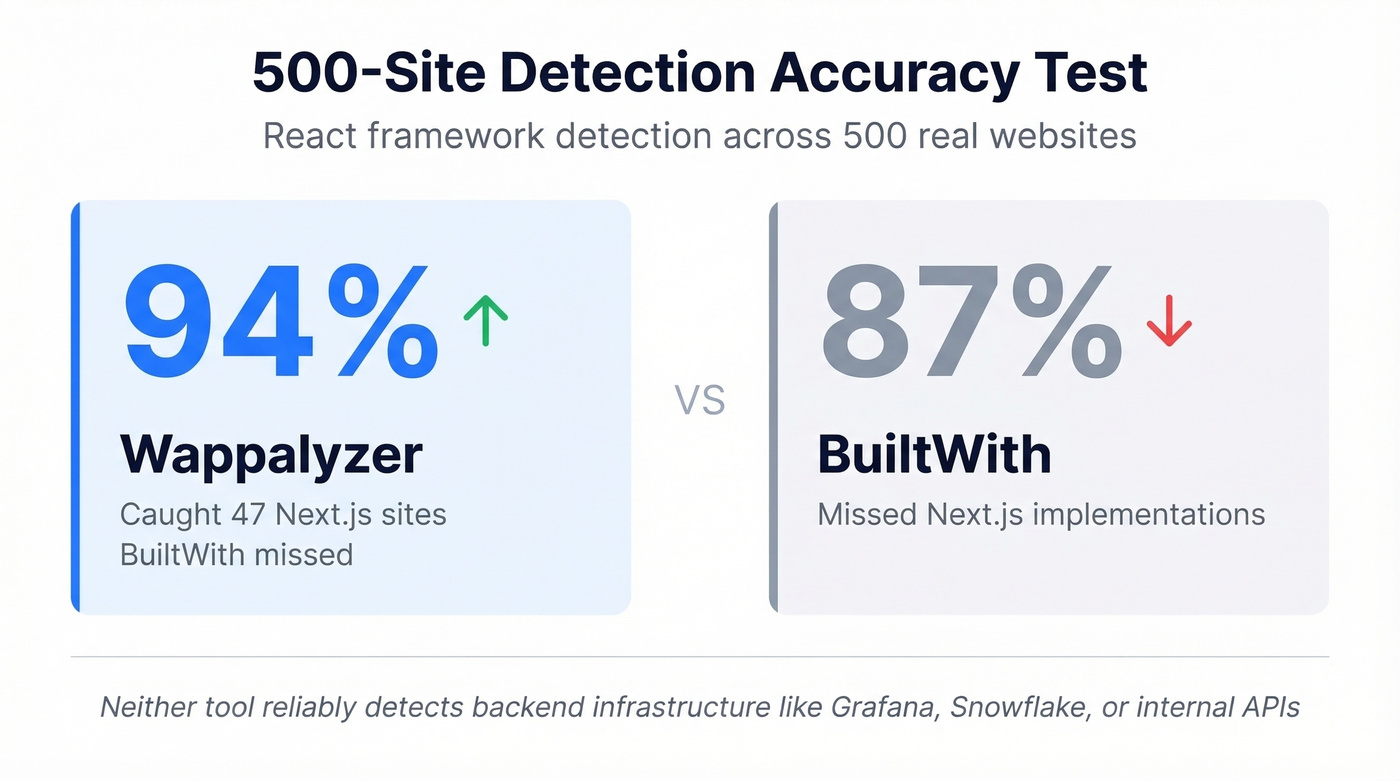
Skip it if you need backend detection or hate expiring credits. Wappalyzer doesn't reliably detect infrastructure like Grafana, Snowflake, or ChatGPT APIs - a common complaint on Hacker News. API credits expire after 60 days, which is aggressive. Free tier gives you 50 lookups/month. Pro runs $250/mo, Business $450/mo, Enterprise $850+/mo.
SimilarTech - Market Share Trends
SimilarTech occupies a different niche than pure detection tools. Its strength is market share trend data - tracking which technologies are gaining or losing adoption over time. That's useful for competitive intelligence and market sizing, less so for prospecting.
Basic plans start at $200/mo for 2 technology reports, with Ultimate at $490/mo for unlimited reports. G2 rates it 4.2/5 (12 reviews). For outbound workflows, look elsewhere.
WhatRuns - Free and Simple
WhatRuns is the tool Hacker News practitioners recommend when someone asks "what's a quick, free way to check a site's stack?" It's a Chrome extension, it's free, and there's no paid tier. Detection is limited to client-side technologies, and the interface is bare-bones.
But for casual checks - "does this prospect's site run WordPress or Shopify?" - it does the job without asking for a credit card. We've used it as a quick sanity check alongside more thorough tools, and it's never let us down for surface-level lookups.
Bloomberry - Backend Tech Detection
Bloomberry goes where browser-based tools can't: CRMs, ERPs, security tools, and DevOps infrastructure that don't leave obvious website footprints. In one test, it detected 380+ companies using UnifyGTM that BuiltWith missed entirely. Paid plans start at $199/mo.
If you're selling into security or infrastructure teams, Bloomberry fills a real gap. For teams focused on client-side web technologies, it's overkill.
Hunter TechLookup - Free Prospect Exports
Hunter TechLookup lets you filter by technology across 4.5M domains and export the first 5,000 rows free. It's part of Hunter.io's broader email-finding platform, so the workflow from "companies using X" to "contact list" is short. Limited scale compared to BuiltWith, but hard to beat at zero cost.
What Most Detection Tools Miss
Here's the thing: if your average deal size is under five figures, you probably don't need BuiltWith-level data. What you need is a way to go from a technology list to a contact list without stitching together three different platforms.
That usually means pairing technographics with data enrichment and a workflow that supports lead enrichment before you push anything into your CRM.
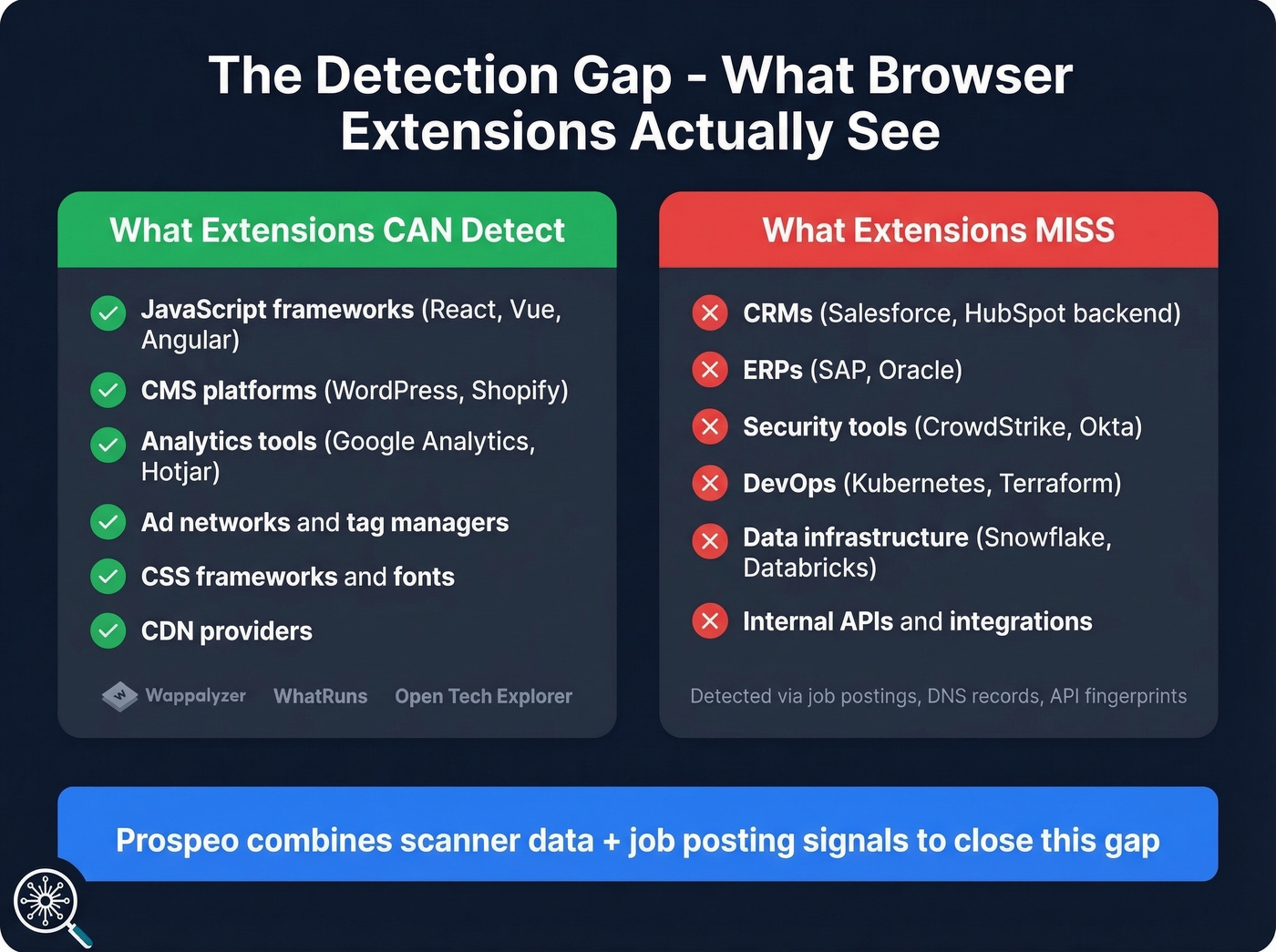
No browser extension reliably detects backend infrastructure. Grafana, Snowflake, internal API integrations - they don't leave client-side fingerprints. We've tested this across hundreds of domains, and the gap is real every time. Practitioners on r/sales work around it by scanning job postings, DNS records, and API fingerprints. Tools that combine scanner data with live job posting signals close that gap far better than any Chrome extension alone.
Let's be honest - most teams don't need 113,000 tracked technologies. They need 50 relevant ones, accurate contact data for the companies using them, and a way to get that into their CRM before lunch. If you're building a repeatable outbound motion, start with a clear ideal customer profile and a simple lead generation workflow.
Most tech detection tools stop at the stack. Prospeo adds 30+ filters - buyer intent, headcount growth, funding - on top of technographics. At ~$0.01 per verified email, you get BuiltWith-level targeting with contacts attached.
Replace your three-tool stack with one platform that starts free.
FAQ
Is Open Tech Explorer really free?
Yes - no paid tiers, a zero-key API, and no credit limits. The tradeoff is community-dependent data, so coverage is patchy for less-visited sites. For popular frameworks on well-trafficked domains, it works fine. For long-tail detection at scale, you'll need something more thorough.
What's the most accurate tech stack tool?
A 500-site test found Wappalyzer at ~94% accuracy for React detection versus BuiltWith's ~87%. For backend technologies, no browser-based tool is reliable - job-posting signal analysis fills that gap by detecting infrastructure invisible to client-side scanners.
Can I get tech stack data and verified emails in one tool?
Yes. Prospeo's B2B database includes technographic filters - search by technology stack and get verified emails (98% accuracy) and direct dials for contacts at matching companies. The free tier includes 75 emails and 100 Chrome extension credits per month.
Which alternative is best for free prospecting?
Hunter TechLookup lets you export up to 5,000 domains by technology at no cost. For verified contact data on a free plan, Prospeo offers 75 emails plus 100 Chrome extension credits monthly - enough to run small tech-triggered outbound campaigns without paying.