

Opportunity Management CRM: The Guide Your Pipeline Actually Needs
It's Monday morning. Your CRM dashboard shows 47 open deals worth $2.1M. You feel good for about six seconds - until you start clicking into them. Nineteen haven't been touched in 45+ days. Twelve have close dates that already passed. Eight are missing a next step entirely.
Your real pipeline isn't $2.1M. It's maybe half that, and your forecast just became fiction.
The three hygiene failures that kill forecasts are the same ones flagged in every r/salesforce pipeline cleanup thread: stale deals stuck in the same stage for months, close dates pushed out quarter after quarter, and opportunities with no defined next step. Fix those three things and your forecast gets dramatically more honest overnight.
What You Need (Quick Version)
Your forecast is wrong because your opportunity data is wrong. This guide covers the qualification framework that matches your deal complexity, a pipeline stage template with exit criteria you can copy today, benchmarks to audit your pipeline health, and the CRM plus data quality stack to make it all work.
If you only do one thing after reading this, enforce a 30-day no-activity rule and purge stale deals weekly. That single discipline will do more for your forecast accuracy than any AI feature or new CRM.
What Is Opportunity Management?
A lead is unqualified interest - someone downloaded a whitepaper, filled out a form, or responded to a cold email. An opportunity is a qualified deal with a stage, an owner, a close date, and a dollar value attached. The moment a lead passes your qualification threshold, it becomes an opportunity, and that's when pipeline management actually begins.
Opportunity management is the discipline of moving those qualified deals through defined stages - from first discovery call to closed-won or closed-lost - with enough rigor that your pipeline reflects reality. Every CRM handles this slightly differently, but the core mechanics are the same: stages with exit criteria, probability weighting, forecasting, and reporting. The CRM is just the container. The discipline is what makes it work.
Why Pipelines Break
Most pipeline problems aren't CRM problems. They're process problems that the CRM faithfully reflects.
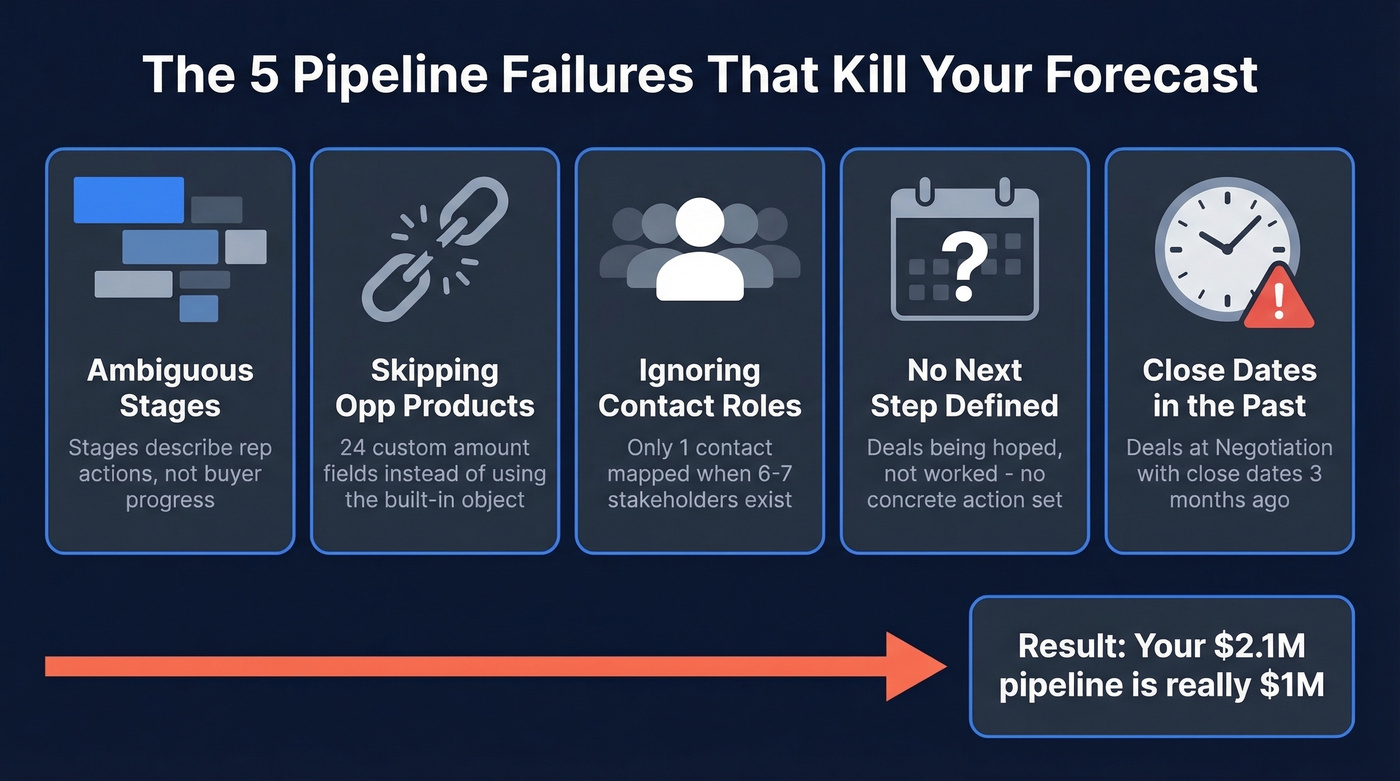
Ambiguous or Bloated Stages
"Proposal Sent" isn't a stage - it's a milestone. Stages should describe where the buyer is in their decision process, not what action the rep took. Too many stages (8+) make dashboards unreadable and reps start skipping them. Too few (under 4) hide deal progression. For most teams, 5-7 stages with clear exit criteria is the sweet spot.
Skipping Opportunity Products
Instead of using the Opportunity Products object, teams create custom amount fields. We've seen an org with 24 custom amount fields - one for each product line. This makes reporting a nightmare, breaks forecasting by product category, and guarantees data inconsistency. Use Opportunity Products. That's what they're for.
Ignoring Contact Roles
B2B buying groups have grown from 5.4 to 6.8 stakeholders per deal, per HBR research. If your opportunity only has one contact attached, you're flying blind on the other five or six people who can kill the deal. Contact Roles map every stakeholder - champion, economic buyer, technical evaluator, blocker - to the opportunity record.
No Next Step Defined
An opportunity without a next step is an opportunity that's stalling. Every deal should have a concrete, time-bound next action: "Demo with VP Eng on Thursday" not "Follow up." If a rep can't articulate the next step, the deal isn't being worked - it's being hoped. If you need a system for this, steal a few sales follow-up templates and standardize what “next step” looks like by stage.
Close Dates in the Past
This is the most basic hygiene failure and one of the most common. Deals with close dates three months in the past sitting at "Negotiation" stage destroy forecast credibility. If the date passed and the deal isn't closed, either update the date to something realistic or close it lost.
Qualification Frameworks
The framework you choose should match your deal complexity, not your ambition. IBM created BANT in the 1950s as a simple filtering tool. PTC developed MEDDIC in the 1990s as a deal navigation scorecard. MEDDPICC added the Paper Process and Competition layers for enterprise procurement cycles.
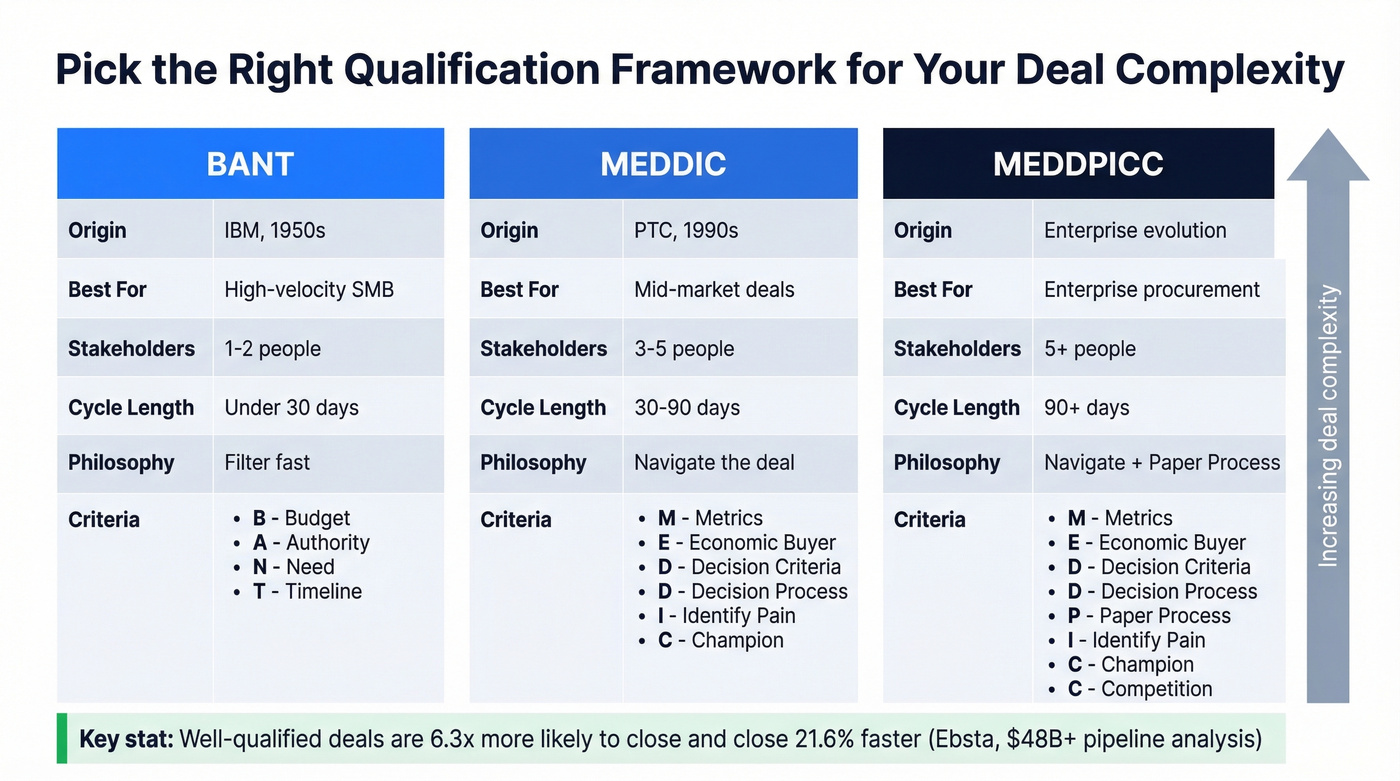
| Framework | Best For | Stakeholders | Cycle Length | Philosophy |
|---|---|---|---|---|
| BANT | High-velocity SMB | 1-2 | Under 30 days | Filter |
| MEDDIC | Mid-market | 3-5 | 30-90 days | Navigate |
| MEDDPICC | Enterprise | 5+ | 90+ days | Navigate + Paper |
Here's the thing: framework choice matters less than consistency. A simple framework used by 100% of your reps beats a sophisticated one used by 30%. One team we worked with switched from BANT to MEDDIC and saw forecast accuracy improve from 62% to 89% - but the real driver was enforcement, not the framework itself. If you want to go deeper on this, use a dedicated lead scoring rubric so reps aren’t guessing.
An Ebsta analysis of $48B+ in pipeline found that well-qualified deals are 6.3x more likely to close and close 21.6% faster. Deals with high qualification scores hit roughly 50% win rates versus about 8% for poorly qualified ones. Qualification isn't overhead - it's the single highest-leverage activity in your pipeline.
Pipeline Stage Template
Here's a stage template that works for most B2B sales teams. Adapt the names to your language, but keep the exit criteria tight.
| Stage | Probability | Exit Criteria |
|---|---|---|
| Lead Captured | 10% | Contact info verified, ICP fit confirmed |
| Qualified | 25% | BANT/MEDDIC criteria met, next step scheduled |
| Proposal/Demo | 50% | Solution presented, stakeholders identified |
| Negotiation | 75% | Pricing discussed, procurement timeline set |
| Verbal Commit | 90% | Terms agreed, contract in review |
| Closed Won | 100% | Signed contract, deal booked |
| Closed Lost | 0% | Reason captured, post-mortem logged |
Expected Revenue is calculated as Probability x Amount. A $100K deal at the Qualified stage (25%) contributes $25K to your weighted pipeline. That's how your CRM generates a forecast - and why accurate stage placement matters so much. If you’re building a more rigorous model, compare your approach to dedicated sales forecasting solutions.
Hygiene rules to enforce: weekly pipeline review with managers, a 30-day no-activity rule that flags stale deals automatically, monthly purge of anything that hasn't progressed, and a quarterly full audit where you re-qualify every open opportunity. These aren't optional. They're the difference between a pipeline you can trust and one that lies to you every Monday.

Your CRM stages mean nothing if the contacts attached to each opportunity are wrong. Prospeo delivers 98% verified emails and 125M+ direct dials so every Contact Role on every deal is a real person you can actually reach.
Stop managing opportunities against dead email addresses.
Pipeline Health Benchmarks
Fewer Deals, Better Results
Reps spend roughly 2 hours per day actually selling. The rest is admin, internal meetings, and CRM updates. Teams that reduced rep books from 300+ to 100-200 active accounts lifted win rates from 13% to 20%+ in under a year. Sometimes the best pipeline optimization is giving reps fewer deals to work, not more.
If your average deal size is under $15K, you probably don't need 300 open opportunities per rep. You need 80 well-qualified ones. (If you’re seeing the opposite, you’re likely running into classic sales pipeline challenges.)
Win Rates and Velocity
The median B2B win rate is 21%, with top-performing teams hitting 30%+. Below 15%? The problem is almost certainly qualification - you're letting unqualified deals into the pipeline and they're dying slowly instead of being disqualified fast. Benchmarking your funnel against broader sales pipeline benchmarks can make the gap obvious.
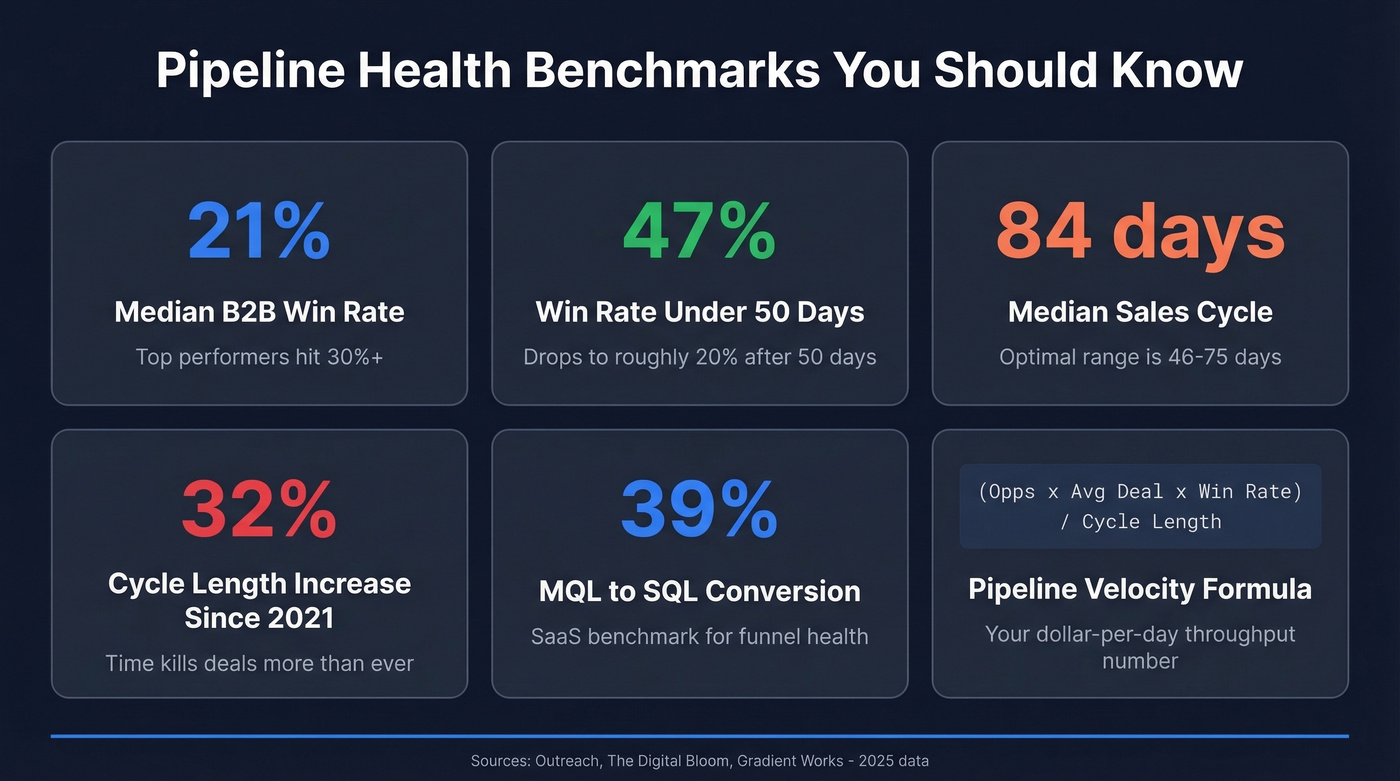
Time kills deals. Opportunities closed within 50 days carry a 47% win rate. After 50 days, that drops to roughly 20% or lower. The median sales cycle runs 84 days, but the optimal range is 46-75 days. Sales cycles have lengthened 32% since 2021, which makes pipeline velocity even more critical to track.
The pipeline velocity formula is straightforward:
(Opportunities x Avg Deal Value x Win Rate) / Sales Cycle Length
This gives you a dollar-per-day throughput number. If velocity is declining, investigate which variable is dragging - fewer deals, smaller deals, lower win rates, or longer cycles.
Stage-by-Stage Conversion
For SaaS teams, here's a stage-by-stage conversion benchmark to gut-check your funnel: MQL to SQL at 39%, SQL to Opportunity at 42%, Opportunity to Close at 39%. If any stage is dramatically below these numbers, that's where your pipeline is leaking.
AI in Opportunity Management
The AI CRM market is projected to hit $125.7B by 2030 at a 14.2% CAGR, and the practical impact is already showing up in forecasting and deal scoring. Manual forecasting typically lands at 60-75% accuracy. AI-native platforms push that to 90-98%. If you’re evaluating vendors, it helps to separate “AI features” from true best sales forecasting tools.
Salesforce Einstein delivers a 38% increase in lead conversion rates and saves roughly 5 hours per rep per week on data entry and prioritization. Microsoft Dynamics 365 with Copilot hits 95% forecast accuracy within 5% margins - a meaningful jump for finance teams that need reliable revenue projections. Pipedrive's AI assistant helps users close deals 28% faster by surfacing next-best-actions and flagging at-risk deals.
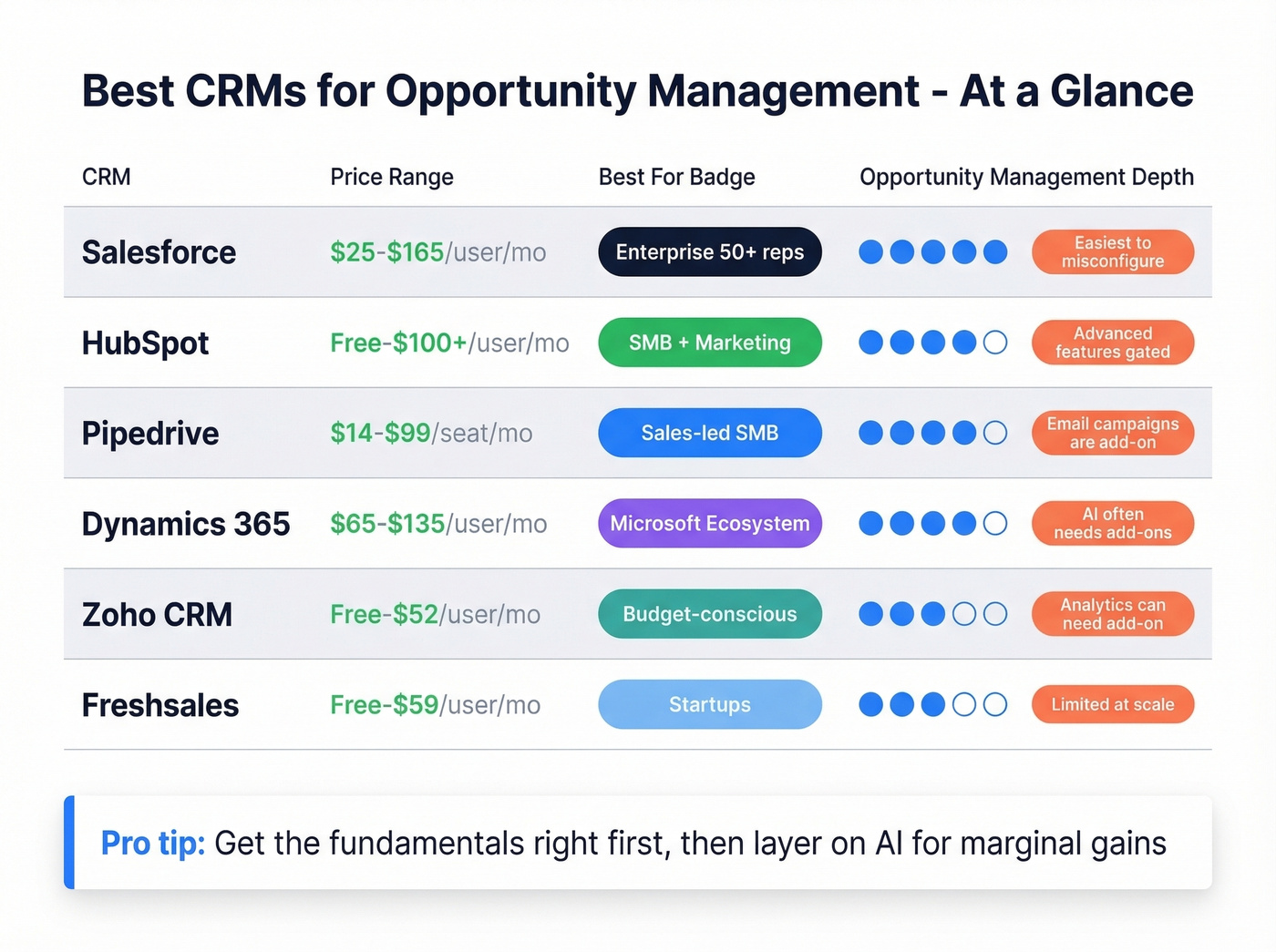
Let's be honest though: AI doesn't fix bad data or broken processes. If your stages are ambiguous and your reps aren't updating opportunities, AI will just make confident predictions about garbage inputs. Most AI features are also gated to higher tiers or sold as add-ons. Get the fundamentals right first, then layer on AI for the marginal gains.
Best CRMs for Opportunity Management
| CRM | Starting Price | Higher-Tier Price | Best For | Key Caveat |
|---|---|---|---|---|
| Salesforce | $25/user/mo | $165/user/mo | Enterprise (50+ reps) | Easiest to misconfigure |
| HubSpot | Free | $100+/user/mo | SMB + marketing alignment | Advanced features gated |
| Pipedrive | $14/seat/mo | $99/seat/mo | Sales-led SMB teams | Email campaigns are add-on |
| Dynamics 365 | $65/user/mo | $135/user/mo | Microsoft ecosystem | AI often needs add-ons |
| Zoho CRM | Free (3 users) | $14-$52/user/mo | Budget-conscious breadth | Analytics can need add-on |
| Freshsales | Free | $9-$59/user/mo | Startups wanting AI scoring | Limited at scale |
Salesforce Sales Cloud
Salesforce is the default for enterprise teams with 50+ reps, and for good reason. The customization depth is unmatched - Opportunity Products, Contact Roles, custom objects, Flow automations, Einstein AI, and an ecosystem of thousands of AppExchange integrations. Reporting and forecasting capabilities are best-in-class once properly configured.
The caveat is real, though. Salesforce is the easiest CRM to misconfigure. I've seen orgs with 24 custom amount fields, 15 pipeline stages, and zero validation rules - turning a powerful platform into an expensive spreadsheet. Budget for a competent admin or implementation partner. Full marketing automation and CPQ require separate products like Marketing Cloud and Revenue Cloud, which adds cost fast. Pricing runs $25/user/mo for Starter up to $165/user/mo for Enterprise. (If you want a deeper cost breakdown, see Salesforce pricing, reviews, pros & cons.)
HubSpot Sales Hub
HubSpot is the best choice for SMBs that need marketing and sales on the same platform without a six-month implementation. The free tier is genuinely usable - you get contact management, deal tracking, and basic pipeline views at $0. Paid plans run roughly $20-$150+/user/mo and unlock sequences, forecasting, and custom reporting.
Onboarding is the fastest of any CRM on this list. The tradeoff is that HubSpot's deal management is less customizable than Salesforce at the enterprise tier. For teams under 50 reps who value speed-to-value over infinite configurability, it's the obvious pick.
Pipedrive
Pipedrive has the cleanest pipeline UI in the CRM market. If your team is sales-led and doesn't need marketing automation baked in, the visual deal management is hard to beat. The drag-and-drop pipeline view makes stage management intuitive, and the AI assistant surfaces deal insights without requiring enterprise pricing.
Where it falls short: deep marketing integration and complex multi-object reporting. Email campaigns require a paid add-on, which is annoying for a tool in this price range. Plans run $14-$99/seat/mo. Skip this one if you need tight marketing-to-sales handoff tracking out of the box.
Microsoft Dynamics 365
The Outlook integration alone makes Dynamics 365 worth evaluating if your company already lives in the Microsoft ecosystem. Teams drowning in copy-paste between email and CRM will feel the difference immediately - emails, meetings, and contact data sync natively without browser extensions or Zapier workarounds.
Dynamics handles pipeline management, forecasting, and account planning competently, but it demands more configuration than HubSpot or Pipedrive. The AI features through Copilot are often packaged as add-ons or higher-tier licensing, so factor that into the real cost. Pricing runs $65-$135/user/mo.
Zoho CRM
The budget pick that punches above its weight. Free for 3 users, paid plans from $14-$52/user/mo. Zoho covers pipeline management, lead scoring, workflows, and basic analytics. The broader Zoho One ecosystem adds project management, invoicing, and support tools at a fraction of Salesforce's cost.
Advanced analytics and AI features can require the Ultimate tier or a separate Zoho Analytics subscription, but for teams that need breadth on a tight budget, nothing else comes close at this price point.
Freshsales
Freshsales offers a free tier with built-in AI lead scoring - useful for startups that want predictive features without enterprise pricing. Paid plans run $9-$59/user/mo. It's a solid starter CRM that handles basic deal tracking well. Don't expect the depth of Salesforce or the ecosystem of HubSpot at scale.
The Data Quality Problem Nobody Talks About
Here's a scenario we've watched play out dozens of times. An SDR books a meeting. The AE opens the opportunity, moves it to "Discovery," and starts prepping. Then the confirmation email bounces. The direct dial goes to a fax machine. A quick check reveals the contact left the company in January.
That "Discovery" stage opportunity? Dead on arrival. But it'll sit in the pipeline for weeks before anyone closes it lost, inflating the forecast the whole time.
Contact data decays constantly - people change jobs, companies restructure, phone numbers get reassigned. When your CRM is full of stale contact data, your pipeline fills with phantom opportunities that look real on a dashboard but can't actually convert. Tools like Prospeo address this by verifying emails at 98% accuracy and providing 125M+ verified mobile numbers on a 7-day refresh cycle, at a fraction of the cost of enterprise data providers. If you’re comparing vendors, start with a shortlist of data enrichment services. Snyk ran this playbook with 50 AEs: bounce rates dropped from 35-40% to under 5%, AE-sourced pipeline jumped 180%, and the team generated 200+ new opportunities per month.

Buying groups average 6.8 stakeholders per deal - and most CRMs only have one contact mapped. Prospeo's enrichment returns 50+ data points per contact at 92% match rate, so you can fill every Contact Role and actually multi-thread your deals.
Map the full buying committee for every open opportunity.
How to Choose the Right CRM
Stop evaluating CRMs on feature lists. Every CRM on this page can track an opportunity through a pipeline. The real question is whether your reps will actually use it and whether the data going in is accurate. In our experience, teams that spend more than four weeks evaluating CRMs end up choosing the one they already knew they wanted. If you’re still mapping the category, here are more examples of a CRM to calibrate what “enough” looks like.
A recent r/CRM thread about a 13-license team captured the frustration perfectly - their CRM was "laggy and slow," and reps had stopped updating deals entirely. The most powerful CRM in the world is worthless if your team avoids it.
Here's a quick decision framework:
- Team size and deal complexity. A 5-person SMB team doesn't need Salesforce. A 200-rep enterprise can't run on Pipedrive.
- Existing tech stack. Microsoft ecosystem shops should default to Dynamics. Google-native teams lean toward HubSpot or Pipedrive.
- Admin burden tolerance. If reps won't update it, it doesn't matter how powerful it is. Pick the tool with the lowest friction for your team's habits.
Expect implementation timelines of 2-6 weeks for SMB setups, 6-12 weeks for mid-market, and 3-6+ months for enterprise deployments with custom objects and integrations. Pair any CRM with a data quality layer to verify and enrich the contacts feeding your pipeline - bad data in means bad forecasts out.
FAQ
What's the difference between a lead and an opportunity?
A lead is an unqualified contact showing interest. An opportunity is a qualified deal with a stage, owner, close date, and dollar value assigned in your CRM. Most platforms convert leads to opportunities once they pass a defined qualification threshold like BANT or MEDDIC criteria.
How many pipeline stages should I have?
Five to seven stages is optimal for most B2B sales teams. Fewer than four hides deal progression, while more than eight creates noise - reps skip stages and reporting becomes meaningless. Each stage needs a clear exit criterion tied to buyer behavior, not rep activity.
What's a good win rate for B2B sales?
The median B2B win rate is 21%, with top-performing teams hitting 30%+. If you're consistently below 15%, audit your qualification criteria and pipeline hygiene before blaming reps - unqualified deals entering the pipeline are the most common culprit.
How often should I clean my pipeline?
Run weekly reviews for active deals, a monthly purge of stale opportunities with 30+ days of no activity, and a quarterly full audit. Deals with close dates in the past should be updated or closed immediately - they're the fastest way to destroy forecast credibility.
What's a cost-effective way to keep CRM contact data accurate?
Prospeo verifies emails at 98% accuracy and provides 125M+ verified mobile numbers on a 7-day refresh cycle, starting at roughly $0.01 per email with a free tier of 75 emails per month. It integrates natively with Salesforce and HubSpot, making it one of the most affordable ways to prevent phantom opportunities from inflating your pipeline.