

Opportunity Pipeline in Salesforce: A Practitioner's Guide That Actually Works
It's Monday morning. The VP of Sales pulls up the dashboard, sees $2M sitting in "Proposal/Price Quote" for six weeks, and asks the question nobody wants to answer: "Is any of this real?" Half the room stares at their laptops. The other half starts hedging.
That's what a broken opportunity pipeline looks like in Salesforce - not missing data, but data nobody trusts.
This is the operating manual for fixing it. Stages, configuration, Pipeline Inspection, reports, benchmarks, and the upstream data quality problem most guides ignore entirely.
What the Opportunity Pipeline Actually Is
The Opportunity object is the backbone of Salesforce revenue tracking. Each Opportunity moves through a series of stages - a picklist field representing where a deal sits in your sales process. String those stages together across all open Opportunities, and you've got your pipeline.
Here's where teams get confused: pipeline and forecast aren't the same thing. Pipeline reports show every open deal and its total value, raw and unfiltered. Your forecast layers in probability weighting and forecast categories like Commit, Best Case, and Most Likely to predict what'll actually close. Pipeline is the raw material; forecast is the filtered output. Confusing the two is how teams end up with a "$5M pipeline" that closes $800K.
Default Stages and How to Customize Them
The 10 Defaults
Every new Salesforce org ships with these ten Opportunity stages:
| Stage | Default Probability |
|---|---|
| Prospecting | 10% |
| Qualification | 10% |
| Needs Analysis | 20% |
| Value Proposition | 50% |
| Id. Decision Makers | 60% |
| Perception Analysis | 70% |
| Proposal/Price Quote | 75% |
| Negotiation/Review | 90% |
| Closed Won | 100% |
| Closed Lost | 0% |
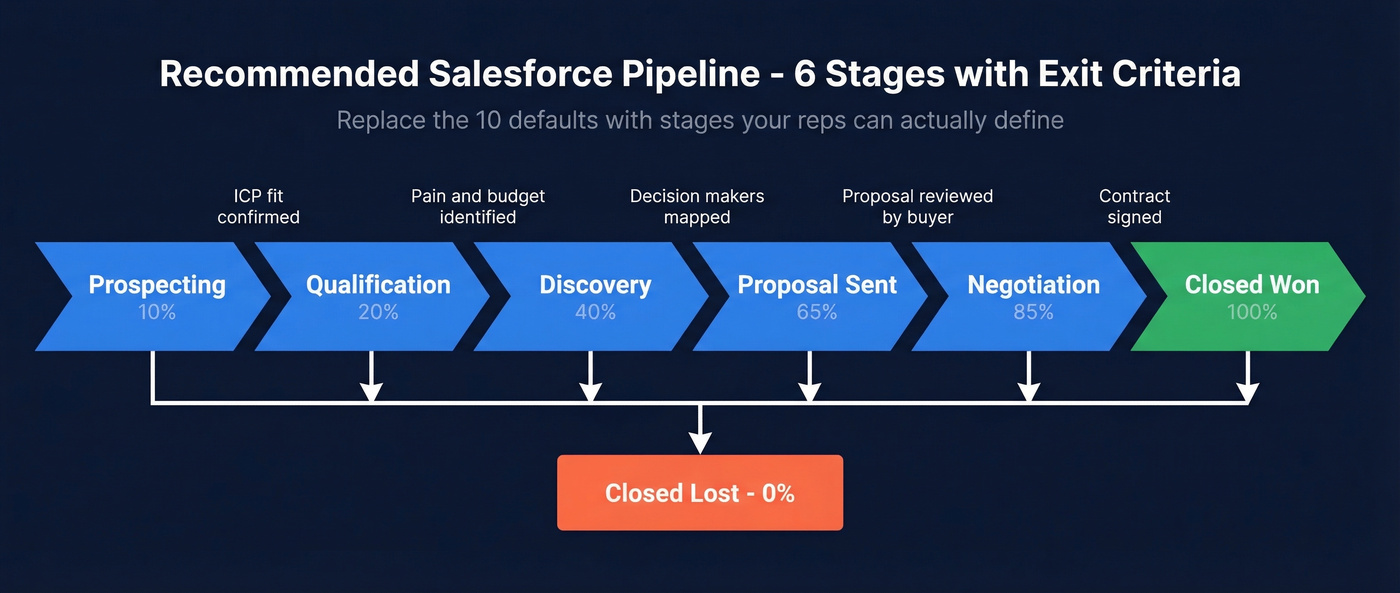
Stop using these as-is. Most B2B orgs need 5-7 stages max with clear exit criteria, because ten stages means reps guess which one applies, and guessing means your data is noise. "Perception Analysis" is a stage nobody can define in a room of ten salespeople - and if your team can't define it, they can't use it consistently.
How to Edit Stages
The path: Setup > Object Manager > Opportunity > Fields & Relationships > Stage. From there you can add, rename, reorder, or deactivate stages. Each stage maps to Type, Probability, and Forecast Category, so when you change stages, check those downstream dependencies or your forecasting breaks silently.
Multiple Pipelines via Record Types
If your org runs more than one sales motion - say, new business and expansion - use Record Types paired with Sales Processes. Each Sales Process defines its own stage path, so your expansion team doesn't wade through stages designed for net-new deals.
Configuration That Makes Your Pipeline Usable
Salesforce Path
Path turns your stage picklist into a visual chevron bar in Lightning. More importantly, it lets you display up to five Key Fields per stage and include Guidance for Success text that tells reps exactly what's needed before advancing. It also shows days in stage - a subtle but powerful nudge against deal stagnation.
Validation Rules
This is your data quality enforcement layer. Want to require Contact Roles before a deal hits Proposal? Build a validation rule. Need a "Next Steps" field populated before Negotiation? Same approach. Validation rules at stage gates are the single most effective way to ensure your pipeline data means something.
Opportunity Teams and Splits
Opportunity Teams let multiple reps collaborate on a deal with appropriate access. Pair them with Opportunity Splits for attribution - so when that enterprise deal closes, the SDR who sourced it and the SE who ran the demo both get credit.
Using Pipeline Inspection
What It Shows You
Pipeline Inspection is Salesforce's built-in workspace for managing pipeline without jumping between reports and list views. It organizes metrics into two groups: Forecast Categories (Commit, Best Case, Open Pipeline) and Pipeline Changes covering New, Increased, Decreased, Moved In, and Moved Out.
The real power is in the hygiene indicators baked into the grid. You'll see days in current stage, overall opportunity age, and - our favorite - push count, which tracks how many times a close date was moved from one calendar month to the next. A deal with a push count of 4 is a deal your rep is afraid to close-lost.
The 7-day change window highlights amount, close date, forecast category, and stage changes in red or green, so you can spot movement at a glance. If a rep's "Next Step" hasn't been updated in 7+ days, a red clock icon appears. That's your cue to ask questions.
You can mark up to 200 opportunities as important, inline-edit fields like Amount and Close Date, and open a side panel with Insights and Activity history. Einstein Deal Insights adds AI-based scoring with High, Medium, and Low tiers if you want the predictive layer.
How to Enable It
- Setup > Quick Find > "Pipeline Inspection" > toggle on
- Add the Pipeline Inspection tab to relevant apps so users can access it from the Opportunities tab
- Assign permissions via Profiles or Permission Sets
- Configure Einstein Opportunity Scoring if you want the AI layer
Pipeline Inspection is included at no extra cost with Performance, Enterprise, and Unlimited editions. Revenue Intelligence, which adds a Flow tab for visualizing pipeline shifts over time, requires a separate license.

Pipeline coverage below 3x? The problem isn't your stages - it's your top-of-funnel data. Prospeo gives you 300M+ verified profiles with 30+ filters like buyer intent, job changes, and headcount growth so you fill Salesforce with opportunities that are real.
Stop padding your pipeline. Start filling it with verified buyers.
Pipeline Health Metrics and Benchmarks
The standard rule of thumb: your pipeline coverage ratio - Total Pipeline Value / Quota - should be at least 3x. Most experienced reps want 3-5x to feel safe. For a deeper set of KPIs, see pipeline health.
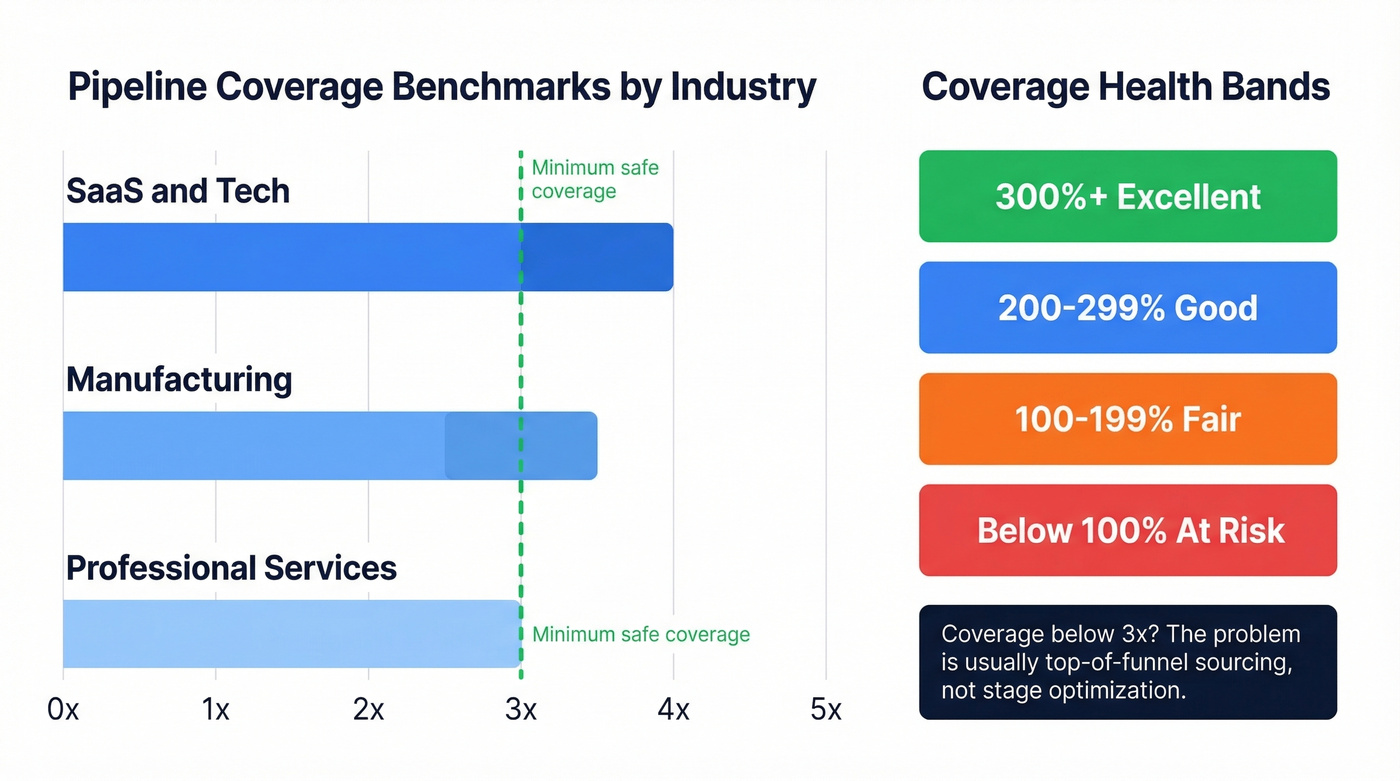
Coverage benchmarks vary by industry:
| Industry | Coverage Range |
|---|---|
| SaaS/Tech | 3.0x-4.0x |
| Manufacturing | 2.5x-3.5x |
| Professional Services | 2.0x-3.0x |
Coverage health bands: 300%+ is excellent, 200-299% good, 100-199% fair, below 100% at risk.
Win-rate benchmarks run 20-25% for early-stage opportunities and 60-75% for late-stage. If your late-stage win rate is below 50%, your stage definitions are too loose - tighten them or accept that your forecast will always be fiction.
For high-growth companies, pipeline refresh rate matters as much as coverage. The benchmark is 40-50% new opportunities per quarter. If your pipeline is mostly recycled deals from last quarter, you've got a sourcing problem, not a closing problem. Coverage below 3x means you need more top-of-funnel - no amount of stage optimization fixes an empty pipeline. If you're pressure-testing your numbers, compare against sales pipeline benchmarks.
Sales Velocity Formula (Number of Deals x Win Rate x Average Deal Size) / Sales Cycle Length
This single metric captures pipeline health better than any individual number. Track it monthly and compare quarter-over-quarter to spot whether improvements in win rate are being offset by longer cycles.
Five Pipeline Reports Every Org Needs
1. Close Month x Opportunity Stage. This is the single most important pipeline report. It shows weighted pipeline by close month, grouped by stage, so you can spot overinflation instantly. If $1.5M is due to close this month but 60% of it is still in Qualification, you've got a problem. This is also where you catch waterlogged deals - dormant opportunities sitting in the same stage for weeks, inflating your numbers without any real momentum. Build this using standard opportunity reports and make it your default pipeline review artifact.
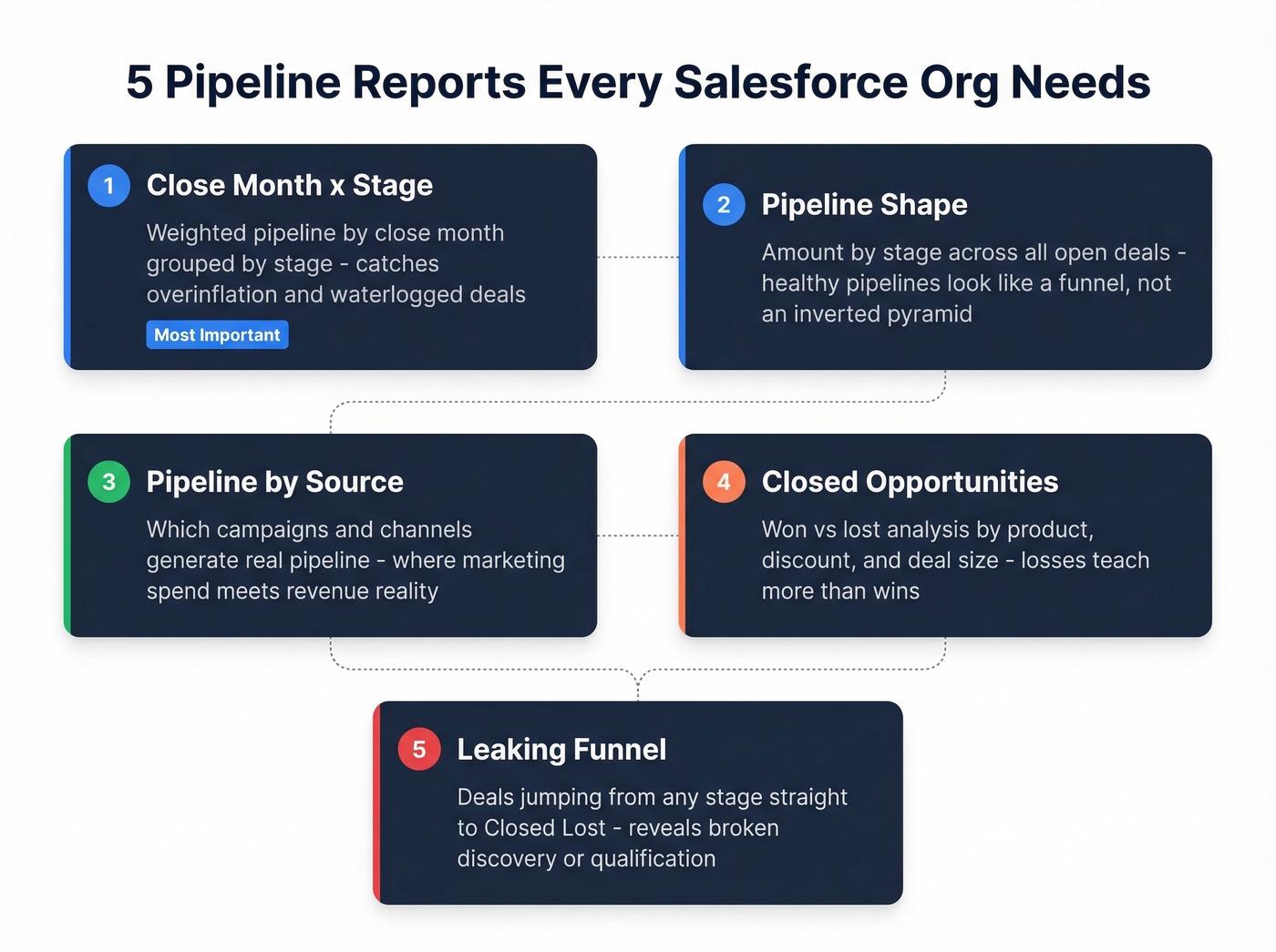
2. Pipeline Shape. Amount by stage across all open deals. A healthy pipeline looks like a funnel: prospecting should outweigh later stages. If your shape is an inverted pyramid, deals are piling up late-stage without enough early-stage feed.
3. Pipeline by Source. Which campaigns and channels are generating pipeline. This is where marketing spend meets revenue reality. If you need a system for fixing upstream leakage, use a lead generation workflow.
4. Closed Opportunities. Closed-won vs. closed-lost analysis. Look for patterns in products, discount levels, and deal size. The deals you lose teach you more than the ones you win.
5. Leaking Funnel. Opportunities that jump from any stage directly to Closed Lost. If 40% of your losses come straight from Needs Analysis, your discovery process is broken. To diagnose root causes, map these issues to common sales pipeline challenges.
Five Pipeline Mistakes That Kill Your Forecast
Too many ambiguous stages. When reps can't tell the difference between "Qualification" and "Needs Analysis," they guess. The fix: 5-7 stages with documented exit criteria. Every stage should answer "what must be true before a deal advances?" This is a core part of sales process optimization.
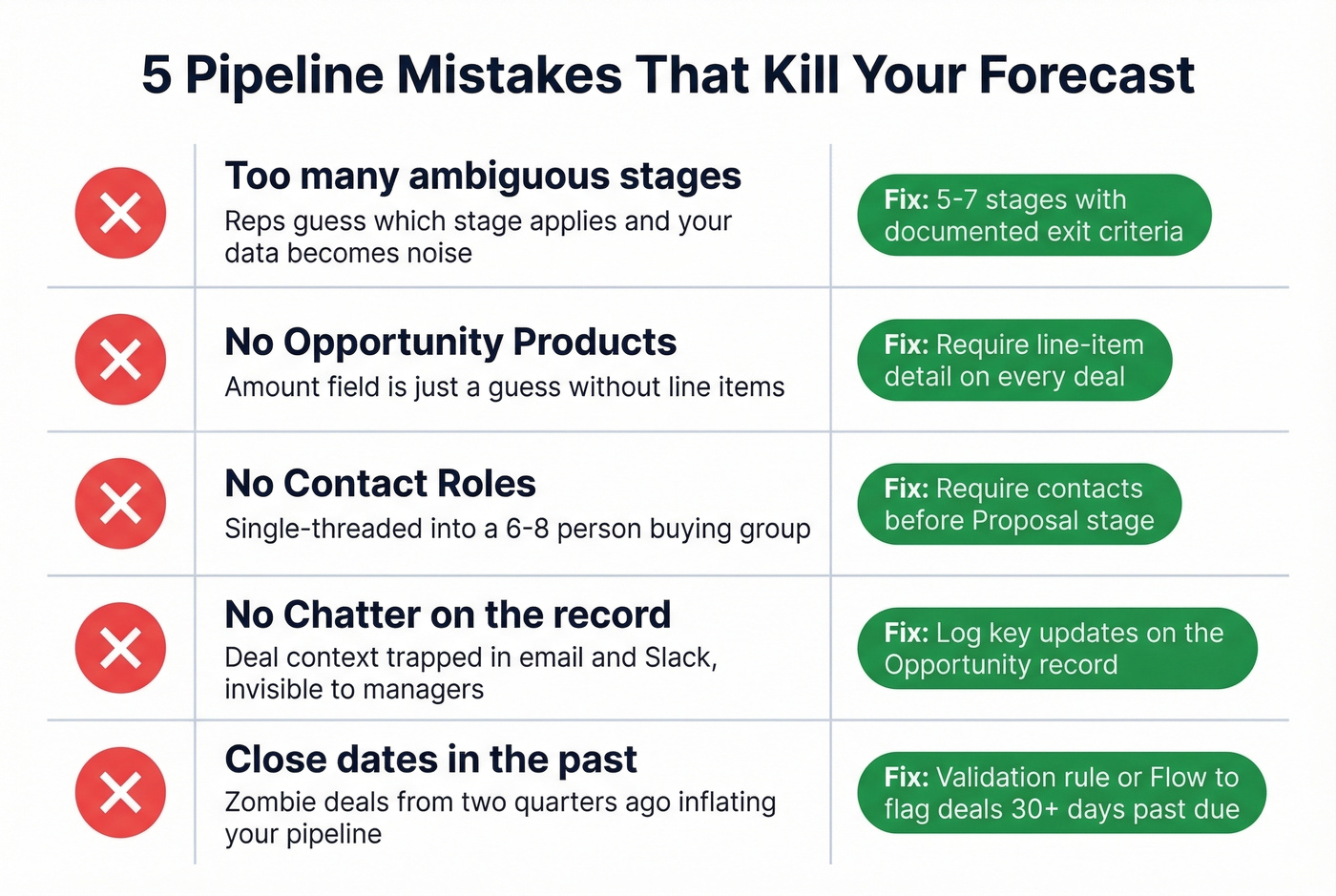
No Opportunity Products. If reps are typing a number into the Amount field, that number is a guess. Opportunity Products force line-item detail, give you pipeline visibility by product category, and enable pricing approvals. It's more work upfront. It's worth it.
No Contact Roles. The average B2B buying group involves 6-8 stakeholders. An Opportunity with zero Contact Roles means your rep is single-threaded into a multi-threaded deal - and you can't coach what you can't see. We've found that enriching Opportunity contacts with verified data from a platform like Prospeo makes it far easier to identify and add the right stakeholders before deals stall. If you're formalizing qualification, pair this with MEDDIC sales qualification.
No Chatter on the record. Deal context trapped in email threads and Slack DMs is invisible to managers, SEs, and anyone who inherits the account. Log key updates on the Opportunity record via Chatter. It takes 30 seconds and saves hours of "what happened with this deal?" conversations.
Close dates in the past. A recurring theme on r/salesforce: zombie deals with close dates from two quarters ago that nobody will close-lost. They inflate your pipeline and destroy forecast accuracy. Build a validation rule or Flow that flags Opportunities with close dates more than 30 days in the past, or auto-moves them to a review queue.
The Data Quality Foundation
Let's be honest: most pipeline guides tell you to configure stages and build reports. That's step 3. Step 1 is making sure the contact data on your Opportunities is actually correct. If you're evaluating vendors, start with this overview of data enrichment services.
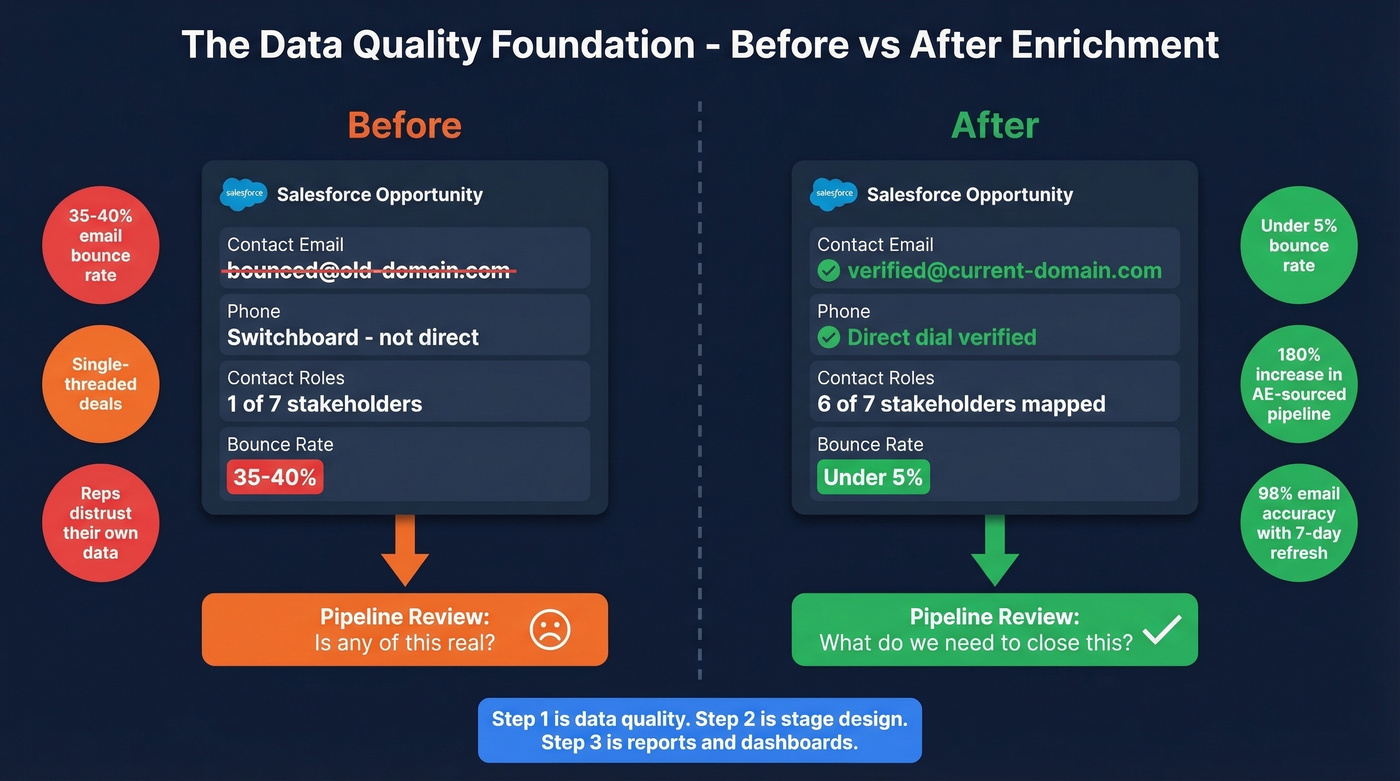
We've seen this pattern repeatedly. A team invests weeks configuring Pipeline Inspection, building dashboards, and training reps on stage definitions - then pipeline reviews still devolve into "is this contact info even right?" because half the emails bounce and direct dials go to switchboards. Snyk's 50-person AE team faced exactly this problem with bounce rates of 35-40% before implementing data enrichment that dropped bounces under 5% and drove AE-sourced pipeline up 180%. If you're tracking this operationally, monitor your email bounce rate.
The fix isn't complicated: enrich Opportunity contacts with verified emails and direct dials on a recurring cycle so the data stays current. Prospeo's native Salesforce integration does this with 98% email accuracy and a 7-day refresh cycle, returning 50+ data points per contact. When reps open an Opportunity and see current, verified contact info for every stakeholder in the buying group, pipeline reviews shift from "is this real?" to "how do we close this?"
Bad contact data is why reps create Opportunities with no Contact Roles and stale Next Steps. Prospeo's 98% email accuracy and 7-day data refresh mean every record entering your Salesforce pipeline connects to a real, reachable decision-maker - not a dead end.
Clean data in, trustworthy pipeline out. At $0.01 per verified email.
FAQ
What's the difference between a pipeline and a forecast in Salesforce?
Pipeline is all open Opportunities and their total unweighted value - everything your team is working. Forecast is the portion expected to close based on probability and forecast categories like Commit and Best Case. If your forecast is consistently off by 20%+, tighten stage exit criteria and enforce updates with validation rules.
Which Salesforce editions include Pipeline Inspection?
Pipeline Inspection is included with Performance, Enterprise, and Unlimited editions at no extra cost. Revenue Intelligence adds extra views like Flow for pipeline movement but requires a separate license on top of Enterprise or Unlimited.
How do I keep pipeline data accurate without manual updates?
Use stage-gated validation rules (require Contact Roles by Proposal, for example), Flows that flag no activity in 30+ days, and enrichment that refreshes contacts automatically on a weekly cadence. That way reps aren't spending every Friday "updating CRM."