

Pre Written Email Templates for Every Scenario in 2026
Desk workers spend 28% of their workweek on email, per McKinsey research. That's more than a full day, every week, staring at a compose window. The average cold email reply rate in 2026 sits at 3.43%, and most of those emails aren't bad - they're just written from scratch every single time, when a solid pre written email template would've done the job in 90 seconds.
Here's the thing: you don't need better writing skills. You need fewer blank screens. The ten templates below cover 90% of professional email scenarios. Change three words, hit send.
What's Working in 2026
The consensus on r/copywriting is clear: long emails and hard meeting asks are dead. What's working is absurdly short copy - 40 to 60 words - with a low-pressure ask like "Worth a conversation?" instead of "Book 15 minutes on my calendar."
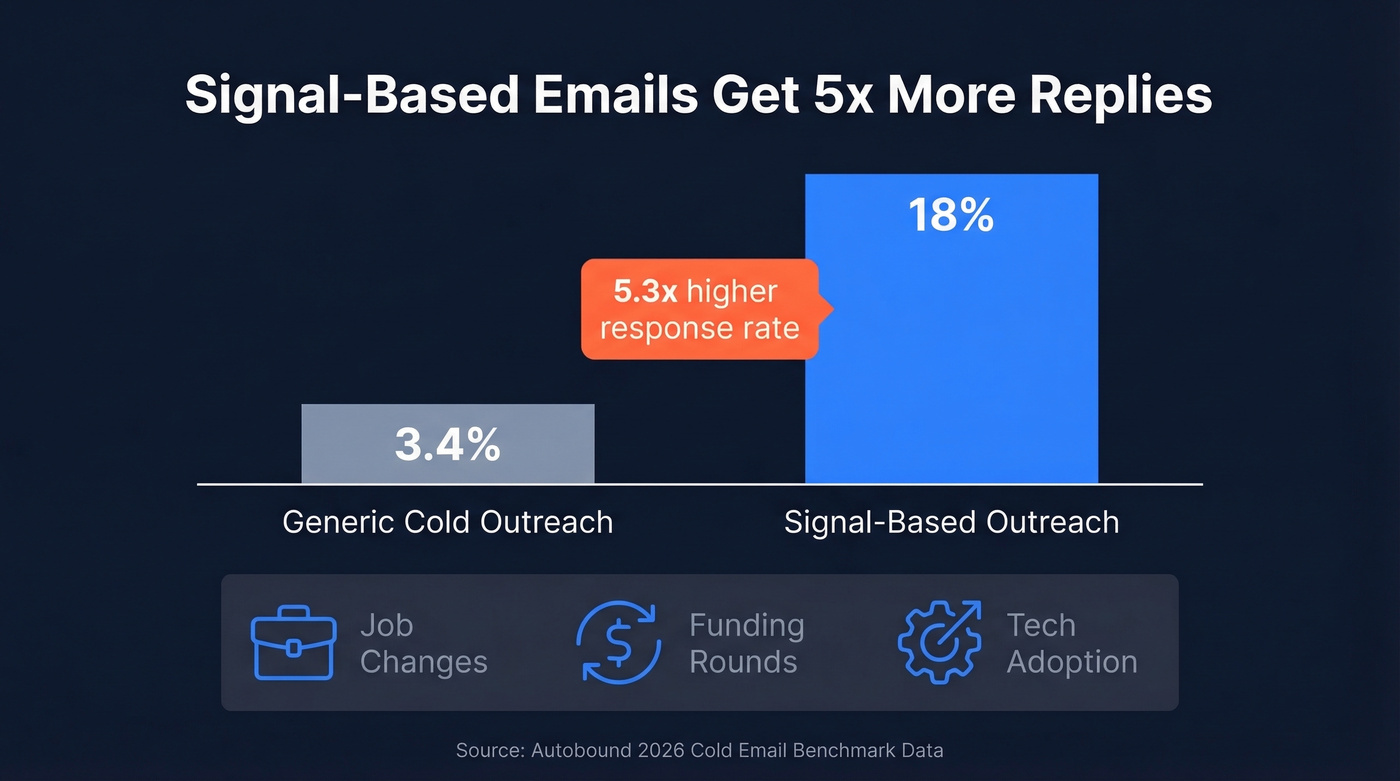
The bigger shift is signal-based personalization. Emails triggered by a real event (job change, funding round, tech adoption) hit 18% response rates versus 3.4% for generic outreach. That's a 5x difference from one variable. Templates give you the structure; signals give you the reason to send.
One more thing most people miss: Google and Microsoft now require SPF/DKIM/DMARC authentication for reliable inboxing. Skip this setup and your carefully crafted messages never reach the inbox, no matter how good they are. If you need a deeper walkthrough, start with an email deliverability checklist and confirm your SPF record is correct.
Cold Sales Outreach Templates
These two templates follow the pattern practitioners on r/sales actually share from their outboxes - value-first framing, adapted by seniority, with a gentle close.
Template 1: The Signal-Based Opener
Subject: Re: Thoughts?
Hi {{first_name}},
Noticed {{company}} just {{trigger - e.g., raised a Series B / opened a new office / hired 3 SDRs}}. When that happens, teams usually run into {{specific pain point}}.
We helped {{similar company}} {{quantified result - e.g., cut ramp time by 40%}}.
Worth a quick conversation?
{{Your name}}
Template 2: The PAS Framework (Pain-Agitate-Solve)
Subject: {{Pain point}} at {{company}}?
Hi {{first_name}},
Most {{job title}}s at {{industry}} companies tell us {{pain point - e.g., reps spend 4+ hours/week finding contact data}}.
That's {{agitate - e.g., 200+ hours/year per rep that could be selling}}.
{{One sentence on your solution + proof point}}. Happy to show you in 10 minutes if it's relevant.
{{Your name}}
Both templates are designed to stay in the ~40-60 word range. That's intentional. Keep subject lines between 6-10 words and, because around 50% of people open emails on mobile, aim for 25-30 characters in the subject. If you want more options, pull from these email subject lines and prospecting email subject lines.
These templates only work if they actually reach the inbox, though. Verify every address before sending. We've seen teams cut bounce rates from 35% to under 4% just by running lists through Prospeo's real-time verification before each campaign - the free tier covers 75 checks per month.

Follow-Up and Breakup Templates
70% of salespeople stop after one email, but 42% of replies come from follow-ups. In our experience, the breakup email consistently outperforms every other message in a sequence - something about closing the loop triggers a response. For more variations, see our sales follow-up templates and cold email follow-up templates.
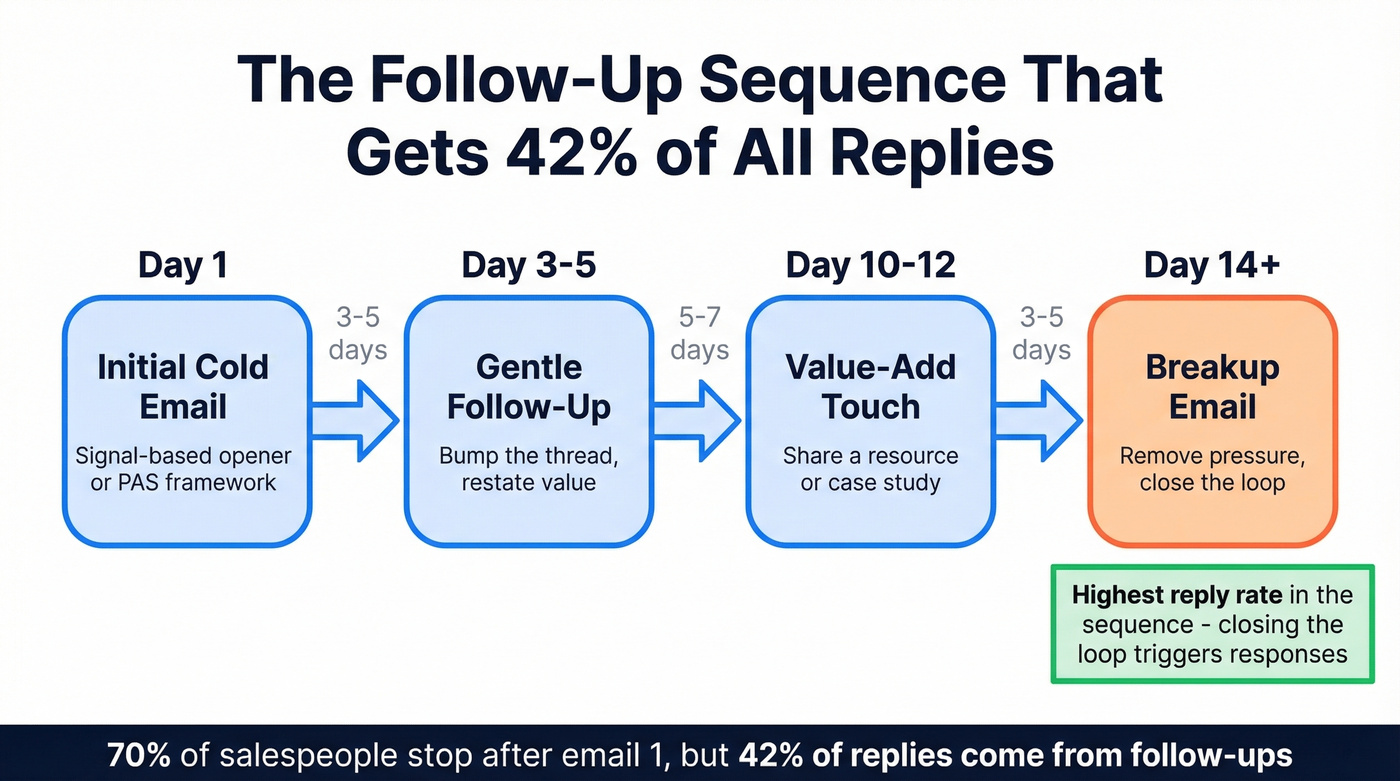
Template 3: Gentle Follow-Up (Day 3-5)
Subject: Re: {{original subject}}
Hi {{first_name}},
Wanted to bump this in case it got buried. The short version: {{one-sentence value prop}}.
If the timing's off, no worries - just let me know.
{{Your name}}
Template 4: The Breakup Email (Day 14+)
Subject: Should I close your file?
Hi {{first_name}},
I've reached out a few times and haven't heard back, so I'll assume the timing isn't right.
If things change, I'm here. Either way, no hard feelings.
{{Your name}}
The breakup email works because it removes pressure. Nobody wants to feel chased. Give them an exit and, paradoxically, they're more likely to respond.
Professional Business Templates
Meeting Request
Subject: [MEETING] {{Topic}} - 15 min this week?
Hi {{first_name}},
I'd like to set up a quick call to discuss {{specific topic}}. I have availability {{two time slots}}, but happy to work around your schedule.
Would either of those work?
{{Your name}}
Using bracketed prefixes like [MEETING] or [ACTION] in subject lines lifts open rates 15-20% based on A/B testing data. Small change, big compound effect over hundreds of sends.
Saying No Gracefully
Subject: Re: {{their request}}
Hi {{first_name}},
Thanks for thinking of me for this. Unfortunately, I can't take this on right now - {{brief, honest reason}}.
I'd recommend reaching out to {{alternative person or resource}} who'd be a great fit.
Best, {{Your name}}
Turning Down a Project
This is the email people agonize over. Don't.
Be direct, be kind, move on.
Subject: Re: {{project name}}
Hi {{first_name}},
I appreciate you considering me for {{project}}. After reviewing the scope, I don't think I'm the right fit for this one - {{one honest reason: timeline, bandwidth, expertise mismatch}}.
I'd suggest {{alternative person or firm}}. They'd do a great job here.
Best, {{Your name}}
33% of recipients decide to open based on the subject line alone. Keep every subject specific and under 10 words.

Templates get you speed. Verified data gets you replies. Prospeo's 98% email accuracy and real-time verification cut bounce rates from 35% to under 4% - so every template you send actually lands in the inbox.
Start with 75 free verified emails. No credit card required.
Canned Responses for Service Teams
The rule from Zendesk's best-practice framework: initiate within 24-48 hours. Every hour past that window erodes trust fast.
Template 7: Apology for Delay or Error
Subject: We dropped the ball - here's how we're fixing it
Hi {{first_name}},
I want to apologize for {{specific issue}}. That's not the experience you should've had, and I take full responsibility.
Here's what we've done: {{corrective action}}. To make it right, {{compensation - credit, discount, expedited resolution}}.
Please reach out directly if there's anything else I can help with.
{{Your name}}, {{title}}
Template 8: Refund Response
Subject: Your refund has been processed
Hi {{first_name}},
Your refund of {{amount}} has been processed and should appear in your account within {{timeframe}}.
We're sorry {{product/service}} didn't meet your expectations. If there's anything we can improve, I'd genuinely appreciate your feedback.
{{Your name}}
With eCommerce return rates running 20-30% depending on category, you'll send this template more than you'd like. Make it graceful.
Networking and Thank-You Templates
Template 9: Post-Event Follow-Up
Subject: Great meeting you at {{event}}
Hi {{first_name}},
Really enjoyed our conversation about {{specific topic}}. I wanted to share {{resource, article, or intro}} that's relevant to what you mentioned about {{their challenge}}.
Would love to stay in touch - coffee or a call sometime?
{{Your name}}
Template 10: Informational Interview Request
Subject: Quick request - 15 minutes for career advice?
Hi {{first_name}},
I'm {{brief intro - role, background, 1 sentence}}. I've been following your work on {{specific project or topic}} and would love to hear your perspective on {{specific question}}.
Would you have 15 minutes for a call in the next couple of weeks? Happy to work around your schedule.
Thank you, {{Your name}}
Add value in every touchpoint. Don't just "check in." Share an article, an intro, a relevant data point. That's what separates a relationship-builder from a pest.
How to Customize Any Template
Every template above follows a 5-component structure. Before you customize, make sure all five are present:
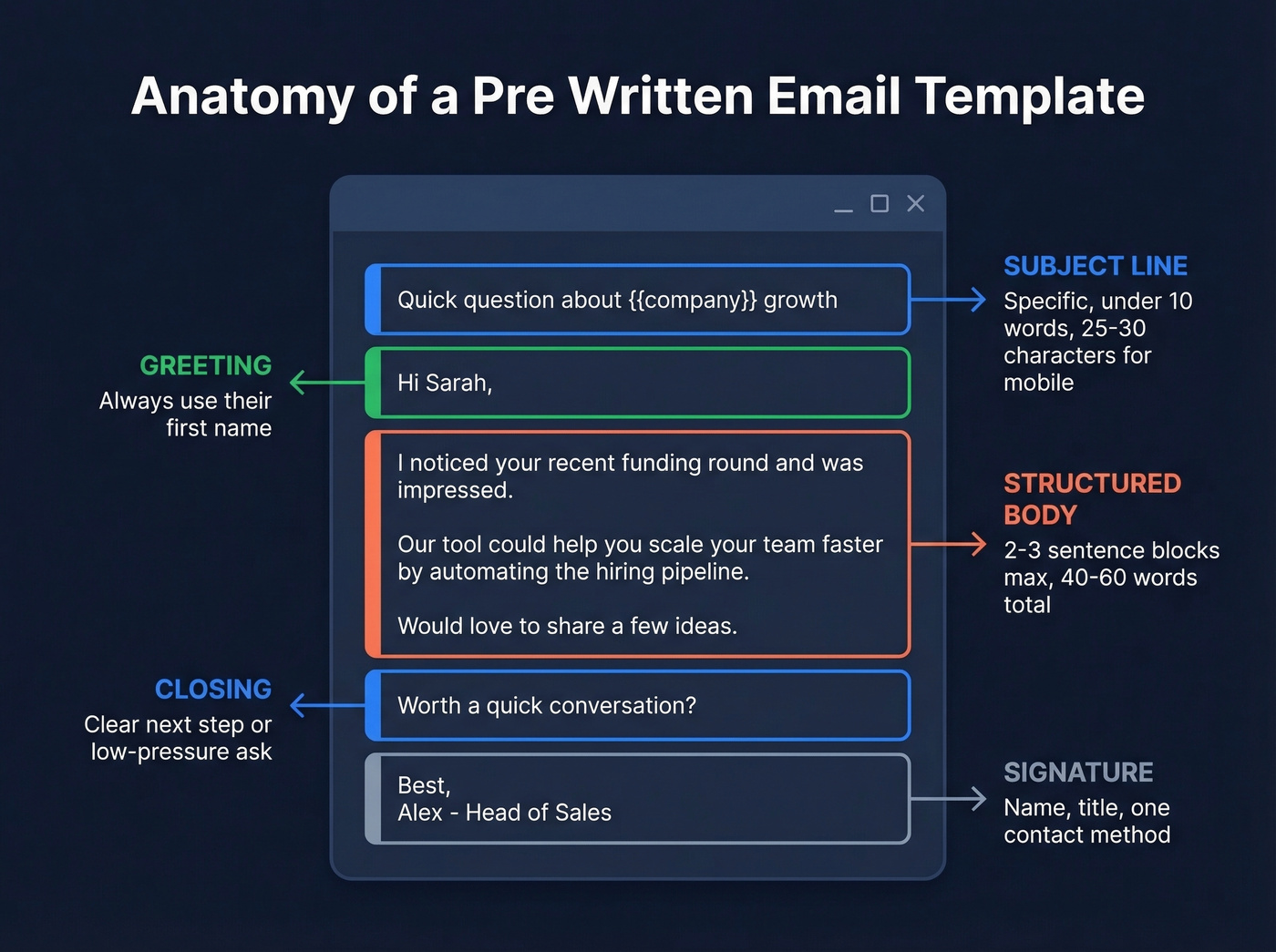
- Subject line - specific, under 10 words
- Greeting - use their name
- Structured body - 2-3 sentence blocks max
- Closing - a clear next step or sign-off
- Signature - name, title, one contact method
Let's talk about the mistakes that kill otherwise good emails, because we see these constantly in outbound audits:
Wall of text. If your email looks like a paragraph from a textbook, it's getting skimmed or skipped. Two to three sentences per block, max. Wrong recipient. Autofill is a career hazard - double-check the "To" field every time. Vague subject lines. "Quick question" and "Following up" tell the reader nothing. Be specific. No sign-off. Ending abruptly makes you look rushed or careless. Even "Best, {{name}}" is enough. ALL CAPS or excess punctuation. Multiple exclamation marks read spammy fast. And sending to invalid addresses - one team we work with cut bounce rates from 35% to under 4% just by verifying addresses before hitting send. If you're troubleshooting, start with email bounce rate benchmarks and fixes.
AI Email Writers vs. Templates
| Tool | Monthly Price | Best For |
|---|---|---|
| Grammarly | Free-$30 | Editing and tone polish |
| Copy.ai | $29-$49 | Generating first drafts |
| Superhuman | $30 | In-inbox AI assistance |
| Jasper | $49-$69 | Long-form marketing copy |
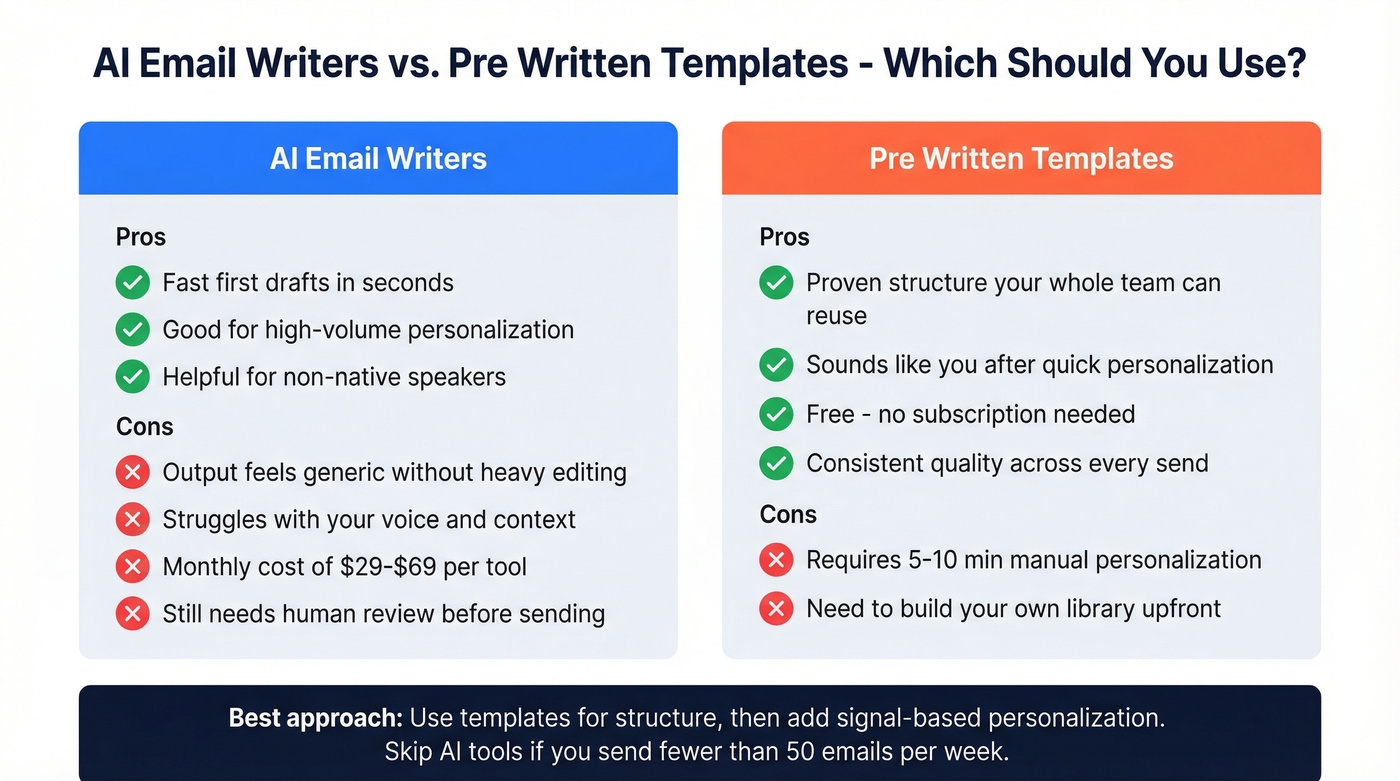
For most people, Grammarly's free tier for editing paired with your own templates is the best value.
AI is fast but generic. Pre written email templates give you proven structure that you can reuse across your entire team. The best approach: start with a template for the skeleton, then use AI to personalize the details - a trigger event, a specific pain point, a relevant metric. I've tested every tool on this list, and none of them write a cold email I'd actually send without heavy editing. AI tools still struggle with your voice and your context, which is exactly what makes an email feel human. If you're experimenting, compare approaches in our guide to AI for sales emails.
Skip the AI tools entirely if your team sends fewer than 50 emails a week. At that volume, templates plus 10 minutes of personalization per email will outperform any AI-generated copy.
This article covers interpersonal and sales templates. If you need marketing lifecycle emails like welcome sequences, abandoned cart, or product launch - those follow different rules and deserve their own guide.
FAQ
How many templates does a sales team actually need?
About 10 covering core scenarios - cold outreach, follow-up, breakup, meeting request, saying no, apology, refund, networking, and thank-you. Everything else is a variation. Most teams also build 5-10 canned responses for objections they hear repeatedly, bringing the total to roughly 15-20.
Should I use AI instead of templates?
Use both. Templates provide the proven skeleton; AI personalizes details like trigger events and pain points. AI alone produces generic copy that recipients can smell instantly - pair it with a tested framework for best results.
How do I stop my emails from bouncing?
Verify every address before sending. One team cut their bounce rate from 35% to under 4% by running lists through real-time verification before each campaign. Prospeo's free tier covers 75 checks per month - enough to validate a small outbound list weekly.
What's the ideal length for a cold email?
Aim for 40-60 words in the body. Emails in that range see the highest reply rates in 2026 because they respect the reader's time and render cleanly on mobile. If you can't say it in three short paragraphs, you're overexplaining.
Signal-based templates hit 18% response rates - but only if you have the trigger data. Prospeo tracks job changes, funding rounds, and buyer intent across 15,000 topics so you always know why you're reaching out.
Stop personalizing blind. Let real-time signals fill your templates.