

The Only Prospect List Template for Excel You'll Actually Use
It's Monday morning, you've got 200 accounts to work, and your "system" is a blank spreadsheet with your name in cell A1. You're not alone - plenty of reps keep a parallel Google Sheet next to Salesforce just to drag rows by hotness and see everything at once. 59% of B2B marketers say generating quality leads is their biggest challenge, and a messy spreadsheet makes it worse.
A good prospect list template in Excel takes ten minutes to build right. Filling it with accurate data is the part that actually matters.
What You Need (Quick Version)
- The right columns. Company, contact name, title, email, phone, status, priority, last contacted, next step, and touch-history columns. Full breakdown below.
- Two Excel features that save hours. Data validation dropdowns so "Interested" doesn't become "intrested," and conditional formatting so overdue follow-ups scream at you in red.
- Verified contact data to fill the rows. A gorgeous empty template is still empty. You need a way to populate it with real, deliverable emails and direct dials.
Essential Columns for Your Sales Prospect Sheet
Most prospecting spreadsheets use a similar set of columns. Here's a column set that works in the real world, drawn from noCRM and CRO Club guidance plus Reddit practitioner examples:
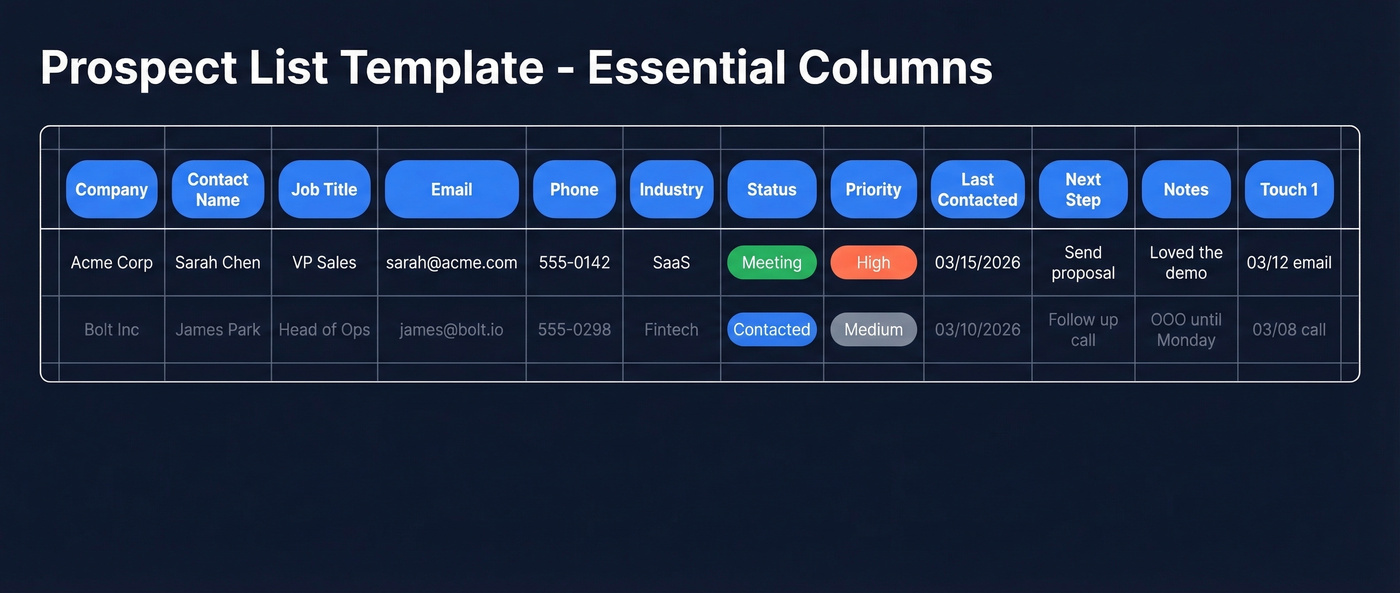
| Column | What Goes In It | Why It Matters |
|---|---|---|
| Company | Legal or common name | Grouping and deduplication |
| Contact Name | First + Last | Personalization |
| Job Title | Exact title | Qualification + messaging |
| Verified work email | Primary outreach channel | |
| Phone | Direct dial or mobile | Backup channel, higher intent |
| Industry | Sector or vertical | Segmentation and sorting |
| Status (dropdown) | New / Contacted / Replied / Meeting / Closed | Pipeline visibility |
| Priority (dropdown) | High / Medium / Low | Daily focus |
| Last Contacted | Date (MM/DD/YYYY) | Follow-up aging |
| Next Step | Specific action | Prevents leads from dying |
| Notes | Call context, objections | Continuity between touches |
| Touch 1, 2, 3... | "12/05 email" / "14/05 call" | Attempt history at a glance |
Copy this column structure into a new Excel workbook - it takes under five minutes. In our experience, the touch-history columns are what separate reps who follow up from reps who forget. One Reddit user running high-volume SMB prospecting tracks every attempt with date and method - "12/05 email, 14/05 call, 18/05 LinkedIn" - so they get a quick snapshot without opening a CRM.
If you want a broader view of what to track beyond a spreadsheet, see our guide to prospecting spreadsheet setups.


A perfect prospect list template means nothing with bad data in it. Prospeo gives you 300M+ profiles searchable by 30+ filters - export as CSV and paste straight into your spreadsheet. Every email is 98% verified on a 7-day refresh cycle.
Stop spending 15 hours a week on manual list building.
Formulas That Make Your Spreadsheet Smarter
A flat list of names is just a contact dump. These three additions turn it into a working system.
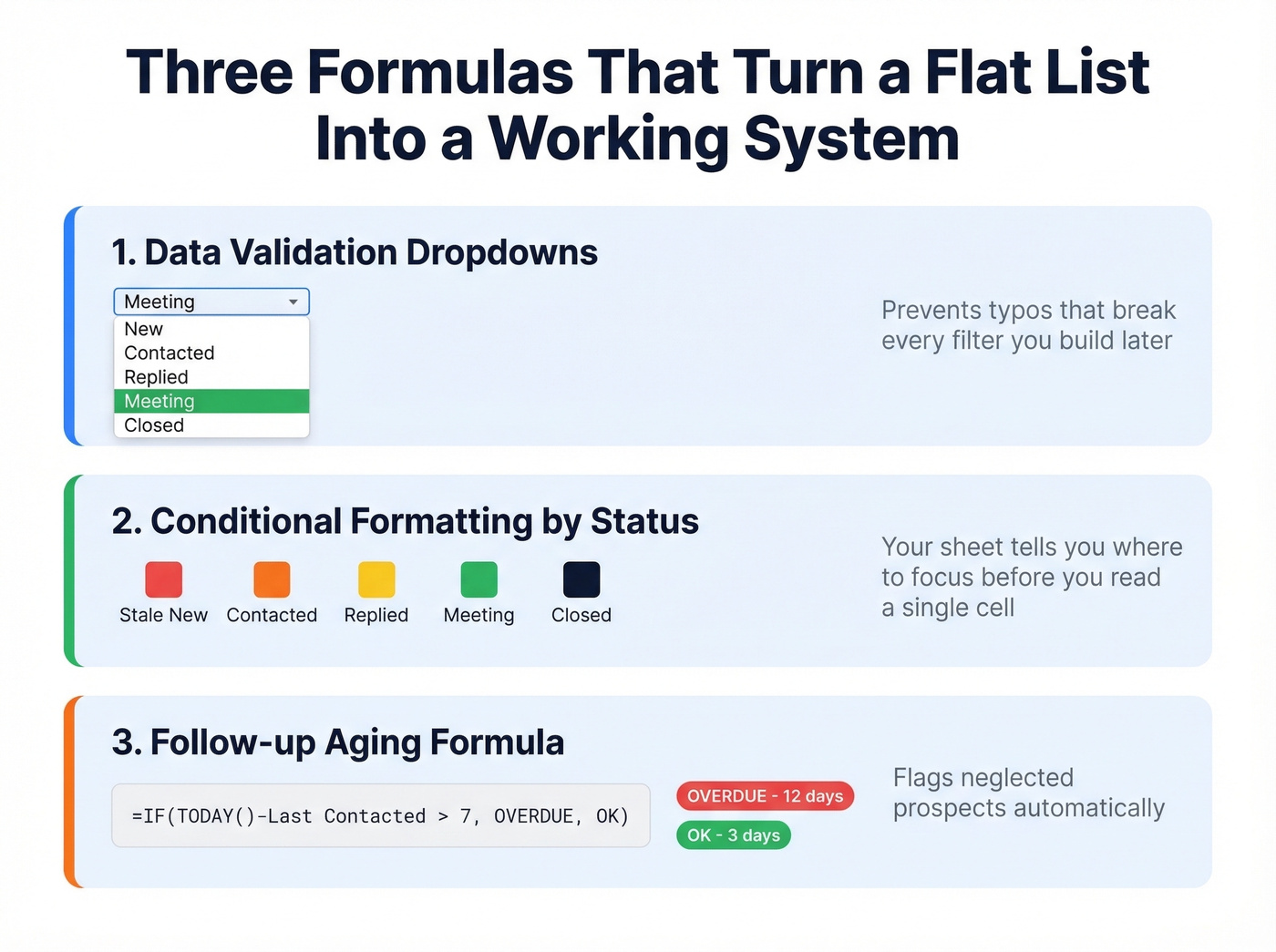
1. Status and Priority dropdowns. Select your Status column, go to Data > Data Validation > Allow: List, then type New,Contacted,Replied,Meeting,Closed. Repeat for Priority with High,Medium,Low. This prevents the typo that breaks every filter you build later.
2. Conditional formatting by status. Select the Status column, then go to Home > Conditional Formatting > New Rule > "Use a formula to determine which cells to format." Enter =$G2="Meeting" (adjust the column letter to match yours) and set the fill to green. Repeat for other statuses - red for stale "New" prospects, yellow for "Contacted." Now your sheet tells you where to focus before you read a single cell.
3. Follow-up aging formulas. In a helper column, add:
=TODAY()-[@[Last Contacted]]- days since last touch=IF(TODAY()-[@[Last Contacted]]>7,"OVERDUE","OK")- flags neglected prospects=COUNTIFS([Status],"Meeting")- live count of meetings booked
If you're in Google Sheets, an Apps Script onEdit trigger can auto-timestamp the Last Contacted column every time you update a row. No manual date entry needed.
For more ways to systematize outreach and follow-ups, use a repeatable prospecting workflow.
How to Fill Your Template With Real Data
Here's the thing: the template isn't the hard part. Getting accurate contact data is. Building prospect lists manually - searching profiles, guessing email formats, cross-referencing company pages - eats 15-16 hours per week. That's two full workdays spent on data entry instead of selling.
If you’re still doing this by hand, it helps to start with a clear process for prospect list building and a repeatable way to build a prospect list.
And even when you find contact data manually, it decays fast. B2B databases lose roughly 30% of their accuracy every year due to job changes and company moves.
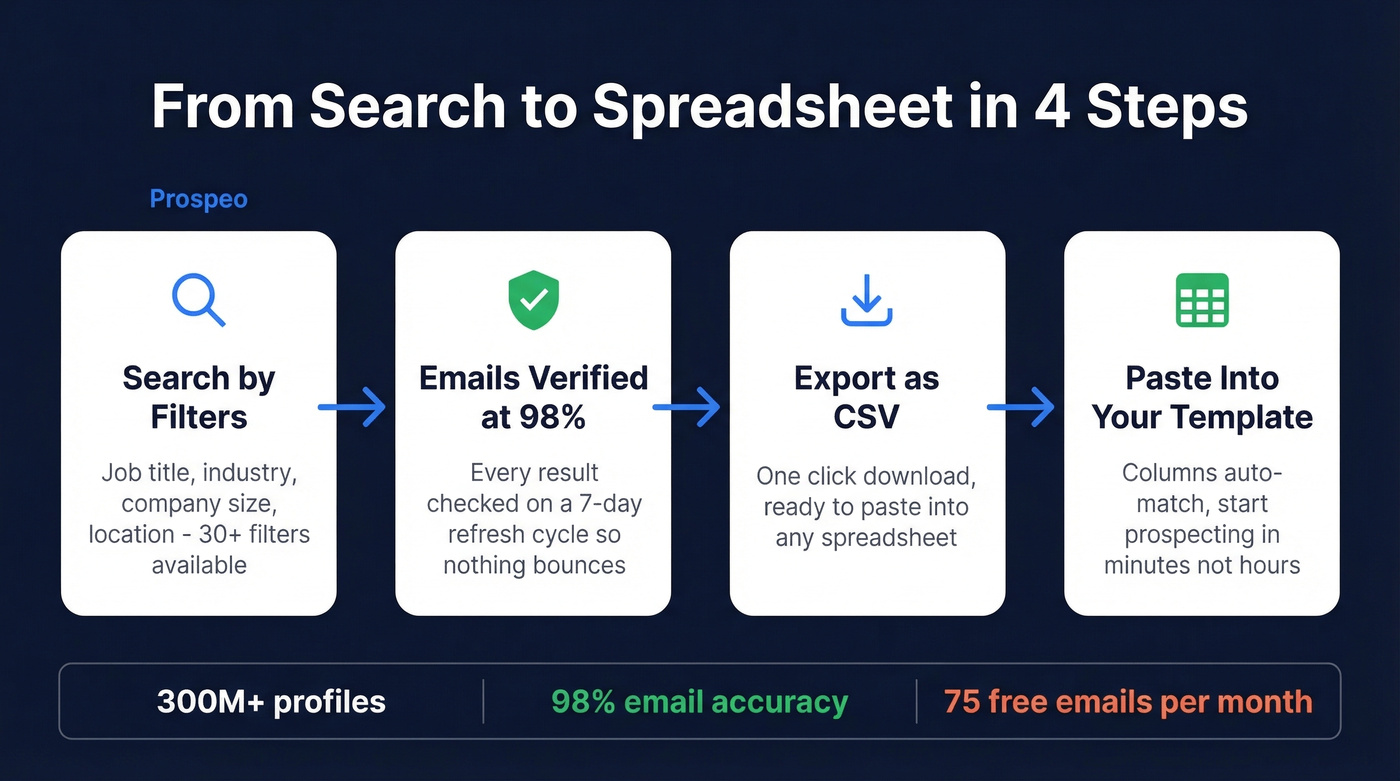
We've tested a bunch of data tools for this exact workflow, and Prospeo is what we use internally. Search by job title, industry, company size, or any of 30+ filters, then export results as a CSV and paste directly into your Excel template. Every email comes back with 98% verified accuracy on a 7-day refresh cycle, so you're not filling your spreadsheet with data that bounces next week. The free tier gives you 75 verified emails per month - enough to test the workflow without spending a dollar.
If you’re comparing options, our breakdown of B2B prospecting tools and list building tools can help you pick the right stack.

You just built a spreadsheet with smart formulas, dropdowns, and follow-up aging. Now fill every row with verified emails at $0.01 each and direct dials that actually get picked up 30% of the time. Prospeo's free tier gives you 75 emails/month - no contracts, no sales calls.
Your template is ready. Your data should be too.
When to Ditch the Spreadsheet
Excel works beautifully until it doesn't. Three thresholds tell you you've outgrown it:
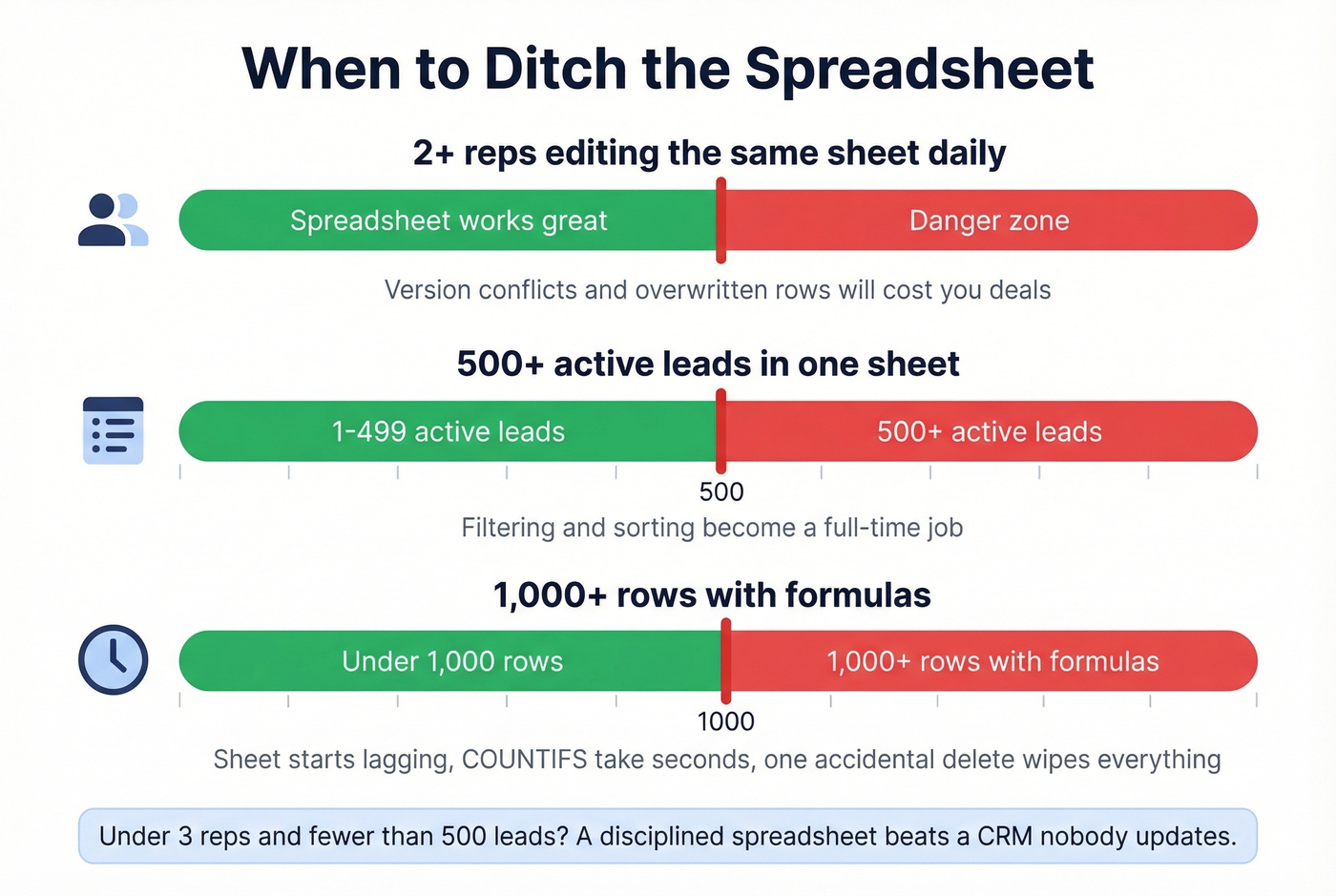
2+ reps editing the same sheet daily. Version conflicts and overwritten rows will cost you deals. We've watched it happen to teams who swore they'd "just be careful."
500+ active leads. Filtering and sorting become a full-time job, and things slip through the cracks. Skip the spreadsheet entirely if you're already past this number.
1,000+ rows with formulas. Your sheet starts lagging, COUNTIFS take seconds to recalculate, and one accidental delete wipes a week of work.
When you hit any of these, a CRM is worth the investment. HubSpot's free tier handles basic pipeline management and eliminates the version-conflict headaches that kill spreadsheet workflows. Paid CRMs run $30-100/user/month. But until you're there, a well-built prospect list template in Excel is genuinely the fastest way to prospect.
If you’re evaluating systems, this CRM comparison can help you decide when it’s time to switch.
Let's be honest: most teams under 3 reps with fewer than 500 active leads don't need a CRM at all. A disciplined spreadsheet with the formulas above will outperform a CRM that nobody bothers to update.
FAQ
What columns should every prospect list have?
At minimum: company name, contact name, job title, email, phone, status, priority, last contacted date, and next step. Add numbered touch columns if you're running multi-touch cadences - they give you attempt history at a glance without opening anything else.
Can I use Google Sheets instead of Excel?
Yes. The same column structure and dropdowns work identically in Sheets. The main difference is automation: Sheets uses Apps Script for auto-timestamps, while Excel uses Office Scripts or VBA macros. Your prospecting workflow stays the same either way.
How do I get verified emails to put in my template?
Use a B2B data tool to search by job title, industry, and company size, then export as CSV and paste into your spreadsheet. Prospeo's free tier covers 75 verified emails per month at 98% accuracy - enough to populate your first working list without paying anything.
How often should I update my prospect tracking spreadsheet?
Refresh your contact data at least quarterly. B2B records lose roughly 30% accuracy per year due to job changes and company moves. Re-exporting a fresh CSV each quarter keeps your spreadsheet current and your bounce rates low.