


Rebump Pricing, Reviews, Pros and Cons: Is It Worth It in 2026?
60% of customers say no four times before saying yes. Only 2% convert on first contact. Rebump exists to handle the other 98% - the follow-ups you forget to send.
We pulled together 106+ verified reviews across G2, Capterra, and AppSumo to give you the full picture. Here's what Rebump actually costs, what users love, what frustrates them, and whether it's the right fit for your workflow.
What Is Rebump?
Rebump is a Gmail Chrome extension that automatically sends follow-up emails to recipients who haven't replied. You compose your email in Gmail, check a box, and Rebump handles the rest - sending customizable "bumps" at intervals you set. Follow-ups come from your email address, so recipients don't know you're using a tool.
Quick clarification: make sure you're looking at the Rebump follow-up tool, the one that uses the Chrome extension + Gmail workflow.
Not on Chrome desktop? Rebump offers a BCC workaround. BCC bump@go.rebump.cc from any email client or mobile device to trigger your default sequence. You can also set up multiple sequences via different BCC addresses, though it's clunkier than the native experience.
Rebump Pricing in 2026
Here's what Rebump actually costs per their pricing page:
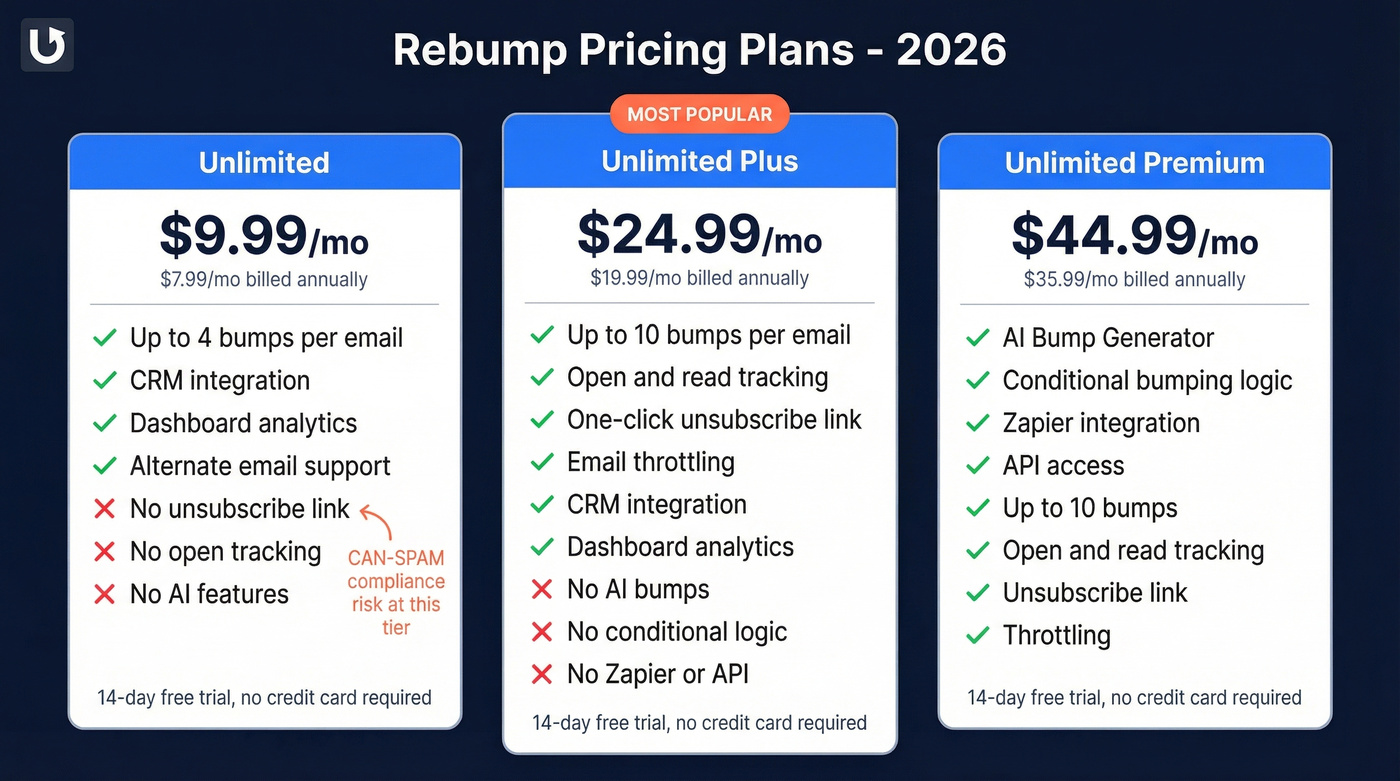
| Plan | Monthly | Annual (per mo) | Key Features |
|---|---|---|---|
| Unlimited | $9.99 | $7.99 (save $24) | Up to 4 bumps, CRM integration, dashboard, alternate email |
| Unlimited Plus | $24.99 | $19.99 (save $60) | 10 bumps, open/read tracking, unsubscribe, throttling |
| Unlimited Premium | $44.99 | $35.99 (save $108) | AI Bump Generator, conditional bumping, Zapier, API |
All three tiers include a 14-day free trial, no credit card required.
Here's the thing: the base Unlimited plan doesn't include an unsubscribe link. If you're sending any volume of follow-ups, that's a compliance risk you shouldn't ignore. Budget for Plus at minimum if you care about CAN-SPAM best practices. The jump from Unlimited to Plus also gets you email throttling and open/read tracking, which are table-stakes features for most outreach workflows in 2026.
If you want to double-check the latest numbers, see Rebump Pricing in 2026.

Rebump automates your follow-ups, but every bounced email wastes a bump and damages your sender reputation. Prospeo verifies contacts at 98% accuracy on a 7-day refresh cycle - so your sequences reach real inboxes, not dead ends.
Clean your list before you automate. 75 free verifications, no card required.
What 106+ Users Actually Say
The Good
The word that appears most across reviews is "simple." One G2 reviewer put it perfectly: "set it once and forget about it." That's not marketing spin - it's the actual user experience. Check a box, write your bumps, walk away.
The tool genuinely revives deals. One AppSumo reviewer reported bringing back 3 old leads they'd written off as dead. For a $10/mo tool, that's serious ROI. We also noticed something unusual: founder Aaron personally resolves support issues, and multiple reviewers mention him by name. That kind of hands-on support is rare at any price point, let alone this one.
Ratings back this up: 4.9/5 on G2 (55 reviews, 92% five-star), 4.8/5 on AppSumo (44 ratings), and 4.7/5 on Capterra (7 reviews).
The Bad
No subject-line customization. This is the #1 complaint across every review site we checked. Every follow-up lands in the same thread with the same subject line. If you want to test different angles or break out of a stale thread, you're out of luck. (If you do need ideas, start with these subject line examples.)
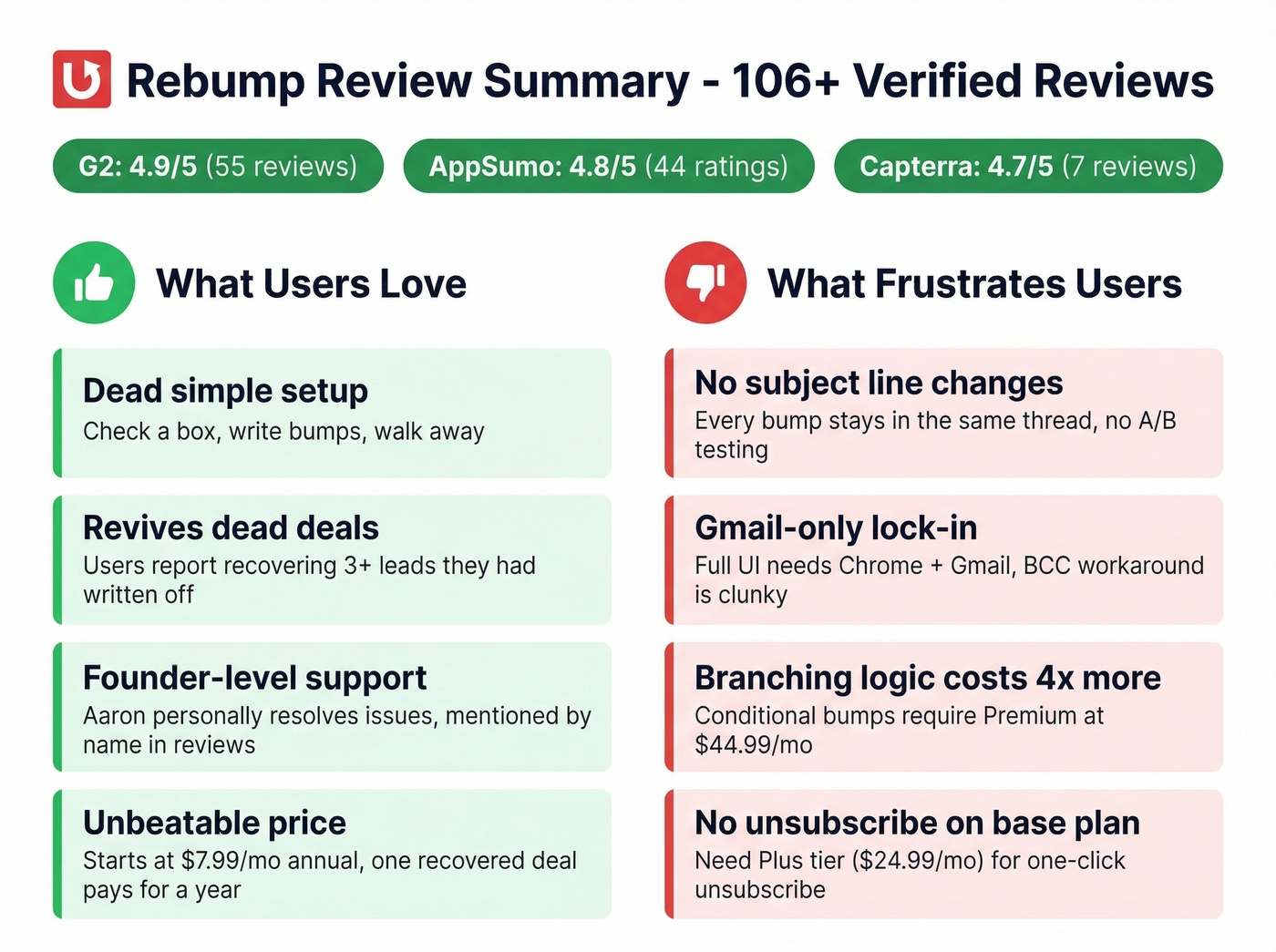
Gmail-first lock-in. Capterra reviewers and a Reddit thread both flag this. The full UI requires Chrome on desktop with Gmail. The BCC workaround exists, but it's not the same as a native Outlook-style workflow - and if your team is split across email clients, that's a real friction point.
No branching logic on lower tiers. Want different follow-ups based on opens or clicks? You need Premium at $44.99/mo, which triples the base price. That's a steep jump for a feature many competitors include in their mid-tier plans.
Base plan lacks an unsubscribe link. You need Plus ($24.99/mo) for one-click unsubscribe - a meaningful gap for anyone following up with people who didn't explicitly opt in.
Edge case worth knowing: Rebump can trigger repeated replies from automated support inboxes, creating an awkward back-and-forth loop. If you're emailing shared inboxes, watch for this.
Let's be honest: for most solo professionals, Rebump at $7.99/mo annual is the best value in follow-up automation. But the moment you need A/B testing, Outlook support, or branching sequences, you've outgrown it - and there's no middle ground. You either stay simple or jump to a full cold email platform at 4x the price. (If you're building a more complete system, this guide on sequence management is a good next step.)
Who Should (and Shouldn't) Use Rebump
Best for:
- Solo professionals - freelancers, consultants, recruiters, agents
- Small Gmail teams doing warm follow-ups
- Anyone chasing proposals, invoices, or intros that went cold (use these sales follow-up templates if you need copy)
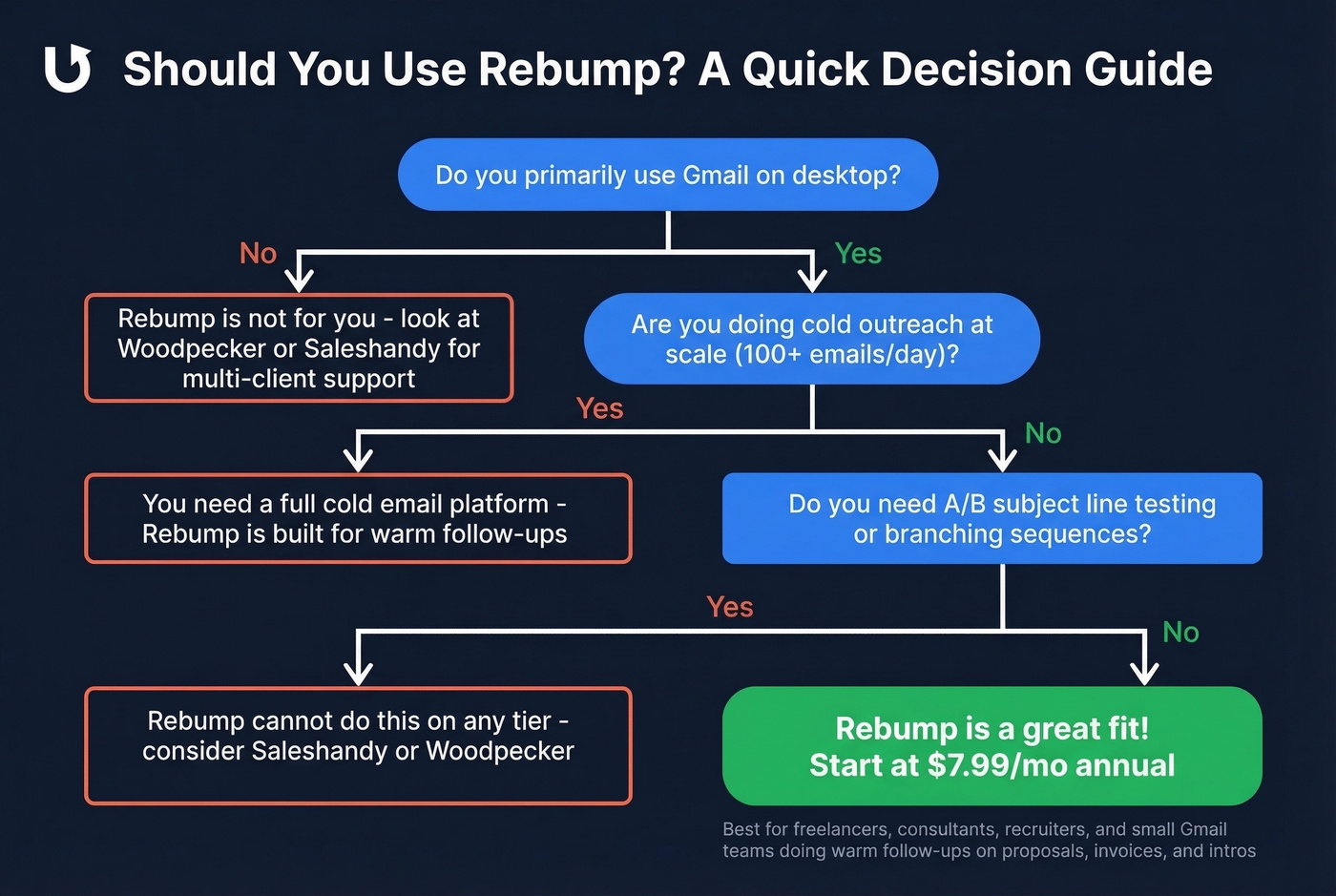
Skip if you need a native Outlook experience, run cold email at scale, or want multichannel outreach with A/B subject-line testing. Rebump wasn't built for those use cases, and trying to force it will frustrate you. If you're doing outbound, it helps to follow a few proven sales prospecting techniques and keep an eye on email velocity.
Rebump Alternatives Worth Considering
Rebump does one thing well. When you need more, here's where to look:
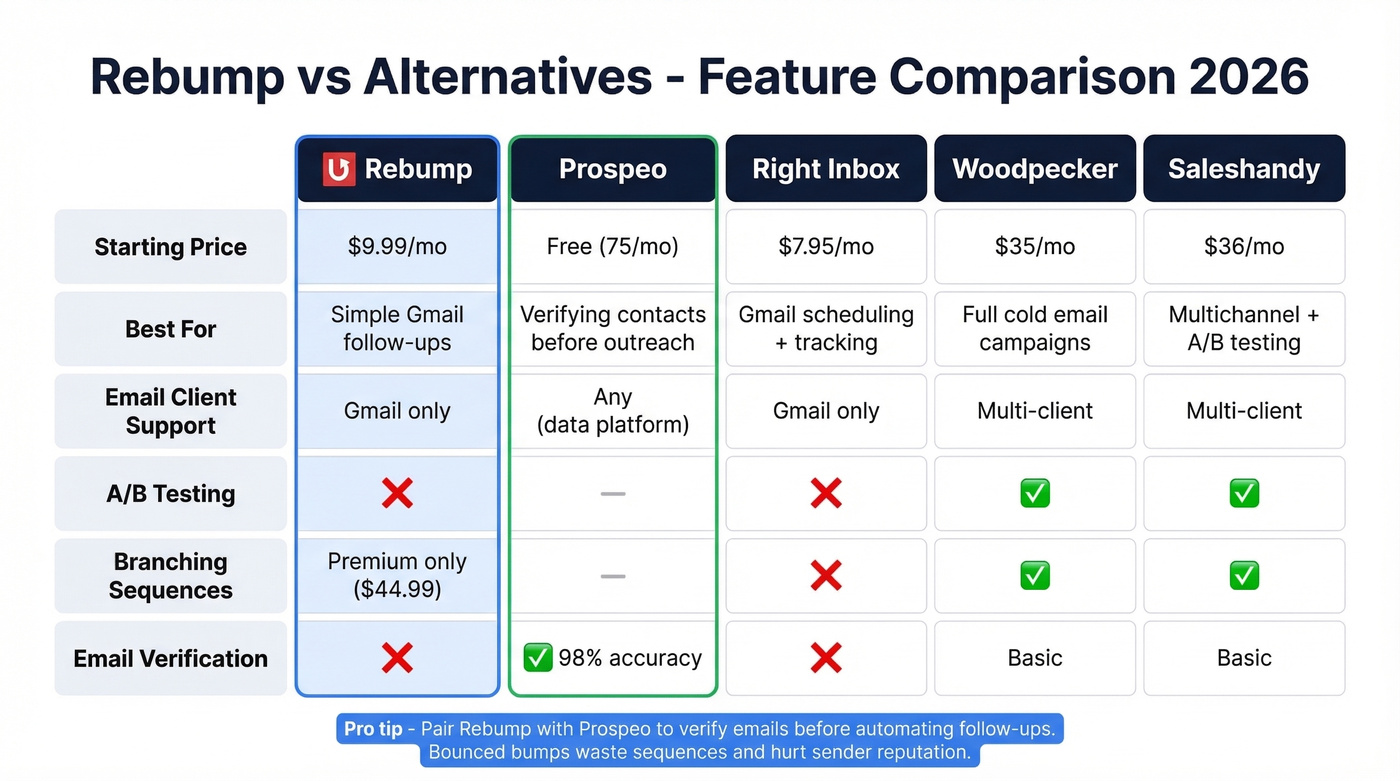
| Tool | Starting Price | Best For | Email Client |
|---|---|---|---|
| Rebump | $9.99/mo | Simple Gmail follow-ups | Gmail (Chrome extension) |
| Prospeo | Free (75 emails/mo) | Verifying contacts before outreach | Any (data platform) |
| Right Inbox | ~$7.95/mo | Gmail scheduling + tracking | Gmail |
| Woodpecker | ~$35/mo | Full cold email campaigns | Multi-client |
| Saleshandy | ~$36/mo | Multichannel + A/B testing | Multi-client |
Rebump sends the follow-up; Prospeo makes sure it reaches a real inbox - 143M+ verified emails at 98% accuracy on a 7-day refresh cycle, with a free tier to start. In our experience, pairing a simple follow-up tool with verified data eliminates the biggest silent killer of outreach: bounces that tank your sender reputation before your sequence even gets going. (For the deliverability side, see our email deliverability guide and benchmarks for email bounce rate.)
Right Inbox is the closest lightweight Gmail alternative. Woodpecker and Saleshandy are where you graduate when you outgrow Rebump - full cold email platforms with branching sequences, A/B testing, and multi-client support.
The biggest gap in Rebump's workflow isn't subject lines or branching logic - it's sending follow-ups to emails that no longer exist. Prospeo's 143M+ verified emails and 5-step verification catch bad addresses before they tank your deliverability.
Stop wasting bumps on bounces. Verify at $0.01 per email.
FAQ
Does Rebump offer a free trial?
Yes - all three plans include a 14-day free trial, no credit card required. You get full access to whichever tier you select, so test Plus or Premium features before committing.
Does Rebump work with Outlook or on mobile?
Not natively. The full UI requires Chrome on desktop with Gmail. You can BCC bump@go.rebump.cc from any client to trigger your default sequence, but it's a workaround - not a first-class experience.
How do I make sure my follow-ups actually land?
Rebump handles timing, but it can't fix bad email addresses. Run your contact list through a verification tool like Prospeo before automating - bounced follow-ups hurt sender reputation and waste your bump sequences. The free tier covers 75 emails per month, which is plenty to clean a small pipeline.
Is Rebump worth the price for small teams?
At $7.99/mo on the annual plan, Rebump is one of the cheapest follow-up tools available. If even one revived deal covers a year of subscription cost - and multiple reviewers report exactly that - the ROI math works easily for freelancers, consultants, and small sales teams.