

How to Write a Recruitment Message That Actually Gets Replies
You sent 200 messages this week. Got 6 replies. Three were "please remove me." The other three asked about salary - which you didn't include.
Every recruitment message you send competes against dozens of others in the same inbox. Most guides cover one channel. This one covers all three - email, SMS, and direct messages - with benchmarks, templates, and the compliance rules that keep you out of trouble.
Why Most Recruiting Messages Get Ignored
72% of candidates expect some level of personalization in hiring communications. That means nearly three out of four people mentally discard your message the moment it reads like a template. And with AI flooding inboxes, the bar is rising fast.
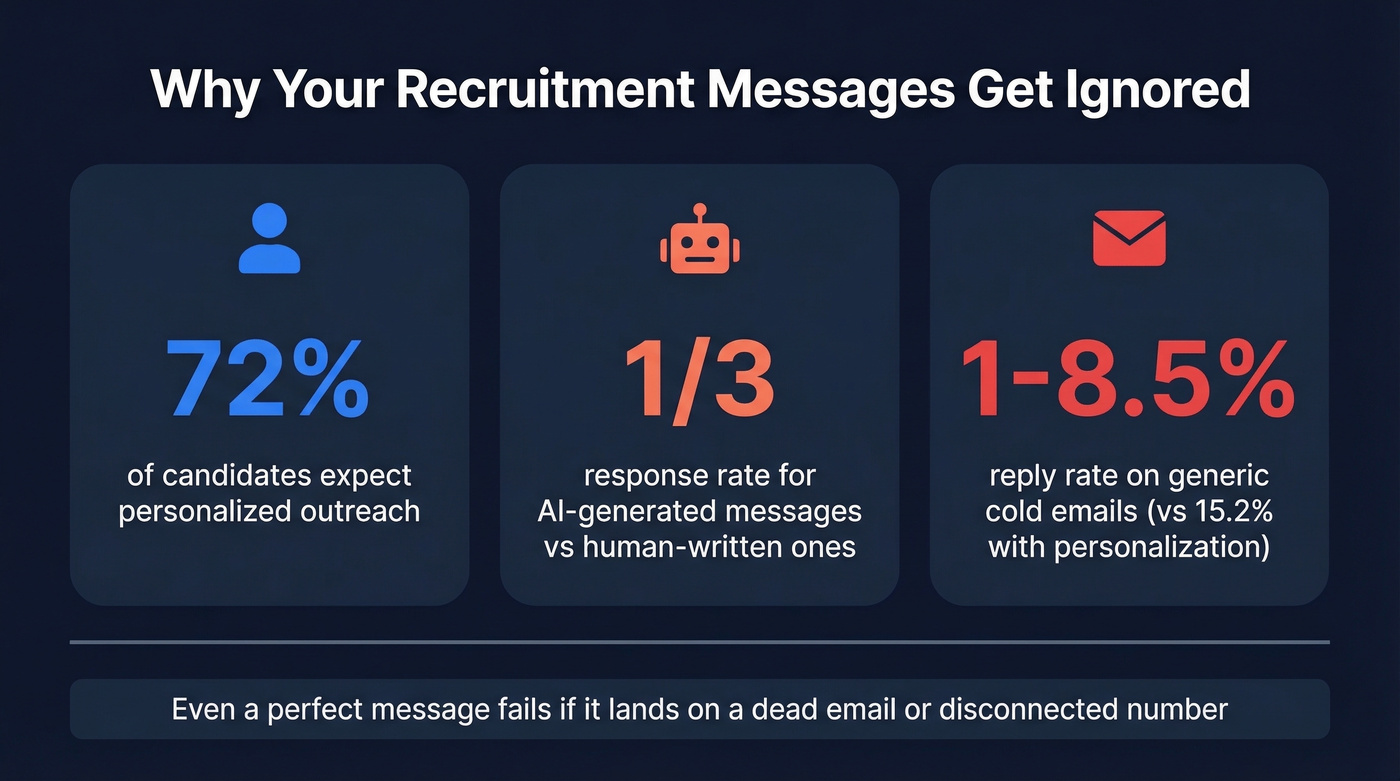
There's a term gaining traction in recruiting circles: "workslop." It describes AI-generated outreach that looks polished on the surface but carries zero substance underneath. The formatting is clean, the grammar is perfect, and the candidate can smell it from the subject line. AI-generated recruiting messages pull response rates as low as one-third of human-written ones.
The problem isn't that candidates are lazy or uninterested. They're drowning. The average passive candidate gets multiple recruiter messages per week, and if yours doesn't demonstrate that you actually read their profile, know what they do, and can articulate why this role matters for them specifically - it's getting archived.
Here's the thing: even a perfectly written message fails if it lands on a dead email or a disconnected phone number. The message isn't the only variable. The data underneath it matters just as much.
The Cheat Sheet
Before we get into templates and benchmarks, here's the quick version:
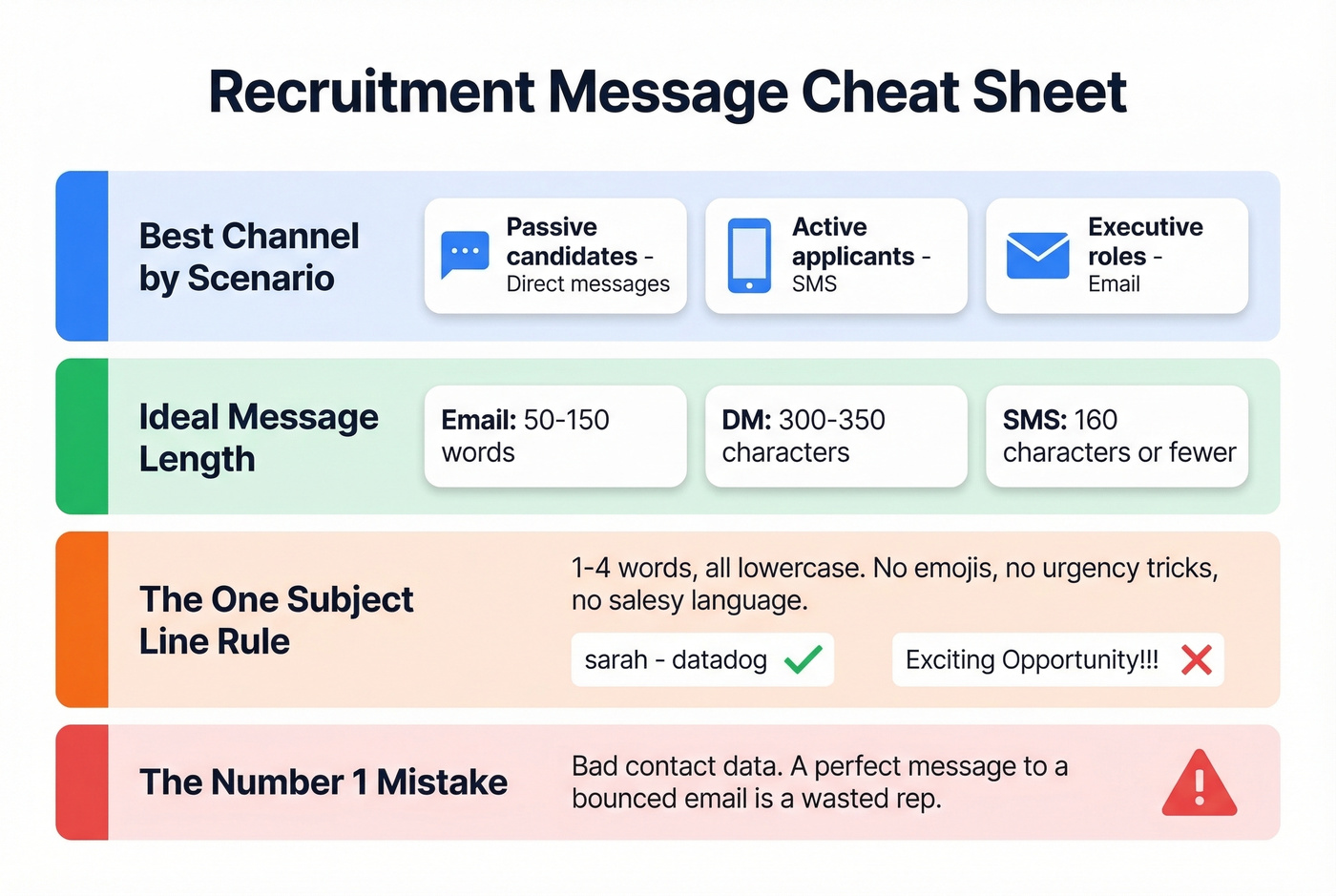
- Best channel by scenario: Passive candidates -> direct messages. Active applicants -> SMS. Executive roles -> email.
- Ideal message length: Email: 50-150 words. Direct message: 300-350 characters. SMS: 160 characters or fewer.
- The one subject line rule: Keep it to 1-4 words, all lowercase. Anything "salesy" tanks open rates. (If you need more options, see subject lines.)
- The #1 mistake killing response rates: Bad contact data. A perfect message to a bounced email is a wasted rep.
Benchmarks by Channel
The right channel depends on who you're reaching and where they are in the hiring funnel.
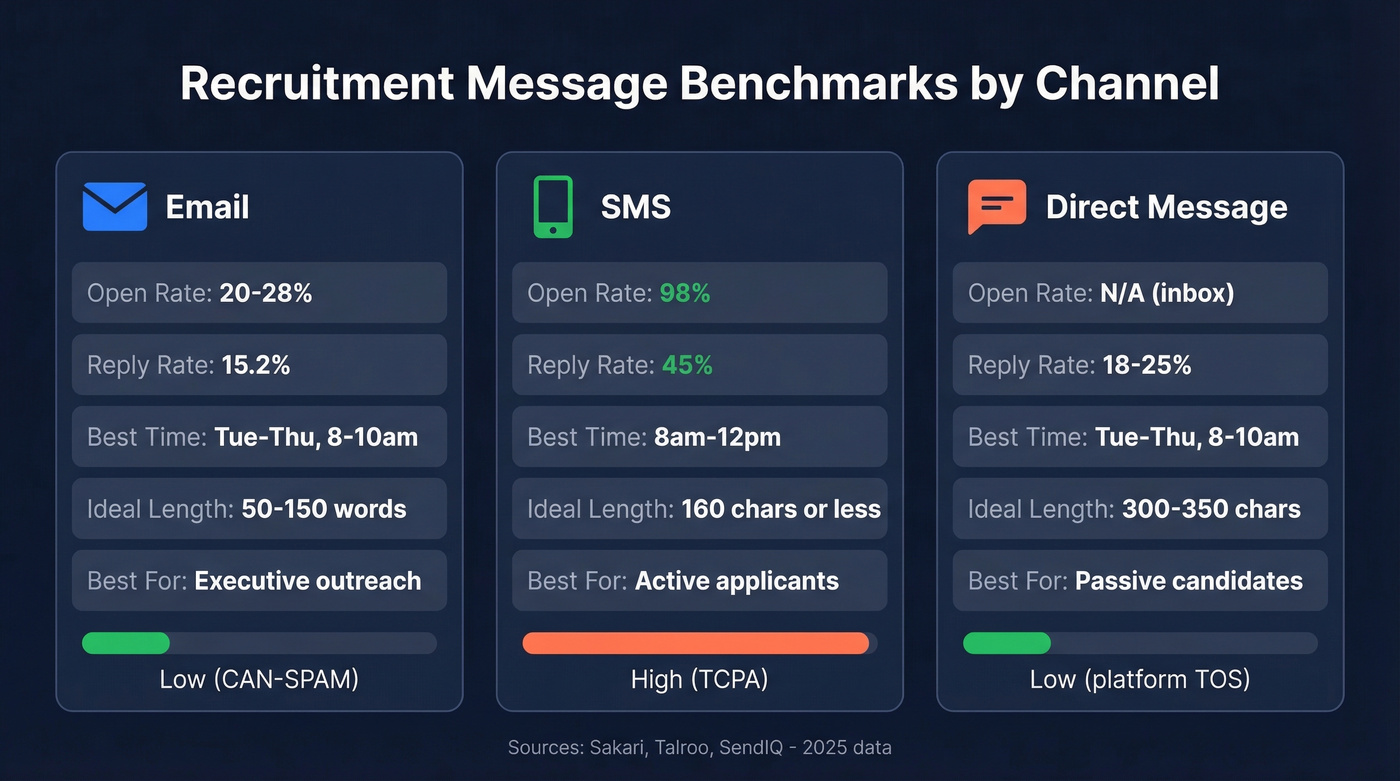
| Metric | SMS | Direct Message | |
|---|---|---|---|
| Open rate | 20-28% | 98% | N/A (inbox) |
| Reply rate | 15.2% avg | 45% | 18-25% |
| Best timing | Tue-Thu, 8-10am | 8am-12pm | Tue-Thu, 8-10am |
| Ideal length | 50-150 words | ≤160 chars | 300-350 chars |
| Compliance risk | Low (CAN-SPAM) | High (TCPA) | Low (platform TOS) |
| Best for | Executive outreach | Active applicants | Passive candidates |
SMS is underused in recruiting. A 98% open rate with 90% of recipients reading within 3 minutes - no other channel comes close. The compliance overhead scares recruiters away, but the math is hard to argue with.
Email remains the workhorse for detailed outreach, especially at the executive level. Direct messages win for passive candidates who aren't checking job boards. Cold email response rates sit between 1% and 8.5% for generic sends, but recruiting-specific campaigns average 15.2% when personalization is done right. That gap is entirely about effort.
If your average role pays under $80k, you probably don't need a multi-touch, multi-channel sequence. A single well-personalized direct message with salary included will outperform a five-step email cadence that dances around compensation.
Subject Lines That Get Opened
An analysis of 85 million cold emails found that 1-4 word subject lines in all lowercase consistently outperform everything else. No emojis, no urgency tricks, no "Quick question" formulas. Salesy techniques like ALL CAPS, exclamation marks, and "limited opportunity" language reduce open rates by up to 17.9%.
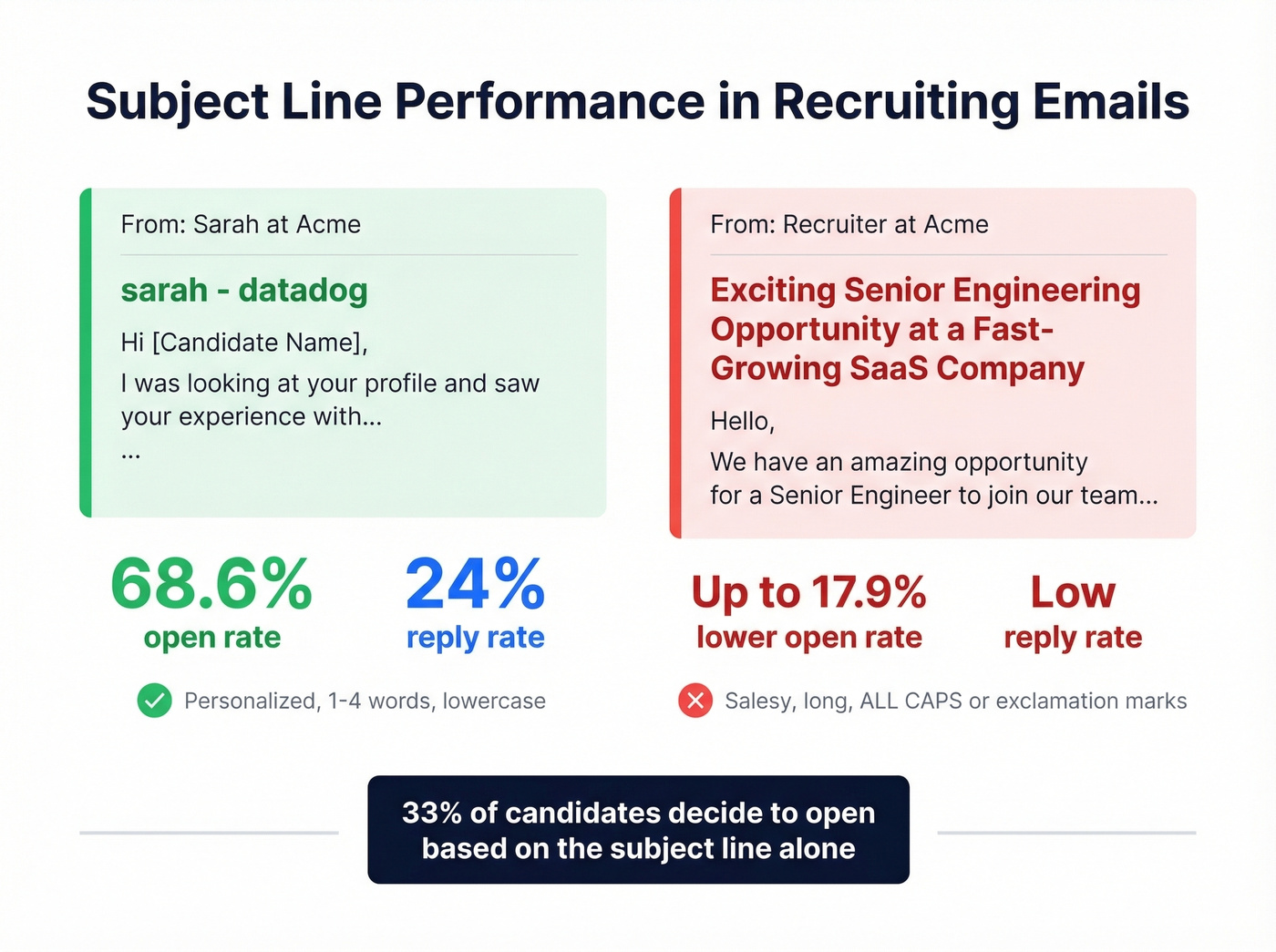
33% of recipients decide whether to open based on the subject line alone.
The strongest performer we've seen in recruiting benchmarks: subject lines that include the candidate's company name plus their first name hit a 68.6% open rate and 24% reply rate. That's not a marginal improvement - it's a different universe from generic "Exciting opportunity" subject lines. "sarah - datadog" outperforms "Exciting Senior Engineering Opportunity at a Fast-Growing SaaS Company" every single time. (For more patterns, browse email subject line examples.)
Email Templates for Recruiters
The sweet spot for recruiting emails is 50-150 words with 3-5 personalized variables. Every template below stays within that range. Bracketed variables are the minimum - add more context wherever you can. If you want a deeper framework, see email copywriting.
Cold Outreach Email
Subject: [first_name] - [their_company]
Hi [first_name],
Your work on [specific_project_or_achievement] at [their_company] caught my attention. We're building out the [department] team at [your_company], and the [role_title] role maps closely to what you've been doing.
The role pays [salary_range], reports to [hiring_manager_title], and the team is [team_size] people focused on [one_sentence_mission].
Worth a 15-minute call this week?
[your_name]
This works because it leads with something specific about the candidate, includes salary upfront, and ends with a low-commitment ask. In our experience, this type of outreach pulls a 20%+ reply rate when the personalization in line one is genuinely specific - not "your impressive background."
Referral Request Email
Subject: know anyone?
Hi [first_name],
I'm hiring a [role_title] at [your_company] - [salary_range], [location/remote]. You came to mind because of your network in [industry/function].
Anyone you'd recommend I reach out to? Happy to return the favor anytime.
Thanks, [your_name]
Interview Invitation Email
Subject: next step - [role_title]
Hi [first_name],
The team loved your background. We'd like to set up a [interview_type] with [interviewer_name], our [interviewer_title].
Available [date_option_1] or [date_option_2]? It'll be [duration] and we'll cover [topics]. Let me know what works.
[your_name]
Follow-Up Email
Subject: re: [role_title]
Hi [first_name],
Wanted to circle back on the [role_title] role at [your_company]. Still think it's a strong fit based on your [specific_skill_or_experience].
If the timing's off, no pressure - happy to reconnect down the road. But if you're open to a quick chat, I can make [date] work.
[your_name]
Offer Email
Subject: your offer - [role_title]
Hi [first_name],
We're excited to extend an offer for the [role_title] position. Attached is the full offer letter with compensation details, start date, and benefits summary.
I'm available [date/time] to walk through everything and answer questions. Looking forward to it.
[your_name]

A perfect recruitment message to a bounced email is a wasted rep. Prospeo delivers 98% email accuracy with 125M+ verified mobile numbers - so every personalized message you craft actually reaches the candidate.
Stop writing great messages to dead inboxes. Fix the data first.
Recruiting Text Message Templates
SMS delivers a 45% response rate versus email's 6%. Ninety percent of texts get read within three minutes. For scheduling, confirmations, and time-sensitive outreach, nothing else is close.
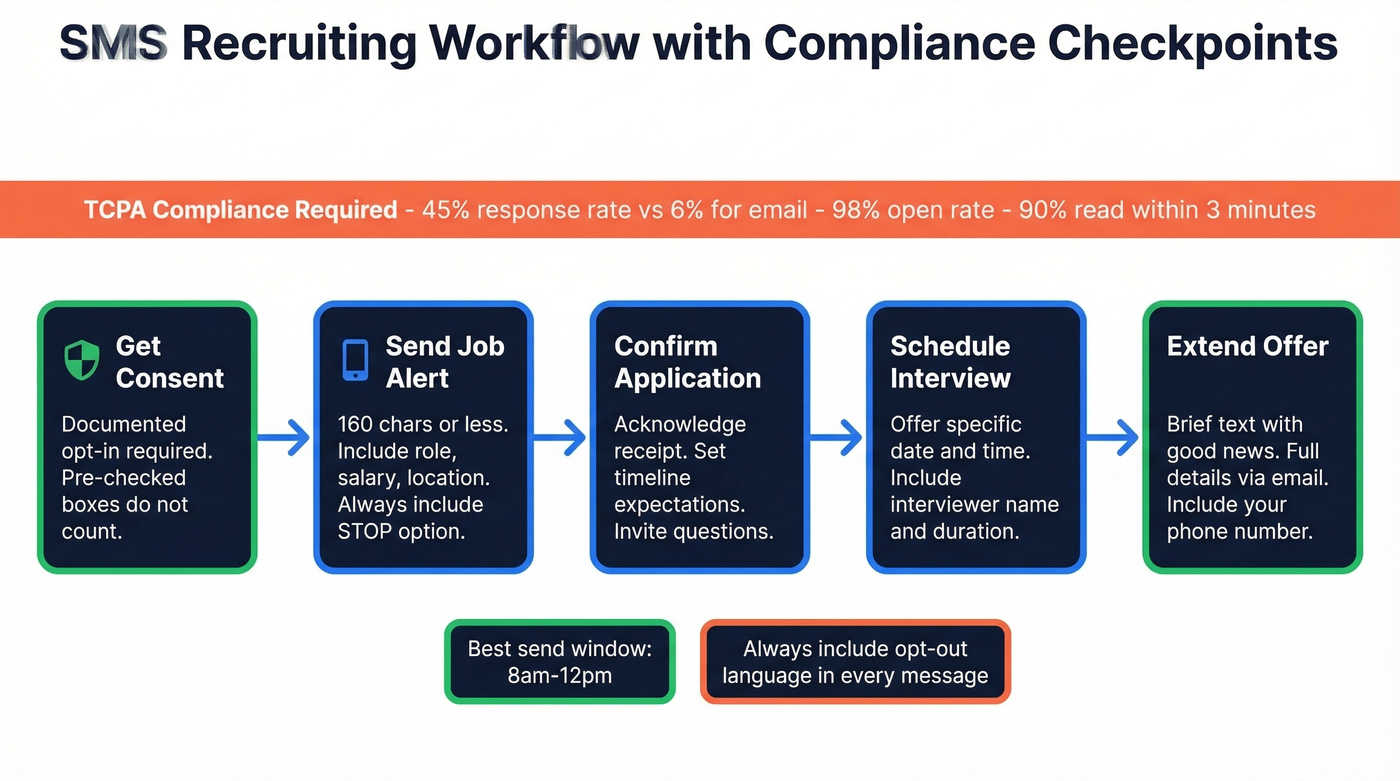
Keep every text under 160 characters where possible. Candidates read these on lock screens. Every SMS template below requires prior consent under TCPA rules. (If you're unsure where the line is, read cold texting.)
Job Alert Text
Hi [first_name], it's [your_name] from [your_company]. We have a [role_title] opening - [salary_range], [location]. Interested? Reply YES for details. Reply STOP to opt out.
Compliance note: This requires documented opt-in before sending. Pre-checked consent boxes don't count.
Application Confirmation Text
Hi [first_name], thanks for applying to [role_title] at [your_company]! We're reviewing your application and will follow up within [timeframe]. Questions? Reply here.
Interview Scheduling Text
Hi [first_name], we'd love to interview you for [role_title]. Are you free [date] at [time]? It'll be [duration] with [interviewer_name]. Reply to confirm or suggest another time.
Interview Reminder Text
Reminder: Your [interview_type] for [role_title] at [your_company] is tomorrow at [time]. [Location/link]. Reply if you need to reschedule. Good luck!
Offer Text
Great news, [first_name]! We're extending an offer for [role_title] at [your_company]. Full details coming to your email. Call me at [phone] with any questions.
Direct Message Templates
Direct messages average an 18-25% reply rate, and personalized messages generate 3x higher response rates than generic templates. Best send windows are Tuesday through Thursday, 8-10am or 2-4pm. Monday mornings and Friday afternoons see roughly 20% lower engagement.
Keep messages between 300-350 characters. Anything longer gets truncated in mobile previews. We've tested these across engineering, product, and GTM roles - the passive candidate template below consistently outperforms the others by 30-40%. For more tactics, see personalized outreach.
Passive Candidate Message
Hi [first_name] - saw your work on [specific_project] at [their_company]. We're hiring a [role_title] ([salary_range], [location/remote]) and your background in [skill] is exactly what we need. Open to a quick conversation?
Executive Outreach Message
[first_name], I've been following [their_company]'s [specific_initiative]. We're looking for a [role_title] to lead [team/function] at [your_company] - the role reports directly to our [C-level title]. Worth 15 minutes to explore?
Warm Introduction Message
Hi [first_name] - [mutual_connection] suggested I reach out. We're building the [department] team at [your_company] and the [role_title] role aligns well with your experience in [specific_area]. Would love to share more details if you're open to it.
Follow-Up Message
Hi [first_name] - following up on my note about the [role_title] role. Totally understand if the timing isn't right. If anything changes, I'd love to connect. Either way, impressive work on [recent_achievement].
TCPA Rules for Recruiting SMS in 2026
Texting candidates without proper compliance can cost you $500-$1,500 per violation. For a campaign of 1,000 texts, that's potentially $1.5 million in exposure.
One-to-one consent has been required since January 2025. You need explicit, documented permission before texting a candidate. For marketing texts, the checkbox must be unchecked by default.
Expanded opt-out rules took effect April 2025. Candidates can revoke consent in any reasonable manner, not just "STOP." Valid opt-out keywords now include STOP, QUIT, END, REVOKE, CANCEL, OPT-OUT, and UNSUBSCRIBE. They can also opt out via email or voicemail.
Honor opt-outs within 10 days. You're allowed exactly one post-revocation message to clarify the scope. That's it.
No texts before 8am or after 9pm in the recipient's local time zone. Some states like Florida, Oklahoma, and Washington are stricter.
Log everything. Consent records, opt-out timestamps, message logs. If you can't prove consent existed, it didn't.
Look, TCPA compliance isn't optional or something you can figure out later. Build it into your texting workflow from day one. We've seen recruiters treat compliance as a "phase two" project and end up with five-figure legal bills before they ever got to phase two.
Mistakes That Kill Your Response Rate
Generic templates with zero personalization. If the candidate can't tell you read their profile, they won't read your message. "I came across your profile and thought you'd be a great fit" is the recruiter equivalent of spam. Skip this if you're not willing to spend 60 seconds researching each person - batch-and-blast recruiting messages aren't worth sending in 2026.
Missing salary range. If you're not including compensation, you're wasting everyone's time. The consensus across r/recruiting and r/recruitinghell is unanimous on this one: candidates will ghost you for it, and they're right to.
Noreply email addresses. Sending from noreply@ tells the candidate you don't actually want a conversation. Use a real email with a direct reply path.
AI workslop. Polished but hollow. Candidates spot it, and they're ignoring it at alarming rates. Use AI to draft, then rewrite in your own voice with specific details only a human would know - the candidate's recent project, their team's growth, a conference talk they gave.
Sending to outdated contact data. Bounced emails damage your domain reputation. Disconnected phone numbers waste your time. This is the silent killer of recruiting outreach - you can't diagnose a copy problem when the real issue is deliverability. Verify every address before you send. Prospeo runs real-time email verification at 98% accuracy with a 7-day data refresh cycle, so your messages actually land where they're supposed to. (If you want the mechanics, start with email deliverability and email bounce rate.)

Verify Before You Hit Send
Let's be honest: every template above is useless if it bounces. This is the prerequisite nobody talks about in recruiting guides - your contact data has to be accurate before your copy matters.
We ran a test last quarter where we split a 500-candidate outreach list into two groups: one verified, one sent as-is from a CRM export that was three months old. The verified list had a 2.1% bounce rate and a 19% reply rate. The unverified list bounced at 14% and pulled a 7% reply rate - and the sender's domain reputation took a hit that affected deliverability for weeks afterward. (If you're troubleshooting that, see how to improve sender reputation.)
Upload a CSV of candidates, verify the entire list in minutes, and export clean data for your outreach workflow. The free tier gives you 75 email lookups per month, enough to test the workflow before committing.
Recruiters using bad data see 35%+ bounce rates - tanking sender reputation and killing future campaigns. Prospeo's 7-day data refresh and 5-step verification keep bounce rates under 4%, so your outreach lands every time.
Get candidate emails and direct dials at $0.01 per contact. No contracts.
FAQ
How long should a recruitment message be?
Email: 50-150 words. SMS: under 160 characters. Direct messages: 300-350 characters. Shorter messages consistently outperform longer ones across every channel - recruiters who cut word count by 30% typically see reply rates climb 10-15%.
What's the best channel for recruiting outreach?
Direct messages for passive candidates (18-25% reply rate). SMS for active applicants and scheduling (45% response rate). Email for executive roles and detailed compensation discussions. Use all three in sequence for maximum coverage.
Do I need consent to text candidates?
Yes. TCPA requires one-to-one consent before sending any recruiting text. Penalties run $500-$1,500 per violation. You must honor opt-outs within 10 days and log all consent records.
Should I use AI to write recruiting messages?
Use AI for first drafts, then rewrite with specific human details. AI-generated outreach pulls roughly one-third the response rate of human-written messages. Add the candidate's recent project or a concrete achievement to stand out.
How do I find verified candidate contact data?
Use a verification tool before every send. Prospeo covers 143M+ verified emails and 125M+ verified mobiles at 98% accuracy, with a free tier of 75 lookups per month - enough to validate a shortlist before launching any campaign.