

RevOps Best Practices: A Practitioner's Guide for 2026
One RevOps person. Sixty sellers. Forecast week hits, and suddenly you're chasing reps for stage updates, sanity-checking three dashboards that show three different pipeline numbers, and fielding Slack messages from a CFO who doesn't understand why the board deck changed overnight. That's not a strategy problem - it's an execution problem. The revops best practices that actually move the needle in 2026 aren't about frameworks or org charts. They're about fixing the plumbing.
And 55% of mid-market companies regularly miss quarterly forecasts by more than 10%.
We've watched this exact scenario play out at companies from 30 reps to 300. The pattern is always the same: dirty data, misaligned teams, and too many tools doing overlapping jobs. These are the revenue operations challenges that keep practitioners up at night - and they're entirely fixable.
The Short Version
If you only do three things: fix your data foundation before layering on any tooling or AI, automate CRM hygiene and lead routing before forecast week kills you, and pick stage-appropriate metrics instead of tracking everything at once.
Why Revenue Operations Matters
The business case isn't theoretical anymore. BCG found that companies with strong revenue operations capabilities see a 10-20% jump in sales growth. Companies that align revenue teams grow 19% faster. Gartner expects 75% of high-growth B2B companies to have a formal RevOps function by 2026, up from under 30%.
The cost of misalignment is concrete: 3-5% of revenue leaks out through coordination gaps - finance not involved early enough in pricing, marketing and sales disagreeing on what counts as a qualified lead, CS not flagged on expansion timing. 73% of B2B revenue originates from existing customers, but only 23% of businesses effectively enable their teams for expansion conversations. That gap is enormous.
Here's the thing: average CRO tenure has fallen to 17 months. That's barely enough time to diagnose the problem, let alone fix it. RevOps exists to create continuity that outlasts any single leader's tenure.
If your average deal size is under $15K and your team is under 20 reps, you probably don't need a dedicated RevOps hire yet. You need one ops-minded person with CRM admin access and the authority to say no to bad data. The title doesn't matter. The mandate does.
10 RevOps Best Practices for B2B Teams
These practices are ordered roughly from foundation to optimization. Pre-$5M ARR? Focus on practices 1-6. Scaling past $20M? Practices 7-10 become critical.
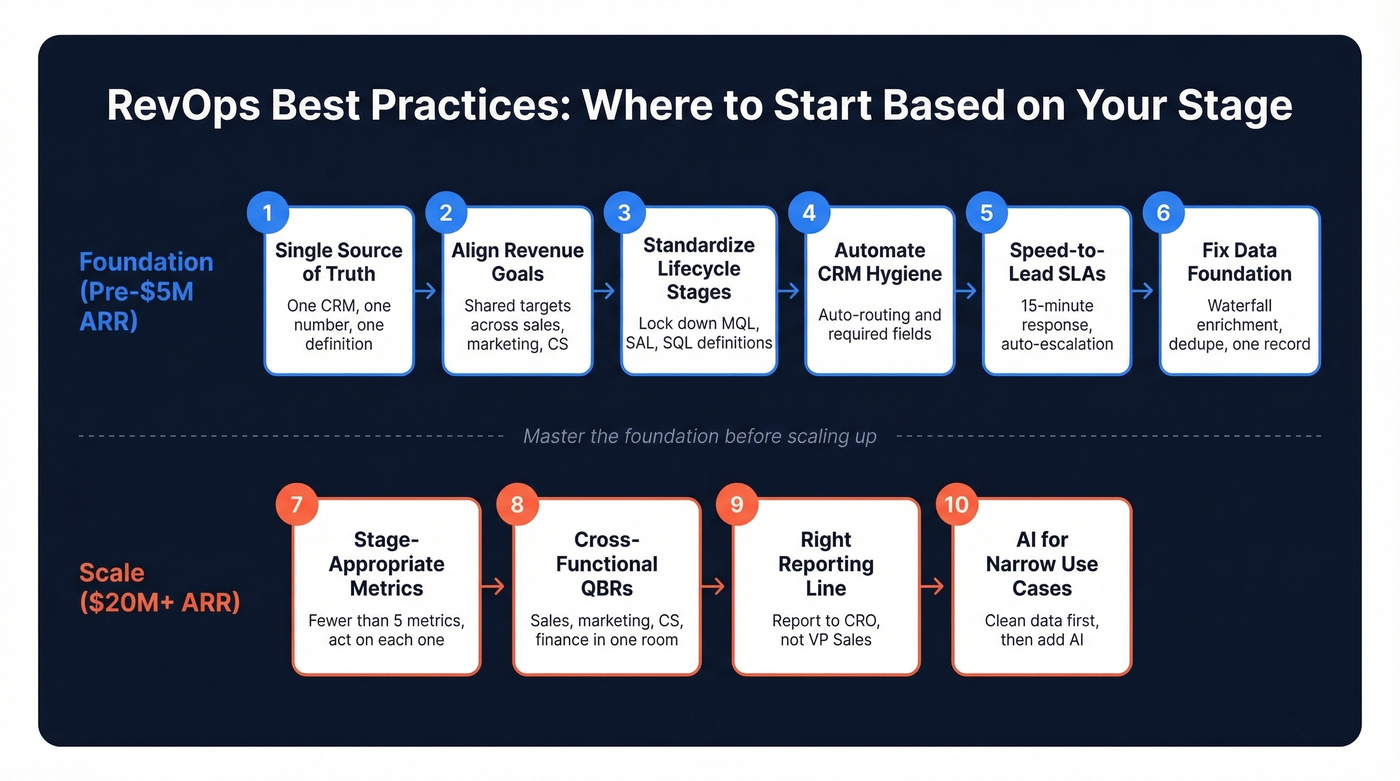
1. Build a Single Source of Truth
Use this if: Your Marketo fields don't match your Salesforce fields, and three dashboards show three different pipeline numbers.
Skip this if: You're a five-person startup with one CRM and one person entering data.
The anti-pattern is painfully common: marketing reports from the MAP, sales reports from the CRM, finance reports from the ERP, and nobody agrees on what "pipeline" means. Fix this by designating one system of record - usually the CRM - enforcing field-level consistency across tools, and killing duplicate dashboards. One number. One definition. One truth.
2. Align on Revenue Goals
Marketing optimizing for MQLs while sales optimizes for closed-won and CS optimizes for NPS creates three teams pulling in different directions. The fix is a shared revenue target that cascades into department-level metrics, but the revenue number comes first.
This matters most for expansion. Most B2B revenue comes from existing customers, yet most organizations still treat upsell as an afterthought. RevOps should own the handoff framework between sales and CS so expansion conversations happen at the right moment, not when a rep remembers.
3. Standardize Lifecycle Stages
Without shared definitions, "MQL" means something different in every meeting. Lock these down:
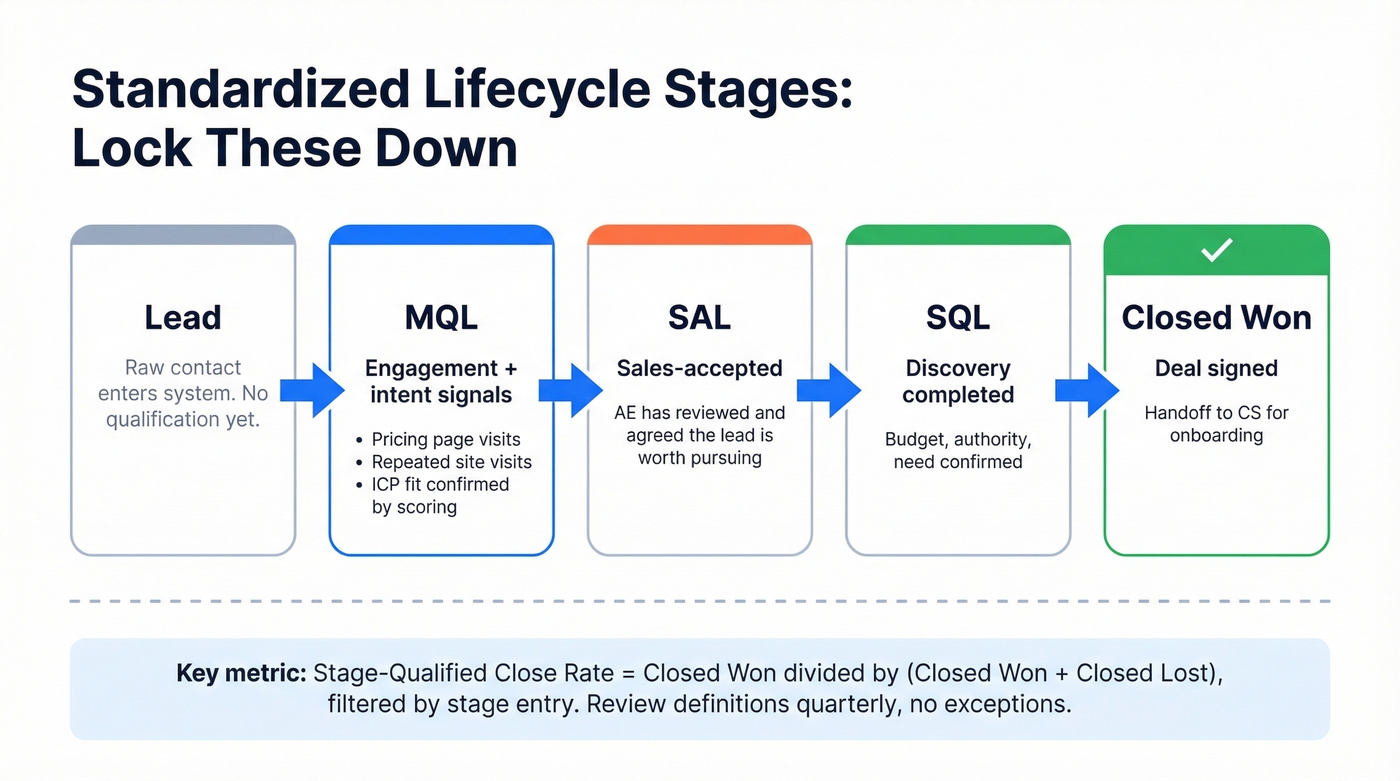
- MQL: Engagement + intent behaviors like pricing page visits, repeated site visits, and webinar attendance, plus ICP fit criteria - typically threshold-based scoring (see lead scoring)
- SAL: Sales-accepted - an AE has reviewed and agreed the lead is worth pursuing
- SQL: Discovery completed, budget/authority/need confirmed
Document these in a shared wiki. Review quarterly. No exceptions. Measure stage-qualified close rate - Closed Won / (Closed Won + Closed Lost) in a period, filtered by stage entry - to validate that your definitions actually predict outcomes.
4. Automate CRM Hygiene First
Use this if: Your reps spend 30% of their time on data entry and leads sit unrouted for days.
Skip this if: You have fewer than 10 reps and can manually assign leads in under an hour.
Manual CRM cleanup becomes unsustainable at around 50-70 sellers, especially around forecast cycles and executive reporting. One case study showed lead routing time dropping from 2-3 days to 15 minutes after automation, and sales time on data entry falling from 30% to 10%. That's not a marginal improvement - it changes how the team operates.
Start with two automations: auto-routing inbound leads based on territory/segment rules, and required fields that prevent reps from advancing deals without updating key data. Every hour saved on hygiene is an hour redirected toward selling. That compounds fast. (If you need a broader system, start with a lead generation workflow.)
5. Enforce Speed-to-Lead SLAs
High-intent leads - demo requests, pricing page conversions, hand-raisers - need a 15-minute response SLA. Not a guideline. An SLA with reporting and accountability.
Build the alert into Slack or your sequencer. If a lead sits uncontacted for 15 minutes, it escalates. If it sits for an hour, it reassigns. No manual intervention required. Automation can drive 2-3x faster lead response times, and we've seen teams go from "leads rotting in a queue for days" to sub-10-minute response just by wiring up a routing rule and an escalation trigger.
6. Fix Your Data Foundation
The average enterprise RevOps team manages 12-18 tools, most of which overlap. The modern approach is waterfall enrichment: query multiple providers in sequence, dedupe, and write one authoritative record (see lead enrichment).

Prospeo works well as the enrichment anchor in this workflow - 98% email accuracy on 143M+ verified emails, with a 7-day refresh cycle versus the 6-week industry average. It plugs directly into Salesforce, HubSpot, Clay, and Zapier. When Snyk's 50-person AE team adopted it, their bounce rate dropped from 35-40% to under 5%, and they generated 200+ new opportunities per month.
7. Track Stage-Appropriate Metrics
We've found that teams tracking fewer than five metrics actually make better decisions than teams tracking forty. The table in the "What to Measure" section below breaks this down by revenue stage, but the principle is simple: build the accuracy habit before you build the dashboard empire.
Early-stage RevOps runs on vibes. Your job is to replace vibes with reliable numbers, one metric at a time. Resist the urge to measure everything and instead measure what you can actually act on. (If you want a deeper list, use funnel metrics as a reference.)
8. Run Cross-Functional QBRs
Without a single owner of data integrity, data rots. Automations break. Reports drift.
The fix is a quarterly business review that includes sales, marketing, CS, and finance - not just pipeline reviews, but SLA compliance reviews. Are leads being routed within SLA? Are MQL definitions still accurate? Are automations firing correctly? This is the unglamorous work that prevents the "three dashboards, three numbers" problem from recurring. Use a consistent agenda and QBR questions to ask so the meeting stays operational.
9. Get the Reporting Line Right
Real talk: if RevOps reports to the VP of Sales, you have Sales Ops with a new title. RevOps loses its cross-functional authority the moment it sits under one department.
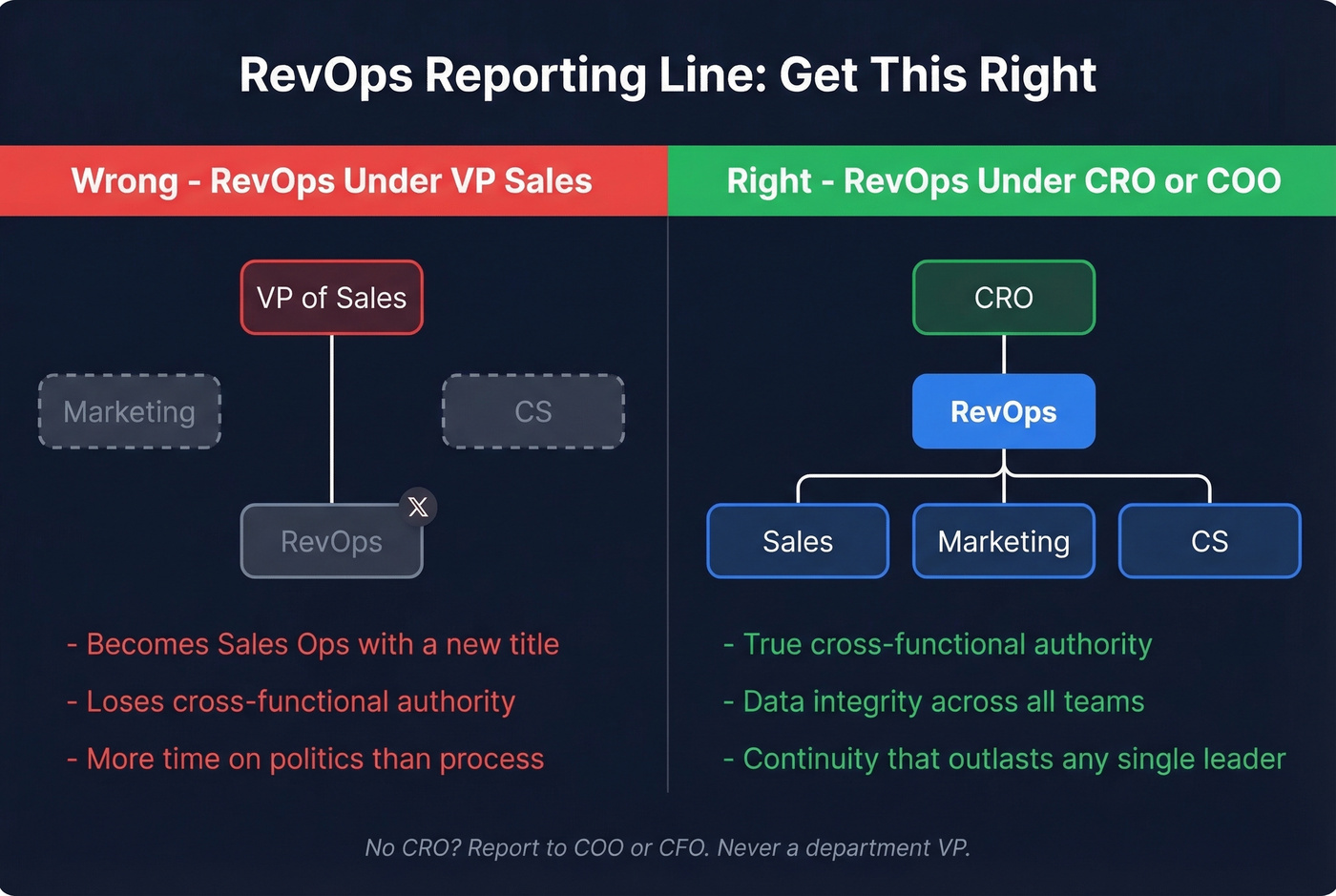
The right reporting line is the CRO. If you don't have a CRO, the COO or CFO. Never the VP of Sales or CMO. RevOps practitioners on r/salesoperations consistently argue this point - and the ones who report to a VP of Sales describe spending more time navigating politics than fixing processes.
10. Use AI for Narrow, High-ROI Cases
96% of revenue leaders expect their teams to use AI tools by end of 2026. The question isn't whether to adopt - it's where to start.
Teams using AI for CRM hygiene and routing report 30-50% less manual data entry and 20-40% better forecast accuracy - but only when the underlying data is clean. Keep customer experience steps, ownership rules, and SLAs rule-based and deterministic. Introduce AI only where genuine uncertainty exists: interpreting engagement signals, prioritizing accounts, normalizing messy job titles. As Matt Volm from RevOps Co-op puts it, "Don't start using AI because everyone's using AI... start with a problem." (For more, see generative AI sales tools.)

Practice #6 says fix your data foundation. Here's how: Prospeo delivers 98% email accuracy across 143M+ verified emails, refreshed every 7 days - not the 6-week industry average. Snyk's 50 AEs dropped bounce rates from 35% to under 5% and added 200+ opportunities per month.
Stop letting stale data sabotage your RevOps stack.
What to Measure (By Stage)
Not every metric matters at every stage. Here's a framework adapted from AccountAim's stage-based approach:
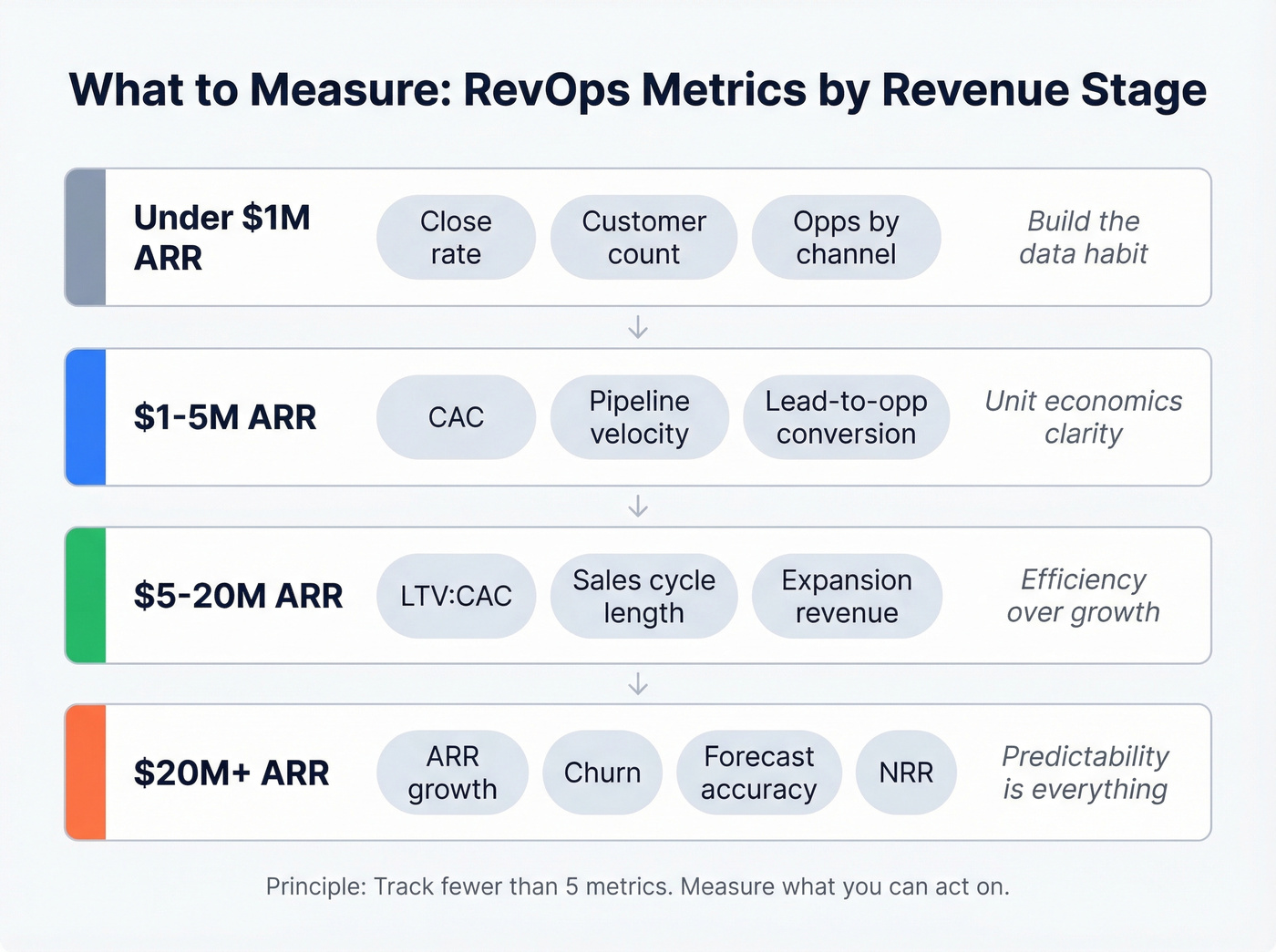
| Stage | Priority Metrics | Why |
|---|---|---|
| <$1M ARR | Close rate, customer count, opps by channel | Build the data habit |
| $1-5M | CAC, pipeline velocity, lead-to-opp conversion | Unit economics clarity |
| $5-20M | LTV:CAC, sales cycle length, expansion revenue | Efficiency over growth |
| $20M+ | ARR growth, churn, forecast accuracy, NRR | Predictability is everything |
Close rate should be calculated as Closed Won / (Closed Won + Closed Lost) in a period, filtered by stage-qualified opportunities. Customer count is surprisingly messy - freemium users, trials, usage-based accounts, and PLG motions all muddy the definition. Define it once and stick with it.
What Good Looks Like
Let's ground this in real numbers. A B2B tech company with 25 reps processing 500+ leads per month implemented RevOps automation over four weeks:
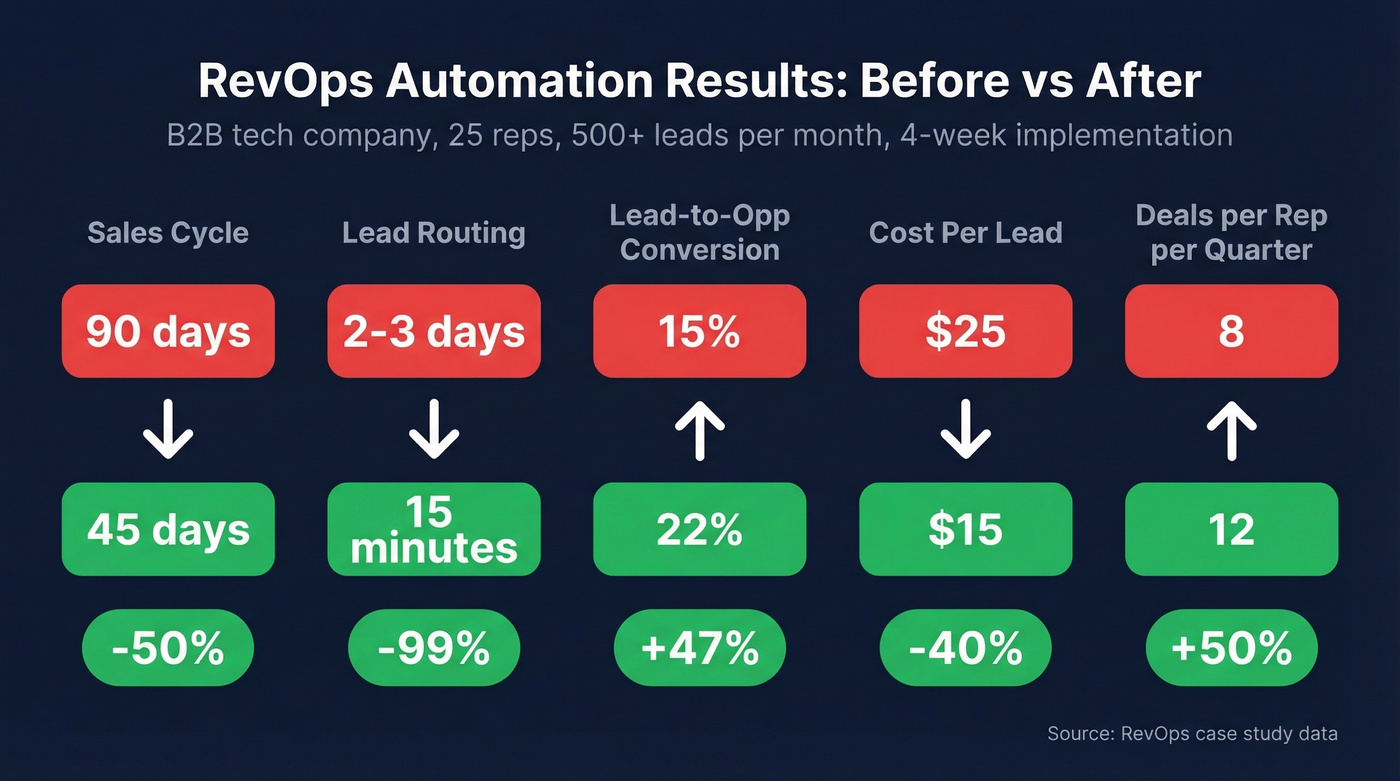
| Metric | Before | After | Change |
|---|---|---|---|
| Sales cycle | 90 days | 45 days | -50% |
| Lead routing | 2-3 days | 15 minutes | -99% |
| Lead-to-opp conversion | 15% | 22% | +47% |
| Cost per lead | $25 | $15 | -40% |
| Deals/rep/quarter | 8 | 12 | +50% |
Separately, 6 River Systems implemented a CPQ system that eliminated $500K+ in annual costs from faulty quotes, while a new sales org structure drove a 20% increase in target account penetration. These aren't moonshot results - they're what happens when you fix the plumbing.
The RevOps Tech Stack
You don't need 18 tools. You need five categories covered well, with clean integrations between them.
| Category | Tool | Starting Price | Best For |
|---|---|---|---|
| CRM | Salesforce | ~$25-$165+/user/mo | Complex orgs, enterprise |
| CRM | HubSpot | Free; paid from $15/user/mo | SMB, PLG motions |
| Sales Engagement | Outreach / Salesloft | ~$100-$200/user/mo | High-volume outbound |
| Data/Enrichment | Prospeo | Free tier; ~$0.01/email | Accuracy-first enrichment |
| Data/Enrichment | Apollo | Free; paid from $59/user/mo | All-in-one on a budget |
| Data/Enrichment | ZoomInfo | $15-40K/year | Enterprise intent + workflow |
| Forecasting | Clari | ~$50-$150/user/mo | Pipeline visibility (compare sales forecasting solutions) |
| Forecasting | Gong | ~$100-$200/user/mo | Conversation intelligence |
| Orchestration | Zapier | Free; paid from $19.99/mo | Lightweight automation |
| Orchestration | LeanData | ~$2,000-8,000/mo | Complex routing at scale |
The pricing contrast in the data/enrichment row tells its own story. ZoomInfo at $15-40K/year makes sense for 500-person sales orgs running intent, chat, and workflow from one platform. For teams with smaller deal sizes or leaner budgets, a free tier with 75 verified emails and 100 Chrome extension credits per month is enough to validate the enrichment workflow before committing budget.
CRM hygiene automation means nothing if you're enriching records with bad data. Prospeo's enrichment API returns 50+ data points per contact at a 92% match rate, plugging directly into Salesforce, HubSpot, Clay, and Zapier. At $0.01 per email, it's 90% cheaper than ZoomInfo.
Build your single source of truth on data that's actually accurate.
FAQ
What's the difference between RevOps and Sales Ops?
Sales Ops focuses on sales team efficiency - territories, comp plans, CRM administration, pipeline reporting. RevOps sits above Sales, Marketing, and CS Ops to align all three around shared revenue goals, unified data, and consistent processes. Think of Sales Ops as one department's plumbing; RevOps is the whole building's infrastructure.
Who should RevOps report to?
The CRO - or the COO/CFO if you don't have one. Never the VP of Sales or CMO, because RevOps loses cross-functional authority the moment it sits under one department. Executive sponsorship is non-negotiable for enforcing SLAs, resolving cross-team conflicts, and securing budget.
What are the biggest challenges RevOps teams face?
Dirty data, misaligned lifecycle definitions, and tool sprawl top the list. Organizationally, reporting into a single department undermines the cross-functional mandate entirely. Fixing data quality first - using enrichment workflows alongside CRM automation - prevents these issues from compounding as you scale.
What should a new RevOps hire do first?
Audit your data foundation. Clean CRM records, set up enrichment workflows, and standardize lifecycle stage definitions across sales, marketing, and CS. Fix the foundation before building dashboards or automations on top of it. Everything downstream depends on data you can trust.