

How to Actually Manage Your RevOps Tech Stack (Not Just Build One)
73% of companies now have a C-suite role dedicated to RevOps. Yet 89% say RevOps lacks clearly defined strategic goals. That gap between executive attention and operational clarity is exactly where tech stack debt piles up. There are over 14,000 martech products on the market. Nobody's problem is finding tools. The real problem is governing, auditing, and optimizing the tools you already own.
47% of RevOps professionals rate their stack ROI as average or worse. That's not a tooling problem. It's a management problem.
What You Need (Quick Version)
- Run a formal stack audit using the 5-step framework below - it's the single highest-leverage thing you can do this quarter.
- Start consolidation with your enrichment layer - it's your most bloated category, and the ROI math is straightforward. (If you need a shortlist, see data enrichment services.)
- Don't add AI until your data is clean. Then go deep on one or two workflows, not wide on seven.
The Cost of Stack Sprawl
The average enterprise RevOps team manages 12-18 tools. That sounds manageable until you realize 25% of those licenses go completely unused. You're paying for shelfware while reps lose up to 40% of their productive time context-switching between CRM, forecasting, conversation intelligence, engagement platforms, and spreadsheets that somehow still hold the whole thing together.
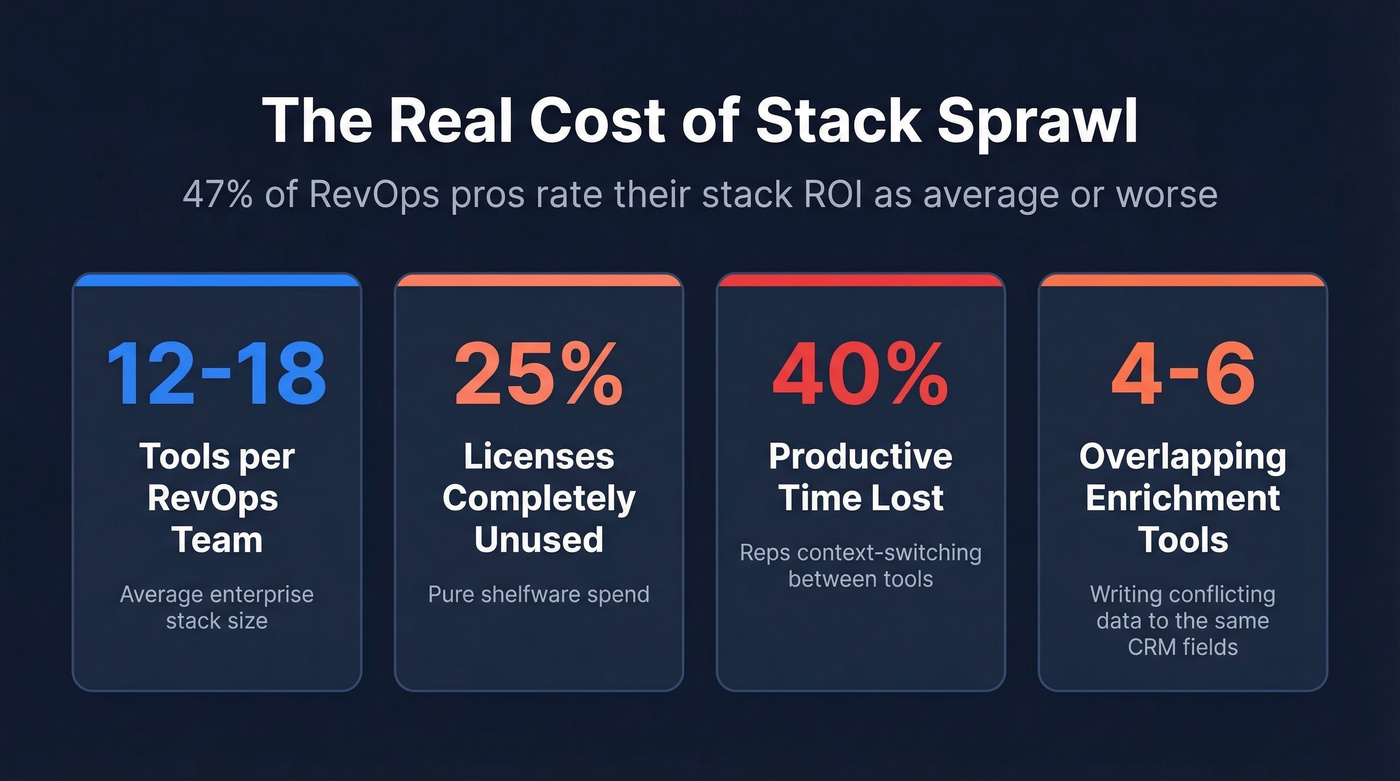
The data layer is where it gets truly wasteful. Most teams carry four to six overlapping enrichment subscriptions. 75% of RevOps teams cite data inconsistencies as their top frustration, and this is exactly why - six tools writing conflicting data to the same CRM fields isn't enrichment, it's chaos. Without connected revenue operations where every system feeds a single source of truth, you're just multiplying the mess.
The 5-Layer Revenue Stack Architecture
Before you audit individual tools, you need a mental model for how they fit together. The CX Today framework breaks the revenue stack into five layers:
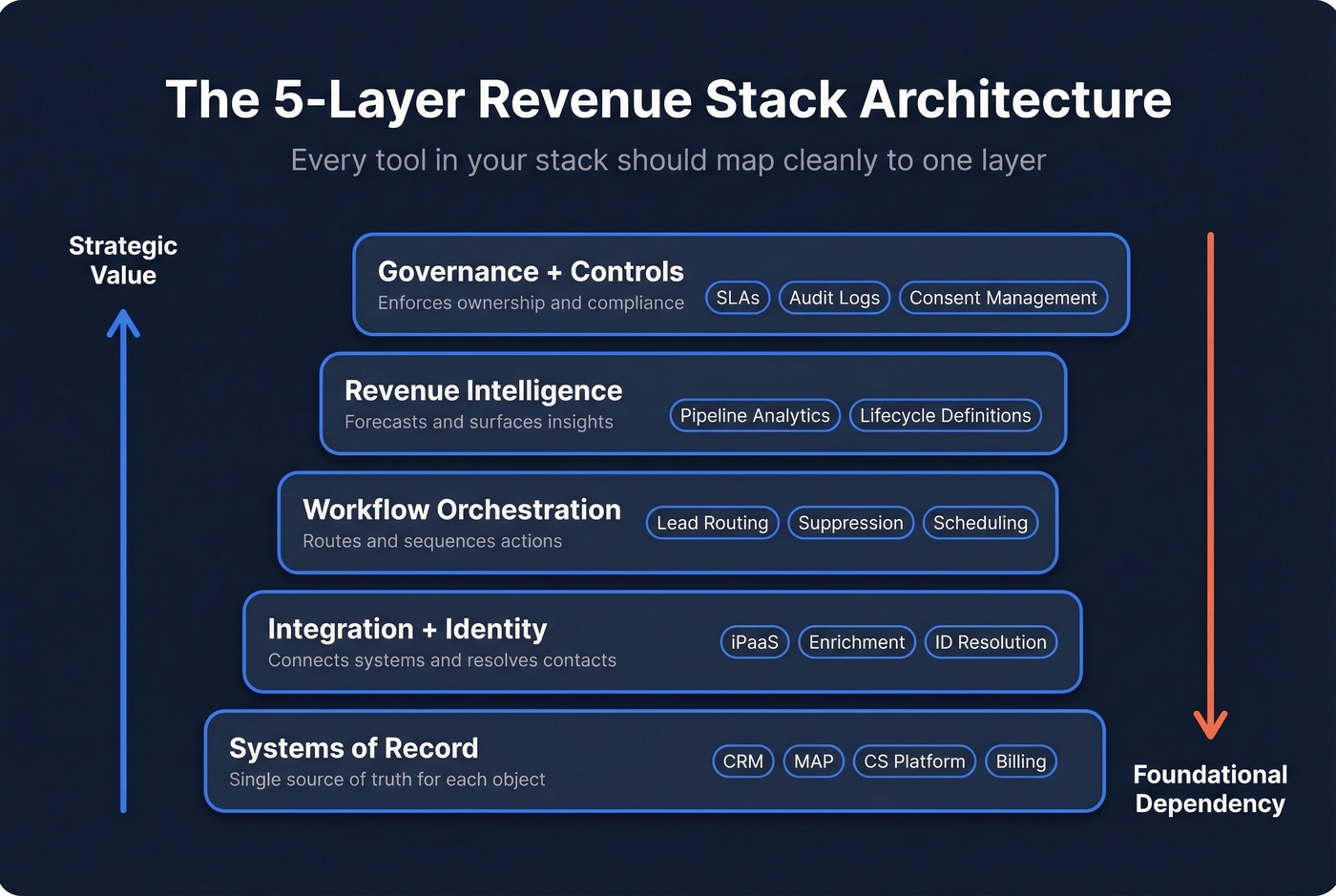
| Layer | Purpose | Examples |
|---|---|---|
| Systems of Record | Single source of truth for each object | CRM, MAP, CS platform, billing |
| Integration + Identity | Connects systems and resolves contacts | iPaaS, enrichment, ID resolution |
| Workflow Orchestration | Routes and sequences actions | Lead routing, suppression, scheduling |
| Revenue Intelligence | Forecasts and surfaces insights | Pipeline analytics, lifecycle definitions |
| Governance + Controls | Enforces ownership and compliance | SLAs, audit logs, consent management |
Every tool in your stack should map cleanly to one layer. If a tool spans three layers, it's either a platform or a source of scope creep - and in our experience, it's usually the latter. OpenPhone used this kind of unified approach to achieve a 67% speed-to-lead improvement, and Bland recovered 80% of previously lost pipeline by tightening their qualification-to-enrichment workflow.
Here's the thing: if your MAP can't pass campaign member data to your CRM, it's a non-starter regardless of price. This is non-negotiable for clean attribution and reporting. RevOps practitioners specifically warn against Zoho Campaigns (no campaign member level for tracking/reporting) and Pardot (poor innovation and a fragile Salesforce integration). Skip those unless you enjoy debugging attribution models at 11 PM.
How to Audit Your RevOps Tools
This is the section that matters most. We've adapted RevBlack's 5-step framework because it produces an execution-ready deliverable, not just a spreadsheet of tool names.
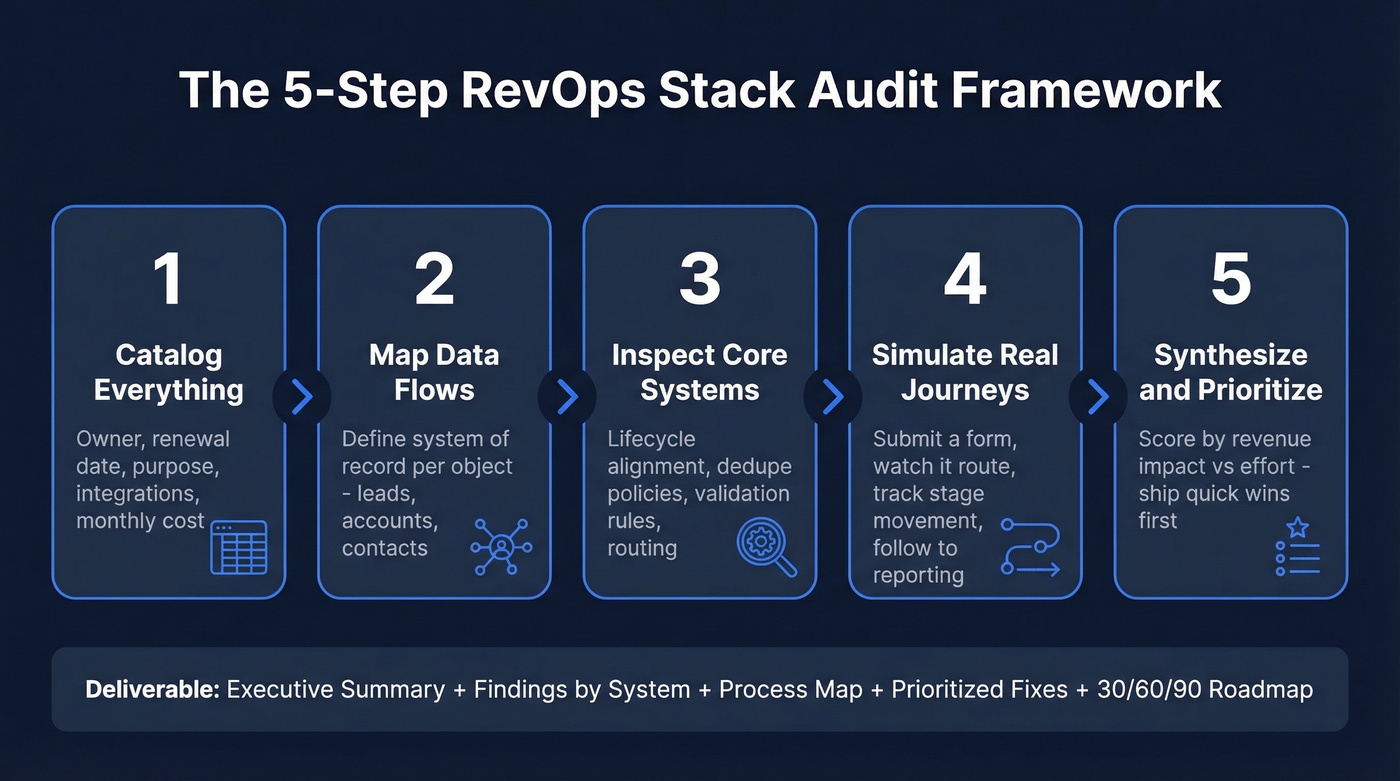
1. Catalog everything. Every tool gets a row: owner, contract renewal date, stated purpose, integrations, and monthly cost. Screenshot critical settings. You'll be surprised how many tools have no clear owner - we've seen teams discover three separate Clearbit contracts billed to three different departments.
2. Map data flows and define the system of record per object. Where does the lead record live? Where does the account record live? If you can't answer in under 10 seconds, you've found your first problem.
3. Inspect core systems. In HubSpot, check lifecycle alignment, required fields, dedupe policies, and workflow routing. In Salesforce, audit lead-to-contact conversion paths, validation rules, picklist governance, and duplicate survivorship logic. These settings silently break your data when misconfigured, and they're almost always misconfigured after a year of multiple admins making changes. (If you’re rethinking your CRM setup, compare examples of a CRM.)
4. Simulate real journeys. Submit a form. Watch it route. Track the stage movement. Follow it through to reporting. We've run these simulations and found routing rules that hadn't been updated in 18 months - sending enterprise leads to an SDR who'd left the company. That kind of thing doesn't show up in dashboards. You have to walk the path yourself.
5. Synthesize into quick wins, foundations, and scale items. Score every recommendation by revenue impact and implementation effort. Ship the high-impact, low-effort fixes first - they earn you credibility and budget for the bigger structural work. (For a rep-ready rollout format, borrow a 30-60-90 day plan.)
Your deliverable should include an executive summary, findings by system, a process and data map, prioritized fixes, and a sequenced 30/60/90 roadmap.

Running 4-6 overlapping enrichment tools is the #1 source of stack bloat. Prospeo replaces them with 143M+ verified emails at 98% accuracy, a 92% API match rate, and native Salesforce + HubSpot integrations - no extra iPaaS layer required. At $0.01/email with a 7-day data refresh, the consolidation math writes itself.
Cut your enrichment stack to one tool that actually works.
Where to Consolidate First
Start with enrichment. ZoomInfo and Apollo have roughly 70% coverage overlap on US business contacts. If you're paying for both, you're buying the same data twice. (To benchmark providers, use a B2B company data comparison.)
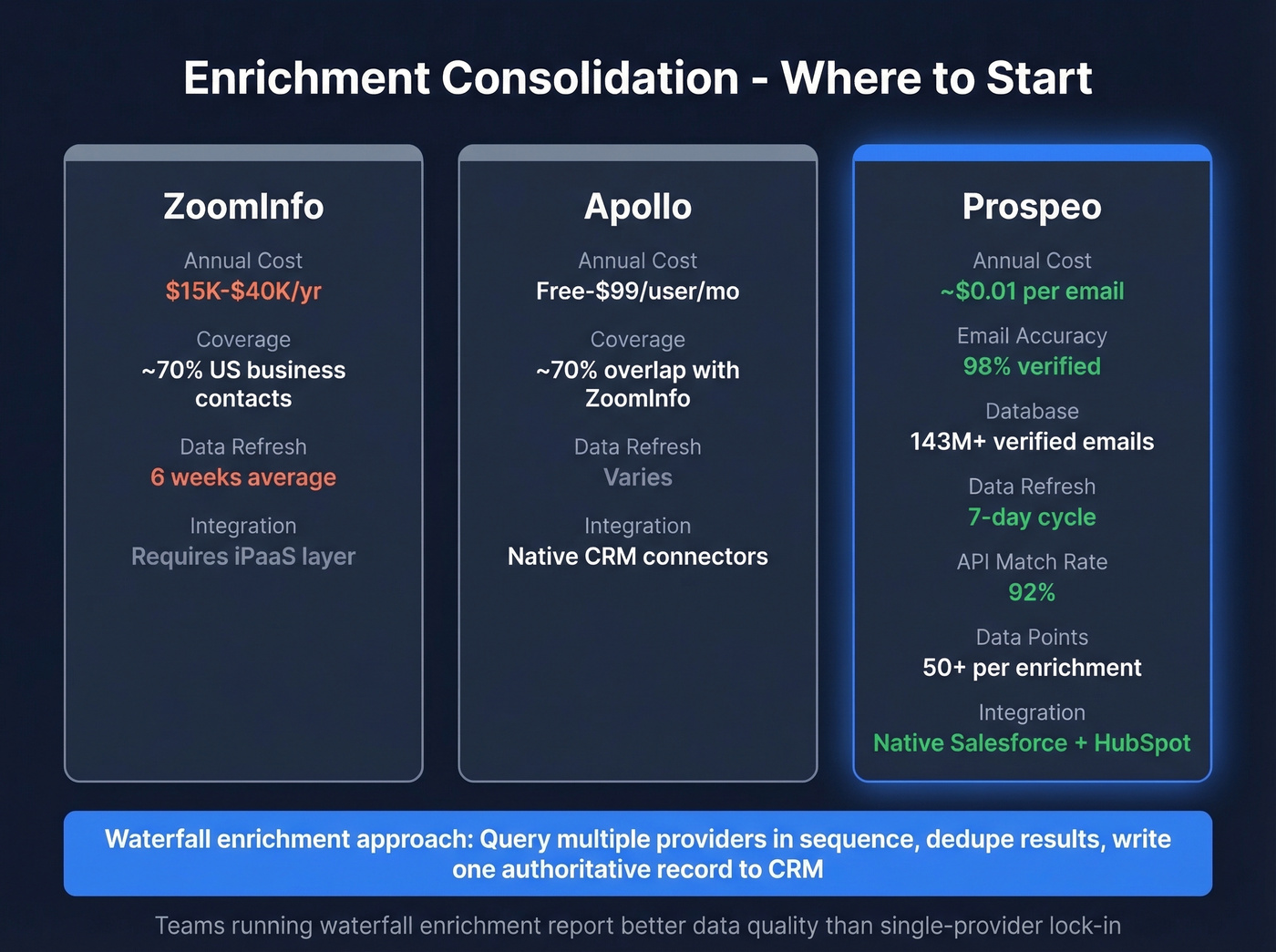
The smarter approach is waterfall enrichment: query multiple providers in sequence, dedupe the results, and write one authoritative record to your CRM. This eliminates conflicting overwrites and gives you a single clean data layer. The consensus on r/sales and r/salesoperations is pretty clear - teams running waterfall enrichment report better data quality than those locked into a single expensive provider. (Related: lead enrichment.)
Prospeo fits this workflow well. It delivers 98% email accuracy on 143M+ verified emails with a 7-day refresh cycle versus the 6-week industry average, and returns 50+ data points per enrichment at a 92% API match rate. Native integrations with Salesforce and HubSpot mean you're not bolting on another iPaaS layer. At roughly $0.01 per email, teams are replacing $15K-40K/year ZoomInfo contracts with better accuracy and self-serve access from day one. (If bounces are part of your pain, track email bounce rate benchmarks.)
The bigger issue is organizational. 60% of orgs don't give RevOps budget control. If you're accountable for stack performance but can't cancel a redundant contract, use your audit data to make the case to the CFO. Hard numbers win budget conversations - vague "we need better tools" pitches don't.
AI in RevOps - What Works in 2026
Only 4% of RevOps teams use AI extensively. And yet 97% of leaders report measurable AI ROI. The disconnect is that the teams seeing the biggest returns go deep on one or two workflows, not wide on seven. A survey of 300+ RevOps leaders confirmed that focused teams report stronger time savings than those spreading AI thin. (For follow-up automation specifically, see best AI for automating sales follow-ups.)
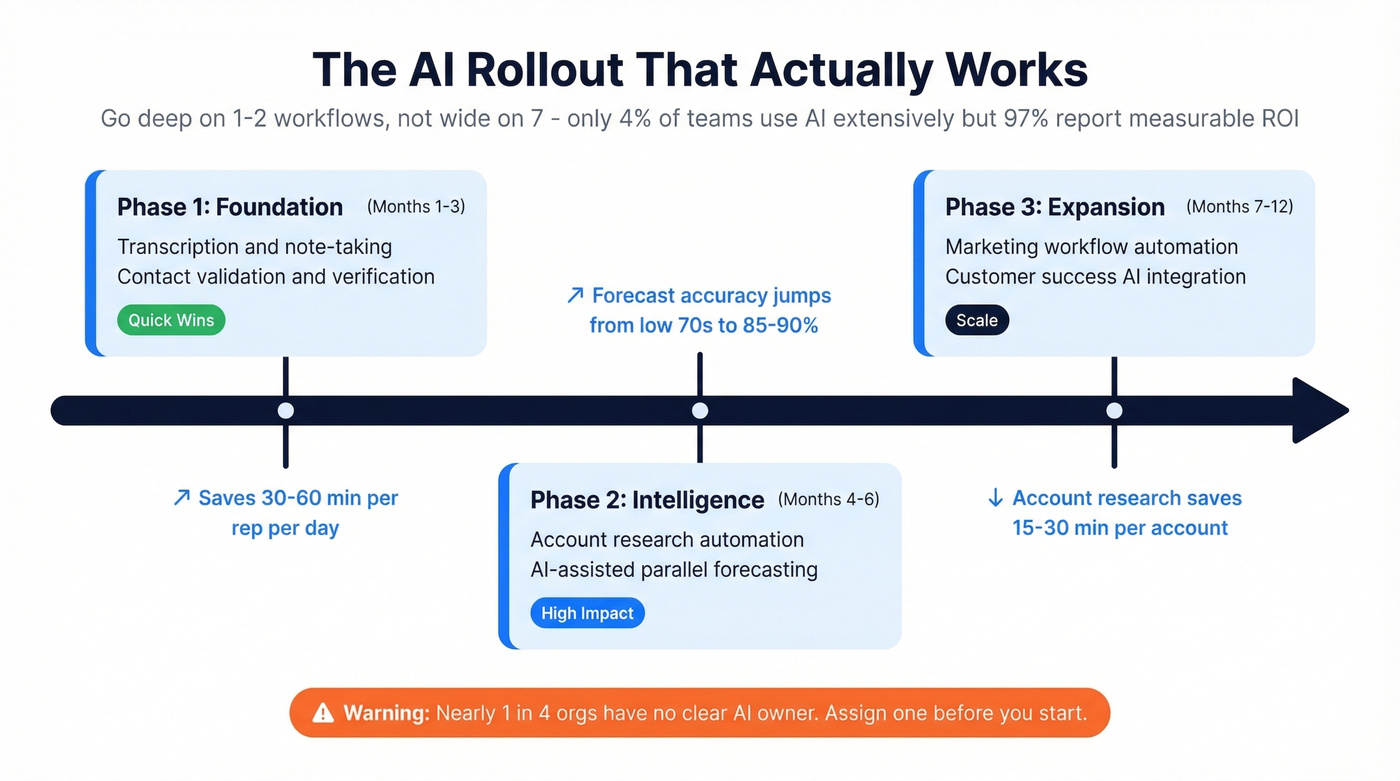
The quantified impacts tell the same story: automated account research saves 15-30 minutes per account, call documentation and MEDDIC extraction save 30-60 minutes per rep per day, and forecast accuracy moves from the low 70s toward 85-90% with AI-assisted parallel forecasting. (If forecasting is a priority, evaluate sales forecasting solutions.)
Nearly 1 in 4 orgs have no clear AI owner. That's a governance failure, not a technology gap.
The rollout that works is phased - transcription and contact validation in months 1-3, research automation and parallel forecasting in months 4-6, then expansion to marketing and CS in months 7-12. Don't try to boil the ocean.
Common Stack Failures
API limits: batch and throttle. Salesforce's monthly API limit equals the daily limit times 30. Teams blow through this at quarter-end when every integration syncs at once. Reduce synced fields, use bulk updates, and avoid major changes during close cycles.
Duplicate creation: survivorship logic. Disparate CRM and MAP data creates duplicates that destroy opt-out visibility - a compliance risk, not just a data quality nuisance. Define merge policies and survivorship rules before you connect another tool.
Over-customization is the silent killer. Every custom object and field you create increases the API surface area that needs to sync. Use standard objects where possible and be ruthless about what actually needs to live in both systems. The teams that build the most custom fields are always the ones who complain loudest about integration fragility - and they're right, but they caused it.
Stale enrichment data: bounces and compliance risk. If your enrichment provider refreshes data every 6 weeks, you're emailing people who changed jobs a month ago. Demand 7-day refresh cycles and real verification from any provider you evaluate. This isn't a nice-to-have; it's the difference between 4% bounce rates and 35% bounce rates. (If you need a verification layer, compare Bouncer alternatives.)
Stack Cost Benchmarks
These ranges reflect typical market pricing, not list prices. Negotiate hard - especially on multi-seat CRM and engagement contracts.
| Category | Example Tools | Annual Cost Range | Notes |
|---|---|---|---|
| CRM | Salesforce, HubSpot | $75-$300/user/mo (SF); Free-$150/user/mo (HS) | HubSpot has a free tier |
| Sales Engagement | Outreach, Salesloft | $100-$150/user/mo | Bundle with CRM for leverage |
| Conversation Intel | Gong, Chorus | $100-$150/user/mo | Gong appeared in 12 of 26 CRO stacks surveyed |
| Enrichment | ZoomInfo, Apollo, Prospeo | $15K-$40K/yr (ZI); Free-$99/user/mo (Apollo); ~$0.01/email (Prospeo) | Biggest variance category - benchmark annually |
| iPaaS | Zapier, Workato | $20-$200/mo (SMB); $10K-$50K/yr (enterprise) | Workato for complex orchestration; Zapier for simple triggers |
| Intent Data | 6sense, Bombora | $30K-$100K+/yr (6sense); $25K-$60K/yr (Bombora) | Layer intent on top of enrichment, don't replace it |
If you're spending five figures on enrichment and haven't benchmarked alternatives in the last 12 months, you're leaving money on the table.
Your waterfall enrichment workflow needs a provider with fresh data, not 6-week-old records that create the conflicting CRM overwrites you just audited. Prospeo refreshes every 7 days and returns 50+ data points per contact - giving RevOps a single clean source of truth without the $40K/year ZoomInfo contract.
Stop paying enterprise prices for stale data your reps don't trust.
FAQ
What is RevOps tech stack management?
It's the ongoing discipline of auditing, governing, and optimizing the tools your revenue team uses - not just selecting them. It covers stack architecture, data flow governance, license utilization tracking, vendor consolidation, and integration health monitoring. Building a stack is a one-time event. Managing it is continuous.
How does workflow management fit into the stack?
Workflow management is the orchestration layer between your systems of record and your intelligence tools. It governs lead routing, sequence triggers, and handoffs between sales, marketing, and CS. Without deliberate workflow governance, even the best tools produce inconsistent outcomes because the logic connecting them is broken or outdated.
How often should you audit your revenue stack?
At minimum, annually - ideally tied to Q4 budget planning. High-growth teams adding 20%+ headcount per year should audit every six months. Any major tool addition or org restructure should trigger a mini-audit focused on data flows and integration impacts.
Who should own the tech stack?
RevOps, with budget authority. 60% of orgs don't give RevOps budget control, and those teams consistently report lower stack ROI. If RevOps is accountable for performance, it needs purchasing and cancellation authority. Accountability without authority is just frustration with extra steps.
What's the cheapest way to fix enrichment data quality?
Run waterfall enrichment through a provider with a 7-day refresh cycle and real-time verification. For most mid-market teams, this approach replaces $15K-40K/year contracts with better accuracy at a fraction of the cost - and you don't need a procurement cycle to get started.