

Sales Activity Automation: Stop Logging, Start Selling
Your SDR finishes a 30-minute discovery call. Then comes the part nobody brags about: 15 minutes of CRM updates, notes, fields, follow-up tasks, and a quick Slack message to keep the manager in the loop. Do that eight times a day and you've got a rep who "worked" all day but only sold for a few hours.
Sales activity automation exists to kill that admin tax. Salesforce has reported that reps spend a huge chunk of their week on non-selling work, and HubSpot's sales automation research puts a big slice of that time specifically on CRM updates. That's the drag on your pipeline, and yes, it's fixable.
- https://www.salesforce.com/sales/state-of-sales/sales-statistics/
- https://blog.hubspot.com/sales/sales-automation-stats
What you actually need
Most articles blur sales automation (sequencing outreach) with sales activity automation (removing CRM admin). They aren't the same problem, and they don't need the same stack.
For most teams, the simplest setup looks like this:
- Activity capture + CRM UI layer (Scratchpad, Rattle)
- Conversation intelligence you already run (Gong, etc.)
- Data verification/enrichment so automations don't fire on junk records (see data enrichment)
Budget-wise, you're usually in the $20-$150 per rep/month range depending on what you already own and whether conversation intelligence is already funded.
What sales activity automation is (and isn't)
Sales activity automation targets the admin layer: auto-logging calls and emails into your CRM, turning notes into structured fields (MEDDIC, next steps, close date, competitor), creating follow-up tasks, and syncing updates across tools without reps retyping the same thing five different ways.
It isn't "send more emails." It's "stop making people do clerical work in Salesforce." (If you're evaluating CRMs, here are examples of a CRM with real pricing.)
When it works, the time savings are real. HubSpot's roundup of sales automation stats includes reps reporting roughly 2 hours and 15 minutes saved per day from automation. That's not a rounding error; that's the difference between a rep hitting quota or quietly drowning in busywork.
The 4 levels of automation maturity
Not all "automation" is equal. Here's the framework we've used with RevOps teams (and any RevOps manager) to figure out where they are today and what to tackle next. Outreach has shared data showing teams using modern automation save meaningful time weekly, and their win-rate analysis also points to a hard truth: deals that sit stale tend to die.
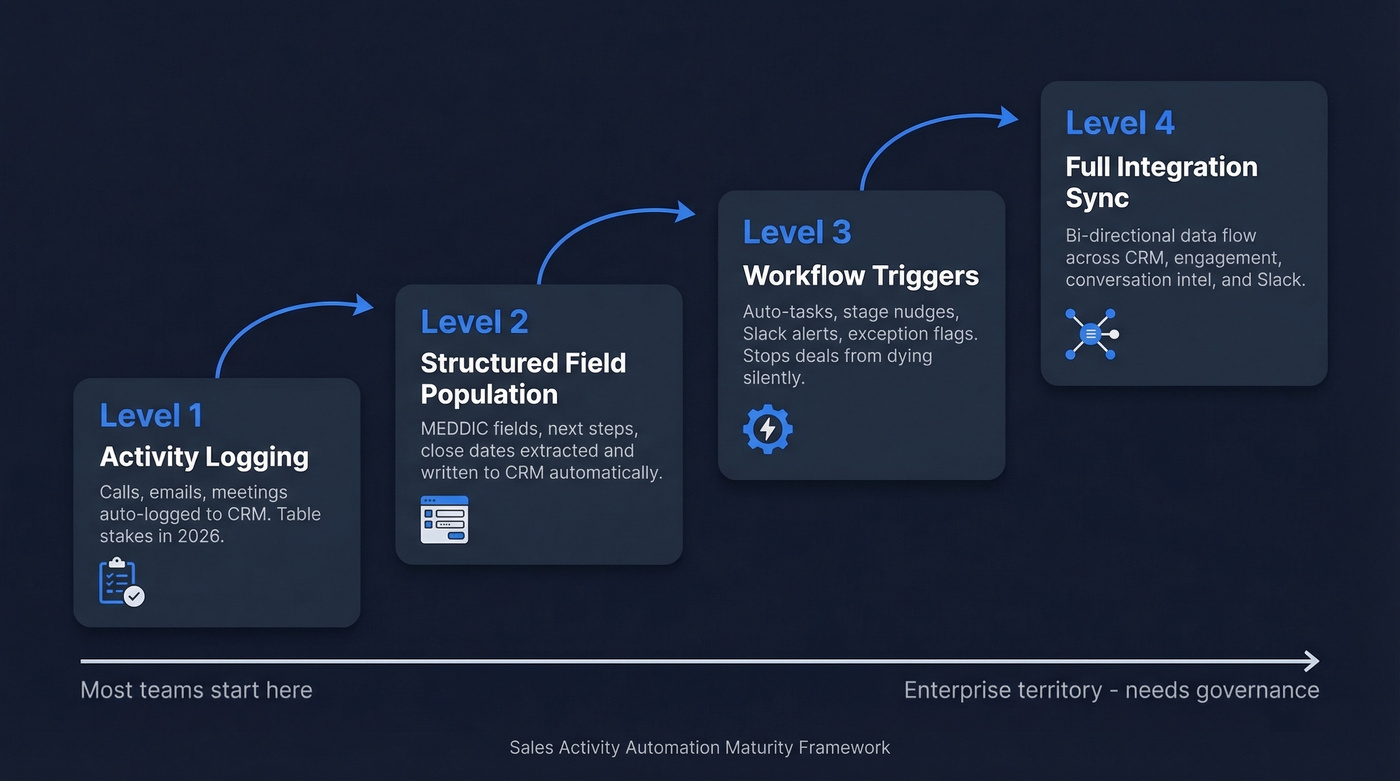
Level 1: Activity logging Calls, emails, and meetings get logged to the right account/contact/opportunity automatically. In 2026, this is table stakes. If your reps are still copy-pasting meeting notes out of Zoom or their calendar, you're paying quota-carrying people to do data entry.
Level 2: Structured field population The system extracts what matters (MEDDIC fields, next steps, close dates, competitor mentions) and writes it into the correct CRM fields. This is where forecasting starts to get less "vibes" and more "math," because the fields your pipeline reports depend on are finally filled in consistently (more on sales forecasting solutions).
Level 3: Workflow triggers Now automation starts pushing the process forward: tasks get created, stages get nudged, Slack alerts go out, and exceptions get flagged.
A real scenario we see all the time: an AE has a great first call, promises a follow-up, then gets pulled into internal fire drills. Two weeks later the opportunity hasn't been updated, nobody notices, and the deal quietly rots. Level 3 fixes that by creating a task at day 14 and pinging the manager in Slack. It's not "big brother." It's a seatbelt.
Outreach's analysis shows a sharp drop in win rate once deals drag on past certain cycle-time thresholds. Level 3 is how you stop "silent death" deals from piling up (track it with pipeline health).
Level 4: Full integration sync Bi-directional data flow across your stack: CRM, sales engagement, conversation intelligence, Slack, and whatever your RevOps team has stitched together. This is enterprise territory. It pays off, but it also needs ownership, governance, and someone who'll actually maintain it when tools change APIs (because they will).
One big context shift: Dooly shut down on June 30, 2026. That reshuffled this category overnight, and plenty of teams are still cleaning up the migration.

Every automation layer in your stack - activity capture, workflow triggers, CRM sync - fires on the data underneath it. Bad data means wasted sequences, misrouted deals, and reps chasing ghosts. Prospeo's 7-day refresh cycle and 98% email accuracy ensure your automations run on records that are actually current.
Fix the data layer first. Everything else gets easier.
Best tools for CRM admin automation (2026)
Let's be honest: most teams don't need seven new tools. They need one good activity layer, one good conversation layer, and clean data underneath so the whole thing doesn't turn into automated chaos (especially if you're building around SDR tools).
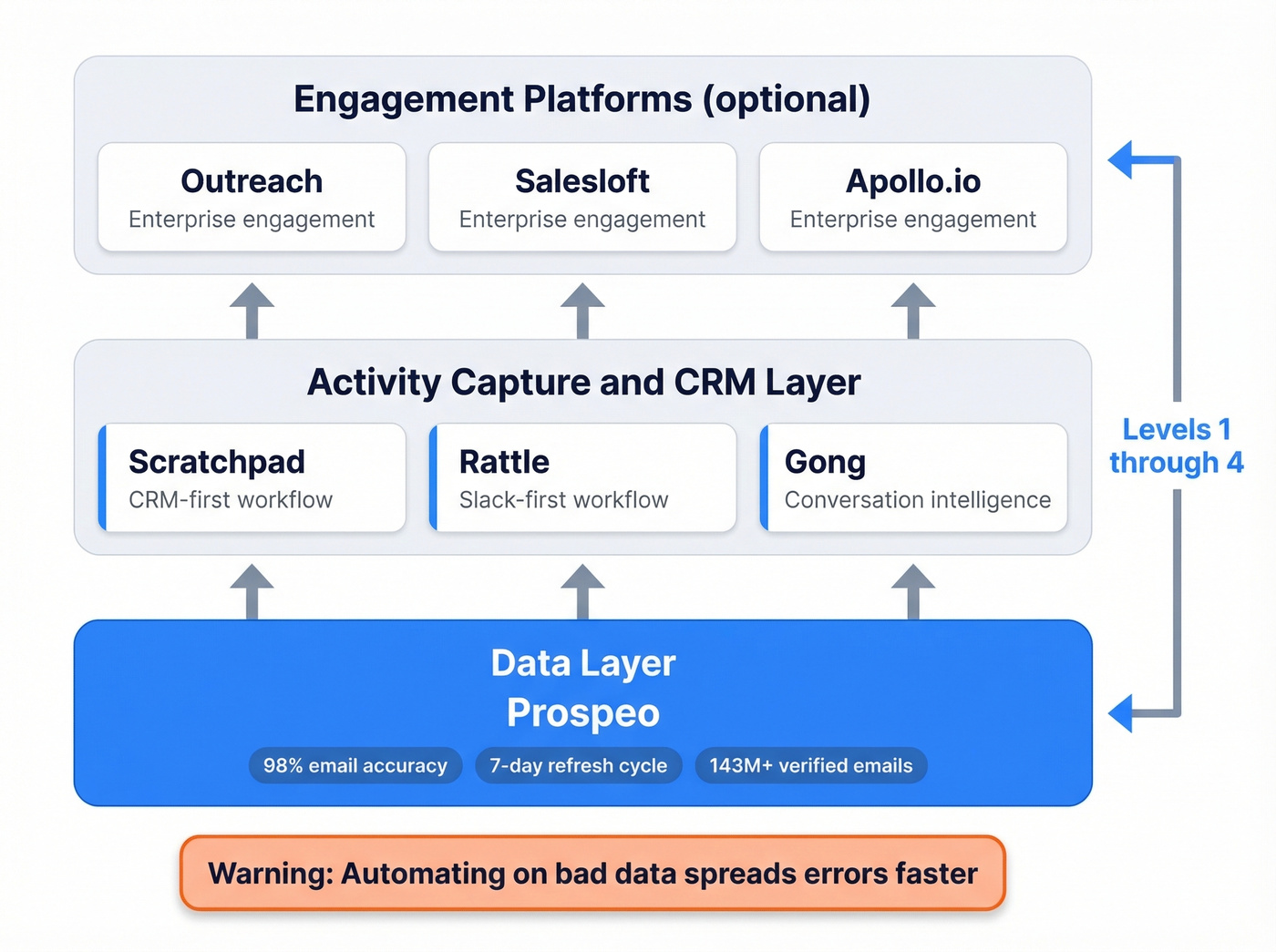
Here's the short list we see most often in real stacks.
| Tool | Best for | Levels | Starting price | Notes |
|---|---|---|---|---|
| Prospeo | Verified contact data + enrichment that keeps automations accurate | Supports 1-4 (data layer) | Free tier; ~ $0.01 per verified email | Best for accuracy, freshness, and self-serve enrichment |
| Scratchpad | CRM-first workflow + rep UX | 1-3 | Free; paid from ~$19/user/mo | Popular Dooly replacement |
| Rattle | Slack-first workflows | 2-3 | ~$29/user/mo | Great if your team lives in Slack |
| Gong | Call capture -> CRM fields | 1-2 | Not public (enterprise) | Often under-configured in the CRM |
| Apollo.io | Prospecting + outreach | Varies | Free; paid from ~$49/user/mo | Engagement first, admin second |
| Outreach | Enterprise engagement + automation | 1-4 | Not public (enterprise) | Powerful, heavy, expensive |
| Salesloft | Enterprise engagement + automation | 1-4 | Not public (enterprise) | Similar story to Outreach |

Scratchpad (best default for most teams)
Scratchpad is the "safe pick" for mid-market teams because it covers Levels 1-3 cleanly and doesn't require you to rebuild your whole process. It's also one of the most common landing spots for teams that had to move off Dooly.
Where it shines is the rep experience: fewer tabs, faster updates, and less "where do I even put this note?" friction. The downside is predictable: once you move past the free tier, per-seat pricing can feel steep if you're rolling it out to a big SDR org. Still, if your reps do 5+ calls a day, the time saved usually dwarfs the license cost.
Rattle (best for Slack-first teams)
Rattle wins when Slack is your operating system. Notes, updates, and alerts happen where reps already work, which means adoption is easier than "please open Salesforce and click three things."
The tradeoff is that Slack-first workflows can get messy if you don't set rules. We've watched teams turn their deal channels into a firehose of automated pings until everyone mutes them, and then the alerts that matter get missed anyway. Keep the triggers tight, and make sure someone owns the workflow logic.
Gong (you probably already pay for it)
Gong is often already in the budget, which makes it the fastest "automation win" available. The frustrating part is how many teams stop at coaching and never finish the CRM sync setup, so reps still log the same info manually.
If you're using Gong, check two things this week:
- Are calls reliably attaching to the right CRM records?
- Are you pushing structured fields back into the CRM, or just storing insights inside Gong?
Fixing those two items is boring, but it pays off immediately.
Outreach / SalesLoft / Apollo
These are engagement platforms first and admin automation second. They can absolutely support higher maturity levels, but you're buying a lot more than activity logging, and you should expect implementation work, governance, and ongoing ops.
Skip these if your only goal is "stop reps from logging calls." You'll overpay and still end up with messy data if you haven't handled the basics.
Fix your data before you automate
Here's the part vendors hate saying out loud: automation doesn't fix bad data. It spreads it faster.
If your CRM is full of bounced emails, wrong titles, and dead phone numbers, every triggered task and Slack alert fires against garbage. NetSuite's CRM guidance pegs automation-driven efficiency gains in the 10-15% range, but that assumes the underlying records are usable.
We've seen this play out in a painfully predictable way: a team buys a shiny workflow tool, sets up auto-tasks and auto-sequences, and then wonders why reply rates drop and deliverability tanks. The answer is usually simple. They automated outreach on top of unverified contacts, and the bounce rate quietly wrecked their domain reputation (see email bounce rate).
This is where Prospeo fits naturally in an activity automation stack. It gives you 300M+ professional profiles, 143M+ verified emails, and 125M+ verified mobile numbers, all refreshed on a 7-day cycle (most databases lag by weeks). Email accuracy is 98%, and enrichment returns 50+ data points per contact with an 83% enrichment match rate.
That matters because Level 3 and Level 4 automation only work if the "who" and "how to reach them" fields are correct. Otherwise you're just building a very efficient machine for creating bad tasks and bouncing emails.
Common mistakes that kill ROI
Automating without a strategy If you don't know which fields drive forecasting, auto-populating everything creates noise. Pick 5-7 fields that actually matter, get those right, then expand (use sales operations metrics to keep it measurable).
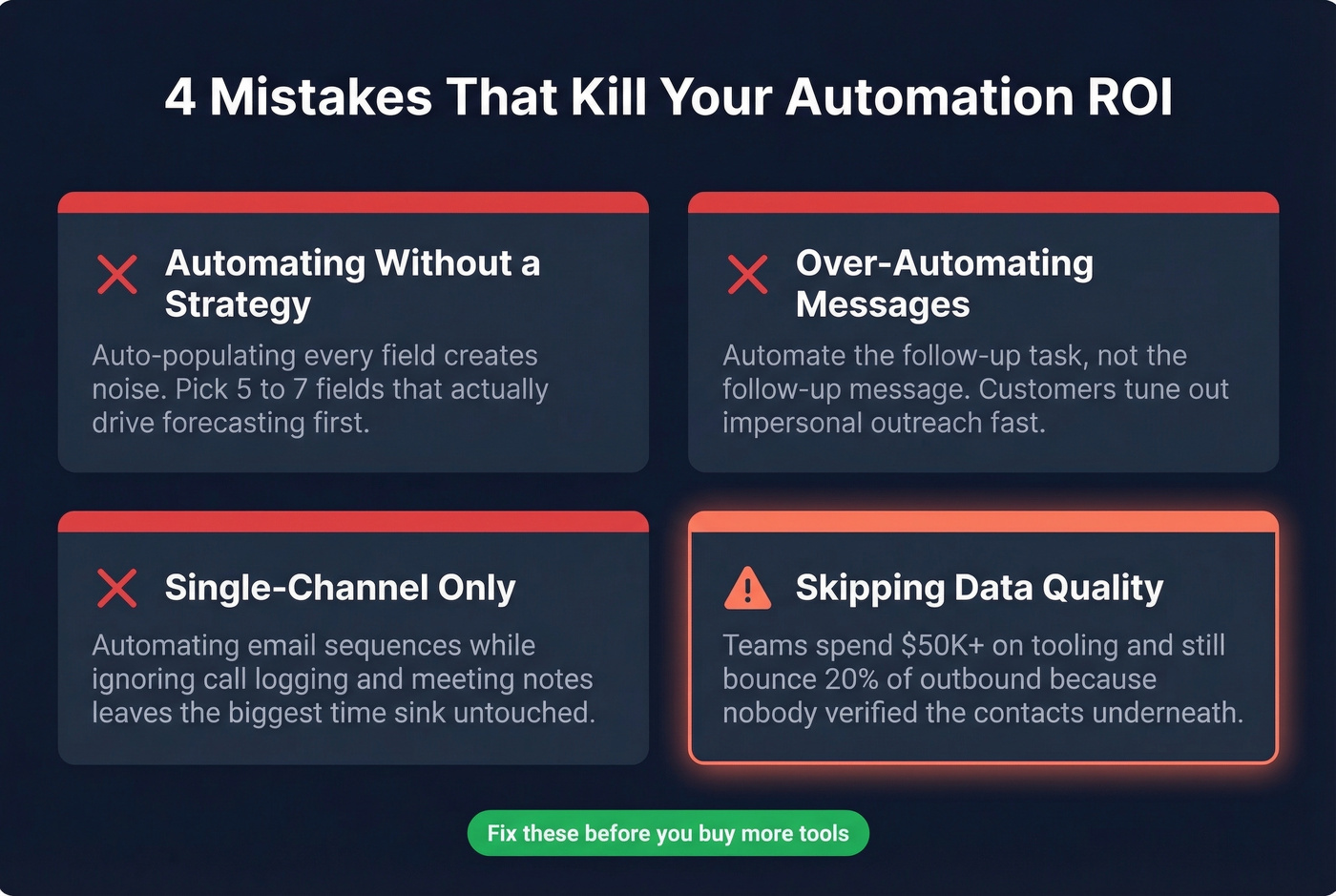
Over-automating and losing personalization SparrowGenie's write-up on sales automation mistakes points out how quickly customers tune out impersonal experiences. Automate the follow-up task, not the follow-up message.
Single-channel automation Automating email sequences while ignoring call logging and meeting notes leaves the biggest time sink untouched. Activity automation should cover every rep touchpoint, not just outbound (see sales activities examples).
Skipping the data quality layer This one drives us nuts because it's so avoidable. We've watched teams spend $50K+ on automation tooling and still bounce 20% of outbound because nobody verified the contact data underneath. The tooling wasn't the problem; the inputs were.
Implementation: a simple 30-day rollout plan
Let's break this down into something you can actually run (and if you're onboarding new reps, pair it with a 30-60-90 day plan for sales reps).
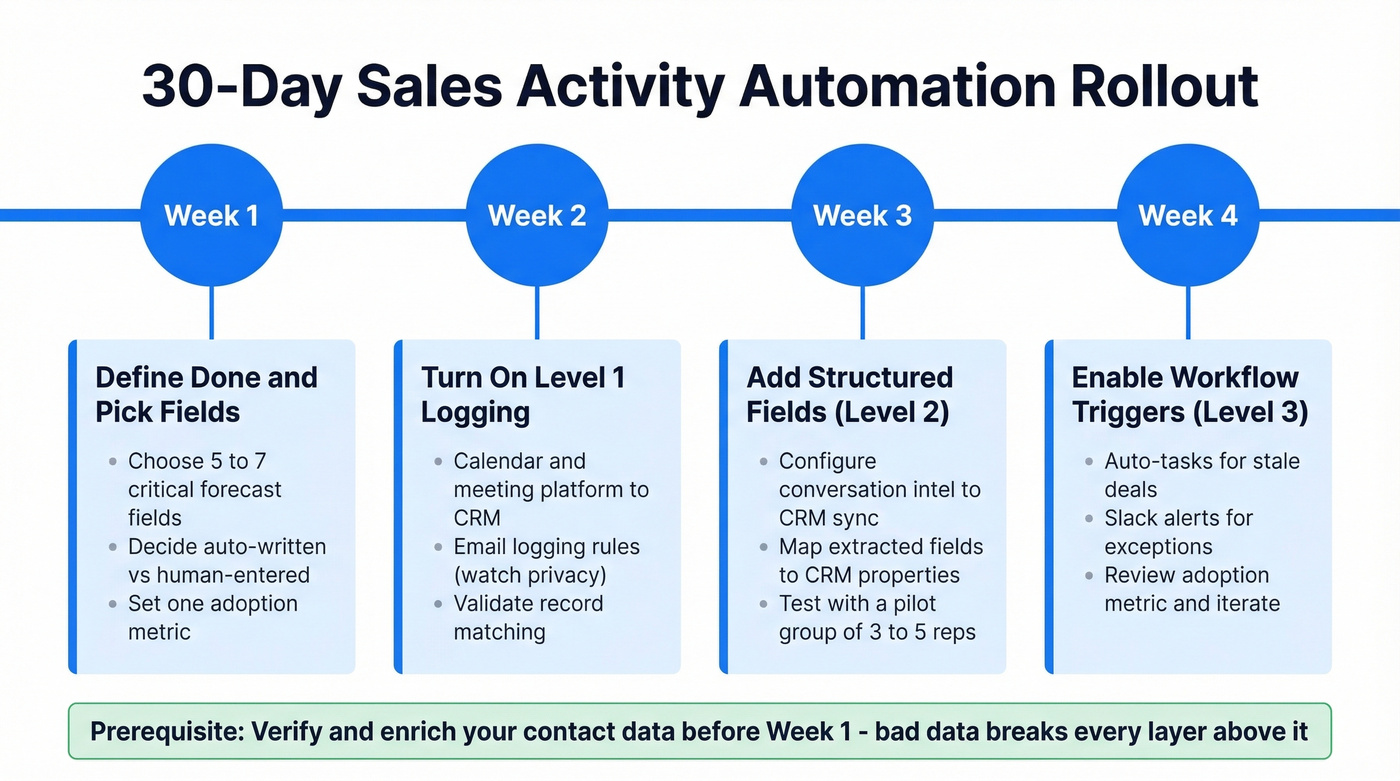
Week 1: Define "done" and pick the fields
- Choose 5-7 fields that must be accurate for forecasting and handoffs
- Decide what gets auto-written vs what stays human-entered
- Set one adoption metric (example: % of opps with next step + close date updated within 24 hours of a call)
Week 2: Turn on Level 1 logging everywhere
- Calendar + meeting platform -> CRM logging
- Email logging rules (be careful with privacy and internal threads)
- Validate record matching so activities attach to the right contact/opportunity
Week 3: Add Level 2 structured fields
- Start with next steps, close date, MEDDIC basics
- QA a sample of records daily for a week (yes, it's tedious; do it anyway)
- Train managers to coach to the fields, not to "write better notes"
Week 4: Add 1-2 Level 3 triggers
- Stale opp task + manager ping
- Competitor mention flag Keep it tight. If you add ten triggers at once, you'll train everyone to ignore them.
FAQ
What's the difference between sales automation and sales activity automation?
Sales automation covers sequencing, lead scoring, and cadence management. Sales activity automation removes admin work: call logging, CRM field updates, and task creation. It's the stuff reps hate, not the stuff reps do to sell.
How much does a sales activity automation stack cost?
A basic stack is usually $19-$79 per user/month for the activity layer, plus whatever you're already paying for conversation intelligence. For a 10-rep team, that's often a few hundred dollars a month for the admin automation piece.
What should we automate first?
Start with Level 1: call-to-CRM logging through activity capture. It's the highest time savings with the lowest risk. Then move to Level 2 structured fields once reps trust the system and you've agreed on which fields drive your forecast.
Can bad data break automation workflows?
Yes. Automated sequences firing against bounced emails hurt deliverability, and triggered tasks against wrong numbers waste rep time. Clean contact data isn't "nice to have" in an automated system; it's the foundation.
You just freed up 2+ hours per rep per day with activity automation. Don't waste that time on prospects with stale emails and dead phone numbers. Prospeo enriches your CRM with 50+ data points per contact at 92% match rate - so every automated workflow fires on verified, fresh records.
Stop automating on top of junk records. Enrich your CRM for $0.01 per email.