

How to Build a Sales Call Tracking Sheet That Doesn't Get Abandoned
Every template site hands you a download button and zero instructions. You get a flat spreadsheet with 30 columns, fill it in for three days, then never open it again. [87% of Americans ignore calls](https://www.pewresearch.org/short-reads/2020/12/14/most-americans-dont-answer-cellphone-calls-from-unknown-numbers/), so your reps are already fighting uphill - the last thing they need is a tracking sheet that creates more work than insight.
We've watched this cycle play out dozens of times. The spreadsheet isn't the problem. The architecture is.
Let's build one that actually sticks.
What You Need
- A 4-tab workbook that separates your daily call log, contact database, tracking/targets view, and configuration - not a single flat table that becomes unsearchable by week two.
- Standardized disposition codes via dropdown menus. Free-text "call outcome" fields are where consistency goes to die.
- Benchmarks loaded into your targets view so you know what "good" looks like. A 9-11% connect rate per 100 dials, and 60-100 dials/day for top performers.
Grab the free Google Sheets template here - it includes four tabs, pre-built dropdowns, conditional formatting, and the benchmarks table below. Duplicate it and start logging today.
Essential Fields for Your Call Log
Start with the minimum. Add optional fields only when you have a reason.
| Minimum Fields | Optional Fields |
|---|---|
| Date | Call duration |
| Time | Escalation flag |
| Prospect name | Product interest |
| Phone number | Lead source |
| Team member | Company / title |
| Disposition (dropdown) | Campaign name |
| Follow-up date | |
| Notes |
Here's the thing: use dropdowns for Call Status (Completed, Call Back, Escalate) and Disposition. If each rep types their own version of "left voicemail," your data is useless within a week. One team we worked with had fourteen different spellings of "no answer" in their sheet. Fourteen.
Disposition Codes to Copy
Drop these into your Configuration tab and wire them as dropdown options in the Call Log.
| Code | Definition |
|---|---|
| Interested | Prospect expressed interest |
| Not Interested | Clear rejection |
| Follow-Up Needed | Conversation started, needs next step |
| Left Voicemail | VM left, awaiting callback |
| Call Back Later | Prospect asked to reschedule |
| Wrong Number | Number invalid or wrong person |
| Sale Closed | Deal won on this call |
| Escalated | Passed to manager or AE |
There's no industry standard for these. But this list covers every outcome a B2B outbound rep hits daily. Standardize across your team and review the list quarterly - you'll find edge cases that need their own code.
How to Structure the Workbook
A single-tab spreadsheet breaks quickly once multiple reps share it and the list grows past a few hundred rows. Here's the architecture that scales, whether you're building a call tracking spreadsheet for the first time or rebuilding an existing workflow.
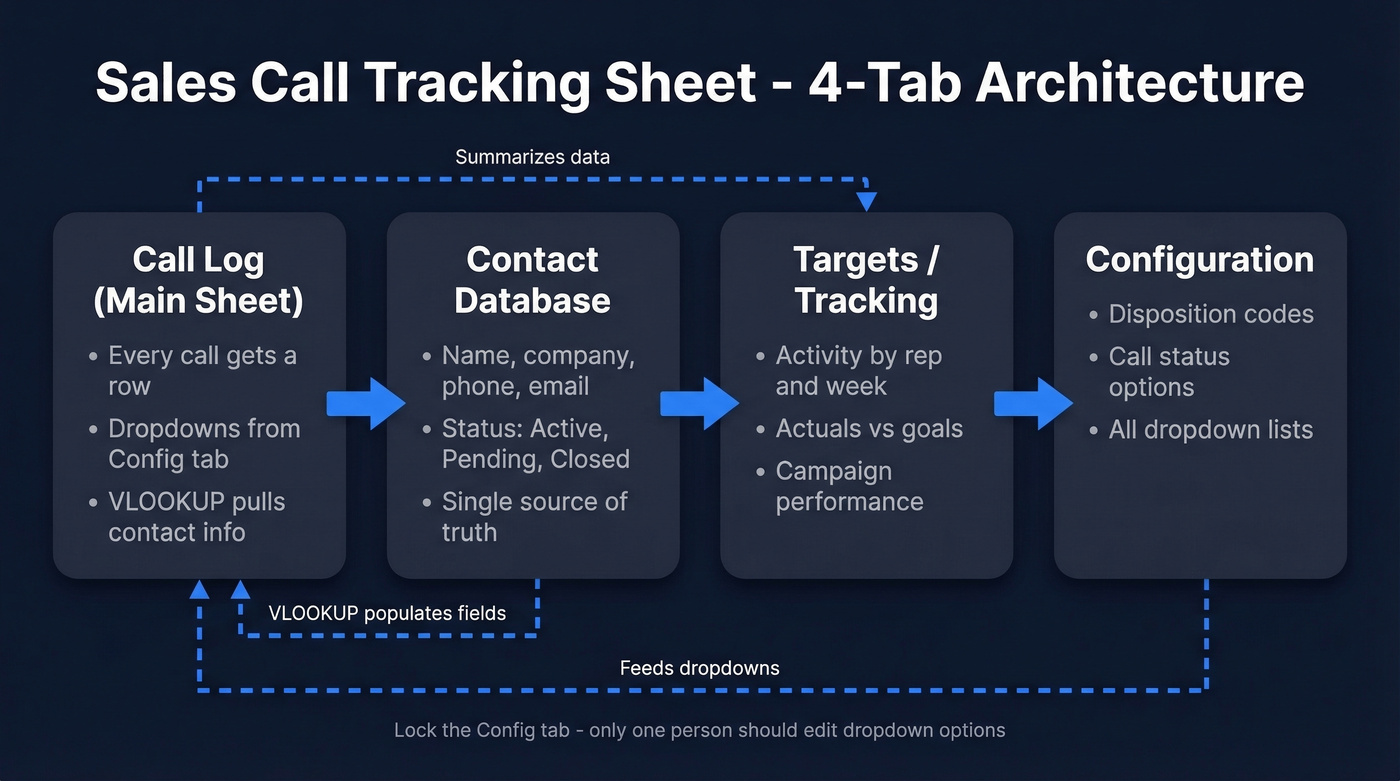
Call Log (Main Sheet) is your daily workspace. Every call gets a row. Dropdowns pull from the Config tab, and selecting a prospect name can auto-populate their phone number via a VLOOKUP from the Contacts tab - saving reps from typing numbers manually and introducing typos.
Contact Database stores prospect details: name, company, phone, email, and a simple status like Active, Pending, or Closed. This is your source of truth. Reps shouldn't be entering phone numbers from scratch into the Call Log.
Targets / Tracking summarizes activity and outcomes by rep, by week, by campaign - and compares actuals to goals. If you're already thinking about moving beyond spreadsheets, start with examples of a CRM to see what "native" call logging looks like.
Configuration manages every dropdown list in the workbook. Update a disposition code here, and it updates everywhere.
Google Sheets beats Excel for team use. Everyone edits live, sharing is built in, and you can set up automatic email notifications for overdue follow-ups using add-ons. If your team prefers desktop software, an Excel template works fine for solo reps - just know you'll lose real-time collaboration.

Your tracking sheet exposes a follow-up problem - but bad phone numbers create a phantom one. Reps log "Wrong Number" and move on, never knowing the prospect was reachable. Prospeo's 125M+ verified mobile numbers hit a 30% pickup rate, so your disposition data reflects actual conversations, not dead contacts.
Fix the data upstream and your call log finally tells the truth.
Spreadsheet Power Tips
Set up conditional formatting on follow-up dates so reps see urgency at a glance: red for overdue, orange for today, grey for future. I've watched reps ignore a plain-text date column for weeks - color changes that instantly.
Create separate filtered views per rep in Google Sheets so each person sees their own pipeline without manual filtering. Before going live, make two copies of your template: one sandbox for testing formulas, one for real data. We've seen teams lose a week of call data because someone broke a lookup formula in production. Lock the Config tab too - only one person should edit dropdown options.
If follow-ups are slipping, pair the sheet with a simple set of sales follow-up templates so reps don't stall after "Call Back Later."
Benchmarks - What Good Looks Like
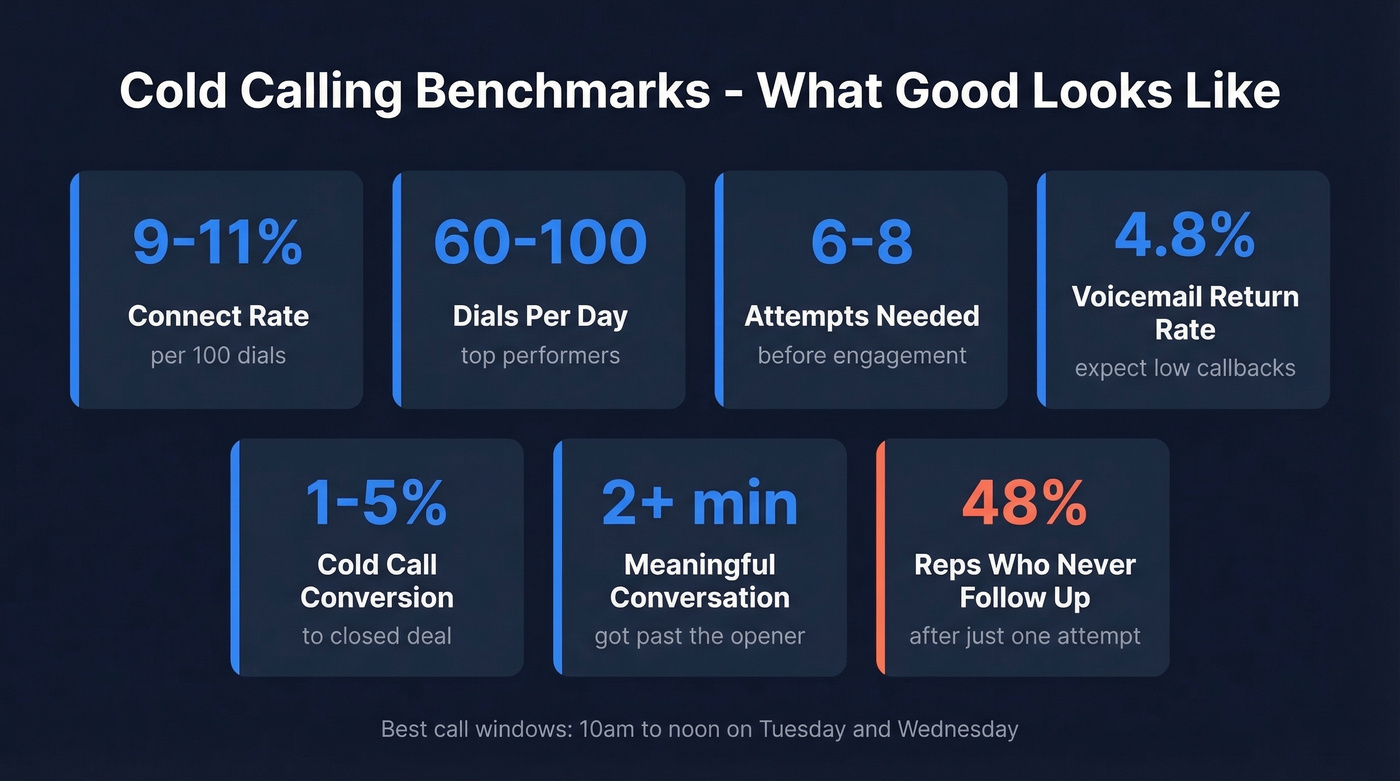
Load these into your Targets tab so reps aren't guessing.
| Metric | Benchmark |
|---|---|
| Connect rate | 9-11% per 100 dials |
| Dials per day | 60-100 for top sellers |
| Attempts before engagement | 6-8 calls |
| Voicemail return rate | 4.8% |
| Best call windows | 10 a.m.-noon, Tue/Wed |
| Cold call conversion | 1-5% |
| Meaningful conversation | 2+ minutes |
48% of reps never follow up after one attempt. If your tracking sheet shows reps averaging 1.2 attempts per prospect, that's not a call quality problem - it's a follow-up discipline problem. The sheet should make that visible. To diagnose where the drop-off happens, map your activity to funnel metrics instead of only counting dials.
Treat Outreach Like an Experiment
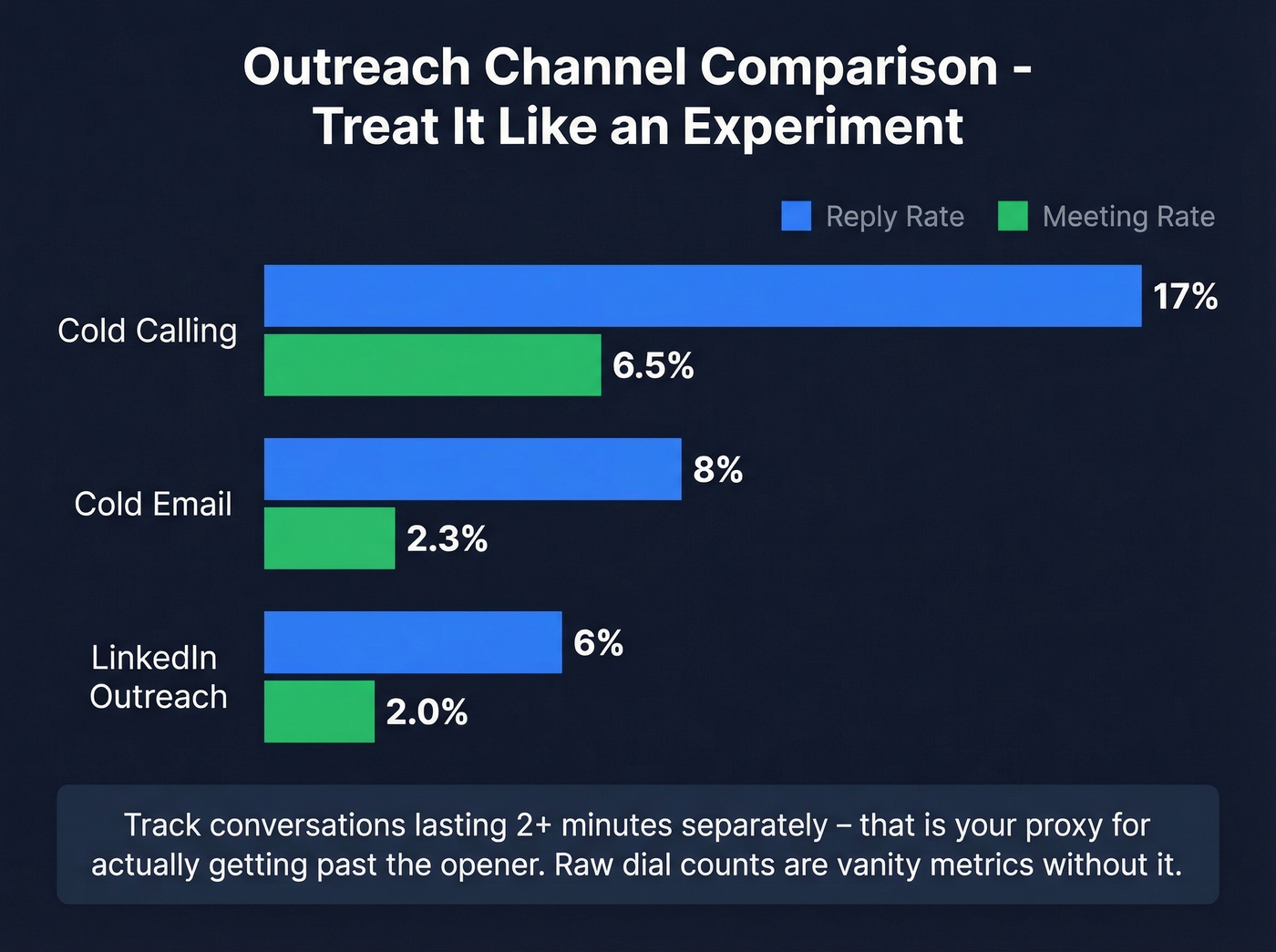
One practitioner on r/sales shared a framework worth stealing: treat each channel as a testable hypothesis with a small, focused list and a specific cadence. Their sample results looked like this:
| Channel | Reply Rate | Meeting Rate |
|---|---|---|
| Cold calling | 17% | 6.5% |
| Cold email | 8% | 2.3% |
| LinkedIn outreach | 6% | 2.0% |
The exact numbers vary by industry, but the approach is what matters. Track conversations lasting 2+ minutes separately in your sheet - that's your proxy for "got past the opener and actually pitched." Raw dial counts are vanity metrics without it. Add a column for channel so you can run your own experiment across calls, emails, and social touches. If you want more ideas for what to test, pull from these sales prospecting techniques.
Mistakes That Kill Your Tracker
No dropdowns, no consistency. Free-text outcome fields produce "Interested," "interested," "Int," and "they seemed keen" - all meaning the same thing, none of them filterable.
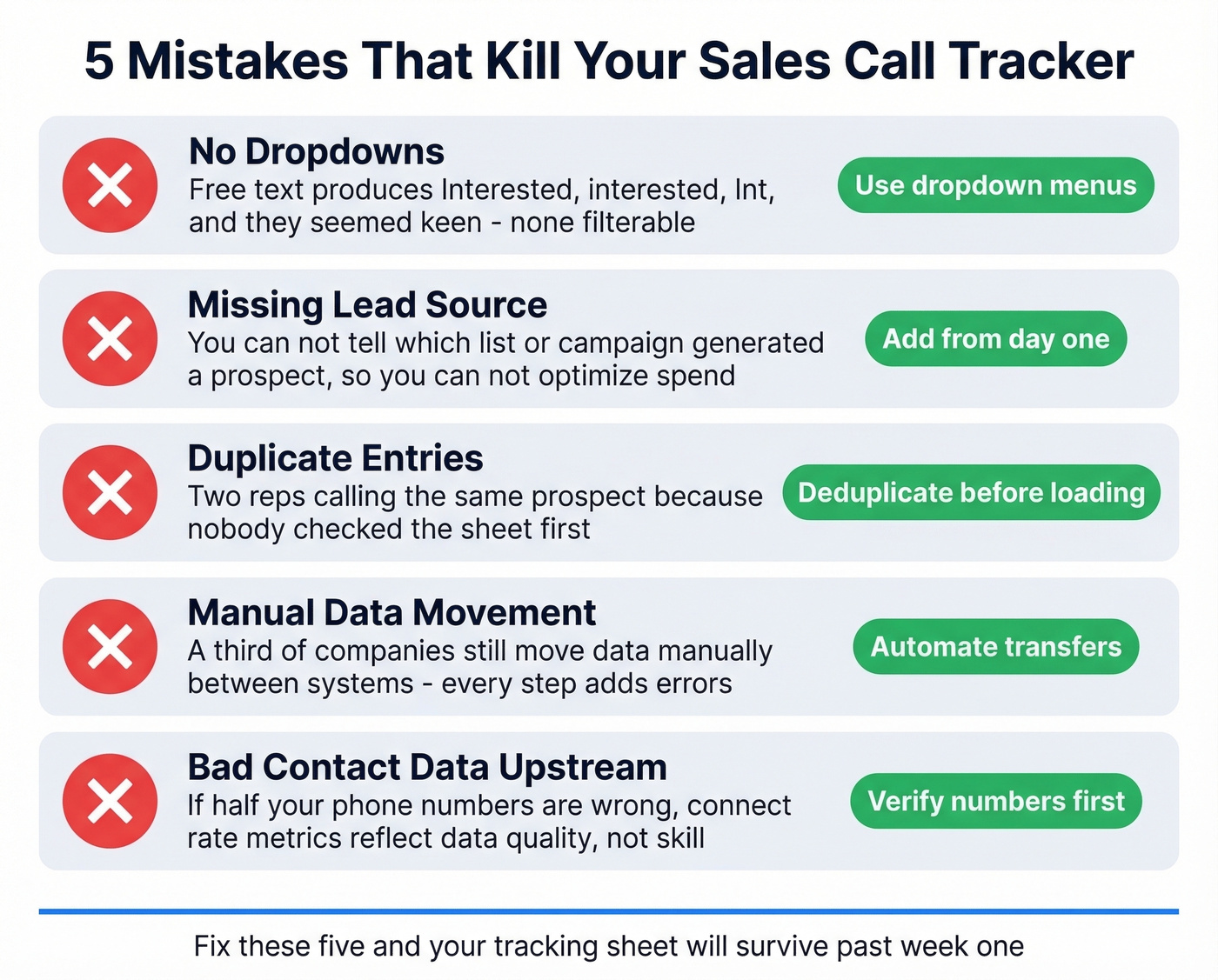
Missing lead source data. If you can't tell which list or campaign generated a prospect, you can't optimize spend. Add a Lead Source column from day one. (If you're not sure what to track beyond calls, use this list of sales activities examples to round out your sheet.)
Duplicate entries. Two reps calling the same prospect because nobody checked the sheet first. Embarrassing and avoidable - deduplicate your contact list before loading it. If your Contacts tab is getting messy, consider lightweight contact management software before jumping straight to a full CRM.
Manual data movement. A third of companies still move data manually between systems. Every manual step is a chance for typos, missed rows, and stale numbers.
Bad contact data upstream. Your call tracking spreadsheet is only as good as the numbers feeding it. If half your phone numbers are wrong, your connect rate metrics reflect data quality, not your team's skill. In our experience, bad phone data is the single biggest reason tracking sheets produce misleading metrics. Run your list through Prospeo's mobile finder before loading it - 125M+ verified mobile numbers with a 30% pickup rate means your metrics actually measure what matters. If you're comparing vendors, start with a shortlist of data enrichment services.
You built the sheet, standardized the dropdowns, loaded the benchmarks. Now the bottleneck is your contact database tab. Prospeo fills it with 98% accurate emails and verified direct dials at $0.01/lead - deduplicated automatically, refreshed every 7 days, and exportable straight into your Google Sheet.
Stop letting stale data poison a perfectly good tracking system.
When to Ditch the Spreadsheet
Over 90% of business spreadsheets contain errors. That's fine when you're two reps and fifty prospects. It's a liability at scale.
Most teams switch to a CRM too late, not too early. Watch for these failure signals:
- Team members overwriting each other's data
- Follow-ups slipping because nobody checked the sheet
- Reps tracking calls in their own side spreadsheets instead of the shared one
Once you're past 3 reps, start looking at a CRM. HubSpot's free tier handles basic call logging. Salesforce runs tens to hundreds of dollars per user per month depending on edition. The sales call tracking sheet got you started - don't let it become the bottleneck. If you're building a more complete stack, compare SDR tools that combine calling, sequences, and reporting.
FAQ
Google Sheets or Excel for call tracking?
Google Sheets wins for teams - real-time collaboration, easy sharing, and automated follow-up reminders via add-ons. Excel works for solo reps who need offline access or prefer a dedicated template they can customize locally.
How many calls should an SDR make daily?
Top performers hit 60-100 dials per day. At a 9-11% connect rate, that's roughly 6 live conversations per 60 dials - enough to generate 2-4 qualified meetings per week.
How do I fix low connect rates?
Start upstream with data quality. Verify your phone numbers before dialing - bad numbers tank your metrics and waste rep time. Then shift calls to 10 a.m.-noon on Tuesday and Wednesday, which consistently outperform other windows.
Can one tracker work for multiple reps?
Yes - that's exactly why the 4-tab architecture matters. Each rep logs calls in the shared Call Log tab, and filtered views let individuals see only their own activity without cluttering the shared workspace.