

How to Build a Sales Pipeline in Google Sheets That Actually Works
You don't need a template. You need a few columns, one formula, and 15 minutes.
Most sales pipeline Google Sheets guides hand you a 12-tab spreadsheet you'll never finish customizing. We've tested the popular ones, and the pattern is always the same: overengineered layouts that look impressive in a screenshot but fall apart the moment a real rep tries to use them daily. Let's skip all that and build something you'll actually maintain.
What You Need (Quick Version)
- Best free template (no email gate): Indzara Sales Pipeline Tracker - five default stages, expected value calculation, and a dashboard with conversion rates plus a "where deals are lost" breakdown
- The only formula that matters:
=deal_value * win_probability- sum the column for your weighted pipeline - The upstream problem nobody mentions: your pipeline is only as good as the contact data feeding it. Verify emails before you add them, or you're building a to-do list that bounces (see data enrichment options)
Who This Is For
If you're a solo founder or a team of two or three managing fewer than 100 leads, a Google Sheet is the right tool. It's free, it's fast, and it doesn't require a three-week implementation.
Here's the thing: if your company already has Salesforce or HubSpot and someone's asking you to track pipeline in a separate spreadsheet, that's not a workflow - that's a symptom. The consensus on r/sales is blunt: external spreadsheets alongside an existing CRM signal broken ops, not a scrappy workaround. If you have a CRM, fix your CRM. If you don't, keep reading.
Minimum Viable Template Structure
A minimum viable pipeline needs four columns: Company, Deal Value, Stage, and Next Follow-Up Date. Everything else is optional until it isn't (if you want a reference point, compare against examples of a CRM to see what you’re not tracking yet).
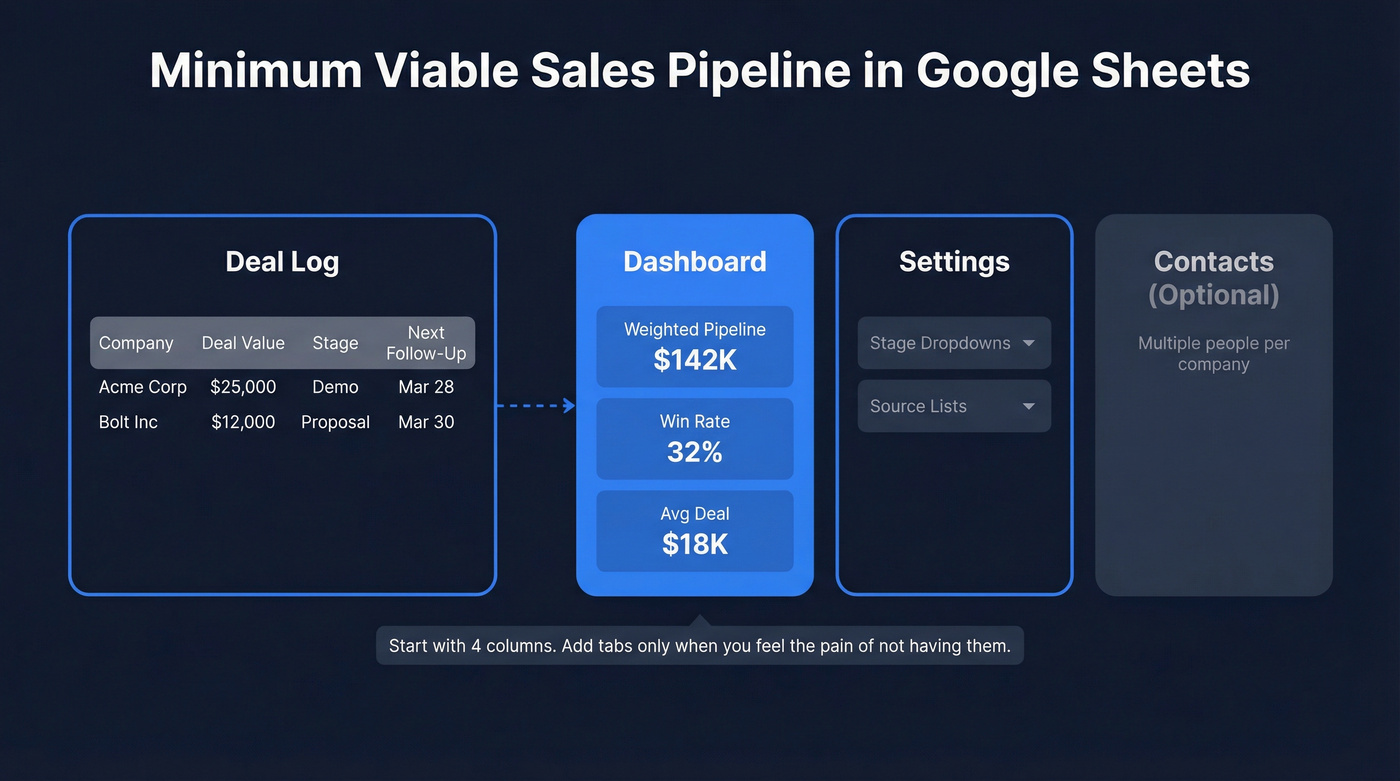
Structure it across three to four tabs: a Deal Log (one row per deal), a Dashboard (weighted pipeline, win rate, average deal size), a Settings tab (dropdown lists for stages and sources), and an optional Contacts tab if you're tracking multiple people per company (at that point, basic contact management software may save you time). That's it. We've looked at most of the popular templates floating around, and the ones with 12 tabs and nested formulas pulling data between sheets are overengineered for anyone who isn't already outgrowing Sheets. Start minimal. Add complexity only when you feel the pain of not having it.
Best Free Templates for 2026
The fact that you have to wade through six gated landing pages to find a usable Google Sheet tells you everything about the CRM industry's marketing playbook.
| Template | Email Required? | Key Features | Dashboard? |
|---|---|---|---|
| Indzara | No | Weighted/expected value, data validation | Yes |
| Reddit community template | No | Basic deal tracking | No |
| Pipedrive | Yes (work email) | Weighted pipeline, stage analytics | Yes |
| Someka | Yes | Weighted pipeline, paid add-ons | Yes |
| Sheetify CRM | Not specified | Kanban-style pipeline via Apps Script | Yes |
Indzara is the clear winner for most people. Five default stages (Lead, Opportunity, Demo, Quote, Sale), weighted expected value, data validation that flags missing close dates and catches impossible timelines like a close date before the create date, plus a dashboard showing where deals get lost by stage. Click the link, hit "Make a copy," and you're working in a couple of minutes.
Sheetify CRM is worth the $67 if you want a Kanban-style view that updates automatically. Someka gates the free download behind an email form, with add-on services running $19.95-$250. Pipedrive's template is solid but requires a work email - they're fishing for leads, not giving you a tool.

You just built a pipeline template - but every row with a bad email is a wasted follow-up. Prospeo verifies contacts at 98% accuracy and enriches each one with 50+ data points. The free tier gives you 75 verified emails per month, enough to keep a lean Sheets pipeline full of contacts that actually reply.
Stop building pipeline on data that bounces.
Stages, Probabilities, and Formulas
Every deal in your pipeline needs a stage and a probability. Here's the standard model:
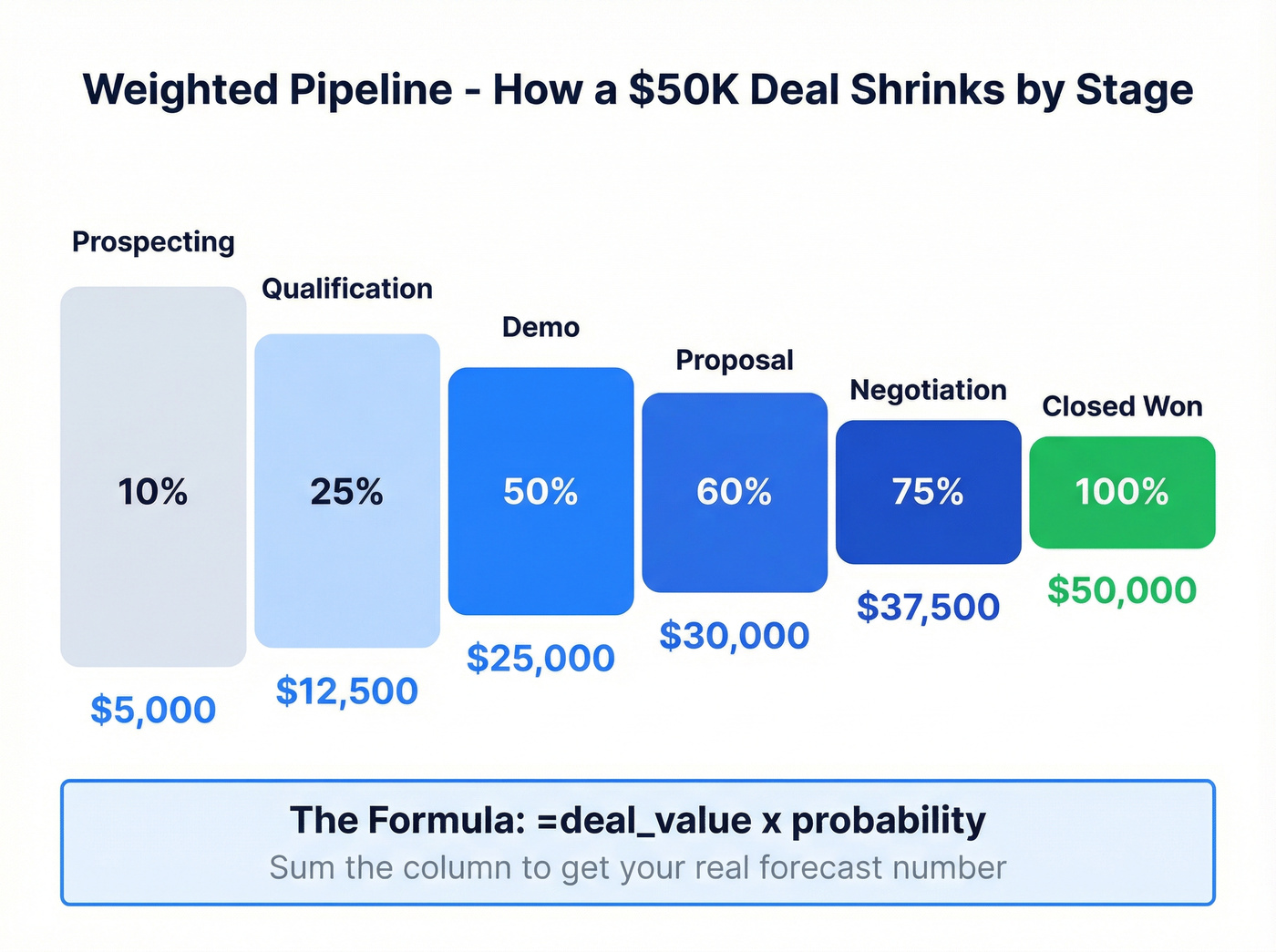
| Stage | Win Probability | $50K Deal - Weighted |
|---|---|---|
| Prospecting | 10% | $5,000 |
| Qualification | 25% | $12,500 |
| Demo | 50% | $25,000 |
| Proposal | 60% | $30,000 |
| Negotiation | 75% | $37,500 |
| Closed Won | 100% | $50,000 |
The formula is dead simple: =deal_value * probability. A $100,000 deal at 60% probability gives you $60,000 in weighted value. Sum that column and you've got the number that actually matters for forecasting (for deeper benchmarks, see sales pipeline benchmarks).
The next metric to track is your coverage ratio: Weighted Pipeline / Revenue Target. SMB teams with short sales cycles can operate at 1.5-2x coverage. Enterprise teams with six-month cycles need 4-5x. If your coverage ratio is below target, you don't have a closing problem - you have a pipeline generation problem (common causes are covered in sales pipeline challenges).
Use Data Validation dropdowns for your stage column so reps can't type "demo" twelve different ways. Add conditional formatting to highlight deals where the "Next Follow-Up" date is overdue. Stale deals inflate your pipeline and wreck your forecast, and a simple red highlight is the cheapest accountability tool you'll ever build.
Automate Follow-Ups With Apps Script
The most useful automation you can build in five minutes: a daily email reminder for deals that need follow-up today. Open Extensions, then Apps Script, and paste this pattern (if you need copy/paste messaging too, keep sales follow-up templates handy):
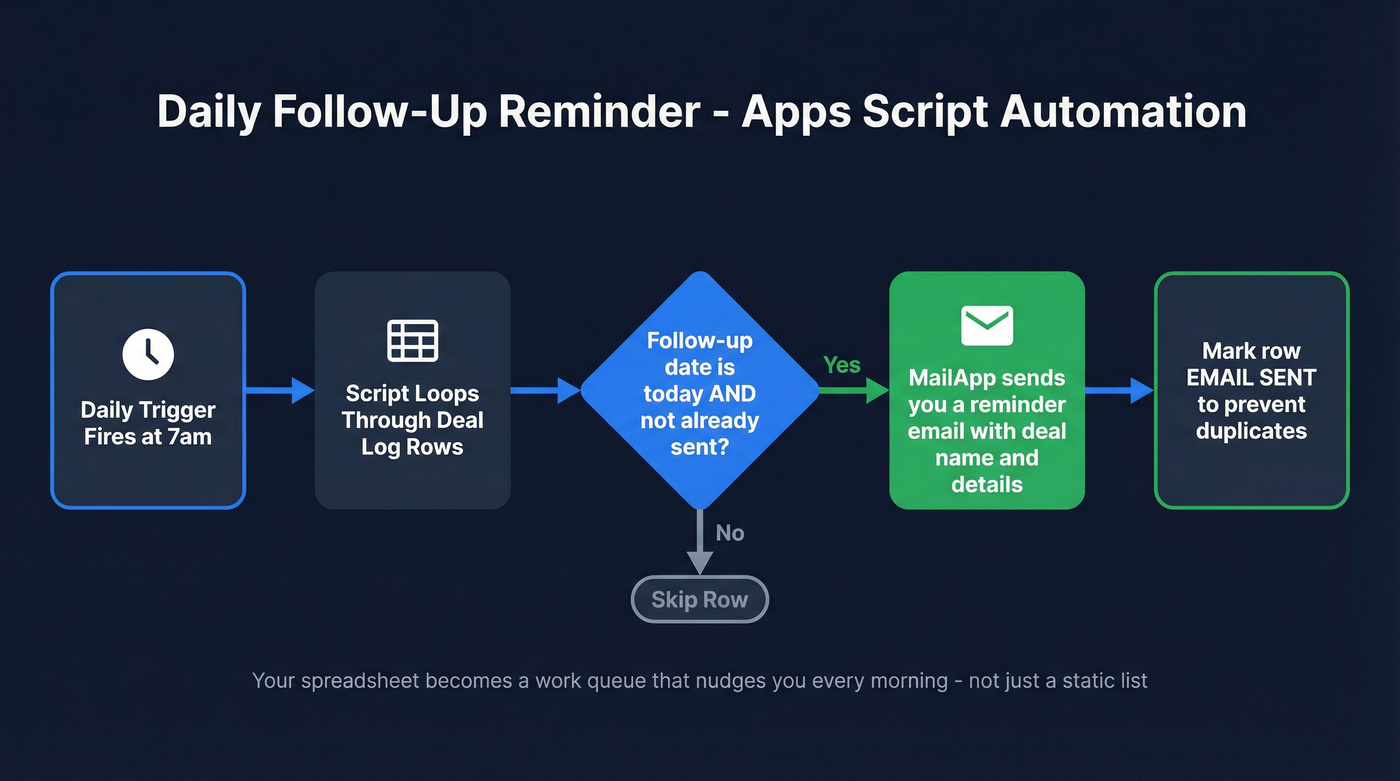
// Loop through Deal Log rows
// If follow-up date === today AND email not already sent:
//   MailApp.sendEmail(you, 'Follow up: ' + dealName, details)
//   Mark row as SENT to prevent duplicates
// Set a daily time-based trigger at 7am
The EMAIL_SENT marker column prevents duplicate sends. For a full working reminder script (including a daily trigger pattern), adapt one of the common task-reminder examples on Google's Apps Script docs and swap in your "Next Follow-Up" column and deal fields. MailApp is the service that sends the email.
Now your spreadsheet pipeline isn't just a list. It's a work queue that nudges you every morning.
Fix the Upstream Data Problem
Look - every pipeline guide assumes you already have contacts. Nobody talks about what happens when half those contacts have bad emails or disconnected numbers. A pipeline full of unverified data isn't a pipeline. It's a to-do list that wastes your afternoon.
This is where data verification matters before anything else. Prospeo's enrichment returns 50+ data points per contact, with an 83% match rate on CSV uploads and 98% email accuracy on matched records. The free tier gives you 75 verified emails per month, which is plenty for a solo founder running a lightweight pipeline in Google Sheets. Connect it via Zapier, and new pipeline rows get auto-enriched before you ever touch them (more ways to source leads: free lead generation tools).

You built the template. Now fill it with data that doesn't bounce.
A weighted pipeline formula means nothing if half your contacts never see your email. Prospeo's CSV enrichment hits an 83% match rate and returns verified emails, direct dials, and company data - ready to paste straight into your Google Sheet. Connect via Zapier and new rows get enriched automatically.
Fill every row with contacts that convert, not contacts that bounce.
When to Graduate to a CRM
Sheets is a starting point, not a permanent home. Move when you're managing 100+ contacts or 50+ active deals, spending 30+ minutes a day on spreadsheet admin, or your team grows past three people and edit conflicts become constant (at that point, consider sales forecasting solutions or a full CRM).
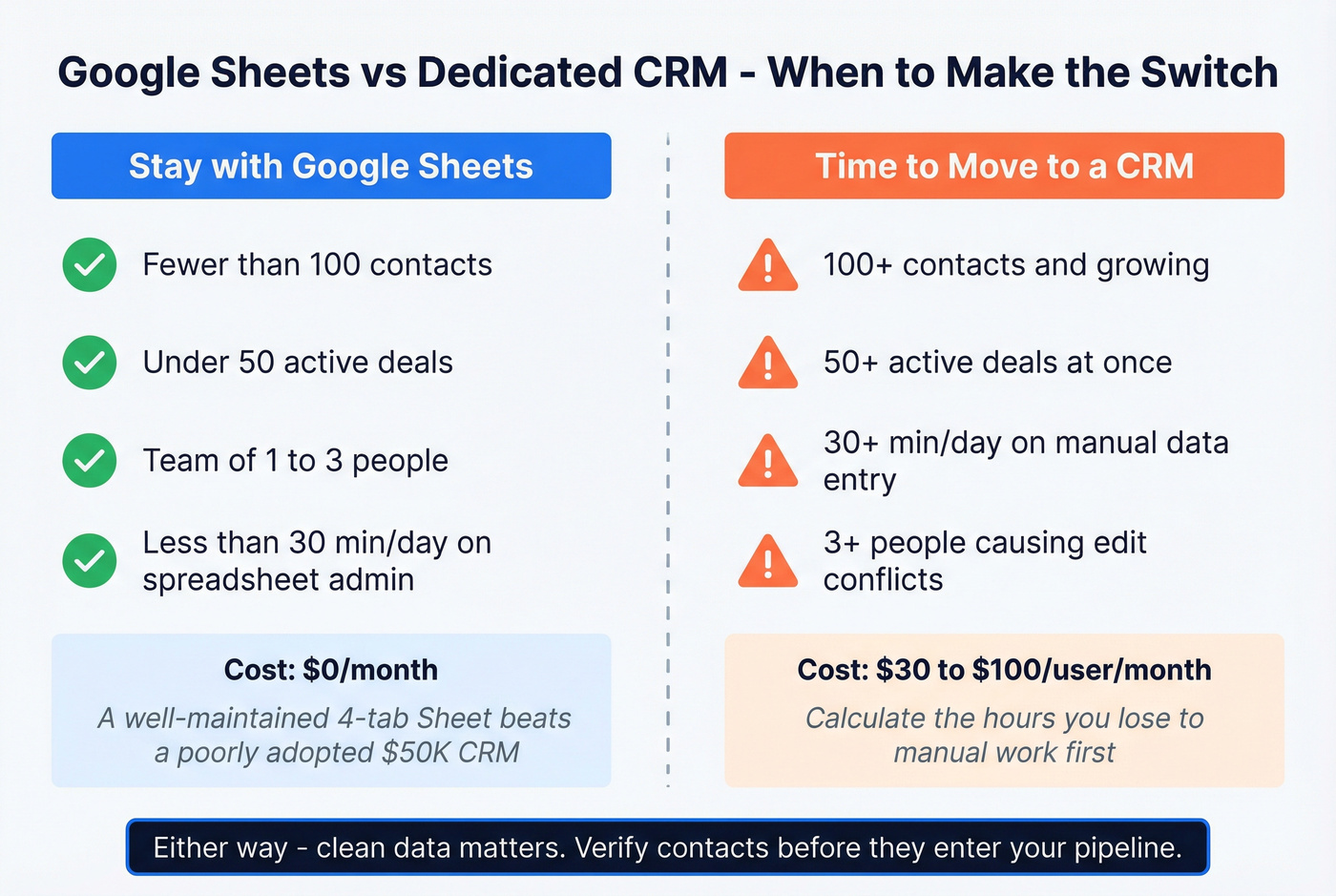
Dedicated CRMs run $30-$100/user/month, which feels steep until you calculate the hours you're losing to manual data entry. When you do make the jump, Prospeo integrates natively with Salesforce and HubSpot, so you can keep enriching contacts in your new CRM without switching tools (see connect outreach tool to CRM for a practical setup path).
Let's be honest: a well-maintained four-tab Sheet will outperform a poorly adopted $50k CRM every time. Most teams don't need more software - they need cleaner data and a simpler process. Start with a sales pipeline in Google Sheets, learn what you actually need, and upgrade when the pain is real.
FAQ
How many deals can Google Sheets handle before it breaks?
Google Sheets performs reliably up to about 5,000 rows with formulas and conditional formatting. Most teams hit workflow pain - edit conflicts, slow load times - around 50-100 active deals with three or more collaborators, well before the technical row limit matters.
What's the most important formula for pipeline forecasting?
=deal_value * win_probability, summed across all open deals, gives you your weighted pipeline - the single number that predicts revenue more accurately than raw deal totals. Pair it with a coverage ratio (weighted pipeline / quota) of 2-3x for SMB or 4-5x for enterprise cycles.
How do I keep contact data accurate in my spreadsheet?
Use a verification tool before adding contacts. Prospeo's free tier validates addresses at 98% accuracy and returns 50+ data points per record. Connect it via Zapier so new rows auto-enrich - this eliminates bounced emails and wasted follow-ups.
Can I build a Kanban view inside Google Sheets?
Yes, but it requires Apps Script or a paid add-on like Sheetify CRM ($67 one-time). Native Sheets doesn't support drag-and-drop Kanban, so most teams stick with a filtered list view sorted by stage and use conditional formatting to visualize deal progression.