

Free Sales Pipeline Template for Excel - Download and Customize It
You downloaded a pipeline template from a big CRM vendor, spent 20 minutes filling out the lead form, and got an Excel file with six empty columns and no instructions. Now you're here.
You're not alone. 84% of reps missed quota last year, and 94% of business spreadsheets contain critical errors. A sales pipeline template for Excel won't fix bad selling, but a good one - with real benchmarks and formulas already wired - removes one excuse. Effective pipeline management alone increases revenue up to 15%.
What You Need
One spreadsheet, six pipeline stages, weighted forecast formulas, and 2026 benchmark defaults you can actually use. No email gate. No "talk to sales." Just the file.
Solo founder or team of 1-3 reps? This template is all you need. 5+ reps or 200+ active deals? Skip to the CRM section.
Download the Free Excel Pipeline Template
Grab the file and start using it in under two minutes:
- Excel (.xlsx): [Download here]
- Google Sheets: [Make a copy] - opens in Google Sheets; click "Make a copy" to save it to your Drive
What's inside: a Pipeline tab with six stages and weighted forecast formulas, plus supporting reference and dashboard-style views to help you track totals and forecast. Everything's editable - shape it to fit your exact process.
What's Inside the Pipeline Sheet
At a minimum, your Pipeline tab should track these core fields:
| Column | What It Does |
|---|---|
| Deal Name | Your label for the opp |
| Company | Account name |
| Stage | Dropdown (6 stages) |
| Value | Total deal size |
| Probability | Stage-based probability |
| Expected Value | Value x Probability |
| Close Date | Target close |
| Owner | Rep name |
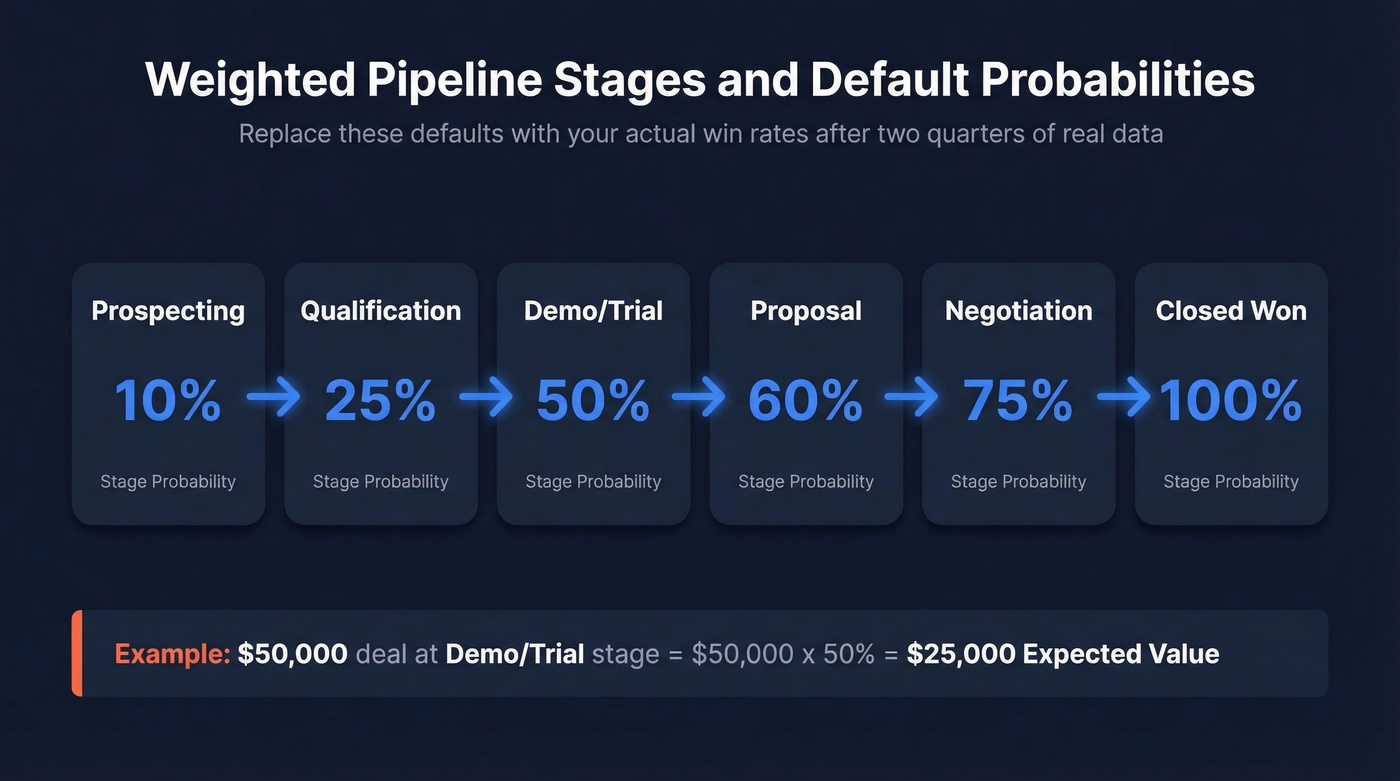
The stage probability defaults are a solid starting point: Prospecting (10%), Qualification (25%), Demo/Trial (50%), Proposal (60%), Negotiation (75%), Closed Won (100%). They come from a common weighted-pipeline framework, and they're useful as placeholders - but after two quarters of real data, replace them with your actual win rates by stage. Arbitrary probabilities are the fastest way to make a weighted forecast useless.
Customize Stages and Formulas
Edit Stages Without Breaking Anything
Most prebuilt pipeline spreadsheet templates use hidden data validation and named ranges to power their dropdowns. You add a custom stage like "Unqualified" and the whole thing breaks. Reddit's r/excel is full of people hitting this exact wall.
Here's how to edit stages safely in Excel:
- Go to the Stage Reference tab and add, rename, or reorder stages in column A.
- Update the probability in column B for each new stage.
- Open Formulas > Name Manager (Ctrl+F3). Find the named range
Stagesand update its reference to include your new rows. - Back on the Pipeline tab, the Stage dropdown reflects your changes. No broken validation.
In Google Sheets, go to Data > Data validation on the Stage column and edit the list range directly. Takes about 30 seconds.
Build a Weighted Forecast
Expected value per deal is straightforward:
Expected Value = Deal Value x Probability
For stage-level totals on a dashboard, SUMIF handles it: sum Expected Value where Stage equals a given stage.
For pipeline velocity - how much revenue your pipeline generates per day - the formula is:
(Opportunities x Avg Deal Value x Win Rate) / Sales Cycle Length
Plug your numbers in. Forty opportunities averaging $15,000 at a 25% win rate with a 90-day cycle gives you about $1,667/day. Now you have a number to improve, not just a gut feeling. Any pipeline tracking spreadsheet worth using should have this formula pre-built.
If you want to go deeper than a spreadsheet forecast, compare this to dedicated sales forecasting solutions and the broader sales forecast vs sales goal distinction.

A weighted forecast built on dead emails is just fiction with formulas. Prospeo verifies every email through a 5-step process - 98% accuracy, 7-day refresh cycle - so the contacts in your pipeline are real buyers, not phantom deals inflating your coverage ratio.
Stop forecasting on bad data. Start with verified contacts at $0.01 each.
2026 Pipeline Benchmarks
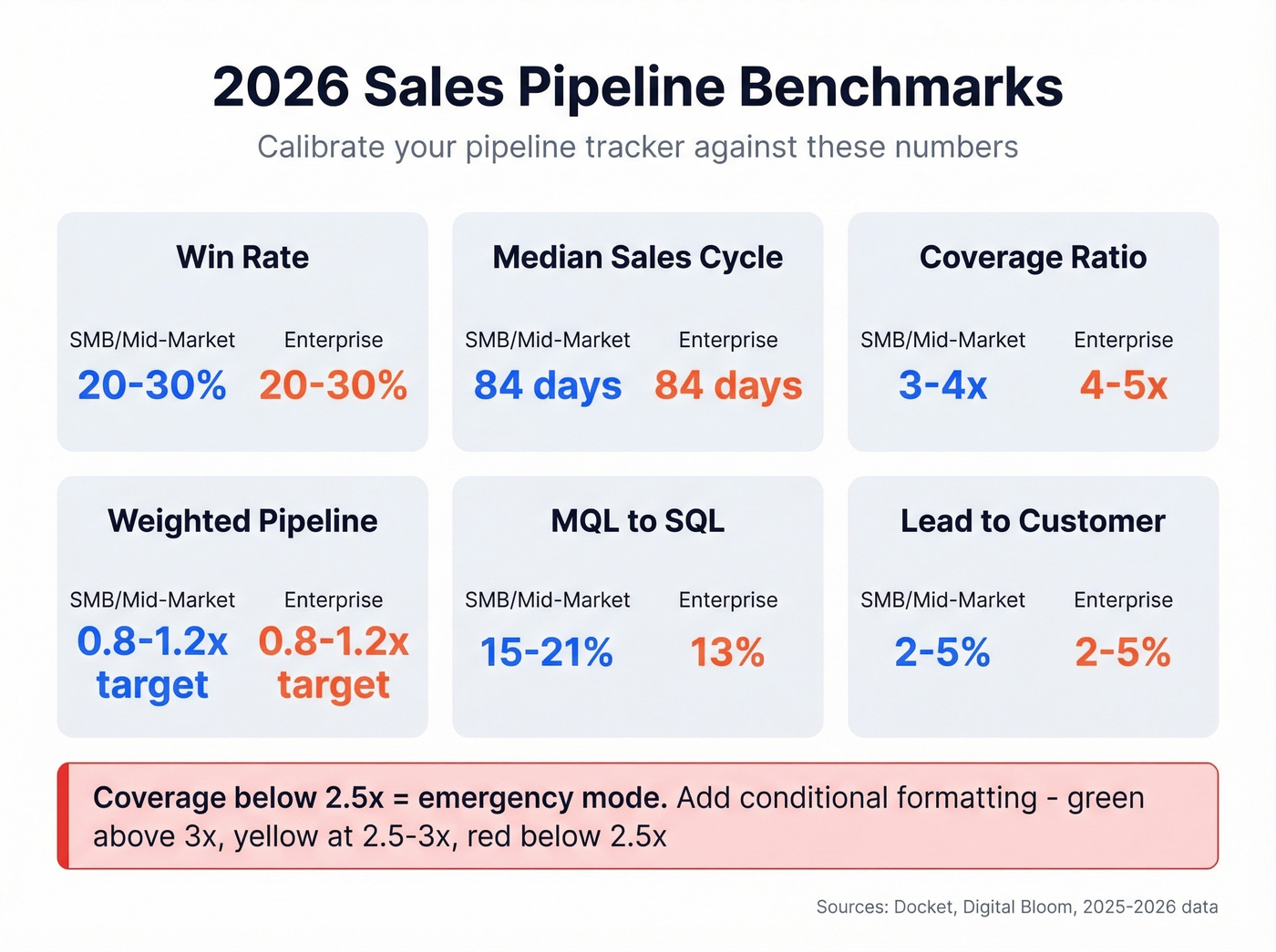
A pipeline tracker without benchmark data is a budget without income. Here are the numbers to calibrate against:
| Metric | SMB / Mid-Market | Enterprise |
|---|---|---|
| Win Rate | 20-30% | 20-30% |
| Median Cycle | ~84 days | ~84 days |
| Coverage Ratio | 3-4x | 4-5x |
| Weighted Pipeline | 0.8-1.2x of target | 0.8-1.2x of target |
| MQL to SQL | 15-21% | ~13% |
| Lead to Customer | 2-5% | 2-5% |
Pipeline velocity varies significantly by industry. Current benchmarks show Marketing & Advertising at $743/day, SaaS & Technology at $1,847/day, and Real Estate & Construction at $2,456/day. The drivers are deal size and cycle length - not magic.
For more context on what “good” looks like across teams, see our full pipeline benchmarks breakdown.
If your coverage ratio drops below 2.5x, you're in emergency mode. Add conditional formatting to your Dashboard tab: green above 3x, yellow at 2.5-3x, red below 2.5x.
Diagnose Bottlenecks With Your Tracker
Once you've got a month of deals flowing through the template, calculate stage conversion rates:
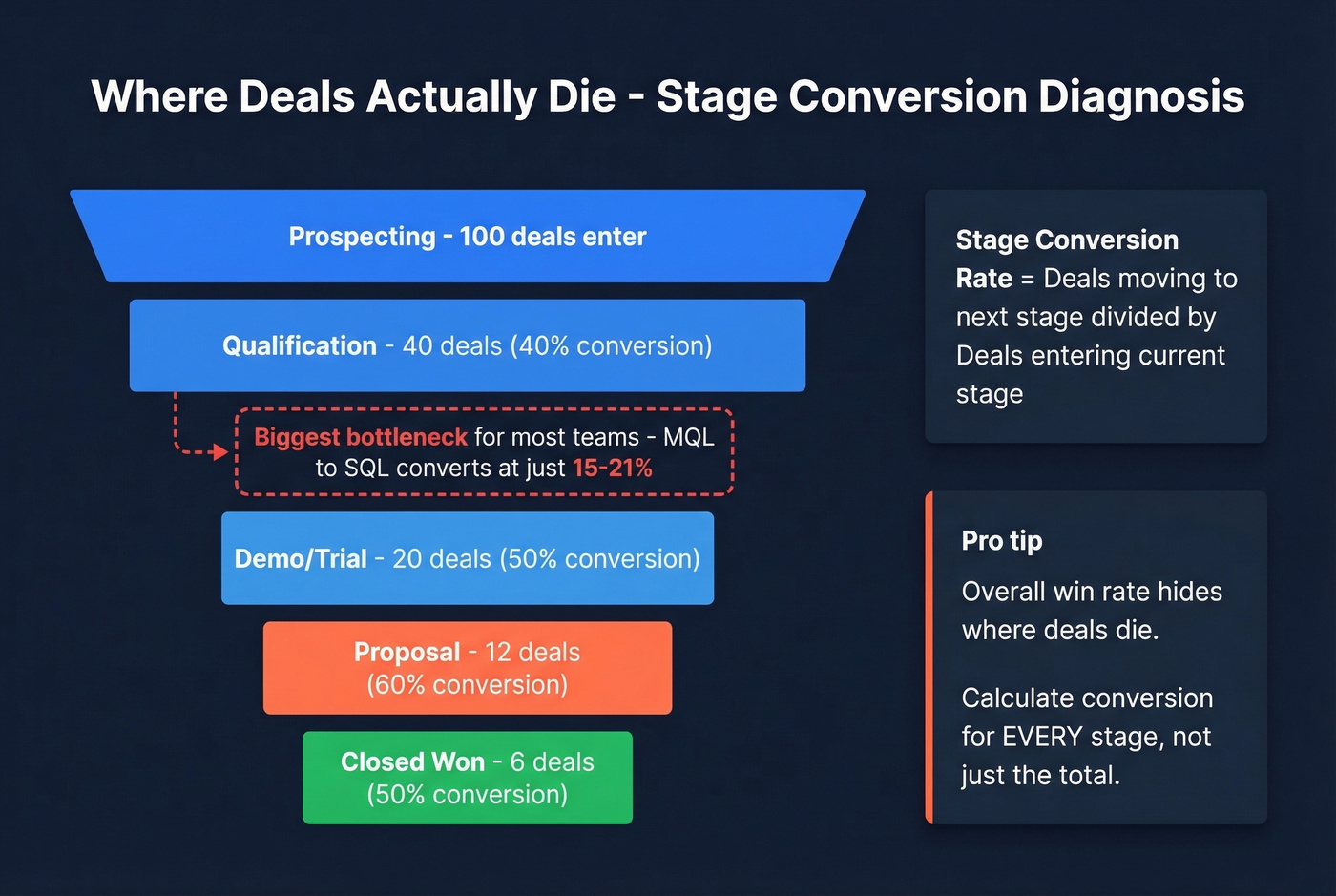
(Deals moving to next stage) / (Deals entering current stage)
Do this for every stage. The overall win rate hides where deals actually die. We've seen teams obsess over late-stage losses when the real problem was garbage qualification two stages earlier - MQL to SQL is the biggest bottleneck in most funnels, converting at just 15-21%.
If you’re consistently stuck at the same stage, it’s usually one of these common sales pipeline challenges.
Late-stage losses often trace back to bad data at the top. Here's the thing: if half your "pipeline" is contacts with dead emails, your conversion rates are lying to you. Prospeo verifies emails at 98% accuracy before they enter your sheet, which eliminates phantom pipeline that inflates your forecast and wastes your reps' time.
Excel vs. Google Sheets
Google Sheets is free, collaborative out of the box, and perfect for teams managing fewer than 100 leads. Communities like r/CRM actively share free sheet templates because most vendor downloads are gated - that demand tells you something about how many teams still run on a spreadsheet instead of a CRM. But Sheets degrades above a few thousand rows, and complex formulas slow to a crawl.
Excel handles larger datasets and heavier formula work without blinking, but real-time collaboration requires OneDrive or SharePoint. HubSpot puts the spreadsheet-CRM ceiling at roughly 100 active leads.
Let's be honest though: most teams outgrow spreadsheets not because of row limits, but because they stop trusting the data. If two reps update the same file and one overwrites the other's changes, the pipeline is fiction. That trust problem hits around 3-5 reps, not 100 leads.
If you’re evaluating what to move to next, start with a few examples of a CRM and compare options in contact management software.
When to Ditch the Spreadsheet
Spreadsheet hoarding is procrastination disguised as productivity. You don't need 13 different sales tracking templates - you need one system you actually maintain.
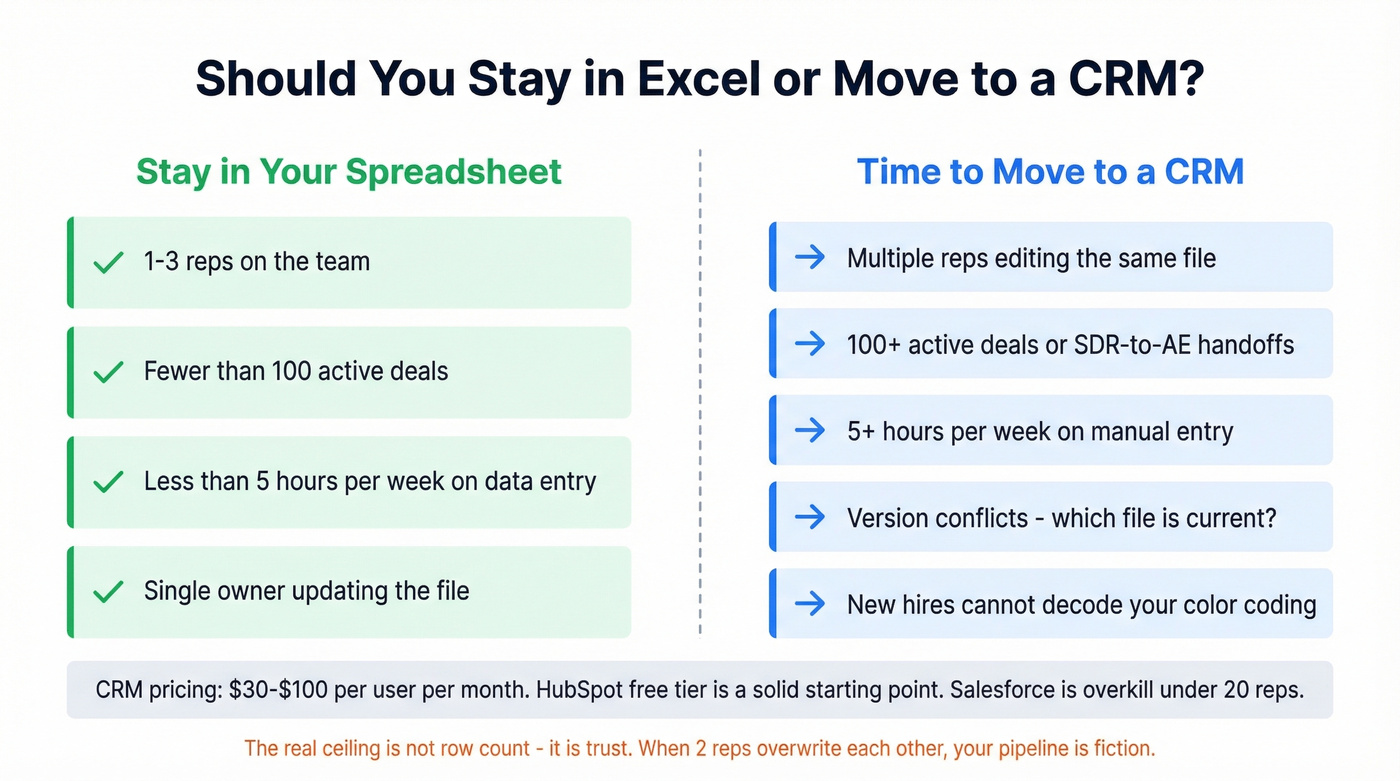
Move to a CRM when you hit any of these:
- Multiple reps editing the same pipeline file simultaneously
- 100+ active deals or frequent SDR-to-AE handoffs
- 5+ hours/week on manual data entry
- Version conflicts ("which file is current?")
- New hires can't decode your color-coded system
CRM pricing typically lands around $30-$100 per user/month for dedicated tools. HubSpot's free tier is a solid starting point. Salesforce is overkill for most teams under 20 reps - skip it unless you're already locked into the ecosystem.
Whether you stay in a spreadsheet or move to a CRM, the contacts going in need to be real. In our experience, the single biggest source of pipeline fiction isn't bad stages or wrong probabilities - it's unverified contact data. Prospeo's free tier verifies 75 emails/month, enough to clean your active pipeline before every weekly review.
If you’re building pipeline from scratch, pair this sheet with proven sales prospecting techniques and a shortlist of free lead generation tools.
You just built a pipeline tracker with stage probabilities and velocity formulas. Now it needs leads that actually convert. Prospeo gives you 300M+ profiles with 30+ filters - buyer intent, funding, headcount growth - so every row in your spreadsheet is a real opportunity.
Your template is ready. Now add leads worth tracking.
FAQ
What's the difference between a pipeline and a funnel?
A pipeline tracks salesperson actions and deal movement - where each opportunity sits right now. A funnel maps the buyer's journey with conversion rates at each stage. Your spreadsheet tracks the pipeline; the funnel is the analysis layer you build on top using stage conversion rates.
How often should I update my pipeline spreadsheet?
Daily if you're actively selling, and at minimum before every weekly review. A deal that closed last week still showing as "Negotiation" corrupts your forecast and misleads anyone reading the numbers. Stale data compounds fast - one outdated deal can skew your coverage ratio by 5-10%.
Can I use this template in both Excel and Google Sheets?
Yes. The download includes an .xlsx file for Excel and a Google Sheets version you can copy to your Drive. Formulas, dropdowns, and conditional formatting work in both. The only difference is collaboration - Sheets lets multiple reps edit simultaneously, while Excel needs OneDrive or SharePoint for real-time co-editing.
How do I keep pipeline contacts accurate without a CRM?
Use a verification tool before adding contacts to your sheet. Prospeo's free tier includes 75 email verifications per month at 98% accuracy - enough for small teams to validate every new lead. Pair that with a monthly audit where you re-verify any contact older than 90 days, and your pipeline stays clean without a CRM's built-in enrichment.