

How to Build a Sales Proposal PPT That Actually Closes Deals
Your VP just asked you to put together a sales proposal PPT for a deal that closes this quarter. You open PowerPoint to a blank slide. Now what?
The proposal software market is on track to hit $9B by 2035 because most teams still don't have a repeatable proposal process. And it shows - teams with defined win themes run 37% win rates vs. 29% without them. That gap isn't about slide design or font choices. It's about structure.
The 10-Slide Framework
This framework covers both the persuasion slides that win champions and the logistics slides - terms, contact info, draft contract - that procurement needs to approve. A tailored proposal deck takes 2-6 hours from scratch. With a strong template and content library, you can cut that to 30-90 minutes.
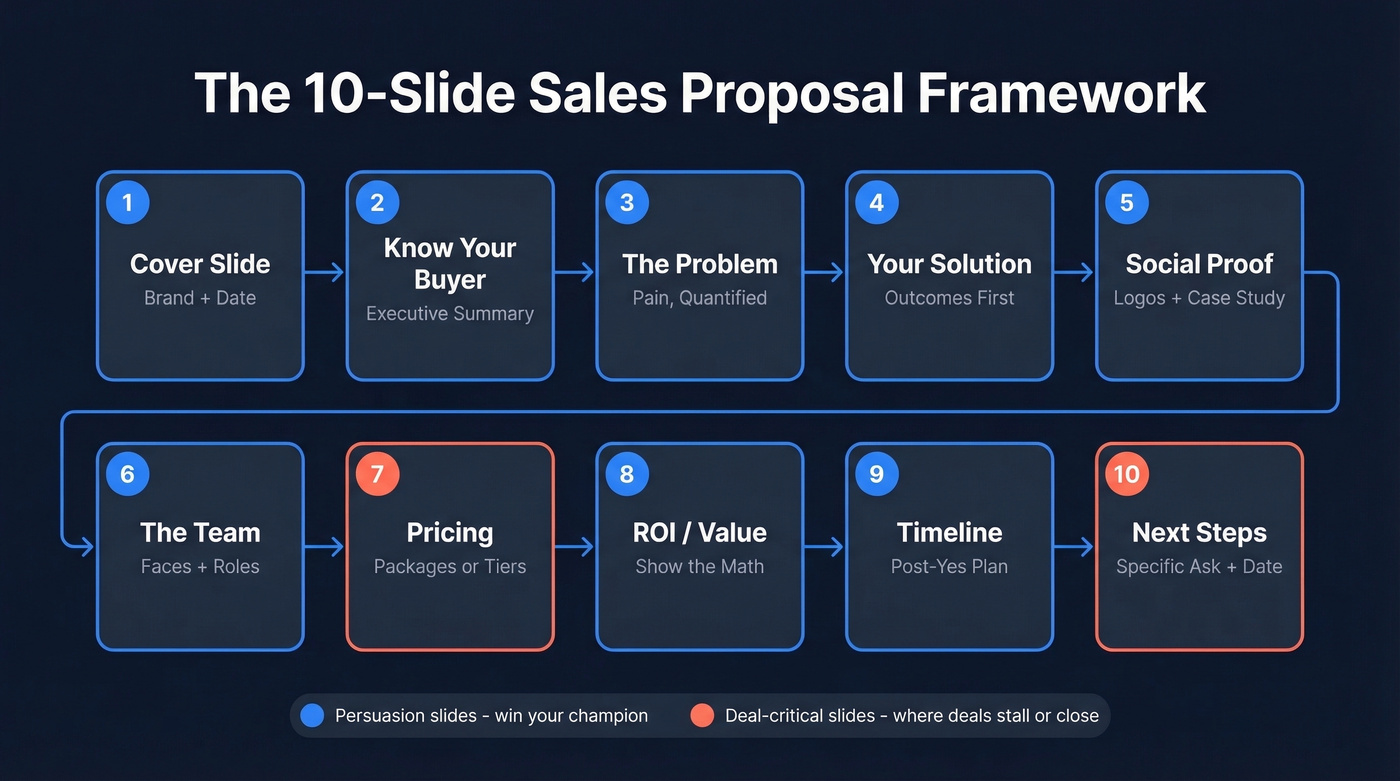
Here's the thing: an ugly proposal with the right structure closes more deals than a beautiful one that buries the ask on slide 18.
1. Cover slide - Your company, their company, date, deal name. Keep it clean and branded. No stock-photo handshake.
2. Know your buyer - Five to seven bullets that prove you did your homework. This is your executive summary in slide form: what they're trying to achieve, what's blocking it, and what success looks like in their language. This slide only works if you're sending the proposal to the actual decision-maker, so verify their email before you hit send - a bounced proposal burns weeks of pipeline work.

3. The problem - Their pain, quantified. Don't write "companies struggle with efficiency." Write "your SDR team is spending 6-8 hours/week chasing bad data and it's dragging meeting volume." (If you're building this into your outbound motion, align it with your sales prospecting techniques.)
4. Your solution - Outcomes first, features second. Show 3-5 capabilities, each tied to a measurable outcome - not a product tour. Humans process visuals 60,000x faster than text, so replace bullet walls with a simple diagram or comparison chart wherever you can.
5. Proof / social proof - Logos plus one tight case study. One strong story beats five vague testimonials. Include a before/after metric, the timeframe, and what changed operationally.
6. The team - Who they'll actually work with. Photos help. Add one line per person: role plus what they'll own in implementation. We've seen this single slide cut "who's my point of contact?" follow-up emails to zero. (If you need a system for what happens after the deck, use sales follow-up templates.)
7. Pricing & packages - Make the buying decision easy. If your proposal doesn't have a pricing slide, it's not a proposal - it's a brochure. Use one of two patterns: a single "recommended" package, or three tiers with clear boundaries showing what's included, what's not, and what upgrades unlock.
8. ROI / value - Show the math, not adjectives. Put a simple model on the slide: current cost, expected improvement, annualized impact. Keep assumptions explicit so finance doesn't dismiss it as fluff. (If you want to benchmark the rest of the funnel, track funnel metrics alongside proposal performance.)
9. Timeline / implementation - What happens after "yes." Outline phases, owners, and decision points. If there are dependencies - security review, data access, training - name them now. This is where terms, conditions, and contract language belong. Don't skip it; procurement will send you back if you do.
10. Next steps (the close) - A specific ask with a date. Terri Sjodin's research across 5,000+ sales professionals nails the failure mode: teams conclude but don't close. A conclusion summarizes. A close asks for commitment: "Approve by Friday, kickoff Monday, first milestone in 14 days." (If you want a broader framework, map this to the steps to close a sale.)
Mistakes That Kill Proposals
Use this as a final edit pass before you export the deck.
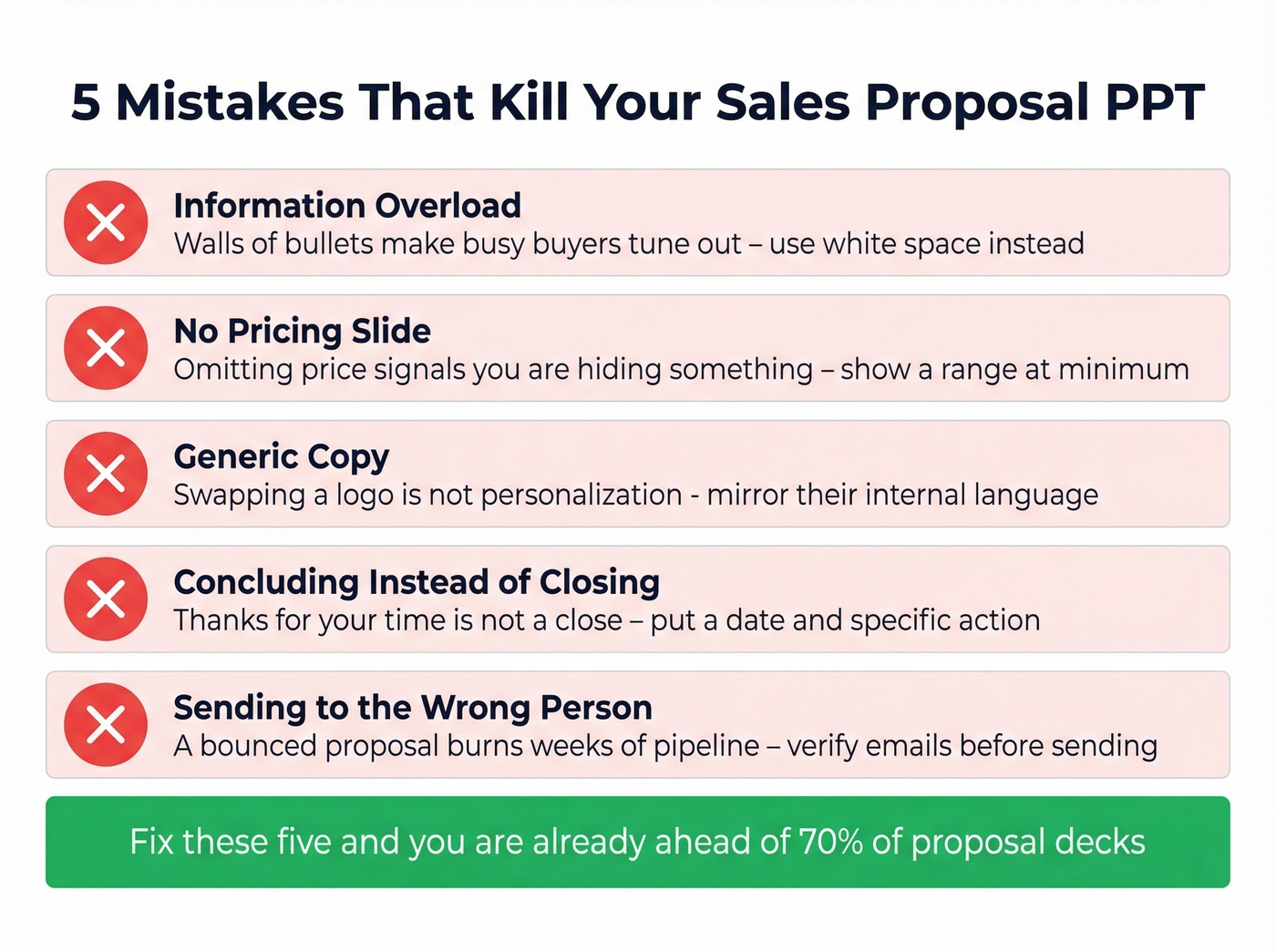
Information overload is the #1 killer. Data dumping is the fastest way to lose a busy buyer. If they have to squint at a wall of bullets, you've already lost. In our experience, the best proposals have fewer words per slide than you'd expect - and more white space than feels comfortable.
No pricing slide. Omitting price signals you're hiding something or you're not confident in the scope. Even if pricing is "pending final requirements," show a range and what drives it. This is where most deals stall or accelerate, and burying it in a follow-up email kills momentum.
Generic copy. Swapping a logo on a template isn't personalization. Your "Problem" slide should read like it came from their internal QBR, not a marketing one-pager you recycled from last quarter. If you're selling internationally, adapt tone and structure too - a proposal that works in New York will fall flat in Tokyo or Frankfurt.
Concluding instead of closing. "Thanks for your time" isn't a close. Put a calendar date and a clear action on the final slide. Ask any r/sales regular and they'll tell you the same thing: the proposal that wins isn't the prettiest - it's the one that makes the buyer's internal champion look smart enough to forward it with a specific next step attached. (If you want to tighten the narrative, use sales deck storytelling.)
Sending to the wrong person. A proposal that bounces is worse than no proposal because it burns momentum. We've watched reps lose three-week-old deals because the email address they had was outdated. Verify your contact's email in real time before you send - tools like Prospeo's email finder catch bad addresses before they waste your pipeline. (If you're comparing options, see Bouncer alternatives for verification.)

Your proposal only closes deals if it reaches the decision-maker. Prospeo's email finder verifies contacts in real time with 98% accuracy - so your 10-slide deck lands in the right inbox, not a bounce folder. At $0.01 per email, it costs less than the coffee you drank while building that deck.
Stop losing deals to outdated emails. Verify before you send.
What High-Win Teams Do Differently
The gap between quota-hitters and everyone else isn't "better slides." It's process.
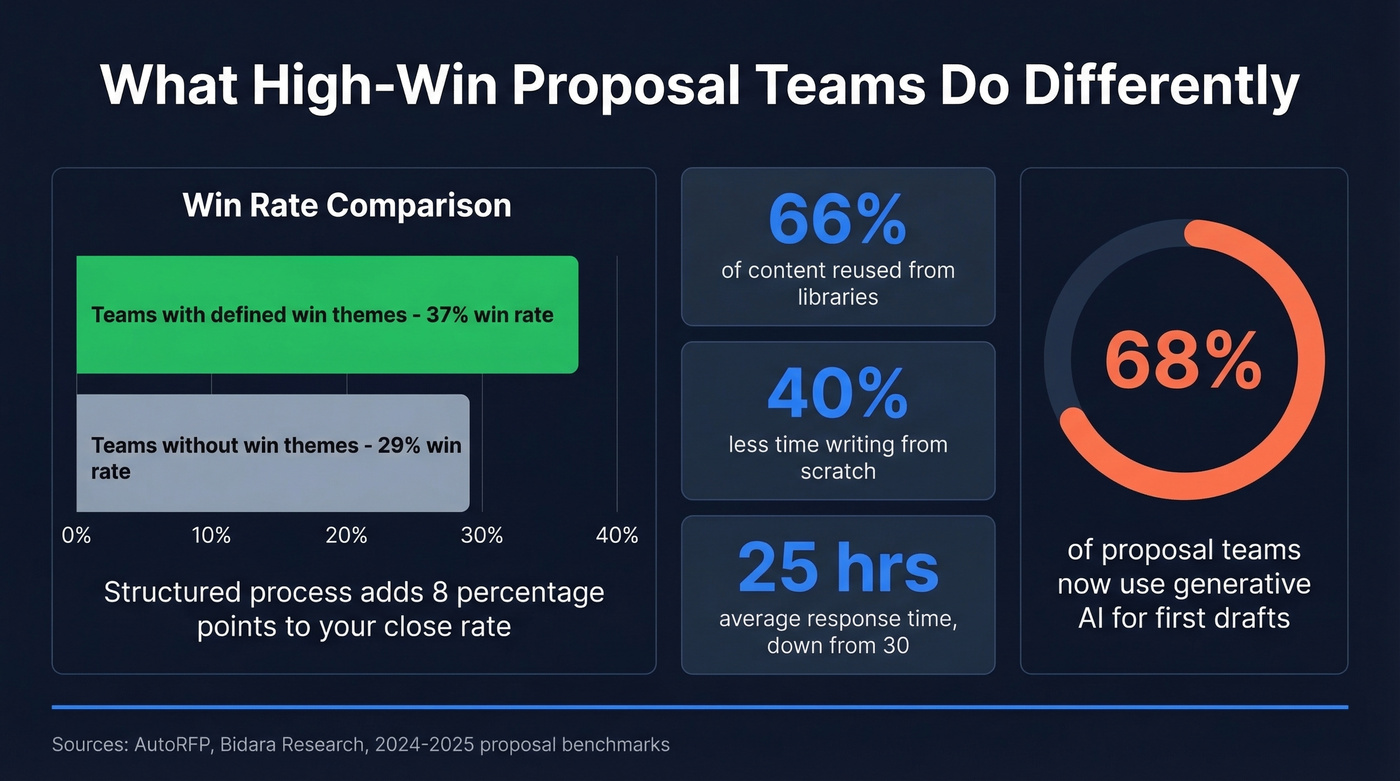
Across multiple dimensions - win themes, governance, customer research - teams with structure consistently hit 37% win rates vs. 29-30% without. That's not a rounding error; it's a repeatable advantage. On the ops side, proposal teams with a content library reuse 66% of their material and spend 40% less time writing from scratch, while the average RFP win rate sits around 45% overall. Average proposal response time has dropped to 25 hours, down from 30 in 2024 - largely because 68% of proposal teams now use generative AI to draft first passes and repurpose existing content. (If you're operationalizing this, build it into your sales process optimization.)
Let's be honest about what this means in practice. Most teams lose deals not because their product is worse, but because their proposal process is nonexistent. They reinvent the wheel every time, skip the pricing slide, and send to an unverified email. Process beats talent. Define your win themes before you open PowerPoint, build a content library, and reuse what works. The difference between a forgettable pitch and a winning proposal presentation is almost always structure, not aesthetics. (This is also where sales enablement makes or breaks consistency.)
Templates & Tools for 2026
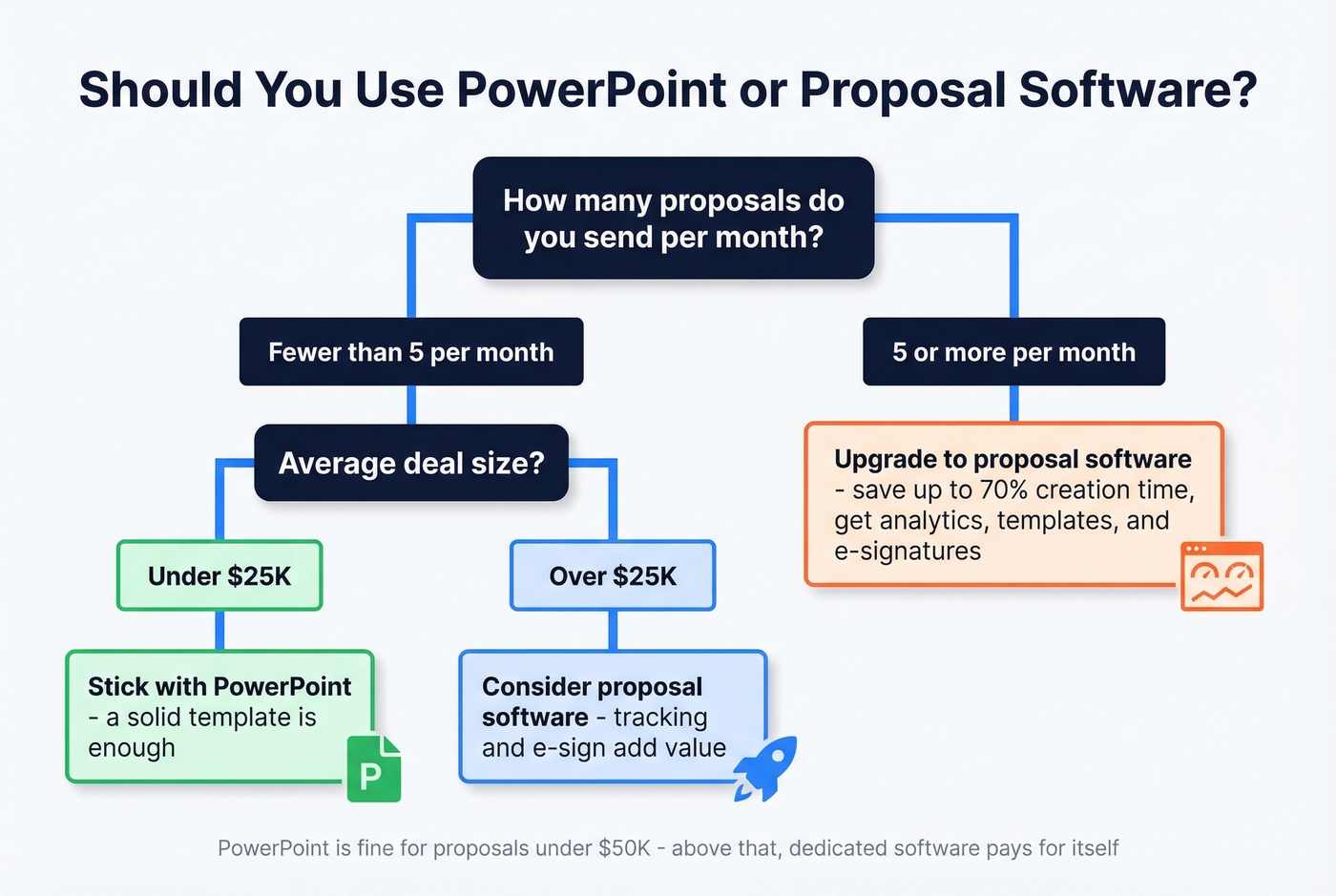
Start with templates when speed matters, then upgrade to proposal software when the deal size and buying committee justify it. PowerPoint is fine for proposals under $50K. Above that, dedicated proposal software pays for itself.
Free Proposal Deck Templates
| Source | Price | Notes |
|---|---|---|
| Microsoft templates | Free | Basic, editable |
| Canva | Free tier | Best design - browse sales templates |
| Pitch | Free | Modern collab - structure guide |
| Slidesgo | 3 free/mo | Slides + PPT |
| Beautiful.ai | 14-day trial | Auto-format |
For a clean baseline layout you can adapt, SlideModel's proposal template is worth bookmarking - it's a solid PowerPoint example to study before building your own. For inspiration, study decks from Zuora, Uber for Business, and Reddit's ad sales team. They all lead with the buyer's problem, not their logo.
When to Upgrade to Proposal Software
Teams using proposal platforms save up to 70% of creation time because you get templates, tracking, e-signatures, and analytics that PPT will never have.
| Tool | Starting price | Best for |
|---|---|---|
| Better Proposals | $19/mo | Budget teams |
| Proposify | From $45/mo | Simple deals |
| PandaDoc | From $35/mo | E-sign + docs |
| Qwilr | $35/mo | Design-forward |
| Oneflow | $17/user/mo | Free plan available |
Skip proposal software entirely if you're running fewer than five proposals a month and your average deal is under $25K. The ROI just isn't there yet - a well-structured PowerPoint template will do the job.
You just spent hours crafting the perfect proposal PPT with win themes, pricing, and ROI math. Now make sure you're sending it to real buyers. Prospeo gives you 300M+ verified contacts with 30+ filters - job title, company size, intent signals - so your proposal reaches the person who can actually sign off.
Build your proposal list with contacts that are verified every 7 days.
FAQ
How many slides should a sales proposal have?
Aim for 8-15 slides. That range covers the problem, solution, proof, pricing, and next steps while staying short enough that a busy executive reads the whole deck end-to-end. Cut anything that doesn't advance the deal.
Should I use PowerPoint or Google Slides?
Use PowerPoint when your buyer expects a .pptx file and offline sharing. Use Google Slides when you need real-time collaboration and fast iteration. Either way, structure and clarity beat tool choice every time.
How do I make sure my proposal reaches the decision-maker?
Verify your contact's email before sending so the proposal doesn't bounce or land with the wrong stakeholder. A bounced proposal kills weeks of pipeline work - real-time email verification catches bad addresses before they waste your momentum.
Can I reuse the same proposal deck template for every deal?
A template gives you a repeatable starting point, but the best reps customize slides 2, 3, and 7 - buyer context, problem, and pricing - for every opportunity. Treat the template as a framework, not a fill-in-the-blank form.