

Sales Tracker Guide: Tools, KPIs & Templates (2026)
A rep on your team just lost a $15K deal. Not because the pitch was bad or the product didn't fit - because the follow-up got buried in a spreadsheet tab nobody checked. The prospect went dark, a competitor swooped in, and your pipeline report still showed it as "active." Sales reps spend 60% of their time on non-selling tasks, and a broken sales tracker is one of the biggest reasons why.
The right tracking system fixes this. The wrong one adds another tool nobody updates. Let's figure out which one you actually need.
The Quick Decision
Before we go deep, here's the shortcut:
- Under 3 reps, under 100 deals? Use the free OnePageCRM spreadsheet template. It's genuinely good.
- Ready for a real CRM? HubSpot (free), Pipedrive ($14/seat/mo), or Zoho CRM (free for up to 3 users).
Now the details.
What Is a Sales Tracker?
It's any system - spreadsheet, app, or full CRM - that records your deals, activities, and pipeline movement so you can see what's working and what's stalling. If you're in e-commerce, you might be thinking of product-tracking tools like WinningHunter. That's a different world. This guide covers B2B pipeline and activity tracking: knowing which deals are moving, which reps are hitting targets, and where your revenue forecast actually stands.
Spreadsheet or CRM?
Spreadsheets aren't inherently bad. For a solo founder running 30 deals, a well-built Google Sheet beats a CRM you'll never configure properly. The OnePageCRM template is the best free option we've found - it includes color-coded status indicators with red for overdue and orange for due today, a six-chart dashboard, and per-rep views. For early-stage tracking, it's more than enough.
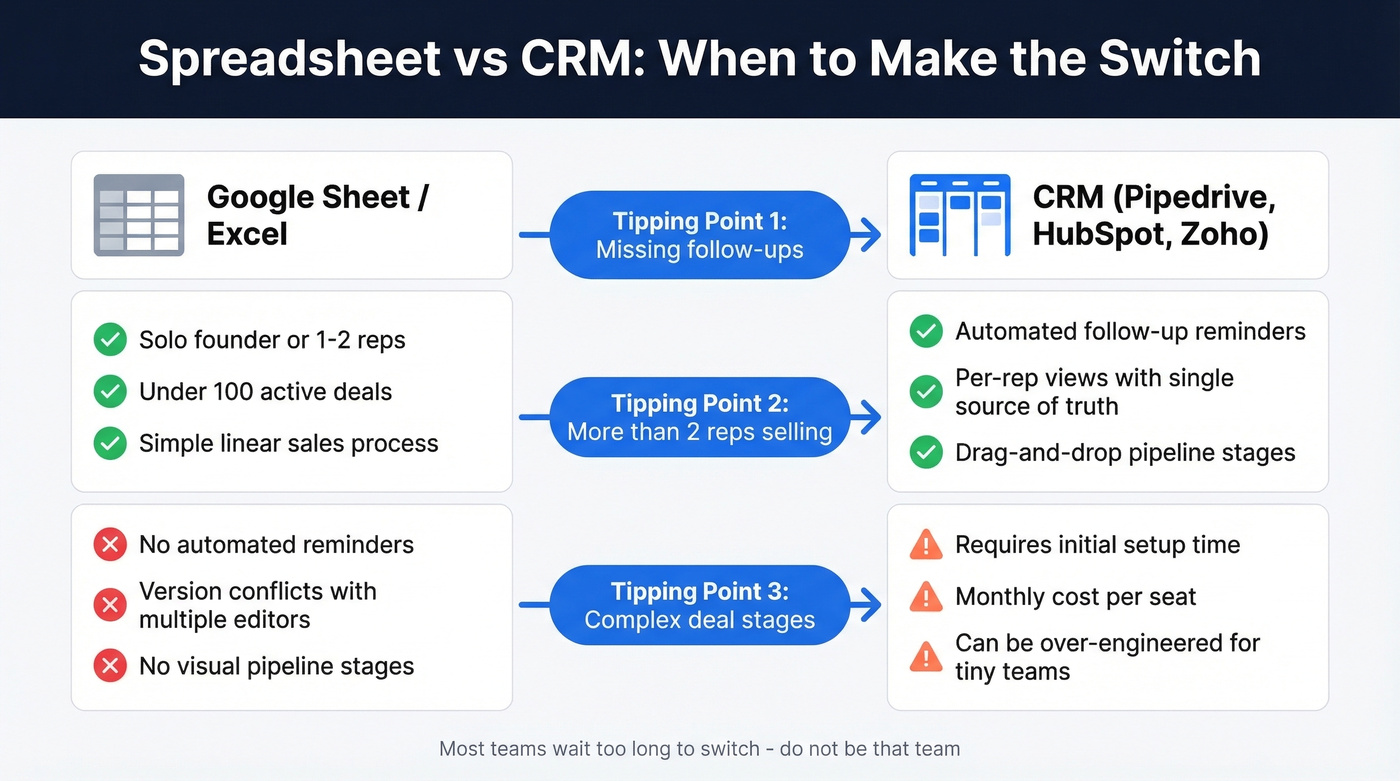
But spreadsheets are static snapshots, and CRMs are dynamic engines. There are three clear tipping points where the spreadsheet breaks.
You're missing follow-ups. If a deal slips through because nobody saw the row turn red, that's a system failure. CRMs send automated reminders. Spreadsheets rely on someone remembering to check. If follow-up is a recurring issue, keep a set of sales follow-up templates handy so reps don't stall.
More than two people are selling. The moment you have multiple reps editing the same sheet, you get version conflicts, overwritten data, and zero accountability. A CRM gives each rep their own view while keeping leadership on a single source of truth.
Deal stages are getting complex. If you're managing discovery calls, demos, proposals, negotiations, and legal reviews across dozens of accounts, a flat spreadsheet can't represent that pipeline visually - you need drag-and-drop stages and automated transitions. If you're formalizing stages, it helps to map them to the steps to close a sale your team actually follows.
Most teams wait too long to switch. They keep patching the spreadsheet until they've lost enough deals to justify the migration. Don't be that team.
Best Sales Trackers in 2026
Most "best sales tracker" lists recommend tools you've never heard of - Zendesk's list includes Spiro, Salesdash, and Skynamo. Let's skip the obscure picks and focus on the tools teams actually use, plus the data quality piece most guides ignore.
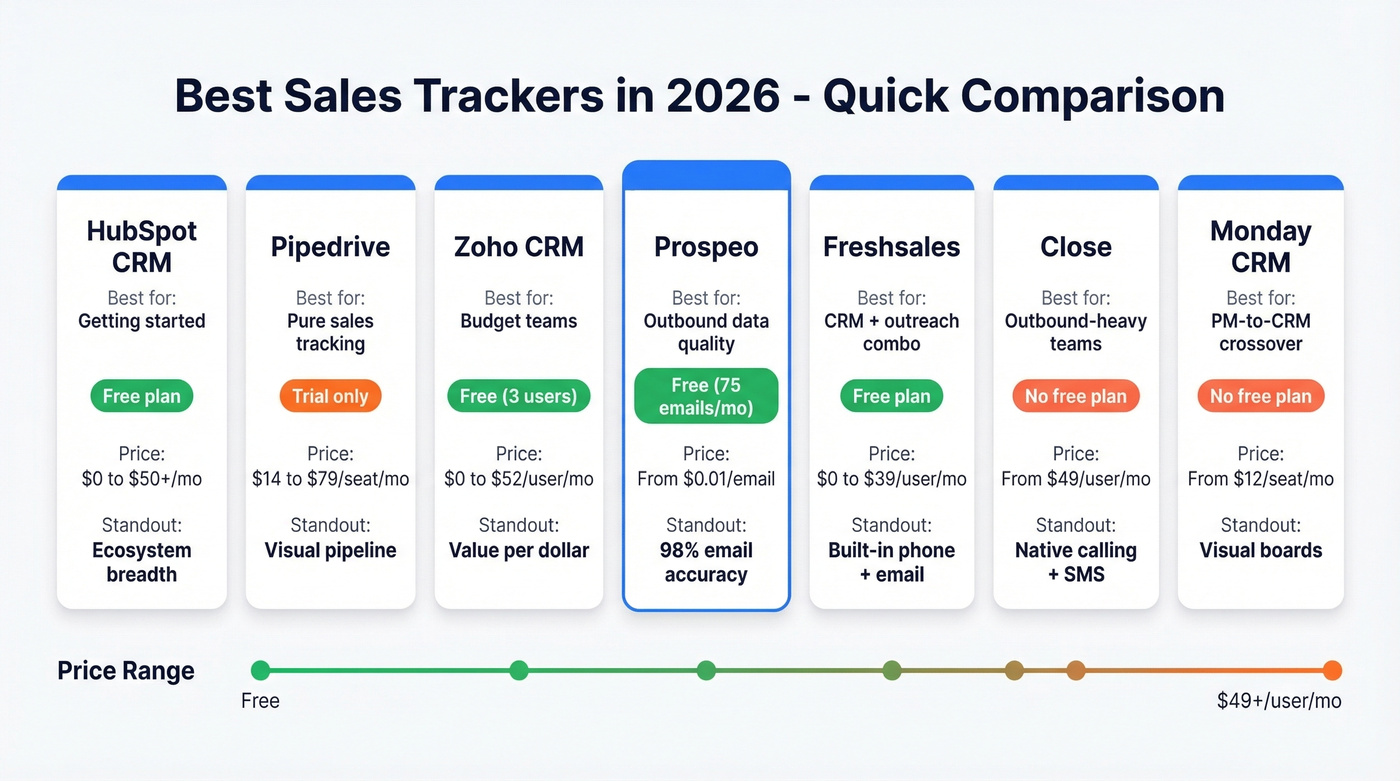
| Tool | Best For | Free Plan? | Starting Price | Standout Feature |
|---|---|---|---|---|
| HubSpot CRM | Getting started | Yes (limited) | ~$50/mo (Starter) | Ecosystem breadth |
| Pipedrive | Pure sales tracking | No (14-day trial) | $14/seat/mo | Visual pipeline |
| Zoho CRM | Budget teams | Yes (up to 3 users) | $14/user/mo | Value per dollar |
| Prospeo | Outbound data quality | Yes (75 emails + 100 extension credits/mo) | ~$0.01/email | 98% email accuracy |
| Freshsales | CRM + outreach combo | Yes (limited) | ~$9/user/mo | Built-in phone + email |
| Close | Outbound-heavy teams | No | ~$49/user/mo | Native calling + SMS |
| Monday CRM | PM-to-CRM crossover | No | ~$12/seat/mo | Visual boards |
HubSpot Free CRM
Use this if you're a small team that wants a real CRM without spending anything upfront. The free tier includes contact management, deal pipelines, email tracking, a meeting scheduler, and basic reporting. It's the best starting point for most small teams. If you're comparing options, here are more examples of a CRM with real pricing.
Skip this if you need automation or have more than a couple of reps. Nutshell's breakdown of HubSpot's free setup lists a 1,000-contact limit and 2 user seats - plus no workflows and no custom reporting. You'll hit the wall faster than you think, and Starter runs about $50/mo to unlock basic automation. From there, pricing escalates quickly into Sales Hub Professional territory at $450/mo and up. HubSpot's genius is the free hook; the business model is the upgrade path.
Pipedrive
Pipedrive is the gold standard for pure deal management. The visual pipeline - drag-and-drop stages, activity-based selling methodology, clean reporting - doesn't require a RevOps degree to configure. If you want a tool that does exactly one thing and does it better than anyone else, this is it.

The catch: no free tier, just a 14-day trial. Pricing runs Lite at $14/seat/mo, Growth at $39, Premium at $59, and Ultimate at $79, all on annual billing. Pipedrive renamed its plans in 2025, so a lot of third-party content still references the old "Professional" tier, which no longer exists. Add-ons like LeadBooster at $32.50/mo and Web Visitors at $41/mo push costs up if you need prospecting features. See our Pipedrive vs Zoho comparison for a full pricing breakdown.
Zoho CRM
Use this if you want the best value in CRM software. Zoho's free plan supports 3 users with 5,000 records and 1GB storage - and it's a real product, not a demo. Paid plans start at $14/user/mo (Standard) and scale to $52/user/mo (Ultimate). If you're also trying to keep your database clean, pair your CRM with data enrichment services so records don't go stale.
Skip this if you want a polished, opinionated UX. Zoho gives you so many configuration options that initial setup takes longer than Pipedrive. The interface feels more utilitarian than modern. But the Professional tier at $23/user/mo hits a sweet spot for growing teams that need workflow automation without enterprise pricing.
Freshsales
Freshsales is the quiet overachiever in this category. It bundles a built-in phone dialer and email sequences alongside standard pipeline management - no stitching together integrations. The free tier covers basic contact and deal management. Paid plans start around $9/user/mo and scale to about $39/user/mo for the Pro tier with AI-powered forecasting. It's not as extensible as HubSpot or Zoho, but for teams that want CRM and outreach in a single login, it's one of the most cost-effective options available. If you're building an outbound stack, compare it against other SDR tools before you commit.
Close
Close starts around $49/user/mo and is built for teams that live on the phone. Native calling, SMS, and email sequencing are baked in - no add-ons needed. If your reps make 50+ dials a day, Close is purpose-built for that workflow. The price is steep compared to Pipedrive, but you're paying for a dialer that'd cost extra everywhere else. For dialing-heavy teams, it can help to standardize a cold calling system alongside the CRM.
Monday CRM
Monday CRM starts around $12/seat/mo and is the obvious pick for teams already running Monday for project management. The visual pipeline boards feel familiar if you're used to Monday's interface. It's not as deep on sales-specific features as Pipedrive, but the crossover convenience is real.

A sales tracker shows you which deals are stalling. But bad contact data is why they stall in the first place. Prospeo's 300M+ profiles with 98% email accuracy and 125M+ verified mobiles mean your reps actually reach the buyer - not a dead inbox.
Stop tracking deals that were dead on arrival. Fix the data first.
KPIs That Actually Move Revenue
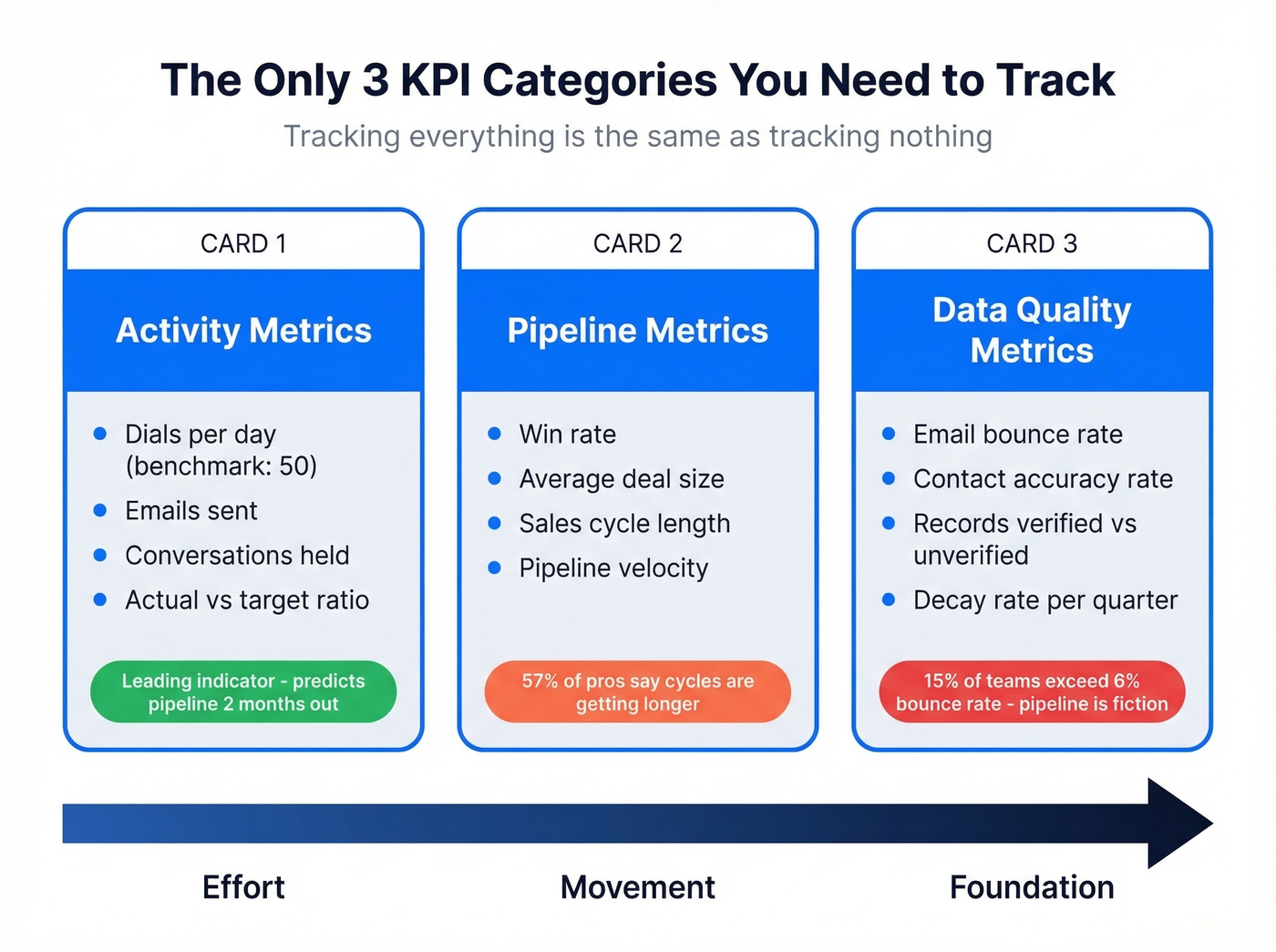
Tracking everything is the same as tracking nothing. We've seen teams build 30-metric dashboards that nobody checks. Focus on three categories instead.
Activity Metrics
These measure effort. Dials per day (50 is a common benchmark), emails sent, conversations held. They're leading indicators - if activity drops, pipeline dries up two months later. But raw dial counts can mislead: a rep making 30 personalized calls often outperforms one making 80 generic dials. Track actual vs. target, not just volume. If you need a baseline list, start with these sales activities examples.
Pipeline Metrics
Win rate, average deal size, sales cycle length, and pipeline velocity tell you how fast deals move through stages. A quick distinction worth knowing: your pipeline shows active deals progressing through stages, while your funnel shows conversion rates at each step. Both matter, but pipeline metrics are what your tracking system should surface daily. If you want a tighter model, use a dedicated pipeline health framework.
57% of sales professionals say the sales cycle is getting longer. If you're not tracking cycle length, you won't see the slowdown until it's already hit your quarter.
Data Quality Metrics
These are the ones everyone ignores until it's too late. Bounce rate and contact accuracy rate tell you whether your outbound engine is running on clean fuel or contaminated data. 48% of teams report bounce rates between 2-5%, and 15% exceed 6%. If your bounce rate is above 5%, your pipeline numbers are fiction. Verifying emails before they enter your CRM - at 98% accuracy with Prospeo - is the difference between a pipeline you can trust and one built on guesswork. If you're diagnosing issues, start with email bounce rate benchmarks and fixes.
Why Bother With a Sales Tracker?
The benefits compound over time, and they go well beyond "knowing where your deals are."
Visibility kills surprises. When every deal, activity, and follow-up lives in one place, managers spot stalled opportunities before they die - and reps stop relying on memory to decide who to call next. One of our team members once watched a $40K deal sit untouched for 11 days because the owner was on vacation and nobody else could see it in the spreadsheet. That doesn't happen in a shared CRM.
Forecasting gets honest. A clean tracker with accurate stage data lets you project revenue based on real pipeline movement, not gut feel. Teams that track pipeline velocity can predict quarterly outcomes within 10-15% accuracy, while spreadsheet-guessers routinely miss by 30% or more. If forecasting is a priority, consider dedicated sales forecasting solutions.
Rep accountability without micromanagement. Activity metrics in a shared system mean managers don't need to ask "what did you do today?" The data answers for them, which frees up 1:1s for coaching instead of status updates.
Faster onboarding for new hires. A well-maintained tracking system doubles as institutional knowledge. New reps can see which sequences, talk tracks, and deal stages produce wins - shortening ramp time significantly. A simple 30-60-90 day plan for sales reps makes adoption stick.
Five Sales Tracking Mistakes
1. Tracking vanity metrics instead of revenue drivers. "Emails sent" feels productive. "Reply rate by segment" actually tells you something. Every metric in your tracker should connect to a revenue outcome within two steps. If it doesn't, remove it.
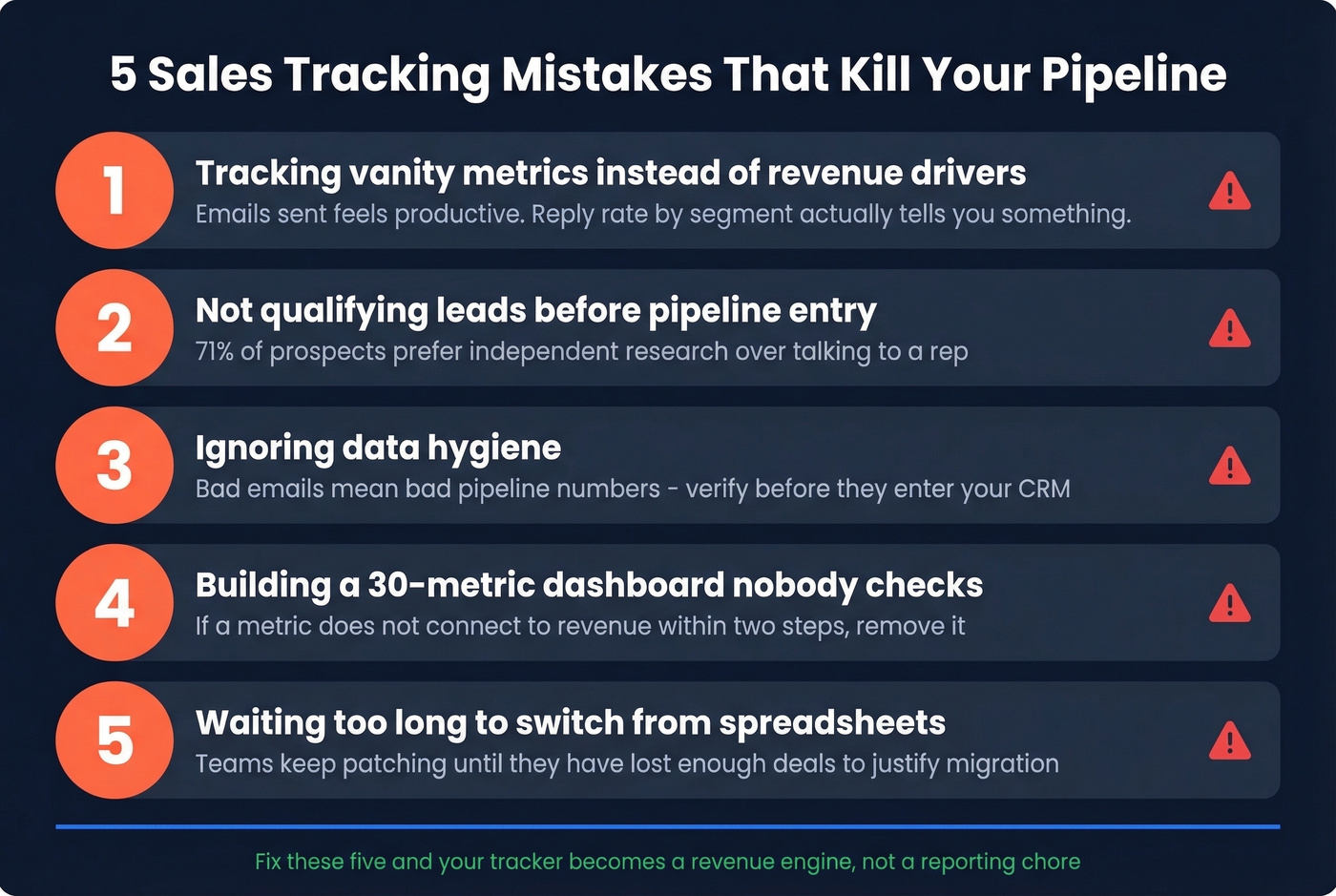
2. Not qualifying leads before they enter the pipeline. 71% of prospects prefer independent research over talking to a rep. If they're not ready, pushing them into your pipeline inflates numbers without adding real opportunity. Gate your pipeline entry.
3. Ignoring data hygiene. 24% of CRM admins report that less than half their data is accurate and complete. That's not a rounding error - it means one in four teams is making decisions on a foundation of garbage. Verify contact data at the source before bad records ever touch your CRM.
4. Overcomplicating the tool. Buying Salesforce when you need a spreadsheet is like hiring a CFO to balance your checkbook. Match the tool to your actual complexity. A 5-person team doesn't need enterprise CRM - they need a clean pipeline view and reliable reminders.
Here's the thing: if your average deal size sits below $10K, you probably don't need anything beyond Pipedrive or Zoho. The teams drowning in Salesforce admin work at that price point would close more revenue with a simpler tool and better data.
5. Not tracking outbound quality. Most teams track how many emails they send but not how many actually land. Bounce rates, reply rates, and deliverability scores are the health check for your outbound engine. If you're not measuring them, you're flying blind.
You just picked a CRM. Now fill it with data that won't wreck your domain. Prospeo enriches your pipeline with 50+ data points per contact at a 92% match rate - refreshed every 7 days, not every 6 weeks like competitors.
Enrich your CRM with contacts that actually convert. Start with 75 free emails.
How to Switch from Spreadsheets to a CRM
Real talk: migration timelines run 30-50% longer than initial estimates. Teams plan for 2-4 weeks and end up spending 2-4 months. Budget accordingly and follow this sequence.
Audit your current data. Export everything from your spreadsheet and assess what you actually have. How many contacts? How many are duplicates? How many fields are consistently filled?
Clean and deduplicate. Remove dead contacts, merge duplicates, and standardize formats for phone numbers, company names, and deal stages. Remember that 24% stat about CRM data accuracy - most of that bad data was imported dirty and never cleaned.
Choose your tool. Use the comparison table above. Don't overthink this - pick based on team size, budget, and whether you need marketing features alongside sales tracking.
Import and test. Load a small batch first. Verify that fields map correctly, automations trigger as expected, and nothing breaks. Then import the rest.
Train the team. The best CRM in the world fails if reps don't use it. Block 2-3 hours for hands-on training, set required fields so critical data can't be skipped, and review adoption weekly for the first month. The consensus on r/sales is that CRM adoption is the single biggest predictor of whether a migration succeeds or becomes expensive shelfware.
FAQ
What's the best free sales tracker?
HubSpot Free CRM is the strongest option for teams wanting a real CRM at zero cost. Zoho CRM's free plan supports up to 3 users with 5,000 records - more generous for small teams. For solo founders, OnePageCRM's Google Sheets template is the best spreadsheet starting point.
Can I use a spreadsheet to track sales?
Yes, if you have fewer than 3 salespeople and under 100 active deals. Once you're missing follow-ups or collaborating across multiple reps, switch to a CRM like Pipedrive ($14/seat/mo) or HubSpot's free tier.
How do I keep my tracker data accurate?
Verify contact data before importing it - 98% email accuracy at $0.01/email catches bad records before they pollute your CRM. Deduplicate monthly. Set required fields so reps can't skip critical information. A 7-day data refresh cycle prevents stale contacts from lingering.
What's the difference between a sales tracker and a CRM?
A sales tracker is any system that records deals and activities - a spreadsheet, a mobile app, or dedicated software. A CRM adds automation, integrations, and reporting on top. Every CRM is a tracker, but not every tracker is a CRM. Start with whatever matches your current complexity.
What are the main benefits of using one?
The biggest wins are pipeline visibility, accurate forecasting, and rep accountability. A well-maintained system also shortens new-hire ramp time and eliminates the "lost follow-up" problem that kills deals in disorganized teams. Even a simple spreadsheet delivers these benefits - the key is consistent use, not tool sophistication.