

Salesforce Data Cleansing Best Practices: Clean Less, Win More
Poor data quality costs organizations around $15M per year. Here's the thing nobody talks about: most of that cost isn't dramatic - it's slow. Reps stop trusting the CRM, adoption drops, data gets worse, and suddenly your pipeline reports are fiction. That vicious cycle is expensive enough on its own. But now, with Agentforce and AI workflows demanding clean inputs to produce anything useful, dirty Salesforce data isn't just a nuisance - it's a blocker for your entire automation roadmap.
The best practices that follow are built for that reality.
Quick-Start Summary
Short on time? Here's the framework. Clean 5 fields, not 300.
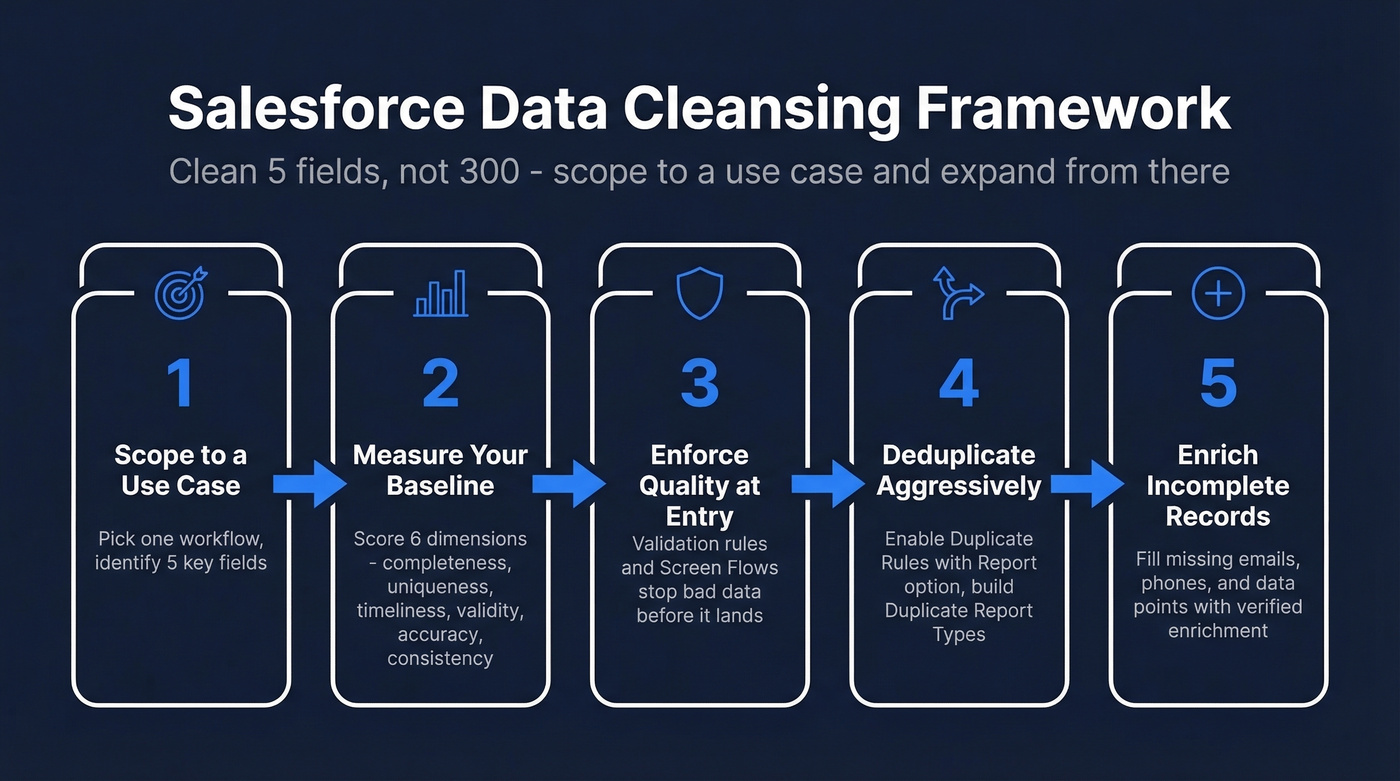
- Scope to a use case. Pick one workflow - an Agentforce agent, a sequence, a report - and identify the minimum fields it needs.
- Measure your baseline. Score your data across 6 dimensions: completeness, uniqueness, timeliness, validity, accuracy, consistency.
- Enforce quality at entry. Validation rules and Screen Flows stop bad data before it lands.
- Deduplicate aggressively. Turn on Duplicate Rules with the "Report" option and build Duplicate Report Types.
- Enrich incomplete records. Deduplication can't add missing emails or phone numbers - push incomplete contacts through an enrichment tool to fill gaps with verified data.
That's the whole playbook. The rest of this guide unpacks each step.
Scope Your Cleanup First
68% of organizations struggle to find reliable data, per Dresner Advisory Services. The instinct is to fix everything at once. Don't.
The Salesforce Admins podcast calls this "boiling a cup of water, not the ocean." Start from the specific functionality you're trying to enable. If you're building an Agentforce agent that emails a customer when an Opportunity is 5 days from close and unsigned, you need roughly 5 fields: Opportunity name, stage, close date, account, and primary contact. That's your cleanup scope - not 300 fields across every object.
In our experience, teams that scope to 5 fields finish cleanup in days, not months. Scope to the use case, clean what matters, then expand.

You scoped your cleanup to 5 fields - but what happens when those fields are empty? Prospeo's CRM enrichment fills missing emails, phones, and 50+ data points per contact with a 92% match rate and 98% email accuracy. No manual research. No guessing.
Stop cleaning records that are still incomplete - enrich them.
Measure Your Baseline
Before you touch a single record, you need to know what "dirty" actually looks like in your org. These six dimensions give you a scoring framework:
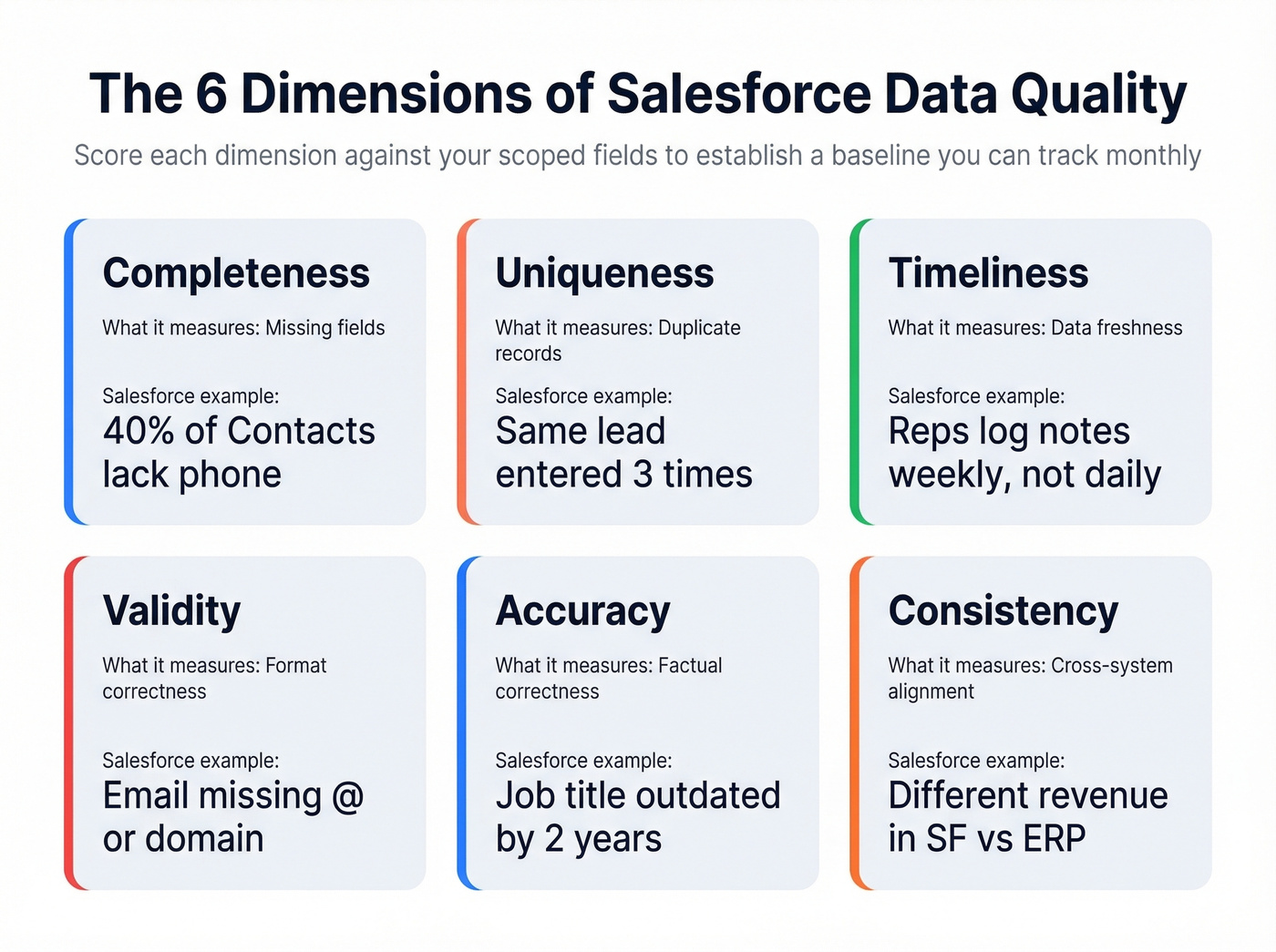
| Dimension | What It Measures | Salesforce Example |
|---|---|---|
| Completeness | Missing fields | 40% of Contacts lack phone |
| Uniqueness | Duplicate records | Same lead entered 3 times |
| Timeliness | Data freshness | Reps log notes weekly, not daily |
| Validity | Format correctness | Email missing "@" or domain |
| Accuracy | Factual correctness | Job title outdated by 2 years |
| Consistency | Cross-system alignment | Different revenue in SF vs ERP |
Run a report for each dimension against your scoped fields. You'll get a baseline score you can track monthly - without this, you're cleaning blind.
If you're building outbound workflows, tie your baseline to lead generation metrics so you can see the revenue impact of cleaner records.
Core Practices for Clean Data
Establish a Governance Framework
Governance sounds bureaucratic until you realize it's the only thing that prevents your cleanup from decaying within 90 days. Build yours around four pillars:
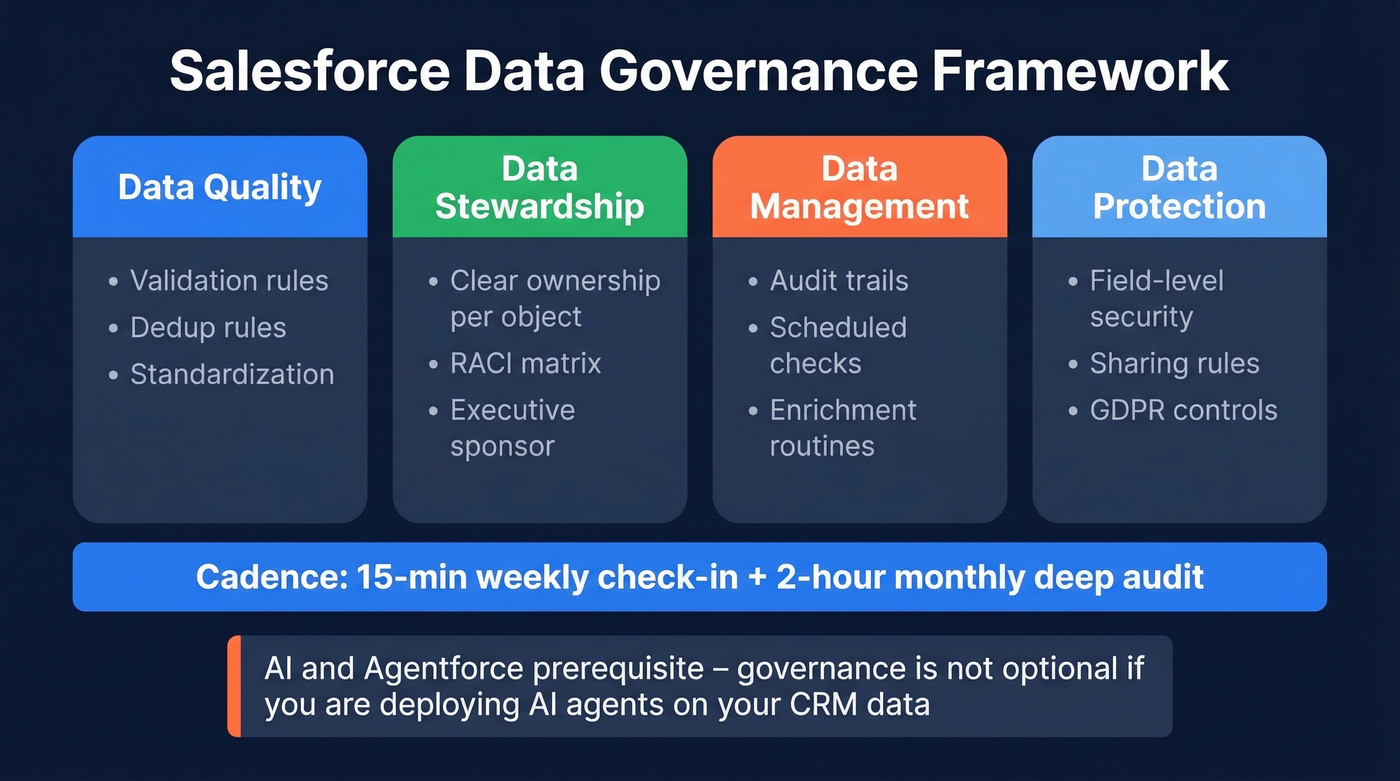
Data Quality covers validation rules, dedup rules, and standardization. Data Stewardship means clear ownership per object - who's responsible for Account data vs. Contact data? Data Management includes audit trails, scheduled checks, and enrichment routines. Data Protection/Compliance handles field-level security, sharing rules, and GDPR controls.
Assign a RACI matrix so everyone knows who's Responsible, Accountable, Consulted, and Informed. Without executive sponsorship, governance dies in committee. Position it as disaster prevention - pipeline inflation, commission disputes, compliance risk - to get leadership buy-in.
The cadence that works: a 15-minute weekly check-in to review metrics, plus a 2-hour monthly deep audit. If ongoing maintenance takes longer than that, your prevention systems need tightening. And here's the angle most governance frameworks miss entirely - if you're planning to deploy Agentforce or any AI-driven automation, governance isn't optional. It's the prerequisite. AI agents trained on dirty data produce confidently wrong outputs, which is worse than no automation at all.
This is also where RevOps should own the operating system - see the responsibilities of a RevOps Manager if you need a clear owner.
Enforce Quality at Entry
The cheapest record to clean is the one that never gets dirty. Validation rules are your first line of defense - they're conditional gates, not blunt required fields.
A classic pattern prevents reps from saving a Closed Lost Opportunity without a reason. The rule fires when the error condition evaluates to true:
AND(
  ISPICKVAL(StageName, "Closed Lost"),
  ISBLANK(TEXT(Closed_Lost_Reason__c))
)
TEXT() is a common pattern for checking whether a picklist is blank, because ISBLANK() doesn't evaluate picklist fields directly unless you convert them to text.
Use Insert Field in the formula editor to avoid API name mistakes. The Stage field's API name is StageName, not "Stage" - that trips people up constantly.
For more complex data capture, Screen Flows guide reps through structured input instead of hoping they'll fill in the right fields. They're especially useful for onboarding new accounts where you need 8-10 fields populated correctly on the first pass.
If your entry rules are meant to support outbound, align required fields to your ideal customer profile so reps capture what actually drives targeting.
Deduplicate Aggressively
Salesforce's native duplicate management is underused. The two pieces work together: Matching Rules define how duplicates are identified - field comparisons like email, phone, or company name - while Duplicate Rules define what happens when a match is found: block, allow, alert, or report.
Enable the "Report" option on your Duplicate Rules for both create and edit actions. This generates Duplicate Reports you can actually monitor. To build the report, go to Setup -> Report Types -> create a new type with Duplicate Record Set as the primary object, then relate Duplicate Record Items. Group rows by Duplicate Record Set Name, run the report, and click any set name to see the clustered records.
One edition caveat: Duplicate Jobs are available in higher-tier editions like Performance and Unlimited. If you need bulk dedup beyond what your edition supports, a third-party tool like DemandTools can help.
Enrich Incomplete Records
Most data cleansing guides skip this entirely. A commonly cited benchmark is that 90% of CRM contacts include incomplete data. Deduplication and formatting can't add a missing email address or phone number - they just rearrange what's already there.
Enrichment is a cleansing step, not a separate project. We've watched teams spend weeks deduplicating and standardizing records only to realize their contact database is still missing 40% of email addresses. All that cleanup effort, and sequences still run at 60% capacity before a single message goes out. That's frustrating - and entirely avoidable.
If you're evaluating vendors, compare options in our roundup of data enrichment services and the deeper breakdown on lead enrichment.

Automate Ongoing Maintenance
A one-time cleanup is worthless without automation to keep it clean. These rules for Salesforce Flows aren't negotiable:
- Sandbox first. Never build or update automation in production. Test at realistic volumes - a Flow that works at 50 records can fail at 5,000 due to CPU time limits.
- Modular subflows. Break large Flows into reusable autolaunched subflows. This simplifies maintenance and helps manage governor limits.
- Set Trigger Order. Since Spring '22, you can run multiple focused record-triggered Flows in a defined sequence instead of cramming everything into one monolithic trigger.
- Scheduled audit dashboards. Build a dashboard that surfaces completeness scores, duplicate counts, and stale records weekly. If the numbers drift, you catch it before it compounds.
Let's be honest: if your Agentforce deployment is stalled, the bottleneck probably isn't your AI configuration - it's your data. We've seen more AI rollouts blocked by incomplete Contact records than by any technical limitation. Automation that monitors data quality isn't just housekeeping; it's the foundation your AI strategy sits on.
If your cleanup is meant to improve forecasting, connect these audits to your pipeline health metrics so leadership sees the trendline.
Tools for Salesforce Data Hygiene
| Tool | Best For | Matching | Pricing |
|---|---|---|---|
| SF Native | All editions | Standard rules | Free |
| DemandTools | Complex orgs | Advanced/fuzzy | ~$30-100/user/mo |
| Insycle | Multi-CRM stacks | Exact/similar | ~$100-300/mo, 14-day trial |
| Prospeo | Enrichment + verification | N/A (enrichment) | ~$0.01/email, free tier available |
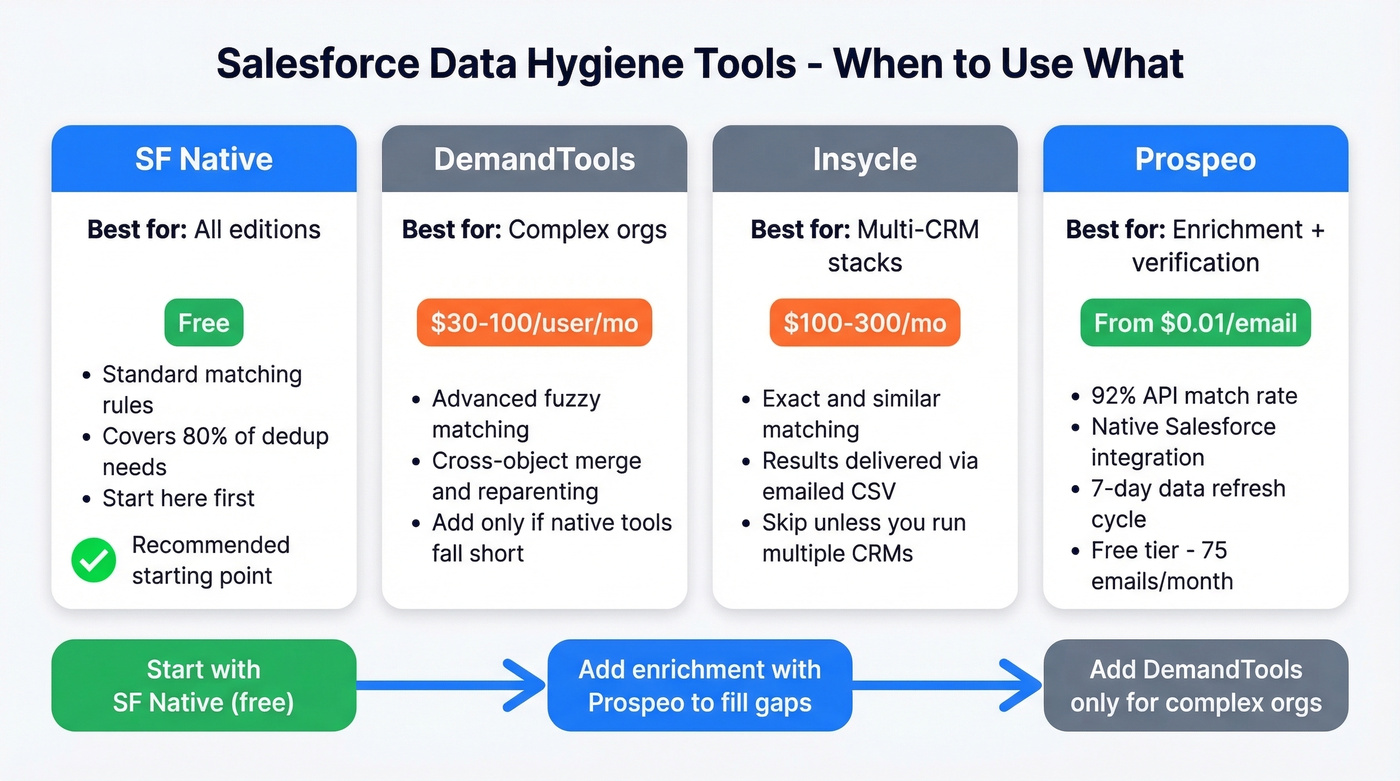
Start with Salesforce's native tools - they're free and cover most dedup needs. We've watched orgs overspend on DemandTools licenses when native tools would have handled 80% of the work, so add DemandTools only if you're managing a complex org with cross-object merge and reparenting requirements. Skip Insycle unless you run multiple CRMs, and know that its matching logic tops out at exact/similar comparisons with results delivered via emailed CSV, which gets old fast.
For enrichment specifically, Prospeo's 92% API match rate and native Salesforce integration mean you can pipe incomplete records through enrichment workflows without leaving the CRM. Its 7-day data refresh cycle keeps records current when the industry average sits around 6 weeks.
If you're also cleaning lists for outbound, pair enrichment with deliverability hygiene - our email deliverability guide covers what to fix before you scale sends.
Deduplication rearranges what you have. Enrichment adds what's missing. Prospeo returns verified emails and direct dials for 83% of contacts you push through - refreshed every 7 days, not every 6 weeks like legacy providers. At $0.01 per email, filling your Salesforce gaps costs less than the pipeline you're losing to incomplete data.
Fill every gap in your Salesforce database before your next sequence runs.
FAQ
How often should I clean Salesforce data?
Run a 15-minute weekly governance check-in plus a 2-hour monthly deep audit. If ongoing maintenance consistently takes longer, your prevention systems - validation rules, Flows, governance cadence - need tightening, not more cleanup hours.
What's the fastest way to find duplicates in Salesforce?
Enable the "Report" option in your Duplicate Rules, then build a Duplicate Report Type using Duplicate Record Set as the primary object. Relate Duplicate Record Items, group by set name, and you'll see duplicate clusters instantly - no third-party tool required.
Can I enrich Salesforce contacts automatically?
Yes. Tools like Prospeo integrate natively with Salesforce and enrich contacts with verified emails, phone numbers, and 50+ data points - refreshing every 7 days. The free tier covers 75 emails per month, so you can test enrichment workflows before scaling.
Does dirty CRM data affect AI and Agentforce?
Absolutely. AI agents produce confidently wrong outputs when trained on incomplete or duplicate records. Clean data across 5-10 critical fields is the minimum prerequisite before deploying any Agentforce workflow or automated sequence in 2026.