

Salesforce Pipeline Stages: Setup & Best Practices (2026)
It's Monday morning. You're staring at a pipeline report that says $2.4M is closing this quarter. Your gut says it's closer to $1.1M. You're right - 47% of forecasted deals never close, and 79% of B2B deals stall due to poor opportunity management. The gap between what your Salesforce pipeline stages say and what they mean comes down to how they're configured, calibrated, and enforced.
Let's fix that.
The Short Version
- Trim to 5-6 stages. Salesforce ships with 10 defaults. Consolidate and calibrate probabilities from historical close data - the out-of-the-box numbers are arbitrary.
- Enable three features immediately. Sales Path, Pipeline Inspection, and Field History Tracking on the Stage field. Pipeline Inspection is available on Performance, Enterprise, and Unlimited editions.
- Enforce stage hygiene with automation. Validation rules and Flows are the difference between a forecast and a wish list.
Pipeline Stages vs. Opportunity Stages
Most guides conflate these two concepts.
Salesforce publishes a conceptual 7-stage pipeline framework: Prospecting, Lead Qualification, Demo/Meeting, Proposal, Negotiation & Commitment, Opportunity Won, and Post-Purchase. That's a sales methodology - a way of thinking about how deals progress from first touch to closed revenue.
The Opportunity Stage field is something different entirely. It's a picklist on the Opportunity object - the mechanical implementation that your reps actually update, your reports query, and your forecast depends on.
The 7-stage framework is aspirational. The picklist field is operational. Your job is to make the picklist reflect your actual sales process, not Salesforce's generic template. For the rest of this guide, "pipeline stages" means the Opportunity Stage picklist - the thing you configure in Setup and your reps interact with daily.
Default Opportunity Stages Explained
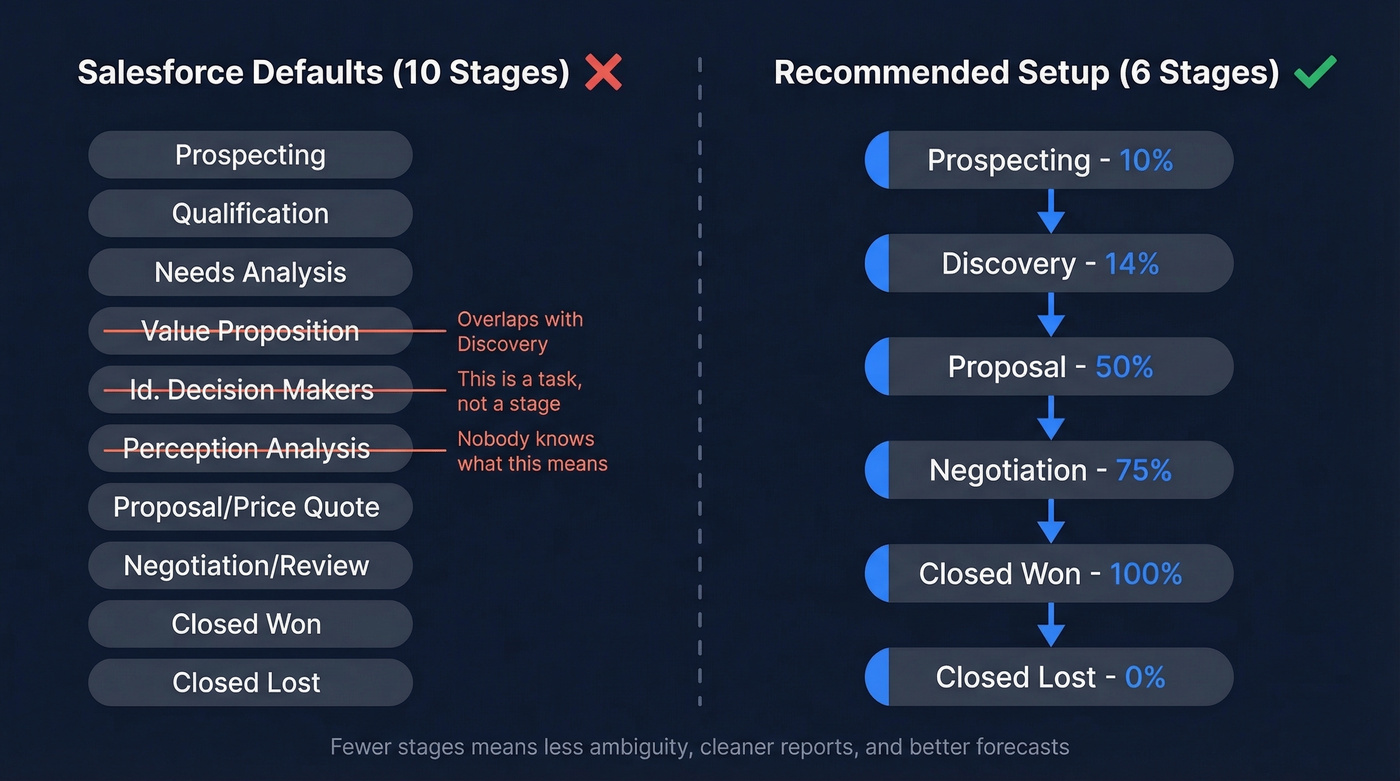
Salesforce ships with 10 default stages:
- Prospecting
- Qualification
- Needs Analysis
- Value Proposition
- Id. Decision Makers
- Perception Analysis
- Proposal/Price Quote
- Negotiation/Review
- Closed Won
- Closed Lost
Each stage value is configured with a Type (Open, Closed Won, or Closed Lost), a Probability (0-100%), and a Forecast Category (Pipeline, Best Case, Commit, Closed, or Omitted).
To edit these, navigate to Setup -> Object Manager -> Opportunity -> Fields & Relationships -> Stage. From there you can add, remove, reorder, and reassign the Type, Probability, and Forecast Category for each value.
A few things jump out. "Perception Analysis" confuses almost everyone - we've seen teams leave it in for years because nobody knows what it means. "Id. Decision Makers" is a task, not a buyer state. And the probability jumps in many orgs are arbitrary. These defaults are a starting point, not a recommendation.
How to Calibrate Stage Probabilities
Most orgs leave default probabilities untouched. Those numbers are arbitrary - Salesforce picked them to look reasonable, not to reflect your win rates.
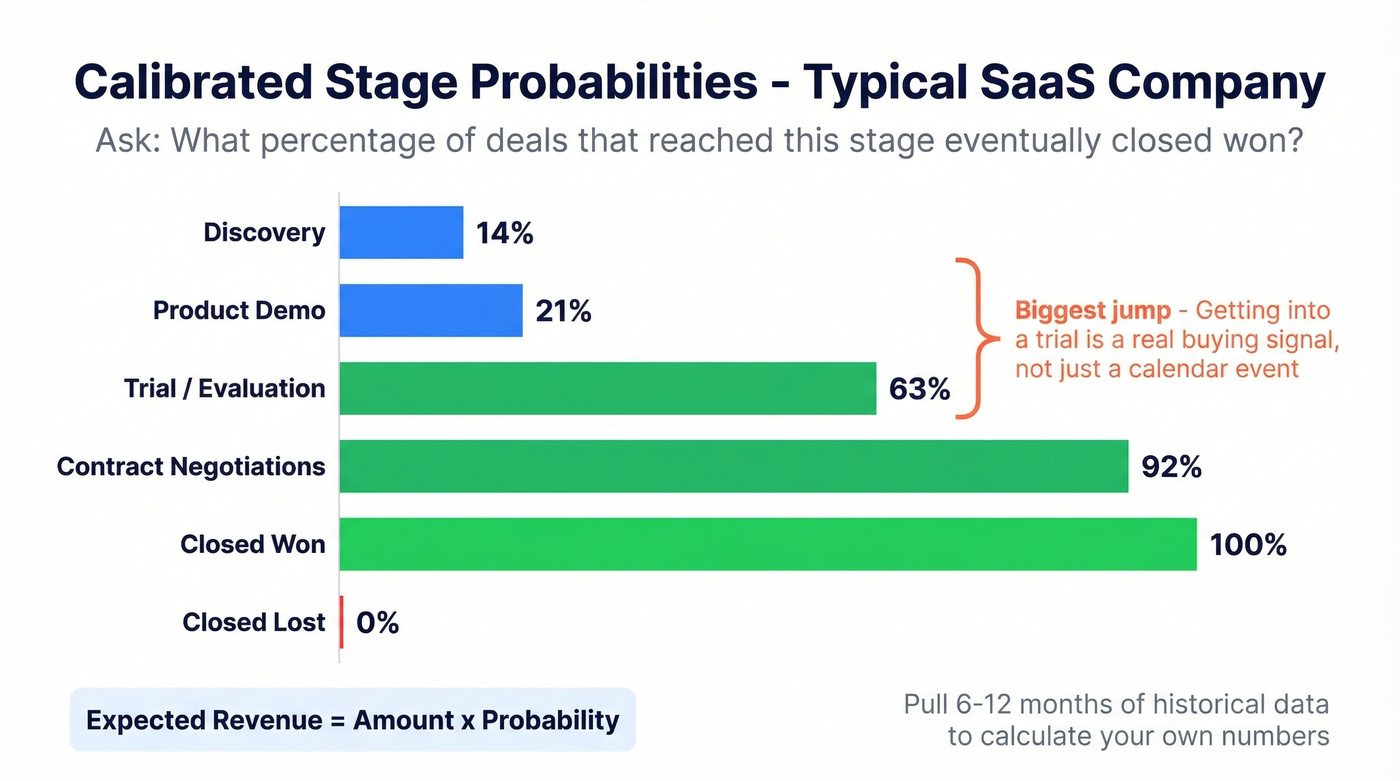
The right approach, outlined well by Clari, is to ask one question per stage: "What percentage of deals that reached this stage eventually closed won?" Pull a representative sample of historical opportunities covering 6-12 months, group by the furthest stage reached, and calculate the close rate.
Here's what a calibrated probability table looks like for a typical SaaS company:
| Stage | Calibrated Probability |
|---|---|
| Discovery | 14% |
| Product Demo | 21% |
| Trial / Evaluation | 63% |
| Contract Negotiations | 92% |
| Closed Won | 100% |
| Closed Lost | 0% |
Notice the jump from Demo (21%) to Trial (63%). That's real - getting a prospect into a trial is a genuine buying signal, not just a calendar event. We've calibrated probabilities for dozens of orgs, and the demo-to-trial jump is consistently the largest. Your specific numbers will differ, but the methodology stays the same.
One critical nuance: define whether a stage means the milestone is completed or in progress. "Product Demo" could mean "demo scheduled" or "demo delivered." The distinction changes your probability math significantly. Document it, train reps on it, and don't assume everyone interprets it the same way.
Since Expected Revenue = Amount x Probability, getting these numbers right directly impacts your forecast accuracy. If you want to go deeper on forecasting mechanics, see our guide to sales forecasting solutions.

Calibrated probabilities only matter when the people in your pipeline are real and reachable. Prospeo's 98% email accuracy and 7-day data refresh mean every opportunity stage reflects a live buyer - not a stale record that bounced three months ago.
Stop forecasting against dead contacts. Start with verified data.
Benchmark Conversion Rates
Even with calibrated probabilities, it helps to know what "normal" looks like. Here are two benchmark sets worth bookmarking. For more baseline numbers, compare against our sales pipeline benchmarks.
SaaS Funnel Conversions (Digital Bloom, 2025):
| Stage Transition | SMB / Mid-Market | Enterprise |
|---|---|---|
| Visitor -> Lead | 1.4% | 0.7% |
| Lead -> MQL | 41% | 39% |
| MQL -> SQL | 39% | 31% |
| SQL -> Opportunity | 42% | 36% |
| Opportunity -> Close | 39% | 31% |
The Digital Bloom data tracks marketing-to-sales handoff. The MarketJoy set below focuses on sales-qualified pipeline. Together, they bracket the full funnel.
Average B2B Conversion Rates (MarketJoy, 2024-2025):
| Stage Transition | Range | Benchmark |
|---|---|---|
| Lead -> MQL | 20-25% | 22% |
| MQL -> SQL | 12-18% | 15% |
| SQL -> Opportunity | 10-12% | 11% |
| Opportunity -> Closed Won | 6-9% | 7% |
The biggest drop-off in both datasets is MQL -> SQL. That's where marketing-generated leads meet sales qualification reality. If your conversion at that stage is significantly below 15%, the problem isn't your stage configuration - it's your lead quality or qualification criteria. (If you need a framework, start with lead scoring.)
For broader context: overall lead-to-customer conversion runs 2-5%, typical win rates land at 20-30%, and median sales cycles average 84 days with an optimal range of 46-75 days. If your numbers fall outside these bands, your stage design might not be the root cause. Look at deal size, market segment, and top-of-funnel quality first.
Stage Design Mistakes That Kill Forecasts
Here are the five most common mistakes, drawn from practitioner guidance and our own pipeline audits. Many of these show up alongside broader sales pipeline challenges.
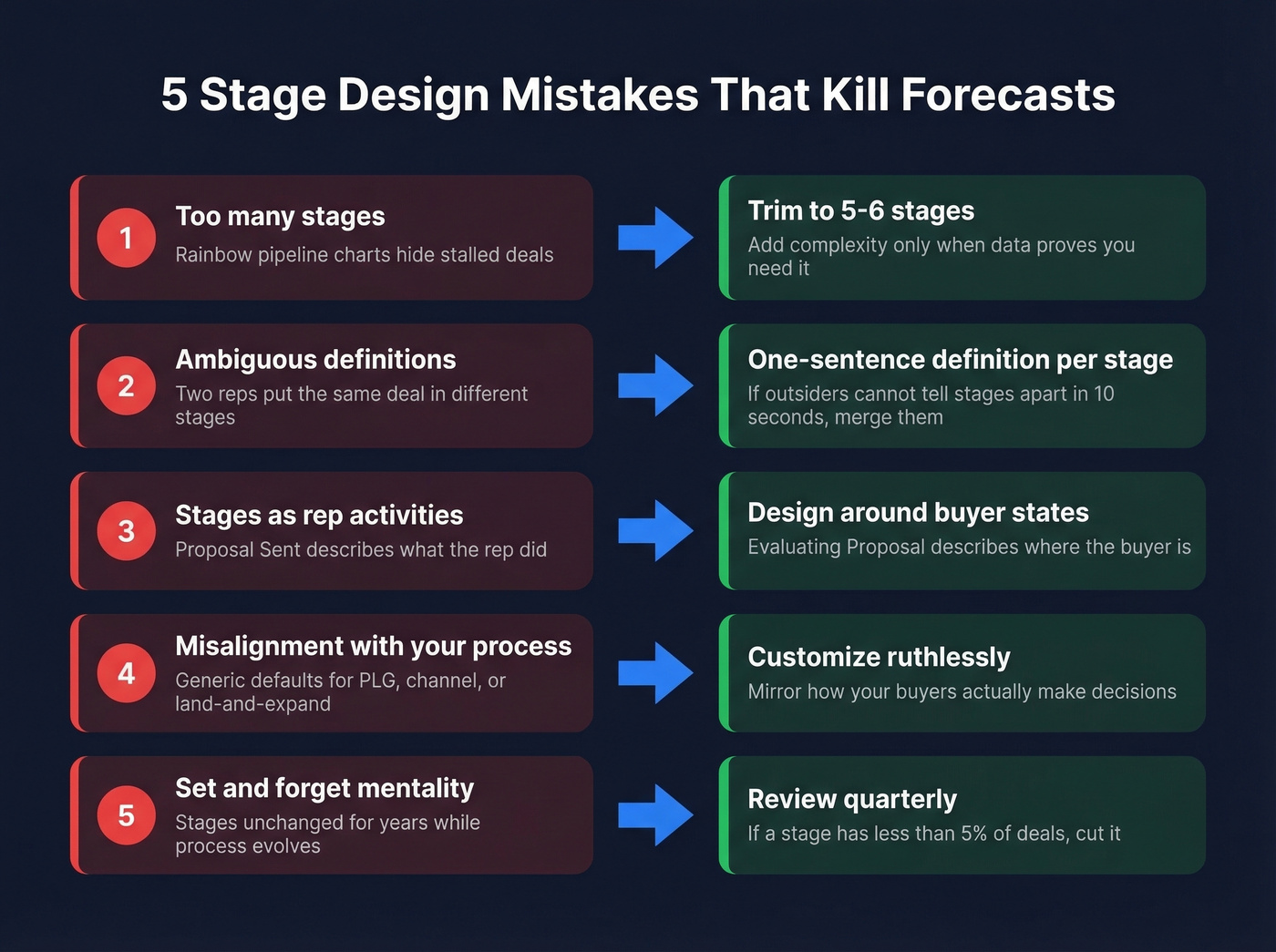
1. Too many stages. If your pipeline chart looks like a rainbow, you've got a problem. More stages means more ambiguity, more places for deals to stall invisibly, and harder-to-read reports. Start with 5-6. Add complexity only when your data proves you need it.
2. Ambiguous stage definitions. If two reps would put the same deal in different stages, your definitions aren't clear enough. Every stage needs a one-sentence definition and explicit exit criteria. Have someone outside sales review them - if they can't distinguish adjacent stages in 10 seconds, merge them.
3. Stages as rep activities, not buyer states. "Proposal Sent" describes what the rep did. "Evaluating Proposal" describes where the buyer is. Design stages around your buyer's decision process, not your rep's to-do list. This matters more than ever: B2B buying groups now average 6.8 stakeholders, up from 5.4 per HBR. A single "Proposal Sent" stage can't capture where six different decision-makers stand.
4. Misalignment with your actual process. Salesforce's defaults assume a generic B2B sales motion. If you're running product-led growth, channel sales, or land-and-expand, those stages don't map. Customize ruthlessly - the sales cycle stages in Salesforce should mirror how your buyers actually move through decisions, not some textbook model. (More on tightening the system in sales process optimization.)
5. Set-and-forget mentality. Your sales process evolves. Your stages should too. Review them quarterly. If a stage consistently has fewer than 5% of active deals, it's probably not earning its place.
Pipeline accuracy starts upstream. If reps prospect with stale contacts, opportunities die before reaching Qualification. Prospeo's native Salesforce integration refreshes contact data on a 7-day cycle with 98% email accuracy, so the leads entering your pipeline are real from day one. If you're evaluating vendors, start with data enrichment services.
How to Customize Stages in Setup
The configuration is straightforward. Navigate to Setup -> Object Manager -> Opportunity -> Fields & Relationships -> Stage -> Edit. From there:
- Remove stages you don't need. Deactivate rather than delete if you have historical data tied to them.
- Add your custom stages. Keep names short. "Discovery" beats "Initial Discovery Call and Needs Assessment." (If you want a tighter discovery motion, use these discovery questions.)
- Set Type - Open, Closed Won, or Closed Lost. You need at least one of each.
- Assign Probability based on calibrated historical data.
- Map Forecast Categories - Pipeline, Best Case, Commit, Closed, or Omitted.
- Reorder stages to match your sales flow. Order matters for Sales Path and Kanban views.
For a first-time setup, we recommend this minimal stage set: Prospecting, Discovery, Proposal, Negotiation, Closed Won, Closed Lost. Six stages. Clean, unambiguous, easy to enforce. Add a "Technical Evaluation" or "Legal Review" stage later if your data shows a meaningful conversion inflection point.
Multiple Sales Processes
Different deal types need different stages. New business, renewals, and upsells don't follow the same path - forcing them through identical opportunity stages creates noise. If you’re building a renewal motion, track it alongside your renewal rate.
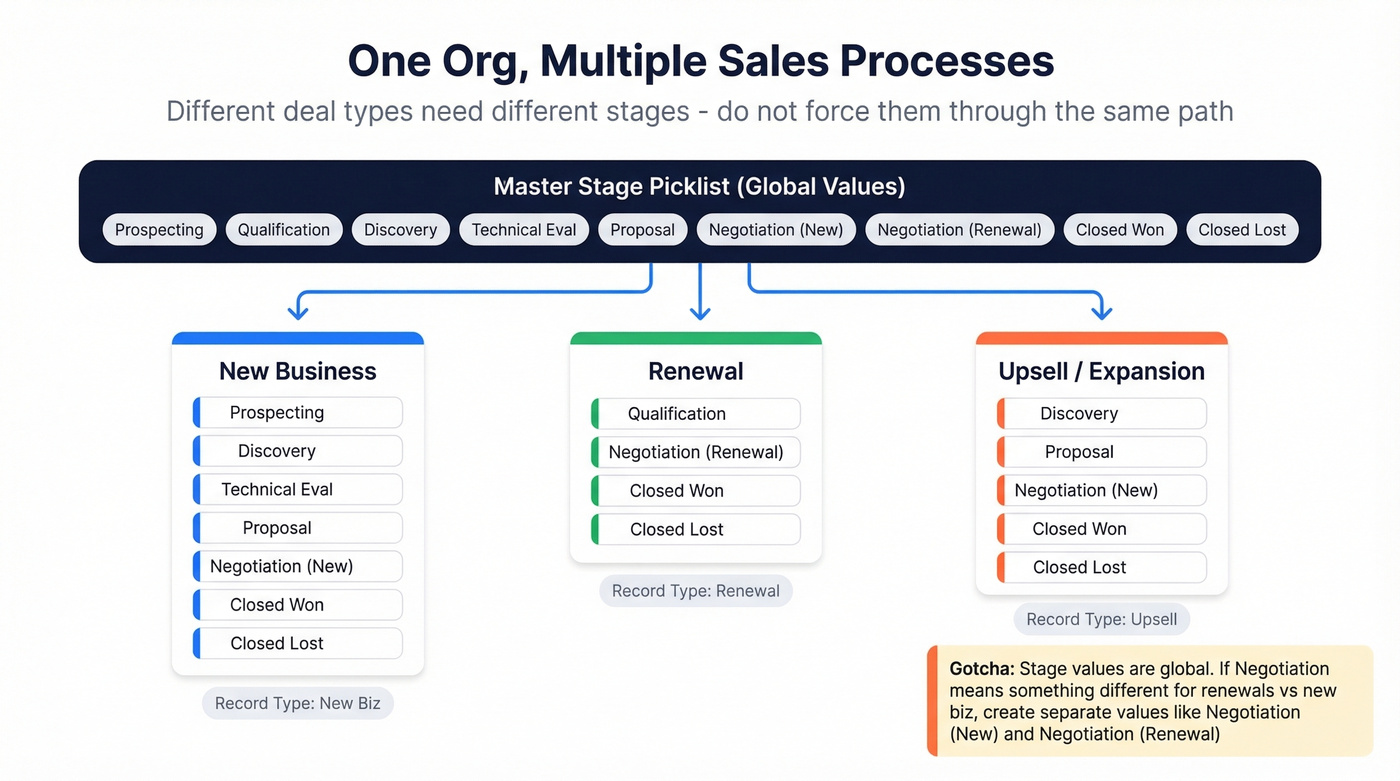
To create a separate Sales Process: Setup -> Sales Processes -> New. Name it, select the master stage values you want, remove the rest, and save. A renewal process might only need Qualification, Negotiation, Closed Won, and Closed Lost.
Then tie it to a Record Type: Object Manager -> Opportunity -> Record Types -> New. Choose your Sales Process, set it as Active, assign profiles, and select a page layout.
One gotcha: Stage values are global picklist values, and each Sales Process is just a subset. If your new business "Negotiation" needs a different meaning than your renewal "Negotiation," create separate stage values like "Negotiation (New)" and "Negotiation (Renewal)" and include the right one in each Sales Process.
Exit Criteria & Stage Enforcement
This is where most implementations fall apart. You can design perfect stages, but if reps can skip from Prospecting to Negotiation in one click - and they will - your pipeline data is worthless.
Enforcing exit criteria with automation yields a 23% improvement in forecast accuracy, and companies with structured sales processes are 33% more likely to be high performers. In our experience running pipeline audits, the single highest-ROI change is requiring a populated Next Step field before any stage advance.
Validation rules are your first line of defense. Require "Next Step" to have at least 20 characters before a deal moves past Qualification. Require a Contact Role before Proposal. Require a dollar amount before Negotiation.
Flows handle time-based enforcement. Build a scheduled Flow that flags any opportunity sitting in Qualification for more than 14 days - send the rep an email, post to Chatter, or create a task. Stale opportunities, pushed close dates, and missing next steps are recurring admin headaches in real Salesforce orgs.
Close date push count monitoring is underrated. Track how many times a rep moves the close date forward. Three pushes on the same deal? That's not a deal in Negotiation - it's a deal that should be in Discovery or Closed Lost. Pipeline Inspection surfaces push count natively, but you can also build a custom field that increments via Flow.
Here's the thing: enforcement creates friction. Reps will push back. But the alternative is a pipeline full of zombie deals that make your forecast meaningless. Start with 2-3 rules and add more as the team adapts.
47% of forecasted deals never close - and bad contact data is a silent contributor. Prospeo enriches your Salesforce opportunities with 50+ verified data points at 92% match rate, so every stage transition is backed by a real decision-maker you can actually reach.
Enrich your Salesforce pipeline with contacts that pick up the phone.
Pipeline Inspection & Sales Path
Pipeline Inspection
If you're still running pipeline reviews from exported spreadsheets, Pipeline Inspection replaces that workflow. Available on Performance, Enterprise, and Unlimited editions, it gives managers a consolidated view that's genuinely useful.
The headline features: Einstein Deal Insights surface AI-driven predictions on deal health. Tiered Opportunity Scores (High/Medium/Low) with directional arrows show which deals are trending up or down. Push count tracking exposes how many times a close date has moved. Days in stage and opportunity age highlight stale deals without custom reports.
You also get week-over-week pipeline change tracking - new deals, increased amounts, decreased amounts, moved in, moved out. This is the view that makes Monday pipeline reviews productive instead of painful. You can mark up to 200 opportunities as "Important" for focused tracking, and inline editing lets you update Amount and Close Date without opening each record.
Skip this if you're on Professional edition - you won't have access. But honestly, Pipeline Inspection alone justifies the upgrade to Enterprise for most teams. Custom reports can't replicate the push count and deal trend visibility, and the time your managers spend building workaround dashboards costs more than the license delta.
Sales Path
Sales Path is the visual stage progression bar on the Opportunity record. It's more than cosmetic - you can configure Key Fields per stage and Guidance for Success content with coaching tips, playbook links, or qualification criteria.
Enable it immediately. Combined with the Kanban view on list views, it gives reps a visual, intuitive way to understand where deals stand and what's expected at each stage. I've watched reps go from ignoring stage definitions to actually reading them, just because the guidance text appeared right where they were already working.
FAQ
What are the default Salesforce opportunity stages?
Salesforce ships with 10: Prospecting, Qualification, Needs Analysis, Value Proposition, Id. Decision Makers, Perception Analysis, Proposal/Price Quote, Negotiation/Review, Closed Won, and Closed Lost. Most teams customize immediately - "Perception Analysis" doesn't map to any recognizable sales process.
How many stages should a pipeline have?
Five to six for most B2B sales motions. If a rep can't explain the difference between two adjacent stages in 10 seconds, merge them. Add stages only when conversion analysis reveals a meaningful inflection point - like a trial step that triples close probability.
Can I have different stages for different deal types?
Yes. Create multiple Sales Processes in Setup, each with its own stage subset, then tie each to a Record Type. When two deal types need different meanings for the same label, create distinct stage values and include the right one in each process.
How do I fix inaccurate pipeline forecasts?
Calibrate stage probabilities from historical close data instead of using defaults - most orgs see immediate improvement. Enforce exit criteria with validation rules so reps can't skip stages. And make sure the contact data feeding your pipeline is accurate; stale records inflate your numbers before a rep even touches the deal.
What Salesforce edition supports Pipeline Inspection?
Performance, Enterprise, or Unlimited. It includes Einstein Deal Insights, tiered Opportunity Scores, push count tracking, and week-over-week pipeline change metrics. On Professional edition, you'll need custom reports and dashboards for similar visibility - but you lose the AI scoring and native push-count surfacing.