

How to Write a Schedule Appointment Email That Actually Gets a Reply
You sent 15 scheduling emails this morning. By Friday, you'll have two confirmed meetings and three no-shows. A study of 2,000 U.S. office workers found 60% say email volume adds stress, and 88% regret an email's contents right after hitting send. The schedule appointment email sits at the intersection of both problems: high-volume, low-effort messages that recipients ignore or forget.
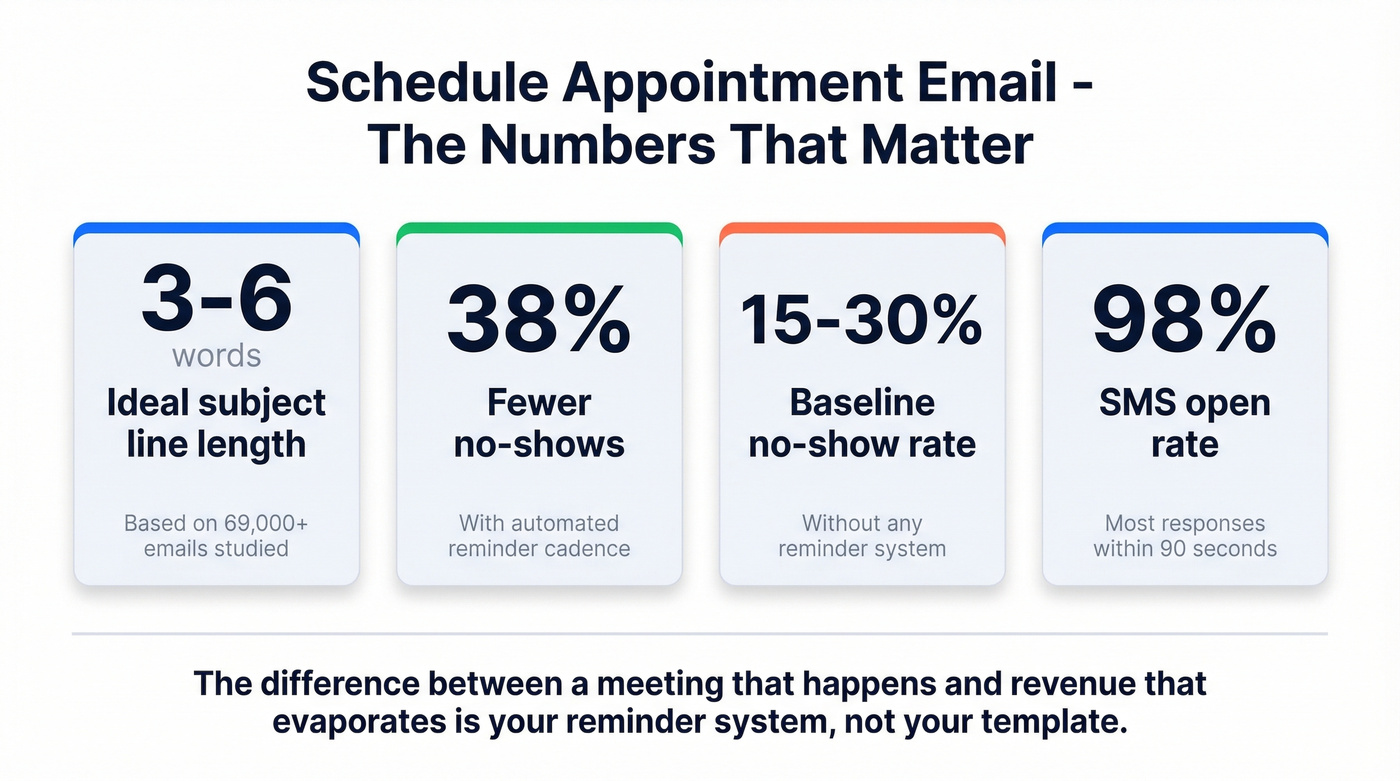
Here's the thing most scheduling advice gets wrong. Everyone obsesses over the perfect template. Nobody talks about the fact that 15-30% of confirmed appointments still no-show. The real skill isn't writing the email - it's building a reminder system that makes showing up the path of least resistance.
What You Need (Quick Version)
- Subject lines: 3-6 words. A 69,000-email study across 700+ organizations found this length drives the best engagement.
- 2-3 specific time slots with time zones. Never write "when works for you?" - that puts the work on the recipient.
- A reminder cadence at 48-72h + 24h + 2h before the meeting. Automated reminders cut no-shows up to 38%.
- Verified email addresses. A perfect appointment request is useless in a dead inbox.
The Reminder Cadence That Prevents No-Shows
We're putting this before the templates on purpose. Most scheduling emails fail not because of bad writing, but because there's no system after the initial confirmation. No-show rates run 15-30% as a baseline, and B2B teams lose 20-40% of booked meetings to ghosting depending on lead source and confirmation rigor.
If your reminders aren’t landing, fix email deliverability before you tweak copy.
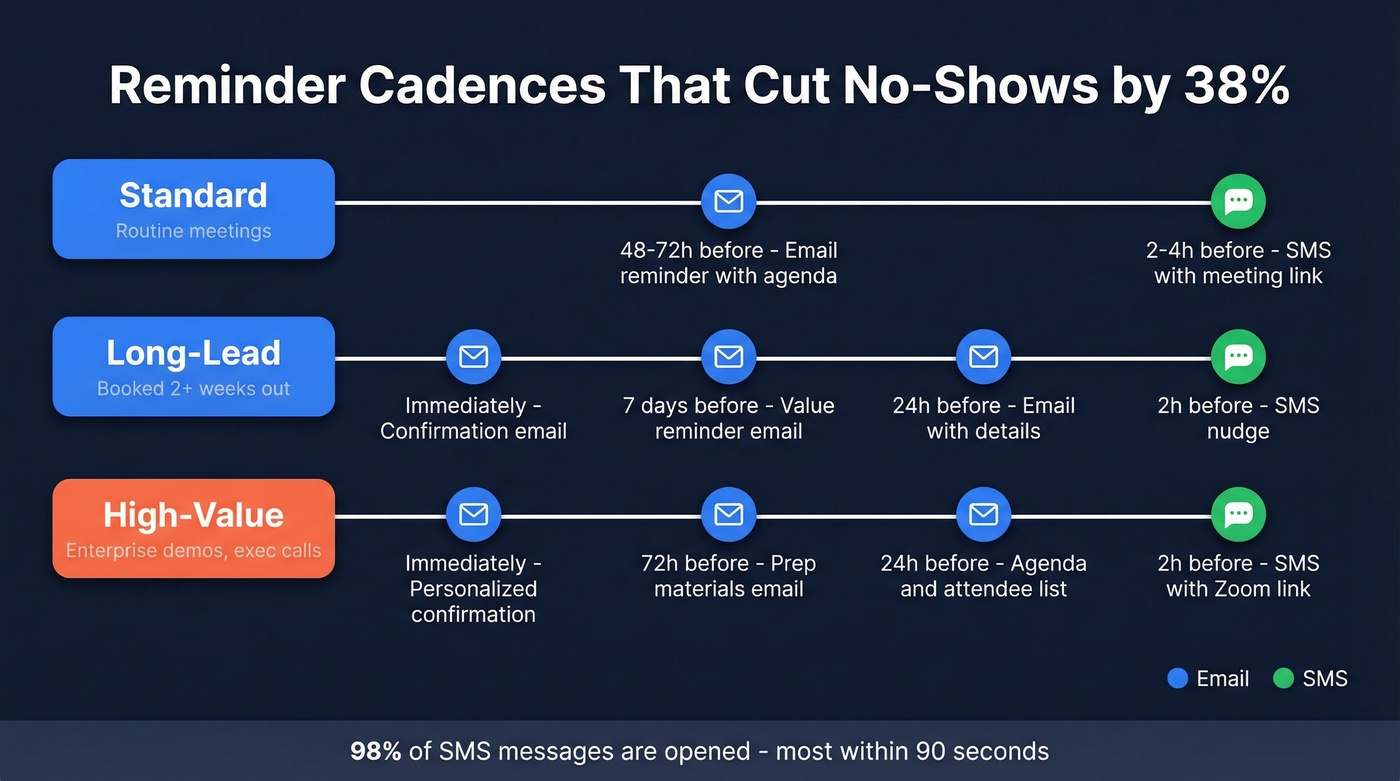
| Cadence Type | Touchpoints | Best For |
|---|---|---|
| Standard | 48-72h email + 2-4h SMS | Routine meetings |
| Long-lead | Immediately + 7d + 24h + 2h SMS | Events booked 2+ weeks out |
| High-value | Immediately + 72h + 24h + 2h SMS | Enterprise demos, exec calls |
SMS reminders are the secret weapon: 98% open rate, most responses within 90 seconds. Even a simple text - "Looking forward to our call at 2 PM ET - here's the Zoom link" - dramatically reduces no-shows.
80% of B2B appointments are set after five or more touchpoints, yet 44% of reps stop after one. Your reminder cadence isn't pestering. It's the difference between a meeting that happens and revenue that evaporates.
Templates for Every Scheduling Scenario
Below are five schedule appointment email templates you can copy, swap in your details, and send today.
Professional First Request
Subject: Meeting re: Q3 partnership
Hi [Name],
I'd like to schedule 30 minutes to discuss [specific topic]. Would any of these work?
- Tuesday, June 10 at 10:00 AM ET
- Wednesday, June 11 at 2:00 PM ET
- Thursday, June 12 at 11:00 AM ET
Just reply with your preferred slot.
Best, [Your name]
Warm or Casual Request
Skip this one for anyone you haven't spoken to before - it'll come across as presumptuous. Use it when you already have a relationship and formality would feel weird.
Subject: Quick catch-up this week?
Hey [Name],
Been meaning to connect on [topic]. Free for 20 minutes this week?
- Wed 3 PM ET
- Thu 10 AM ET
- Fri 1 PM ET
Let me know what works.
Cold Outreach Scheduling
When you're setting an appointment with someone who doesn't know you yet, lead with value, not your calendar. One sentence that proves you've done your homework is worth more than three paragraphs of pleasantries.
If you’re doing this at scale, build a B2B cold email sequence instead of one-off asks.
Subject: 15 min - [specific value prop]
Hi [Name],
[One sentence tied to their role or company]. I'd love 15 minutes to walk through how we've helped similar teams.
- Monday, June 16 at 9:00 AM PT
- Tuesday, June 17 at 1:00 PM PT
If neither works, grab a time here: [scheduling link]
Rescheduling Request
Subject: Need to move our Thursday call
Hi [Name],
Something came up and I need to reschedule our Thursday meeting. Would either of these work instead?
- Friday, June 13 at 10:00 AM ET
- Monday, June 16 at 2:00 PM ET
Appointment Confirmation Email
Subject: Confirmed: [Meeting topic] - June 10 at 10 AM ET
Hi [Name],
Just confirming our meeting:
- Date: Tuesday, June 10
- Time: 10:00 AM ET
- Duration: 30 minutes
- Location: [Zoom link / address]
If you need to reschedule, let me know at least 24 hours in advance.
One principle runs through every template: politeness comes from clarity, not from excessive apologies. "Can we meet Thursday at 2 PM ET to discuss Q3 pipeline?" is more respectful of someone's time than 15 words of "I hope this finds you well and I was wondering if perhaps..."

A perfect appointment email in a dead inbox books zero meetings. Prospeo's 5-step verification delivers 98% email accuracy - so your scheduling requests actually reach decision-makers. At ~$0.01 per verified email, bad data stops killing your reply rates.
Stop scheduling into the void. Verify every address before you hit send.
Subject Lines That Get Opened
| Tone | Example | Words |
|---|---|---|
| Direct | Meeting Thursday 2 PM | 4 |
| Direct | 15 min: pipeline review | 4 |
| Polite | Quick call this week? | 4 |
| Polite | Time for a 20-min sync? | 5 |
| Formal | Scheduling: Q3 review | 3 |
| Follow-up | Still available Thursday? | 3 |
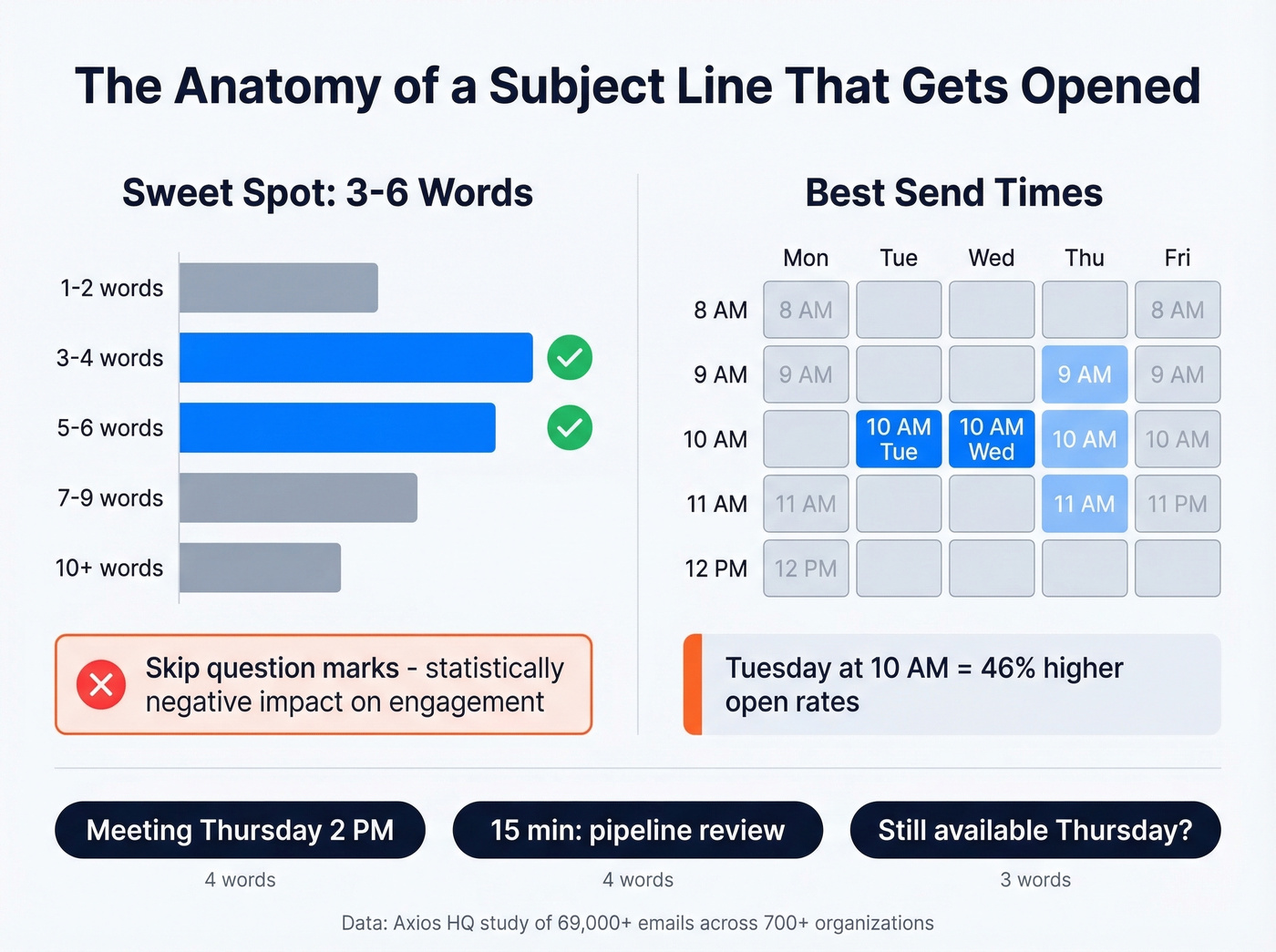
The Axios HQ data is unambiguous: 3-6 words and 31-49 characters outperform longer subject lines. Skip question marks - they found a statistically significant negative impact on engagement.
If you want more options, pull from these email subject line examples and adapt them to your meeting context.
HubSpot data shows Tuesday at 10 AM generates 46% higher open rates, though Apple Mail Privacy Protection has made open-rate tracking noisy since Apple Mail accounts for over half of email clients.
Mistakes That Kill Your Reply Rate
Vague subject lines are the fastest way to get archived. Stick to 3-6 words tied to the meeting purpose.
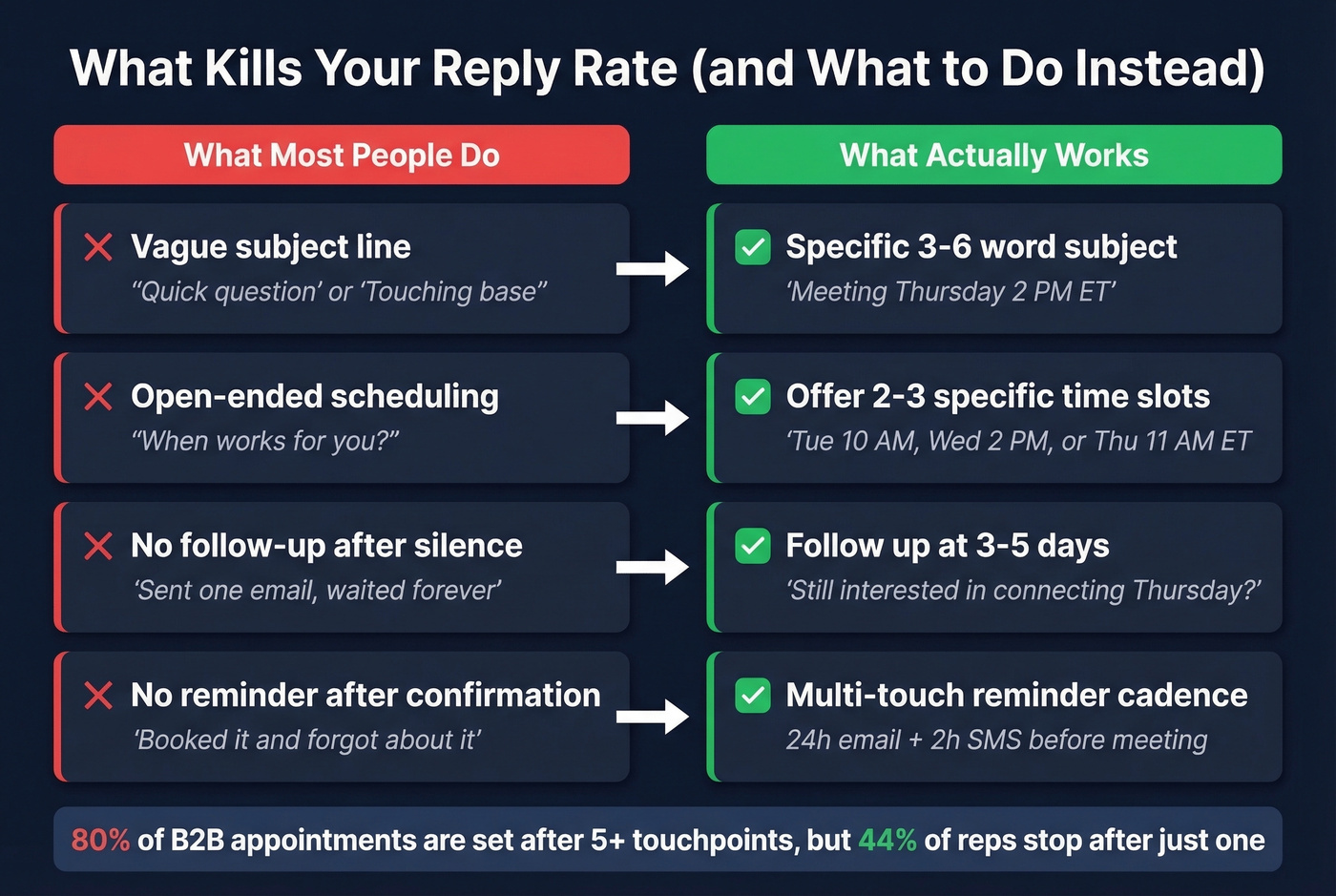
Open-ended "when works for you?" feels polite but actually creates friction. Offer 2-3 concrete time slots instead - you're not being presumptuous, you're making it easy to say yes.
Scheduling over existing calendar blocks is a consistent frustration on Reddit. People decline on principle. Propose options or use a scheduling link that reads their availability.
No follow-up after silence. This is where most reps lose winnable meetings. In our experience, following up at 3-5 days is the single highest-leverage habit you can build. If you need a system, use proven sales follow-up templates and track your follow-up email reply rate.
Tools to Streamline Scheduling
| Tool | Starting Price | Best For |
|---|---|---|
| Prospeo | Free / ~$0.01/email | Verify before you send |
| Calendly | Free / $12/user/mo | General scheduling |
| Cal.com | Free / $15/user/mo | Open-source flexibility |
| Sidekick | $5/user/mo | Budget teams |
| zcal | $9.50/user/mo | Simple booking pages |
Let's be honest about Calendly for a second. A Reddit user reported that its SMS reminders didn't work as expected even on paid plans. Test any tool's reminder features before committing to an annual plan - the reminder cadence is too important to leave to chance.
For teams on a tight budget, Cal.com's open-source tier handles the basics well. If you need something dead simple with no learning curve, zcal is worth a look.
If you’re pairing scheduling with outbound, consider automated cold email scheduling so reminders and follow-ups don’t slip.
Cold outreach scheduling only works when you have the right contact. Prospeo gives you 300M+ verified professional profiles with 30+ filters - job title, intent signals, tech stack - so your 15-minute meeting request lands with someone who actually wants to take it.
Find the right person first. Then book the meeting that sticks.
FAQ
How many time options should I include?
Two to three specific options with time zones. Open-ended "when works for you?" tanks reply rates because it shifts the decision-making burden to the recipient. Pick realistic slots and let them choose, or include a scheduling link as a fallback.
When's the best time to send a meeting request?
Tuesday through Thursday, 9-11 AM in the recipient's local time zone. Tuesday at 10 AM consistently outperforms other windows. Segment by time zone so "9 AM" means 9 AM for them, not for you.
How do I reduce no-shows after confirmation?
Use a multi-touch reminder cadence: confirmation immediately, reminder at 24 hours, and a final nudge via email or SMS two hours before. Automated reminders cut no-show rates up to 38%. And make sure your reminders actually reach the inbox - a 5% bounce rate on reminder emails defeats the entire purpose of having a cadence in the first place.