

How to Scrape a Website for Emails - and What to Do After
You scraped 3,000 emails from a prospect list last quarter. The bounce rate hit 14%. Your sending domain got flagged, and it took three weeks to recover deliverability. That's not a scraping problem - it's a workflow problem.
One Reddit thread had someone needing to scrape a website for emails across roughly 8,000 company domains. Most guides teach you how to extract emails and stop there. This one covers the full pipeline: extraction, verification, compliance, and the mistakes that get domains blacklisted.
What You Need (Quick Version)
Three paths, depending on what you're actually trying to do:
- Need to scrape specific websites? Outscraper for bulk extraction, or Python + BeautifulSoup for custom jobs.
- Want a no-code automation pipeline? Firecrawl + n8n to scrape, clean, and push leads into your sequencer automatically.
Whatever method you choose, never send to unverified scraped emails. One bad campaign can wreck your domain for weeks.
Is Email Scraping Legal?
Let's separate two things: scraping publicly available data and using the emails you collect. In many jurisdictions, scraping public pages is generally legal. The regulated part is what happens after - especially when you extract emails from websites at scale.
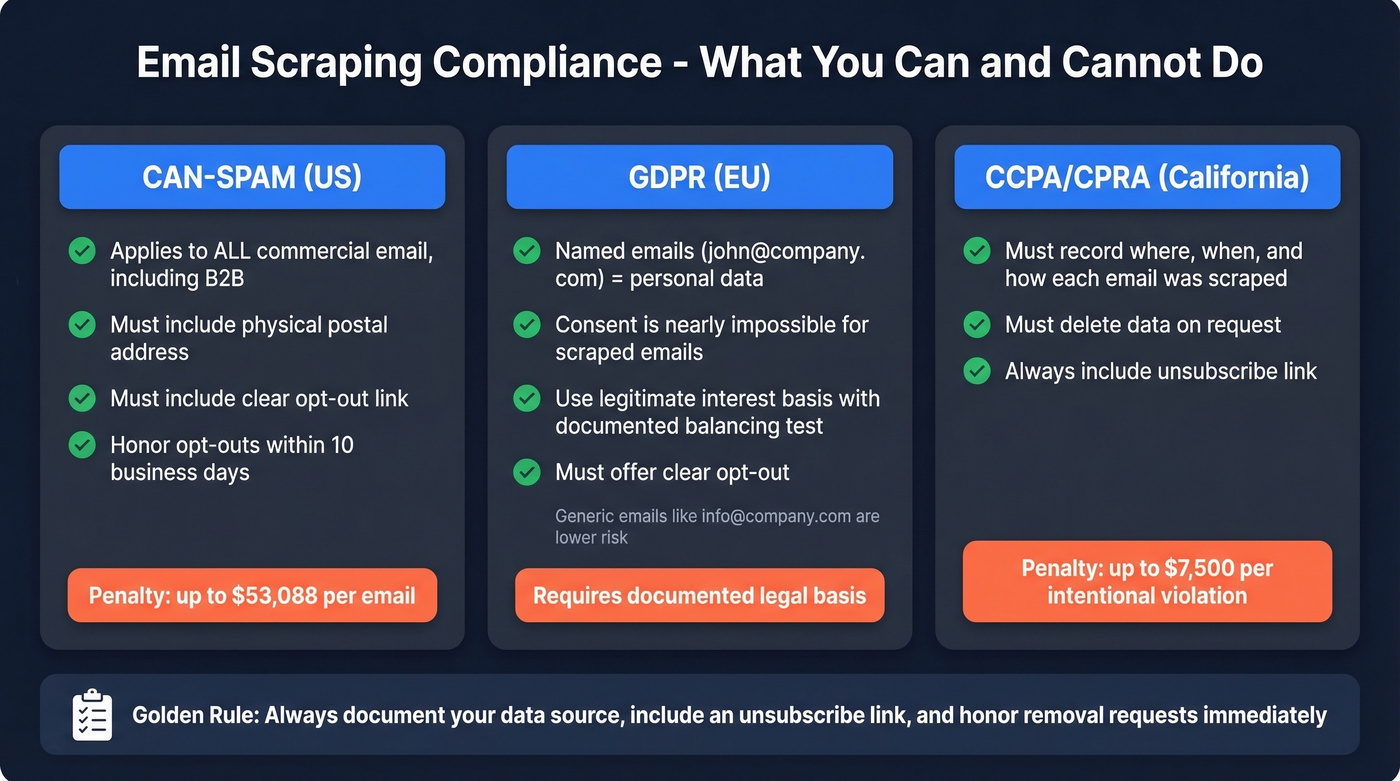
CAN-SPAM applies to every commercial email you send, including B2B. There's no exemption for business-to-business messages. The requirements are straightforward: no misleading headers, no deceptive subject lines, a valid physical postal address, and a clear opt-out mechanism. Opt-out requests must be honored within 10 business days, and the mechanism has to work for at least 30 days after sending. Penalties run up to $53,088 per email in violation. Per email, not per campaign.
GDPR is trickier. An email like firstname.lastname@company.com counts as personal data under EU law. Consent is nearly impossible to claim for scraped addresses, so most B2B teams rely on the legitimate interest basis - which requires a documented balancing test showing the outreach is necessary, minimally intrusive, and that you offer a clear opt-out. Generic addresses like info@company.com are less likely to qualify as personal data, but named addresses should always be treated as such.
CCPA/CPRA adds another layer, with penalties up to $7,500 per intentional violation. The practical takeaway: record where you scraped each email, when, and how. Be ready to delete on request. And always include an unsubscribe link.
Three Ways to Extract Emails From Websites
No-Code Tools (Extensions + Visual Scrapers)
Use this if you're scraping directories, local business listings, or specific websites without writing code. A common use case on r/Entrepreneur is scraping local SMB leads from Yelp or Google Maps.
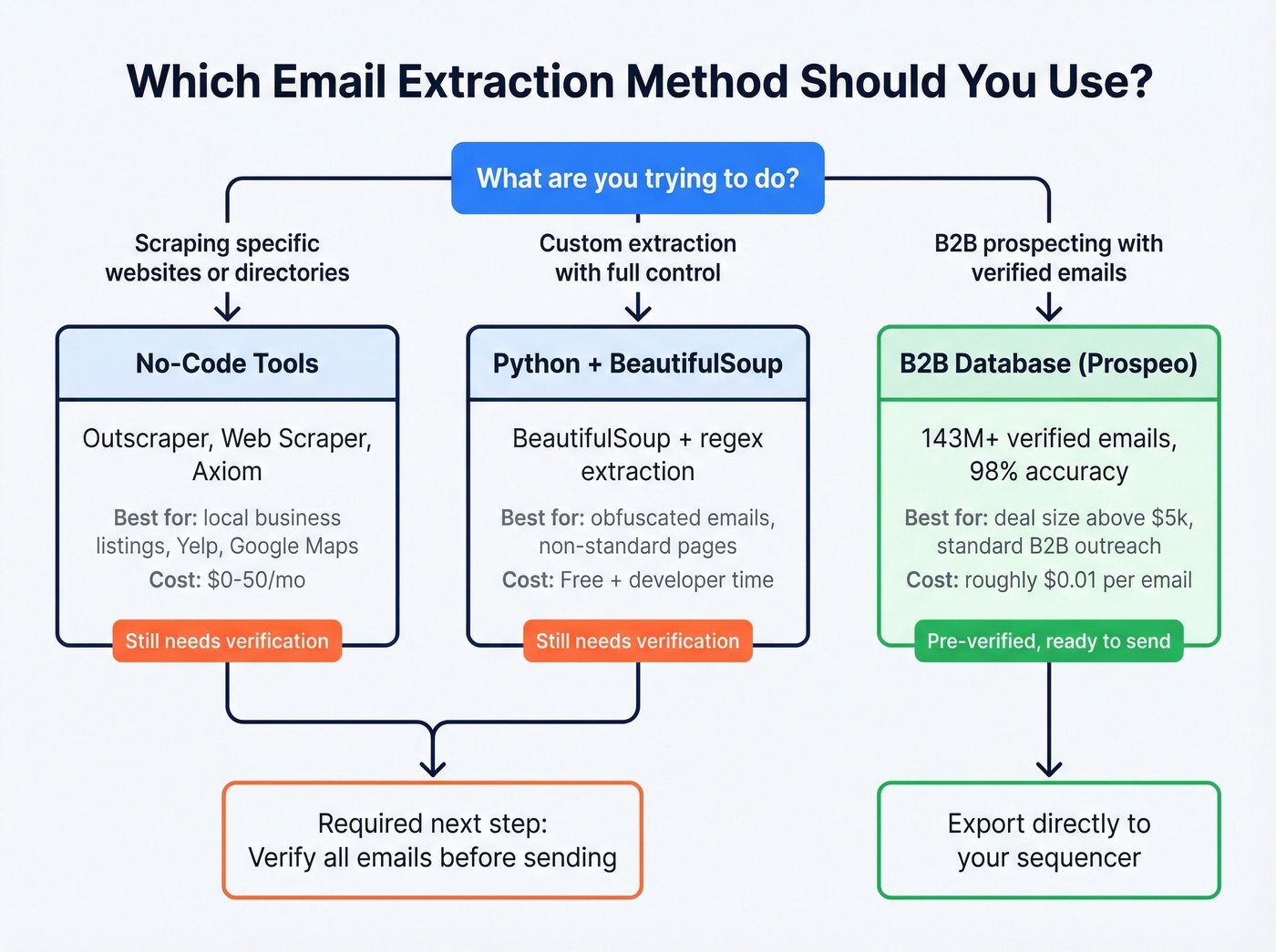
Skip this if you need verified B2B emails at scale - you'll spend hours scraping and still need a separate verification step.
Outscraper is a go-to for bulk website scraping and local lead generation: free for the first 500 domains/contacts, then $3 per 1,000 domains up to 100,000 (and $1 per 1,000 after that). Web Scraper offers an always-free Chrome extension for unlimited local use, with cloud plans from $50/mo for scheduling and automation. Axiom gives you 2 hours of free runtime per month and can pipe scraped page content through ChatGPT to extract emails from inconsistent layouts - useful when sites don't follow standard patterns.
After extraction, you still need to verify everything before sending.
Python + BeautifulSoup (DIY Approach)
For custom extraction jobs, Python remains the most flexible option. The basic approach: fetch the page with requests, parse the HTML with BeautifulSoup, and extract emails two ways.
First, grab mailto: links directly:
soup.select('a[href^="mailto:"]')
Second, run a regex across the page text for plain-text emails:
re.findall(r'([a-zA-Z0-9._%+-]+@[a-zA-Z0-9.-]+\.[a-zA-Z]{2,})', page_text)
Watch for false positives - that regex will happily match image@2x.png and similar non-email strings. You'll want a validation layer after extraction (see: email crawlers and verification). If you'd rather skip local parsing entirely, API-based scraping services like ScrapingBee handle server-side extraction with structured rules, though you'll pay per request.
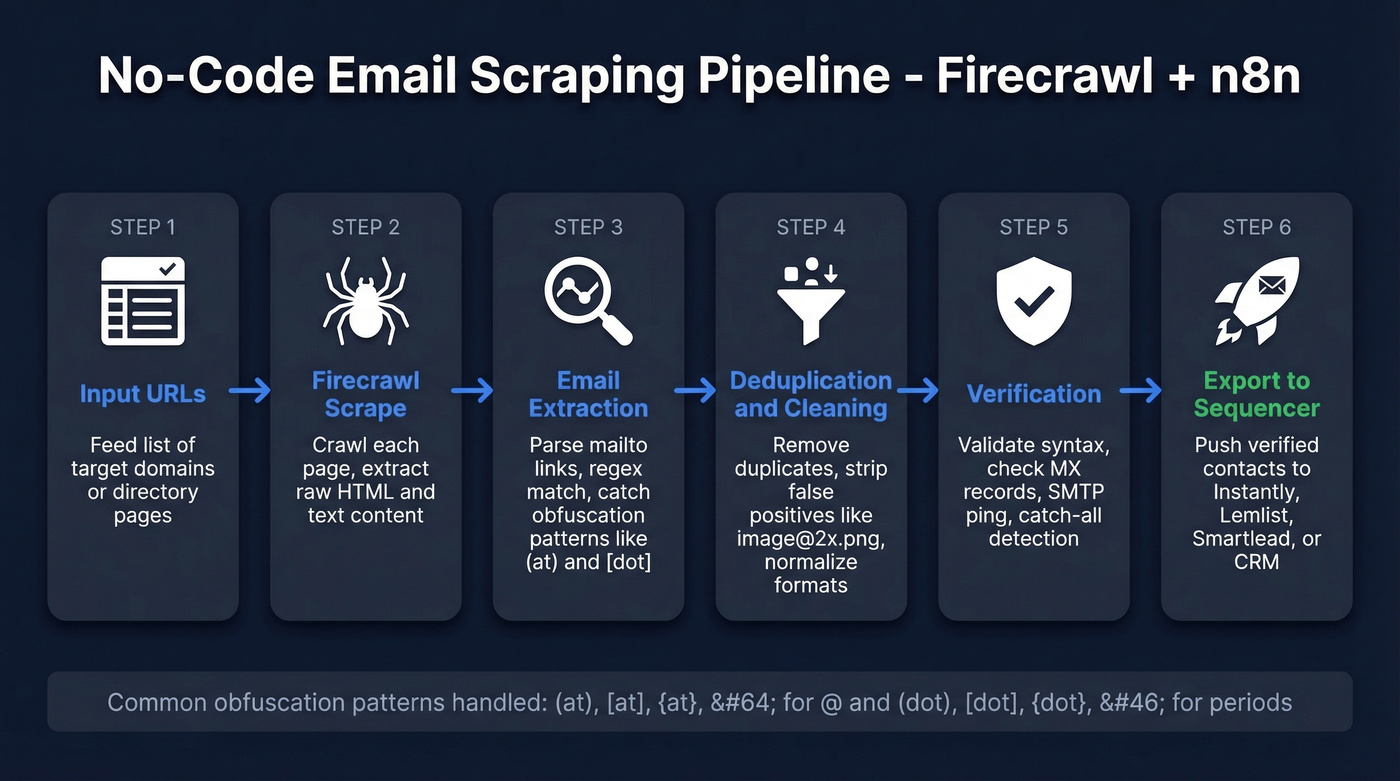
The harder problem is obfuscation. Many sites encode email addresses to dodge scrapers: (at), [at], {at}, @ for the @ symbol, and (dot), [dot], {dot}, . for periods. A solid extraction script normalizes all of these before deduplication. The Firecrawl + n8n workflow shared on Reddit handles this well - the extraction prompt explicitly catches common obfuscation patterns.
Skip the Scraping - Use a B2B Database
Here's the thing: if your average deal size is above $5k and you're doing standard B2B prospecting, scraping websites for email addresses is a waste of your team's time. We've watched SDRs spend 4 hours scraping 200 company sites, ending up with 47 emails - most unverified. A 30-second database search returns 200 verified contacts ready for outreach.
Prospeo's database covers 300M+ professional profiles with 143M+ verified emails. The 5-step verification process handles catch-all domains, removes spam traps, and filters honeypots before you ever export a contact. Accuracy sits at 98%, with a 7-day data refresh cycle. You search by 30+ filters - intent signals, technographics, job changes, headcount growth - and export verified emails at roughly $0.01 each. The free tier gives you 75 emails per month to test.

Scraping still makes sense for niche use cases: local businesses without a web presence in databases, conference speaker pages, or industry-specific directories. But for reaching VPs at SaaS companies? A database search is faster, cheaper, and dramatically more accurate.
| Method | Speed | Accuracy | Cost | Best For |
|---|---|---|---|---|
| No-code tools | Medium | Low (unverified) | $0-50/mo | Directories, specific sites |
| Python DIY | Slow | Low (unverified) | Free + dev time | Custom extraction |

You just read about the hours it takes to scrape, clean, and verify emails from websites. Prospeo's database has 143M+ emails already verified through a 5-step process - catch-all handling, spam-trap removal, honeypot filtering. 98% accuracy, $0.01 per email, 30+ filters to find exactly who you need.
Skip the scraping pipeline. Export verified emails in 30 seconds.
Best Email Scraping Tools in 2026
Prospeo
If what you actually care about is getting verified B2B emails without scraping overhead, this is where you start. Every record goes through a 5-step verification process - syntax, DNS/MX, SMTP, catch-all detection, and spam-trap removal - before it hits your export.
The Chrome extension (40,000+ users) finds verified emails from any company website or professional profile in one click. For bulk work, the API returns a 92% match rate with 50+ data points per contact. Stack Optimize, an outbound agency, scaled to $1M ARR using Prospeo as their primary data source - maintaining 94%+ deliverability and under 3% bounce across all client campaigns.
Pricing starts free (75 emails/month), with paid plans at roughly $0.01 per email. No contracts, no sales calls, cancel anytime. Native integrations with Salesforce, HubSpot, Smartlead, Instantly, Lemlist, and Clay mean verified contacts flow straight into whatever sequencer you're running (more on sequence management).

Hunter
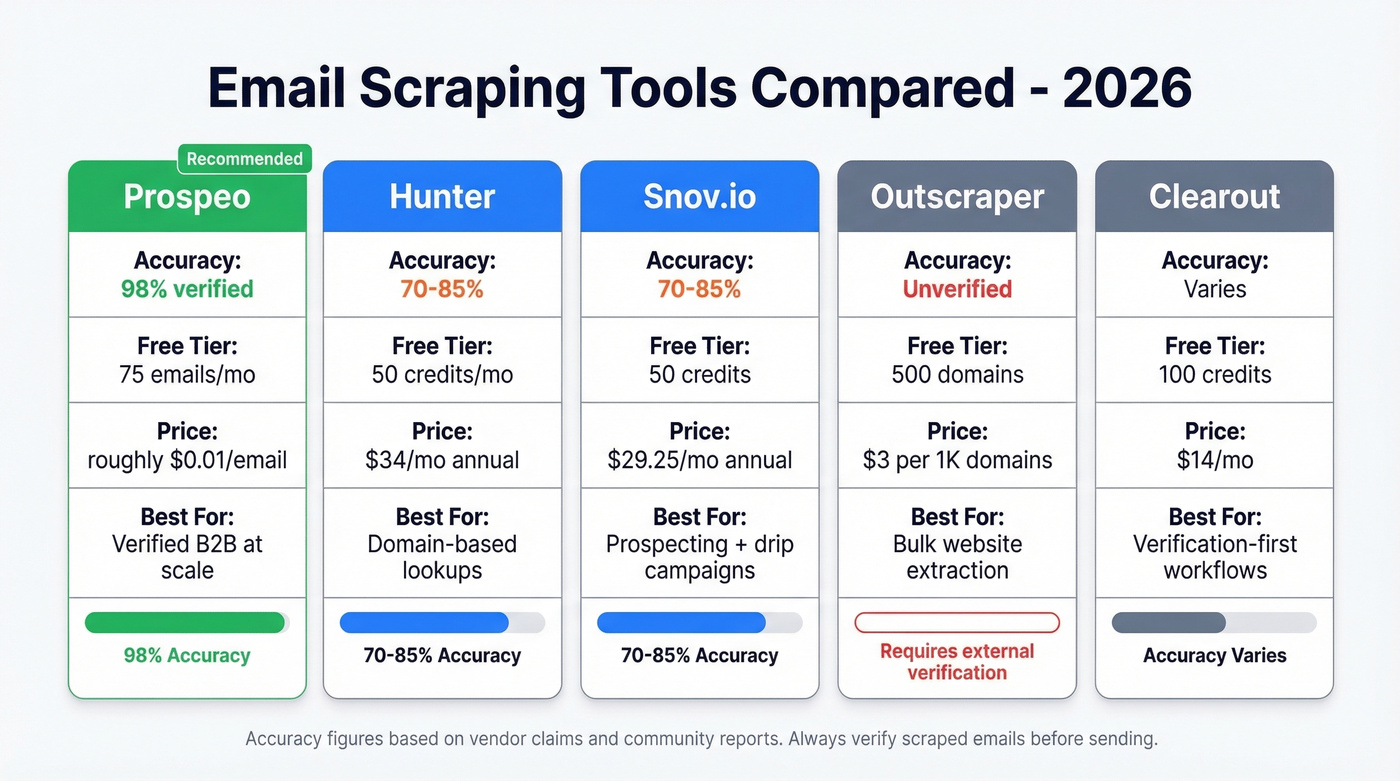
Hunter remains the default recommendation in most cold email communities for domain-based lookups - punch in a company domain and get a list of associated email addresses with confidence scores. The free tier gives you 50 credits per month. Starter runs $49/mo ($34/mo on annual billing) for 2,000 credits, and Growth hits $149/mo ($104/mo annual) for 10,000 credits. Verification costs 0.5 credit per address.
The limitation is real: accuracy on harder searches (name + company, no domain) drops to the 70-85% range. Hunter works best as a domain-search tool, not a full prospecting database. If you already know which companies you're targeting, it's solid. For building lists from scratch with intent filters and technographics, you'll outgrow it fast (see Hunter alternatives).

Snov.io
Snov.io bundles email finding with drip campaign automation, which makes it appealing for solo founders and small teams who want one tool for prospecting and outreach. Starter plans run $29.25/mo (annual) for 1,000 credits, Pro is $74.25/mo for 5,000 credits. There's a free tier with 50 credits to test.
The catch: credits are shared across search, verification, and prospect lookups. Each prospect and each email verification costs 1 credit, so a single lead can easily burn multiple credits by the time you've found and verified their email. The LinkedIn automation add-on costs an extra $69/mo per slot. Email accuracy lands in the 70-85% range - serviceable, but verify externally before sending at volume.
Outscraper
Outscraper is purpose-built for bulk website scraping, not email finding. Free for the first 500 domains/contacts, then $3 per 1,000 domains up to 100,000 and $1 per 1,000 after that. You feed it URLs, it extracts whatever contact data exists on those pages. Everything you get back is raw and needs cleaning and verification before outreach. It's a solid choice when you need to pull emails from pages that don't follow standard patterns.
Clearout
Primarily a verification tool with email finding bolted on. Free plan gives you 100 credits, paid plans start at $14/mo for 3,000 credits. Useful if you've already scraped a list and need cheap verification, but it's not where you'd start for prospecting.
| Tool | Accuracy | Free Tier | Starting Price | Best For |
|---|---|---|---|---|
| Prospeo | 98% verified | 75 emails/mo | ~$0.01/email | Verified B2B at scale |
| Hunter | ~70-85% | 50 credits/mo | $34/mo (annual) | Domain-based lookups |
| Snov.io | ~70-85% | 50 credits | $29.25/mo (annual) | Prospecting + drips |
| Outscraper | Unverified | 500 domains | $3/1K domains | Bulk extraction |
| Clearout | Varies | 100 credits | $14/mo | Verification-first |
Scraping gets you raw emails. Prospeo gets you verified contacts. One outbound agency built to $1M ARR on Prospeo data alone - under 3% bounce rate across every client campaign. The Chrome extension pulls verified emails from any website in one click, no scripts or regex required.
Get the emails without the bounce rate disaster. 75 free emails to start.
Post-Scrape Workflow Most Guides Skip
Extracting emails is step one. Here's the pipeline that actually protects your domain.
1. Deduplicate and normalize. Convert everything to lowercase, strip whitespace, remove duplicates. We've seen scraped lists with 15-20% duplicate rates that inflate send volumes and trigger spam filters.
2. Filter role accounts and disposable domains. Remove info@, support@, sales@, admin@, and any address on a known disposable domain. Role accounts tank your reply rates and often forward to shared inboxes where cold email gets flagged as spam.
3. Verify in layers. A proper verification stack runs syntax validation (catches 5-10% of bad addresses), DNS/MX record checks, SMTP verification, and catch-all detection. That last one matters - over 9% of "verified" emails are catch-all addresses that accept everything but may not have a real person behind them.
4. Re-verify before every campaign. Not just once after scraping. About 23% of email addresses become invalid annually, which means a list scraped three months ago has already decayed significantly. Bounce rates above 2% can trigger filtering and blocking, and keeping bounces below 1.5% is associated with 10-12% higher inbox placement. Gmail and Yahoo require spam complaint rates under 0.3% (see the full email deliverability guide).
| Tool | Claimed Accuracy | Cost per 1,000 |
|---|---|---|
| MillionVerifier | ~99% | ~$3.70 |
| NeverBounce | 97-99% | ~$8 |
| ZeroBounce | 99% | ~$10 |
| Hunter (verify) | N/A | ~$24.50 |
The math is worth running: scraping 5,000 emails with Outscraper ($15) plus verifying with ZeroBounce ($50) costs $65 and several hours of manual work. Prospeo gets you 5,000 verified emails for roughly $50 with zero scraping. The economics only favor scraping when you're targeting niche sources that aren't in any database.
Mistakes That Get Your Domain Blacklisted
Ignoring robots.txt and rate limits. Hammering a site with rapid-fire requests gets your IP blocked and can trigger legal action. Throttle requests and respect crawl directives.
Not deduplicating. Sending the same person two identical cold emails from the same campaign is an instant spam signal. Normalize and dedupe before anything else.
Harvesting role accounts. info@, contact@, and support@ addresses go to shared inboxes where your email gets marked as spam by whoever's on inbox duty that day.
Skipping verification. This is the mistake that actually kills domains. One campaign with a bounce rate over 2% can trigger filtering that takes weeks to recover from. We've seen teams lose months of domain warmup progress from a single unverified send.
Treating scraped data as evergreen. Email addresses decay. A list from six months ago is already stale. Re-verify before every send.
No opt-out mechanism. CAN-SPAM requires it. GDPR requires it. A missing unsubscribe link is the fastest way to get reported as spam.
Scraping behind login walls. Platforms detect scrapers and can permanently ban accounts. Stick to publicly accessible pages - and don't confuse "technically possible" with "legally safe."
Automating the Full Pipeline
For teams that genuinely need to scrape a website for emails at scale - not standard B2B prospecting, but niche directories, conference pages, or industry-specific sources - here's the automation stack that works.
The Firecrawl + n8n + Instantly pipeline handles the full workflow:
- Feed a homepage URL into Firecrawl's
/mapendpoint with keyword filters - "person", "about", "team", "contact" - to identify likely contact pages without scraping the entire site. - Run
/batch/scrapewith an extraction prompt that normalizes obfuscated emails ((at)to@,(dot)to.,@to@) and ignores addresses in HTML comments,<script>, and<style>tags. - Deduplicate case-insensitively and push cleaned leads into Instantly via API for sequencing.
The polling loop checks scrape status every 5 seconds with a roughly 1-minute timeout - extend that for larger jobs. The workflow template is available as an n8n JSON on the Reddit thread linked above. This setup is powerful for niche scraping, but if you're just trying to reach B2B decision-makers, a database search gets you there in a fraction of the time (or use web scraping lead generation only where it truly fits).
FAQ
Is it legal to scrape emails from websites?
Scraping publicly available data is generally legal in many jurisdictions. What's regulated is how you use the emails afterward. CAN-SPAM requires opt-out mechanisms and honest headers, with penalties up to $53,088 per violation. GDPR requires a documented lawful basis for processing personal email addresses. Always include an unsubscribe link and record where each email was sourced.
What's the best free tool to scrape a website for emails?
For raw website scraping, Web Scraper's Chrome extension is free and handles basic extraction from any public page. For verified B2B emails without scraping, Prospeo's free tier gives you 75 emails per month at 98% accuracy - far more reliable than unverified scraped data.
How accurate are scraped emails?
Raw scraped emails are unverified and typically 50-70% accurate. Email finder tools like Hunter and Snov.io land in the 70-85% range on real-world searches. Pre-verified database emails reach 98% accuracy through multi-step verification that includes catch-all handling and spam-trap removal.
How often should I re-verify my email list?
Re-verify before every campaign. About 23% of email addresses become invalid annually, and bounce rates above 2% can trigger filtering and domain reputation damage. Even a list verified last month may have decayed enough to cause deliverability problems at volume.
Can I scrape emails from any website?
You can scrape public pages, but respect robots.txt, rate-limit your requests, and never scrape behind login walls. For standard B2B contacts, a database search is faster, more accurate, and avoids the compliance complexity of scraping entirely.