

How to Actually Send Unlimited Email Without Destroying Your Domain
You just hit Gmail's 500-email daily cap halfway through your Tuesday send. The sequence stalls, follow-ups queue up, and you're searching for ways to send unlimited email - only to discover that every "unlimited" promise has fine print.
Here's the uncomfortable truth: "unlimited email" is a marketing term, not a technical reality. Every tool that promises it has a meter running somewhere - verification credits, SMTP costs, server fees, or shared infrastructure that tanks your deliverability the moment you push volume. What matters isn't how many emails you can send. It's how many land in inboxes without burning your domain.
What You Need for Unlimited Email Sending
Skip the product pages promising "no limits." Here's the actual stack:
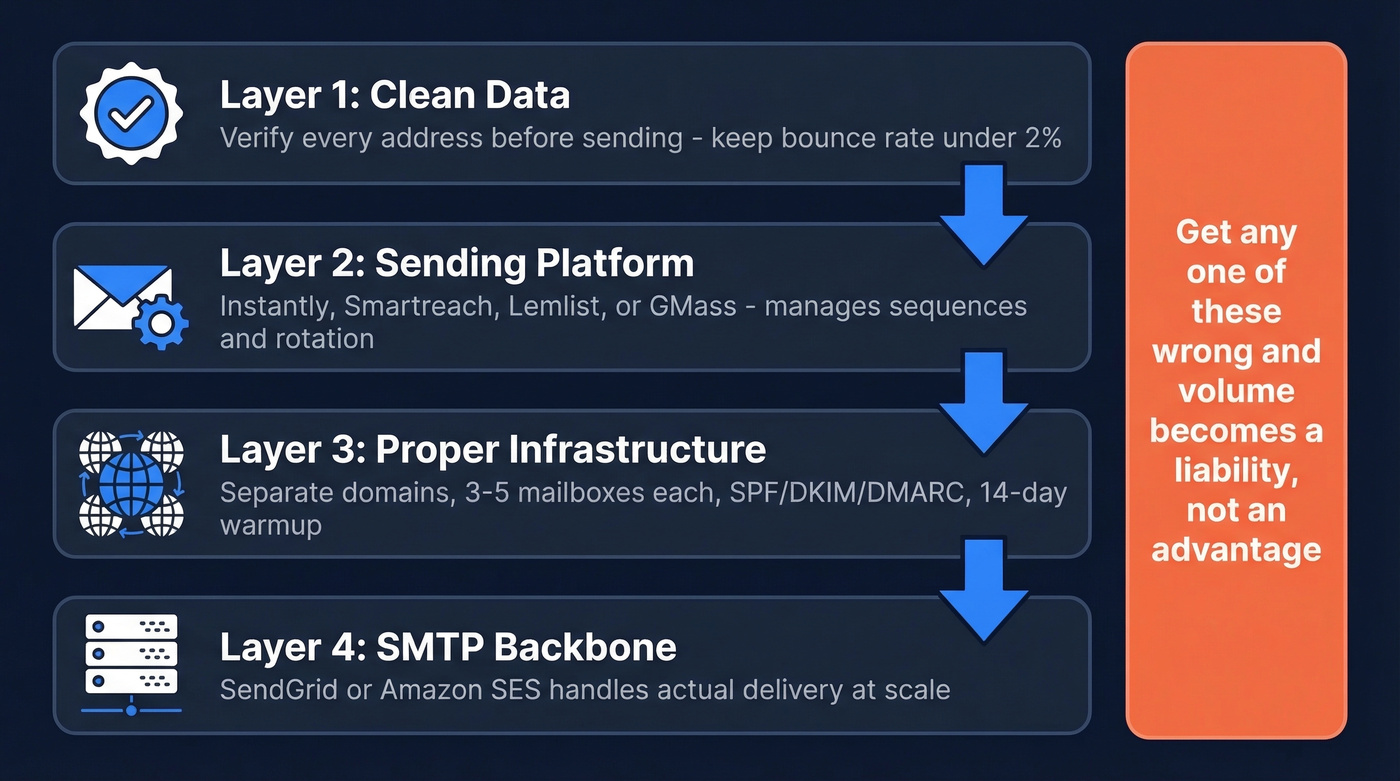
- Clean data - Verify every address before it touches your sending infrastructure. A 5% bounce rate at scale will destroy your domain reputation in a single campaign.
- A sending platform - Instantly, Smartreach, Lemlist, or GMass + an SMTP relay.
- Proper infrastructure - Separate domains, 3-5 mailboxes each, SPF/DKIM/DMARC authentication, 14-day warmup minimum.
- An SMTP backbone - SendGrid or Amazon SES for the actual delivery layer.
Get any one of these wrong and volume becomes a liability, not an advantage.
Why You Can't Just Hit Send
Every major email provider enforces daily sending limits. These aren't suggestions - exceed them and you'll get throttled, blocked, or suspended.
| Provider | Daily Limit | Per Message | If You Exceed | |---|---|---|---| | Gmail (free) | 500/day | 500 recipients | Blocked 1-24 hours | | Google Workspace | 2,000/day | 2,000/day | 500 external | Temporary suspension | | Outlook.com (free) | ~300/day | ~300/day | 100 recipients | Throttled, then blocked | | Microsoft 365 | 10,000/day | 10,000/day | 500 recipients | Rate-limited at 30 msg/min | | Yahoo | 500/day | 500/day | 100 recipients | Account restrictions |
Google Workspace at 2,000/day sounds generous until you're running outbound for a 10-person SDR team - that's 200 emails per rep before you're done. The workaround isn't finding a provider with higher limits. It's building infrastructure that distributes volume across enough mailboxes and domains that no single provider ever sees suspicious activity from your accounts.
What "Unlimited" Actually Means
When a tool says "unlimited emails," they mean unlimited sends through their platform. They don't control whether those emails reach inboxes, and they're almost always metering something else.

A Brevo user on r/Emailmarketing reported open rates below 10% on the Basic plan (100k monthly sends, unlimited contacts). New warmed domains went to spam. Older domains landed in promotions. The culprit? Shared IPs. On shared sending infrastructure, other senders' bad behavior drags your reputation down. "Unlimited" sending meant unlimited emails going nowhere.
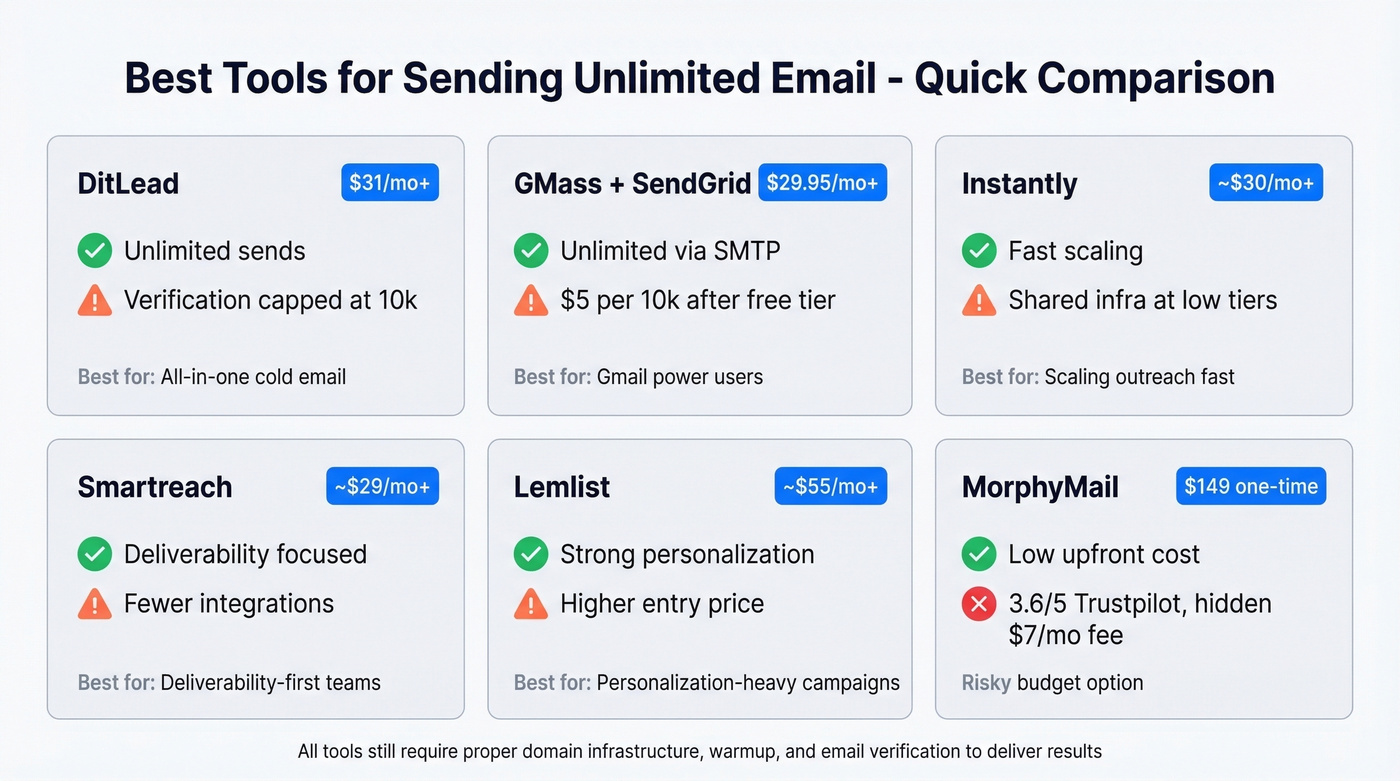
DitLead offers "unlimited emails" on its $31/mo Starter plan - but verification credits are capped at 10,000. MorphyMail sells a "lifetime" deal up to $149 with a $7/mo server fee buried in the fine print. GMass charges $5 per 10k emails after the first 10k free through SMTP.
The "Unlimited" Asterisk
- DitLead: unlimited sends, verification credits metered (10k on Starter)
- MorphyMail: lifetime pricing, $7/mo ongoing server fee
- GMass: unlimited via SMTP, $5/10k after first 10k free
- SMTP providers: per-email pricing at scale (~$15-$35 per 100k/month on entry tiers)
The real cost of high-volume email isn't the sending platform. It's the infrastructure underneath it.

You just read why 5% bounce rates destroy domains at scale. Prospeo's 5-step verification catches invalid addresses, spam traps, and honeypots before they touch your infrastructure - 98% accuracy, catch-all handling included, at roughly $0.01 per email.
Clean your list before it burns your sending domains.
The Infrastructure Blueprint
This is where most teams fail. Sending tools are the easy part. What follows separates teams that scale to 100k+ emails/month from teams that get their domains blacklisted in week two.
Domain Strategy
Never send cold email from your main domain. Full stop. If your outreach domain gets flagged, you want your company's primary domain - the one your customers email you on - completely untouched.
Buy separate outreach domains like yourcompany-mail.com or getyourcompany.com. Redirect them to your main website so they look legitimate if a prospect checks.
Mailbox and Volume Math
Three to five mailboxes per domain, 15-25 sends per mailbox per day once warmed. That gives you roughly 75-125 emails per domain per day.
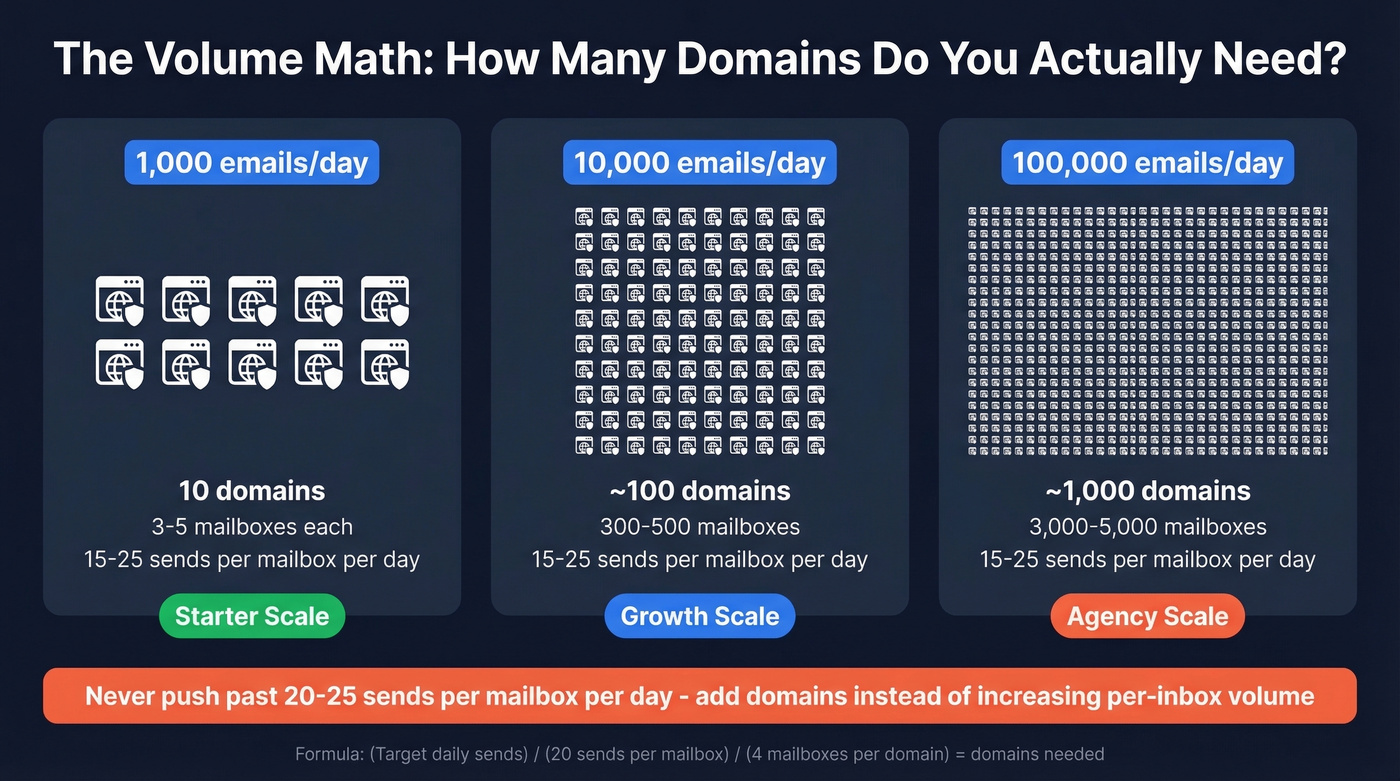
Want 10,000 emails per day? You need approximately 100 domains. That sounds like a lot, but agencies running 300,000+ emails/month manage 10,000+ inboxes across their client base. Scale by adding domains, never by pushing individual mailboxes past 20-25 sends/day. The moment you try to blast 200 emails from a single inbox, you're flagged.
Authentication Setup
Every outreach domain needs three records configured before you send a single email:
- SPF tells receiving servers which IPs are authorized to send on your domain's behalf (see SPF examples).
- DKIM adds a cryptographic signature proving the email wasn't tampered with in transit (and you can verify DKIM is working).
- DMARC tells providers what to do when SPF or DKIM fails - and gives you reporting on authentication results (more on DMARC alignment).
Missing any of these is an instant credibility hit. Gmail and Microsoft both weight authentication heavily in placement decisions, and we've seen domains with perfect content still land in spam because DMARC wasn't configured.
Warmup and Sender Rotation
New mailboxes start with zero reputation. A 14-day warmup minimum is standard - gradually increasing send volume while warmup tools simulate engagement (opens, replies, moves from spam to inbox). Don't turn warmup off, even after you're at full volume.
Run at least 2 ESPs (3-4 for higher volume). If one provider has an infrastructure issue or tightens policies, your entire operation doesn't go dark overnight. Configure sender rotation to distribute sends across mailboxes so no single inbox bears disproportionate volume - most modern sending platforms handle this natively. If you’re comparing options, start with warmup tools.
Verify Before You Send
Here's the thing: a 5% bounce rate on 100,000 emails means 5,000 bounces hitting your sending domains in a single campaign. That's reputation destruction that takes weeks to recover from.
Prospeo's 5-step verification catches invalid addresses, spam traps, and honeypots before they touch your infrastructure. At 98% email accuracy with catch-all domain handling, you upload a CSV, get results in minutes, and push clean lists directly to Instantly or Lemlist through native integrations. If you want the deeper benchmarks and fixes, use this email bounce rate guide.
What 100k Emails/Month Actually Costs
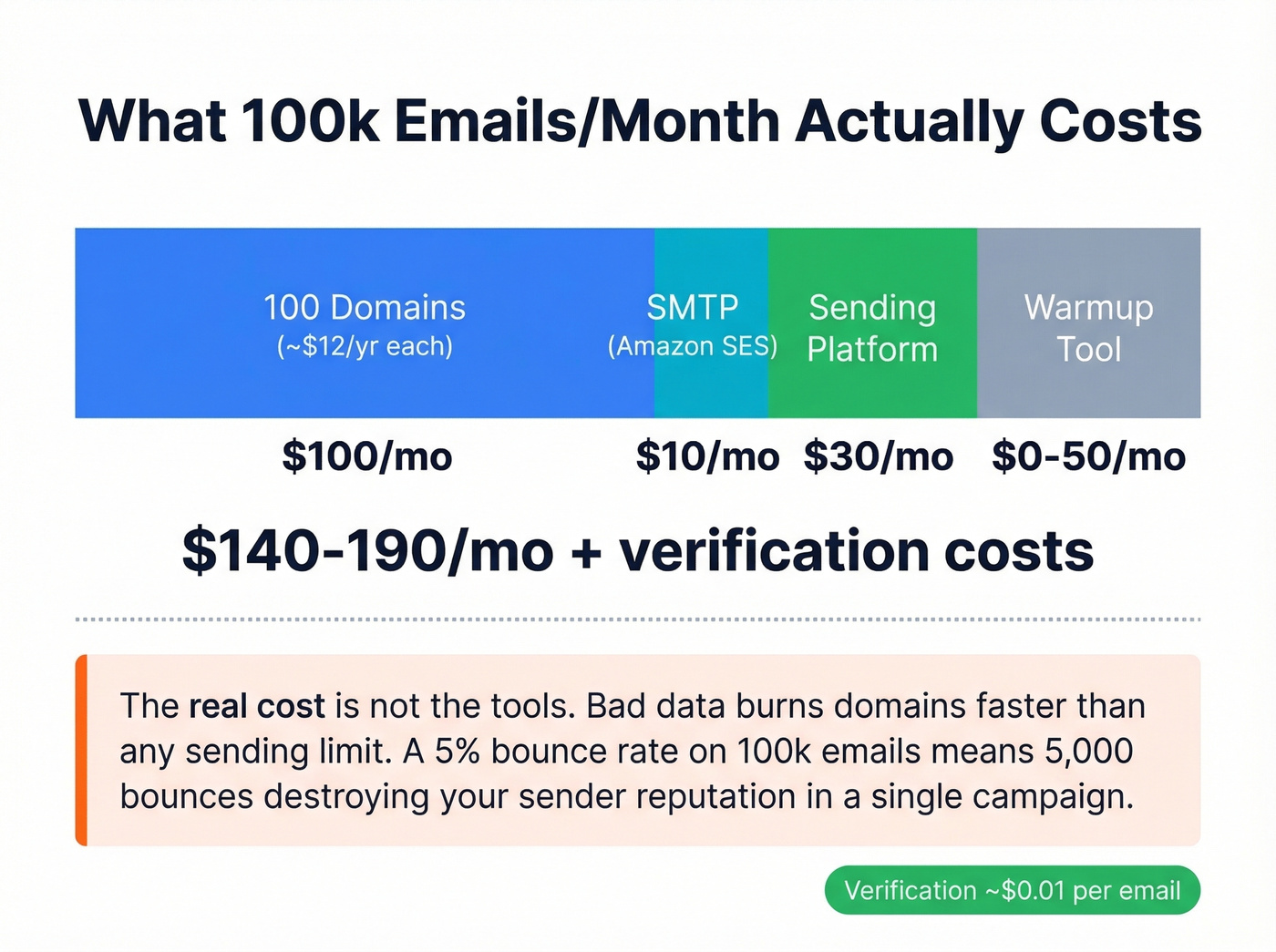
We've run these numbers across multiple client setups, and the math is surprisingly consistent:
| Line Item | Monthly Cost |
|---|---|
| 100 domains x ~$12/year | ~$100 |
| SMTP (Amazon SES at $0.10/1k) | ~$10 |
| Sending platform (GMass Standard / Instantly entry tier) | ~$30 |
| Email verification (~$0.01 per verified email) | Scales with volume |
| Warmup tool (if separate) | ~$0-50 |
| Total | ~$140-190/mo + verification |
That's why "unlimited sending" is never the real bottleneck: your cost and risk are driven by infrastructure and list quality. Bad data burns domains faster than any sending limit ever will.
Let's be honest - if your average deal size is under $5k, you probably don't need 100k emails/month. A tighter list of 10k verified contacts with strong copy will outperform a 100k blast to unverified addresses every single time. Volume is a crutch for bad targeting. (If you want to systematize targeting, start with an Ideal Customer Profile.)
Deliverability Reality Check
Inbox Placement Benchmarks
Even with perfect infrastructure, not every email reaches the inbox. Global inbox placement averages around 84% - roughly one in six emails never arrives.
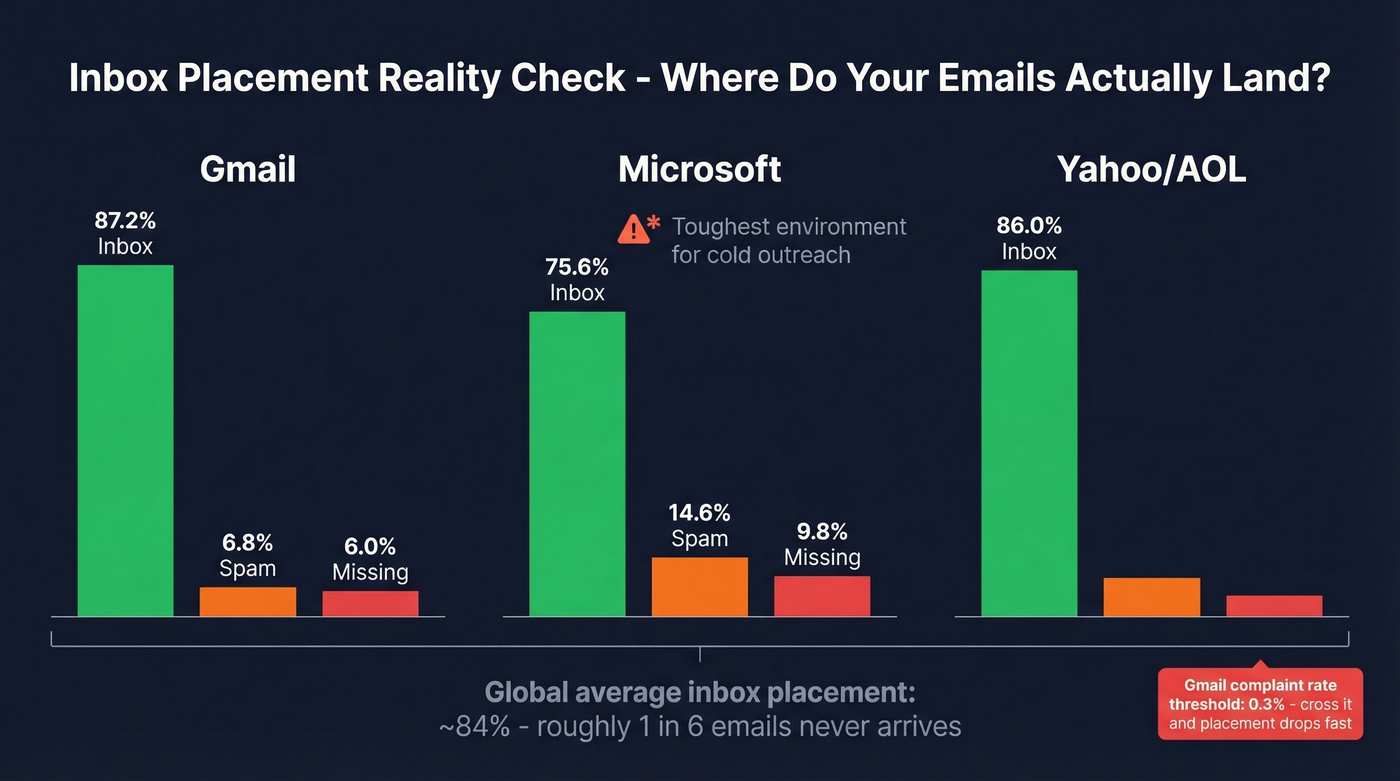
- Gmail: 87.2% inbox (6.8% spam, 6.0% missing)
- Microsoft: 75.6% inbox (14.6% spam, 9.8% missing) - the toughest environment for cold outreach
- Yahoo/AOL: 86.0% inbox
If your prospect list skews heavily toward Microsoft domains (common in enterprise), expect lower placement rates and plan accordingly. Gmail's 0.3% complaint rate threshold is the line you can't cross - exceed it and inbox placement drops fast. For a full diagnostic checklist, use an email deliverability guide.
Blacklists That Actually Matter
Spamhaus is the only blacklist that materially impacts delivery to major providers. Microsoft 365, Outlook, Yahoo, and AOL reject Spamhaus-listed IPs at the SMTP level - hard blocks, no negotiation. If you do get listed, follow a proper Spamhaus blacklist removal process.
Gmail operates differently. It generally doesn't use public blacklists for filtering, relying instead on behavioral signals and internal reputation scoring. This means "blacklist removal" isn't a Gmail silver bullet. If your Gmail deliverability is tanking, the problem is engagement metrics and sending patterns, not a blacklist entry.
Best Tools for High-Volume Email
| Tool | Price | Unlimited? | Catch | Best For |
|---|---|---|---|---|
| DitLead | $31/mo+ | Yes | Verification credits capped at 10k | All-in-one cold email |
| GMass | $29.95/mo+ | Via SMTP | $5/10k after 10k free | Gmail power users |
| Instantly | ~$30/mo+ | Plan-dependent | Shared infra at low tiers | Scaling outreach fast |
| Smartreach | ~$29/mo+ | Plan-dependent | Fewer integrations | Deliverability-focused |
| Lemlist | ~$55/mo+ | Plan-dependent | Higher entry price | Personalization-heavy |
| MorphyMail | Up to $149 one-time | Claims unlimited | 3.6/5 Trustpilot; $7/mo fee | Risky budget option |
| SendUnlimitedEmail | $49.99/mo+ | Claims unlimited | No KYC; accepts crypto | Avoid |
| Systeme.io | Free plan | Marketing only | Not for cold outreach | Newsletter/marketing |
DitLead
DitLead's free plan gives you 200 contacts and 1,000 emails/month - enough to test workflows. Starter at $31/mo unlocks "unlimited" emails with unlimited email accounts and warmup, but caps verification credits at 10,000. That's the real constraint.
Team ($82/mo) bumps credits to 100,000 and adds sender rotation, A/Z testing, and API access. The jump from Starter to Team is where DitLead becomes genuinely useful for scale - sender rotation alone is worth the upgrade.
Use this if you want sending, warmup, and basic verification in one platform under 100k/month. Skip this if you need high-accuracy data - DitLead's built-in verification isn't its strength, and you'll want a dedicated verification layer like Prospeo sitting in front of it.
GMass + SendGrid
GMass turns Gmail into a bulk sending engine by routing emails through third-party SMTP servers. You compose in Gmail, but SendGrid handles actual delivery. Gmail never sees the volume, so your Google account stays safe.
Pricing runs $29.95/mo (Standard) to $59.95/mo (Professional), with annual plans dropping Standard to ~$20.75/mo. The SMTP layer adds cost: first 10,000 emails are free, then $5 per 10,000 after that. At 100,000 emails/month, you're looking at roughly $45 in SMTP overage plus your GMass subscription. SendGrid dominates as the SMTP choice - 14,555 GMass users connect through it.
Use this if your team lives in Gmail and wants to scale without leaving the interface. Skip this if you need built-in warmup and inbox rotation - GMass relies on you managing that separately. (If GMass is your baseline, compare deliverability tactics in GMass email deliverability.)
Instantly
Instantly has become the default recommendation on r/coldemail for teams scaling outreach fast, and in our experience, the hype is mostly justified. Entry pricing around $30/mo gets you started, but the shared infrastructure risk at lower tiers is real - higher-tier plans mitigate this with better infrastructure isolation. The platform handles warmup, rotation, and campaign management in one interface, which is why practitioners gravitate toward it.
Smartreach
Smartreach flies under the radar, but practitioners consistently praise its deliverability stack. At ~$29/mo, you get warmup, blacklist checks, and inbox rotation included - features that cost extra or require manual setup on competing platforms. It won't win any design awards, but your emails will actually land. For teams where deliverability is the primary concern (and it should be), Smartreach deserves a serious look.
Lemlist
Lemlist starts at ~$55-79/mo - a meaningful premium over Instantly or Smartreach. The tradeoff is best-in-class personalization: dynamic images, custom landing pages, and multi-channel sequences. For teams running highly personalized campaigns to smaller, high-value prospect lists, the ROI math works. For pure volume plays, the cost adds up fast and you're paying for features you won't use. If you need help tightening messaging, pull from these cold email subject line examples.
MorphyMail
A 3.6/5 Trustpilot rating from 79 reviews, with complaints about months-long setup failures and support that takes over a month to reply. Plus a $7/mo server fee despite the "lifetime" positioning. Too good to be true usually is.
SendUnlimitedEmail.com
$49.99-$149.99/mo. They accept cryptocurrency without KYC verification. That tells you everything about their target customer. Avoid.
Systeme.io
Free plan, automated sequences, and the ability to email your contacts - but this is a marketing automation platform, not a cold outreach tool. Fine for newsletters and lead nurture sequences. Not designed for cold email and will get you flagged if you try.
Amazon SES
Not a sending platform, but the cheapest SMTP backbone available. At ~$0.10 per 1,000 emails, SES costs roughly $10/month for 100k sends. Pair it with GMass or a self-hosted sending tool and you have the lowest-cost high-volume setup possible. The tradeoff: zero hand-holding. You manage reputation, bounce handling, and complaint processing yourself. Worth it for technical teams; skip it if you want a managed experience.
Scaling to 100k emails/month means nothing if you're sending to dead addresses. Prospeo verifies your entire CSV in minutes and pushes clean lists directly to Instantly, Lemlist, or Smartlead - no manual exports, no guesswork. 143M+ verified emails, refreshed every 7 days.
Build the list and verify it in one platform for $0.01 per email.
Legal Lines You Can't Cross
Volume doesn't exempt you from compliance. CAN-SPAM applies to all commercial email - including B2B. There's no exception for business-to-business messages. Penalties run up to $53,088 per email in violation.
The requirements are non-negotiable: truthful "From" headers and routing information, non-deceptive subject lines, identification as an ad if applicable, your physical postal address, a clear opt-out mechanism, and honoring opt-out requests within 10 business days. You're also responsible for third parties sending on your behalf.
If you're sending into the EU, GDPR penalties reach EUR 20M or 4% of global annual turnover. UK PECR fines cap at GBP 500,000. Build opt-out handling into your stack from day one.
FAQ
Can I send 100,000 emails from Gmail?
Not directly - Gmail caps at 2,000/day on Workspace. Connect an SMTP relay like SendGrid or Amazon SES through GMass to bypass native limits while composing in the Gmail interface. Emails route through the SMTP provider, so Gmail never sees the volume.
What's the cheapest way to send bulk email?
Amazon SES at ~$0.10 per 1,000 emails paired with a free-tier sending tool costs roughly $10/month for 100k sends. Add domain costs (~$12/domain/year) and a platform like GMass (~$30/mo), and total infrastructure runs $140-190/month.
How many domains do I need for 10,000 emails per day?
At 5 mailboxes per domain x 20 sends per mailbox per day = 100 emails per domain daily. For 10,000 emails/day, you need roughly 100 domains. Always scale by adding domains, never by pushing individual mailboxes harder.
How do I keep emails out of spam at high volume?
Verify your list first - catch invalid addresses, spam traps, and honeypots before they bounce. Authenticate every domain with SPF, DKIM, and DMARC. Warm up for 14+ days. Keep complaint rates below 0.3%. And never send from your main domain.
Is there a free tool to send unlimited email?
No tool genuinely offers unlimited sending for free. Systeme.io has a free marketing email plan, but it isn't built for cold outreach. GMass gives 10,000 free SMTP sends, and you can combine free tiers strategically - but expect to pay once you scale past a few thousand sends.