

7 Short Follow-Up Emails to Send After Any Meeting
You walked out of the meeting two minutes ago. Your notes are still warm. And now you're staring at a blank compose window, trying to turn a 45-minute conversation into something that sounds professional without writing a novel.
Most follow-up guides hand you 200-word templates and call them "concise." That's not short. Short is three to five sentences - enough to prove you were paying attention, remind them what you agreed on, and lock in a next step. We've tested dozens of formats across our own outbound campaigns, and the pattern below is what actually gets replies.
The formula: Every follow-up needs three things - a thank-you, a recap of one key point, and a next step. Keep it between 50 and 125 words. Below are 7 ready-to-send templates, none longer than about 120 words.
Why Brief Follow-Ups Get More Replies
With roughly 333 billion emails sent daily, brevity isn't polite - it's strategic.
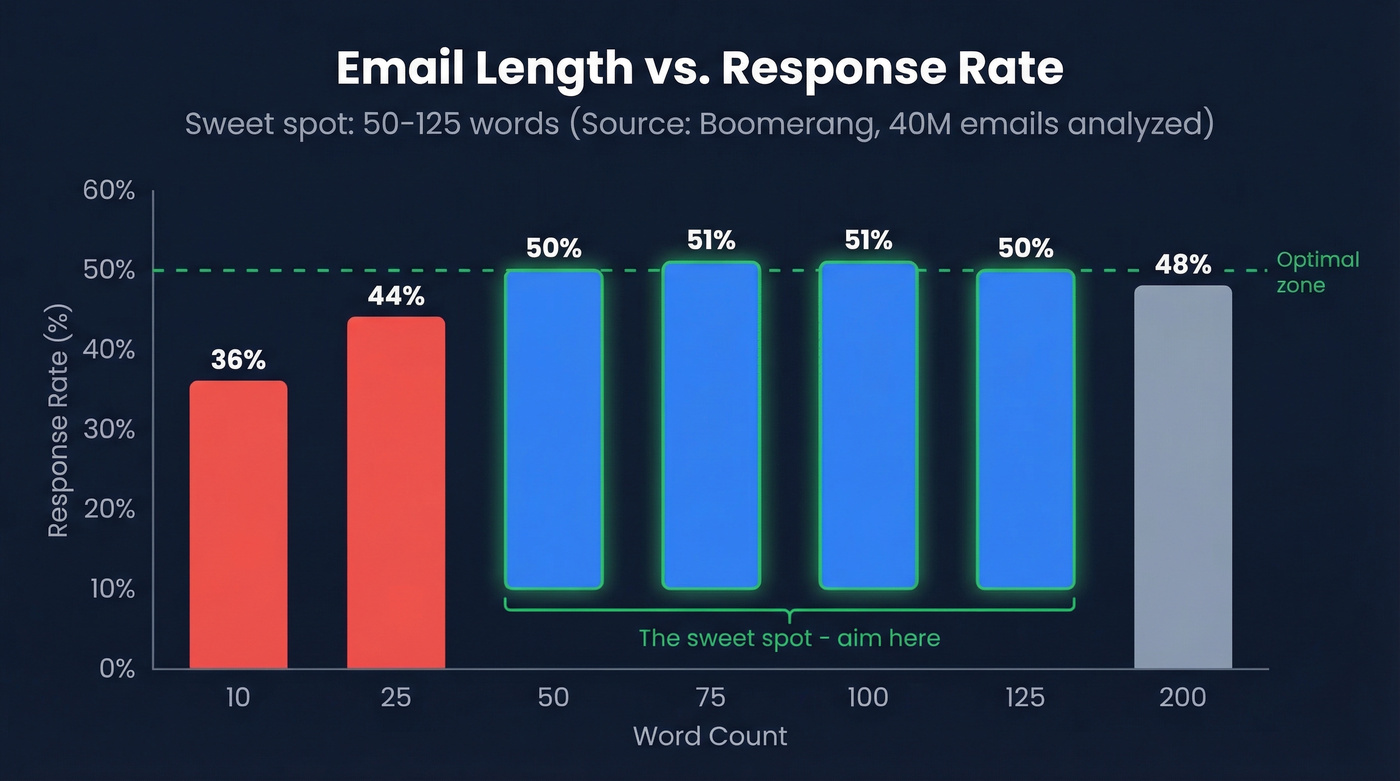
Boomerang's analysis of 40 million emails found the response-rate sweet spot sits between 50 and 125 words. At 25 words, replies drop to 44%. At 10 words, you're at 36%. Give enough context to be useful, but not so much that you become homework.
If you're trying to push reply rates higher, it also helps to treat follow-ups as part of your broader sales communication system - not one-off messages.
| Word Count | Response Rate |
|---|---|
| 10 | 36% |
| 25 | 44% |
| 50 | 50% |
| 75 | 51% |
| 100 | 51% |
| 125 | 50% |
| 200 | 48% |
A Belkins study of 16.5 million cold emails reinforces this: the highest reply rate - 8.4% - came from a single well-crafted email. Four or more emails in a sequence more than tripled unsubscribe and spam complaint rates. One great email beats five mediocre ones.
The Only Structure You Need
Every short follow-up email after a meeting follows the same skeleton:
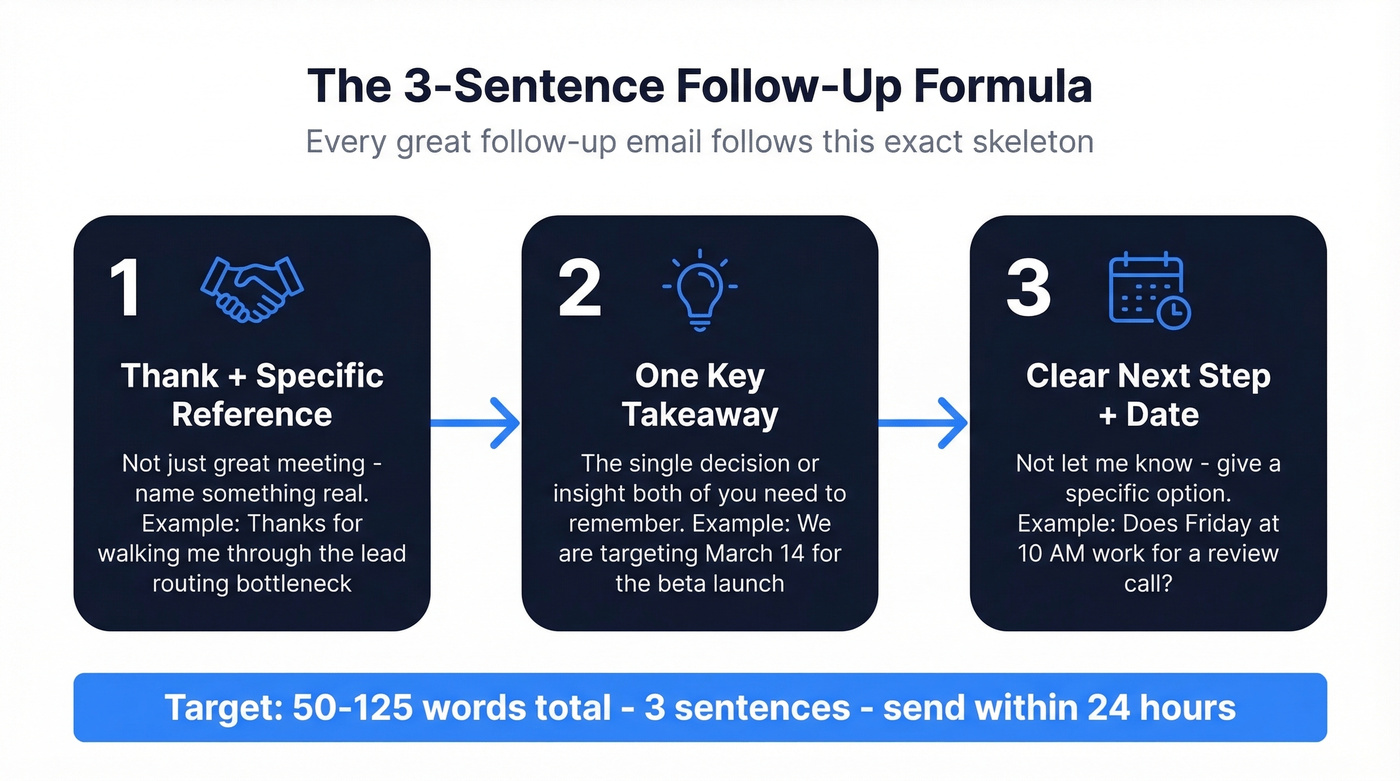
- Thank + reference something specific (not a generic "great meeting")
- One key takeaway or decision both of you need to remember
- A clear next step with a date - not "let me know" but "does Thursday at 2 work?"
Three sentences. That's it. Here's what it sounds like in practice.
If you want more variations beyond post-meeting notes, keep a swipe file of sales follow-up templates you can adapt fast.

You just nailed a 3-sentence follow-up. Now imagine it bouncing because your contact changed jobs last month. Prospeo verifies emails with 98% accuracy on a 7-day refresh cycle, so your follow-up actually reaches the person you met with - not their old inbox.
Verify any email in one click before you hit send.
7 Ready-to-Send Templates
After a Team Meeting
Subject: Action items from today's sprint review
Hi Sarah,
Thanks for running today's review - the dashboard demo cleared up the timeline questions. Key takeaway: we're targeting March 14 for the beta launch, and Jake owns the QA checklist.
I'll send the updated Gantt chart by end of day tomorrow. Flag anything I missed.
Best, Alex
After a Sales Call
Subject: Next steps from our demo today
Hi Marcus,
Appreciate you walking me through your current workflow - the bottleneck around lead routing makes sense now. I'm putting together the custom pricing we discussed for your 12-person team.
Expect that proposal by Thursday. Does Friday at 10 AM work for a quick review call?
Best, Jordan
Why this works: It proves you listened by naming the specific pain point, then immediately moves to a concrete deliverable with a deadline. No fluff.
If you're doing this at scale, pairing follow-ups with a lightweight sequence management process keeps timing consistent without spamming.
After a Networking Event
Subject: Great connecting at SaaStr - the podcast link
Hi Priya,
Really enjoyed our conversation about scaling outbound in APAC. Here's the podcast episode I mentioned on localization strategy.
Want to keep the conversation going - coffee next week? I'm free Tuesday or Wednesday afternoon.
Best, Taylor
After a Client Meeting
Subject: Recap from today + revised timeline
Hi David,
Thanks for today's session. The feedback on the onboarding flow was exactly what we needed - we'll prioritize the single sign-on integration you flagged.
Revised project timeline will be in your inbox by Monday. Let me know if anything shifts on your end before then.
Best, Rachel
Sharing a Promised Resource
Subject: The case study I mentioned
Hi Elena,
As promised - here's the case study on how Meridian cut their onboarding time by 40%. Pages 3-5 are most relevant to what you described today.
Happy to walk through it together if helpful. Does next Tuesday work?
Best, Chris
Dead simple. Deliver the thing you promised, point them to the relevant section, and suggest a next conversation. Don't overthink it.
No-Response Follow-Up
Subject: Trying to finalize my schedule for next week
Hi Tom,
I'm locking in my calendar for next week - does Wednesday or Thursday afternoon work for the pricing review we discussed? Either day works on my end.
If timing's shifted, no worries - just tell me what works better.
Best, Sam
Why this works: Framing it as scheduling logistics ("I'm organizing my calendar") feels collaborative, not desperate. You're not chasing - you're planning.
Timing note: Same-day or within-24-hours follow-ups are ideal for sales demos. For internal meetings, send within 24 hours. Networking contacts? Anywhere within 48 hours is fine.
For more timing guidance, see when should i follow up on an email.
Scheduling the Next Meeting
Subject: Locking in our Q2 planning session
Hi Megan,
Great progress today on the channel strategy. Before we lose momentum, let's get the Q2 planning session on the calendar.
Does the week of April 7 work? I'll send an agenda once we confirm the date.
Best, Jamie
Mistakes That Kill Your Follow-Up
I've sent the "just checking in" email more times than I'd like to admit. Here's what it looks like - and what it should look like instead.
Bad:
"Hey Tom, just following up - did you get a chance to look at our proposal? Let me know if you have any questions or if there's anything else I can help with!"
Good:
"Hi Tom, I'm finalizing my schedule for next week. Does Wednesday work to walk through the proposal together? I can prep a comparison with your current vendor's pricing."
The first version asks if they read your email. The second gives them a reason to reply.
Bad:
"Hey Sarah, just following up, did you receive our quote? Please let me know if you have any questions."
Good:
"Hi Sarah, I pulled a quick comparison showing how the quote stacks up against your current setup - attached. Worth 10 minutes on Thursday to walk through it?"
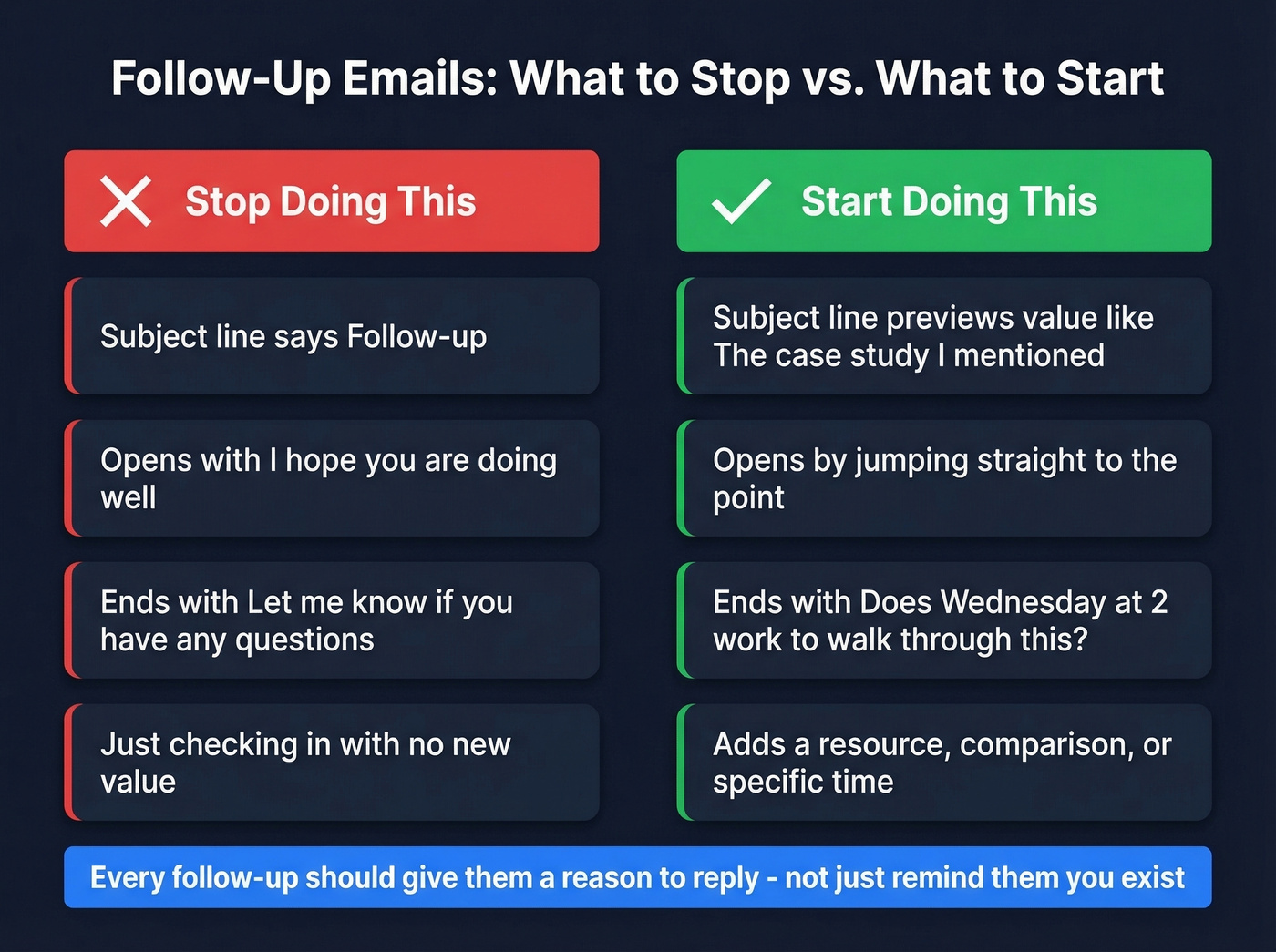
Here's the thing: "just following up" tells the recipient you have nothing new to say. Every follow-up should add something - a resource, a comparison, a specific time. The consensus on r/sales is pretty clear on this too: if your follow-up doesn't give them a reason to respond, it's just noise in their inbox.
If you need alternatives to “just checking in,” this guide on how to say just checking in professionally is a solid shortcut.
A few more rules worth pinning:
- Don't use "Follow-up" as your subject line. It tells the reader nothing and screams template.
- Cut "I hope you're doing well." Filler. Jump to the point.
- Never skip the CTA. Every follow-up needs one clear ask. (More examples: email call to action.)
- Stay under 125 words. Past that, response rates slide.
From Meeting Notes to Sent Email in 30 Seconds
Pre-write your template before the meeting. Open a draft with the three-part structure already in place. After the meeting, you're filling in specifics from your notes instead of starting from scratch - a 10-minute task becomes 30 seconds.
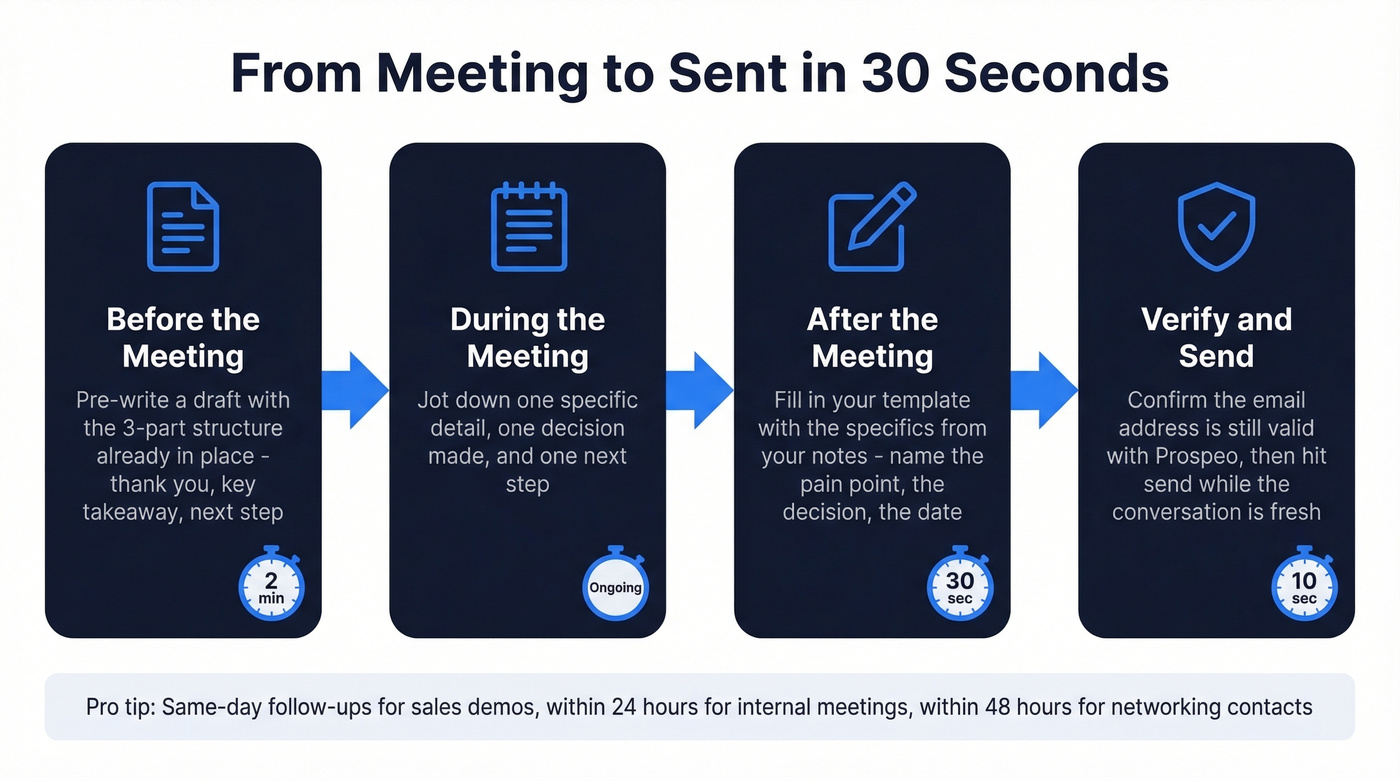
Verify the email address before you hit send. We've all been there: you write the perfect three-sentence follow-up, hit send, and it bounces because the contact changed jobs two months ago. Bounces hurt your sender reputation, and enough of them will tank your deliverability across the board. If you're sending follow-ups at any kind of scale, tools like Prospeo can verify addresses in real time so you're not wasting good copy on dead inboxes.
If bounces are a recurring issue, it’s worth learning the basics of email bounce rate and how to improve sender reputation before you ramp volume.
Writing the perfect follow-up takes 30 seconds. Finding a verified email for the person you just met shouldn't take longer. Prospeo's Chrome extension lets 40,000+ users pull verified emails and direct dials from any LinkedIn profile or company site - so your follow-up lands the same day.
Stop guessing email addresses. Start landing in inboxes.
FAQ
How long should a meeting follow-up email be?
Aim for 50-125 words for the highest response rates. Post-meeting messages can skew even shorter - 30-75 words - because the recipient already has full context from the conversation.
What's the best way to write a first meeting follow-up email?
Reference one specific detail from the conversation. It proves you were engaged and separates your message from every generic "nice to meet you" in their inbox. Then close with a concrete next step, not an open-ended "let's stay in touch."
How soon should you send a follow-up after a meeting?
Within 24 hours. Same day is better - the longer you wait, the more it feels like an interruption instead of a continuation of the conversation.
What if they don't respond to your follow-up?
Wait 3-5 business days, then send one value-add follow-up with a resource or data point. After two attempts, move on - Belkins data shows 4+ emails more than triple unsubscribe and spam complaint rates. Skip the third nudge and spend that energy on someone who's actually engaged.