

Soft Bounce Emails: What They Are, Why They Happen, and How to Fix Them
You just sent a 50,000-email campaign and your bounce rate came back at 4.2%. Your marketing ops lead is pinging you. Your deliverability dashboard is flashing yellow. Before you panic-suppress half your list, let's figure out what actually happened - because most of the time, a soft bounce isn't what you think it is, and the fix isn't what you'd expect.
The Quick Version
Three things matter most for fixing email bounces. First, authenticate your domain - SPF, DKIM, and DMARC should all be passing before you send a single email. Second, verify your list before sending, not after bounces roll in. Third, monitor your bounce rate after every campaign and investigate anything above 2%.
If you're above that threshold, the problem is almost certainly upstream data quality or missing authentication. Stop obsessing over individual bounce notifications. Start obsessing over what caused them.
What Is a Soft Bounce?
A soft bounce is a temporary email delivery failure. The receiving server accepted the connection but couldn't deliver the message right now. In SMTP terms, these are 4xx-class response codes - the server is saying "try again later," not "this address doesn't exist."
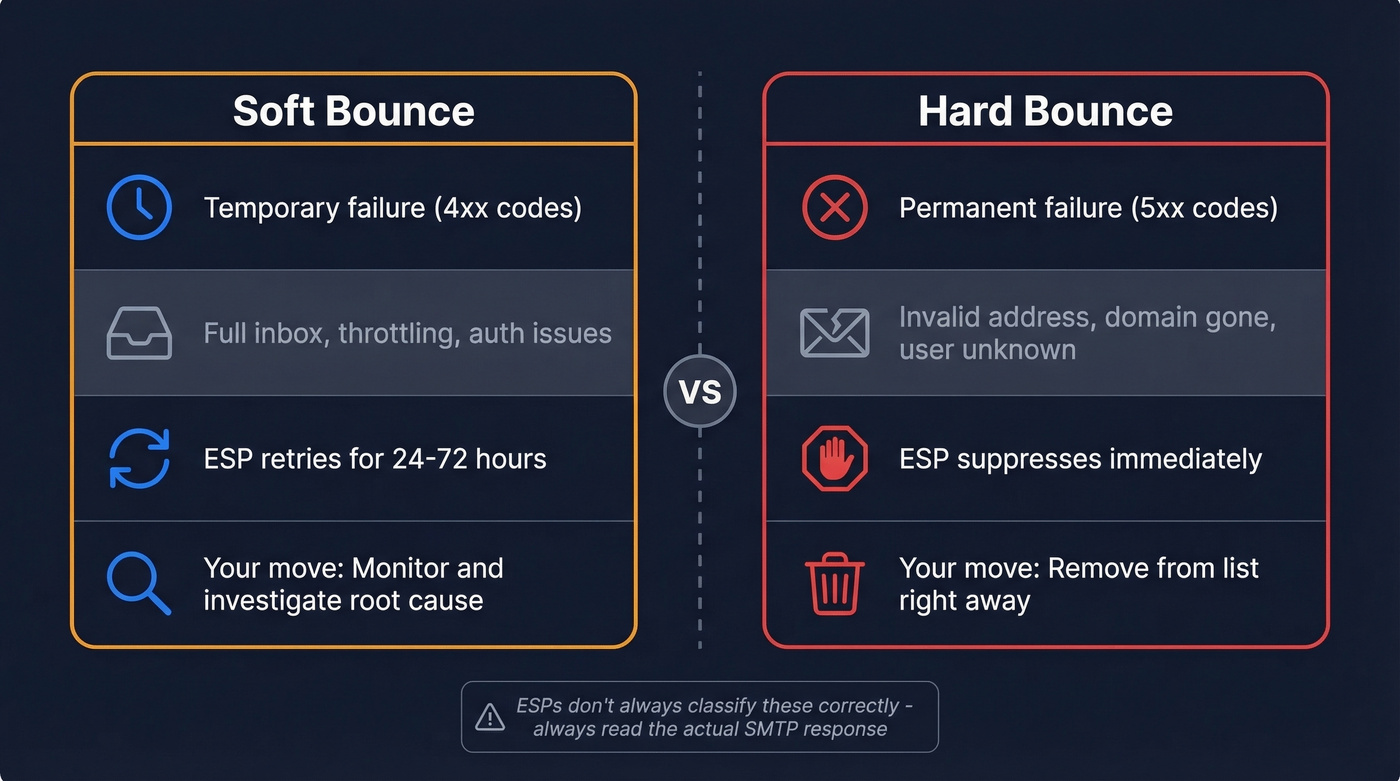
The hard/soft binary is oversimplified, though. Laura Atkins of Word to the Wise puts it well: SMTP only tells you what to do with this message - retry or don't. It doesn't tell you what to do with future sends. That distinction matters more than most email marketers realize, because some ESPs layer on their own categories like "pending" bounces, "global" bounces, and "deferred" - which muddies the water further. Don't treat bounce classifications as gospel. Read the actual SMTP response.
| Soft Bounce | Hard Bounce | |
|---|---|---|
| Type | Temporary failure (4xx) | Permanent failure (5xx) |
| Common cause | Full inbox, throttling, auth failure | Invalid address, domain gone |
| ESP action | Retry for 24-72 hrs | Suppress immediately |
| Your action | Monitor, investigate root cause | Remove from list |
Here's the thing: ESPs don't always classify these correctly. A "mailbox full" response might be temporary today and permanent next month. A content rejection might get logged as a temporary bounce when the address is perfectly valid. Context matters more than the code.
What Causes Soft Bounces?
Recipient-Side Causes
These are outside your control, but you need to recognize them:
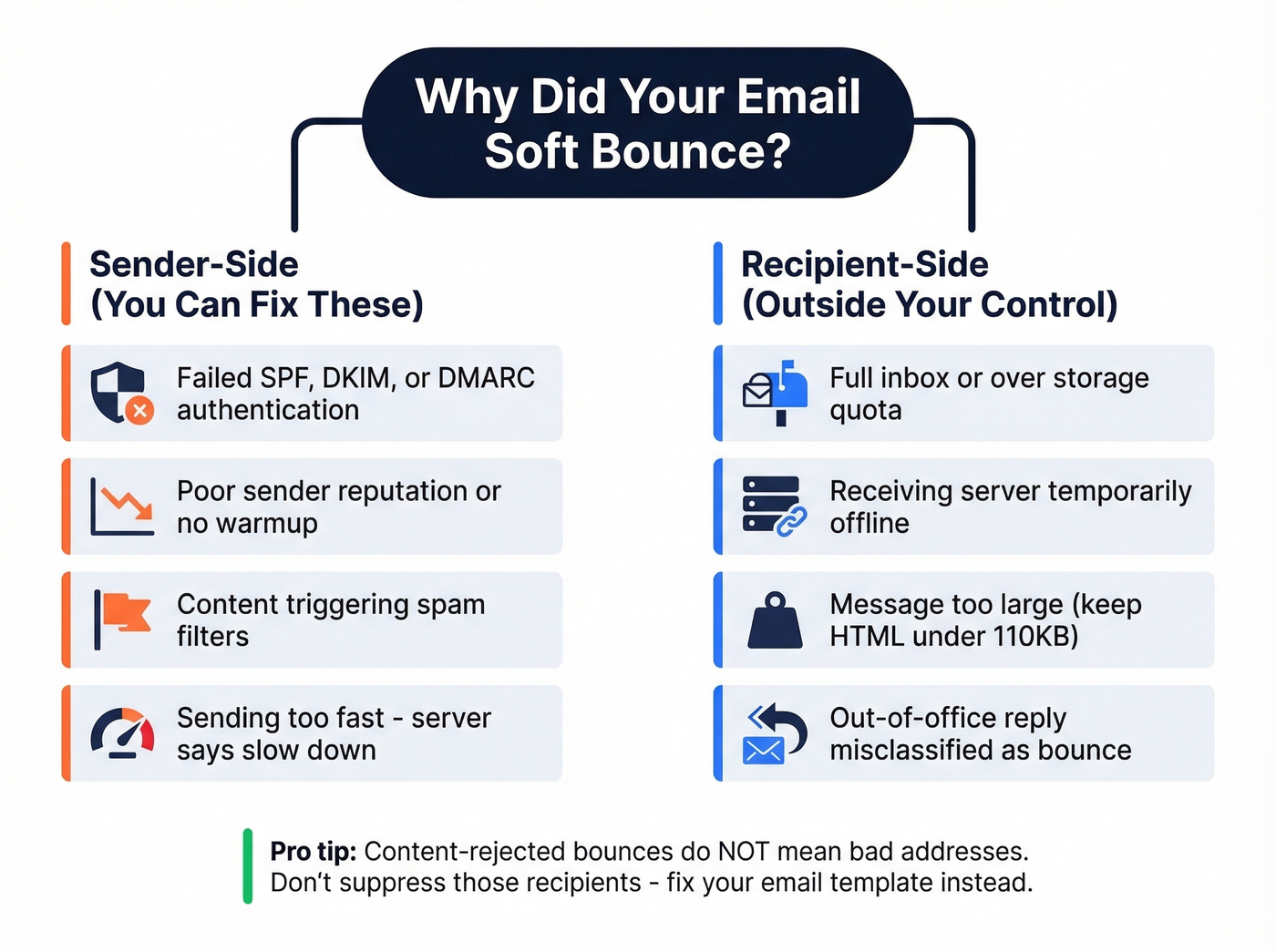
- Full inbox / over quota - the recipient's mailbox hit its storage limit. Gmail handles this with two different responses: a 4xx when the mailbox might clear soon, and a 5xx "OverQuotaPerm" when it's effectively abandoned. Many ESPs classify both as soft bounces, which is operationally wrong.
- Server temporarily down - the receiving mail server is offline or overloaded. This resolves on its own.
- Message too large - attachments or heavy HTML pushing past the server's size limit. Keep email HTML under 110KB to avoid size-limit issues and prevent Gmail clipping.
- Autoresponder misclassification - out-of-office replies and challenge-response systems sometimes get logged as soft bounces by your ESP, even though the email was delivered.
Sender-Side Causes
These are on you, and they're fixable:
- Failed SPF/DKIM/DMARC authentication - one of the biggest causes of "mystery" bounces and deferrals under modern bulk-sender rules. If your authentication isn't passing, Gmail and Yahoo will reject or defer your mail regardless of list quality.
- Poor sender reputation - high complaint rates, previous spam flags, or a new domain without warmup history. (If you need a playbook, see sender reputation.)
- Content triggering spam filters - certain keywords, link patterns, or HTML structures trip content filters. The bounce gets logged, but the address is fine. (Related: spam checker.)
- Throttling by receiving server - you're sending too fast. The server is saying "slow down," not "go away." (See email velocity.)
"Content Rejected" Doesn't Mean Bad Address
We see this mistake constantly: a campaign gets content-filtered, the ESP logs those as soft bounces, and someone on the team suppresses all those recipients. That's wrong. The addresses are valid. The content was the problem. Suppressing recipients for content-triggered bounces means you're throwing away good leads because your email template needs work.
One more edge case worth knowing: non-existent domains can paradoxically generate temporary bounce responses. If there's no server to respond, there's no 5xx rejection, and some ESPs default to classifying the failure as soft. Keep that in mind when reviewing your bounce logs.
Watch out for Gmail's dual "mailbox full" responses. A 4xx means the inbox might clear. A 5xx OverQuotaPerm means it's effectively dead. If your ESP treats both as soft bounces, you're retrying addresses that'll never deliver.
SMTP Bounce Codes Decoded
Classic 3-Digit Codes
These are the basic SMTP response codes you'll see in bounce logs:
| Code | Meaning | Type |
|---|---|---|
| 421 | Service not available | Soft |
| 422 | Mailbox over quota | Soft |
| 431 | Server temporarily unavailable | Soft |
| 450 | Mailbox temporarily unavailable | Soft |
| 451 | Local error in processing | Soft |
| 452 | Insufficient storage | Soft |
| 550 | Mailbox doesn't exist | Hard |
| 551 | User not local | Hard |
| 552 | Storage limit exceeded | Hard |
| 553 | Mailbox name not allowed | Hard |
Enhanced Status Codes (X.Y.Z)
Modern mail servers return enhanced status codes with more detail. The structure is X.Y.Z where X is the class (4 = temporary, 5 = permanent), Y is the subject category, and Z is the specific detail.
| Code | Meaning | Soft/Hard | Action |
|---|---|---|---|
| 4.2.2 | Mailbox full | Soft | Retry with backoff |
| 4.4.1 | Connection timeout | Soft | Retry later |
| 4.4.2 | Bad connection | Soft | Retry later |
| 4.7.0 | Throttling/greylisting | Soft | Slow sending cadence |
| 5.1.1 | Recipient doesn't exist | Hard | Suppress immediately |
| 5.7.1 | Policy/security refusal | Hard (until fixed) | Fix auth or reputation |
| 5.7.26 | DMARC non-alignment | Hard (until fixed) | Fix DMARC alignment |
That 5.7.26 code is the one catching people off guard in 2026. It means your sending domain doesn't align with your SPF or DKIM records, and the receiving server is enforcing DMARC. This isn't a list problem - it's a DNS configuration problem. Fix your records and the bounces stop. (More detail: DMARC alignment and SPF record examples.)
One important caveat: ISPs don't always adhere perfectly to these conventions. A 5xx from one provider might be a 4xx from another for the same underlying issue. Always read the human-readable bounce message alongside the code.

Most soft bounces trace back to bad data upstream. Prospeo's 5-step email verification - with catch-all handling, spam-trap removal, and honeypot filtering - delivers 98% accuracy. That's how teams like Snyk cut bounce rates from 35% to under 5%.
Verify before you send. Pay $0.01 per email. Zero surprises in your bounce log.
How Many Soft Bounces Before Suppression?
There's No Standard
We looked at what five deliverability pros recommend for suppression thresholds, and none used the same policy. One said suppress after 3 soft bounces within 30 days. Another said 5 consecutive bounces. A third used a 7-day temporary invalid period, then suppressed after 3 consecutive failures. This frustration plays out constantly in email marketing communities - a recent Reddit thread asking deliverability pros about suppression thresholds got five different answers, with heated debate over whether 3 or 5 consecutive bounces is the safer cutoff.
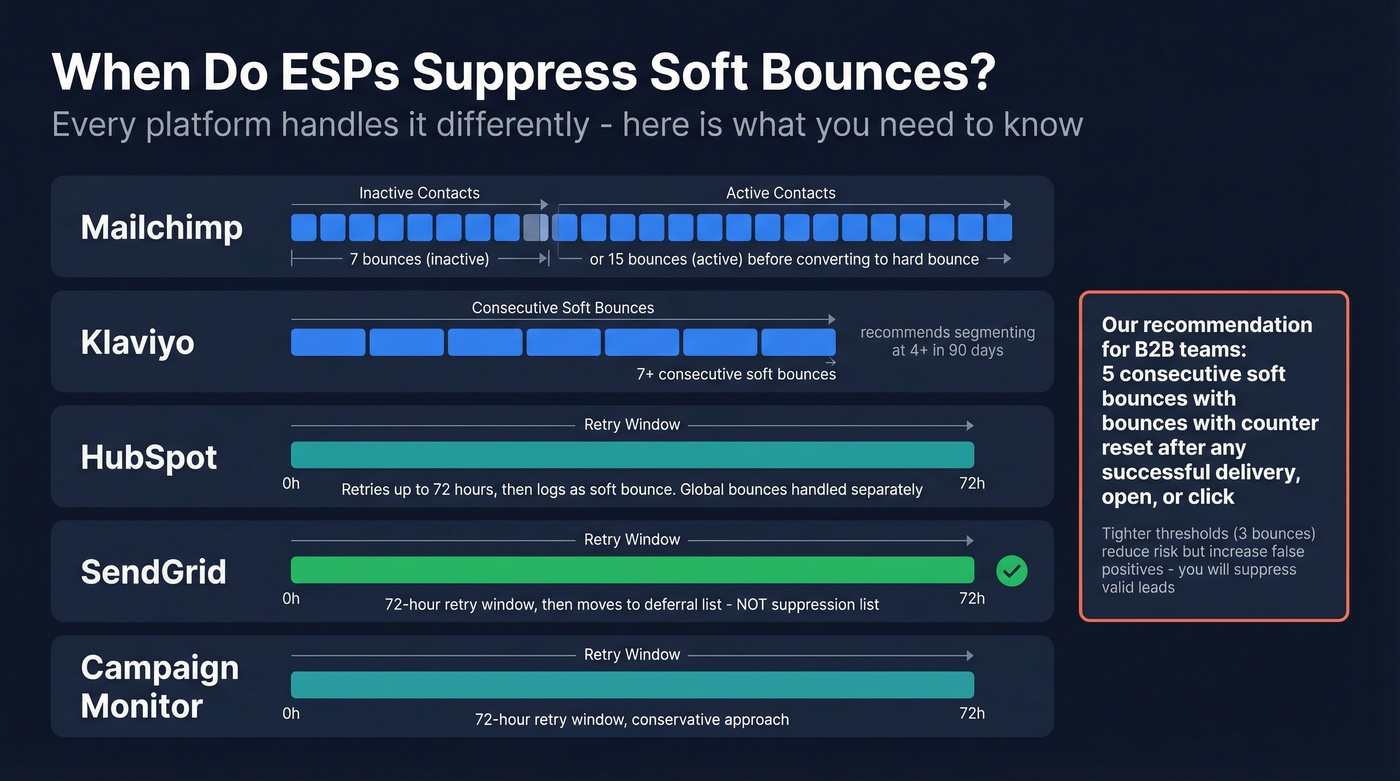
The fact that every ESP handles this differently - and none clearly document their thresholds - is maddening.
Here's our take: if your deal sizes are modest, say sub-$15k contracts, you probably can't afford to suppress aggressively. Every false positive is a lead you paid to acquire and then threw away. Tightening from 5 to 3 consecutive bounces reduces deliverability risk but increases false positives - you'll suppress more valid addresses that had temporary issues. For most B2B teams, 5 consecutive bounces with a counter reset after any successful delivery, open, or click is the right balance.
One nuance nobody talks about: "3 consecutive soft bounces" means wildly different things depending on your sending cadence. For daily senders, that's 3 days. For monthly newsletter senders, that's 3 months of failed delivery. Your suppression threshold should account for how often you send, not just the raw bounce count.
ESP Suppression Policies
| ESP | Suppression Rule | Retry Window | Notes |
|---|---|---|---|
| Mailchimp | 7 soft bounces (inactive) / 15 (active) before converting to hard | Varies | Thresholds vary by engagement |
| Klaviyo | 7+ consecutive soft bounces | Per-send | Recommends segmenting at 4+ bounces in 90 days |
| HubSpot | Pending bounces retried up to 72hr, then logged as soft bounce | 72 hours | Global bounces handled separately |
| SendGrid | Retries up to 72hr, then treated as block/deferral list entry | 72 hours | Soft bounces aren't added to suppression |
| Campaign Monitor | 72hr retry | 72 hours | Conservative approach |
SendGrid's approach is worth highlighting: they explicitly treat temporary bounces as blocks and move them to a deferral list, not a suppression list. That's the right instinct. Temporary delivery failures are temporary by definition - suppressing them permanently defeats the purpose.
Gmail & Yahoo's 2026 Authentication Rules
Most bounce problems now are authentication problems, not list problems. Google and Yahoo announced stricter sender requirements in late 2023, began gradual enforcement through 2024, and moved to stricter enforcement in November 2025. Microsoft aligned with similar bulk-sender compliance rules mid-2025. If you set up your email authentication two years ago and haven't touched it since, it's time to re-audit.
What Every Sender Needs
Every sender, regardless of volume, must have:
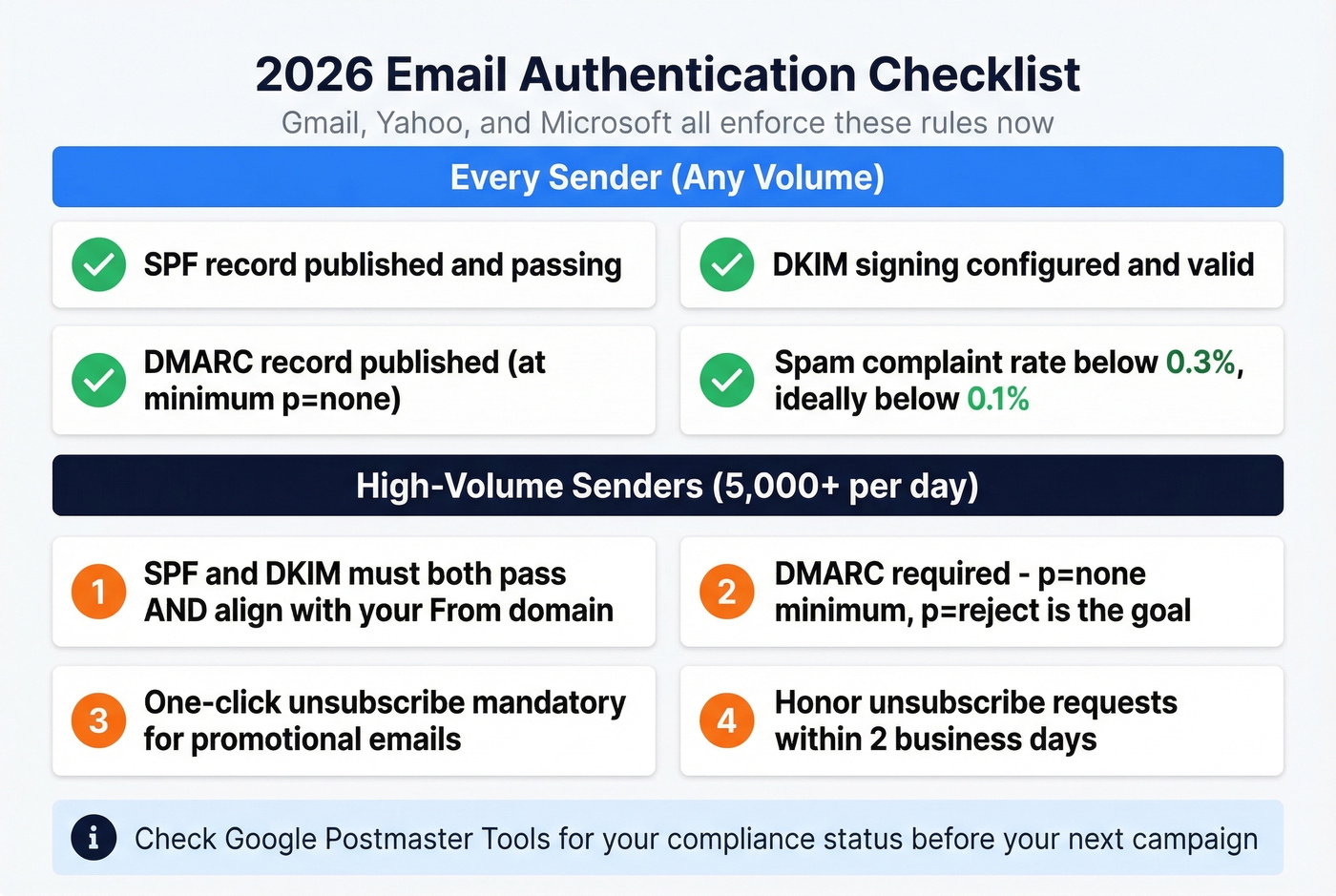
- SPF record published and passing
- DKIM signing configured and valid (see how to verify DKIM is working)
- DMARC record published (at minimum
p=none) - Spam complaint rate below 0.3% - ideally below 0.1%
If any of these are missing, your mail will be rejected or routed to spam. Full stop.
Extra Rules for High-Volume Senders
For anyone sending more than 5,000 messages per day, the requirements get tighter. SPF and DKIM must both pass and align with your "From" domain. A DMARC record is required with at least p=none, though p=reject is the goal. One-click unsubscribe is mandatory for promotional messages and must be honored within 2 business days, and you need a visible unsubscribe link in the email body.
Google Postmaster Tools has a compliance status dashboard that'll show you exactly where you stand. If you haven't checked it recently, do it before your next campaign.
What's a Good Bounce Rate?
The rule of thumb: under 2% is acceptable, under 1% is ideal. Above 2% means your list needs cleaning. Above 5% is critical - you're actively damaging your sender reputation.
Here's how different industries stack up:
| Industry | Avg Bounce Rate |
|---|---|
| Beauty / personal care | 0.33% |
| Agriculture / food services | 0.50% |
| Business / finance | 0.55% |
| Consulting | 0.79% |
| Creative services / agencies | 0.93% |
| Construction | 1.28% |
Mailchimp's benchmark dataset includes average soft and hard bounce rates by industry, calculated from billions of emails sent to lists of 1,000+ subscribers. If you're above the industry average, the problem is almost certainly list hygiene or authentication - not bad luck. (Related: email bounce rate and the broader email deliverability guide.)
How to Fix and Prevent Soft Bounces
Fix What's Bouncing Now
Start with the SMTP codes. Pull your bounce log and categorize what you're seeing. If it's mostly 4.7.0 (throttling), slow your sending cadence. If it's 5.7.26 (DMARC failure), fix your DNS records. If it's 4.2.2 (mailbox full), those addresses are likely abandoned - segment them and reduce frequency.
For chronic bouncers, Klaviyo's approach is smart: create a segment of contacts with 4+ bounces in the last 90 days and exclude them from campaigns until you can verify the addresses are still valid.
If you're seeing content-triggered bounces, the fix isn't suppression - it's fixing your email. Strip heavy images, check your link reputation, and test against spam filters before sending.
The Purchased List Cautionary Tale
We've seen this play out dozens of times: an SDR team buys a list of 20,000 "verified" contacts, uploads it straight into their ESP, and blasts a campaign. Bounce rate comes back at 18%. The ESP throttles their sending. Gmail flags their domain. Now their legitimate marketing emails to opted-in subscribers are landing in spam too.
It takes 4-6 weeks of careful warmup to recover - if the domain recovers at all. Purchased lists are the fastest way to destroy a sending domain, and no amount of clever copy or authentication fixes the damage after the fact.
Prevent Bounces Before They Happen
Cleaning your list after bounces is reactive. Verifying before you send is the move.
Authenticate your domain. SPF + DKIM + DMARC. Table stakes. This alone eliminates an entire category of temporary delivery failures.
Verify emails before sending. Prospeo runs a 5-step verification process that catches invalid addresses, catch-all domains, spam traps, and honeypots before they ever hit your ESP. With 98% email accuracy and a 7-day data refresh cycle, you're working with current data, not stale records from six weeks ago. Snyk's team of 50 AEs cut their bounce rate from 35-40% to under 5% after switching to Prospeo for verification - that's the difference between upstream verification and downstream damage control. (If you're comparing tools, see Bouncer alternatives.)
Use double opt-in for inbound lists. It adds friction, but it eliminates typos and fake signups.
Monitor bounce rate after every campaign. Don't wait for monthly reports. If a single send spikes above 2%, investigate immediately.
For other verification tools, ZeroBounce starts at $18 for 2,000 credits, NeverBounce runs $0.008/email for up to 10,000 with volume discounts, and Bouncer charges $8 for 1,000 verifications.
Why Gmail Bounces But Outlook Doesn't
This is one of the most common confusion points. You send the same campaign to your full list, and Gmail recipients bounce while Outlook delivers fine. What gives?
Gmail enforces authentication and reputation scoring more aggressively than most providers. If your SPF alignment is slightly off, or your domain reputation dipped from a previous campaign, Gmail will defer or reject while Outlook lets it through. The fix isn't provider-specific - it's getting your authentication and reputation right across the board. Verify your list before sending so you're not feeding bad data into a system that's already watching you closely.
Suppressing valid contacts because of content-triggered bounces? That's a data quality problem disguised as a deliverability problem. Prospeo refreshes 300M+ profiles every 7 days - not every 6 weeks - so you're never guessing which addresses are real.
Kill bounce rate anxiety at the source with emails verified this week, not last quarter.
Not Every Bounce Is Real
Not every "bounce" in your ESP dashboard is actually a failed delivery. Autoresponder and out-of-office notifications sometimes get misclassified as soft bounces - the email was delivered, but the automated reply confused your tracking. Challenge-response systems are another culprit: the first email triggers an auto-response requiring sender verification, and if your system doesn't respond, subsequent sends bounce.
Before you suppress any address flagged as a temporary bounce, check whether the email was actually opened or clicked. If it was, the "bounce" was a misclassification, and suppressing that contact is a mistake.
FAQ
What is a soft bounce email?
A soft bounce is a temporary delivery failure where the recipient's server accepts the connection but returns a 4xx code, meaning "try again later." Common causes include full inboxes, server downtime, throttling, and authentication failures. Unlike a hard bounce, the address itself is often perfectly valid.
What's the difference between a soft bounce and a hard bounce?
A soft bounce is temporary - the server says "retry later" with a 4xx code. A hard bounce is permanent - the address doesn't exist or the domain is dead (5xx code). ESPs retry soft bounces for 24-72 hours before potentially suppressing. Hard bounces get suppressed immediately and should be removed from your list.
How many soft bounces before an email gets suppressed?
There's no industry standard. Mailchimp suppresses after 7 consecutive soft bounces for inactive contacts (up to 15 for active ones). Klaviyo suppresses after 7+ consecutive failures. SendGrid doesn't suppress at all - it uses a block/deferral list instead. For most B2B teams, 5 consecutive bounces with a reset after any successful delivery is a safe threshold.
Can email verification prevent soft bounces?
Verification catches invalid, inactive, and catch-all addresses before they bounce. Prospeo's 5-step process with spam-trap and honeypot removal reduces bounce rates to under 5% for most teams - Snyk's 50-person AE team dropped from 35-40% to under 5% after switching. ZeroBounce and NeverBounce are solid alternatives starting around $0.008-0.009/email.
Does a soft bounce hurt sender reputation?
An isolated one won't cause damage. Consistently high bounce rates above 2% signal list-quality problems to mailbox providers like Gmail and Yahoo, and repeated failures to the same addresses gradually erode your domain reputation. Keep overall bounce rate under 2% and complaint rate under 0.1%.