

Soft Bounce Rate: What It Should Be and How to Fix It
Your deliverability dashboard says "soft bounce" next to 4% of last week's send. The ESP retried, some went through, some didn't - and now you're wondering whether that number is normal or a five-alarm fire.
Most soft bounces aren't emergencies. But some are. The difference comes down to which SMTP codes you're seeing and whether the problem is your list, your authentication, or your content. Here's the breakdown with actual benchmarks, the codes that matter, and a fix playbook that works.
The Quick Version
Formula: (Soft Bounces / Total Emails Sent) x 100
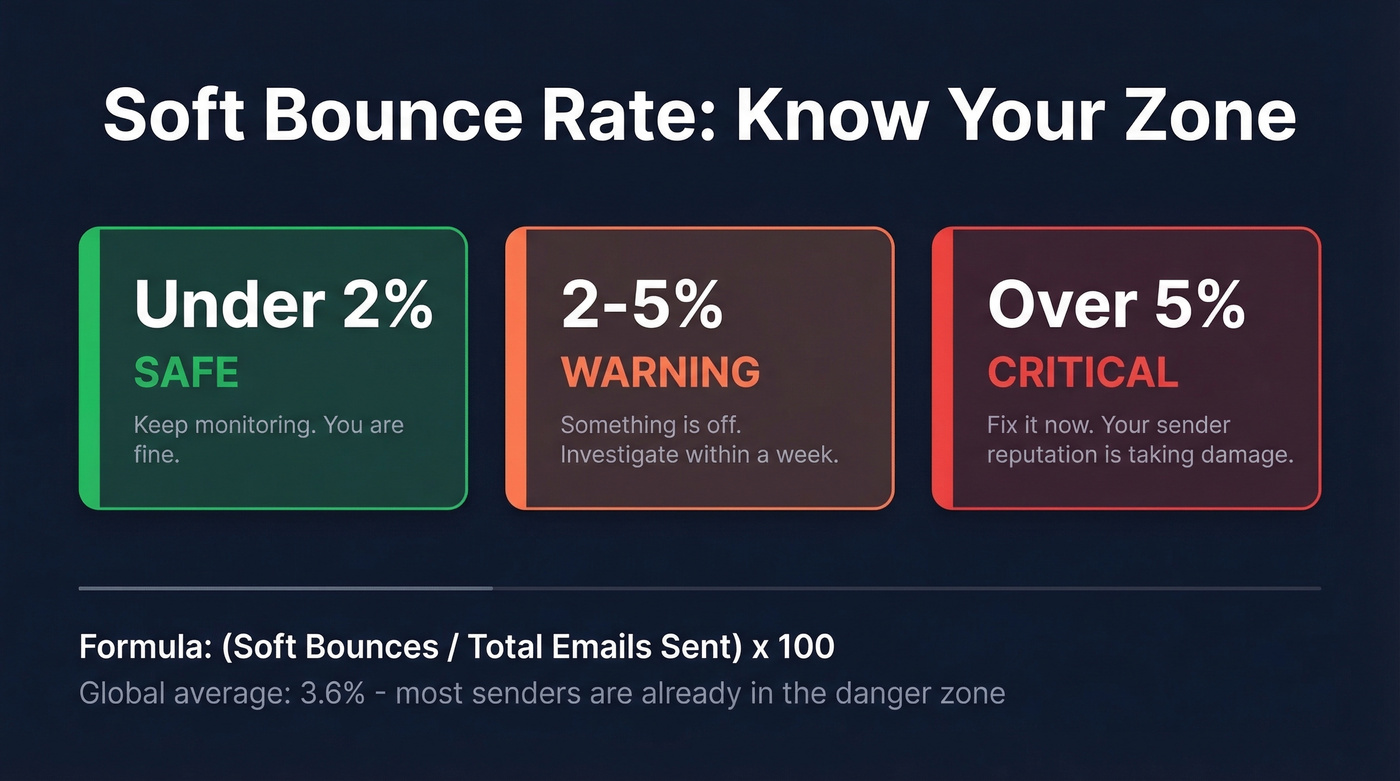
- Under 2% - you're fine. Keep monitoring.
- 2-5% - something's off. Investigate within a week.
- Over 5% - fix it now. Your sender reputation is taking damage.
Three moves that actually lower the number: verify your list before sending, fix SPF/DKIM/DMARC authentication, and design a suppression policy that matches your send cadence.
What Is Soft Bounce Rate?
Soft bounce rate measures the percentage of emails that reached the recipient's server but got temporarily rejected. The server said "not right now" instead of "this address doesn't exist." The formula is straightforward:
Soft Bounce Rate = (Soft Bounces / Total Emails Sent) x 100
One wrinkle worth knowing: some ESPs use "delivered" as the denominator instead of "sent," which changes your number. If your bounce rate looks suspiciously low, check which denominator your platform uses. Most industry benchmarks reference total sent, so that's the standard we'll use here.
ESPs don't all label soft bounces the same way, either. Some platforms show a soft bounce immediately in the report, while others keep the message in a "pending/retry" state for up to 72 hours and only log it as a soft bounce if delivery still fails. That lag can make your numbers look better than they are mid-campaign, then worse a few days later.
What's a Good Benchmark?
The widely accepted threshold is under 2% for total bounces, with below 1% as the ideal target. Here's how to read your numbers:
| Soft Bounce Rate | Status |
|---|---|
| Below 1% | Excellent |
| 1-2% | Acceptable |
| 2-3% | Risk zone |
| 3-5% | High risk |
| Above 5% | Critical |
The global soft bounce average sits around 3.6%. That means most senders are already in the high-risk band. Don't use the average as your target - use it as motivation to do better.
Industry-specific benchmarks tell a more useful story. These come from a Mailerio analysis of Mailchimp data covering billions of emails:
| Industry | Soft Bounce Rate | Hard Bounce Rate |
|---|---|---|
| Daily Deals / E-coupons | 0.06% | 0.02% |
| E-commerce | 0.12% | 0.08% |
| Software & Web App | 0.49% | 0.16% |
| Architecture / Construction | 0.54% | 0.24% |
| Government | 0.46% | 0.19% |
| Real Estate | 0.39% | 0.22% |
The cross-industry average in that dataset was 0.70%, with hard bounces averaging 0.21%. MailerLite's platform data corroborates this, showing a 0.55% average bounce rate across all industries. If you're running well-maintained opt-in lists, you should be in that neighborhood. Consistently above 1%? Something's broken.
Soft vs. Hard Bounces
| Soft Bounce | Hard Bounce | |
|---|---|---|
| SMTP code class | 4xx (temporary) | 5xx (permanent) |
| Meaning | Try again later | Don't bother |
| Action | Retry, then suppress | Suppress immediately |
| Target rate | Under 1% sustained | Under 0.5% |
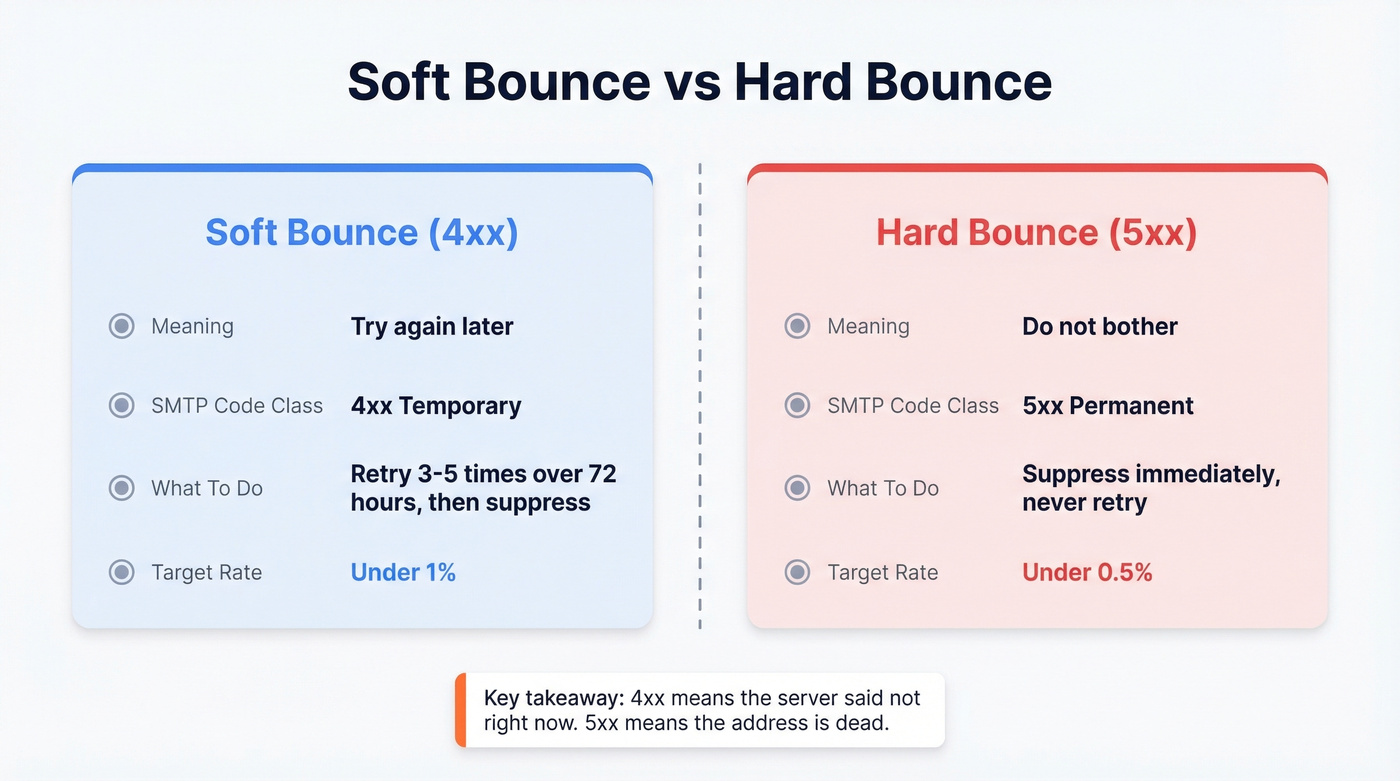
The critical distinction: a 4xx code means the server acknowledged the address but couldn't accept the message right now. A 5xx code means the address is dead, blocked, or flat-out doesn't exist. Your ESP should handle these very differently - and so should you.

Every soft bounce chips away at your sender reputation. Prospeo's 5-step email verification and 7-day data refresh cycle catch invalid, abandoned, and risky addresses before they ever hit your send queue - delivering 98% email accuracy across 143M+ verified addresses.
Stop retrying dead addresses. Send to verified contacts from day one.
Why Soft Bounces Happen
In our experience, these are the most common causes, ranked roughly by how often we see them:
- Full mailbox - increasingly rare with Gmail and Outlook offering massive storage. Here's the thing: in 2026, if you're seeing quota bounces, those addresses are almost certainly abandoned. Treat them like hard bounces.
- Recipient server down - genuinely temporary. The retry window handles this.
- Message too large - attachments or heavy HTML pushing past server limits. Keep emails lightweight.
- Content/policy filtering - the server rejected based on content, not the address. Suppressing these addresses makes no sense because the problem is the message, not the recipient. (If you suspect filtering, run a quick check with an email spam checker.)
- Authentication failures - missing SPF, DKIM, or DMARC. This is the big one right now. (If you're troubleshooting, start with DMARC alignment and a clean SPF record.)
Most ESPs retry for up to 72 hours before giving up. If the message still can't get through after multiple attempts, that "temporary" problem is probably permanent.
Why Temporary Bounces Spike
If your soft bounces jumped recently, check authentication and reputation throttling before you blame your list. We've seen teams cut their rate in half just by fixing DMARC alignment. (If you're trying to recover, this ties directly to how to improve sender reputation.)
Gmail and Yahoo rolled out strict bulk sender enforcement starting in 2024, and 2026 enforcement is even tighter. The requirements: SPF, DKIM, and DMARC configured and aligned, spam complaint rates below 0.10%, one-click unsubscribe for marketing email, and valid TLS.
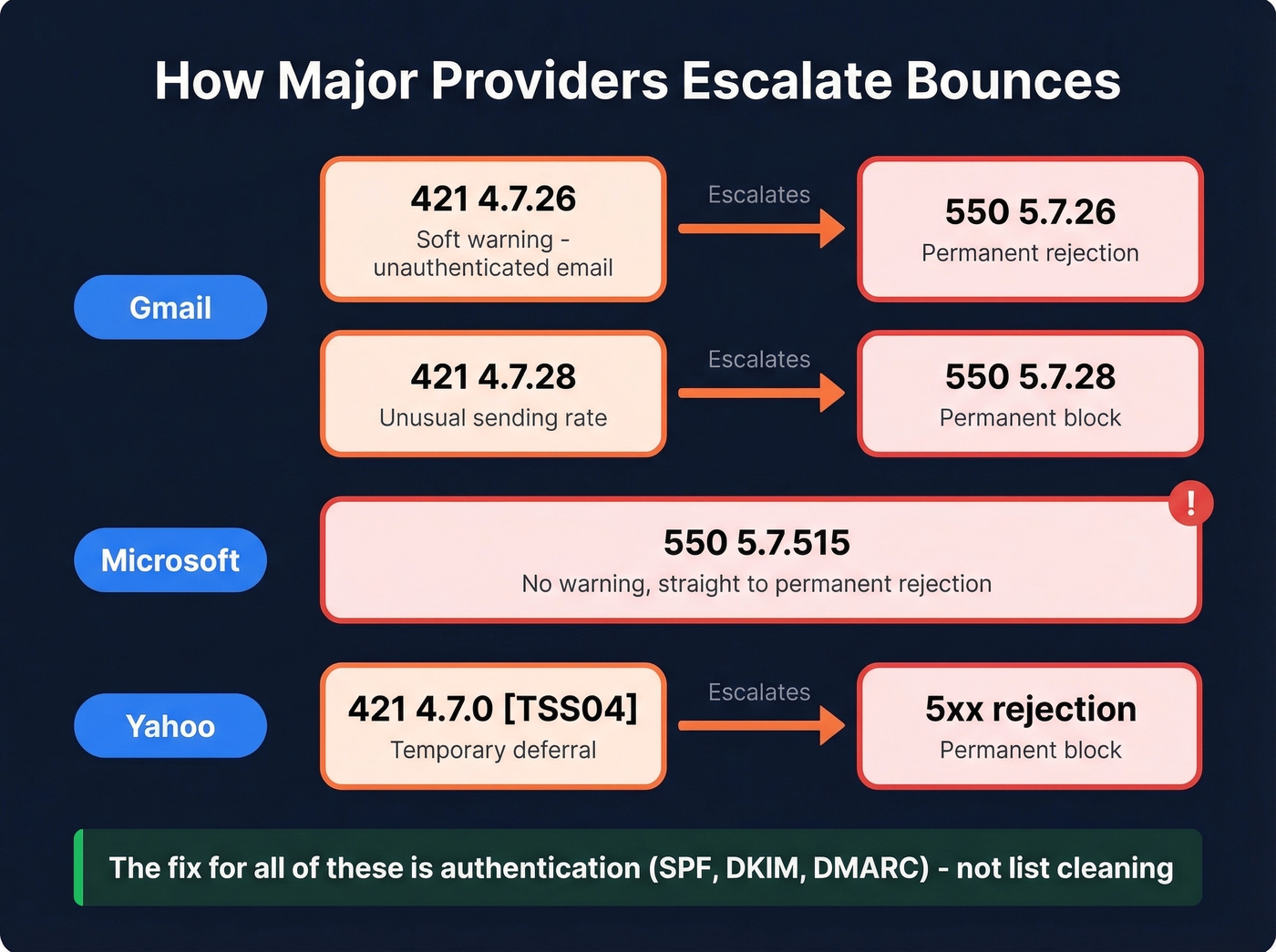
The escalation pattern is what catches people off guard. Gmail starts with a 4xx warning before upgrading to a 5xx permanent rejection:
- 421 4.7.26 then 550 5.7.26 - unauthenticated email, SPF/DKIM missing
- 421 4.7.28 then 550 5.7.28 - unusual sending rate or high spam rate
Microsoft goes straight to 550 5.7.515 with no warning. Yahoo uses 421 4.7.0 [TSS04] for temporary deferrals before escalating. If you're seeing these codes in your SMTP logs, the fix is authentication configuration, not list cleaning.
How to Fix a High Soft Bounce Rate
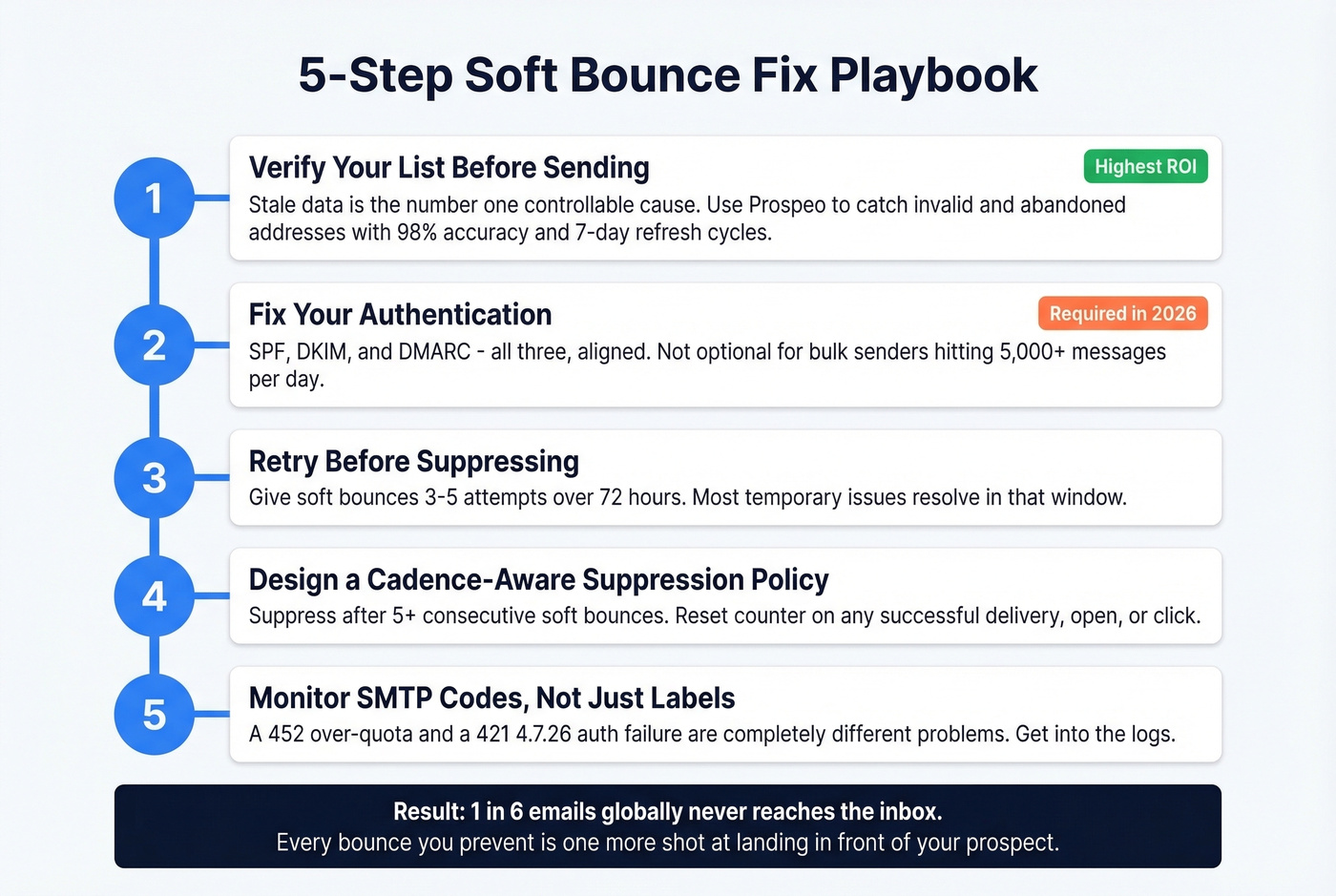
Step 1: Verify your list before sending. Stale data is the #1 controllable cause of bounces. Addresses go bad constantly - people change jobs, companies shut down, inboxes get abandoned. No amount of retries will save a dead address. (If you're comparing approaches, see our full guide to email bounce rate.)
Prospeo's email verification catches invalid, abandoned, and risky addresses before they ever hit your send queue. The 98% email accuracy rate and 7-day data refresh cycle mean you're not sending to addresses that went stale weeks ago. Real results back this up: Meritt went from a 35% bounce rate to under 4%, and Stack Optimize maintains under 3% bounce rates with 94%+ deliverability across all their clients.

Step 2: Fix your authentication. SPF, DKIM, and DMARC - all three, aligned. This isn't optional anymore. If you're a bulk sender hitting 5,000+ messages a day to Gmail or Yahoo, you're already being evaluated on this. (If you need a quick diagnostic, use this checklist to verify DKIM is working.)
Step 3: Retry before suppressing. Give soft bounces 3-5 attempts over 72 hours. Most temporary issues resolve in that window.
Step 4: Design a cadence-aware suppression policy - details in the next section.
Step 5: Monitor SMTP codes, not just labels. Your ESP's "soft bounce" label hides important detail. A 452 (over quota) and a 421 4.7.26 (authentication failure) are completely different problems with completely different fixes. Get into the logs. (If you're scaling volume, keep an eye on email velocity too.)
For context on why this matters: roughly 1 in 6 emails globally never reaches the inbox. Every bounce you prevent is one more shot at landing in front of your prospect. (For the full system view, see our email deliverability guide.)
Stale data is the #1 controllable cause of bounces - and most providers only refresh every 6 weeks. Prospeo refreshes every 7 days, so you're never sending to addresses that went bad last month. Stack Optimize maintains under 3% bounce rates across every client using Prospeo data.
Clean data at $0.01 per email beats fixing deliverability after the damage is done.
Designing a Suppression Policy
There's no universal standard here. A thread in r/Emailmarketing polled five deliverability professionals and got five different policies. The key insight: cadence changes everything. "Three consecutive soft bounces" means three days for a daily sender and three months for a monthly newsletter. Same rule, wildly different real-world impact.
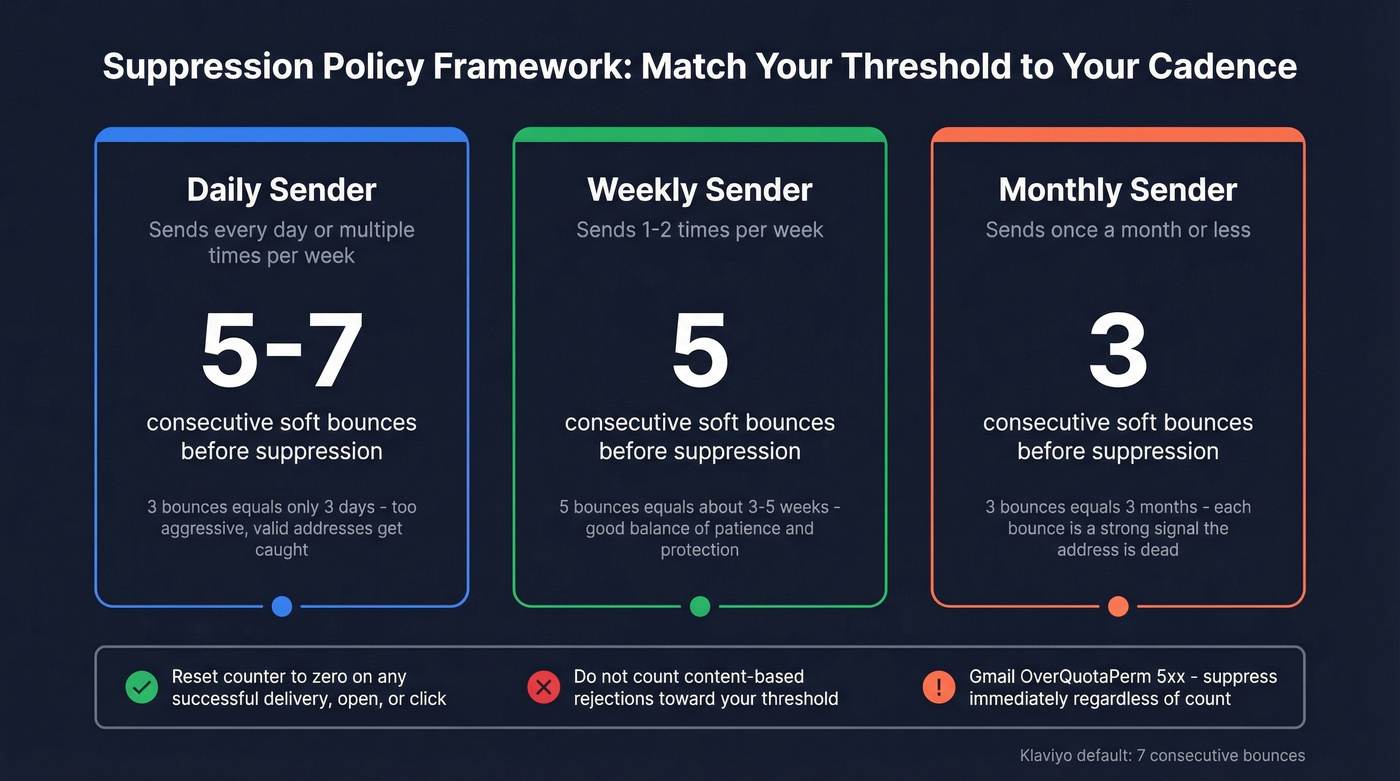
Here's the framework we recommend after working through this with dozens of teams:
Suppress after 5+ consecutive soft bounces. Reset the counter to zero on any successful delivery, open, or click. Don't count content-based rejections toward your suppression threshold - those are about the message, not the address. For reference, Klaviyo suppresses after 7 consecutive soft bounces, which is reasonable for their typical send cadences.
The 3-consecutive-bounce rule that many guides recommend is too aggressive for anyone sending more than twice a week. You'll end up suppressing valid addresses that just had a bad server day. Match your threshold to your rhythm - daily senders can afford a longer consecutive count, while monthly senders should act faster because each bounce represents a much larger time gap and a stronger signal that the address is dead.
One more thing to watch: Gmail's "OverQuotaPerm" 5xx response. Many ESPs still classify it as a soft bounce even though it's permanent. If you're seeing that code, suppress those addresses immediately regardless of your consecutive-bounce threshold.
FAQ
What's the difference between bounce rate and soft bounce rate?
Total bounce rate includes both hard and soft bounces. Soft bounce rate isolates temporary delivery failures only - 4xx SMTP codes where the server may accept the message on a retry. Keep total bounce rate under 2% and soft bounces under 1% sustained.
How many soft bounces before I suppress an address?
Suppress after 5 or more consecutive soft bounces, resetting the counter on any successful delivery, open, or click. Daily senders can tolerate a higher consecutive count; monthly senders should act at 3. Klaviyo's default threshold is 7 consecutive bounces.
Can email verification prevent soft bounces?
Verification eliminates bounces from invalid, abandoned, and stale addresses - the largest controllable cause. Prospeo's 5-step process includes catch-all handling and spam-trap removal, keeping bounce rates well under 2%. Tools like NeverBounce and ZeroBounce also help, though refresh cycles vary.
Skip verification if...
You're only sending to addresses that were confirmed via double opt-in within the last 30 days. In that case, your list is already clean. For everyone else - especially outbound teams working purchased or scraped lists - verification isn't optional. It's the single highest-ROI step you can take for deliverability.