

SORBS Blacklist: The Definitive Post-Shutdown Guide for 2026
It's Monday morning. Your bounce log is throwing 454 4.7.1 ... blocked using dnsbl.sorbs.net, and you're about to spend an hour troubleshooting a delisting process that no longer exists.
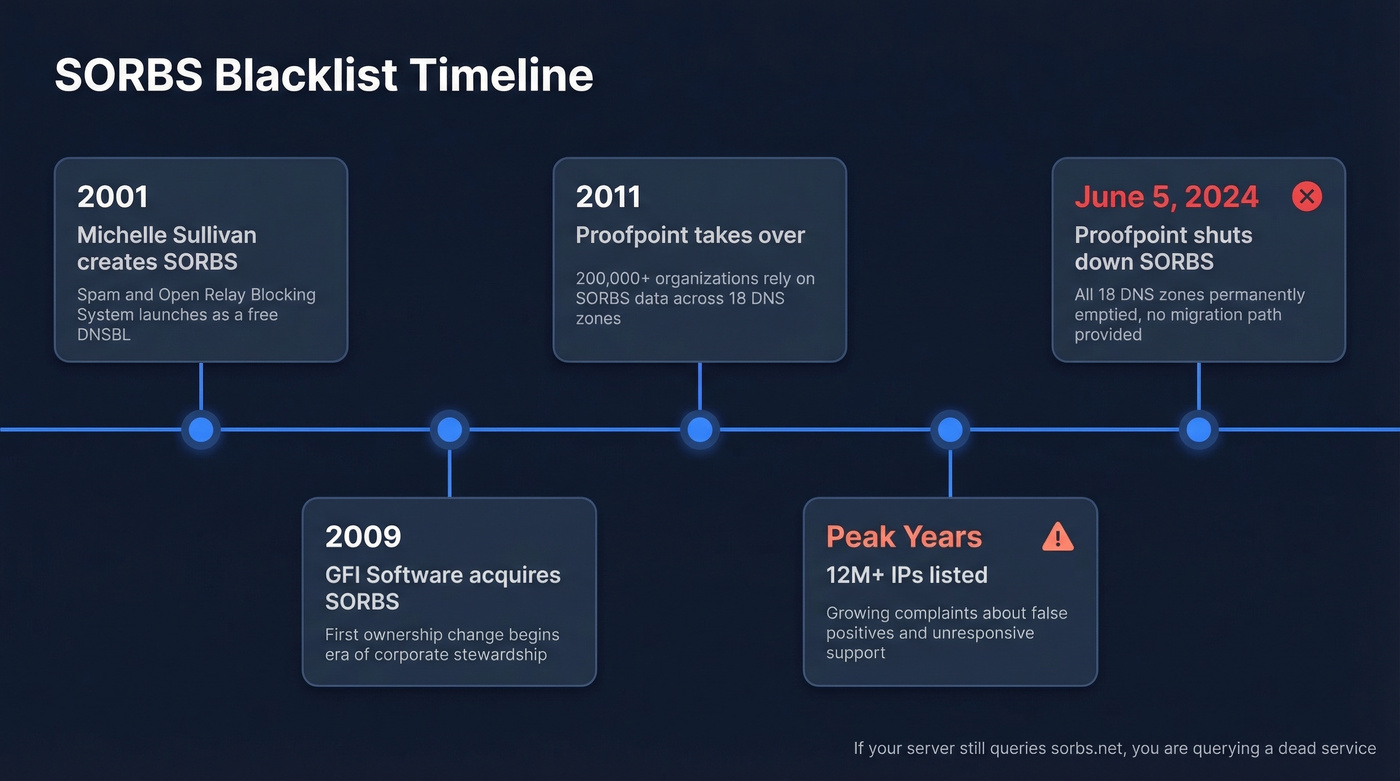
The SORBS blacklist has been dead for over two years. Proofpoint decommissioned it on June 5, 2024, emptied all 18 DNS zones, and walked away without recommending a replacement. If your mail server is still querying SORBS, you've got configuration debt that's actively degrading your mail flow - and we've seen this exact scenario trip up teams who haven't touched their Postfix configs since 2019.
What You Need (Quick Version)
Three things to do right now:
- Search your mail server configs for
sorbs.netand remove every reference. All 18 zones are dead. - Replace SORBS with Spamhaus ZEN (
zen.spamhaus.org) as your primary DNSBL. - Verify your sending data. Spam traps and invalid addresses are a top cause of blacklistings. Prospeo's 5-step verification catches spam traps and honeypots before they damage your sender reputation - 98% accuracy across 143M+ verified emails.
What Was the SORBS Email Blacklist?
SORBS - Spam and Open Relay Blocking System - launched in 2001, created by Michelle Sullivan. It grew into one of the largest free DNSBLs on the internet, listing over 12 million IP addresses at its peak across 18 DNS zones covering everything from open relays to dynamic IP ranges to compromised botnet hosts. The Register noted SORBS was "highly rated for its accuracy" during its operational years, though that reputation eroded significantly over time.
GFI Software acquired it in 2009, then Proofpoint took over in 2011. For years, Proofpoint maintained SORBS as a free community resource, and over 200,000 organizations relied on its data. Then, on June 5, 2024, Proofpoint pulled the plug. All zones emptied. No migration path, no endorsed replacement.
Why SORBS Was Controversial
Here's the thing: SORBS was a necessary evil that overstayed its welcome. Admins on the Plesk forums flagged it for a "high false positive rate," and commenters frequently grouped SORBS with UCEPROTECT as blocklists that caused more problems than they solved. One Reddit user called SORBS an "untouchable mafia" after repeated failed attempts to get a legitimate IP removed.
When the shutdown was announced, the reaction on The Register's forums was telling: "FINALLY, that thing was a real pain." Multiple commenters said SORBS had effectively stopped individuals from running their own SMTP servers by aggressively classifying residential and dynamic IPs, then being unresponsive to support requests. The consensus on r/sysadmin was relief, not mourning.
Can SORBS Still Block Your Email?
No. But querying dead DNS zones isn't harmless either.
If your MTA still has reject_rbl_client dnsbl.sorbs.net in its restrictions, every inbound connection triggers a DNS lookup against a service that returns nothing useful. Best case, you get NXDOMAIN responses and a few milliseconds of latency per message. Worst case, DNS timeouts stack up and degrade your MTA's throughput, or stale cached results from intermediate resolvers produce unpredictable false blocks.
Major providers like Gmail and Outlook never relied on SORBS for inbox placement decisions. The shutdown's real impact landed on self-hosted and enterprise mail admins - which is exactly who's reading this. In our experience, the most common scenario is finding SORBS zones in smtpd_recipient_restrictions that nobody remembers adding. They've been there since 2019. Nobody noticed because they "worked" - until they didn't.

Dead blacklists aren't your only deliverability risk. Sending to spam traps and invalid addresses will land you on active lists like Spamhaus faster than stale SORBS configs ever did. Prospeo's 5-step verification - with spam-trap removal, honeypot filtering, and catch-all handling - delivers 98% email accuracy across 143M+ verified addresses.
Clean your list before the next blacklist cleans it for you.
All 18 SORBS Zones to Remove
Search your mail server configs for any of these and remove them immediately.
| Zone | Targeted |
|---|---|
dnsbl.sorbs.net |
All categories (comprehensive) |
spam.dnsbl.sorbs.net |
Known spam sources |
new.spam.dnsbl.sorbs.net |
Recently observed spam |
old.spam.dnsbl.sorbs.net |
Historical spam sources |
recent.spam.dnsbl.sorbs.net |
Recent spam activity |
dul.dnsbl.sorbs.net |
Dynamic/residential IPs |
smtp.dnsbl.sorbs.net |
Open SMTP relays |
http.dnsbl.sorbs.net |
Open HTTP proxies |
socks.dnsbl.sorbs.net |
Open SOCKS proxies |
web.dnsbl.sorbs.net |
Web-exploitable servers |
zombie.dnsbl.sorbs.net |
Compromised hosts/botnets |
block.dnsbl.sorbs.net |
Demanded delist payment |
escalations.dnsbl.sorbs.net |
Repeat offenders |
noserver.dnsbl.sorbs.net |
No valid mail server |
misc.dnsbl.sorbs.net |
Miscellaneous threats |
rhsbl.sorbs.net |
Domain-based blacklist |
badconf.rhsbl.sorbs.net |
Domains with bad DNS config |
nomail.rhsbl.sorbs.net |
Domains that don't send mail |
The fastest way to find them: grep -r "sorbs.net" /etc/postfix/ /etc/mail/ /opt/zimbra/ (adjust paths for your environment). You can also watch live lookups with tcpdump -i any port 53 | grep sorbs.
Removing SORBS From Your Server
Postfix
Open /etc/postfix/main.cf and find the smtpd_recipient_restrictions block. Remove any line containing a SORBS reference:
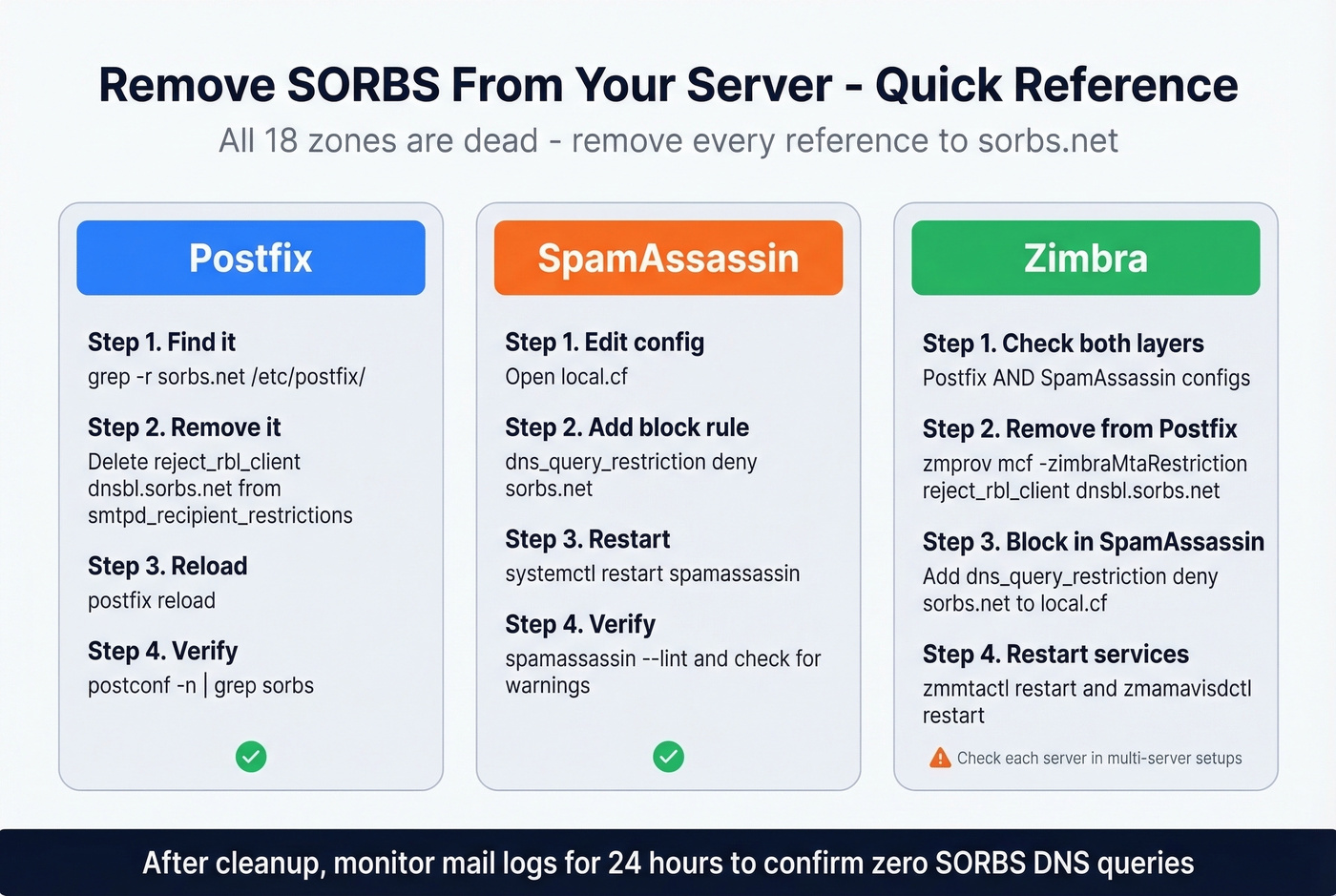
# Remove this line:
reject_rbl_client dnsbl.sorbs.net
Remove all SORBS zones if you had multiple, then reload:
postfix reload
SpamAssassin
SpamAssassin queries SORBS zones independently of your MTA config. Add this to local.cf:
dns_query_restriction deny sorbs.net
Then systemctl restart spamassassin. This blocks all DNS queries to sorbs.net subdomains - cleaner than hunting down individual rule files.
Zimbra
Zimbra uses SORBS via SpamAssassin by default, and admins may have also added SORBS to Postfix restrictions. Check both as the zimbra user:
zmprov gcf zimbraMtaRestriction
zmprov mcf -zimbraMtaRestriction "reject_rbl_client dnsbl.sorbs.net"
zmmtactl restart
zmamavisdctl restart
Add the dns_query_restriction deny sorbs.net line to SpamAssassin's local.cf as well. One caveat from Zimbra's own documentation: in multi-server setups, server-level settings can override global config. Check each server individually with zmprov gs $(zmhostname) zimbraMtaRestriction.
Verify the Cleanup
After removing SORBS references, confirm the fix. Run postconf -n | grep sorbs to verify Postfix is clean, check spamassassin - lint for SORBS-related warnings, and monitor your mail logs for 24 hours to confirm no more SORBS queries are firing. If you're still seeing DNS lookups to sorbs.net after all that, check whether a third-party spam filter appliance or hosted gateway is doing its own DNSBL queries upstream of your MTA.
What to Use Instead of SORBS
Let's break this down by priority.
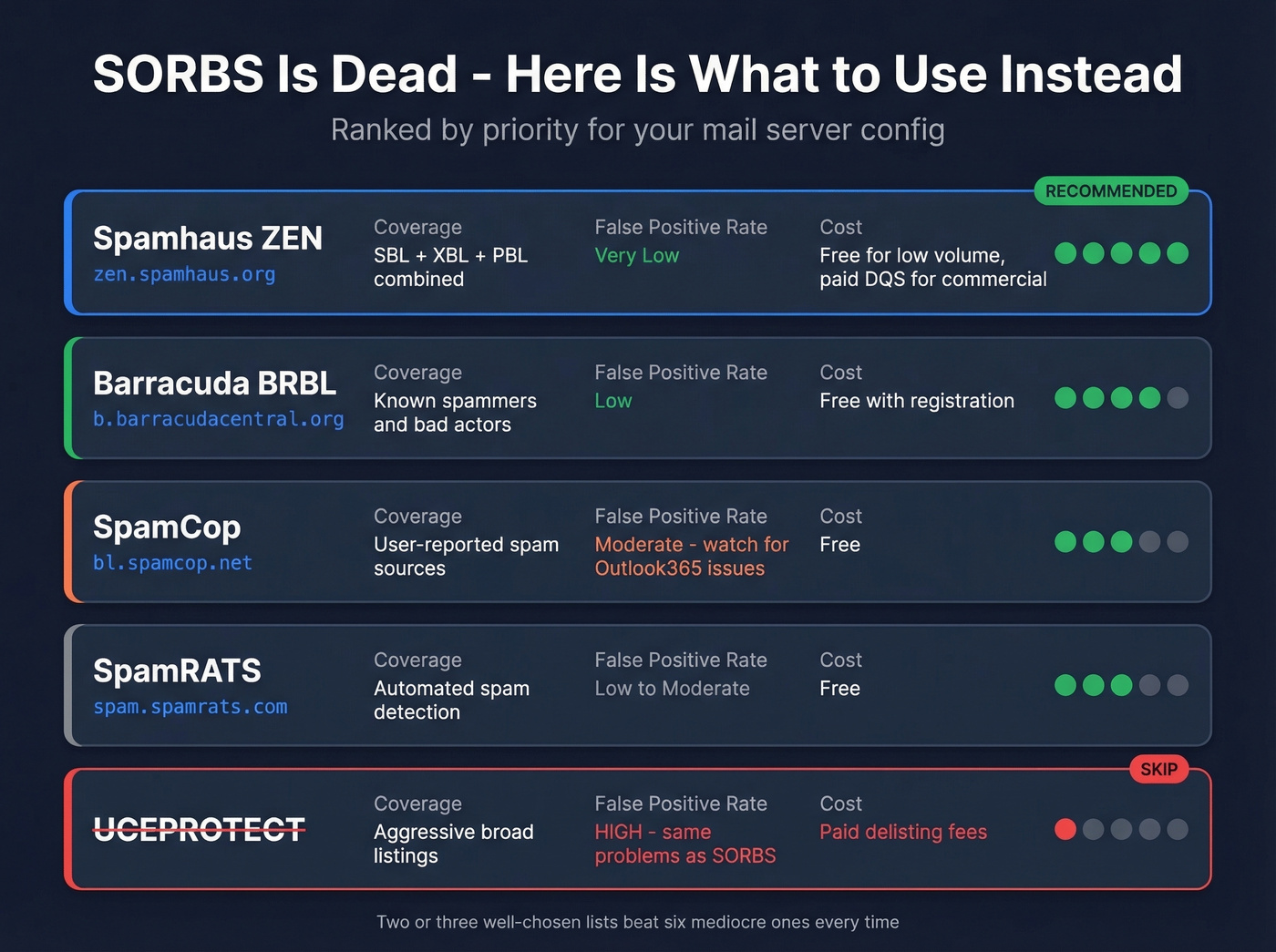
Spamhaus ZEN (zen.spamhaus.org) is the industry default and deserves the top spot. ZEN combines their SBL, XBL, and PBL into a single lookup, which means one DNS query covers known spammers, exploited hosts, and policy-blocked ranges all at once. It's free for low-volume, non-commercial use; commercial deployments typically need Spamhaus' paid Data Query Service. For most teams, this is the only list you strictly need.
For a secondary layer, register for Barracuda (b.barracudacentral.org). It's free, has a solid reputation, and adds meaningful defense in depth alongside Spamhaus.
A word of caution on SpamCop (bl.spamcop.net): admins on the Plesk forums have reported false positives on Outlook365 traffic. If you receive mail from Microsoft tenants, test carefully before enforcing.
SpamRATS (spam.spamrats.com) and Abusix Mail Intelligence are worth evaluating for larger environments, but don't overcomplicate your stack. Two or three well-chosen lists beat six mediocre ones every time.
Skip UCEPROTECT entirely. It shares the same aggressive-listing, unresponsive-support DNA that made SORBS frustrating, and the community consensus is that it isn't worth the headaches.
Prevent Future Blacklist Issues
Stop obsessing over blocklists - they're a symptom, not the disease. The actual chain of failure looks like this: bad data leads to spam traps in your list, which triggers blacklisting, which causes deliverability collapse. Fix the root cause and the blacklist problem goes away.
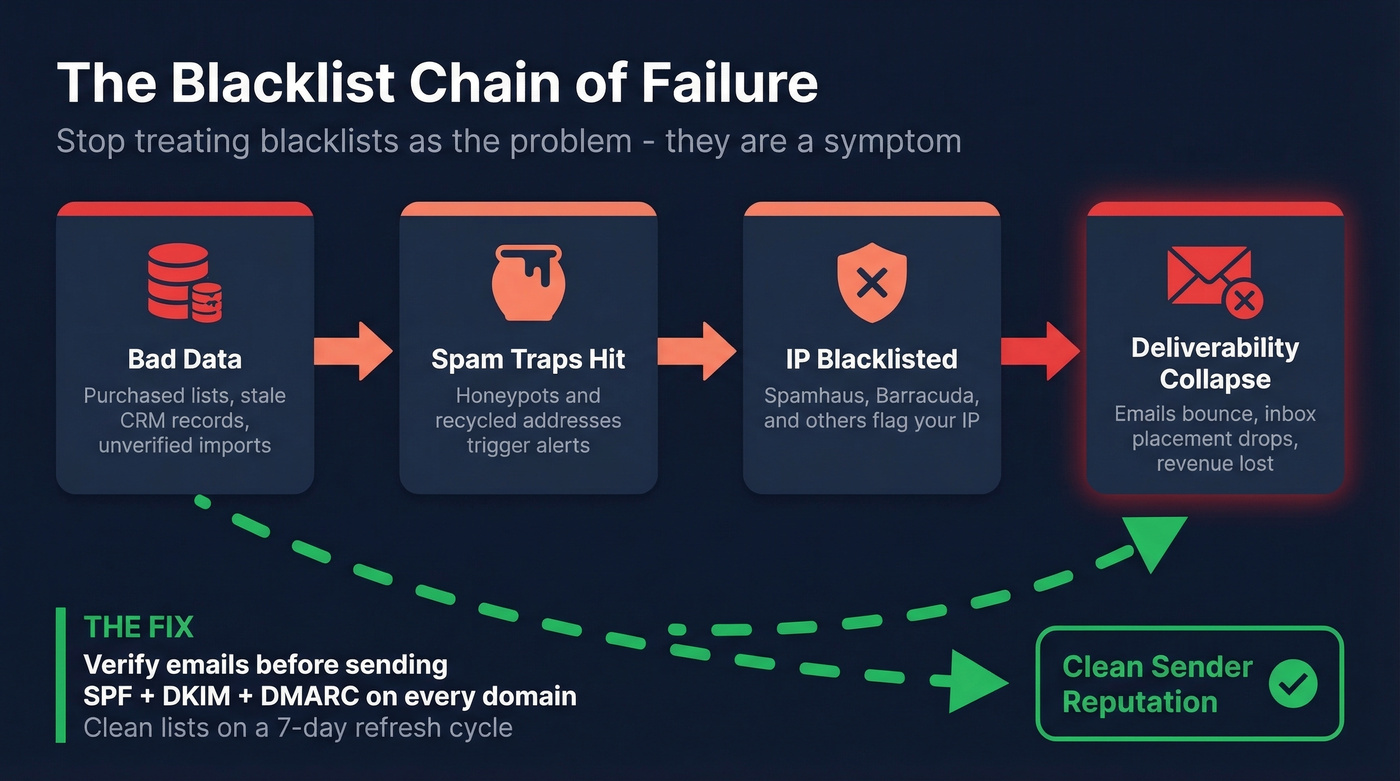
Start with authentication. SPF, DKIM, and DMARC should be non-negotiable on every sending domain in 2026. If you haven't enforced DMARC at p=reject yet, you're behind.
More importantly, stop sending to bad addresses. Spam traps and honeypots are a top trigger for IP blacklisting, and they get into your lists through purchased data, stale CRM records, and unverified imports. We've seen teams burn through two or three sending domains before realizing the problem wasn't their IP warm-up or their copy - it was a significant chunk of their list hitting spam traps that a proper verification step would have caught instantly.

Clean data is the cheapest insurance against blacklisting. Period.
You just spent time purging dead SORBS zones from your MTA. Now purge the bad data that gets you blacklisted in the first place. Prospeo refreshes every record on a 7-day cycle - not the 6-week industry average - so you're never sending to addresses that went stale last month.
Stop fixing blacklist problems. Start preventing them at $0.01 per verified email.
FAQ
Is the SORBS blacklist still active in 2026?
No. Proofpoint decommissioned SORBS on June 5, 2024, and all 18 DNS zones were permanently emptied. The SORBS spam database is offline with no successor. If your server still references any sorbs.net zone, remove those references immediately - they're querying a dead service and adding latency to every connection.
What if a receiving server still uses SORBS?
The problem is on their end, not yours. Contact the recipient's postmaster and point them to the dnsbl.com shutdown notice. Audit your own configs too - dead DNSBL lookups add latency to every inbound connection even when they don't cause outright blocks.
How do I prevent my IP from getting blacklisted?
Set up SPF, DKIM, and DMARC authentication on every sending domain. More critically, stop sending to bad addresses. Spam traps and invalid emails are the top cause of IP blacklisting, and tools like Prospeo verify against spam traps and honeypots with 98% accuracy, keeping your sender reputation clean at the source.
What replaced SORBS as the best free DNSBL?
Spamhaus ZEN (zen.spamhaus.org) is the standard replacement. It combines SBL, XBL, and PBL into one lookup and is free for low-volume, non-commercial use. Add Barracuda (b.barracudacentral.org) as a secondary layer for defense in depth.