

SpamAssassin Score: What It Means, How to Check It, and How to Fix It
You just ran your first cold email campaign through a deliverability checker and got a SpamAssassin score of 6.2. The email looked fine - no spammy words, no shady links. But three rules you've never heard of (BAYES_99, RELAYCOUNTRY_XX, MIME_NO_TEXT) pushed you over the threshold, and now you're staring at a result that makes zero sense.
Here's the thing: most guides tell you "stay under 5" and call it a day. That advice is incomplete, and in some cases it's flat-out wrong. We've spent enough time debugging deliverability issues to know that the real target is much lower - and the fixes are more specific than anyone lets on.
The Quick Version
Target a score of 0-2, not "under 5." Apache's own documentation calls the 5.0 default threshold "quite aggressive," meaning it flags too much legitimate mail. Aiming for 0-2 gives you a real safety margin across different server configurations.
Three things move the needle most: authentication (SPF, DKIM, DMARC), clean HTML with a plain-text part, and a clean recipient list. Fix those three and most scoring problems disappear.
One clarification worth making early: SpamAssassin isn't Gmail's spam filter. It's a diagnostic tool. Gmail, Outlook, and Yahoo all use proprietary ML systems. SpamAssassin tells you what's fixable in your email - it doesn't control where your message lands. Current version is 4.0.2, released August 30, 2025. If your reference guide still mentions 3.4.x, that branch is officially end-of-life.
What Is SpamAssassin?
SpamAssassin is an open-source spam filter and Apache Software Foundation project, originally released in 2001. It runs on mail servers - typically self-hosted or managed hosting environments - and scores email against hundreds of rules. Higher score means spammier.
The current release is Apache SpamAssassin 4.0.2, which shipped with Perl 5.42 compatibility and a new Redirector plugin. The 4.0 series brought full Unicode support when it launched in December 2022, and the 3.4 branch is end-of-life - Apache's explicit position is that all future development and bug fixes happen in the 4.0 series only.
With roughly 45-55% of global email traffic being spam, filtering tools remain essential infrastructure. Despite being about 25 years old, SpamAssassin is still widely deployed in hosting and self-managed mail stacks and serves as a common diagnostic standard in deliverability testing.
How the Scoring System Works
Every email gets run through a battery of tests. Each test has a name like SPF_FAIL or BAYES_99 and a score - positive numbers mean "spammy," negative numbers mean "looks legitimate." The system sums all triggered rules and compares the total against a threshold (default: 5.0). Exceed it, and you're flagged.
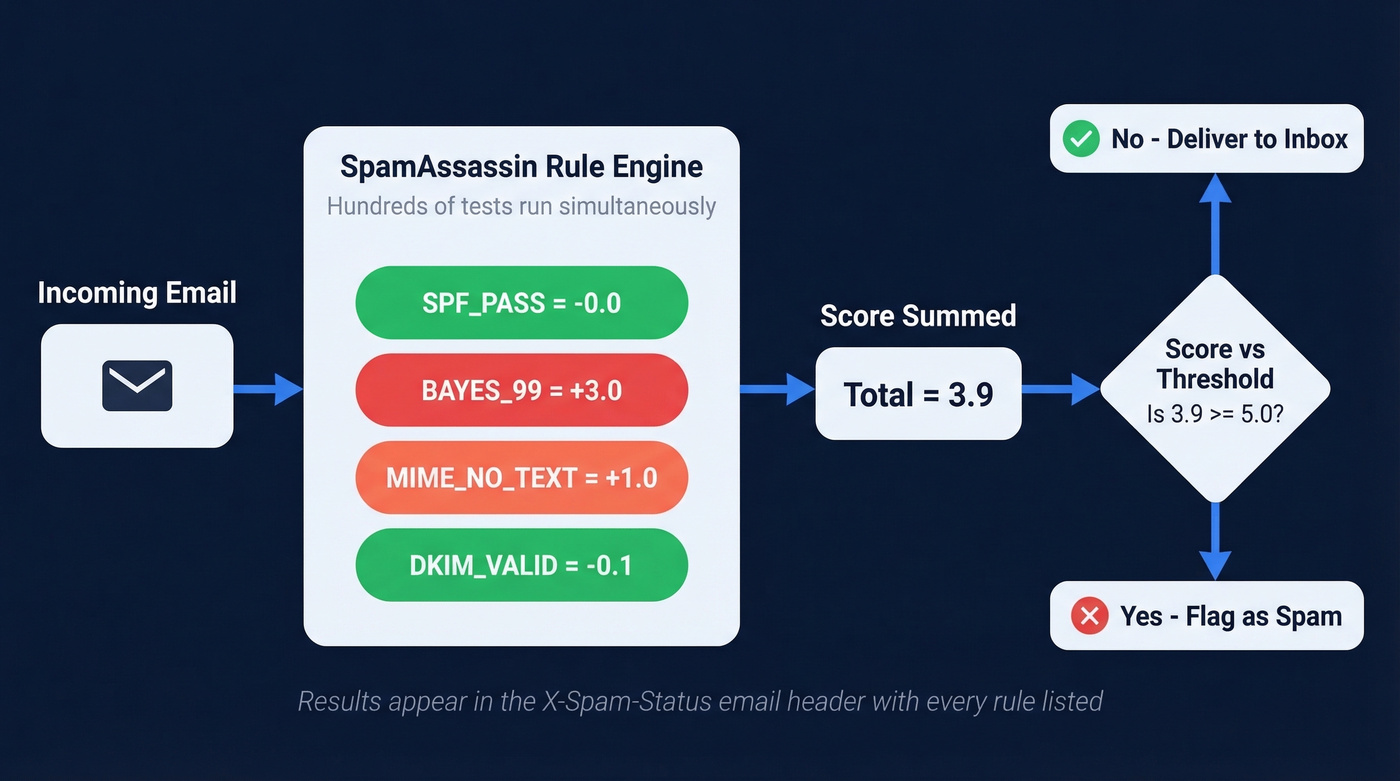
Results show up in email headers. Here's a typical X-Spam-Status header:
X-Spam-Status: Yes, score=6.2 required=5.0
  tests=BAYES_99=3.0, BAYES_999=0.2, RELAYCOUNTRY_XX=2.0,
  MIME_NO_TEXT=1.0, HTML_MESSAGE=0.0
The score= field is your total. The required= field is the server's threshold. The tests= section lists every rule that fired and how many points each contributed - and this transparent, rule-by-rule breakdown is what makes SpamAssassin so useful as a diagnostic tool. You can act on each individual trigger.
There's also X-Spam-Level, which displays asterisks proportional to the score. A score of 3.4 shows as ***, not ****. Useful for quick visual scanning, but the X-Spam-Status header is where the actionable detail lives.
Why Bayesian Filtering Might Not Be Learning
SpamAssassin includes a Bayesian classifier that learns from your mail corpus. You train it with two commands:
sa-learn - ham /path/to/good-mail/
sa-learn - spam /path/to/spam-mail/
Over time, the classifier gets better at distinguishing spam from legitimate mail for your specific environment. The BAYES_99 rule often carries around ~3.0 points and fires when the classifier is 99%+ confident a message is spam.
Here's the gotcha that trips up nearly every sysadmin at least once: sa-learn stores its database under the user account you run it as. If you train as root but SpamAssassin runs as debian-spamd or amavis, you're updating a completely different Bayes database than the one the daemon actually reads. Check which user your SpamAssassin process runs as with ps aux | grep spamd, then train as that user. We've seen teams spend weeks wondering why their Bayes accuracy never improves - this mismatch is almost always the reason.
What Score Should You Aim For?
The default threshold is 5.0, but that number is misleading. Apache's own configuration documentation suggests ISP-style deployments use 8.0 or 10.0 because 5.0 generates too many false positives. For auto-deletion, they recommend only doing so at 15.0 or higher.
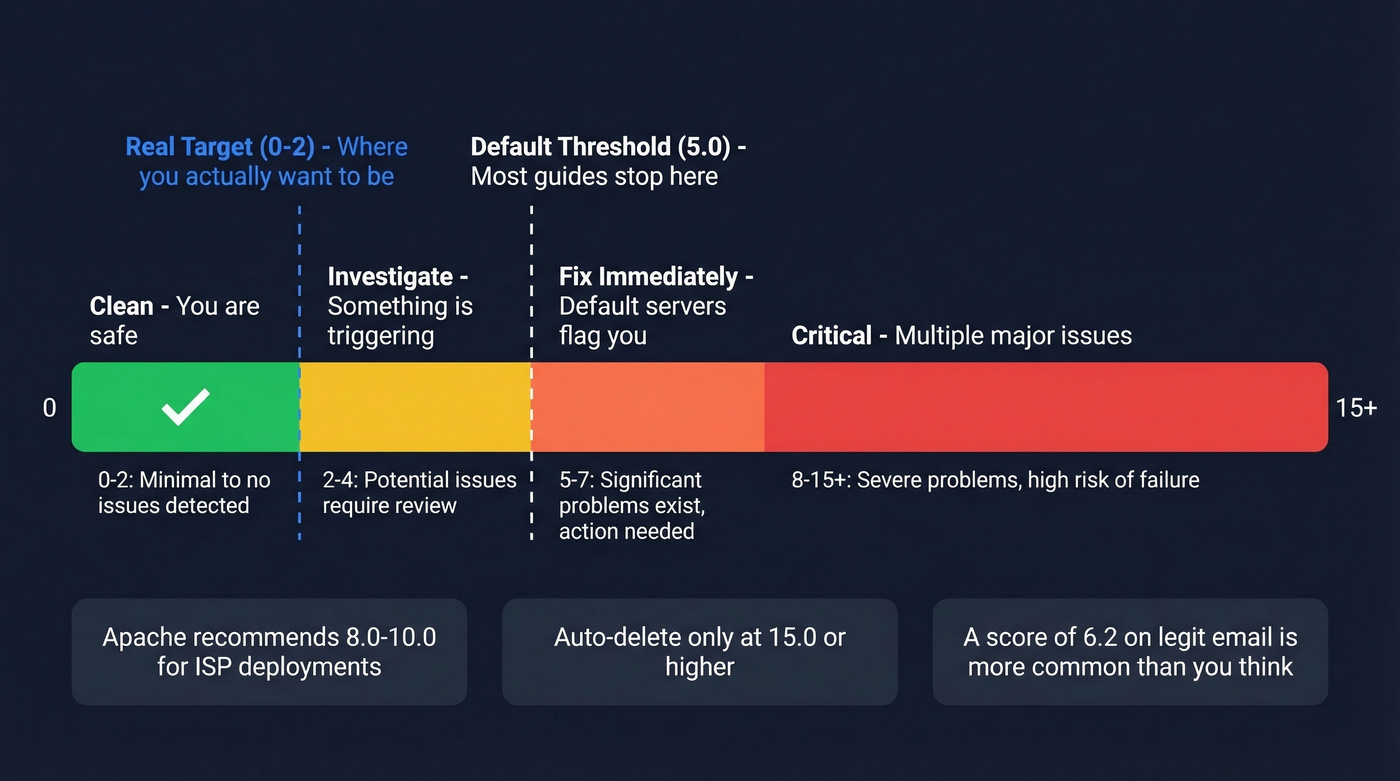
0-2: You're clean. Authentication passes, content is well-structured, no blocklist hits. This is where you want to be.
2-4: Investigate. Something specific is triggering - a missing plain-text part, a URL shortener, or a Bayes hit from a poorly trained corpus. Find the rule and fix it.
5+: Fix immediately. Multiple rules are firing, and any server running default thresholds is flagging your mail.
A score of 6.2 on a legitimate email isn't unusual. One Mxroute user reported exactly that - BAYES_99 contributed 3.0 points, RELAYCOUNTRY_XX added 2.0 because the email relayed through a country with poor spam reputation, and MIME_NO_TEXT tacked on 1.0 for lacking a plain-text body part. Perfectly normal email, scored as spam. The host operator in that thread mentioned they'd found 15.0 to be the real sweet spot for their environment - far above the default.
Don't panic at 5.0. But aim for 0-2 on mail you control, because you can't predict what threshold the recipient's server uses.

A SpamAssassin score of 0-2 means nothing if you're sending to dead addresses. Bad recipient lists trigger blocklist rules and tank your sender reputation. Prospeo's 5-step email verification delivers 98% accuracy - customers routinely report bounce rates under 4%, down from 35%+.
Stop debugging spam scores caused by bad data.
Does Your Score Matter for Gmail and Outlook?
Your SpamAssassin results have zero direct impact on Gmail, Outlook, or Yahoo inbox placement. Those providers run proprietary machine-learning systems that weigh sender reputation, engagement signals (opens, clicks, complaints), and infrastructure quality. They don't consult SpamAssassin.
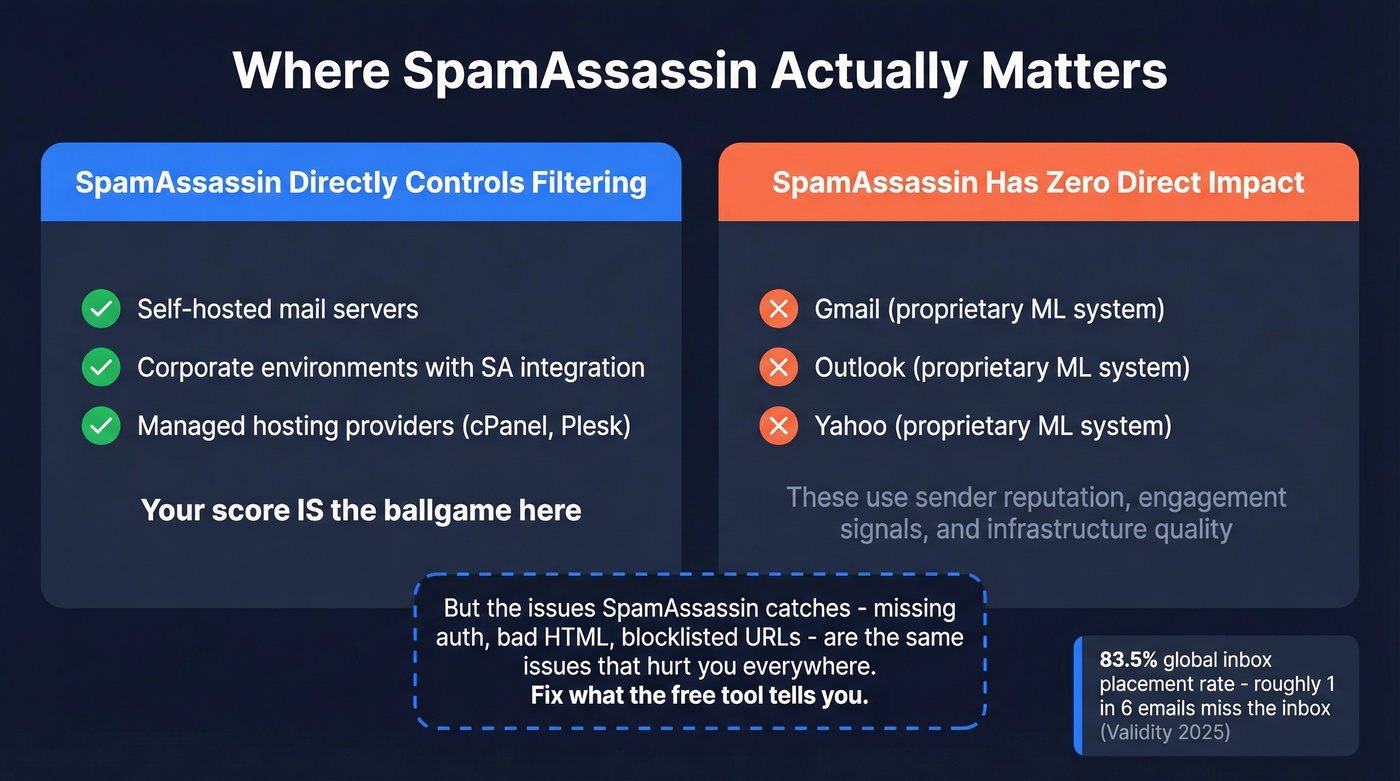
Where SpamAssassin directly matters: self-hosted mail servers, corporate environments with SpamAssassin integration, and managed hosting providers that use it as their primary filter. For recipients on those systems, your score is the ballgame.
For everyone else, SpamAssassin is still an excellent diagnostic tool. The issues it flags - missing authentication, bad HTML structure, blocklisted URLs - are the same issues that hurt you with Gmail's proprietary filters. Fix what SpamAssassin catches and you'll improve deliverability everywhere. Per Validity's 2025 benchmark, the global average inbox placement rate sits around 83.5%, meaning roughly one in six emails misses the inbox even from legitimate senders.
Hot take: If your average deal size is under five figures and you're sending fewer than 5,000 emails a month, SpamAssassin is a better use of your debugging time than any paid deliverability platform. Fix what the free tool tells you before spending money on dashboards.
How to Check Your Score
Read Your Email Headers
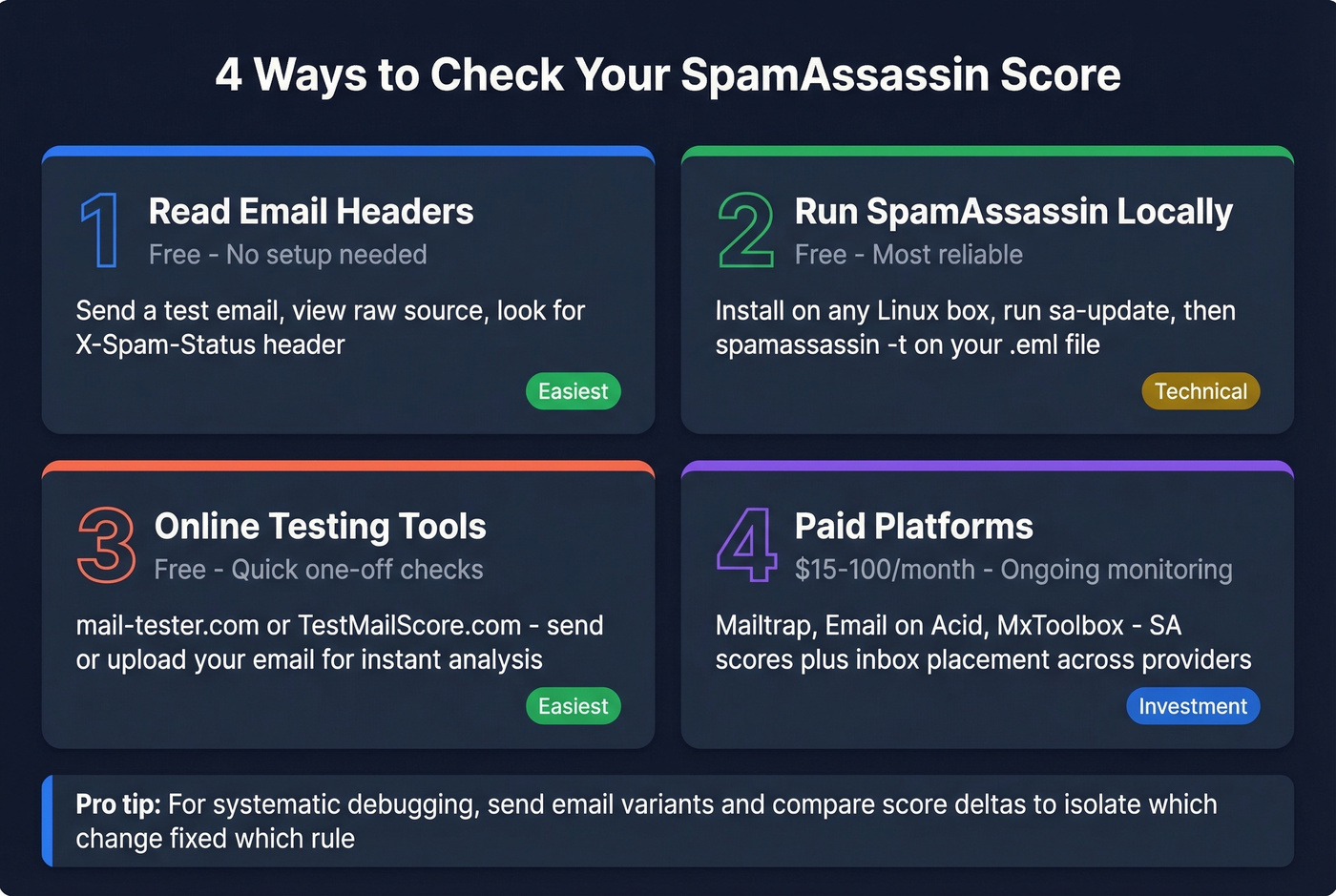
Send a test email to an account on a server running SpamAssassin, then view the raw message source. Look for the X-Spam-Status header - it contains your score, the threshold, and every rule that fired. In Gmail, open the message, click the three dots, and select "Show original." In Outlook, it's under File > Properties > Internet Headers.
Run SpamAssassin Locally
This is the method no one talks about, and it's the most reliable way to check on demand. Install SpamAssassin on any Linux box:
apt-get install -y spamassassin
sa-update
spamassassin -t < your_email.txt
The output includes the full X-Spam-Status header with every rule hit and score. Save your email as a .eml or .txt file first. Run sa-update before testing to make sure you're using current rules.
If you need to re-score a message that's already been processed, strip the existing X-Spam-* headers from the file before re-running - otherwise you'll get stale results. For systematic debugging, send email variants to a test inbox and compare score deltas to isolate which change fixed which rule. In our testing, this iterative approach catches problems that a single scan misses entirely.
Online Spam Filter Testing Tools
mail-tester.com is the quickest option - send an email to their generated address and get a detailed report. Free, but limited to a few checks per day. TestMailScore.com lets you upload a .eml file up to 3MB and get an analysis without sending anything. Both are solid for quick one-off checks.
Deliverability Testing Platforms
For ongoing monitoring, paid platforms give you SpamAssassin scores alongside inbox placement data across multiple providers. Mailtrap offers a free tier, with paid plans starting around $15-$30/month. Email on Acid starts around $70-$100/month and includes rendering previews. MxToolbox offers free blocklist lookups with paid monitoring starting around $50-$100/month.
Common Rules and What They Mean
Here's a reference table of rules you'll encounter often. Point values vary by version and ruleset - many servers add third-party rulesets like KAM - so treat these numbers as the common ballpark from stock setups, not universal constants.
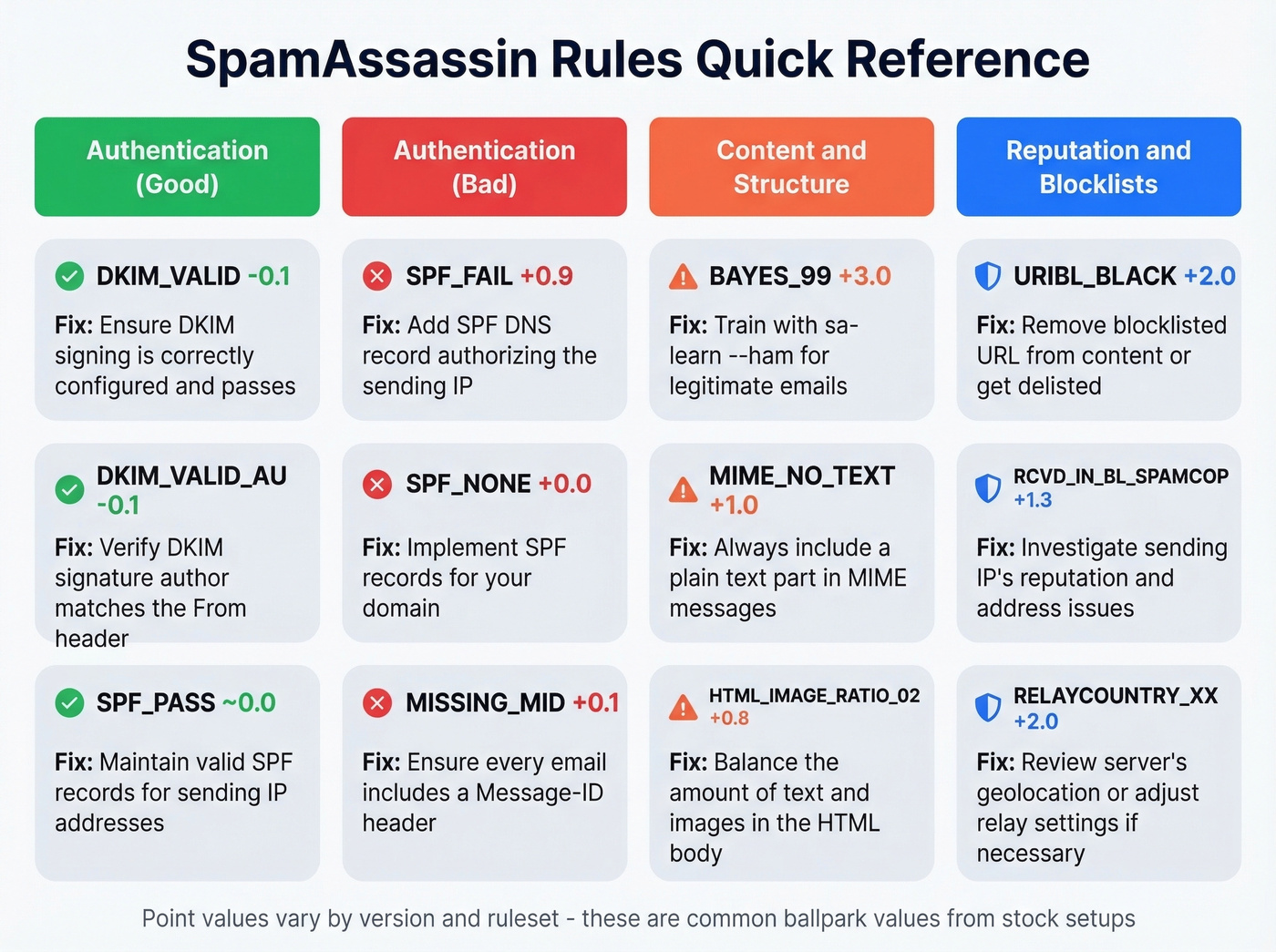
| Rule | Typical Score | What It Means | Fix |
|---|---|---|---|
| DKIM_VALID | -0.1 | Valid DKIM signature found | None needed - this helps you |
| DKIM_VALID_AU | -0.1 | DKIM signature matches author domain | None needed - this helps you |
| SPF_PASS | ~0.0 | SPF check passed | None needed - this helps you |
| BAYES_99 | ~3.0 | Bayes 99%+ spam confidence | Train with sa-learn - ham |
| SPF_FAIL | ~0.9 | SPF record doesn't authorize sender IP | Fix your SPF DNS record |
| SPF_NONE | ~0.0 | No SPF record found | Add an SPF record |
| URIBL_BLACK | ~2.0 | Email contains blocklisted URL | Remove or replace the URL |
| RCVD_IN_BL_SPAMCOP_NET | ~1.3 | Sending IP on SpamCop blocklist | Request delisting; fix IP reputation |
| MIME_NO_TEXT | ~1.0 | No plain-text body part | Add a text/plain MIME part |
| MIME_HTML_ONLY | ~0.0 | HTML only, no multipart | Send multipart/alternative |
| HTML_IMAGE_RATIO_02 | ~0.8 | Too many images vs text | Add more text content |
| MISSING_MID | ~0.1 | No Message-ID header | Fix your mail server config |
| RELAYCOUNTRY_XX | ~2.0 | Relayed via high-spam country | Use a relay in a reputable region |
| MPART_ALT_DIFF_COUNT | ~1.5 | HTML and text parts differ significantly | Keep both parts consistent |
Tiny scores like ~0.0 are often used as flags for rule-chaining rather than direct scoring. And while DKIM-related rules are commonly negative, many installations include other negative-score rules too, depending on configuration.
How to Improve Your Score
Fix Authentication First
Authentication failures are the highest-impact, easiest-to-fix scoring problems. Set up SPF, DKIM, and DMARC in this order:
SPF: Publish a DNS TXT record listing every IP authorized to send on your behalf. Eliminates SPF_FAIL and SPF_NONE. (If you need syntax help, start with an SPF record example.)
DKIM: Configure your mail server or ESP to sign outbound messages. Resolves DKIM_ADSP_ALL and related rules. If you're unsure, use this guide on verify DKIM is working.
DMARC: Add a DMARC policy that aligns with your SPF and DKIM setup. Start with p=none for monitoring, then move to p=quarantine or p=reject (see DMARC alignment).
In practice, these three fixes alone often drop scores by several points. They're the single highest-ROI change you can make.
Clean Your HTML and Content
Send multipart/alternative emails - always include a plain-text part alongside HTML. This eliminates MIME_NO_TEXT (often ~1 point) and avoids HTML-only structure penalties. Keep your text-to-image ratio healthy; HTML_IMAGE_RATIO_02 fires when your email is mostly images with minimal text. Avoid URL shorteners like bit.ly and t.co, and check any links against URI blocklists before sending - URIBL_BLACK is one of the most common high-impact rule hits we see. (If you want a second opinion, run an email spam checker before launch.)
Monitor Your Infrastructure
Check whether your sending IP appears on any blocklists - RCVD_IN_BL_SPAMCOP_NET alone can push you over threshold. Use MxToolbox's free blocklist checker weekly. When warming up a new IP or domain, send low volume to engaged recipients first and ramp gradually. The RELAYCOUNTRY_XX rule fires when your email routes through servers in countries with poor spam reputations, so make sure your relay chain stays in reputable regions. If you're troubleshooting reputation issues, this guide on improve sender reputation helps.
Clean Your List Before Sending
You can have perfect authentication and clean HTML, but if 15% of your list bounces, every filter scores you harder. Bounce rates above 2-3% signal list quality problems to receiving servers, and that reputation damage compounds across every email you send afterward. (Benchmarks and fixes: email bounce rate.)

List verification is the root-cause fix here. Prospeo's 5-step verification process catches invalid addresses, spam traps, and honeypots before they ever hit a mail server - at 98% email accuracy and roughly $0.01 per verification. It handles catch-all domains, which most verifiers punt on, and removes the addresses that silently destroy your sender reputation. If you're building lists from scratch, pair verification with a solid lead generation workflow.
You just learned that authentication, clean HTML, and a clean recipient list are the three biggest score drivers. Prospeo handles the third one - 143M+ verified emails refreshed every 7 days, not the 6-week-old data that gets you blocklisted.
Clean list, clean score. Emails start at $0.01 each.
FAQ
What is a good SpamAssassin score?
Aim for 0-2. Apache's own documentation calls the 5.0 default "quite aggressive" and suggests ISPs use 8.0 or 10.0 instead. Anything above 2 is worth investigating. Above 5 means something concrete is wrong - check authentication and HTML structure first.
Is there a maximum score?
No hard cap exists. Scores are the sum of all triggered rules, so extremely spammy messages can hit 20-40+. Apache recommends auto-deletion only above 15.0, and even then, quarantining is safer than deleting outright.
Is SpamAssassin still maintained in 2026?
Yes. Version 4.0.2 released August 30, 2025, with Perl 5.42 support and a new Redirector plugin. The 3.4 branch is end-of-life - all active development happens in the 4.0 series. If you're still running 3.4.x, it's time to upgrade.
Does Gmail use SpamAssassin?
No. Gmail uses proprietary machine-learning systems that weigh sender reputation, engagement signals, and infrastructure quality. SpamAssassin is most relevant for self-hosted mail servers and as a diagnostic tool for identifying content and authentication issues that affect deliverability everywhere.
How do I check my score for free?
Three ways: read the X-Spam-Status header in your raw email source, run SpamAssassin locally via CLI (spamassassin -t < email.txt), or use a free web tool like mail-tester.com. For ongoing prevention, verify your list before sending - preventing the bounce-rate problems that trigger spam filters is cheaper than diagnosing them after the damage is done.