


The Best Storylane Alternatives in 2026 (Ranked + Pricing)
Every "interactive demo" tool looks identical - right up until you have to ship a real demo, update it after a UI change, and get clean attribution into your CRM without turning reporting into a spreadsheet hobby.
In Navattic's 2026 benchmark of ~5,000 B2B SaaS sites, 18% run an interactive demo CTA (up 40% YoY), and teams built 40,000+ demos in the prior year. Translation: buyers expect to click before they talk to sales.
Two scenarios drive the Storylane alternatives search: marketing wants a fast web demo that converts on the site, or pre-sales needs something realistic enough to close late-stage deals without rebuilding the demo every sprint.
Our picks (TL;DR): the 3 Storylane alternatives to try first
Pick a demo method first; then trial only two tools.
Otherwise you'll spend two weeks debating button styles while pipeline stays flat.
Navattic - best for web-capture interactive demos that convert on your site. Why: it's the cleanest "capture -> publish -> measure" loop, and support's genuinely excellent. Buy it if: marketing owns the demo and you need fast iteration.
Prospeo - best for turning demo engagement into meetings (distribution + verified contacts). Why: teams build decent demos and then send them to the wrong people. Prospeo fixes the "who do we send this to?" problem with verified emails/mobiles and intent signals, so your demo reaches real buyers and follow-up goes to the right accounts. Best paired with: any demo builder when you want outbound + follow-up to hit the right accounts.
Supademo - best budget-friendly tours and quick enablement assets. Why: fast to build, easy to share, and pricing stays sane until you need HTML editing + sandboxes. Buy it if: you need lots of lightweight assets across PMM/CS/enablement.
Look, for smaller deal sizes and short sales cycles, you don't need "sandbox realism."
You need a crisp, fast-loading demo on your highest-intent pages and a tight follow-up loop. Most teams overspend on realism and underinvest in distribution and measurement.
Why teams switch from Storylane (and what to confirm before you leave)
Switching tools only helps if you're switching methods or removing a real packaging/maintenance blocker. Here are the triggers that justify the hassle.
Switch triggers (and what to test)
You hit a packaging gate mid-project. Storylane's gates are straightforward: HTML Demo Editor = Growth, SSO = Premium, Sandbox demos = Enterprise. If security shows up late (it always does), you'll feel this immediately.
Seat scaling gets expensive fast. Storylane's seat add-ons follow the classic "looks fine at 2 creators, hurts at 10" pattern: +$40 per additional seat on Starter and +$100 per additional seat on Growth. If PMM, SEs, and CS all want creator access, model it before you sign.
You need a different demo method than "capture and stitch." If your product's value depends on data states (permissions, workflows, integrations), capture-only demos will always feel fake. That's not a Storylane problem - it's a method mismatch.
You need multi-workspace governance. The moment you have multiple brands, regions, or product lines, you need separate workspaces, permissions, and analytics. Without it, your demo library becomes a junk drawer.
You need "offline/event mode." If your team demos at conferences or in locked-down environments, you need a plan for flaky Wi-Fi, blocked domains, and embed performance. Tools that look great in the office can fall apart on a show floor.
Your analytics isn't usable for forecasting. "Views" aren't a signal. You need account identification, buyer-level engagement, and a CRM feedback loop that ties demo activity to pipeline without manual cleanup.
Before you leave Storylane, test these 4 things in any alternative
- Build one real demo (not a template).
- Embed it on a page and measure load time.
- Break it on purpose with a small UI change and see maintenance effort.
- Route engagement to your CRM and confirm attribution doesn't become a spreadsheet.

If a vendor can't help you do #4 cleanly, you're not buying a demo tool - you're buying a content widget.
Choose your demo method first (the decision framework competitors don't give you)
Most "Storylane alternatives" lists rank tools like they're interchangeable. They aren't. Procurement also treats these as different categories because implementation, security review, and maintenance are wildly different, and the tool that feels easiest in a 20-minute trial can be the one that costs you the most once you need SSO, governance, and a reliable CRM loop.

The four practical approaches you'll see in the market:
- Interactive video paths (choose-your-own-adventure video)
- Sequenced captures (screenshots/recordings stitched into a clickable flow)
- Application cloning / sandbox (realistic environments with data states)
- Customizable overlays / data injection (personalize what the buyer sees)
Quick quiz: pick your method in 60 seconds
Answer these with your team (marketing + sales + one SE). Don't overthink it.
1) What's the primary job of the demo?
- Convert website traffic -> sequenced captures
- Win late-stage deals -> sandbox/cloning or overlays
- Educate a buying committee asynchronously -> interactive video paths
2) How often does your UI change?
- Weekly -> prioritize fast recapture + versioning
- Monthly/quarterly -> you can afford heavier builds
3) Do you need real data states (permissions, workflows, integrations)?
- Yes -> sandbox/cloning
- No -> captures or HTML editing
4) Who creates demos?
- PMM/marketing creators -> choose the simplest builder and clean governance
- SE-heavy -> choose power + reuse + environment management
If your answers point to two different methods (common), pick one method for website conversion and a second for late-stage realism. Trying to force one tool to do both is how you end up with expensive mediocrity, plus a demo library nobody wants to maintain because every update feels like defusing a bomb.
If you need speed + website conversion -> web/screenshot captures
This is the "ship it this week" path: capture screens, add hotspots, publish, iterate. It's also the easiest to maintain - until your UI changes daily. Then you need strong recapture, versioning, and library hygiene.
If you need "looks real" edits -> HTML editor tools
HTML editing is the difference between "nice tour" and "this feels like the product." It's also where packaging gates show up, because vendors know this is the feature that gets deals over the line.
If you need complex workflows/data -> sandbox/cloning
If your product's value depends on data states, captures will always feel staged. Sandbox/cloning costs more and takes longer to implement, but it wins late-stage deals when done well. I've watched teams buy a cheap capture tool, then rebuild everything six months later when sales demands "real" demos.
If you need live personalization -> overlays/data injection
Overlays are for "make the app look configured for this prospect." Powerful, but it's real work: you're managing mappings, edge cases, and QA. If nobody owns demo ops, overlays become shelfware.
If you sell via stakeholders -> interactive video paths
When deals require consensus (security, finance, ops), interactive video paths beat clickable tours because they're easier to consume asynchronously and easier to control. Stakeholders don't want to explore your UI - they want the story.

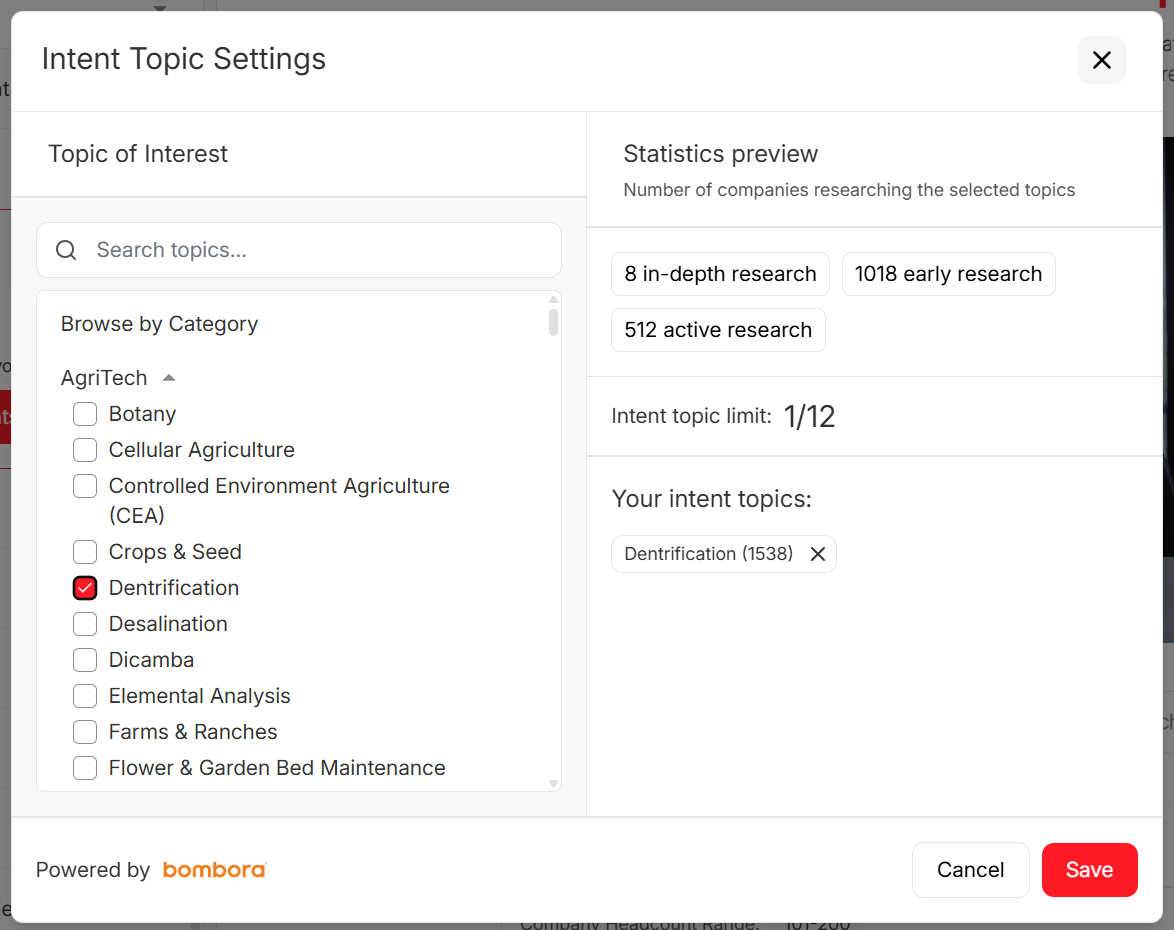
You just built a killer interactive demo. Now who sees it? Most teams overspend on demo realism and underinvest in distribution. Prospeo gives you 300M+ profiles with 98% email accuracy and intent data across 15,000 topics - so your demo lands in front of buyers actively researching your category, not dead inboxes.
Stop sending polished demos to the wrong accounts.
Pricing reality: Storylane alternatives compared (2026)
Pricing in this category's annoying for one reason: seat definitions vary. Some tools price per creator, others split editors vs presenters, and enterprise features (SSO, sandboxes, custom domains, SCIM) are often gated behind a plan jump that doubles your bill.
Two rules that save money every time:
- Model pricing at 5 creators and 10 creators before you talk to sales. Most teams buy at 2 creators and regret it at 8.
- Separate budgets for "demo creation" and "demo distribution." Creation tools don't fix targeting, deliverability, or list quality.
Normalized pricing table (with consistent 5/10-creator math)
Notes: "Starting price" reflects the lowest paid tier commonly listed. "Team reality" shows the cleanest 5-creator and 10-creator math based on published packs or straightforward per-seat pricing.

| Tool | Best for | Starting price | Team reality (5 creators / 10 creators) | Key gates to watch |
|---|---|---|---|---|
| Storylane | Capture + tours (plan-gated editing) | Free; Starter $50/mo | $625 / $1,500 (Growth $625 includes 5 seats; Premium $1,500 includes 10 seats) | HTML Demo Editor=Growth; SSO=Premium; Sandbox=Enterprise |
| Navattic | Web capture for marketing pages | Free; Starter Plus $40/mo | $500 / $1,000 (published 5/10 packs) | SSO + sandbox demos in higher tier |
| Supademo | Budget tours + enablement | Free; $38/creator/mo | $350 / $600 (Growth includes 5 creators; +5 creators at $50 each) | HTML + unlimited sandbox demos gated to Growth |
| Walnut | Personalization + governance | $750/mo (annual billing) | $750 / $1,550 (bundled seats) | SSO/SCIM in higher bundle; Deal Rooms add cost |
| Consensus | Interactive video paths | $600/mo | $600 / $1,250 (published user packs) | Enterprise adds SSO + deeper governance |
| Arcade | Polished "story" demos | Free; $42.50/user/mo | $425 / $425 (10 x $42.50 Growth) | SSO/custom domain gated to Enterprise |
| Reprise | Cloning + enterprise demo infra | Quote-based | $40k-$130k+/yr (platform + users) | Enterprise security + implementation baked in |
| Saleo | Overlays + data injection | Quote-based | $40k-$80k/yr (seats + complexity) | Learning curve + demo ops ownership required |
| Demostack | Sandbox demos | ~$55k/yr | $55k-$120k/yr (teams + environments) | Enterprise by default; security review common |
Seat-model traps (with real math)
These are the "how did we end up paying that?" moments.

Trap #1: Storylane looks cheap until you price the plan you actually need.
- Want HTML Demo Editor? You're in Growth.
- Want SSO? You're in Premium.
- Want 10 seats? Premium includes 10 seats at $1,500/mo on monthly billing (or $1,200/mo billed annually). If you start on Starter because it's $50/mo, you'll re-buy later. Price the end state first.
Trap #2: Supademo's upgrade jump is rational - if you'll use the gates. Supademo's per-creator tier is great for small teams. The moment you need HTML Supademos + unlimited sandbox demos, you jump to Growth ($350 for 5 creators). At 10 creators, it's $350 + (5 x $50) = $600/mo. That's still fair - just don't upgrade "just in case."
Trap #3: Per-user tools (Arcade) scale cleanly... and relentlessly. Arcade's simple to model on Growth: 10 users x $42.50 = $425/mo.
The trap's organizational: once sales enablement loves it, everyone wants a seat. If you see 25 creators coming, negotiate a cap early.
Trap #4: Walnut's bundles can be perfect - or a procurement maze. Walnut's one of the few that makes editor vs presenter explicit. That's good. It also means you can accidentally buy more "presenting" capacity than you need. If your team doesn't run formal deal rooms, don't let Deal Rooms become the default SKU.
Feature-gate checklist (print this before procurement)
For each vendor, get a yes/no and the plan name:
- SSO/SAML
- SCIM (auto-provisioning)
- RBAC (roles beyond admin/user)
- Multi-workspace (separate brands/regions)
- Custom domain + whitelabel
- Sandbox / cloning environments
- Audit logs + retention controls
- CRM integration (Salesforce/HubSpot) + field mapping
- Webhooks / API access
- Consent controls (GDPR/DPA)
If a vendor can't answer these in one email, implementation will be slower than the demo you're trying to ship.
Best Storylane alternatives (ranked)
Storylane vs Navattic is the most common head-to-head. Storylane wins on ease-of-use; Navattic wins on support and the marketing-publishing workflow. The "best" choice comes down to method fit and how much governance you need.
Below is how we've seen the category break in production: maintenance, embed performance, governance, and attribution.
The best Storylane alternatives: Tier 1 picks
Navattic (Tier 1): best for marketing-site conversion demos
Best for: teams that want a clean, fast web-capture demo embedded on high-intent pages (pricing, integrations, comparison pages).
What breaks in production (and how Navattic handles it):
- Weekly UI changes: you need quick recapture and painless versioning. Navattic's workflow is built for "ship, measure, iterate" without turning your library into spaghetti.
- Attribution: the tool has to connect engagement to accounts and downstream actions. If you can't route signals, you're just collecting views.
Pricing (clear and pack-based): Navattic's pricing is unusually legible. G2 lists: Free (1 demo), Starter Plus $40/mo (1 seat), $500/mo for 5 seats, and $1,000/mo for 10 seats with SSO + sandbox demos. Most teams land on the 5-seat pack if marketing owns creation; 10 seats makes sense when SEs and CS also build.
My recommendation: if your primary goal's website conversion, start here. It's the fastest path to a demo that looks good, loads fast, and can be iterated weekly.

Prospeo (Tier 1): best for distribution + verified contacts after the demo is built
Most teams obsess over the builder and then send the demo to a list that bounces, misses decision-makers, or hits people who aren't in-market. That's not a demo problem - it's a targeting problem.
Prospeo is "The B2B data platform built for accuracy": 300M+ professional profiles, 143M+ verified emails, and 125M+ verified mobile numbers, refreshed every 7 days. It's used by 15,000+ companies and 40,000+ Chrome extension users, delivers 98% email accuracy, and drives a 30% mobile pickup rate.
Here's a real scenario we've seen: a PMM team ships a beautiful Storylane-style tour, sales loves it, and then outbound sprays it to a stale list. Bounce rates spike, deliverability tanks, and the "demo experiment" gets blamed. The fix wasn't a different demo builder. The fix was clean targeting, verified contacts, and a follow-up loop that hits the right roles at the right accounts.
How it fits a demo workflow (practical, not theoretical):
- Build your demo in your chosen tool.
- Use Prospeo's B2B database filters (30+ filters) to pull your ICP list, then layer intent data across 15,000 topics to focus on accounts already researching your category.
- Verify emails and mobiles in real time, enrich records, and push clean data into your CRM/sequencer.
Integrations that matter for this use case: Salesforce, HubSpot, Smartlead, Instantly, Lemlist, Clay, Zapier, Make (plus API access). If your outbound stack's modern, it plugs in cleanly.
Pricing model (transparent): credit-based, self-serve, no contracts. It runs at ~$0.01/email, 10 credits per mobile, with a free tier that includes 75 emails + 100 Chrome extension credits/month.
Internal links (for the exact features above):
- Pricing: https://prospeo.io/pricing
- B2B database: https://prospeo.io/b2b-leads-database
- Intent data: https://prospeo.io/intent-data
- Integrations: https://prospeo.io/integrations
Supademo (Tier 1): best for lightweight tours (and the cleanest budget path)
Supademo's what we recommend when you need lots of small assets: onboarding tours, feature callouts, enablement snippets, and "show me how it works" flows that don't require a pre-sales engineer to maintain.
Where it wins:
- Non-technical creators ship quickly.
- Sharing's frictionless (great for enablement and customer education).
- It stays affordable until you intentionally cross into advanced territory.
The only pricing question that matters: when do you upgrade?
- Start: Free (good for proving the workflow).
- Scale: $38/creator/month when you just need more creators and demos.
- Growth: $350/month for 5 creators when you need HTML Supademos + unlimited sandbox demos. At 10 creators, the math's clean: $350 + (5 x $50) = $600/mo.
My rule: don't buy Growth because it sounds "more enterprise." Buy it the week you actually need HTML editing or unlimited sandboxes.
Walnut (Tier 1): best for personalization + governance (if you can keep it fast)
Walnut's the enterprise-feeling option when you need personalization across segments and stronger controls around who can publish what. It's also the tool I see most often in orgs that treat demos like a product: standardized components, reusable tokens, and consistent analytics.
Seat model unpacked (so you don't overbuy):
- Ignite: $750/mo billed annually (3 editor seats)
- Accelerate: $1,550/mo billed annually (5 editor + 5 presenter seats) SSO & SCIM live in the higher tier, and Deal Rooms are separate SKUs.
Performance reality (don't skip this test): Walnut's powerful, but performance is where enterprise tools get punished. Test it like a skeptic: embed on your heaviest page template, test on mobile, then test on conference Wi-Fi. If load time slips, conversion drops, and you'll feel it in pipeline long before anyone admits the demo's the culprit.
My recommendation: Walnut's worth it when governance and personalization are the point - not when you just need a quick tour.
More Storylane alternatives: Tier 2 (specialists)
Reprise (Tier 2): best for cloning + enterprise demo infrastructure
Reprise is what you buy when "interactive demo" stops being a marketing project and becomes infrastructure. It's built for teams that need realistic environments, security posture, and repeatable demo ops.
Where it shines:
- Cloning/sandbox realism for complex products
- Enterprise security and procurement readiness
- Strong fit for SE-led demo programs
Pricing: quote-based, structured as an annual platform fee plus per-user licenses.
Who should skip it: teams that only need a website conversion asset. This is a pre-sales and demo-ops tool first.
Consensus (Tier 2): best for interactive video paths and stakeholder alignment
Consensus is the specialist for buying committee education. Instead of letting every stakeholder click around your UI, you guide them through role-based paths and keep the narrative tight.
Where it wins:
- Multi-stakeholder deals (security, finance, ops)
- Asynchronous education that sales can track
- Cleaner story control than a free-form clickable tour
Pricing: $600/mo for 5 users and $1,250/mo for 10 users, with Enterprise tiers adding deeper governance (including SSO).
My opinion: if your sales cycle involves a committee, Consensus often beats clickable demos because it reduces confusion. Stakeholders don't want a sandbox - they want clarity.
Saleo (Tier 2): best for overlays and prospect-specific "configured" demos
Saleo is the overlay/data injection play: you personalize what the buyer sees so the demo looks configured for their industry, role, or use case.
Where it wins:
- Late-stage deals where "show me my world" closes
- Personalization without rebuilding full environments
- Strong impact when paired with disciplined demo ops
Pricing: quote-based; a realistic budget range is $40k-$80k/year as you scale seats and complexity.
Non-negotiable requirement: someone must own demo ops. Overlays require QA and upkeep. Without ownership, they drift.
Arcade (Tier 2): best for polished narrative demos (simple, fast, collaborative)
Arcade is the "make it look great" tool. It's excellent for narrative demos with chapters, collaboration, and lightweight interactivity, especially when you want creators across GTM to publish without training.
Pricing: per-user and easy to model: $32/user/mo on Pro or $42.50/user/mo on Growth. On Growth, 10 users = $425/mo. Enterprise gates SSO/custom domain.
The real watch-out: success creates seat sprawl. If you're rolling it out broadly, negotiate a plan that doesn't punish adoption.
Even more Storylane alternatives: Tier 3 (niche fits + adjacent tools)
These aren't wrong. They're just narrower, or they solve adjacent problems (content experiences, services, evaluation sandboxes).
HowdyGo
HowdyGo shows up a lot in interactive demo searches because it's strong for interactive experiences that feel like guided microsites - great for campaigns and content-led funnels. Pricing is $159/month for core demo-creation features and $399/month for advanced workflow features like analytics and integrations, with a 14-day free trial.
RELAYTO
RELAYTO is closer to a content experience platform than a pure demo builder: think interactive sales collateral, decks, and asset hubs with engagement tracking. It's a smart pick when your "demo" is really a content journey.
Omedym
Omedym appears in enterprise demo conversations because it leans into demo automation and orchestration for complex orgs. It's not a lightweight tour builder. Pricing is quote-based and sits in enterprise territory: $20k-$100k/year depending on environments, seats, and services.
Demostack
Enterprise sandbox/cloning for realism. Demostack starts around $55,000+ per year, and scales up with teams, environments, and implementation needs.
Tourial
Lightweight product tours. Budget $25-$120/month, driven by seats, branding/whitelabel, and analytics depth.
Demoboost
Services-led demo building and demo ops support. Starts around $10,000/year, and scales with how many demos you outsource and how often your UI changes.
Testbox
Sandbox evaluation environments for POCs. Starts at $33,000/year for 15 users, and scales with number of POCs, environment complexity, and security/procurement requirements.
Cloudshare
Virtual labs/sandboxes with serious IT gravity. Budget $5k-$20k/month, driven by concurrent users, lab complexity, and support/SLA needs.
Olto
Adjacent enablement/tour tooling for simple guided experiences. Starts around $40,000/year, driven by seats and whether you need advanced targeting/analytics.
Security, compliance, and governance checklist (don't discover this at renewal)
Security is where "we'll upgrade later" goes to die. If you're evaluating demo platforms, treat security as a first-week requirement - not a renewal surprise.
Minimum security bar by company stage
SMB (moving fast, low risk tolerance for busywork):
- GDPR + DPA
- Basic access controls
- Clear data retention policy
- Vendor security documentation you can forward to a customer
Mid-market (where deals start getting blocked):
- SOC 2 Type II (or a firm timeline)
- SSO/SAML 2.0
- Audit logs (who changed what, when)
- Domain restrictions and link controls
Enterprise (where procurement runs the show):
- SOC 2 Type II + mature security program
- SSO + SCIM
- RBAC (roles beyond admin/user)
- Multi-workspace separation
- Custom domain/whitelabel controls
- Contractual SLAs + security review support
Storylane's more enterprise-ready than people assume: it supports SOC 2 Type II, GDPR, and SSO/SAML 2.0. The practical question is which plan unlocks what (SSO in Premium; sandbox in Enterprise).
Procurement questions to copy/paste (and demand direct answers)
- "Which plan includes SSO/SAML, and is SCIM included or an add-on?"
- "Do you support multi-workspace with separate analytics and separate asset libraries?"
- "What's your retention policy for captured assets, logs, and viewer data?"
- "Can we restrict sharing by domain, set link expiration, and disable downloads?"
- "Do you provide audit logs for demo edits and publishing actions?"
- "What data is collected on viewers, and can we control consent prompts?"
If a vendor answers these with marketing fluff, assume implementation pain.
Performance + measurement maturity (what "analytics" should actually mean)
"Analytics" shouldn't mean "views and time spent." It should mean you can identify intent, route it, and learn what converts without manual cleanup.
The measurement stack that actually matters
| What to measure | Why it matters | Winner (what to prioritize) |
|---|---|---|
| Embed performance | Slow demos kill conversion | Fastest-loading tool on your heaviest page |
| Account identification | Routes to sales | Tool with reliable company reveal + CRM sync |
| Buyer-level engagement | Prioritizes follow-up | Tool that tracks steps, branches, and repeat visits |
| A/B testing | Improves conversion | Tool with variant reporting you'll actually use |
| CRM feedback loop | Proves pipeline | Tool that writes clean fields + avoids duplicates |
A simple "week 2" rubric (so you can decide fast)
By the end of week 2, your stack should answer these without debate:
- Can we name the accounts engaging with the demo? (Yes/no)
- Can we define a "hot" threshold and trigger follow-up automatically? (Yes/no)
- Can we tie demo engagement to influenced opportunities in CRM? (Yes/no)
- Can one creator update the demo in under 30 minutes after a small UI change? (Yes/no)
- Does the demo load fast on mobile and weak Wi-Fi? (Yes/no)
If you can't hit at least 4/5, the tool isn't ready for production.
Trial testing checklist (do this, not "poke around")
- Embed performance test: measure load time on your highest-traffic template (pricing page is the truth serum).
- Attribution sanity test: push engagement into CRM fields and confirm it doesn't create duplicates or junk contacts.
- Intent thresholds: define "hot" (example: 60% completion + pricing click + return visit) and route it.
- Maintenance test: change one UI element in your product and update the demo. Time it.
Here's the blunt truth: a gorgeous demo that can't be measured becomes a vanity project.
A 2-week evaluation plan (build 1 demo, ship 1 experiment, decide)
Two weeks is enough to pick a winner if you force focus and treat this like a revenue experiment, not a design project.
Navattic's benchmark is a good reality check: 86% of top demos use web captures, and 37% include media captures. Start with what ships fastest, then earn the right to go deeper.
Day 1-2: Pick the use case (and kill scope creep)
- Choose one buyer question (not your whole product). Examples: "How do you handle approvals?" "How does onboarding work?" "What does reporting look like?"
- Define the aha moment (the step where a buyer says "okay, I get it").
- Decide the CTA: meeting link, form, or "send to my inbox."
Deliverable: a one-paragraph demo brief and a single owner.
Day 3-5: Build the demo and publish it somewhere real
- Build an 8-12 step flow with one branch (persona or industry).
- Embed it on a staging page that mirrors production (same scripts, same layout).
- Add basic tracking and confirm it doesn't break page performance.
Success criteria: one creator builds it without needing admin help every 10 minutes.
Day 6-9: Ship one experiment on a high-intent page
- Put the demo behind a CTA on one page that already has intent: pricing, integrations, or a comparison page.
- Place the CTA at the moment of clarity (not at the end out of politeness).
- Set up alerts for high-intent activity and define response time.
Success criteria: you can identify engaged accounts and trigger follow-up within 5 minutes.
Day 10-12: Stress-test maintenance (the part everyone ignores)
- Make a small UI change in your product (rename a nav item, move a button).
- Update the demo and time it.
- Check whether the update creates duplicate versions, broken links, or analytics fragmentation.
Success criteria: update time stays under 30 minutes and analytics remain clean.
Day 13-14: Prove distribution (so the demo actually creates pipeline)
Run a small outbound test: 200-500 targeted contacts, two-message sequence, demo link as the primary CTA. This is where teams learn the uncomfortable lesson: distribution quality matters as much as demo quality.
Success criteria: completion rate, replies/meetings, and bounce rate that doesn't torch deliverability.
Demo engagement without a follow-up loop is just content marketing with extra steps. Prospeo's verified mobiles (125M+, 30% pickup rate) and CRM enrichment turn demo viewers into booked meetings - with contact data refreshed every 7 days, not the 6-week-old records that kill your reply rates.
Close the gap between demo view and sales conversation for $0.01 per lead.
FAQ
What's the closest alternative to Storylane for web-capture interactive demos?
Navattic's the closest match for web-capture demos because it's built around a tight capture -> publish -> measure workflow and has straightforward 5-seat ($500/mo) and 10-seat ($1,000/mo) packs. If your goal's website conversion, ship one demo to your pricing page first and measure load time plus completion rate.
Which Storylane alternative is best if we only need lightweight product tours?
Supademo's the best fit for lightweight tours because non-technical creators ship fast, sharing's frictionless, and pricing stays predictable as you scale. Expect to start on the $38/creator tier, then move to Growth at $350/month for 5 creators when you actually need HTML editing and unlimited sandboxes.
Which tools get expensive fastest as more creators need access?
Per-seat and add-on seat models tend to spike once you hit 10-20 creators, especially when multiple teams (PMM, SE, CS) all want editor access. Model pricing at 10 creators before signing, and ask whether "presenters" are free or a paid seat type - this one detail can change your bill by 2-3x.
After we build the demo, how do we get it in front of the right accounts?
Treat distribution as its own motion: build a targeted list, add intent signals, verify contacts, and trigger fast follow-up based on engagement. Prospeo's a strong option here because it delivers 98% email accuracy, refreshes data every 7 days, and includes intent data across 15,000 topics, so your demo goes to real buyers instead of bouncing or hitting the wrong roles.
Summary: how to pick between Storylane alternatives
If you're comparing Storylane alternatives, don't start with feature checklists. Start with method fit (captures vs sandbox vs overlays vs interactive video), then run a two-week test that forces attribution and maintenance into the open.
For most teams, Navattic's the fastest path to a high-converting site demo, Supademo's the clean budget play for lots of lightweight assets, and Prospeo's the simplest way to make sure the right accounts actually see the demo and turn engagement into meetings.