

Follow-Up Email Subject Lines That Get Opened After No Response
You emailed a VP of Sales on Tuesday. It's Friday. Nothing - not even an open. Your subject line competed against 392.5 billion other emails sent that day and lost. The right subject line for a follow-up email after no response is the difference between a reply and the trash folder. Here's how to win the next round.
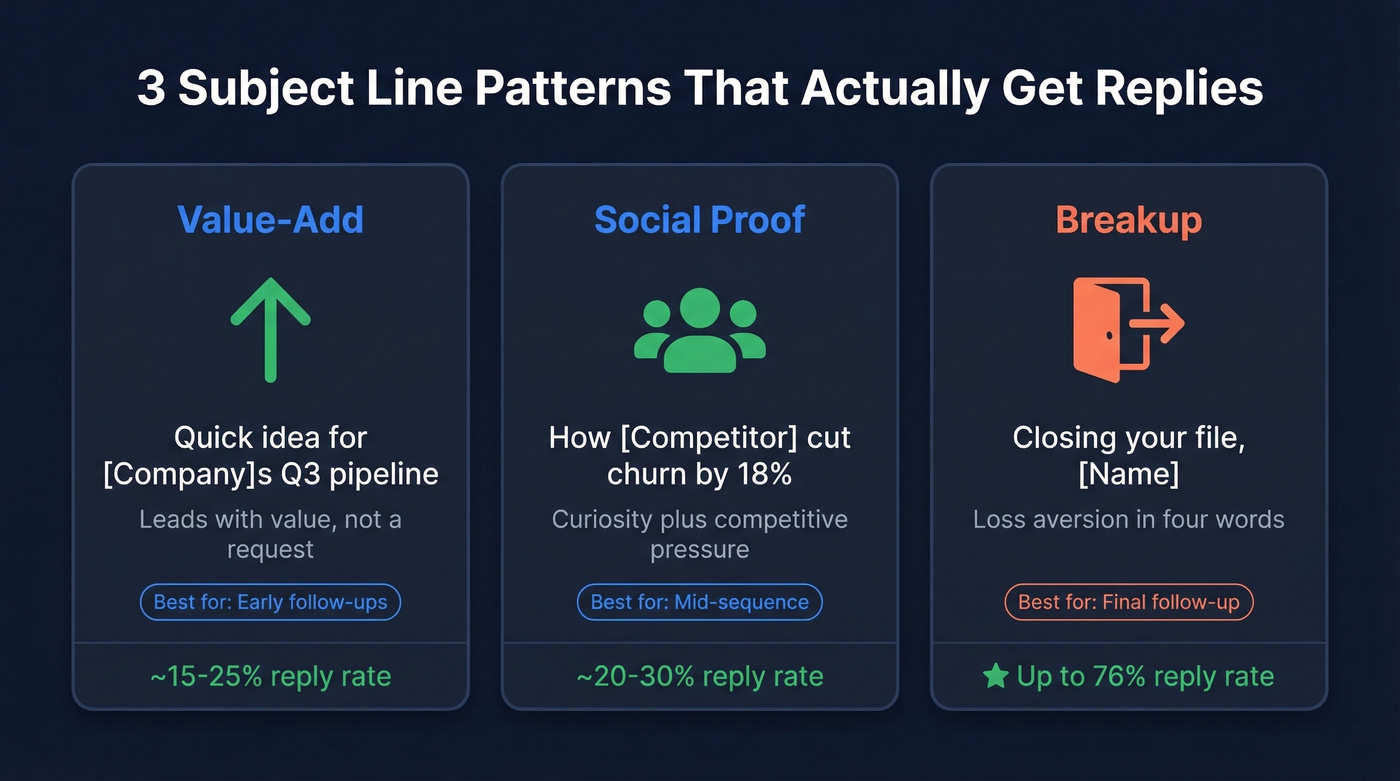
The three highest-performing follow-up subject line patterns we've seen across thousands of outbound campaigns:
- Value-add: "Quick idea for [Company]'s Q3 pipeline"
- Social proof: "How [Competitor] cut churn by 18%"
- Breakup: "Closing your file, [Name]"
And the contrarian take nobody else will give you: your subject line is completely irrelevant if the email bounces. Verify your list first.
Why the Subject Line Decides Everything
69% of recipients mark emails as spam based solely on the subject line. Not the body. Not the sender name. Just the subject line. That's the gate, and most follow-ups never get through it because they default to "Just checking in" - the laziest five words in professional email.
The average open rate across industries sits around 42.35%. Your follow-up doesn't need to beat every email in someone's inbox. It just needs to beat the 30 other cold emails they got that morning.
50+ No-Response Follow-Up Subject Lines That Work
Cold Outbound
- "Quick idea for [Company]'s Q3 pipeline" - leads with value, not a request. The prospect sees something for them, not something for you.
- "How [Competitor] cut churn by 18%" - social proof with a specific number. Curiosity plus competitive pressure. (More on using social proof without sounding try-hard.)
- "[Name], one thing I missed" - implies the first email had substance and you're adding to it, not repeating it.
- "Saw [Company]'s [recent news] - thought of this" - ties your outreach to something real. Personalization beyond a merge tag.
If you're replying to a real existing thread, keep the same subject line and let the "RE:" stay. If you're starting a brand-new outreach attempt, use a new subject line - and don't fake "RE:" when there was no prior exchange.
Post-Meeting or Post-Demo
Most reps default to "Following up on our call." That tells the prospect absolutely nothing and gives them zero reason to click.
Before: "Following up on our meeting" After: "The ROI model we talked through - updated with your numbers"
The second version references something concrete, promises a deliverable, and makes opening the email feel worthwhile. Other lines that work: "Next step on [specific feature discussed]" and "[Name], quick question from our call." In our experience, the more specific you get about what happened in the meeting, the higher your reply rate climbs. We've seen teams double their post-demo reply rates just by swapping generic subject lines for ones that reference a specific pain point the prospect mentioned during the call, which takes about 15 seconds of extra effort per email.
Job Application or Interview
- "Thank you, [Name]" - simple, professional, under six words.
- "Excited about [Role]" - conveys enthusiasm without being pushy.
- "One thing I forgot to mention" - creates a reason to reopen the conversation.
Keep these under 10 words. Professional contexts reward brevity and restraint over cleverness. Never reference the silence directly - "Following up since I haven't heard back" makes the hiring manager feel guilty, not motivated. (If you need wording options, see following up regarding.)
The Breakup (Final Follow-Up)
The breakup email is the most underused weapon in follow-up sequences. Instead of listing subject lines, here's why each one works psychologically:
"Closing your file, [Name]" triggers loss aversion in four words. People hate losing access to something - even something they haven't used yet. "Should I stop reaching out?" hands the prospect control, which paradoxically makes them more likely to respond. "My last email, [Name]" creates finality, and the human need for closure pulls them back in.
Breakup emails have driven reply rates as high as 76% in documented campaigns, compared to 5-10% for standard follow-ups. The gap is enormous, and most reps never send one. If you want plug-and-play copy, use a final follow-up email template.
Data-Backed Rules for High-Performing Subject Lines
Five rules that separate subject lines that get opened from ones that get deleted:
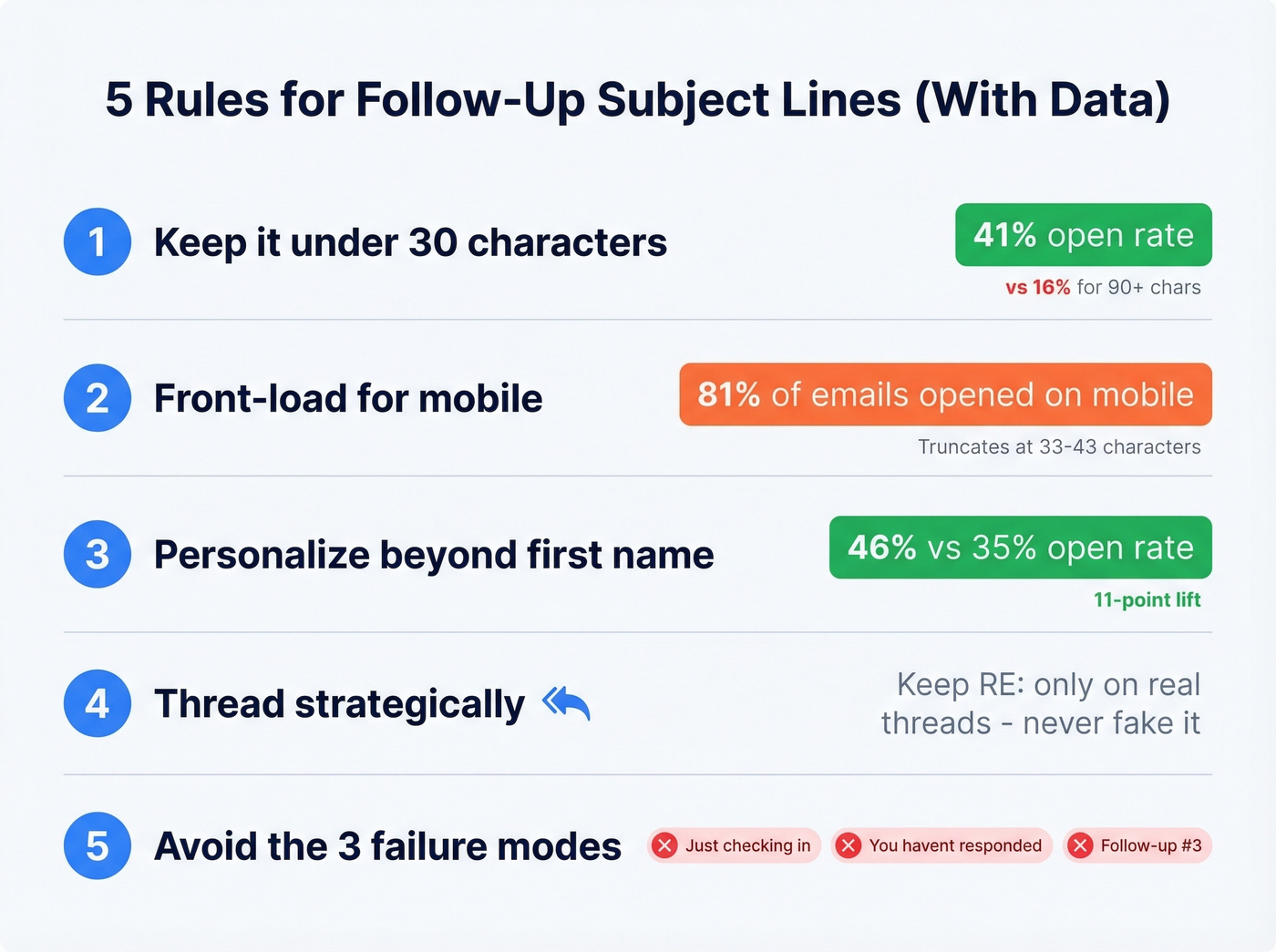
Keep it around 30 characters or less. HubSpot's data shows subject lines around 30 characters or less hit a 41% open rate. Lines over 90 characters? 16%. That's not a marginal difference - and clear subject lines produced 541% more responses across all channels than clever or vague ones. (More examples: sales email subject lines.)
Front-load for mobile. 81% of emails are opened on mobile, and half of recipients delete emails that aren't mobile-optimized. Mobile clients truncate at 33-43 characters. If your key info sits at character 45, half your audience never sees it.
Personalize beyond first name. Emails with personalization hit a 46% open rate vs. 35% without - an 11-point lift. But "[First Name]" alone isn't personalization anymore. Reference their company, role, a recent hire, a funding round. Something that proves you did 30 seconds of research. (Frameworks + examples: personalized emails.)
Thread strategically. Keep the same subject line when you're replying to a genuine existing email thread. When you're not, start fresh. Don't fake "RE:" when there was no prior exchange.
Avoid the three failure modes. "Just checking in" is too vague. "You haven't responded" is too aggressive. "Follow-up #3" is too robotic. Each one signals that you've got nothing new to offer. Campaign Monitor found emojis boost read rates by 12%, but in B2B follow-ups, they look unprofessional. Test before committing. If you want a bigger swipe file, start with subject line templates.

You just spent 10 minutes crafting the perfect follow-up subject line. Now imagine it bouncing because the email address was wrong. Prospeo's 5-step verification delivers 98% email accuracy - so every subject line you write actually reaches an inbox. At $0.01 per email, a bad list is the only thing you can't afford.
Fix your list before you fix your subject lines.
Why Your Follow-Up Never Arrived
Here's the thing: you can write the perfect subject line for a follow-up email after no response and still get ignored. The problem isn't your copy - it's your deliverability.
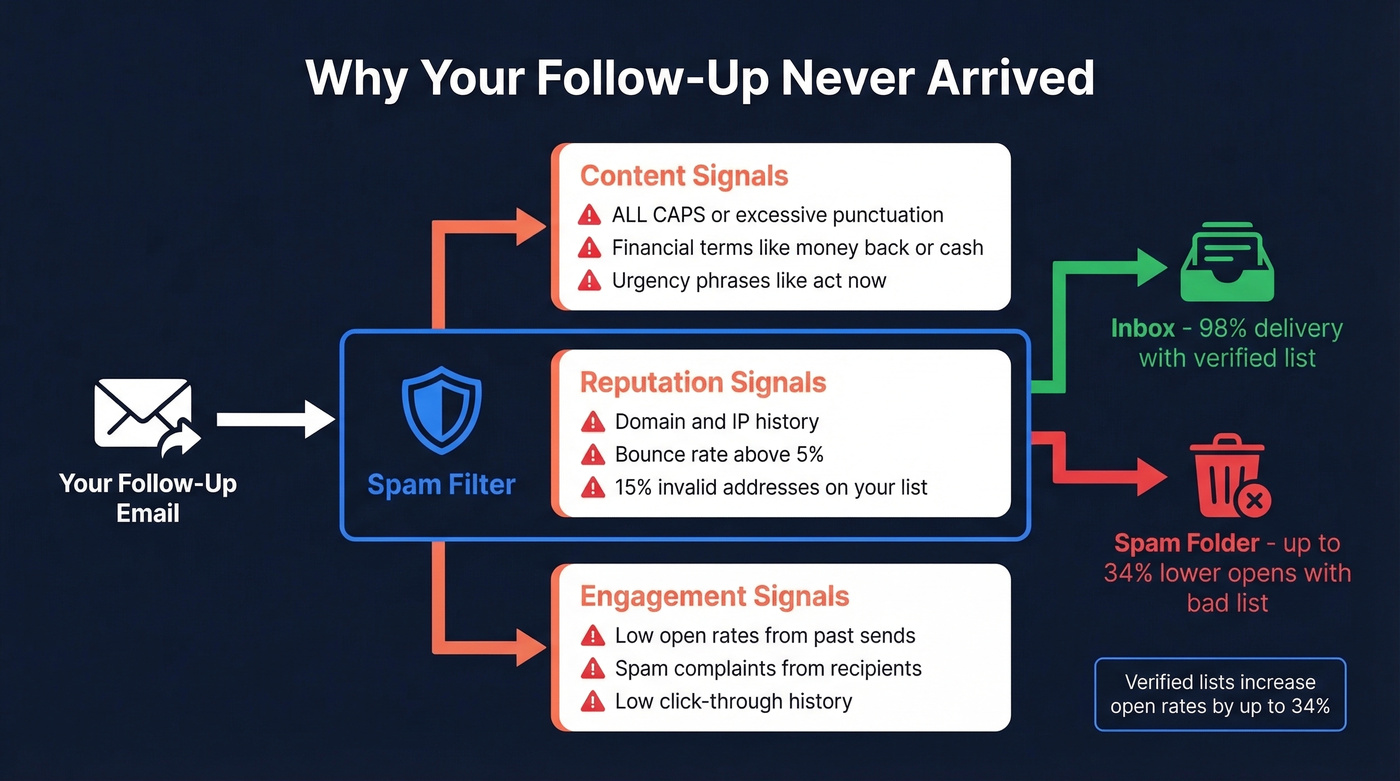
Spam filters evaluate three signal categories: content signals like trigger words and formatting, reputation signals from your domain and IP history, and engagement signals based on how recipients interact with your emails. A bad subject line is one factor. A bad list is the multiplier.
Patterns that trigger filters:
- ALL CAPS or excessive punctuation ("FREE!!!" is a guaranteed spam folder)
- Financial terms ("money back," "cash," "$$$")
- Urgency phrases ("limited time," "act now," "offer expires")
- Overpromise language ("guaranteed," "risk-free," "winner")
Most subject line articles skip this part entirely: your subject line doesn't matter if 15% of your list is invalid. Invalid addresses wreck your sender reputation, which tanks deliverability for every email you send - including the good ones. Verified lists increase open rates by up to 34%. One Prospeo customer, Snyk, cut bounce rates from 35-40% to under 5% by verifying their list before sending, which directly improved follow-up open rates across every subsequent campaign. If you’re troubleshooting bounces, start with the basics in our email bounce guide.
When to Send Each Follow-Up
Let's be honest: most teams obsess over subject line wording but completely ignore timing, which matters just as much.
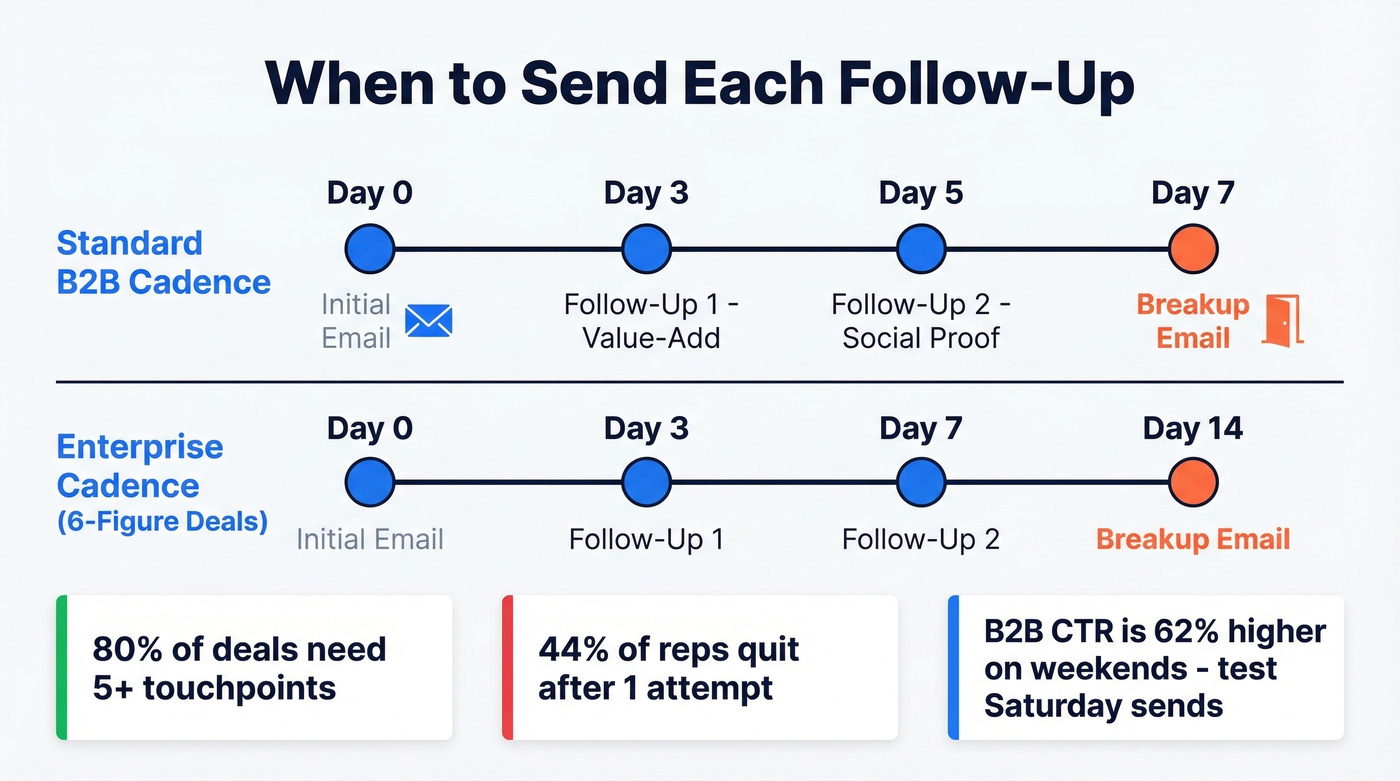
The 3-5-7 cadence works for most B2B sequences - first follow-up on Day 3, second on Day 5, breakup on Day 7. For enterprise deals with six-figure contracts, stretch to Day 3, Day 7, Day 14. Deploy the breakup after 5+ contact attempts over 2-3 weeks. Not before. 80% of B2B deals require five or more touchpoints, but 44% of reps quit after one attempt. You're not being annoying - you're being persistent enough to actually close. For more timing benchmarks, see when should i follow up on an email.
One surprising finding: B2B email CTR is 62% higher on weekends. If you're only sending Tuesday through Thursday, you're competing in the most crowded window. Test a Saturday morning send.
How to A/B Test Subject Lines
Skip this section if you're sending fewer than 200 follow-ups per month - you won't have enough volume for statistically meaningful results. For everyone else, here's how to do it right.
Judge on reply rate, not opens. Opens are vanity. Replies are pipeline. Meetings booked is the real metric. Target 30-50 characters for the sweet spot between mobile rendering and cognitive load. Change one variable at a time - subject line A vs. subject line B, everything else identical. You need a minimum of 1,000 recipients per variant; anything less and you're reading noise, not signal. Document your winners in a swipe file, because what works for your ICP won't match generic benchmarks. The consensus on r/sales is that most teams test too many variables at once and end up with data that tells them nothing, which tracks with what we've seen internally. For a step-by-step process, use our guide to email subject line testing.
If you only test one thing, test personalized vs. generic lines. That 11-point open rate improvement is the single biggest lever most teams haven't pulled.
The article above proves personalization lifts open rates by 11 points. But personalization beyond first name requires real data - company news, funding rounds, headcount growth. Prospeo gives you 50+ data points per contact and 30+ search filters so every follow-up subject line references something specific, not just a merge tag.
Turn generic follow-ups into replies with real prospect data.
FAQ
What's the best subject line for a follow-up email after no response?
The three patterns that consistently outperform are value-add ("Quick idea for [Company]'s Q3 pipeline"), social proof ("How [Competitor] cut churn by 18%"), and breakup ("Closing your file, [Name]"). Pick the pattern that matches where you are in the sequence - value-add for early follow-ups, breakup for the final touch.
How many follow-ups should I send before stopping?
Send 5-7 follow-ups using a 3-5-7 day cadence before deploying a breakup email as your final touch. Data shows 80% of B2B deals require five or more touchpoints, but 44% of reps quit after one attempt. Most teams stop too early, not too late.
Should I reply in the same thread or start a new email?
Reply in the same thread if you're continuing a genuine existing conversation - the "RE:" prefix signals continuity. Start a fresh email with a new subject line when the prior thread is stale or never got a response after 2+ attempts. Never fake "RE:" when there was no prior exchange.
What if my follow-up emails keep bouncing?
Your list likely contains invalid addresses, which destroys sender reputation and tanks deliverability for every email you send. Verify contacts before sending - tools with 5-step verification processes catch invalid emails, spam traps, and catch-all domains before they damage your domain.
The best follow-up email subject line is worthless if it never reaches the inbox. Fix your data first, then fix your copy.