

Email Subject Line Testing: What Actually Works (and What's Wasting Your Time)
You ran an A/B test on your last campaign. Variant B "won" with a 2% higher open rate. You celebrated, rolled it out - and revenue didn't move. That's the dirty secret of email subject line testing: most teams optimize for a metric that's been broken since Apple Mail Privacy Protection started inflating open tracking. Apple Mail now accounts for 46% of email clients, which means a huge chunk of your "opens" are phantom signals generated by a privacy proxy, not human eyeballs.
Here's the good news: testing subject lines absolutely works. One ecommerce brand changed only the subject line and preheader text and saw revenue per thousand emails jump 9% - while open rates stayed flat. Teams that test consistently compound 10-30% gains in clicks and conversions over a few months. But those gains only materialize if you're measuring the right outcomes, using sound methodology, and sending to a list that actually reaches inboxes. Most teams get at least one of those wrong.
What You Need (Quick Version)
Just want a quick score before hitting send? Use SubjectLine.com or MailerLite's free tester. Fast, catches obvious mistakes. (If you want more options, see our roundup of free subject line testers.)
Want to actually improve results? Run A/B tests in your ESP using the framework below. Track clicks and revenue, not opens.
What Subject Line Testing Actually Means
Two completely different activities get lumped under "subject line testing," and most articles treat them as interchangeable. They're not.
Grading tools run your subject line through heuristic rules - word count, spam triggers, emotional tone, readability - and spit out a score. They're pre-flight checklists. They catch obvious mistakes like ALL CAPS or spammy words, but they don't know your audience, your brand voice, or your offer. (If you’re worried about deliverability flags, run an email spam checker too.)
A/B testing sends two real variants to a randomized slice of your actual audience and measures which one performs better. This is the only method that tells you what your subscribers respond to. Everything else is an educated guess.
Both have a place. But if you're only using grading tools and calling it "testing," you're leaving real performance gains untouched.
Why Open Rates Are Broken
Apple Mail Privacy Protection changed everything. Apple Mail accounts for 46% of email clients, and its privacy features load tracking pixels in ways that make many emails appear "opened" whether the recipient read them or not. A study of 80,000+ email marketing accounts found open rates jumped 18 points after MPP rolled out. That's not engagement. That's noise.
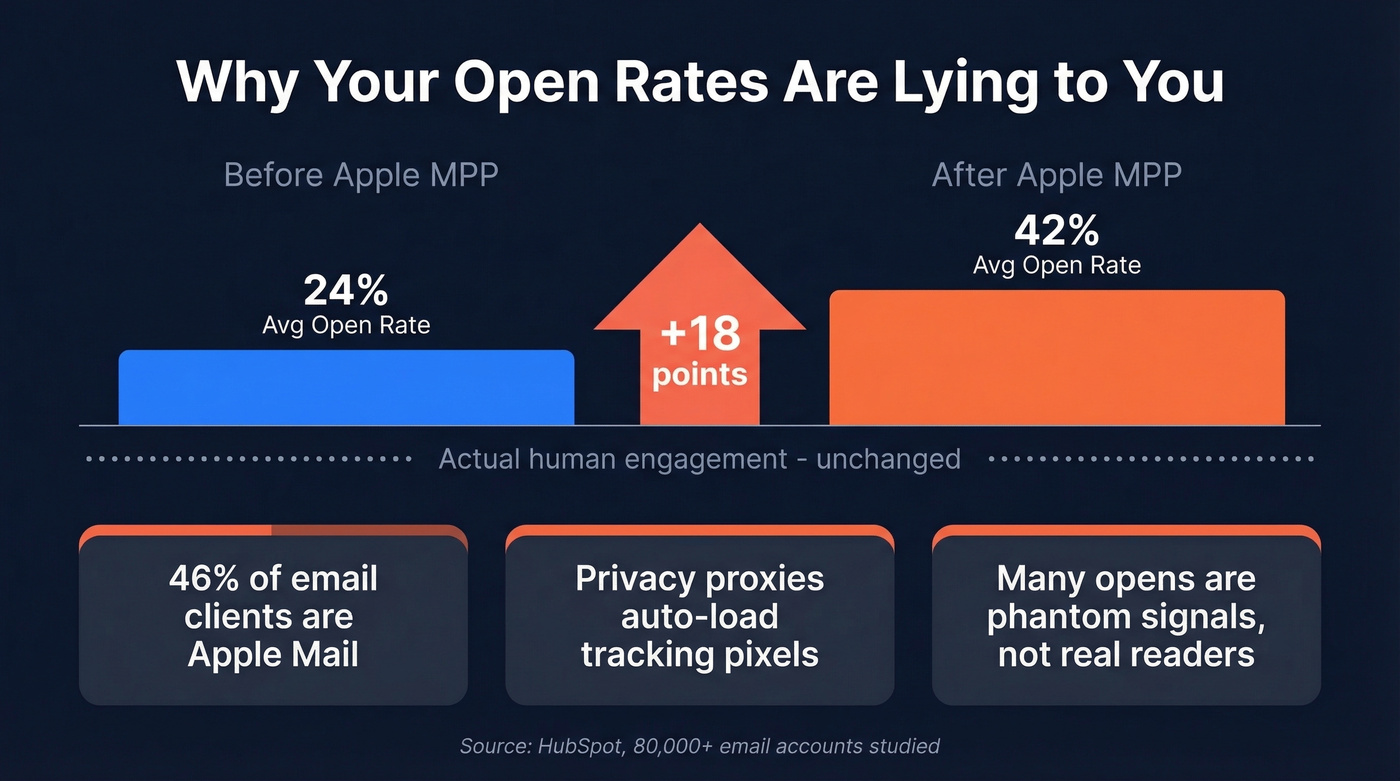
The benchmark gap makes the problem obvious:
| Industry | HubSpot Open Rate | Mailchimp Open Rate | HubSpot CTOR |
|---|---|---|---|
| All Industries | 42.35% | 35.63% | 5.3% |
| Retail/Ecommerce | 38.58% | 29.81% | - |
| B2B Services | 39.48% | - | - |
| Nonprofit | 46.49% | 40.04% | - |
| SaaS | 38.14% | - | - |
| Business & Finance | - | 31.35% | - |
The gap between HubSpot and Mailchimp's numbers shows why benchmarks are directional, not absolute - different methodologies, different sample compositions, different time periods.
So what should you track? Click-through rate, click-to-open rate, and - if your ESP supports it - revenue per email sent. Opens still work as a rough diagnostic signal, but they're no longer a reliable business metric. (If you want to get more precise, use a consistent click rate formula across campaigns.)
The Three Inbox Elements
Your subscribers see exactly three things before deciding to open or ignore your email. Most teams only test one of them.
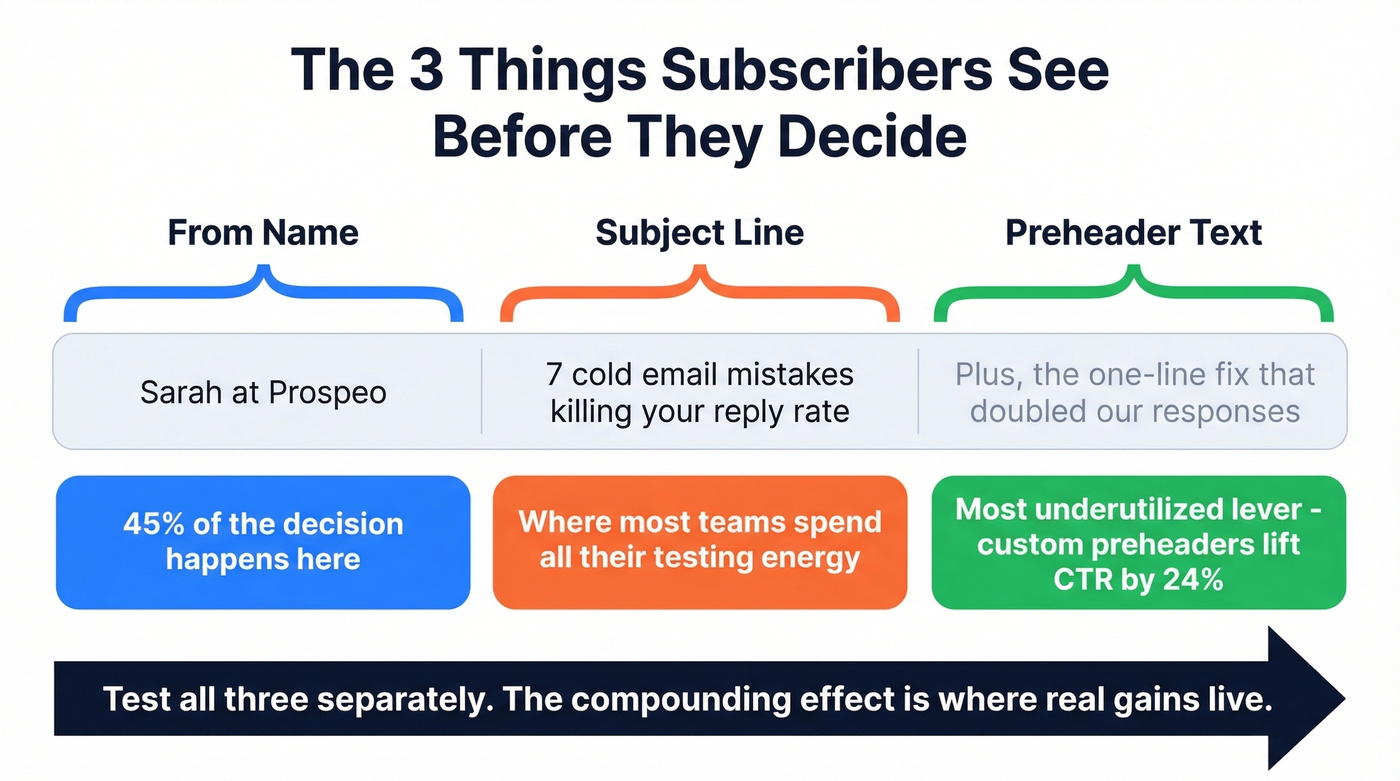
The "From" name is where 45% of subscribers make their open/ignore decision. That's nearly half your battle decided before anyone reads a word of your subject line. Test "Company Name" vs. "First Name at Company" vs. "First Name, Title" - the lifts can be dramatic.
The subject line is the obvious one, and where most testing energy goes. It matters, but it's one lever out of three. (Need inspiration? Steal from these email subject line examples.)
The preheader text is the most underutilized lever in email marketing. GetResponse data shows custom preheader text lifted open rates from 39.28% to 44.67% and CTR from 3.67% to 4.54%. That's a meaningful jump from something most teams leave on auto-fill. Keep preheaders between 85-100 characters. Here's a specific trick worth testing: preheaders that start with continuation words like "And," "But," or "Plus" showed a +19% lift in opens. They create a narrative pull from the subject line that makes the reader's eye keep moving right. (If you want a deeper framework, see email preview text A/B testing.)
Test all three. Separately. The compounding effect is where real gains live.

Subject line A/B tests only produce real results when your emails actually land in inboxes. If 20-35% of your list is bouncing, you're testing noise - not copy. Prospeo's 98% email accuracy and 5-step verification means every variant reaches a real person, so your test data reflects actual human behavior.
Stop optimizing subject lines that never reach the inbox.
Best Free Subject Line Graders
These tools are pre-flight checklists, not crystal balls. They catch obvious mistakes but don't predict how your audience will respond. Use them to sanity-check before you hit send, then let your A/B tests do the real work.
| Tool | Scoring Method | Key Features | Price |
|---|---|---|---|
| SubjectLine.com | 800+ rules, 3B+ emails | Spam check, basic preview | Free |
| MailerLite Tester | Rule breakdown | Spam check, good preview | Free (platform from $10/mo) |
| Omnisend Tester | Rules + scannability | Spam check, artsy preview | Free |
| Send Check It | Rules-based | Spam check, basic preview | Free (sign-up required) |
| Mailmeteor | Rules + GPT suggestions | AI alternatives, spam check | Free |
| CoSchedule Analyzer | Headline-focused rules | Word balance scoring | Free tier (paid ~$40/mo) |
| InboxArmy | 100-point scoring | AI alternatives, mobile preview | Free |
SubjectLine.com is the one we reach for most often. It's based on 3B+ emails across 800+ rules, and it gives you a score in seconds. It won't tell you anything surprising, but it flags the dumb mistakes fast.
MailerLite's tester shows a clear scoring breakdown - you can actually see why your score is what it is, which makes it more useful for learning patterns over time. We've found it particularly helpful for onboarding new team members who are still building intuition around what works.
Mailmeteor is the only free option here that explicitly uses GPT models to generate alternative suggestions. If you're stuck on phrasing, it's worth a quick pass. InboxArmy combines 100-point scoring with AI alternatives and mobile-first previews in a single scan - solid for a free tool.
The rest are fine but unremarkable. Send Check It requires sign-up, which is annoying for a quick check. Omnisend's preview can feel artsy and unrealistic. CoSchedule is really a headline analyzer repurposed for email - useful if you're already in their ecosystem, but the free tier is limited.
For enterprise teams with bigger budgets, AI-powered platforms like Phrasee and Persado generate and test subject lines at scale. Expect $2,000+/month - overkill for most teams, but worth evaluating if you're sending millions of emails monthly.
How to Run a Subject Line A/B Test
The 20/80 Framework
Split 20% of your list randomly into two equal groups (10% each). Send variant A to one, variant B to the other. Wait for results to stabilize, then send the winner to the remaining 80%.
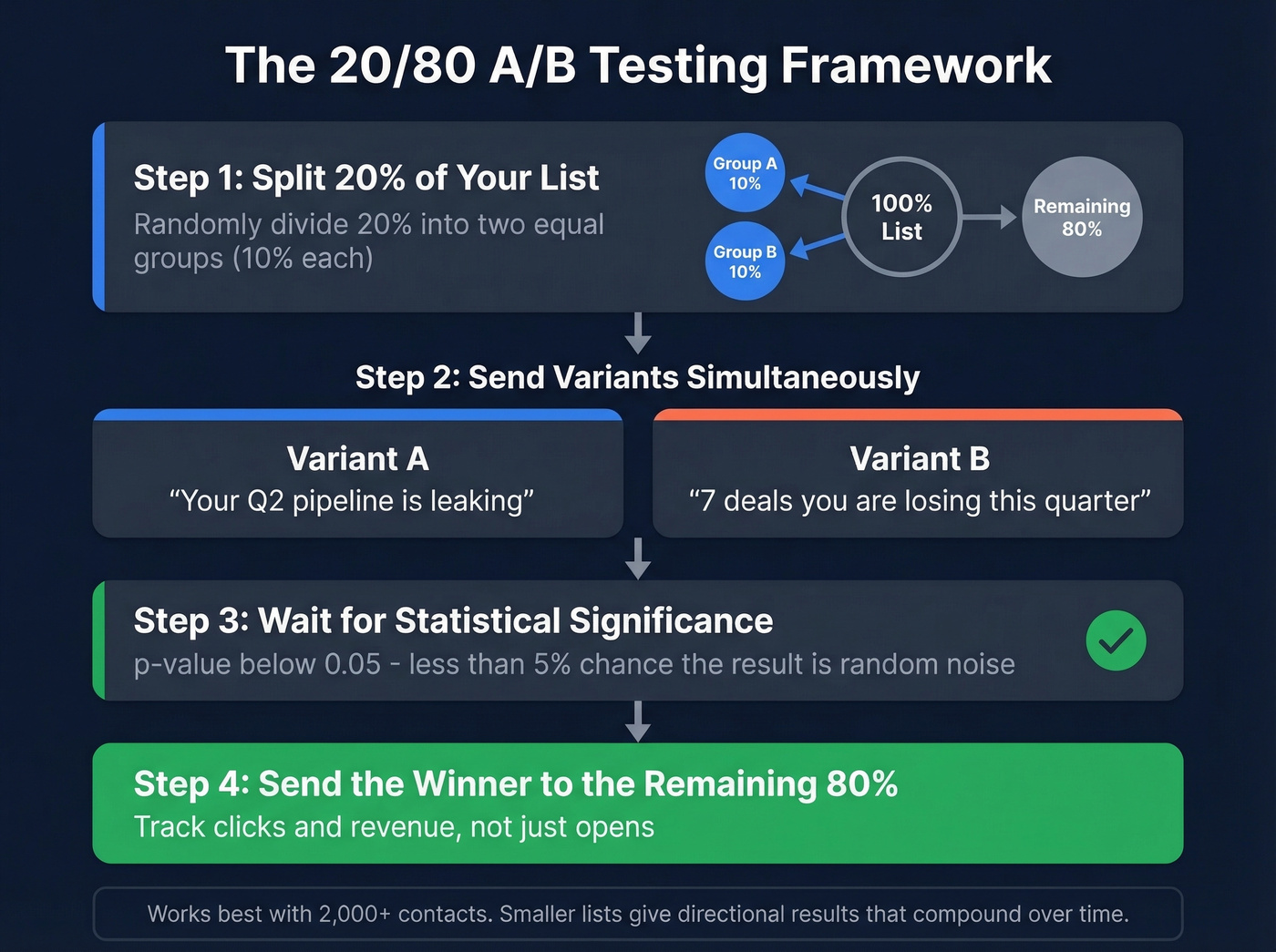
This framework works well for lists of 2,000-5,000 contacts. Got 10,000+ subscribers? You're in ideal territory for statistically meaningful results. Smaller lists can still benefit - results will be directional rather than bulletproof, but compounding directional improvements over months adds up to 10-30% gains in clicks and conversions.
One thing most teams forget: your effective test sample is only as large as the number of emails that actually reach inboxes. A list of 10,000 with a 15% bounce rate gives you 8,500 delivered - and a biased sample. Verify your list before running your next test so you're working with clean numbers. (Start with the basics: email bounce rate benchmarks and fixes.)
When to Call a Winner
Use a p-value threshold of 0.05 or lower - that means there's less than a 5% chance the difference is random noise. Most ESPs calculate this for you, but if yours doesn't, plug your numbers into an online significance calculator.
The rules that matter: test one variable at a time, send both variants at the same time, randomize your split, and document what you learn. That last one sounds obvious, but we've seen teams run the same test three quarters in a row because nobody wrote down the results.
Supplement with Qualitative Feedback
A/B tests tell you what works. They don't tell you why.
One underused tactic: add a one-question survey to your welcome sequence asking subscribers what kind of emails they actually want to open. Or simply ask for replies. The qualitative signal from 20 genuine responses often reveals patterns that 20,000 data points can't - like the fact that your audience hates urgency language but loves behind-the-scenes content.
The Metric That Actually Matters
Let's look at the case study that should change how you think about this. An EmailOpShop test changed only the subject line and preheader text. The results:
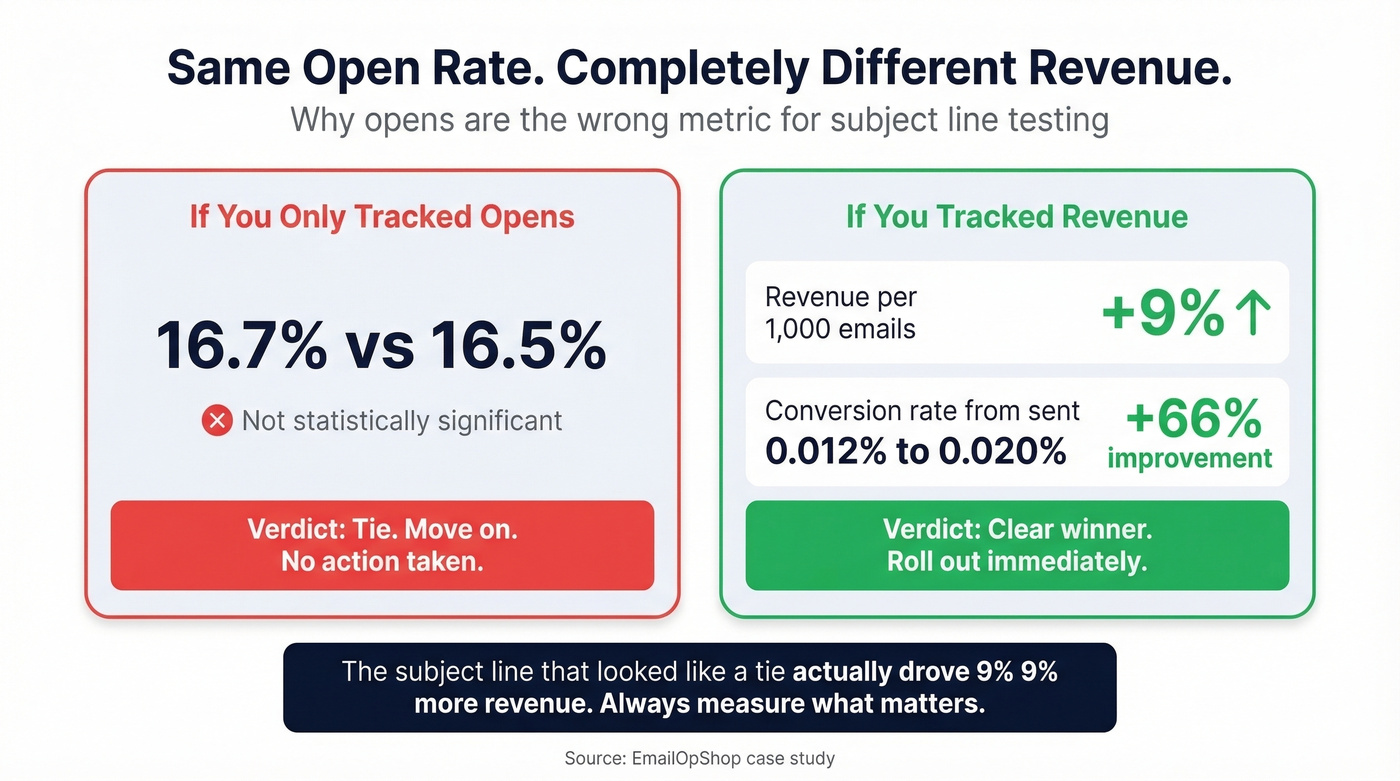
- Control open rate: 16.7%. Test open rate: 16.5%. Not statistically significant.
- Revenue per thousand emails sent? Up 9%.
- Conversion rate from sent: 0.012% (control) vs. 0.020% (test) - a 66% improvement.
If they'd been optimizing for opens, they would've called it a tie and moved on. Instead, they found a variant that drove meaningfully more revenue.
Here's the thing: if your average deal size is under $10K and you're spending more than 30 minutes per campaign on subject line optimization, you're over-investing. Write two decent variants, A/B test them, track revenue, and move on. The marginal return on agonizing over word choice drops off fast when your list is small and your product is low-ticket. Spend that time on list quality and offer strategy instead. (If you’re building a repeatable system, pair this with a solid email copywriting process.)
10 Test Ideas with Quantified Results
Don't guess what to test. Start with these - each has a quantified lift to benchmark against.
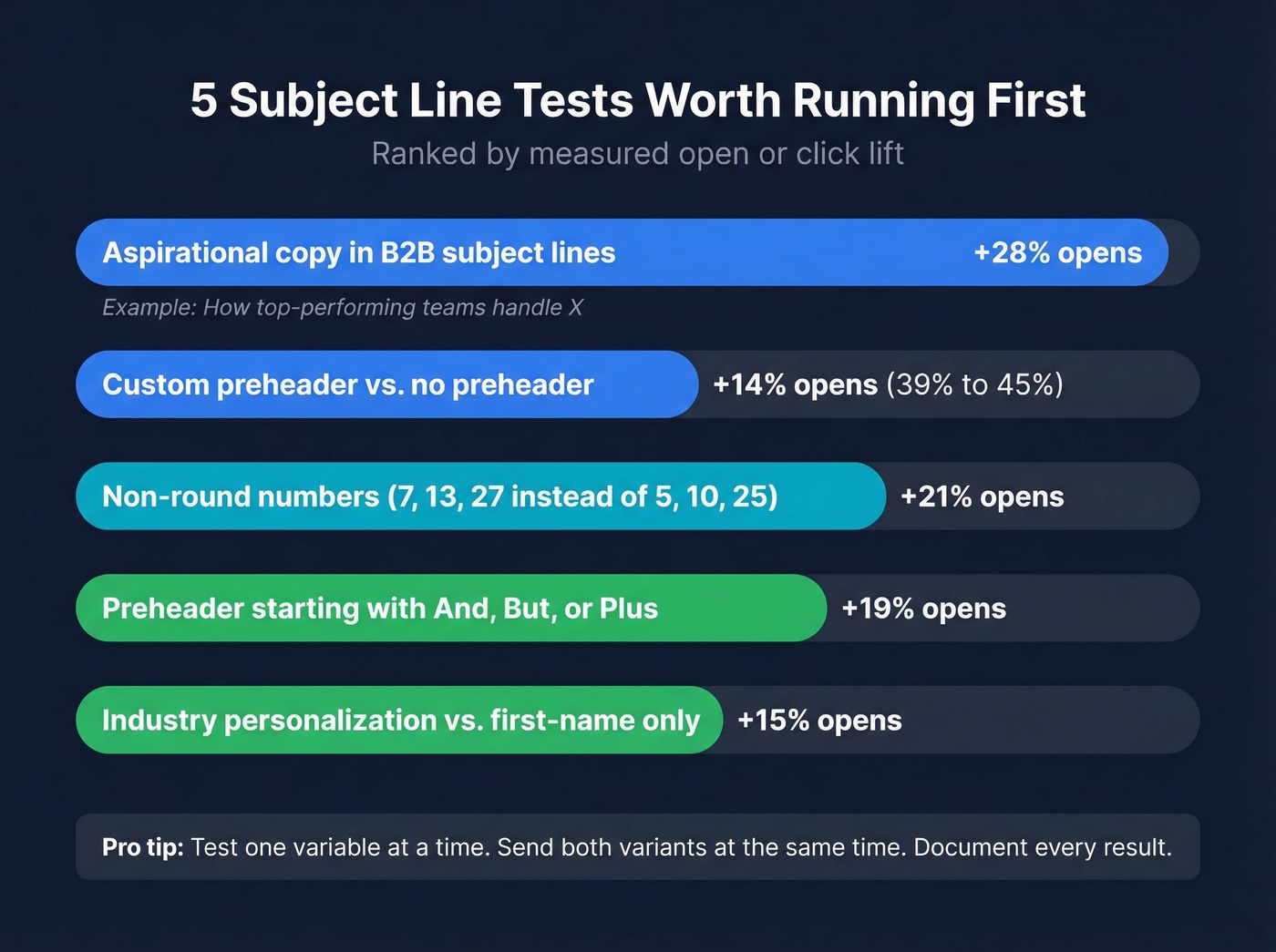
Aspirational copy in B2B subject lines - +28% opens. "How top-performing teams handle X" outperforms "How to handle X."
Non-round numbers - +21% opens. Use 7, 13, or 27 instead of 5, 10, or 25. Odd numbers signal specificity and feel less manufactured.
Custom preheader vs. no preheader - open rate from 39.28% to 44.67%. The single easiest win on this list. Most ESPs let you set preheader text in 10 seconds.
Preheader starting with "And," "But," or "Plus" - +19% opens. Creates a narrative bridge from the subject line that pulls the reader forward.
Industry/function personalization vs. first-name personalization. First-name personalization is overrated - everyone does it, so it's lost its novelty. Test "for fintech CFOs" or "for SaaS marketers" instead.
Dynamic product attributes in triggered emails. For cart abandonment, test the specific product name ("Your Allbirds Tree Runners are waiting") vs. generic ("You left something behind").
Emoji in subject line - +6.4% opens per MailerLite data. Works better in B2C and ecommerce. B2B tends to underperform, so test before committing.
Question vs. statement framing. "Are you making this hiring mistake?" vs. "The hiring mistake costing you $50K/year." Questions invite curiosity; statements assert authority. Your audience's preference will surprise you.
Urgency language vs. value-first language. "Last chance" vs. "The playbook 200 teams downloaded this week." Urgency fatigues fast; value compounds.
Resend to non-openers with a new subject line and updated preheader. Litmus recommends this as a low-effort way to squeeze more value from every send. (If you’re doing this in outbound, you’ll also want strong sales follow-up templates.)
Automated Testing and Multi-Armed Bandits
When you're sending high-volume triggered or transactional emails, manual A/B testing becomes impractical. You can't wait for a cart abandonment email to declare a winner.
Automizy's multi-armed bandit algorithm solves this by automatically shifting traffic toward the winning variant in real time, without manual intervention. Moosend (from ~$9/mo) offers similar built-in automation. For teams sending thousands of triggered emails daily, this is the right approach - especially when you're optimizing across dozens of triggered flows simultaneously.
Skip this if your list is under 10,000 or you're sending monthly newsletters. Bandit algorithms need volume to converge, and on small sends they'll just oscillate between variants without learning anything useful. Stick with the 20/80 framework instead.
Fix Your List Before Testing
Look, none of the optimization in this guide matters if your emails don't reach inboxes. Bad contact data leads to bounces, which damage sender reputation, which tanks deliverability, which means your tests are running on a shrinking, biased sample. You're not testing subject lines at that point - you're testing which variant performs least badly on a broken list. (If you need the full checklist, start with our email deliverability guide.)
If your bounce rate is around 5% or higher, fix your list before you run another test.

I've watched teams spend weeks perfecting subject line copy while 15% of their sends bounced silently. Snyk's sales team was in a similar spot - their bounce rate sat at 35-40% before they switched to verified data and dropped it under 5%. That's the difference between a subject line test that means something and one running on noise. Prospeo's free tier gives you 75 verified emails per month, enough to audit a segment of your list and see the difference before committing. (If you’re comparing tools, start with these Bouncer alternatives.)
You're compounding 10-30% gains from subject line testing - but bad contact data wipes those gains out overnight. Teams using Prospeo cut bounce rates from 35%+ to under 4% with 143M+ verified emails refreshed every 7 days. That means your revenue-per-send metric finally reflects your copywriting skill, not your data quality.
Fix the data first. Then your subject line wins actually count.
FAQ
What's a good subject line score?
Most graders score 0-100, and anything above 70 means you've avoided obvious mistakes like spam triggers and excessive length. But scores are based on generic heuristics - a 95 can still bomb with your specific audience. Use scores as a sanity check, then A/B test to find what actually resonates.
How many variants should I A/B test?
Two at a time. Testing more than two variants requires exponentially larger sample sizes to reach statistical significance. Master two-variant testing first, document your learnings, and let compound gains build over months.
Does email subject line testing work for small lists?
Yes - lists of 2,000-5,000 can use the 20/80 split method effectively. Results will be directional rather than statistically bulletproof, but consistent testing compounds into 10-30% cumulative improvement in clicks and conversions over a quarter.
How do I test subject lines if my bounce rate is high?
You don't - at least not meaningfully. High bounce rates shrink your effective sample and damage sender reputation, biasing every test. Get your bounce rate under 5% with an email verification tool first, then start testing on clean data where results actually mean something.
What's the difference between A/B and multivariate testing?
A/B tests one variable - subject line A vs. B. Multivariate tests multiple variables simultaneously, like subject line plus preheader plus send time. Multivariate requires much larger lists and more sophisticated analysis. Start with A/B.