

How to Test If an Email Address Exists - Without Sending a Single Email
You just uploaded 5,000 contacts from a trade show into your sequencer, hit send, and watched 1,100 of them bounce. Your domain reputation tanks. Your next campaign lands in spam. Now you're spending a week cleaning up the mess instead of closing deals.
That's what happens when you skip verification. Here's how to test if an email address exists - five methods, ranked from smartest to dumbest.
Why Verify Before Sending
At least 23% of an email list degrades every year. People change jobs, companies rebrand, domains expire. That list you built six months ago? Nearly a quarter of it is already dead.
Deliverability enforcement got stricter through 2025 and into 2026. Major inbox providers now reject non-compliant bulk mail at the protocol level instead of just dumping it in spam, returning SMTP rejection codes like 5.7.26 and 5.7.27. If your bounce rate crosses 2%, you're damaging your sending infrastructure - and recovery isn't quick. (If you need a deeper breakdown, see our guide to bounce rate.)
Here's the number that should worry you: only 62% of all emails submitted to ZeroBounce in 2024 were classified as valid. Nearly four in ten addresses people thought were good simply weren't. The gap between "I have an email list" and "I have a usable email list" is wider than most teams realize.
5 Ways to Test If an Email Address Exists
1. Use a Dedicated Verification Tool
This is the right answer for 95% of use cases. Verification tools run a multi-step check - syntax validation, DNS/MX lookup, SMTP handshake, and intelligence layers - without ever sending an actual email. Good tools verify a single address in 1-2 seconds, and bulk runs of 100K addresses typically finish in under an hour. (If you're comparing options, start with our roundup of email reputation tools.)
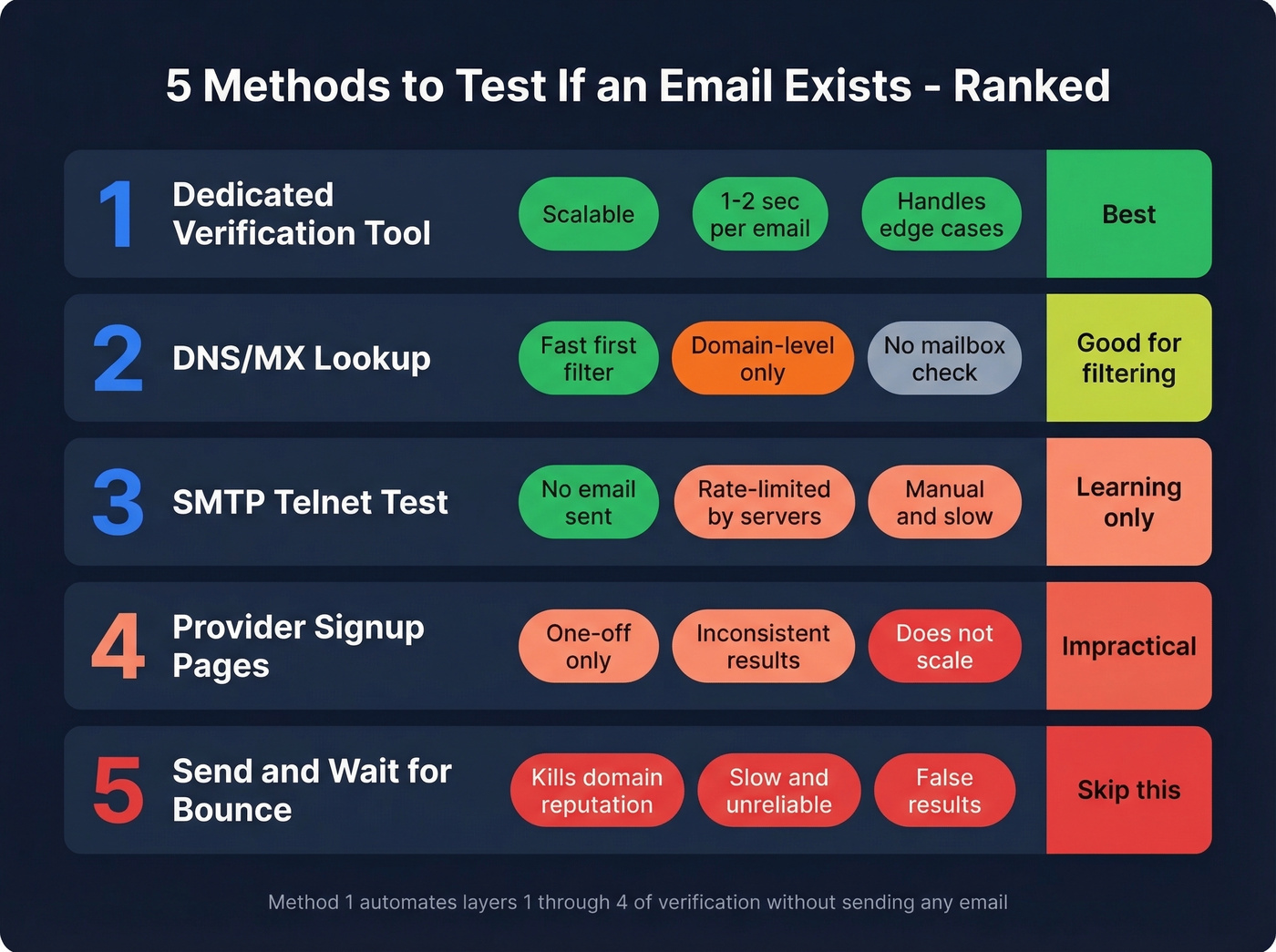
The best tools handle the edge cases that manual methods can't: disposable addresses, role-based emails like info@ and support@, and the catch-all domains that trip up simpler checks. Upload a CSV or check one address at a time. This is the method everything else in this article is building toward. (Related: spam trap removal.)
2. Manual DNS/MX Lookup
You can check whether a domain even accepts email before going further. Open a terminal and run:
[nslookup -type=MX](https://learn.microsoft.com/en-us/windows-server/administration/windows-commands/nslookup) example.com
Or on Linux/Mac:
[dig MX example.com +short](https://www.linode.com/docs/guides/use-dig-to-perform-manual-dns-queries/)
If you get MX records back like 10 mail.example.com, the domain is configured to receive email. No MX records? The domain doesn't accept mail, and any address @that-domain is dead.
This won't tell you if a specific mailbox exists, but it's a fast first filter when you need to check whether a domain can receive anything at all.
3. Manual SMTP Test via Telnet
This is the DIY version of what verification tools automate. Connect to the mail server on port 25 and walk through the SMTP handshake:
telnet mail.example.com 25
EHLO mydomain.com
MAIL FROM:<test@mydomain.com>
RCPT TO:<target@example.com>
QUIT
If the server responds with 250 OK to the RCPT TO command, the mailbox likely exists. A 550 means the address is invalid. A 450 means the server is temporarily refusing - possibly greylisting you.
You issue QUIT before ever reaching the DATA command. No email gets sent. You're just asking the server "would you accept mail for this address?" and hanging up.
This works for learning how verification actually functions under the hood, but it's impractical at scale. Most mail servers rate-limit or block repeated SMTP probes from unknown IPs.
4. Check Provider Signup Pages
Here's a trick that works for one-off checks but doesn't scale at all. Try creating an account on a major platform using the email address you want to verify. Amazon, Canva, and similar services will tell you "an account already exists" if the email is registered - which confirms it's real and active. Shopify and Wix, on the other hand, let you proceed to account creation even with fake emails. It's a curiosity, not a workflow.
5. Send an Email and Wait for Bounce
This is the worst option. Skip it.
ZeroBounce COO Brian Minick puts it bluntly: sending test emails to validate addresses can "kill your sending reputation." If your domain reputation is marginal, those test sends create false results - you get blocked not because the address is bad, but because the server doesn't trust you. (More on remediation: how to improve sender reputation.)
Beyond reputation damage, it's slow. You're waiting hours or days for bounce notifications that never come. Soft bounces, catch-all domains, and delayed NDRs all muddy the picture.
How Email Verification Actually Works
Every serious verification tool follows the same four-layer model, whether they describe it that way or not.
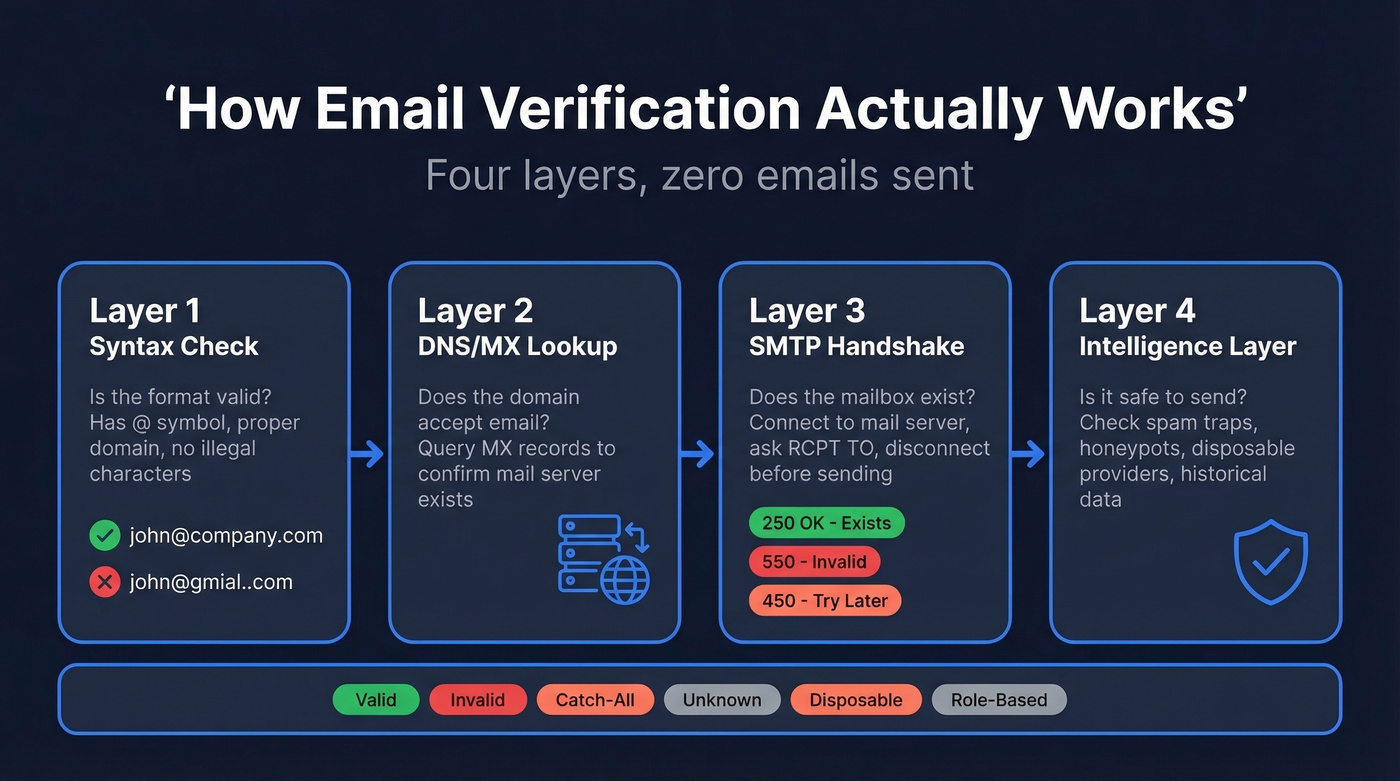
Layer 1 - Syntax check. Is the address formatted correctly? Does it have an @ symbol, a valid domain structure, no illegal characters? This catches typos like john@gmial.com instantly.
Layer 2 - DNS/MX lookup. Does the domain exist, and does it have mail exchange records? The tool queries DNS for MX records, confirming the domain is configured to receive email. No MX records means a dead address.
Layer 3 - SMTP handshake. This is where the real verification happens. The tool connects to the mail server and initiates an SMTP conversation per RFC 5321:
EHLO verifier.example.com      → Server: 250 OK
MAIL FROM:<probe@verifier.com> → Server: 250 OK
RCPT TO:<target@company.com>   → Server: 250 OK  (exists)
                                   or 550 (doesn't exist)
                                   or 450 (try later)
QUIT
The connection uses ESMTP, triggered by the EHLO command, which supports STARTTLS encryption and additional parameters. The tool closes the connection at QUIT - before the DATA command - so no message is ever transmitted.
Layer 4 - Intelligence/database. The best tools add a final layer: checking against known spam traps, honeypots, disposable email providers, and historical deliverability data. This is where tools diverge most in quality. A basic verifier stops at Layer 3. A good one catches the addresses that pass SMTP but will still wreck your deliverability.
Most tools return results in a handful of categories: Valid (safe to send), Invalid (hard bounce, don't send), Catch-All/Accept-All (server accepts everything, mailbox existence unconfirmed), Unknown (server unresponsive or inconclusive), Disposable (temporary inbox, will expire), and Role-Based (shared mailbox like info@ that tanks engagement). Knowing what each bucket means is the difference between reading your verification report and actually acting on it. (If you're building a workflow around this, see email deliverability.)
The Catch-All Problem
SMTP verification has a blind spot, and it's a big one.
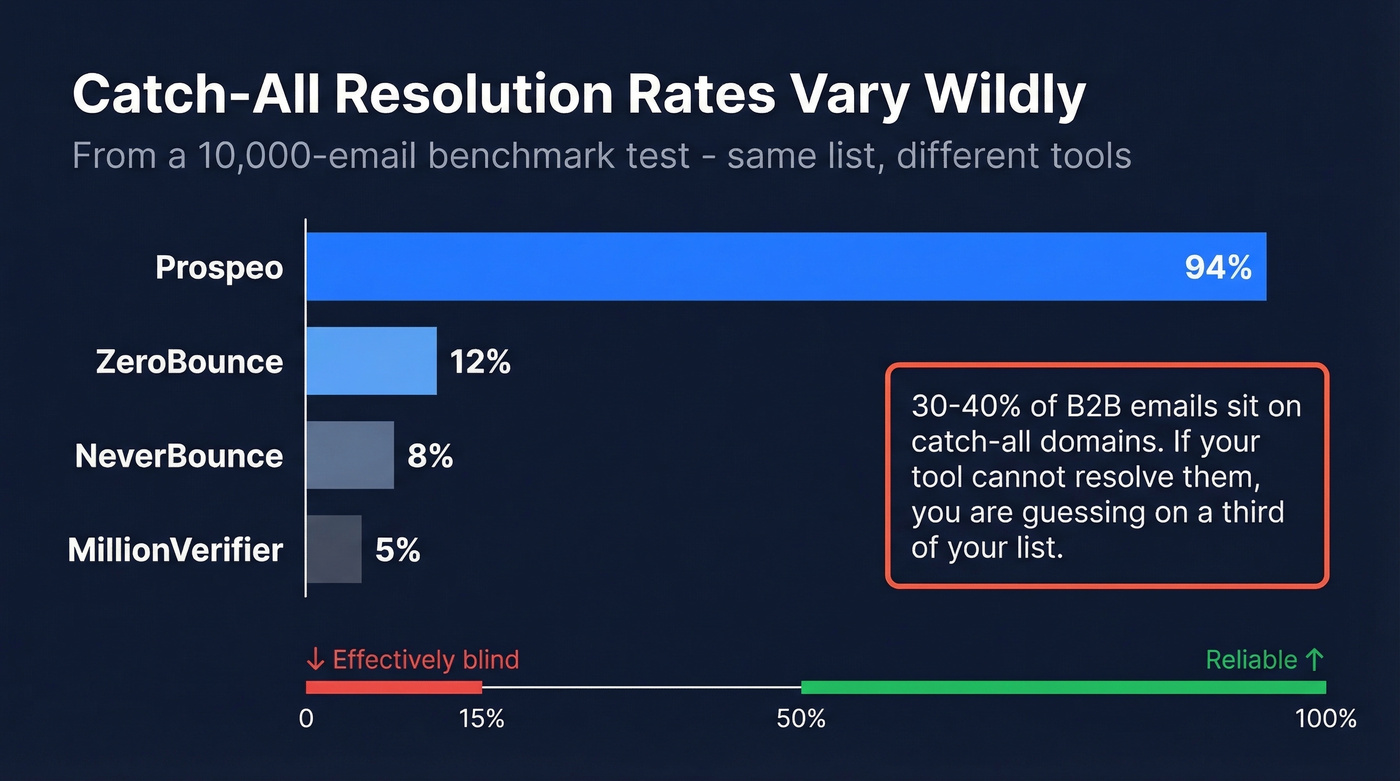
Between 30% and 40% of B2B email addresses sit on catch-all domains. A catch-all domain accepts every email sent to it, regardless of whether the specific mailbox exists. Send to ceo@company.com, asdfgh@company.com, or literally-anything@company.com - the server says 250 OK to all of them. The SMTP RCPT TO command is useless here. The server always says yes.
It gets worse. Enterprise security layers like Proofpoint, Mimecast, Barracuda, and Microsoft Defender sit in front of the actual mail server. They introduce greylisting, rate limiting, and outright probe rejection. Even valid addresses on these domains can return "unknown" results because the security gateway won't cooperate with verification probes.
In a 10,000-email benchmark test, catch-all resolution rates ranged from 5% to 94% across tools. That's not a rounding error - it's the difference between verifying your list and guessing at a third of it.
Let's be honest: if more than 25% of your prospect list targets mid-market and enterprise companies, catch-all resolution isn't a nice-to-have feature. It's the only feature that matters. A tool with 99% accuracy and 5% catch-all resolution will leave you blind on a third of your list. Pick your verifier based on catch-all handling first, everything else second.

Prospeo's 5-step verification does all four layers automatically - syntax, DNS, SMTP, and intelligence - plus catch-all handling, spam-trap removal, and honeypot filtering. 98% accuracy across 143M+ verified emails. At $0.01 per email, cleaning a 5,000-contact list costs less than a coffee.
Test if every email on your list actually exists - before you hit send.
Verification Tools Compared (2026)
| Tool | Accuracy | Catch-All | Pricing | Best For |
|---|---|---|---|---|
| Prospeo | 98% | Yes | ~$0.01/email; 75 free/mo | Pre-verified discovery |
| ZeroBounce | 97.8% | 12% | $15 for 2,000 (pay-as-you-go) | Standalone bulk |
| NeverBounce | 96.9% | 8% | $8/1K; 1K free | API integrations |
| MillionVerifier | 95.8% | 5% | ~$0.60/1K | Budget bulk runs |
| Hunter | 70%* | Yes | Free tier; 100/mo | Quick one-offs |
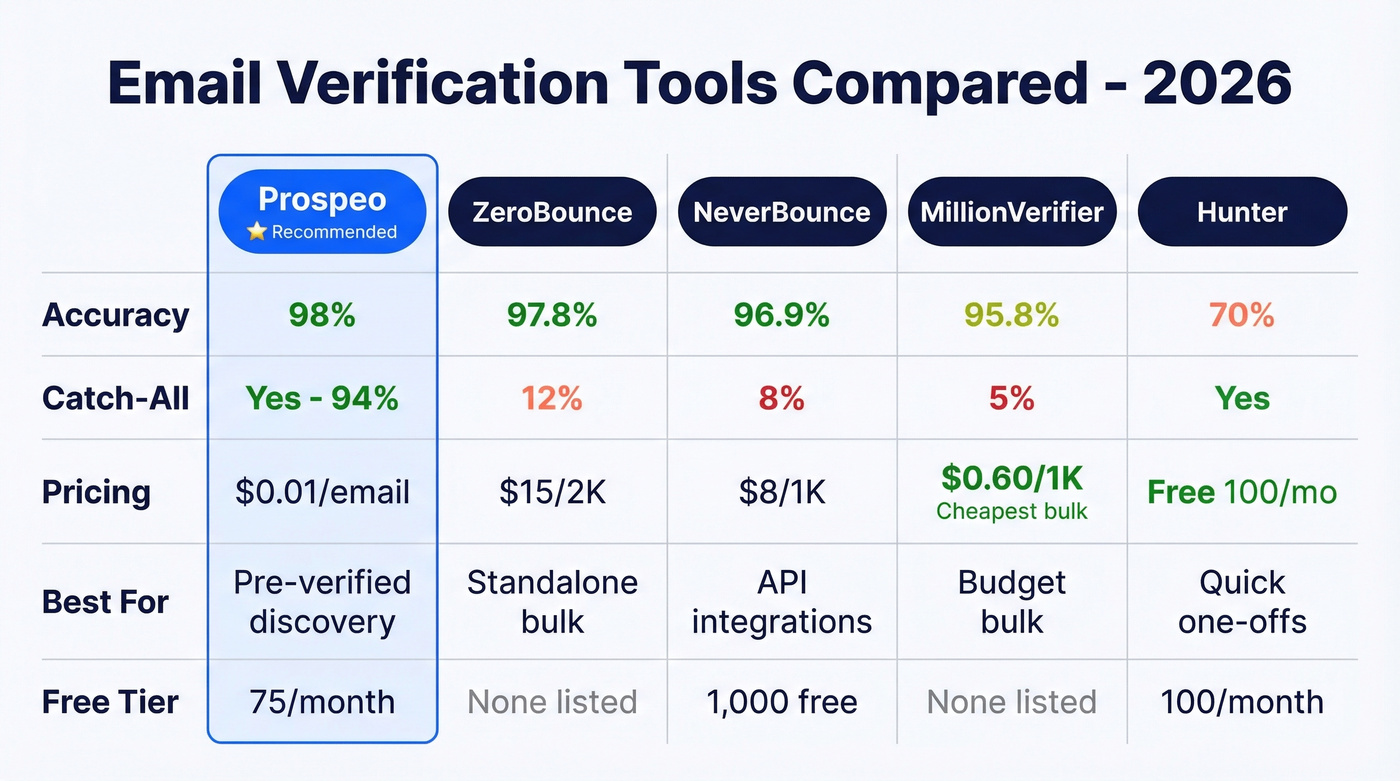
*Hunter's 70% figure comes from a benchmark using real business emails where "unknown/accept-all" results were common - accuracy varies significantly by dataset composition.

Prospeo doesn't work like a traditional verifier - it finds emails that are already verified. The proprietary email-finding infrastructure runs a 5-step verification process with catch-all handling, spam-trap removal, and honeypot filtering at the point of discovery, not after the fact. With 143M+ verified emails in the database and a 7-day refresh cycle versus the 6-week industry average, you're working with data that's current. The free tier gives you 75 emails per month, and paid plans run about $0.01 per email with no contracts. (If you're sourcing contacts too, see email list providers.)
ZeroBounce is the strongest standalone bulk verifier we've tested. In the 10K-email benchmark, it hit 97.8% accuracy with a 22-minute processing time. Catch-all resolution is modest at 12%, but the core verification is rock-solid. Good API documentation and a deliverability toolkit alongside verification make it a strong all-rounder.
NeverBounce and MillionVerifier occupy opposite ends of the value spectrum. NeverBounce hit 96.9% accuracy with decent API support but only 8% catch-all resolution, and credits expire after 12 months - annoying for low-volume users. MillionVerifier is the budget play at roughly $0.60 per 1,000 verifications, about 8-13x cheaper than most competitors. The tradeoff: only 5% catch-all resolution and 95.8% accuracy. For anything touching your primary sending domain, spend the extra few dollars.
Hunter is best for quick, free, one-off checks with 100 free verifications per month. Verifalia and Mailmeteor also offer free tiers - Verifalia with daily limits and Mailmeteor with a Google Sheets integration that's handy if that's where your lists live. (For more options, see Hunter alternatives.)
Skip MillionVerifier if you're prospecting enterprise accounts. The 5% catch-all resolution means you're flying blind on exactly the companies where accuracy matters most.
Catch-all domains fool basic SMTP checks, but not Prospeo. Our proprietary verification infrastructure handles catch-all domains, greylisting, and enterprise security gateways that return false unknowns. That's why teams using Prospeo see bounce rates drop from 35%+ to under 4%.
Get verified emails that survive catch-all domains and spam filters.
What Benchmarks Actually Show
Every verification vendor claims 99%+ accuracy on their website. Independent-style benchmarks tell a different story.
The 10,000-email benchmark using real B2B outbound data - 42% corporate, 28% catch-all, 15% known invalid - showed top-tier tools landing between 95.8% and 99.5% accuracy. The spread matters less than you'd think on clean corporate domains. Most tools handle those fine. The catch-all slice is where everything falls apart, with resolution rates ranging from 5% to 94.2%. Worth noting: LeadMagic, which ran that benchmark, scored highest on their own test. Take that with appropriate skepticism. (If you're building outbound at scale, see sales prospecting techniques.)
A separate benchmark from Hunter using 3,000 real business emails segmented by company size painted an even starker picture. The best-performing tools only hit 65-70% accuracy - dramatically lower than the 10K test. The difference was dataset composition. The Hunter benchmark skewed toward mid-market and enterprise domains with stricter mail server configurations, and verification accuracy drops hard when you're probing companies running Proofpoint or Microsoft Defender.
What this means in practice: vendor-claimed accuracy and real-world accuracy are different things. A tool that scores 99% on Gmail and small-business domains might score 70% on enterprise targets. Ask what kind of companies you're prospecting, then pick accordingly.
Common Mistakes to Avoid
Sending test emails to verify addresses. It damages sender reputation and produces unreliable results. Use SMTP-based verification tools instead.
Treating verification as a one-time event. Email lists decay at 23%+ per year. With average professional turnover at 41%, addresses go stale fast. Verify before every campaign, not just once at import. (If you're running sequences, see sequence management.)
Ignoring catch-all and "unknown" results. These aren't "probably fine." They're unverified. Sending to them is a gamble with your domain reputation.
Skipping disposable and role-based detection. Addresses like info@company.com or anything @guerrillamail.com will pass SMTP checks but tank your engagement metrics.
Not re-verifying purchased lists. Even "fresh" lists from data vendors contain stale addresses. Trust but verify - literally. (Related: is it illegal to buy email lists.)
How Often to Re-Verify
Every four months is the right cadence for most teams. ZeroBounce's year-over-year data shows list decay trending between 22% and 28% annually - roughly 6-7% per quarter.
With 41% average workforce turnover, people are changing jobs constantly, and their old email addresses die with their old roles. A list that was 95% valid in January could be 88% valid by May. That 7-point drop is enough to push your bounce rate past the 2% threshold that triggers deliverability problems.
We've seen teams set calendar reminders for quarterly re-verification and still forget. The better approach: build verification into your workflow so it happens automatically. Run lists through a verifier before every campaign, or use a data source with a short refresh cycle so the data stays current without manual intervention.
FAQ
How can I test if an email address exists without sending an email?
Use a verification tool that performs an SMTP handshake - specifically the RCPT TO command - to probe the mail server without transmitting any message. The connection closes before the DATA step, so nothing is sent. Top tools add catch-all resolution and spam-trap detection on top of the basic SMTP check.
Why does my verification tool return "unknown"?
The domain is configured as catch-all, or the mail server uses greylisting and rate limiting. Between 30-40% of B2B domains behave this way. Choose a verifier with strong catch-all resolution - rates range from 5% to 94% across providers.
What's a catch-all domain?
A domain configured to accept every email sent to it, regardless of whether the specific mailbox exists. The server returns 250 OK for everything, so SMTP verification alone can't distinguish real from fake addresses. Resolving catch-alls requires intelligence layers beyond basic SMTP probing.
Are free email verification tools accurate enough?
Free tiers from Hunter (100/mo), Verifalia, and Prospeo (75/mo) work for small one-off checks. For lists over 1,000 contacts, paid tools with catch-all handling are worth the investment - at ~$0.01/email, the cost of verification is a fraction of the cost of a trashed domain reputation.
Is it legal to verify someone's email address?
GDPR and CAN-SPAM regulate how you collected the address and what you do with it afterward. Running an SMTP check doesn't send any message, but verification doesn't grant consent to email someone. You still need a lawful basis for outreach under applicable regulations.