

Triggered Email Campaigns: The Complete 2026 Guide for Ecommerce and B2B
Triggered email campaigns are the highest-performing channel in your stack - but only when the data underneath them is clean and the setup is right. Your cart abandonment flow is running, and half the emails are bouncing. Your welcome series fires into inboxes that don't exist anymore. The automation looks great in your platform dashboard while it quietly destroys your sender reputation.
That's the gap most teams don't see until it's too late.
What You Need (Quick Version)
Start with three trigger campaigns: welcome, abandonment, and post-purchase for ecommerce or onboarding for B2B. Not ten. Three. Get those performing before you add complexity.
Authenticate your domain with SPF, DKIM, and DMARC, and verify your email list before launching anything. Measure click rate and conversion rate, not open rate - Apple Mail Privacy Protection inflates opens to the point where they're directionally useful at best.
What Triggered Emails Actually Are
A triggered email fires when a specific event happens. Someone abandons a cart, starts a free trial, hits a usage milestone, or goes dormant for 60 days - and the system sends a relevant message automatically.
Three terms get used interchangeably, but they're different. Triggered emails are event-driven and reactive. Batch/broadcast emails go to a segment on a schedule - your weekly newsletter, a product launch announcement. Drip campaigns send a pre-planned sequence on a fixed cadence regardless of behavior. Most modern platforms blend triggered entry points with drip campaigns downstream, which is where the confusion starts.
Trigger-based emails outperform everything else by a wide margin. The reason is context: the message arrives when the recipient's intent is highest.
Why Automated Flows Outperform Batch Sends
Email marketing returns $36 for every $1 spent on average, and triggered flows capture the lion's share of that return.
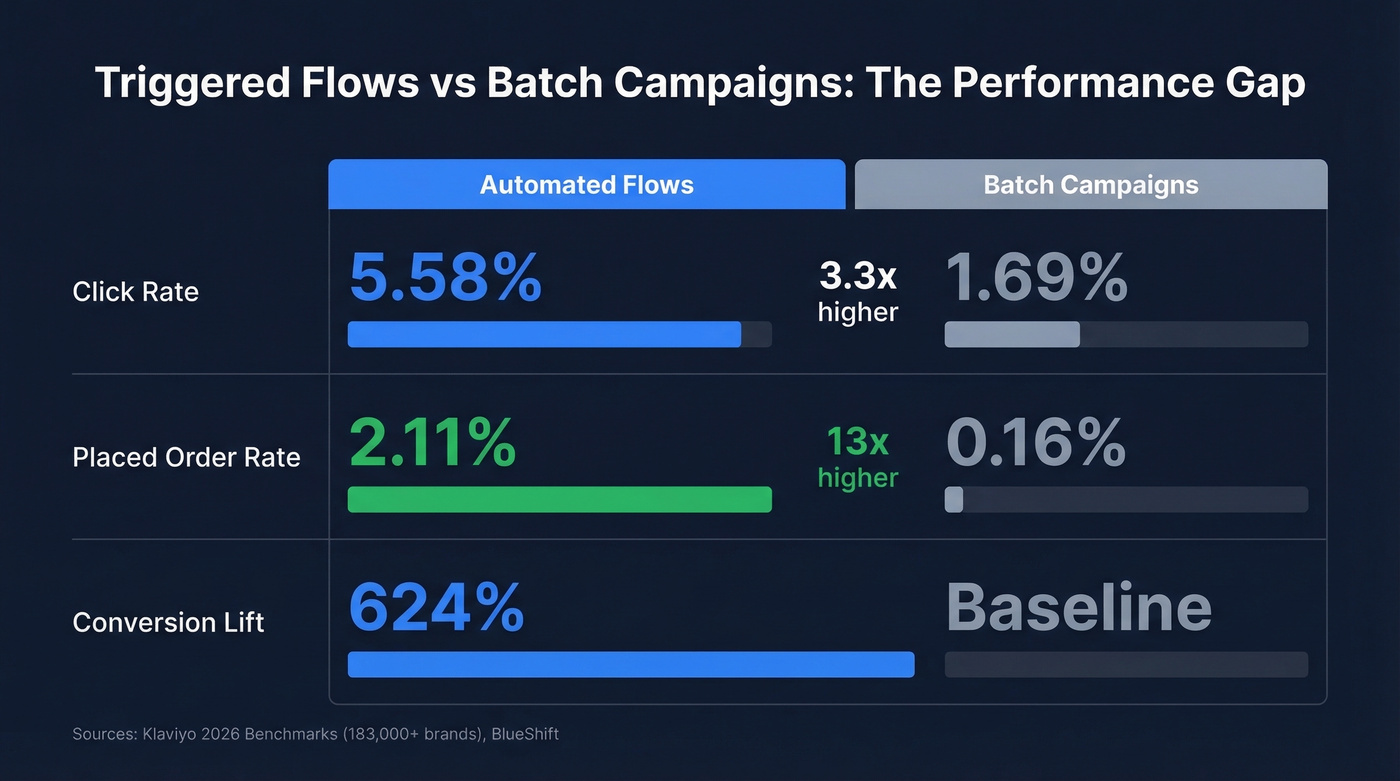
Klaviyo's 2026 benchmarks across 183,000+ brands make the case cleanly. Automated flows hit a 5.58% click rate versus 1.69% for campaigns. The placed-order rate gap is even more dramatic: 2.11% for flows versus 0.16% for campaigns - a 13x difference in revenue-generating actions. For context, Mailchimp's campaign-only benchmarks show a 2.62% click rate across billions of emails, still below the 5.58% flow average.
BlueShift's data puts the conversion lift at 624% higher for triggered sends over batch sends.
One caveat most guides bury: open rates aren't reliable as a primary metric in 2026. Apple MPP inflates opens across the board, and Klaviyo's benchmark data shows a 31% average campaign open rate that includes phantom opens from Apple's proxy servers. Click rate is your real signal. (If you want to get precise, use a consistent click rate formula across flows and campaigns.)
Campaigns You Should Be Running
Most guides stop at ecommerce. If you're running a SaaS or B2B operation, the playbook looks different.
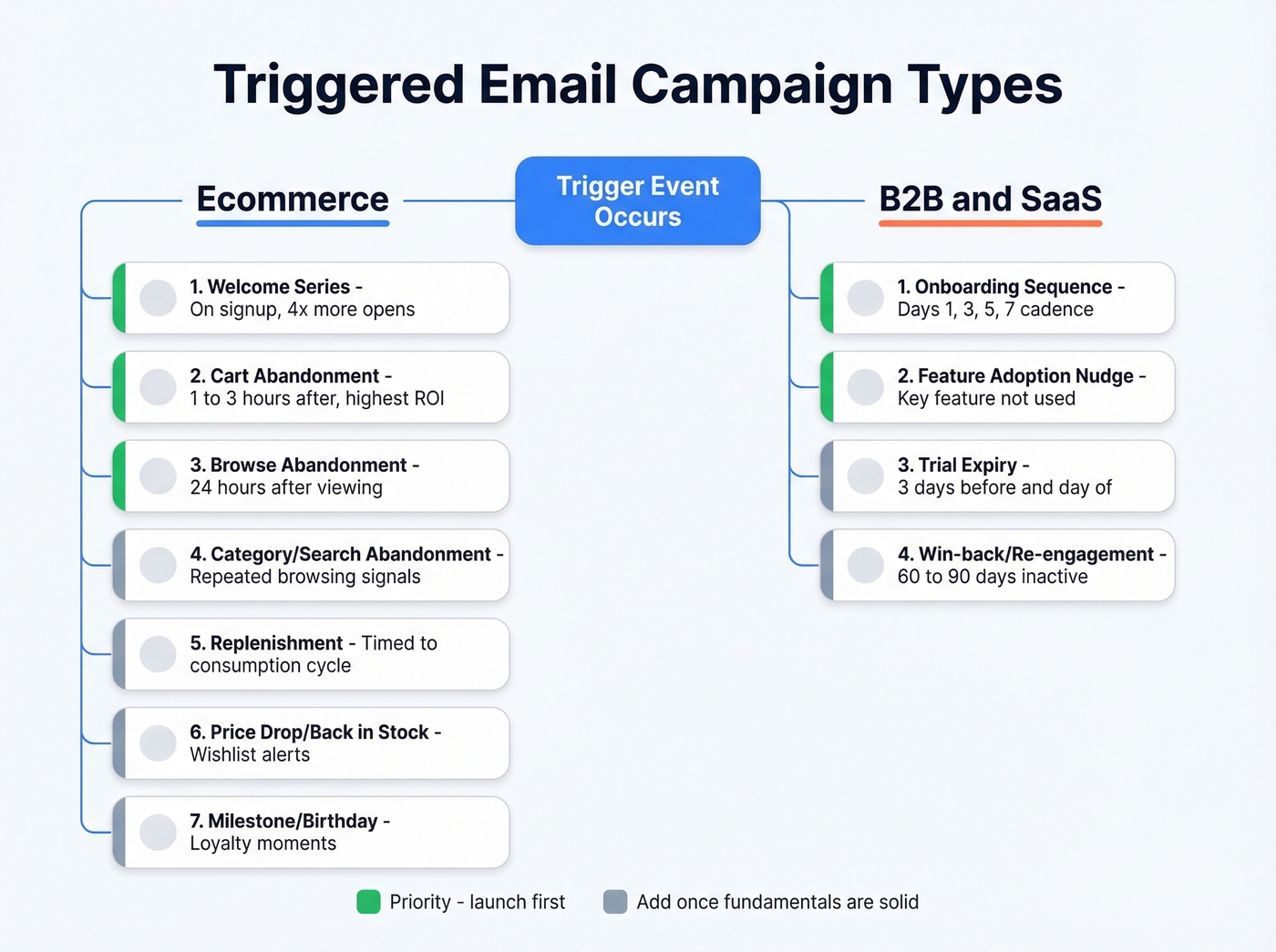
Brevo's trigger taxonomy breaks triggers into three categories: behavior-based (user did something), demographic-based (user is something), and time-based (a date arrived). That framework applies across both models.
Ecommerce Triggers
Welcome series fires immediately on signup. Welcome emails generate 4x more opens and 5x more clicks than promotional emails - this is your highest-engagement moment. Deliver a first-purchase incentive, set expectations, and introduce your brand story.
Cart abandonment is the money trigger. Send 1-3 hours after abandonment with the specific items, a clear CTA back to cart, and consider a small incentive in the second or third email. Bluecore highlights a Zwilling cart-abandonment email that offers free shipping on orders over $59 - that kind of specificity works because it feels like a real offer, not a template.
Browse abandonment fires 24 hours after someone views products without adding to cart. Lower intent than cart abandonment, so keep the tone lighter.
Beyond these core triggers, category abandonment and search abandonment are worth adding once your fundamentals are solid. If someone browses your running shoe category three times without purchasing, that's a signal worth acting on. Similarly, a search for "waterproof jacket" that doesn't convert is a trigger most teams ignore.
The remaining ecommerce triggers - replenishment timed to consumption cycles, price drop/back-in-stock alerts for wishlisted items, and milestone/birthday emails - round out a mature program. If you sell a 30-day supply of something, fire the reorder email on day 25.
B2B and SaaS Triggers
Onboarding sequence is your activation engine. A solid cadence: Day 1 (setup guide and quick-start docs), Day 3 (tutorial or walkthrough), Day 5 (use cases and social proof), Day 7 (success tips and check-in). We've seen effective onboarding lift product activation rates by 30% or more, and the teams that nail this almost always have clean contact data feeding the trigger - because if your welcome email bounces, the entire sequence is dead on arrival.
Feature adoption nudge fires when a user hasn't engaged with a key feature. The best versions show exactly what the user is missing and give them a single clear path to try it.
Trial expiry - send 3 days before expiration and again on the day. Include what they'll lose access to and a clear upgrade path.
Win-back / re-engagement fires after 60-90 days of inactivity. Be direct: "We noticed you haven't logged in. Here's what's new." If contacts don't engage after 2-3 attempts, sunset them to protect your sender reputation.
How to Build a Trigger-Based Campaign
Here's the thing: most teams overcomplicate this. A well-tuned welcome series beats a dozen half-built automations every time.
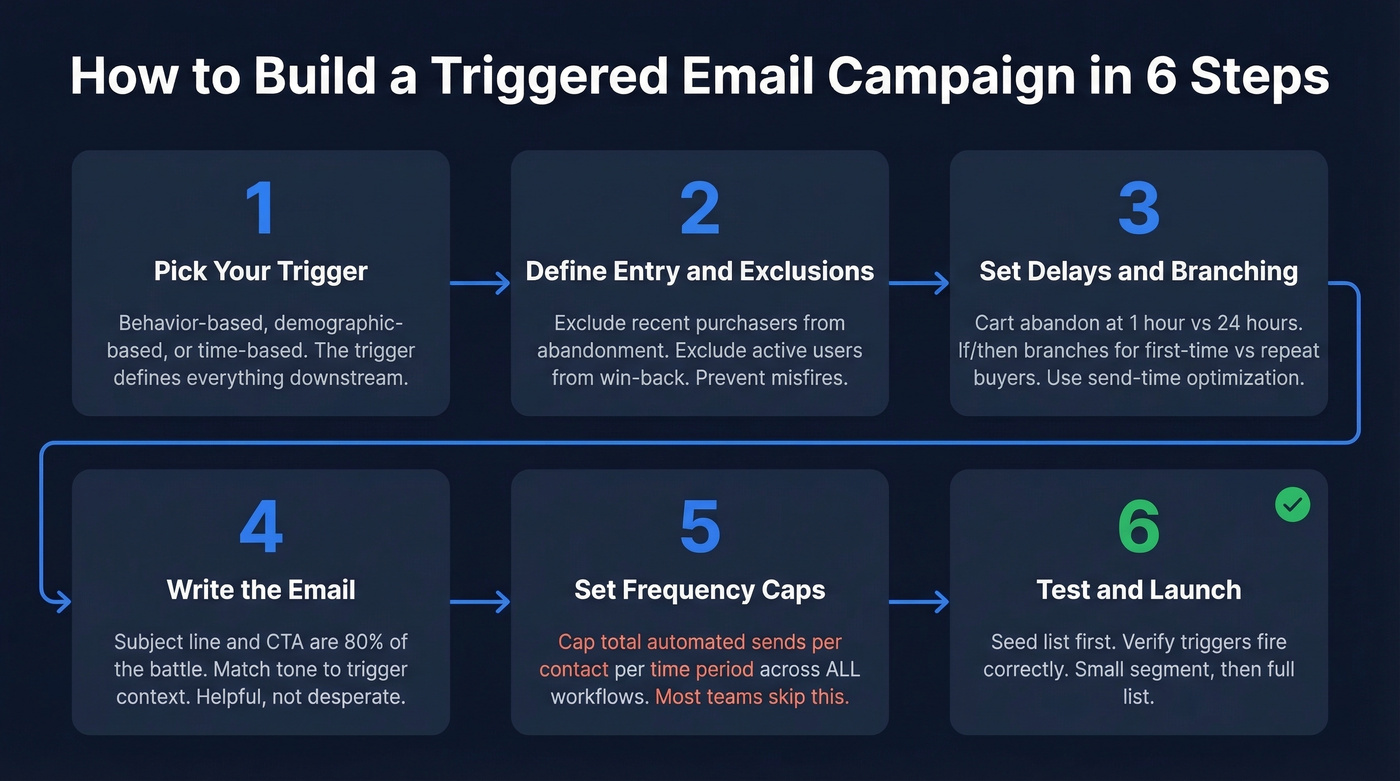
1. Pick your trigger type. Behavior-based (cart abandoned, feature used), demographic-based (job title changed, birthday), or time-based (trial expiring, subscription renewing). The trigger defines everything downstream.
2. Define entry conditions and exclusions. Not everyone who triggers the event should enter the flow. Exclude recent purchasers from abandonment emails. Exclude active users from re-engagement campaigns. Conditions prevent embarrassing misfires - and we've all received the "come back!" email from a product we used that morning.
3. Set delays and branching logic. A cart abandonment email at the 1-hour mark performs differently than one at 24 hours. Use if/then branches to personalize the path: first-time buyers get a different sequence than repeat customers. Most major platforms offer send-time optimization. Use it.
4. Write the email. Subject line and CTA are 80% of the battle. Keep subject lines short and scannable, make the CTA a single clear action, and match the tone to the trigger context. An abandoned cart email should feel helpful, not desperate. (If you need a swipe file, start with these email subject line examples.)
5. Set frequency caps. If a customer triggers three different automations in the same week, they shouldn't get nine emails. Cap total automated sends per contact per time period across all workflows. Most teams skip this, and it's the fastest way to earn spam complaints.
6. Test with a seed list, then launch. Send to internal addresses first. Verify the trigger fires correctly. Then go live with a small segment before opening to your full list.

Your triggered campaigns are only as good as the data feeding them. Bounced welcome emails kill your sender reputation before the sequence even starts. Prospeo's 98% email accuracy and 7-day refresh cycle ensure every trigger fires into a real inbox - not a dead end.
Stop destroying your sender reputation with stale contact data.
Deliverability Rules Most Guides Skip
Sending an email isn't the same as delivering it to the inbox. Litmus makes the distinction clearly: delivery means the server accepted it and didn't bounce. Deliverability means it landed in the inbox, not spam or promotions. When Litmus analyzed thousands of emails, 70% showed at least one spam-related issue.
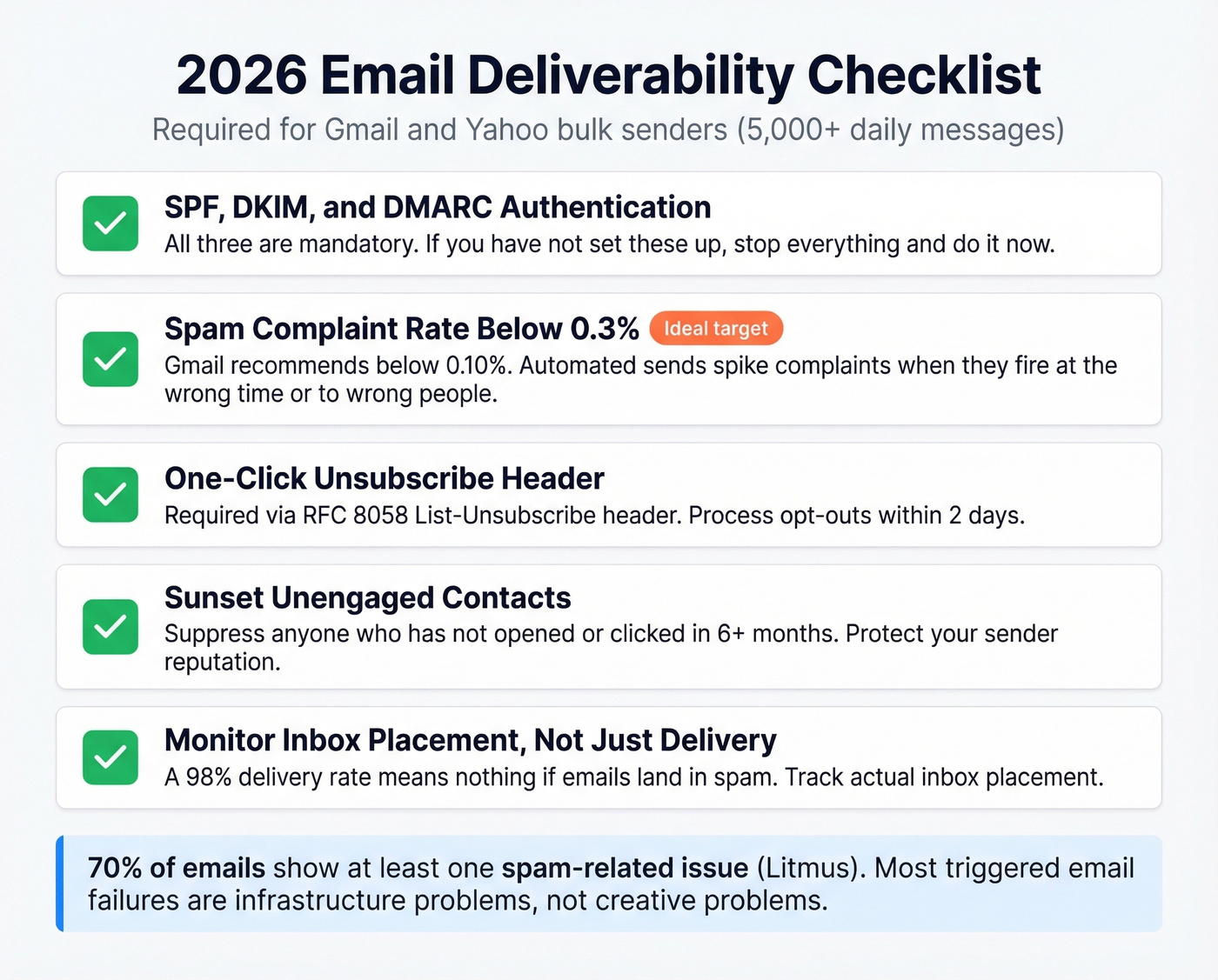
Here's the checklist that matters in 2026, especially after the Gmail and Yahoo bulk sender requirements took effect:
- SPF, DKIM, and DMARC - all three are mandatory for senders pushing 5,000+ daily messages to Gmail/Yahoo recipients. If you haven't set these up, stop reading and do it now.
- Spam complaint rate below 0.3% - Gmail recommends staying below 0.10%. Automated sends can spike complaints if messages fire at the wrong time or to the wrong people.
- One-click unsubscribe - required via the List-Unsubscribe header (RFC 8058). Opt-out requests must be processed within 2 days.
- Sunset unengaged contacts - anyone who hasn't opened or clicked in 6+ months should be suppressed.
- Monitor inbox placement, not just delivery - a 98% delivery rate means nothing if a big chunk of those emails land in spam.
Let's be honest: most failures aren't creative problems. They're infrastructure problems. Authentication, list hygiene, and complaint management are unglamorous, but they determine whether your beautifully designed cart abandonment email ever gets seen. If you need a deeper playbook, use this email deliverability guide as your baseline.
Clean Data Comes First
Email lists decay at about 23% per year - nearly 2% per month. People change jobs, abandon email addresses, and get auto-provisioned new domains. A list you verified in January is missing almost a quarter of its valid addresses by December.
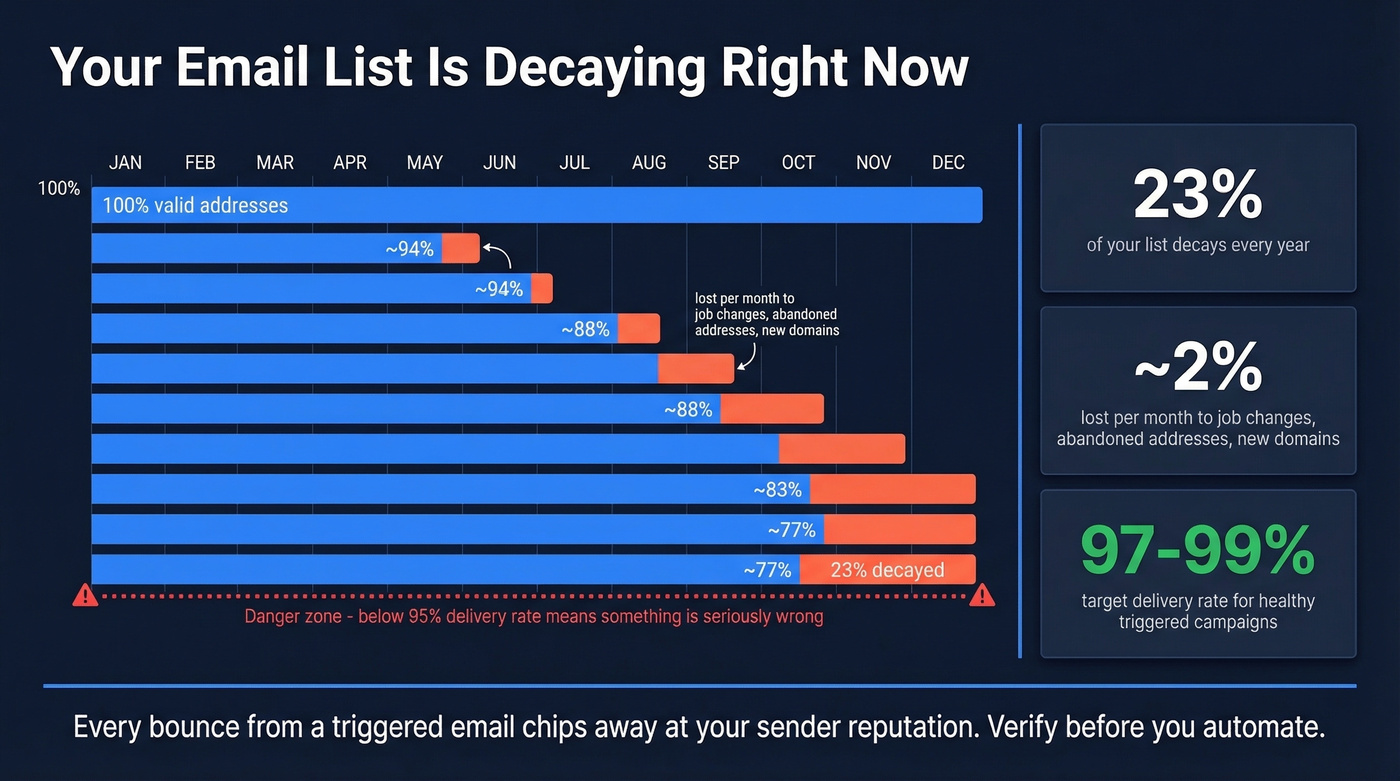
Your automated flows are firing into the void, and every bounce chips away at your sender reputation. The delivery rate target is 97-99%. Below 95%? Something is seriously wrong. (Start by checking your email bounce rate and fixing the root cause.)
Prospeo's 5-step verification process catches spam traps, honeypots, and catch-all domains with 98% email accuracy - meaning the addresses you're feeding into your workflows actually exist and accept mail. The 7-day data refresh cycle keeps your list clean between campaigns, not just on the day you import it. Upload your list, verify in bulk, and push clean contacts into HubSpot, Salesforce, or whatever you're using via native integrations.
Mistakes That Kill Your Automations
A popular thread on r/EmailMarketing lines up with what we've seen in practice across dozens of client setups.
Automation without real personalization. Slapping a first name into a template isn't personalization. If your "recommended products" email suggests items the customer already bought, you've lost trust. Use actual behavioral data - browsing history, purchase patterns, feature usage - to make recommendations relevant. (This is where intent based segmentation pays off fast.)
Frequency creep. Without caps across workflows, a single customer can receive a welcome email, an abandonment email, a browse abandonment email, and a promotional email in the same 48-hour window. That's how you earn spam complaints.
Lazy segmentation. Blasting your entire list with the same flow defeats the purpose. Segment by purchase history, engagement level, lifecycle stage, and product interest.
Skipping list hygiene. Every other mistake on this list gets worse when you're sending to bad addresses. Bounces damage sender reputation, which pushes even your good emails toward spam. Verify your list before every major launch.
Best Tools for Triggered Emails
| Tool | Starting Price | Best For | Key Limitation |
|---|---|---|---|
| ActiveCampaign | ~$15/mo | Behavioral automation + CRM | Steep learning curve |
| Klaviyo | Free tier available; ~$20/mo | Shopify/ecommerce flows | Overpriced outside ecom |
| Brevo | Free (2K contacts); ~$8/mo | Budget-conscious teams | Basic templates/editor |
| Mailchimp | ~$13/mo | Simplicity and templates | Free-tier automation limited |
| HubSpot | ~$20/mo/seat | CRM-integrated B2B workflows | Full automation $800+/mo |
Ecommerce verdict: Klaviyo if you're on Shopify - the integration is unmatched. ActiveCampaign if you need CRM depth alongside your flows. Brevo if budget is the primary constraint.
B2B/SaaS verdict: ActiveCampaign or HubSpot for workflow complexity and CRM integration. The consensus on r/MarketingAutomation is that ActiveCampaign's depth is excellent but the learning curve is real. Both platforms let you automate behavioral workflows across the full lifecycle - from onboarding through renewal - without stitching together multiple tools. Pair either with Prospeo for verified contact data feeding into your workflows, since your automation platform handles the sending but data quality determines whether those sends reach real inboxes. If you're comparing stacks, start with these sales funnel automation tools.
Skip HubSpot's $800/month automation tier if your average deal size is under $15k. ActiveCampaign at $15/month with clean, verified data will outperform an expensive platform fed with garbage contacts every single time.
Building B2B onboarding or re-engagement triggers? If 35% of your emails bounce, your entire automation is dead on arrival. Teams using Prospeo cut bounce rates from 35%+ to under 4% - and tripled their pipeline. Clean data at $0.01 per verified email.
Fix the data layer before you build another automation.
Benchmarks: What Good Looks Like
| Metric | Campaign Avg | Flow Avg | Top 10% Flow |
|---|---|---|---|
| Click rate | 1.69% | 5.58% | 10.48% |
| Placed-order rate | 0.16% | 2.11% | 4.30% |
| Open rate* | 31% | - | 45.1% |
*Open rates inflated by Apple MPP - use click rate as your primary metric.
Source: Klaviyo 2026 benchmarks, 183K+ brands.
If your triggered flows are hitting 5%+ click rates, you're in the middle of the pack. Top performers push past 10%. Below 3%? Look at your segmentation, timing, and list quality before touching creative - those are almost always the bottleneck.
FAQ
What's the difference between triggered and drip emails?
A triggered email fires when a specific event occurs - a cart abandoned, a trial started, a birthday reached. Drip emails send on a fixed schedule regardless of behavior. Most modern platforms blend both: a triggered entry point followed by a timed drip sequence downstream.
How many campaigns should I start with?
Three: welcome sequence, abandonment recovery, and post-purchase (ecommerce) or onboarding (B2B). Get these hitting 5%+ click rates before adding complexity. Stacking too many triggers without frequency caps causes fatigue and spam complaints.
How do I keep my email list clean?
Verify addresses before import, remove hard bounces immediately, and sunset contacts unengaged for 6+ months. Lists decay at roughly 23% per year. Run bulk verification before every major campaign launch, and use a tool with ongoing refresh cycles so decay doesn't silently wreck your sender reputation between cleanups.
Can I build trigger-based workflows without developers?
Yes. Klaviyo, ActiveCampaign, Brevo, and HubSpot all offer visual workflow builders with drag-and-drop logic. You define the event, set conditions and delays, and the platform handles execution. The real complexity is mapping which events matter most and ensuring your contact data is accurate enough to act on.