

URL Blacklist: Detection, Removal, and Prevention Guide
A sysadmin posted on r/sysadmin with a maddening problem: outbound emails were landing in spam, but only when the signature included a link to the company website. Every blacklist scanner came back clean. The culprit? A compromised WordPress site had gotten the domain placed on a URL blacklist - not the sending IP, not the mail server, but the web address itself.
If your URL ends up on the wrong list, the consequences cascade fast. And the diagnosis isn't always obvious.
What Is a URL Blacklist?
A URL blacklist is a database maintained by security providers that flags specific web addresses - full URLs or entire domains - as dangerous. When your URL appears on one of these lists, browsers display warning pages, email servers reject or spam-folder messages containing your link, and search engines can suppress your pages entirely.
The key distinction: this type of blacklist targets the web address itself, not the IP address serving it. The major maintainers include Google Safe Browsing (powering Chrome and many other browser/app warnings), Spamhaus (protecting 4.5 billion mailboxes worldwide), Norton Safe Web, and McAfee SiteAdvisor, and PhishTank. Each maintains its own criteria, its own database, and its own delisting process. Getting flagged by one doesn't automatically mean you're on all of them - but it often triggers a domino effect.
What You Need (Quick Version)
- Check now. Run your URL through Google Search Console, Sucuri SiteCheck, and check.spamhaus.org to identify which list flagged you.
- Fix it. Clean the root cause (malware, phishing page, compromised plugin), then submit a review request to each provider. Cleanup alone doesn't delist you - you have to ask.
- Prevent it. Configure SPF/DKIM/DMARC, keep software updated, and verify outbound email data so bounces don't burn your domain reputation (see Email Deliverability Guide and How to Improve Sender Reputation).
URL vs. IP vs. Domain Blacklists
These three blacklist types operate at different layers, and confusing them is the number-one reason people can't diagnose their problem.
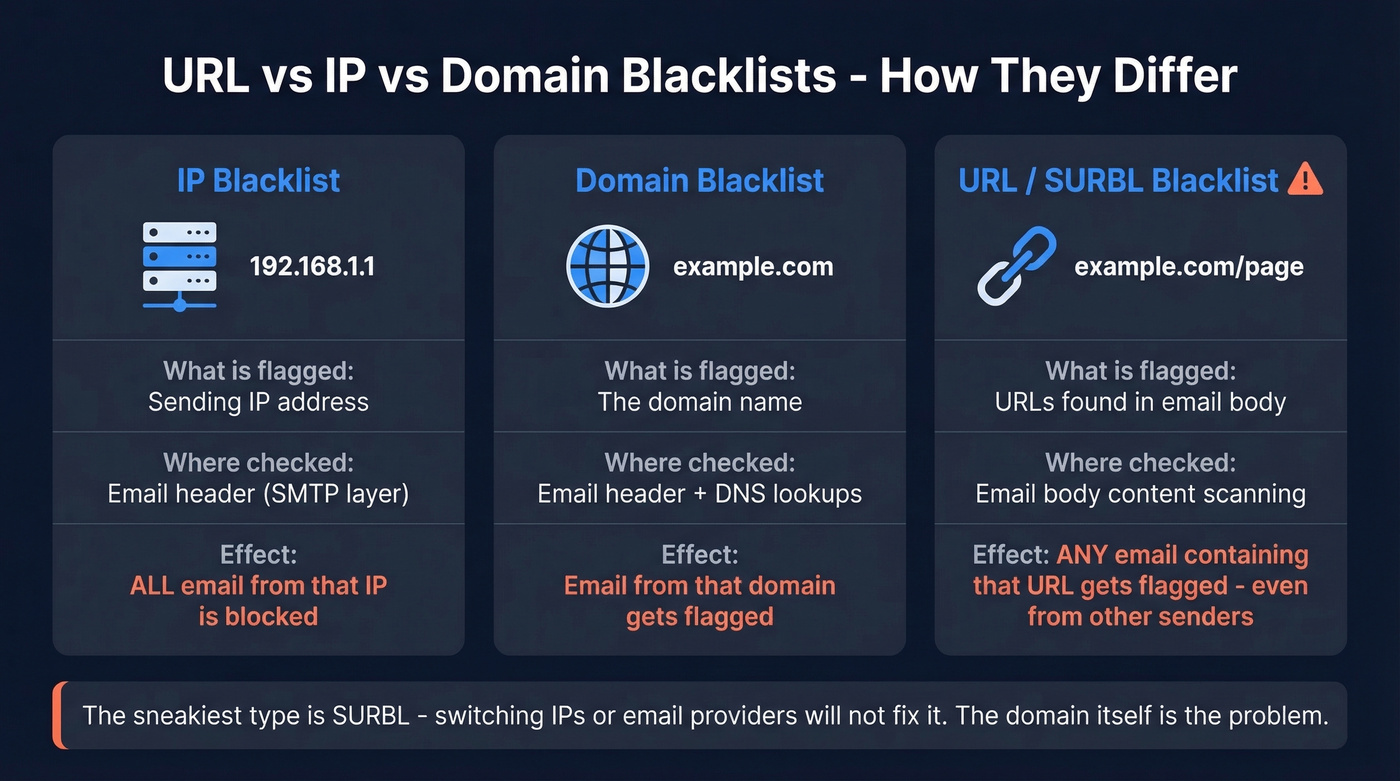
| Type | What's Flagged | Where It's Checked | Effect |
|---|---|---|---|
| IP Blacklist | Sending IP address | Email header (SMTP) | All email from that IP blocked |
| Domain Blacklist | The domain name | Email header + DNS | Email from that domain flagged |
| URL/SURBL | URLs in email body | Email body content | Any email containing the URL flagged |
An IP blacklist affects everything sent from that IP - every domain, every sender. A domain blacklist targets the domain regardless of which IP serves it.
But the sneakiest type is the SURBL/URIBL category. These lists scan the body of every message and extract URLs. If your domain appears on a SURBL, any email from anyone that contains a link to your site gets flagged. Rotating IPs or switching email providers won't fix it. The domain itself is the problem.
Why Sites Get Blacklisted
SEO spam makes up about 60% of affected websites, but it's far from the only cause.
- Malware injection. Attackers plant malicious code that redirects visitors or serves drive-by downloads.
- Phishing pages. Even a single phishing page buried in a subdirectory can get your entire domain flagged.
- Outdated CMS or plugins. WordPress sites running stale plugins are the most common entry point. It's not a matter of if - it's when.
- Bad domain history. Bought a domain at auction? Previous owners' spam activity can linger on blacklists for months.
- Outbound email data quality. High bounce rates and spam-trap hits from bad prospect data damage your domain's sending reputation, feeding directly into blacklist scoring (see Email Bounce Rate and Spam Trap Removal).
Impact of Getting Blacklisted
The damage isn't just "emails go to spam." It cascades across every channel you rely on.
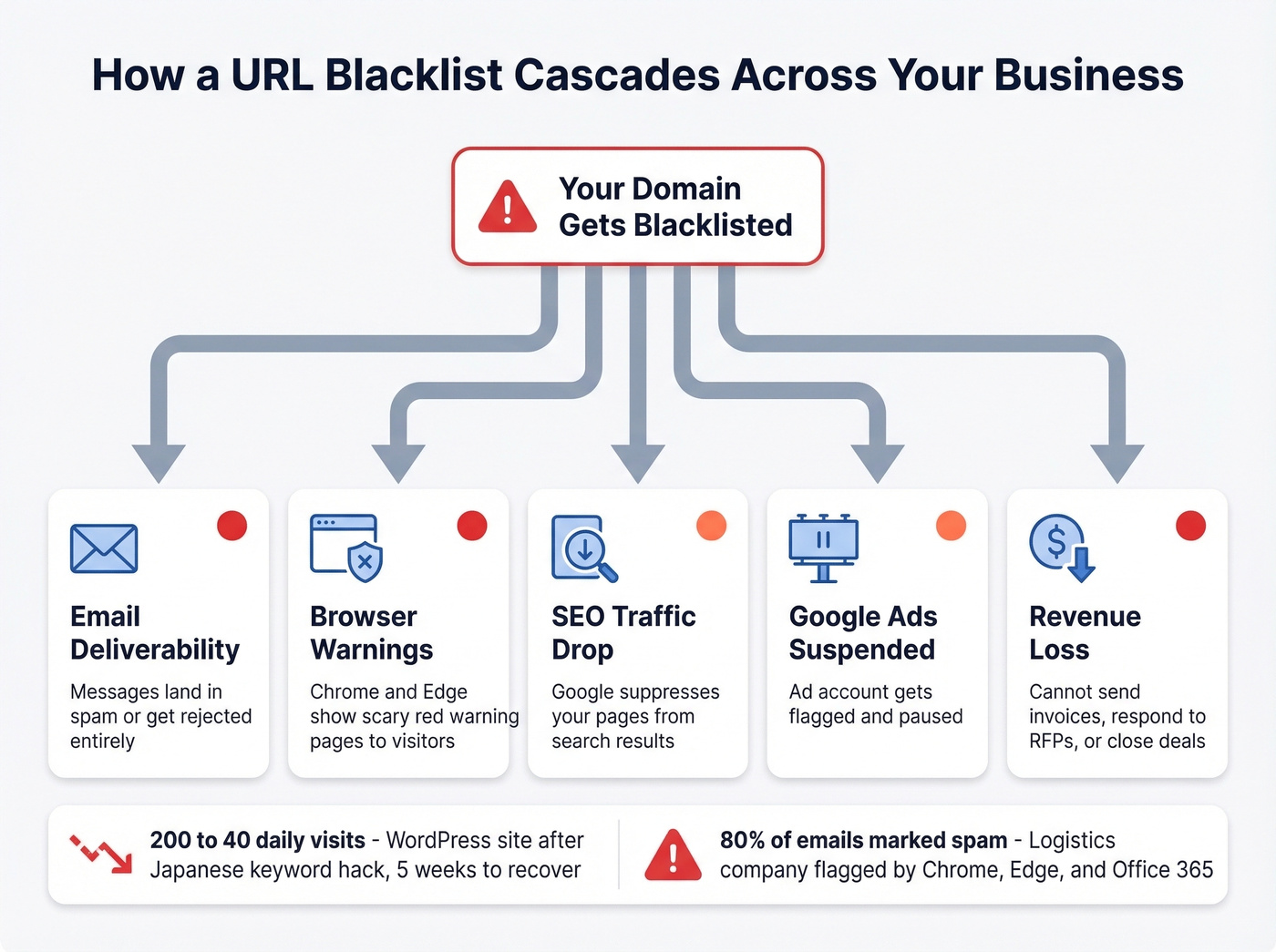
A health-focused WordPress site got hit with a Japanese keyword hack. Traffic dropped from roughly 200 visits per day to 40. The owner cleaned the malware, migrated hosts, and rebuilt - but it took five weeks before organic traffic fully recovered. A logistics company had it worse: their domain got flagged by Chrome and Edge simultaneously, and Office 365 restricted outbound sending. Over 80% of messages were marked as spam. They couldn't send invoices, couldn't respond to RFPs. The fix required delisting with both Microsoft and Google, reconfiguring email authentication, and restoring from a clean backup.
Once you're flagged, Google Ads can suspend your account too. Every day you're listed costs money.

High bounce rates and spam-trap hits are a direct path to URL blacklists. Prospeo's 5-step email verification - with catch-all handling, spam-trap removal, and honeypot filtering - keeps bounce rates under 4%. At $0.01 per verified email, clean data costs less than one day on a blacklist.
Stop feeding blacklists with bad data. Start sending to verified contacts.
How to Check Your Blacklist Status
Not all scanners check the same lists. In our testing, running three different scanners catches issues that any single tool misses.
| Tool | Type | Lists Checked | Limitation | Price |
|---|---|---|---|---|
| Google Search Console | Site data | Google Safe Browsing | Your own sites only | Free |
| Sucuri SiteCheck | URL scanner | Google, PhishTank, etc. | Remote only; no server-side | Free |
| VirusTotal | URL scanner | Multiple security engines | Aggregator, not diagnostic | Free |
| MxToolbox | DNSBL aggregator | 100+ DNSBLs | Email/IP focused | Free tier |
| Spamhaus Checker | Official checker | Spamhaus reputation listings | Spamhaus only | Free |
Start with Google Search Console if you own the site - it tells you directly if Google has flagged you and why. Then run Sucuri SiteCheck for a quick external scan. The critical caveat: Sucuri's scanner visits your site like a regular browser and can't detect server-side malware. Backdoors and mailer scripts hiding in your file system won't show up. You need server-side scanning for that.
For email-specific blacklists, MxToolbox is your go-to. Start with an MX lookup to identify the mail server IP, then check that IP against DNSBLs - catching cases where your domain is clean but your mail server's IP is listed. If you're troubleshooting ongoing inboxing issues, keep an eye on email reputation tools too.
How to Get Delisted
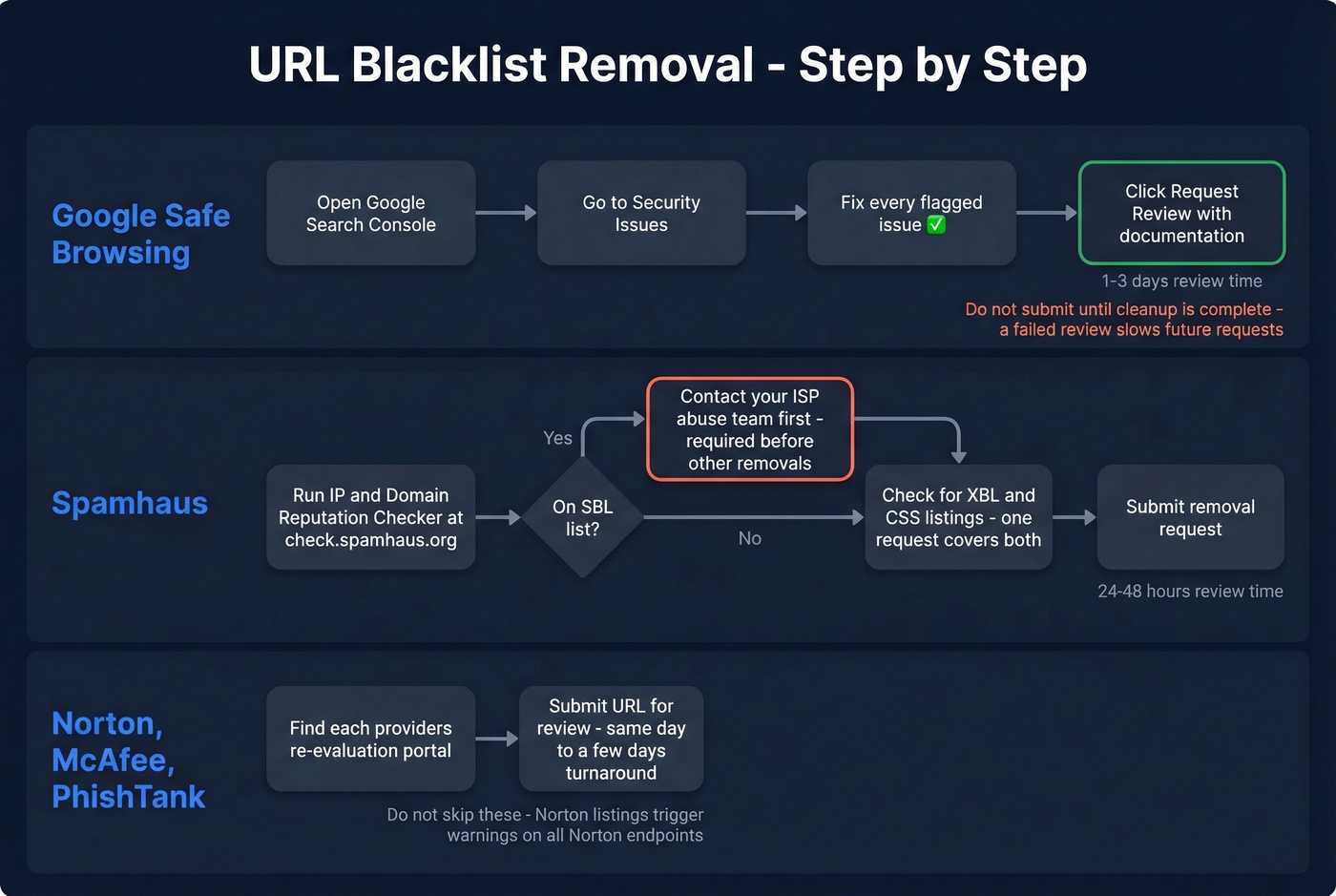
Cleanup is necessary but not sufficient. Every provider requires you to actively request review.
Google Safe Browsing
Go to Google Search Console, then Security Issues. Fix every flagged issue, then click "Request Review" with documentation of what you found and fixed. Google reviews usually clear in 1-3 days. Don't submit until cleanup is complete - a failed review slows subsequent requests.
Spamhaus Removal
Use the IP & Domain Reputation Checker to identify which specific list you're on. The checker accepts IPv4, IPv6, domains, email addresses, and hash strings, and it shows listings in the required removal order.
If you're on SBL, you must contact your ISP abuse team and have them work with Spamhaus first. When SBL is listed, you can't move on to other removals until it's handled. If you're listed on XBL and/or CSS, one removal request can cover both when they appear together. PBL delisting only applies if you're actually running a mail server from that IP. For a deeper walkthrough, see our Spamhaus Blacklist Removal guide.
Expect 24-48 hours for review. In our experience, Spamhaus is thorough but fair - if you've genuinely cleaned up, they'll delist you. Repeat offenders get longer listing durations.
Norton Safe Web, McAfee, and PhishTank
Each has its own re-evaluation portal for direct URL submission. Turnaround ranges from same-day to a few days. Don't skip these smaller providers - a Norton listing triggers warnings on every endpoint running Norton security software.
When Scanners Show Nothing
Here's the thing: this is the most frustrating scenario, and r/sysadmin threads are full of it.
Most free scanners check IP-based DNSBLs. They don't cover URL reputation systems or the internal blocklists maintained by enterprise email security gateways. Your domain can be clean on every public list and still get blocked by a recipient's corporate email filter.
We've seen teams spend days chasing phantom blacklistings that turned out to be a single enterprise filter. The fix: check multiple blacklist types (URL scanners and DNSBL aggregators), analyze bounce-back headers for specific rejection codes, and test by sending to different recipient domains - Gmail vs. Outlook vs. corporate. If possible, ask the recipient's IT team which filter flagged you. That rarely works since recipient IT departments are notoriously unresponsive, but when it does, it saves hours.
How to Prevent Blacklisting
Prevention is cheaper than remediation in every possible way.
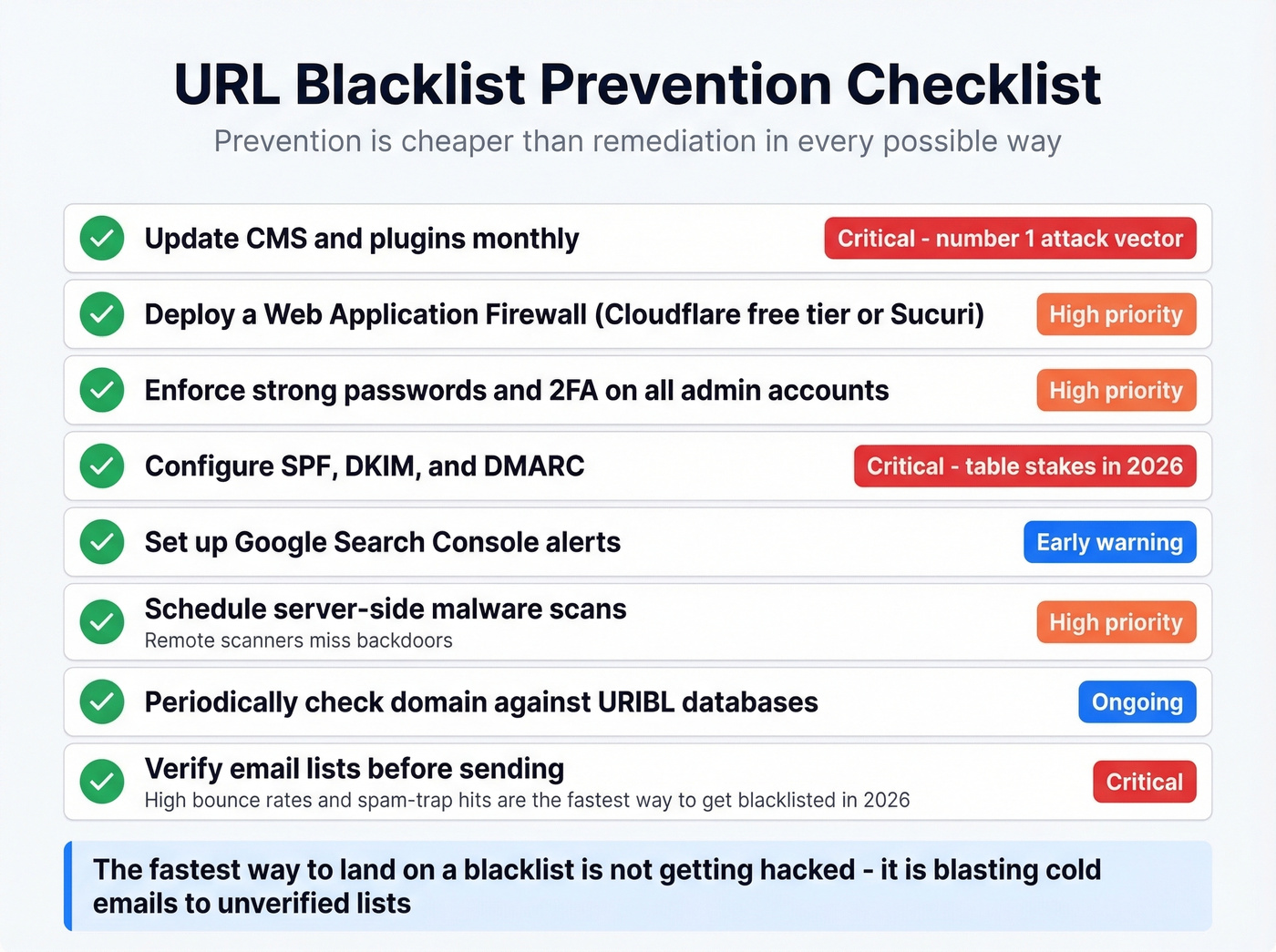
Keep your CMS and plugins updated - set a monthly reminder at minimum, because outdated WordPress plugins remain the single most common attack vector. Use a web application firewall like Cloudflare's free tier or Sucuri's paid option to block exploit attempts before they reach your server. Enforce strong passwords and 2FA on every admin account, hosting panel, and FTP credential without exception.
Configure SPF, DKIM, and DMARC. These aren't optional anymore - they're table stakes for email authentication, and missing them is a fast track to deliverability problems. (If you want to validate your setup, see How to Verify DKIM Is Working and DMARC Alignment.) Set up Google Search Console alerts so you know the moment Google flags something, not weeks later when traffic has cratered. Schedule server-side malware scans, because remote scanners miss backdoors. It's also worth periodically checking your domain against URIBL databases, since a listing there silently poisons deliverability for every message that includes your URL - even messages sent by partners or customers linking back to your site.
Let's be honest about the fastest way to land on a blacklist in 2026: it isn't getting hacked. It's blasting cold emails to unverified lists. We've watched teams destroy their sender reputation in under a month this way. High bounce rates trigger spam filters; spam-trap hits get your domain flagged on lists you didn't know existed. Prospeo's 5-step email verification catches bad addresses before they burn your reputation, with 98% email accuracy and a 7-day data refresh cycle that keeps contact data current. Its proprietary verification infrastructure includes catch-all handling, spam-trap removal, and honeypot filtering - the exact traps that land domains on SURBLs. If you're sending at scale, also review the best way to send bulk email without getting blacklisted.

Stack Optimize built a $1M agency with zero domain flags across all clients - because every email Prospeo delivered was verified. With a 7-day data refresh cycle and 98% email accuracy, your outbound never triggers the reputation damage that lands domains on SURBLs.
Zero domain flags. 98% accuracy. Data refreshed every 7 days.
FAQ
How long does it take to get removed from a URL blacklist?
Google Safe Browsing reviews usually clear in 1-3 days. Spamhaus takes 24-48 hours. Norton and PhishTank range from same-day to several days. Cleanup must be complete before you submit any review request.
Can a URL blacklist affect email deliverability?
Yes. If your domain appears on a SURBL or URIBL, any email containing a link to your domain gets flagged - even if your sending IP is clean. This is why deliverability problems persist after switching ESPs.
What's the difference between a URL blacklist and an IP blacklist?
An IP blacklist blocks all traffic from a specific IP address. A URL blacklist targets the web address itself, regardless of which IP serves it. You can be clean on one and flagged on the other - always check both.
Why do scanners show "clean" when I'm still blocked?
Most free scanners check IP-based DNSBLs only. Enterprise email security gateways maintain internal blocklists that public tools don't cover. Check multiple tool types and analyze bounce-back headers for specific rejection codes.
How do I prevent my domain from getting blacklisted again?
Keep CMS and plugins updated, configure SPF/DKIM/DMARC, run server-side malware scans regularly, and verify outbound email data to avoid bounce spikes and spam-trap hits. Cleaning your lists before sending is the single highest-leverage prevention step most teams skip.