

How to Verify Email Deliverability: The Complete Framework
Three tools, three different scores. One says you're landing in the inbox. Another flags you for spam. The third wants $59/month to "warm up" your domain before it'll even show results.
Here's the thing: most deliverability checker tools are designed to sell you warm-up services, not give you answers. That's why 70% of senders don't use free monitoring tools like Google Postmaster Tools - they just send and hope. Learning to verify email deliverability is simpler than most guides make it sound, and we've broken the whole process into five concrete steps.
What You Need (Quick Version)
A list verifier, an authentication checker like MxToolbox or EasyDMARC, and Google Postmaster Tools for ongoing monitoring. That's the core stack. The rest of this guide walks through each step with exact thresholds and tool picks.
What "Deliverability" Actually Means
Most people use this phrase as a catch-all, but it covers three distinct layers - and confusing them is where things go wrong.
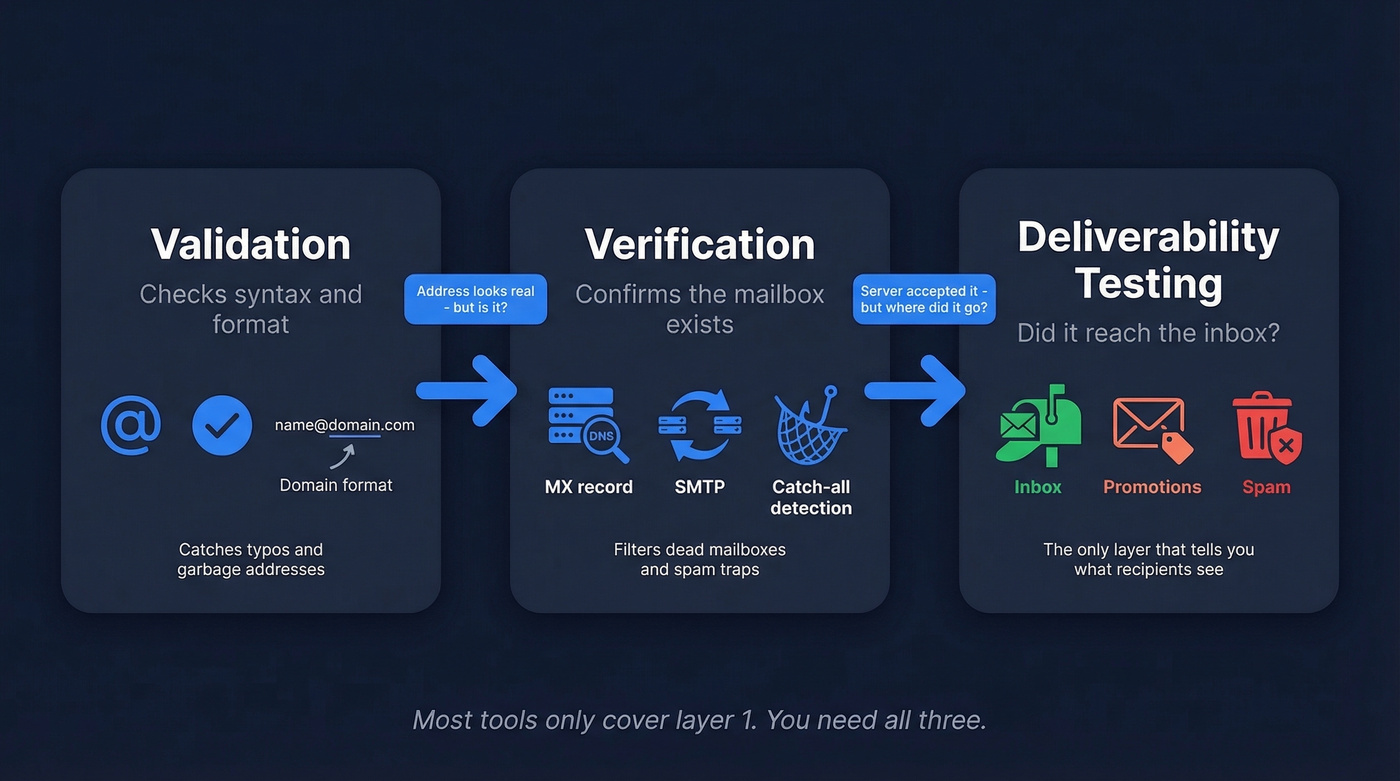
Validation checks syntax: a real domain format, an @ symbol, no typos. This catches obvious garbage. Verification goes deeper, confirming the mailbox actually exists and can receive mail through MX record lookups, SMTP handshakes, and catch-all detection. A technically valid address can still be a dead mailbox or a spam trap.
Deliverability testing is the final layer. Your email was accepted by the server - but did it hit the inbox, the promotions tab, or spam? As Litmus explains, delivery means the server accepted the message; deliverability means the recipient actually sees it.
Five Steps to Verify Email Deliverability
Step 1 - Verify Your Email List
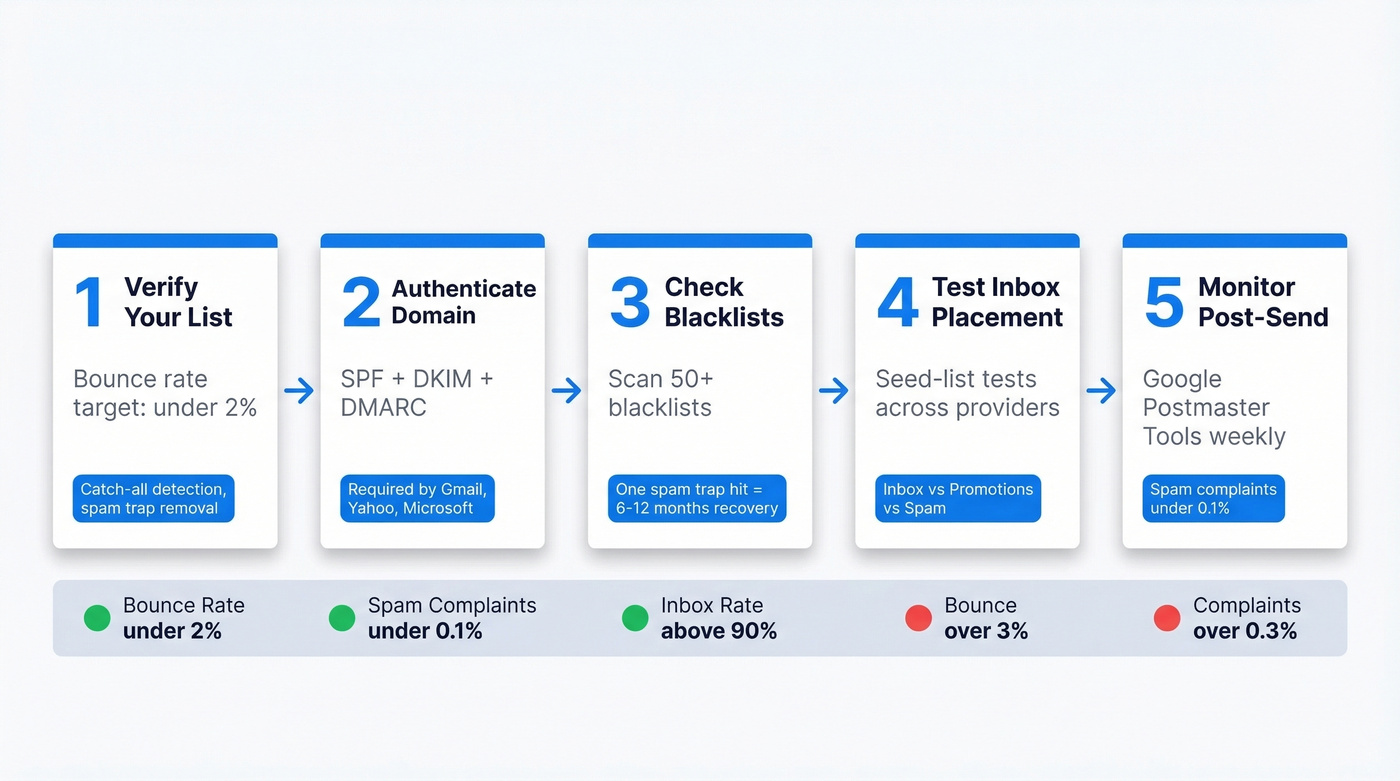
This is where most deliverability problems start and where they're easiest to fix. Verify all net-new contacts before first send, and re-verify any segment older than 30 days before a major campaign. Your target: a bounce rate under 2%. (If you want the deeper benchmarks and bounce-code breakdown, see our guide to bounce rate.)
Catch-all domains are the silent killer here. These domains accept every email at the server level, so basic verification tools mark them "valid." But catch-all addresses can still bounce later, and they often correlate with higher-risk addresses including spam traps. Prospeo's 5-step verification handles catch-all detection and spam-trap removal, filtering out the addresses that damage your reputation - backed by 98% email accuracy and a 7-day data refresh cycle. (If you’re actively cleaning up a compromised list, start with spam trap removal.)
Snyk's team saw this firsthand: bounce rates dropped from 35-40% to under 5% after switching their verification workflow. That's the difference between a domain getting blacklisted and one building positive sender reputation.
Step 2 - Authenticate Your Domain
SPF, DKIM, and DMARC aren't optional anymore. Gmail and Yahoo require all three for senders exceeding 5,000 emails/day, enforced since February 2024. Microsoft followed with similar requirements in 2025.
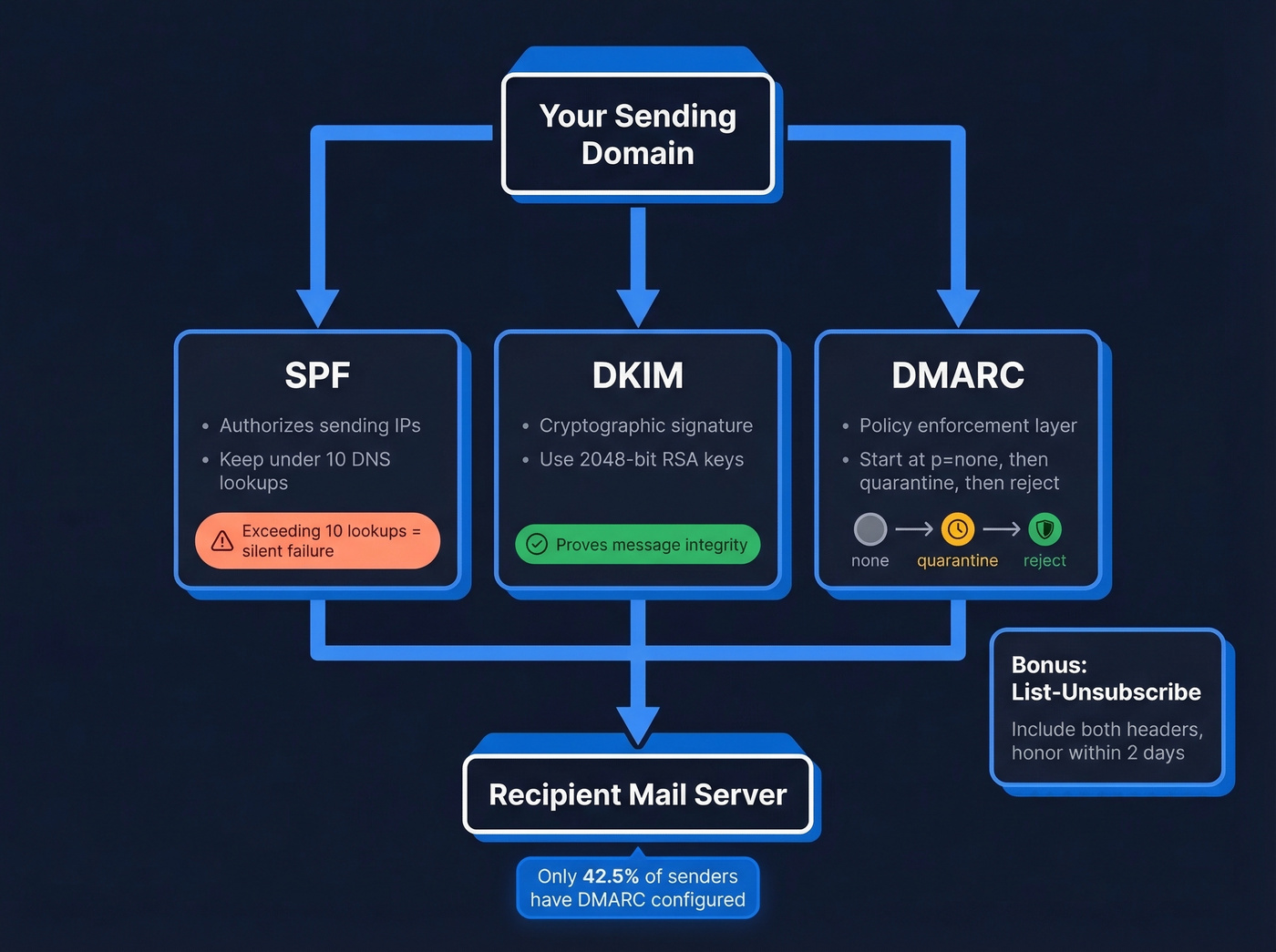
- SPF: Keep it under 10 DNS lookups. Exceed that and SPF can fail silently, which tanks deliverability. (Need syntax examples? Use these SPF record examples.)
- DKIM: Use 2048-bit RSA keys. 1024-bit still works but isn't best practice. (Here’s how to verify DKIM is working.)
- DMARC: Start at
p=nonewith reporting enabled. Review reports for 2-4 weeks, then move top=quarantine, thenp=reject. (If you’re troubleshooting policy failures, read our breakdown of DMARC alignment.) - List-Unsubscribe: Include both
List-UnsubscribeandList-Unsubscribe-Postheaders. Honor unsubscribes within 2 days.
Only 42.5% of senders have DMARC, and across the top 10 million domains, just 18.2% have valid DMARC records. Set up all three properly and you're already ahead of most senders. Consider adding a BIMI record as a bonus step for brand visibility in supported inboxes.
Step 3 - Check Blacklists and Reputation
Run your sending domain and IP through MxToolbox's blacklist checker. It scans 50+ blacklists in seconds. If you're listed anywhere, that's your priority - a single spam trap hit can take 6-12 months to fully recover from. (If you’re dealing with Spamhaus specifically, follow this Spamhaus blacklist removal playbook.)
Good list hygiene is infinitely cheaper than remediation. Skip this step at your own risk.
Step 4 - Test Inbox Placement
This is where you find out if authenticated, verified emails actually reach the inbox. GlockApps runs seed-list tests across roughly 100 mailboxes for $59/mo. EasyDMARC offers a free inbox placement test with a daily limit for lighter testing needs.
One caveat worth knowing: seed-list inboxes don't generate engagement like opens, clicks, and replies, so test results tend to understate your real deliverability. The provider-level benchmarks tell a more accurate story - and the Outlook/Hotmail number will probably surprise you.
Step 5 - Monitor Post-Send Metrics
Google Postmaster Tools is free and essential. It shows domain reputation, spam rates, authentication pass rates, and delivery errors directly from Google's perspective. Set it up once, check it weekly. That's it. (For a broader stack beyond Postmaster, see our roundup of email reputation tools.)
If inbox placement drops below 90%, investigate immediately. Your spam complaint target is under 0.1%. Hit 0.3% and you're getting filtered - no warning, no grace period.

Bad data is the #1 deliverability killer - and the easiest to fix. Prospeo's 5-step verification catches catch-all traps, honeypots, and dead mailboxes before they tank your sender reputation. 98% email accuracy, refreshed every 7 days.
Snyk dropped bounce rates from 35% to under 5%. Your domain deserves the same.
2026 Inbox Placement Benchmarks
Let's be honest about the numbers. Outlook/Hotmail inbox placement sits at just 26.8%. That's not a bug in your setup; it's Microsoft's aggressive filtering. Many of the practices teams relied on in prior years - basic SPF setup and occasional list cleaning - aren't enough now that Microsoft has tightened enforcement alongside Gmail and Yahoo.
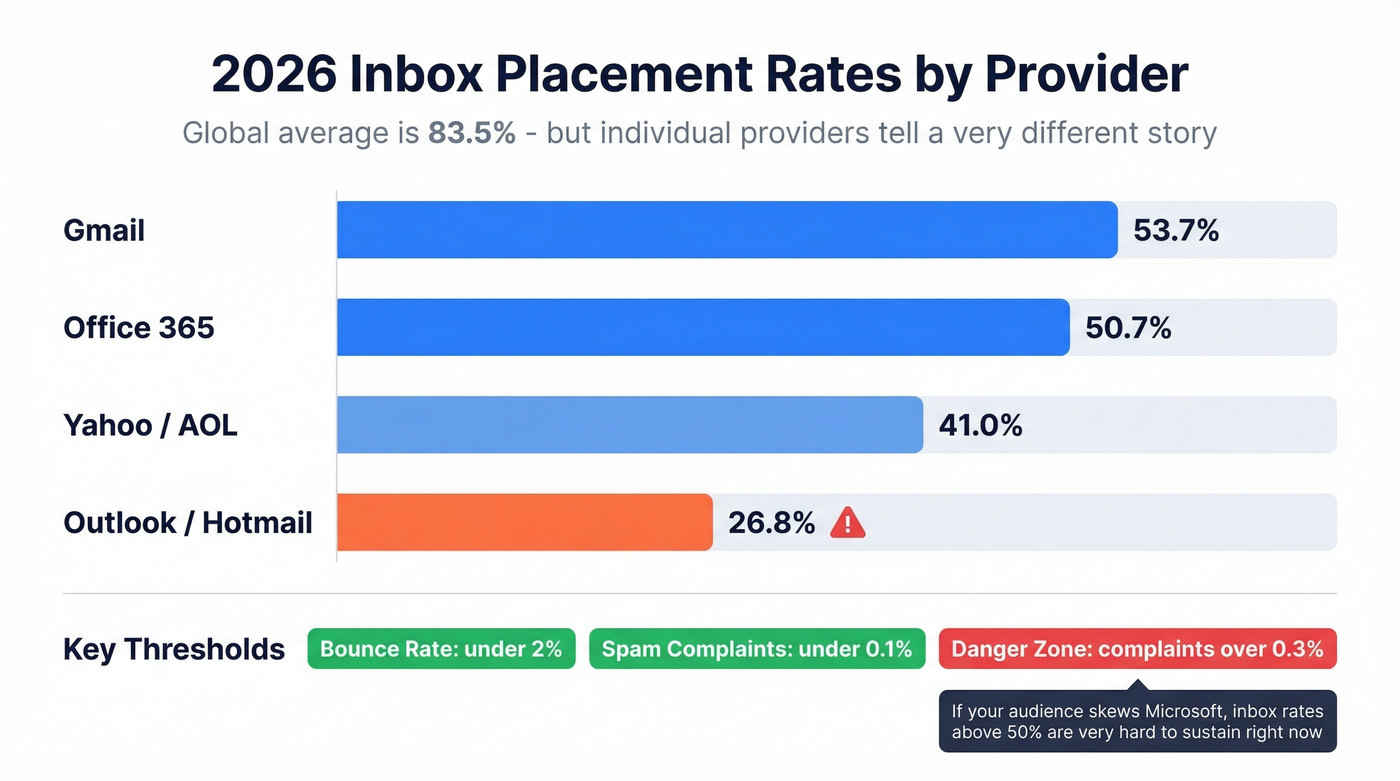
| Metric | Target | Danger Zone |
|---|---|---|
| Bounce rate | < 2% | > 3% |
| Spam complaints | < 0.1% | > 0.3% |
| Global inbox rate | 83.5% avg | Below 75% |
| Gmail inbox | ~53.7% | - |
| Office365 inbox | ~50.7% | - |
| Outlook/Hotmail | ~26.8% | - |
| Yahoo/AOL inbox | ~41.0% | - |
If your audience skews heavily toward Microsoft domains, it's hard to sustain inbox placement above 50% right now. Focus your energy on list quality and engagement signals instead of chasing a number that the ecosystem won't support.
Mistakes That Wreck Deliverability
Treating verification as a one-time event. We've seen teams verify a list in January, then blast the same list in June without re-checking. Email addresses decay every month - people change jobs, companies shut down mailboxes, domains get recycled. By June, a "clean" list can be full of dead mailboxes and recycled spam traps. (If you’re building a repeatable outbound process, use a documented lead generation workflow.)
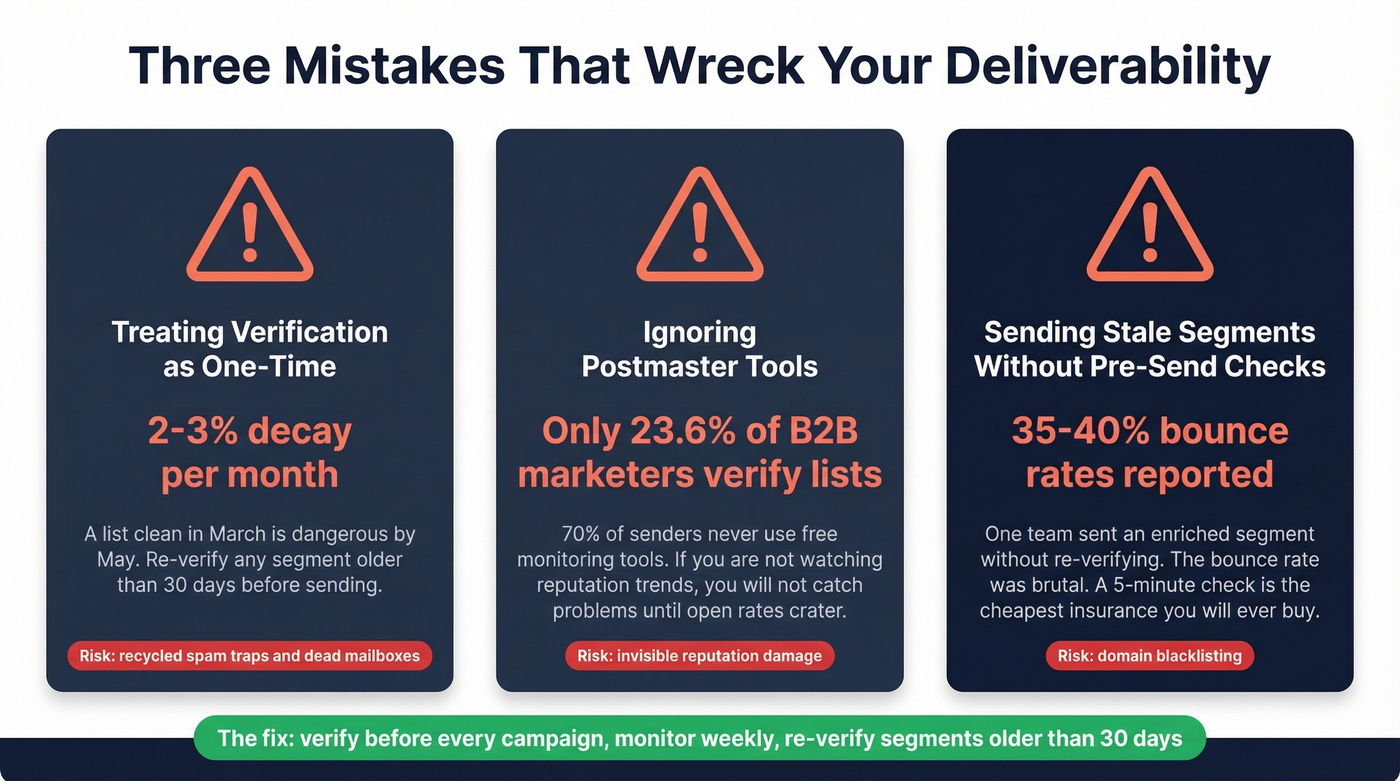
Ignoring Postmaster Tools. Only 23.6% of B2B marketers verify lists before campaigns. The monitoring gap is even worse. If you aren't watching your domain reputation trend over time, you won't catch problems until your open rates crater. (If you need a full diagnostic checklist, start with our email deliverability guide.)
Sending a stale segment without a pre-send check. One Reddit user described running a "clean" enriched segment through pre-send verification and finding it riddled with risky addresses. They sent anyway. The bounce rate was "brutal." Don't be that team - a five-minute verification run before every campaign is the cheapest insurance you'll ever buy.
Verification Tool Pricing
| Tool | Cost | Free Tier |
|---|---|---|
| Prospeo | ~$0.01/email | 75 emails/mo |
| ZeroBounce | $15/2,000 | 100 credits |
| Bouncer | $7/1,000 | 1,000 credits |
| NeverBounce | $8/1,000 | 1,000 credits |
| Hunter | Starts around $50/mo | 100 verifications/mo |
| GlockApps | $59/mo | Limited free test |
| MxToolbox | Free | - |
| EasyDMARC | Free (daily limit) | - |
| Google Postmaster Tools | Free | Full access |
You just built a 5-step deliverability framework. Now make step one effortless. Prospeo verifies emails at $0.01 each with spam-trap removal, catch-all detection, and a 7-day refresh cycle - so your list never goes stale.
Keep bounce rates under 2% without re-verifying manually every month.
FAQ
What's the difference between email verification and deliverability testing?
Verification confirms a mailbox exists and can receive mail via SMTP handshakes and MX lookups. Deliverability testing checks whether your sent email reaches the inbox versus the spam folder. You need both - a verified address can still land in spam if your SPF, DKIM, or DMARC authentication is broken.
How often should I re-verify my email list?
Re-verify any segment older than 30 days before a major campaign, and verify all net-new contacts before first send. Email addresses decay at roughly 2-3% per month, so a list that was clean in March can be dangerous by May.
Do I need SPF, DKIM, and DMARC for bulk sending?
Yes - all three are required by Gmail, Yahoo, and Microsoft for senders exceeding 5,000 emails/day. Start DMARC at p=none with reporting enabled, confirm legitimate sending sources are aligned, then progress to p=quarantine and finally p=reject. Only 42.5% of senders have DMARC configured, so proper setup puts you ahead immediately.
What's a good free tool to check email deliverability?
Google Postmaster Tools is the best free option for ongoing monitoring - it shows domain reputation, spam rates, and authentication results directly from Google. For one-off inbox placement checks, MxToolbox and EasyDMARC both offer free tests. For list verification, Prospeo offers 75 free email verifications per month with full catch-all and spam-trap detection.