

How to Verify Email Validity in 2026 (Full Guide)
You uploaded 5,000 emails, hit send on your first sequence, and woke up to a 12% bounce rate. Your sending domain took a hit that'll take weeks to recover from, and half your "verified" list turned out to be garbage. That's what happens when you skip verification before launching a campaign - when it's an afterthought instead of a workflow step.
What You Need (Quick Version)
For one-off spot checks, use Mailmeteor or Hunter's free verifier - just paste an address and get a result without signing up. It's the fastest way to test if an email address is valid before firing off a message.
For bulk list cleaning, ZeroBounce or NeverBounce are the benchmark leaders. Both handle large CSVs, offer APIs, and deliver top-tier accuracy in benchmark testing. ZeroBounce edges ahead on credit rollover and its money-back guarantee if your bounce rate stays above 3%.
For B2B prospecting where you need finding and verification in one step, Prospeo finds emails from professional profiles and web sources, then runs every address through a 5-step verification pipeline - catch-all handling, spam-trap removal, honeypot filtering - before you ever see it. 98% email accuracy at roughly $0.01/email, with a free tier of 75 verified emails per month.
What "Email Validity" Actually Means
Most people think email verification is binary: valid or invalid. It's not. Verification is a confidence assessment across three distinct layers, and each layer catches different problems.
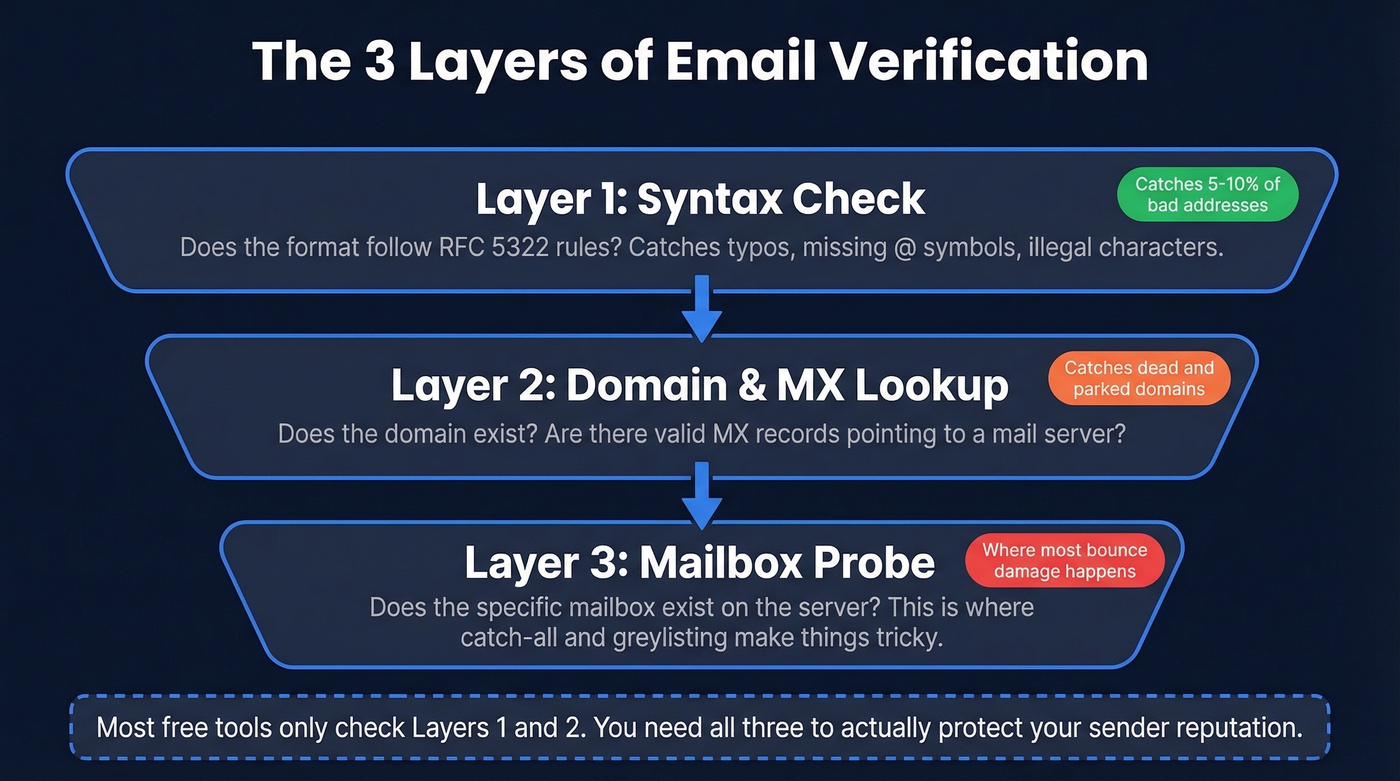
Layer 1: Syntax. Does the address conform to RFC 5322 formatting rules? This catches typos, missing @ symbols, illegal characters, and malformed domains. Syntax validation alone catches 5-10% of bad addresses in scraped or imported lists.
Layer 2: Domain. Does the domain exist, and does it have valid MX records? A perfectly formatted address like john@companyxyz123.com passes syntax but fails here if the domain doesn't resolve or has no mail server configured.
Layer 3: Mailbox. Does the specific mailbox exist on that mail server? This is where things get complicated - a domain can be valid while the individual mailbox is dead, full, or deliberately obscured by the server.
The gap between "valid format" and "deliverable mailbox" is where most bounce-rate damage happens. A tool that only checks syntax and domain will tell you an address is "valid" right up until it hard bounces.
How Email Verification Works
Syntax & Format Check
Every verification starts here. The tool parses the email against RFC 5322 rules: is there exactly one @ symbol? Is the local part within length limits? Does the domain contain valid characters? This step is instant and deterministic - an address either conforms to the spec or it doesn't.
If you want a deeper breakdown of what tools check (and what they miss), see our guide on email validation vs verification.
DNS & MX Record Lookup
Next, the tool queries DNS for the domain's MX records - the records that tell the internet which servers handle mail for that domain. No MX records means the email can't receive messages, period.
DNS isn't always reliable, though. Timeouts, propagation delays, and flaky nameservers can produce "unknown" results even for valid domains. Good verifiers retry across multiple DNS resolvers before marking a domain as dead.
SMTP Mailbox Probe
This is the core of email verification. The tool opens an SMTP connection to the mail server and simulates a delivery without actually sending a message.
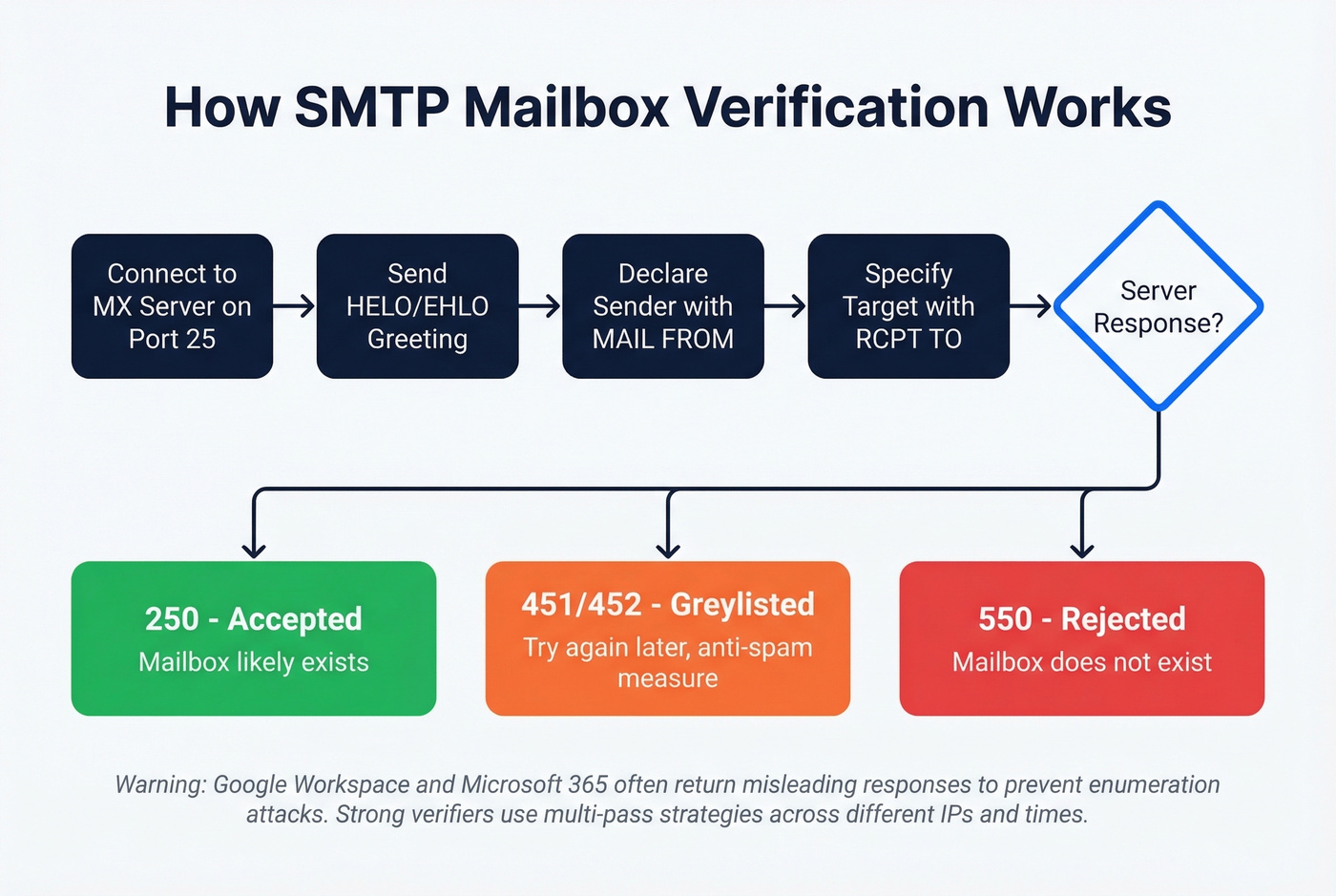
The flow goes like this: connect to the MX server on port 25, issue a HELO/EHLO greeting, declare a sender address with MAIL FROM, specify the target with RCPT TO, then interpret the response code. A 550 response typically indicates an invalid address. A 250 means the server accepted the recipient at SMTP time. A 451 or 452 signals greylisting or temporary deferrals - the server saying "try again later" as an anti-spam measure.
Here's the thing: large providers like Google Workspace and Microsoft 365 intentionally obscure mailbox existence to prevent enumeration attacks. They'll return misleading responses regardless of whether the mailbox is real. Secure Email Gateways from Proofpoint, Mimecast, and Barracuda add another layer of interference by blocking SMTP probes entirely. Strong verifiers counter this with multi-pass strategies - retrying across different IPs, times, and geographic regions, then treating patterns across attempts as signal rather than relying on a single response.
If you’re trying to confirm existence without ever sending, this walkthrough on verify email address without sending email goes deeper on the mechanics and limitations.
Classification & Scoring
After gathering SMTP responses, the tool classifies each address into categories like Valid, Invalid, Risky, Catch-All, Disposable, and Role-Based. This classification step is where tool quality really diverges.
For a broader list of options, compare providers in our roundup of the best email verification tools.
Understanding Verification Results
| Status | What It Means | What to Do |
|---|---|---|
| Valid | Mailbox accepted at SMTP time | Send confidently |
| Invalid | Mailbox doesn't exist | Remove immediately |
| Catch-All | Server accepts everything | Send with caution |
| Risky | Temporary issues detected | Quarantine, re-verify |
| Unknown | Couldn't determine status | Re-verify later |
| Disposable | Throwaway address | Remove |
| Role-Based | info@, support@, etc. | Skip for cold outreach |
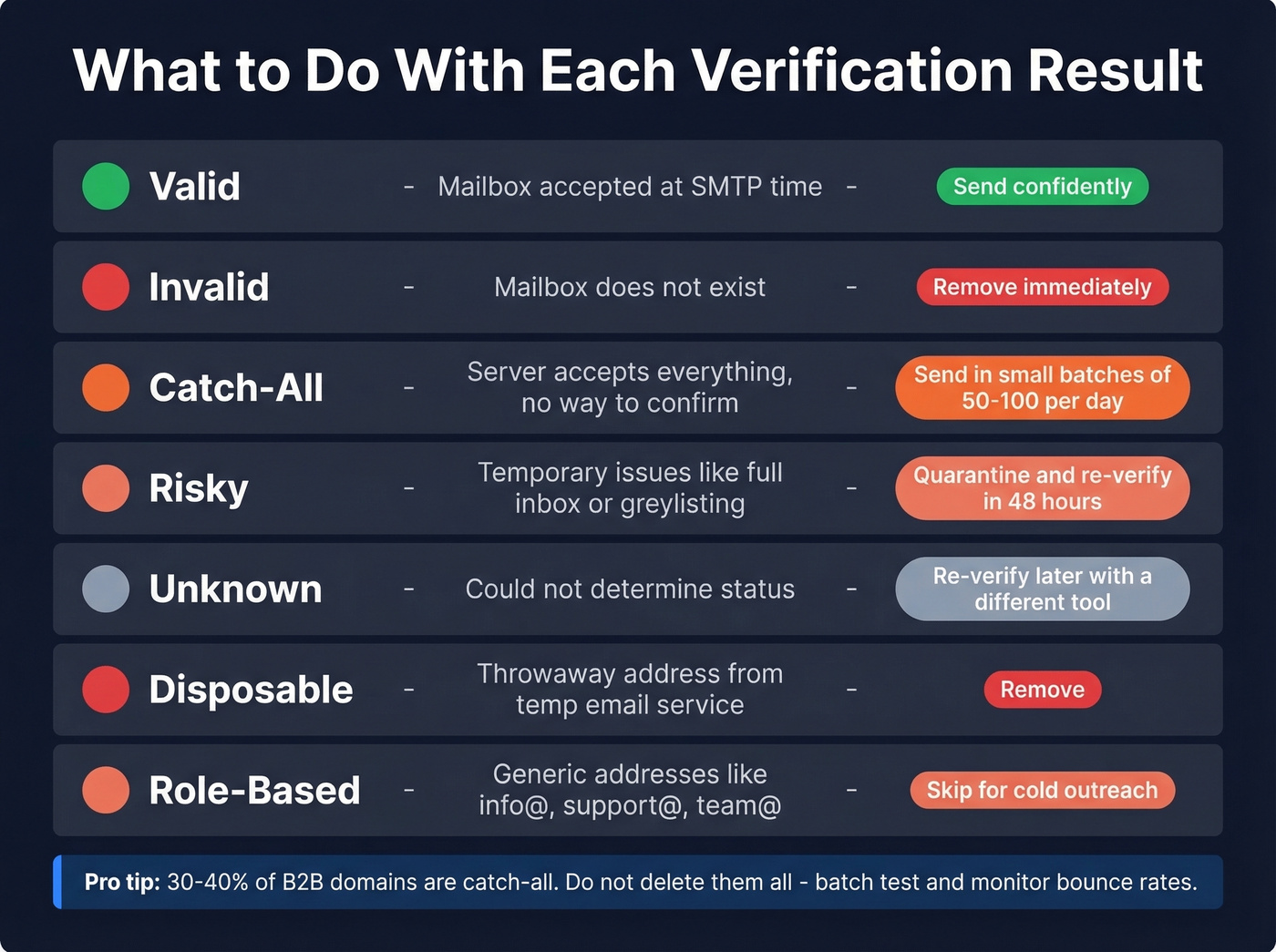
The key decision point is what you do with catch-all and risky results. Deleting them all is safe but wasteful. Sending to all of them is aggressive and risky. The right move is sending to catch-all addresses in smaller batches with careful deliverability monitoring - we've found that batches of 50-100 catch-all addresses per day give you enough signal to spot problems before they snowball.
If you’re cleaning lists regularly, this email cleaning guide covers practical hygiene rules beyond verification.

Prospeo runs every email through 5-step verification - catch-all handling, spam-trap removal, and honeypot filtering - before it ever reaches your list. 98% accuracy at ~$0.01/email, with data refreshed every 7 days so you're never sending to dead mailboxes.
Skip the separate verification step. Get pre-verified emails from the start.
Why Verification Matters
About 23% of email addresses become invalid within a single year. People change jobs, companies rebrand, domains expire. If you're running outbound on a list you built six months ago without re-verifying, roughly one in eight addresses is dead.
The financial cost is real. A 10,000-contact database with typical 23% annual decay means roughly 2,300 dead addresses. Factor in wasted sequence steps, damaged sender reputation, and missed opportunities, and bad data can easily cost thousands of dollars per year. But the deliverability cost is worse. ISPs track your bounce rate in real time. Under 2% is safe. Above 5%, you're in danger territory - ISPs start filtering your messages aggressively, and your domain reputation takes damage that can persist for months. One bad campaign with a 10% bounce rate can tank deliverability for every campaign that follows.
To benchmark and troubleshoot bounces, use our email bounce rate breakdown (codes, thresholds, and fixes).
Hot take: If your average deal size is under $10K and your list is under 5,000 contacts, you don't need a $99/month verification tool. A free tier plus good list hygiene habits will get you 90% of the way there. Save the budget for when you're scaling outbound past 10K sends per month.
The Catch-All Problem
A catch-all domain accepts mail sent to any address at that domain - anything@company.com gets accepted whether or not a real mailbox exists behind it. This makes SMTP verification essentially useless for confirming individual mailbox existence. 30-40% of B2B email domains are catch-all, and the percentage is higher in enterprise environments.
If you’re building lists from scratch, pairing verification with sourcing matters - see our picks for a B2B email finder tool.
Why Verification Tools Disagree
A common complaint on r/coldemail: run the same address through three different tools and you'll get three different results. One says valid, one says catch-all, one says unknown. We've seen teams waste weeks trying to figure out which tool is "right."
The disagreement happens because each tool uses different retry logic, different IP infrastructure, different timeout thresholds, and different classification rules for ambiguous SMTP responses. Greylisting adds another variable - a server might reject the first probe and accept the second, so the result depends entirely on whether the tool retries and how long it waits.
No tool can be definitively right on catch-all domains. It's a structural limitation of SMTP verification. Stop thinking about catch-all verification as a binary pass/fail - it's risk assessment. Layer signals beyond SMTP like engagement history, company firmographics, and role seniority to decide which catch-all addresses are worth the send.
Best Email Verification Tools Compared
| Tool | Accuracy | Free Tier | ~Cost/10K | Catch-All Handling |
|---|---|---|---|---|
| Prospeo | 98% | 75 emails/mo | ~$100 | Yes (5-step) |
| ZeroBounce | 97.8% | 100/mo | ~$65-99 | Partial (12%) |
| NeverBounce | 96.9% | Varies | ~$50-125 | Partial (8%) |
| Hunter | 70%* | 100/mo + free single checks | Paid plans | Limited |
| MillionVerifier | 95.8% | Limited | ~$6 | Limited |
| Verifalia | 30+ steps | Free single checks | Paid plans | Not public |
| Mailmeteor | N/A | 50/mo (Sheets add-on) | Free | No |
| Email Hippo | N/A | 100/day | Paid plans | Limited |
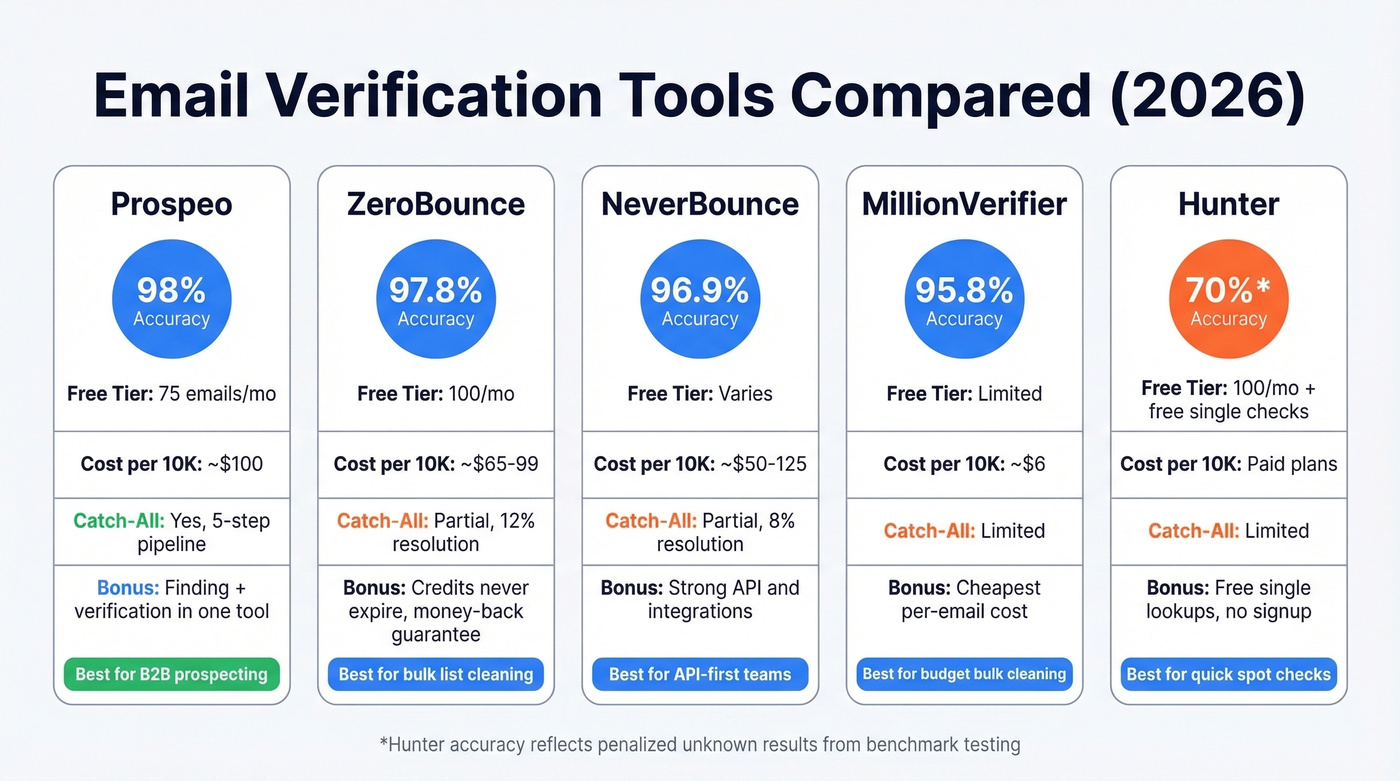
*Hunter's 70% reflects accuracy when "unknown" results are penalized - an important distinction.
If you want a longer, ranked breakdown, start with our best email validation guide.
Prospeo
Most verification tools make you find emails somewhere else, then upload a list for cleaning. Prospeo eliminates that gap - it finds emails from professional profiles and web sources, then verifies every address through a proprietary 5-step pipeline before it hits your CRM.
That pipeline delivers 98% email accuracy across a database of 143M+ verified emails, with a 7-day data refresh cycle versus the 6-week industry average. Snyk's team of 50 AEs dropped their bounce rate from 35-40% to under 5% after switching, and Stack Optimize maintains under 3% bounce across all clients with zero domain flags. Pricing runs about $0.01 per email with a free tier of 75 emails per month. No contracts, no sales calls.
ZeroBounce
ZeroBounce posted 97.8% accuracy in a 10,000-email benchmark test - the highest among standalone verifiers tested. Their ONE plan runs $99/mo for 10,000 verifications, and credits roll over and never expire, which is a meaningful advantage over competitors with expiration policies. In our experience, that rollover policy alone saves teams with lumpy verification volumes hundreds of dollars annually.
The money-back guarantee if your bounce rate stays above 3% is a rare commitment in this space. The catch: catch-all resolution sits at 12%, meaning most catch-all addresses remain unresolved. For B2B lists heavy on enterprise domains, that's a significant blind spot. ZeroBounce is also a pure verification tool - you'll need a separate sourcing solution to find emails at scale.
If you’re evaluating it specifically, see our ZeroBounce Email Verifier review.
Hunter vs. NeverBounce
These two occupy similar territory but serve different use cases.
Hunter is the better choice if you need to check an address on an ad-hoc basis and already use it for email finding - single checks are free with no signup, and the free plan includes 100 verifications per month after you create an account. Their email verification guide is also one of the best educational resources in the space. Skip Hunter if accuracy is your top priority: 70% accuracy with unknowns penalized means 3 in 10 addresses don't get a definitive answer.
NeverBounce hit 96.9% accuracy in the same benchmark, processing 10K emails in 18 minutes. Far more accurate than Hunter, but at $125/mo for 10,000 verifications it's pricier than ZeroBounce for similar performance. The deal-breaker: NeverBounce credits expire after one year while ZeroBounce's roll over indefinitely. If your verification volume is seasonal, that expiration policy will burn you.
Budget & Free Options
MillionVerifier is the budget champion at roughly $6 per 10,000 verifications. It posted 95.8% accuracy in benchmark testing - not best-in-class, but remarkable for the price. If you're running massive volumes on a tight budget, test it first.
Verifalia uses a proprietary system with over 30 verification steps and offers a well-documented API that developers love. Solid choice when you need to confirm deliverability programmatically.
Mailmeteor is the simplest free option - no signup required for single checks, and the Google Sheets add-on offers 50 verifications per month. Perfect for non-technical users who just need a quick validity check.
If you’re trying to stay free as long as possible, compare options in our free bulk email checker roundup.
Email Hippo offers 100 free verifications per day with a clean OK/Bad/Unverifiable output. Useful for quick daily checks, less suited for bulk operations.
How Often Should You Re-Verify?
With 23% annual list decay, a "set it and forget it" approach guarantees deliverability problems. Here's what we recommend based on list size and activity:
Before every major campaign - non-negotiable. Even basic syntax validation catches 5-10% of bad addresses upfront, so make sure your import workflow includes this as a first filter.
Quarterly for ongoing prospect databases under 10K contacts. Every 2 weeks for lists greater than 10,000 emails, especially if you're adding scraped or purchased contacts regularly. Immediately after any import from a new data source - scraped lists, event attendee lists, purchased databases. Let's be honest: purchased lists are the worst offenders here, and we've seen bounce rates above 30% on lists that were supposedly "pre-verified" by the vendor.
The best approach is building verification directly into your import workflow so no unverified address ever enters your CRM. One operator testing 10+ tools at 1M emails/month found that tool differences show up at scale - but verification cadence matters at every volume.
That 23% annual decay rate? Prospeo's 7-day data refresh cycle means your contact data never sits stale for weeks. While other providers refresh every 6 weeks, Prospeo catches dead mailboxes, job changes, and domain expirations before they become bounces.
Bounce rates under 4% - that's what 15,000+ companies get with Prospeo.
FAQ
Can you verify an email without sending a message?
Yes. SMTP verification simulates the delivery handshake - connecting to the mail server and issuing HELO, MAIL FROM, and RCPT TO commands - then reads the server's response code without transmitting message content. You can confirm whether an address is deliverable purely through the protocol handshake, no actual email required.
Why do different tools give different results for the same email?
Catch-all domains, greylisting, rate limiting, and provider-specific SMTP behaviors cause tools to interpret the same server response differently. Each tool uses its own retry logic, IP infrastructure, and timeout thresholds, so three tools often yield three answers. Layering multiple signals beyond SMTP - like engagement history and firmographics - is the only reliable approach for ambiguous domains.
What's a safe bounce rate?
Under 2% is safe and won't trigger ISP filtering. Above 5% risks domain blocking or aggressive spam filtering that can take months to reverse. Between 2-5%, re-verify your list before the next send and investigate which segments are driving bounces.
Is there a free way to verify emails in bulk?
Most free tools cap you at 50-100 verifications per day or month. Mailmeteor offers 50/month via Google Sheets, Email Hippo allows 100/day, ZeroBounce gives 100/month, and Prospeo provides 75 verified emails per month with full catch-all handling. For true bulk verification above 1,000 emails, paid tools start as low as $6 per 10,000 with MillionVerifier.