

How to Verify an Email Address Without Sending Email (2026)
You just exported 5,000 leads from a conference list, uploaded them to your sequencer, and watched 800 bounce on the first send. Your domain reputation took a hit before the campaign even started.
That's the cost of skipping verification - and it's entirely avoidable. You can verify an email address without sending email at all, using methods that range from manual command-line checks to automated tools that handle everything in bulk. But here's the thing: email lists degrade by roughly 23% every year. People change jobs, domains go dark, mailboxes get deactivated. ZeroBounce's analysis found that only 62% of submitted addresses were actually valid. The other 38% were invalid, catch-all, disposable, or spam traps waiting to wreck your sender score.
Whether you need to check a single address or clean an entire database, here are the five methods that actually work - from terminal commands to tools that handle everything automatically.
What You Need (Quick Version)
One-off checks: Use Verifalia's free online verifier, or run a manual MX/SMTP check from your terminal.
Bulk list cleaning: Bouncer or ZeroBounce deliver 98-99% observed accuracy in independent tests. Upload a CSV and get results in minutes.
B2B prospecting where you need to find and verify in one step: Prospeo finds and verifies emails from 300M+ professional profiles, so you skip the export-upload-download-reimport cycle entirely.
Why Validate Before Sending?
Every email you send to a bad address chips away at your sender reputation. Once that reputation drops, it's brutally hard to rebuild.

The thresholds are tighter than most people realize. A bounce rate above 2% signals poor list quality to inbox providers and can trigger filtering. Hit 5%, and you're in critical territory for sender reputation. Gmail, Yahoo, and Outlook now require spam complaint rates below 0.3% - and bounces feed into that calculation indirectly by reducing your engagement ratios.
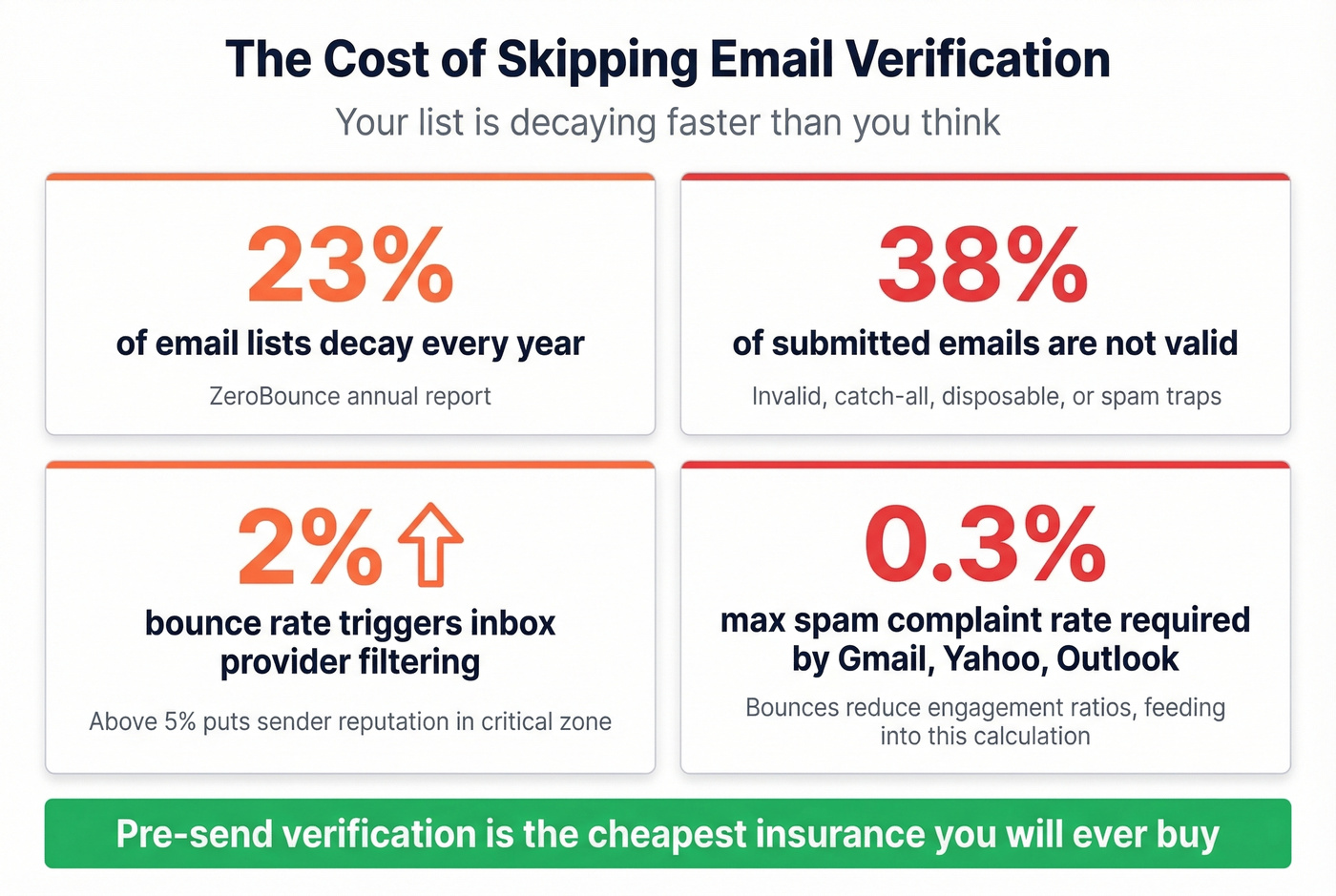
Sender reputation damage compounds. One bad campaign doesn't just hurt that send - it poisons deliverability for every email you send afterward, including replies to warm prospects. Pre-send validation is the cheapest insurance you'll ever buy.
Five Methods That Work
1. Syntax and Format Checks
The simplest check is structural: does the address follow valid email formatting rules? A regex pattern catches missing @ symbols, double dots, spaces, and invalid characters. Sounds basic, but syntax validation catches roughly 5-10% of bad addresses - especially in scraped or manually entered lists where typos and extraction errors are common.
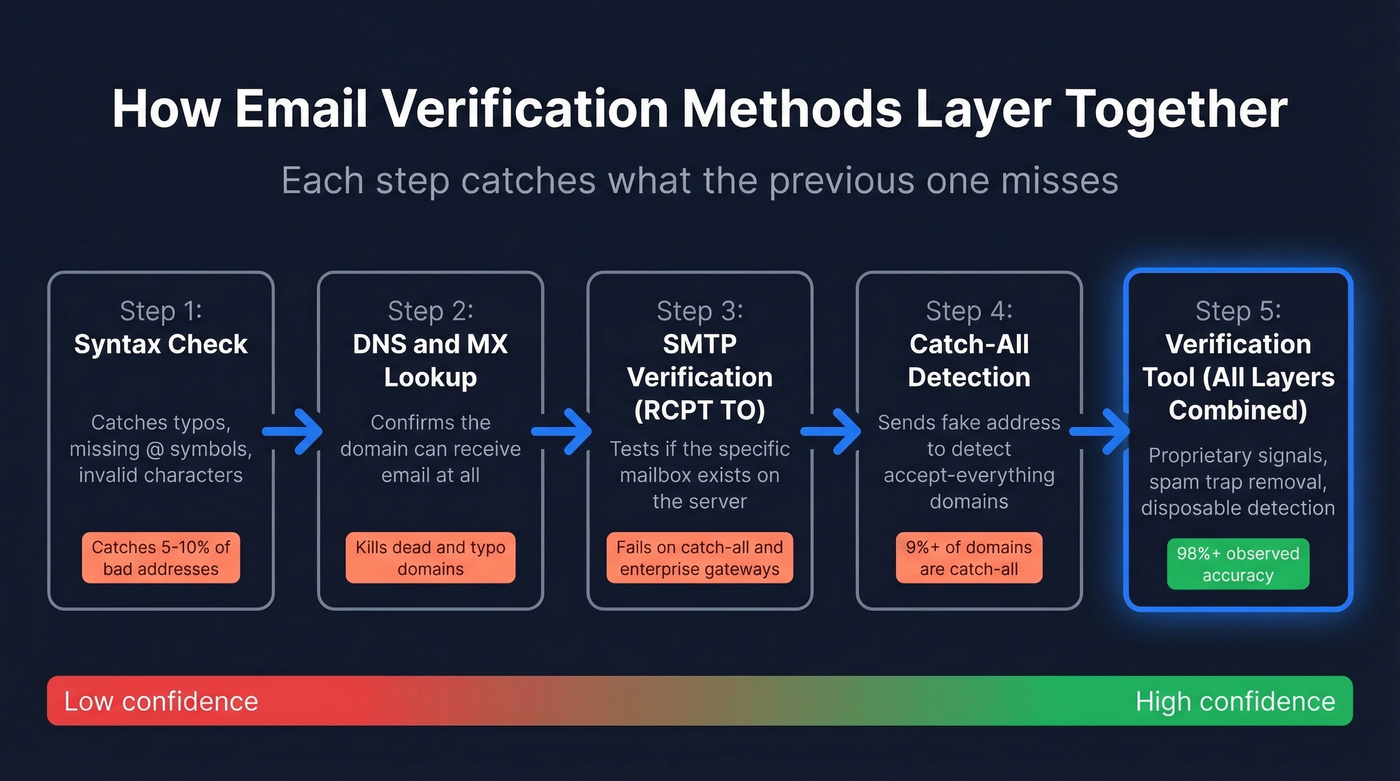
The limitation is obvious. totally.fake.person@google.com passes every syntax check. Format validation tells you an address could exist, not that it does.
2. DNS and MX Record Lookups
MX records tell you which mail servers handle email for a domain. If a domain has no MX records, no email address at that domain can receive mail. Period.
Run this from any terminal:
[nslookup -type=MX](https://learn.microsoft.com/en-us/windows-server/administration/windows-commands/nslookup) example.com
You'll get back a list of mail servers with priority numbers, where lower means preferred. If you get results, the domain is configured to receive email. If you get nothing, every address at that domain is dead. On Linux/macOS, dig MX example.com works the same way, and online tools like MXToolbox offer a browser-based alternative.
This catches defunct domains and typo-domains like gmial.com, but it can't tell you whether a specific mailbox exists on a valid domain. Necessary layer, not a sufficient one. (If you want more domain-level checks, see email domain validation.)
3. SMTP Verification (RCPT TO)
This is where things get interesting - and where most guides oversimplify. SMTP verification lets you test whether a mailbox exists without actually delivering a message by simulating the beginning of an email delivery without completing the transaction. Here's the full command sequence:
telnet mail.example.com 25
HELO verify.example.com
MAIL FROM:<test@verify.example.com>
RCPT TO:<target@example.com>
QUIT
The server's response to RCPT TO is what matters:
- 250 - Mailbox exists and accepts mail
- 550 - No such user, definitively invalid
- 450 - Temporary failure, often greylisting; retry in 15-30 minutes
- 421 - Service unavailable
The VRFY command was designed for exactly this purpose, but RFC 2505 recommends disabling it to prevent directory harvest attacks. Almost every modern mail server has it turned off. (More detail here: SMTP check workflows.)
4. Catch-All Domain Detection
Some domains accept email for any address - anything@company.com returns a 250 response regardless of whether the mailbox exists. These are catch-all domains, and they make SMTP verification inconclusive.
The detection technique is straightforward: send a RCPT TO for a clearly fake address like xq7z9randomstring@company.com. If the server accepts it, the domain is catch-all, and you can't trust any individual verification result for that domain. Over 9% of all emails verified through ZeroBounce were catch-all addresses - nearly one in ten contacts sitting in a verification gray zone.
5. Use a Verification Tool (Layered Approach)
Every method above has gaps. Syntax checks miss fake addresses. MX lookups can't verify mailboxes. SMTP checks fail on catch-all domains and anti-enumeration defenses. The practical solution is a tool that layers all methods together, plus proprietary databases and signals that manual checks can't replicate.
Tools typically return results in six categories: valid, invalid, catch-all, disposable, role-based, and unknown. Understanding these categories matters because a "catch-all" result requires different handling than a clean "valid." Most tools let you filter by category so you can decide your own risk tolerance for borderline addresses. (If you’re comparing options, start with a email verification tool shortlist.)

Why verify emails separately when you can get them pre-verified? Prospeo's 5-step verification catches catch-all domains, spam traps, and honeypots before you ever see the address. 98% accuracy across 143M+ verified emails - no SMTP checks, no CSV uploads, no guesswork.
Skip the verification pipeline. Get emails that are already clean.
Why SMTP Checks Fail in 2026
Every "how to verify an email" guide walks you through the SMTP handshake like it's reliable. It isn't - not for business email in 2026. Developer forums and practitioner communities on r/sales and r/coldemail consistently flag three failure modes that make DIY SMTP verification a losing bet:
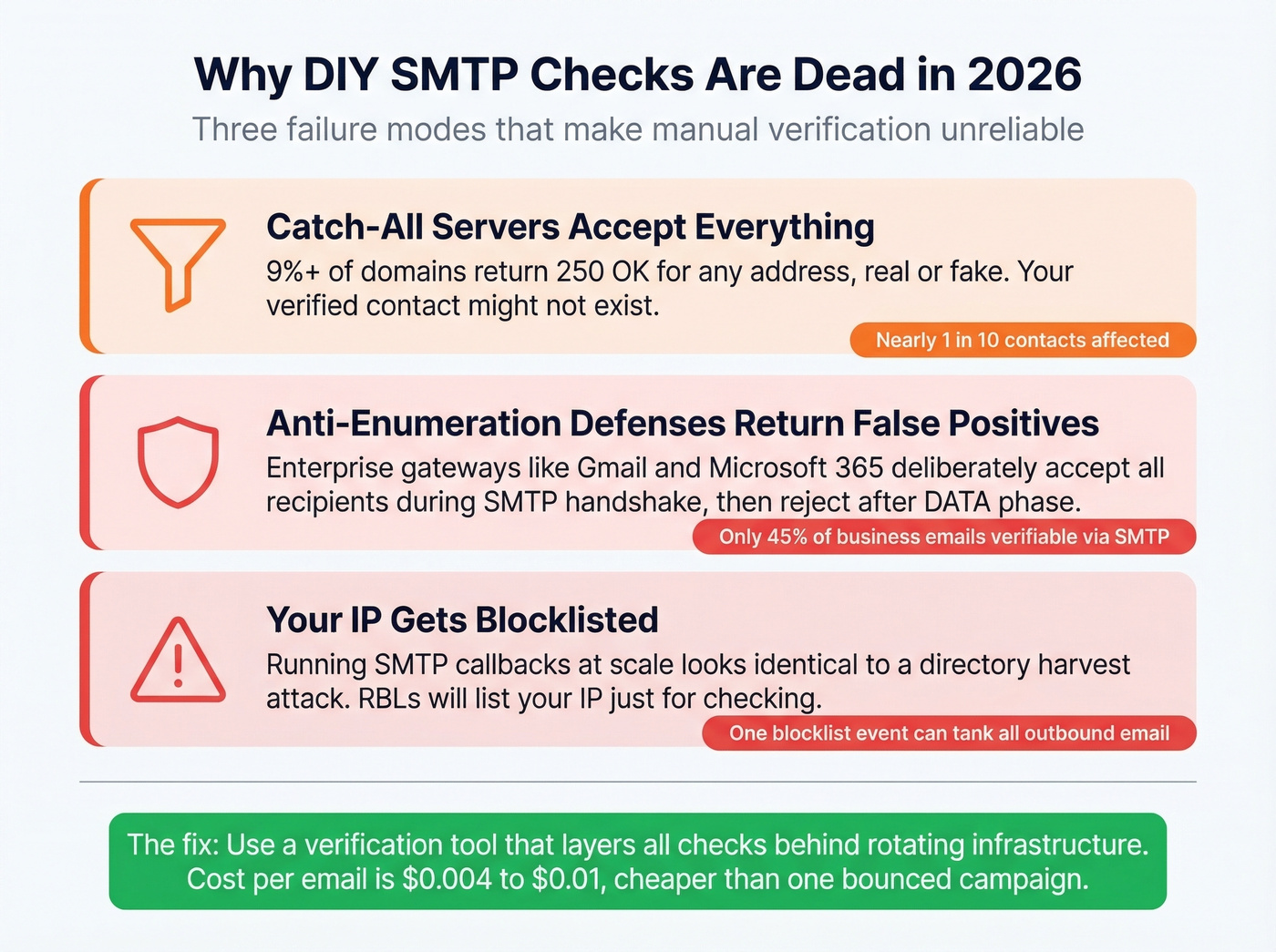
Catch-all servers accept everything. That 9%+ of domains returning 250 for any address means your "verified" contact might not exist.
Anti-enumeration defenses return false positives. Enterprise mail gateways deliberately accept all recipients during the SMTP handshake, then reject after the DATA phase - an intentional defense against directory harvest attacks.
Blocklisting risk is real. Running SMTP callbacks at scale looks identical to a directory harvest attack. Some RBLs will list your IP just for performing sender address verification. One vendor estimates SMTP-level checks can only validate roughly 45% of business email addresses.
Let's be honest: the DIY SMTP approach died around 2020. Gmail, Microsoft 365, and Yahoo all actively block or obfuscate enumeration. The cost of a verification tool - $0.004 to $0.01 per email - is trivial compared to the cost of a damaged sender reputation. If your deal size is above $500, a single bounced email to a decision-maker costs more than verifying your entire list. (For bounce benchmarks and fixes, see bounce rate guidance.)
Verification Tools Compared
Vendor-claimed accuracy rates often exceed 99%. Independent tests tell a different story, which is why this table uses test-observed figures only.
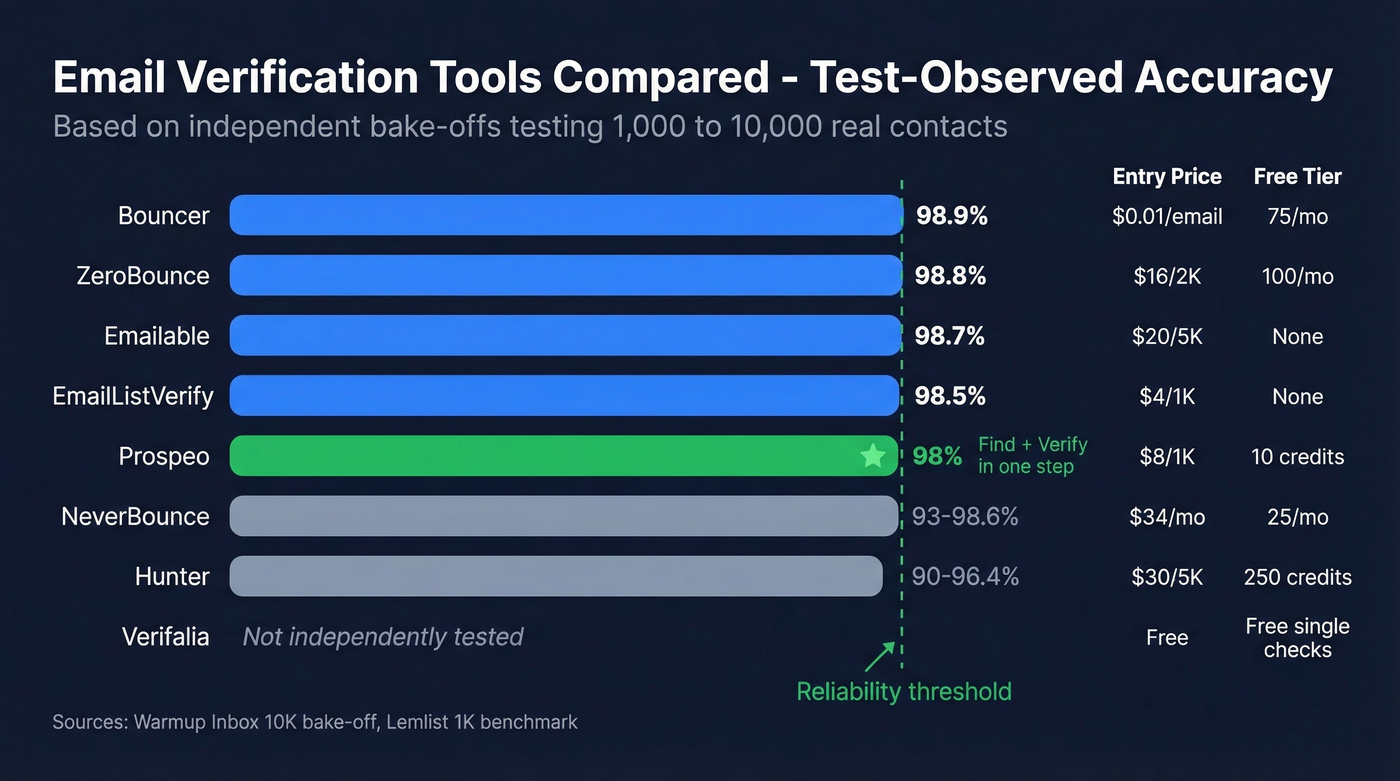
| Tool | Observed Accuracy | Entry Price | Free Tier | Best For |
|---|---|---|---|---|
| Prospeo | 98% | ~$0.01/email | 75 emails/mo | B2B find + verify |
| ZeroBounce | ~98.8% | $16/2K emails | 100/mo | Marketing list hygiene |
| Bouncer | ~98.9% | $20/5K emails | None | Pure bulk accuracy |
| NeverBounce | 93-98.6% | $8/1K emails | 10 credits | Budget bulk cleaning |
| EmailListVerify | ~98.5% | $4/1K emails | None | Large lists, lowest cost |
| Hunter | 90-96.4% | $34/mo | 25 searches/mo | Email finding first |
| Emailable | ~98.7% | $30/5K emails | 250 credits | Teams already in ecosystem |
| Verifalia | Not tested | Free online | Free single checks | One-off manual checks |
Accuracy figures come from a Warmup Inbox bake-off testing 10,000 contacts across tools, cross-referenced with a Lemlist benchmark using 1,000 labeled emails.
Prospeo
Most verification tools solve a downstream problem: you already have a list, and you need to clean it. Prospeo solves the upstream problem too - it finds verified emails from 300M+ professional profiles, so you never build a dirty list in the first place. (If you’re evaluating alternatives, compare B2B email finders.)
The 5-step verification pipeline handles syntax, DNS, MX, SMTP, and catch-all detection with spam-trap and honeypot removal. Data refreshes every 7 days versus the 6-week industry average, so you're verifying against current records rather than stale snapshots. The email-finding infrastructure is proprietary - accuracy isn't dependent on third-party data vendors whose quality can fluctuate. (Related: lead verification for a broader data-quality view.)
Pricing runs about $0.01 per email with a free tier of 75 emails per month. No contracts, no sales calls. For B2B sales teams, this is the tool that eliminates the verification step entirely because the emails arrive pre-verified.
Every method above has gaps - syntax checks miss fakes, SMTP fails on catch-alls, and DIY scripts get your IP blocklisted. Prospeo's proprietary infrastructure layers all of these checks automatically across 300M+ profiles, refreshed every 7 days. At $0.01 per email, it's cheaper than one bounced campaign.
One bounced campaign costs more than a year of verified data.
ZeroBounce
ZeroBounce hit 98.8% observed accuracy in the Warmup Inbox 10,000-email bake-off, making it one of the most reliable pure-verification tools available. It's also the company behind the annual email list decay reports that half the industry cites - they publish genuinely useful data about bounce trends and catch-all prevalence.

The key tradeoff: ZeroBounce is a verification tool, not a prospecting platform. You need to bring your own list. Entry pricing starts at $16 for 2,000 verifications, with 100 free monthly credits. Use this if you already have lists and need best-in-class cleaning. Skip it if you need to find emails, not just verify them. (If you need a process, see email list hygiene.)
Bouncer
Bouncer posted the highest observed accuracy in the Warmup Inbox test at 98.9% and hit 99% in the Lemlist benchmark. For pure verification accuracy, it's the top performer.
Entry pricing is $20 for 5,000 emails. No free tier, which makes it harder to test before committing. But if accuracy is the priority over price, Bouncer consistently delivers - we've seen it perform particularly well on mixed-quality lists where other tools struggle with edge cases. (More options: best email validation.)
NeverBounce
NeverBounce is the budget pick, but the accuracy inconsistency gives us pause. It scored 98.6% in the Warmup Inbox test but dropped to 93% in the Lemlist benchmark - a gap that suggests performance varies by list composition. At $8 per 1,000 emails, it's cheap. Use it for large, low-stakes lists where a few percentage points of accuracy won't tank a campaign. For anything tied to high-value outbound sequences, we'd spend the extra few dollars on Bouncer or ZeroBounce.
EmailListVerify
The cheapest option at $4 per 1,000 emails, with 98.5% observed accuracy. If you're cleaning a 100,000-record marketing database on a tight budget, EmailListVerify delivers solid results at roughly half the cost of most competitors. No free tier, but at these prices the barrier to entry is barely there. (If you’re deciding between DIY vs vendors, see email list cleaning service.)
Hunter, Emailable, and Verifalia
Hunter is popular for email finding, but its verification accuracy underperforms at 90-96.4% across tests - well below the 98%+ tier. Verification is a secondary feature, and it shows. (If you want lookup-first tools, see email lookup tool comparisons.)
Emailable lands at 98.7% accuracy and $30 per 5,000 emails. Solid but unremarkable. No strong reason to pick it over Bouncer or ZeroBounce unless you're already using their other products.
Verifalia is the go-to for free one-off checks. Their online verifier handles single-address lookups without an account. Not built for bulk work, but perfect for quickly checking a handful of addresses before manual outreach. (More free options: email verification free.)
When Verification Isn't Enough
Verification tells you an address is deliverable right now. It doesn't guarantee it'll be deliverable next month - that 23% annual decay rate means roughly 2% of your list goes bad every month.
For inbound signups, double opt-in remains the gold standard. No verification tool replaces a confirmed subscription. For outbound prospecting, re-verification cadence matters: a 7-day data refresh cycle keeps results current, while a one-time verification snapshot from three months ago is already degraded.
B2B prospecting and marketing list hygiene are fundamentally different problems requiring different tools. Don't use a marketing verifier for prospecting, and don't use a prospecting platform for newsletter cleanup.
FAQ
Is it legal to verify an email without sending one?
SMTP verification isn't illegal, but performing it at scale can get your IP blocklisted on RBLs because the technique resembles directory harvest attacks. Most businesses use dedicated verification tools that manage IP reputation and rate limits on their behalf, avoiding blocklisting risk entirely.
Can I check Gmail or Outlook addresses without sending?
Only partially. Major consumer providers actively block SMTP enumeration, so SMTP-level checks often return "unknown" for Gmail, Outlook, and Yahoo addresses. Verification tools use proprietary databases beyond raw SMTP to improve accuracy on these domains, but catch-all and anti-enumeration defenses still create blind spots.
How often should I re-verify my list?
At least quarterly - ideally monthly. Email lists degrade by 23% annually, meaning roughly 2% of addresses go invalid every month. Tools with 7-day refresh cycles keep results current far longer than one-time verification snapshots.
What's the best free way to check email validity?
Verifalia offers free single-address checks through their online tool, and Prospeo provides 75 free verifications per month with full catch-all handling. For manual checks, MX record lookups and SMTP handshakes cost nothing but require technical knowledge and carry blocklisting risk at scale. Free options work for small volumes; paid tools become necessary past a few hundred addresses.