

Email Marketing Bounce Rate: What It Means, Why It Spikes, and How to Fix It
You just sent a 10,000-email campaign and 400 bounced. Your ESP dashboard shows 4% with a yellow warning icon, and your deliverability score dropped overnight. That 4% isn't a vanity metric - it's your sender reputation bleeding out in real time, and every subsequent send gets harder to land.
Email marketing bounce rate is the percentage of emails that fail to reach the recipient's inbox. It splits into hard bounces (permanent failures) and soft bounces (temporary ones), and each demands a different response. A lot of the bounce-rate benchmarks people still quote trace back to Mailchimp's 2019 dataset, but inbox filtering and authentication requirements have changed dramatically since then. Let's get current.
The Short Version
- Your bounce rate should sit under 2%. Under 1% is the real target.
- Hard bounces mean delete immediately. Soft bounces mean quarantine after 3 consecutive attempts.
- Roughly 20.94% of addresses in an unverified list are invalid.
- Verify before every major send, authenticate your domain (SPF/DKIM/DMARC), and clean your list every 2-3 months.
Hard Bounces vs. Soft Bounces
The distinction matters because your response to each type should be completely different.
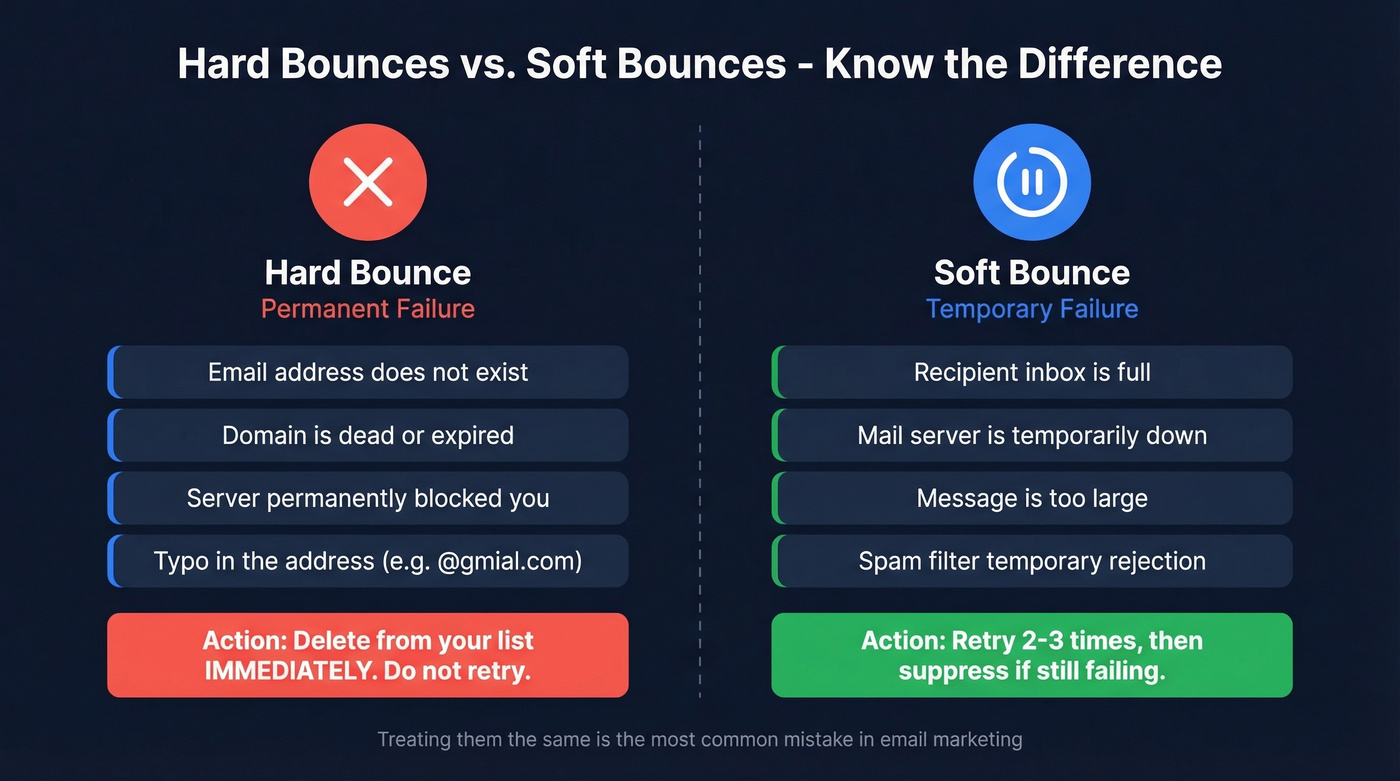
A hard bounce is a permanent delivery failure - the address doesn't exist, the domain is dead, or the server has explicitly blocked you. A soft bounce is temporary: a full inbox, a server that's down, or an oversized attachment. Treating them the same is one of the most common mistakes we see. Hard bounces sitting in your list for even one more send actively damage your sender reputation.
| Type | Common Causes | What to Do |
|---|---|---|
| Hard bounce | Invalid address, dead domain, permanent block | Delete immediately |
| Soft bounce | Full inbox, server down, oversized message | Retry 2-3x, then suppress |
How to Calculate Bounce Rate
(Bounced emails / Emails sent) x 100 = Bounce rate %
If you sent 10,000 emails and 150 bounced, your rate is 1.5%. One thing that trips people up: some ESPs use "emails delivered" as the denominator instead of "emails sent," which makes your bounce rate look artificially low. Always use total emails sent for an honest number.
2026 Benchmarks by Industry
Here's the threshold framework that actually matters, per Mailtrap's analysis:
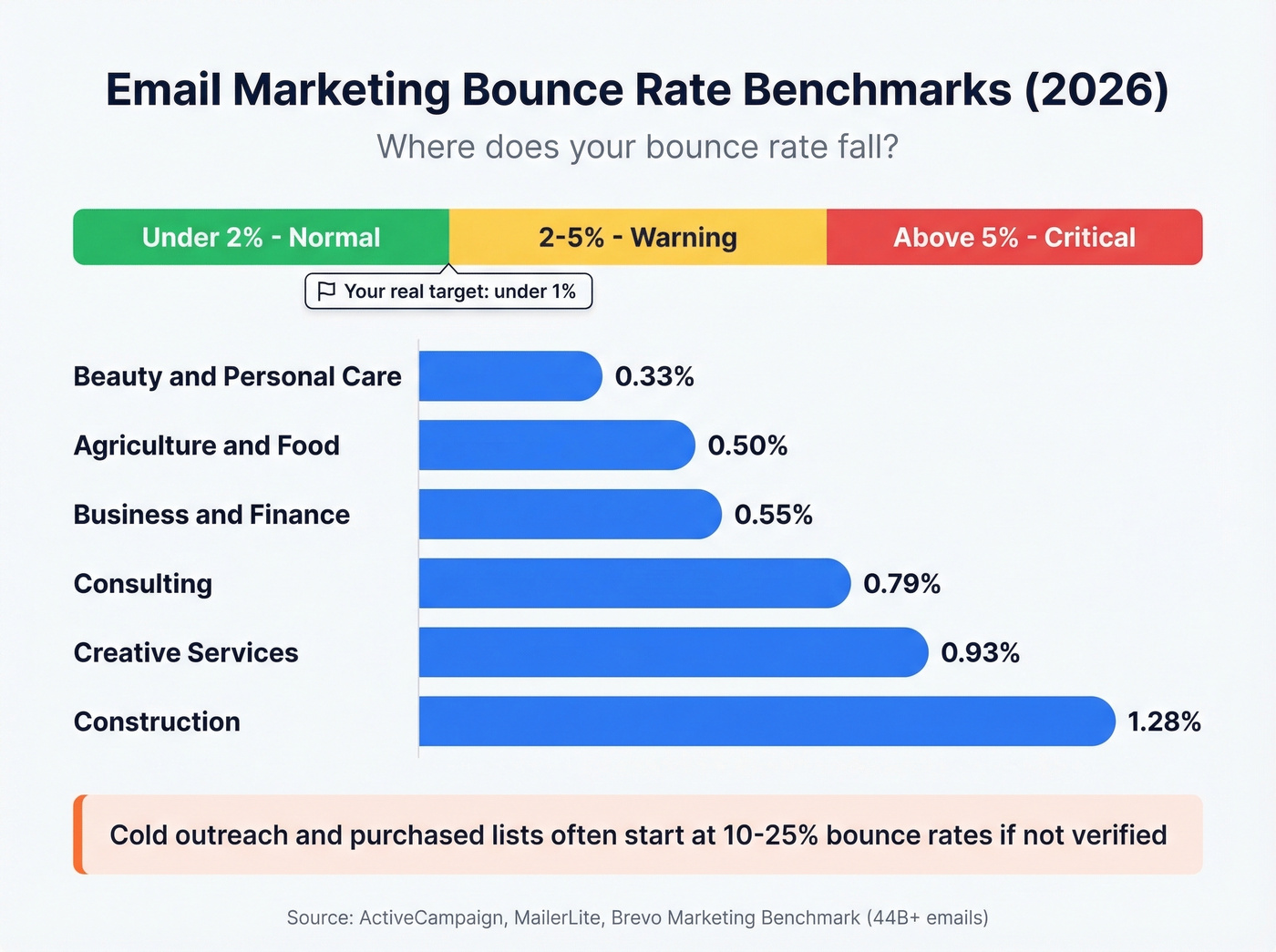
- Under 2%: Normal. You're fine.
- 2-5%: Warning. Investigate list hygiene and authentication.
- Above 5%: Critical. Stop sending and diagnose before your domain gets flagged.
2% is the ceiling, not the goal - aim for under 1%.
One of the largest recent datasets comes from Brevo's Marketing Benchmark analyzing 44B+ emails across countries and industries. Their methodology accounts for Apple Mail Privacy Protection, which inflated open rates industry-wide starting in 2021. Industry-specific averages, drawn from ActiveCampaign's compilation of MailerLite data:
| Industry | Avg. Bounce Rate |
|---|---|
| Beauty & personal care | 0.33% |
| Agriculture & food | 0.50% |
| Business & finance | 0.55% |
| Consulting | 0.79% |
| Creative services | 0.93% |
| Construction | 1.28% |
These are opt-in marketing list averages. Cold outreach, event-sourced lists, and purchased lists often start in the 10-25% bounce range if they aren't verified.

That 20.94% invalid rate on unverified lists? Prospeo's 5-step verification with catch-all handling, spam-trap removal, and honeypot filtering delivers 98% email accuracy - keeping your bounce rate well under the 2% danger zone.
Verify every address before it costs you your domain reputation.
Why Your Bounce Rate Is Spiking
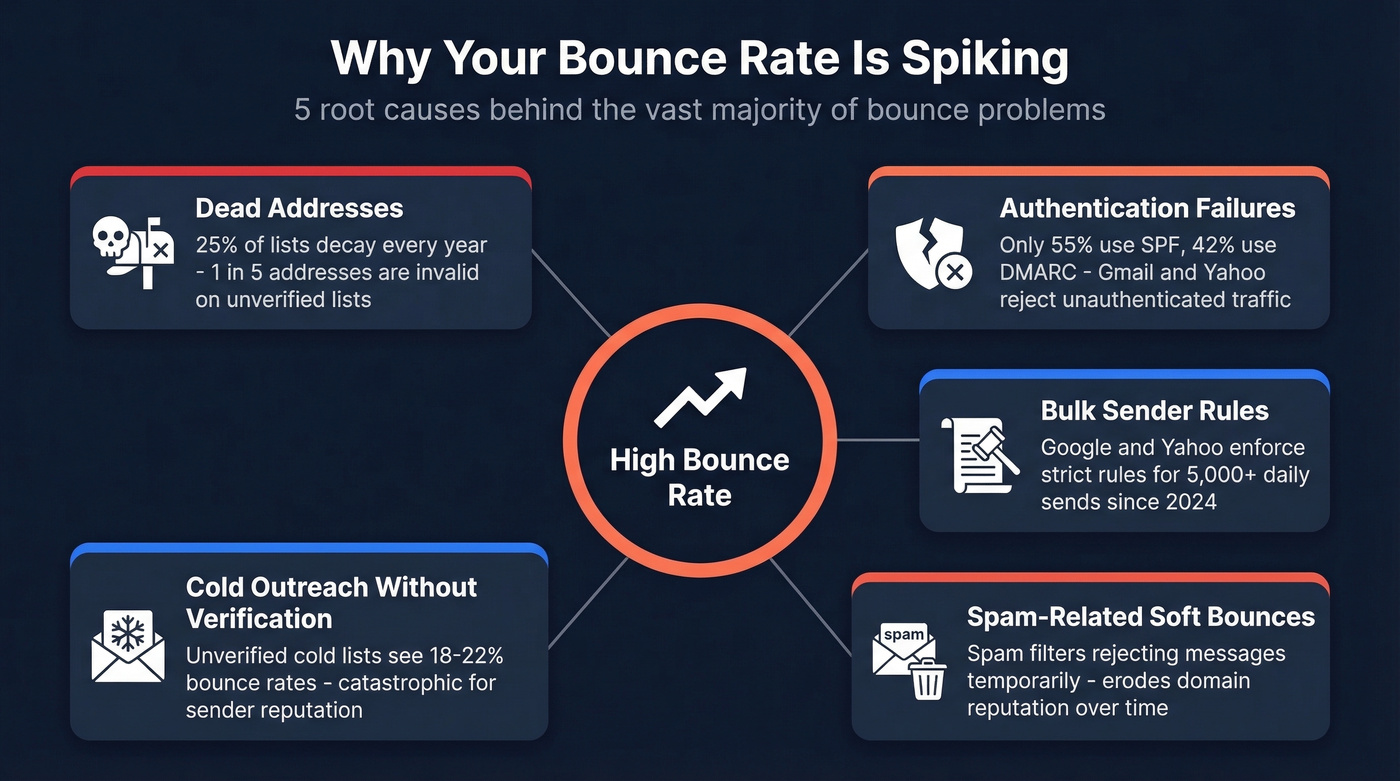
Five root causes account for the vast majority of bounce problems.
Dead Addresses
Email lists decay at roughly 25% per year. People change jobs, companies shut down domains, inboxes get deactivated. If you're sending to an unverified list, expect about one in five addresses to be invalid.
Authentication Failures
For bulk sending to Gmail and Yahoo, SPF/DKIM plus DMARC (at least p=none) are baseline requirements now. They tell receiving servers you're authorized to send from your domain. The adoption numbers are alarming: only 55.4% of senders use SPF, 42.5% use DMARC, and nearly 39% aren't even sure whether they have DMARC configured. If you're missing authentication, Gmail and Yahoo can reject your traffic outright - and those rejections show up as bounces in your ESP. (If you want to sanity-check your setup, start with how to verify DKIM is working and an SPF record example.)
Gmail and Yahoo Bulk Sender Rules
Since 2024, Google and Yahoo enforce strict requirements for bulk senders (5,000+ emails per day to Gmail addresses is the commonly cited threshold). Proper authentication, low spam complaint rates, and one-click unsubscribe. Non-compliant senders don't just land in spam - a percentage of their traffic gets outright rejected.
Spam-Related Soft Bounces
Not all soft bounces are innocent "full inbox" situations. Some are spam filters at the receiving server rejecting your message temporarily. These erode your domain reputation over time because ESPs see repeated delivery failures, and that pattern compounds. If you're seeing repeated spam-related failures, run a quick email spam checker before you change your list.
Cold Outreach vs. Marketing Email
Cold outreach and marketing email have completely different bounce rate expectations. A team on r/salestechniques sending 800-1,000 cold emails per week reported an 18-22% bounce rate initially - numbers that would be catastrophic for a marketing newsletter but are disturbingly common in outbound. If you're running cold outreach, a realistic first milestone is getting under 10%, then pushing toward sub-5% as your sourcing and verification mature. (For a deeper outbound-specific baseline, see cold email marketing.)
How to Read Your Bounce Codes
Your ESP logs contain SMTP codes that tell you exactly why an email bounced. The pattern is simple: 4xx codes are soft bounces, 5xx codes are hard bounces.
| Code | Type | Meaning | Action |
|---|---|---|---|
| 421 | Soft | Temporary system problem | Retry later |
| 450 | Soft | Mailbox temporarily unavailable | Retry; verify address |
| 452 | Soft | Insufficient storage | Retry; recipient issue |
| 550 | Hard | Mailbox doesn't exist | Remove immediately |
| 553 | Hard | Mailbox name not allowed | Check formatting; remove |
| 554 | Hard | Transaction failed (spam filter) | Review content + reputation |
Sources: GMass SMTP code reference, Mailgun error code guide.
Clusters of 554 codes point to a content or reputation problem, not a list quality issue. Diagnose accordingly.
How to Reduce Your Bounce Rate
Here's the thing: most teams treat list cleaning as damage control. The real fix is never letting bad data onto your list in the first place. If you need the full deliverability picture, use this email deliverability guide alongside the steps below.
Verify Before Sending
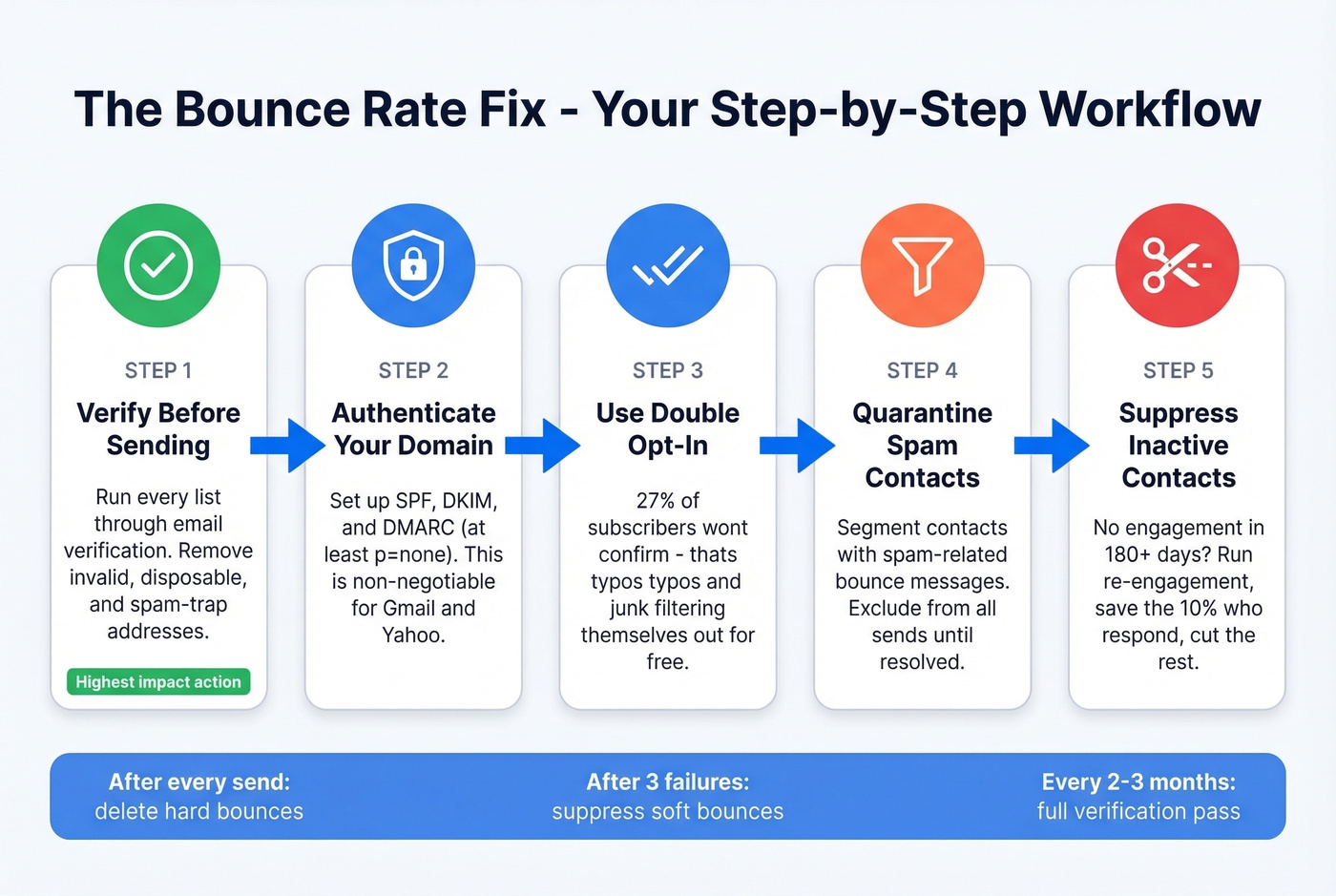
This is the single highest-impact action you can take. Run every list through a verification tool before you hit send. The cost is negligible compared to the domain damage from a bad send. (If you're building lists from scratch, pair verification with a tighter lead generation workflow.)
| Tool | Cost per Email | Key Strength |
|---|---|---|
| Prospeo | ~$0.01 (free: 75/mo) | 5-step verification, catch-all handling, 98% accuracy |
| ZeroBounce | ~$0.009 | Strong "risky email" detection |
| QuickEmailVerification | ~$0.008 | Budget-friendly for small volumes |
| MyEmailVerifier | ~$0.005 | Lowest cost per verification |
An independent benchmark of 15 email verifiers testing 3,000+ real business emails scored the top tools at about 65-70% accuracy on that specific test design. In our experience, Prospeo's 5-step verification with catch-all domain handling and spam-trap removal on a 7-day refresh cycle is what keeps bounce rates consistently low at scale - especially for teams running high-volume outbound. If you're comparing options, start with Bouncer alternatives and AI email checker.
Set Up SPF, DKIM, and DMARC
Look, if you haven't configured these, stop reading and go do it now. Set DMARC to p=none at minimum so you start receiving reports. SPF authorizes your sending servers. DKIM adds a cryptographic signature. Together, they're the baseline Gmail and Yahoo require for bulk sending. Without them, you're generating bounces that have nothing to do with your list quality. (If you're troubleshooting policy + alignment issues, see DMARC alignment.)
Use Double Opt-In
Industry data consistently shows about 27% of subscribers won't confirm a double opt-in. That's a feature, not a bug. Those 27% include typos, disposable addresses, and people who were never going to engage. Letting them filter themselves out is the cheapest list hygiene you'll ever do.
Quarantine Spam-Flagged Contacts
A practitioner workflow from r/Emailmarketing we've battle-tested across multiple client accounts: create a dynamic segment where the bounce message contains "spam," exclude that segment from all future sends, and monitor campaign over campaign until spam-related soft bounces drop to near zero. Only then consider a cautious re-engagement attempt.
Suppress Inactive Contacts
No engagement in 180+ days? Suppress them. Re-engagement campaigns recover roughly 10% of inactive subscribers, which means 90% are dead weight dragging your reputation down with every send. Run the re-engagement sequence, save whoever responds, and cut the rest without hesitation.
With 25% annual list decay, a list that was clean in January is noticeably degraded by April. Delete hard bounces immediately after every send, suppress soft bounces after 3 consecutive failures, and run a full verification pass every 2-3 months. Skip this cadence and you're just watching your sender score erode in slow motion.
What Happens When You Fix Your Data
Most bounce rate problems aren't email problems. They're data source problems. Fix where your contacts come from and half your deliverability issues disappear overnight. If your acquisition channels are messy, tighten them with data enrichment services and a cleaner how to generate an email list process.
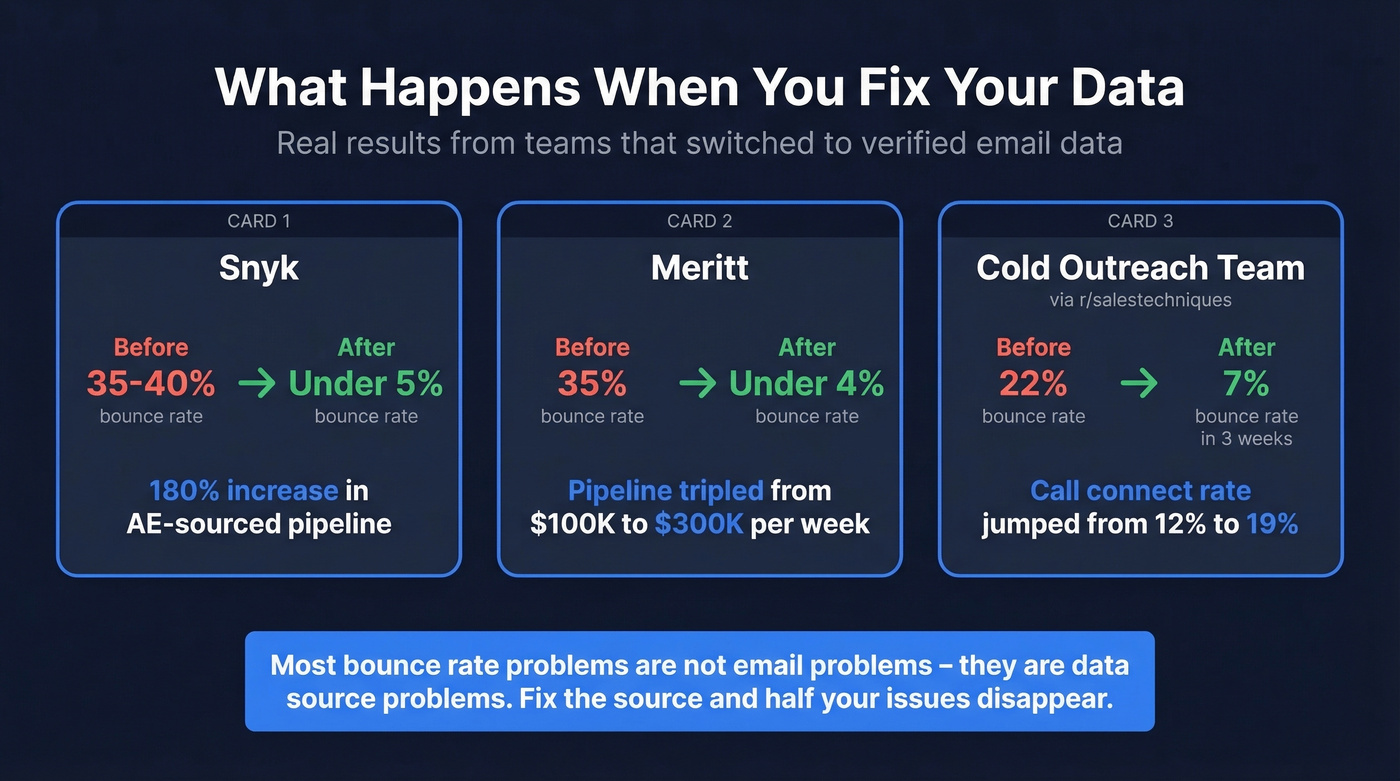
Snyk had 50 AEs prospecting with bounce rates of 35-40%. After switching to verified data, bounces dropped under 5% and AE-sourced pipeline jumped 180%. Meritt saw bounce rates fall from 35% to under 4%, with pipeline tripling from $100K to $300K per week. Stack Optimize built their agency to $1M ARR with client deliverability consistently above 94% and zero domain flags across all clients.
On the cold outreach side, a team on r/salestechniques reported dropping from 22% to 7% bounce rate in three weeks after adding email verification to their workflow. Their call connect rate climbed from 12% to 19% in the same period. The math is straightforward: clean data means more emails land, more emails land means more replies, more replies means more pipeline.
Cold outreach teams using bad data see 18-22% bounce rates that torch sender reputation overnight. Prospeo refreshes 300M+ profiles every 7 days - not every 6 weeks - so you're never sending to dead addresses.
Clean data at $0.01 per email beats rebuilding a burned domain.
FAQ
What's a good email marketing bounce rate?
Under 2% is acceptable. Under 1% is the real target for healthy sender reputation. Above 5%, stop sending and diagnose immediately. Industry averages range from 0.33% (beauty) to 1.28% (construction), but no industry should tolerate rates above 2%.
What's the difference between a hard bounce and a soft bounce?
Hard bounces are permanent - the address doesn't exist or the server has permanently blocked you. Remove these immediately after every send. Soft bounces are temporary: full inboxes, server outages, oversized messages. Suppress soft bounces after 3 consecutive failures.
How often should I clean my email list?
Every 2-3 months minimum, and always before a major campaign. Lists decay roughly 25% per year as people change jobs and inboxes get deactivated. Catch-all domain handling and regular verification catch recently deactivated addresses that basic syntax checks miss entirely.
Why does my bounce rate keep climbing?
The most common reason is list age - every month you skip verification, more addresses go dead, and each send to those dead addresses chips away at sender reputation. Authentication gaps, missing DMARC records, and sending to purchased lists also drive steady increases. Verify before sending, authenticate your domain, and suppress contacts that repeatedly bounce.