

How to SMTP Check if an Email Address Exists (and Why It Often Fails)
You telnet into port 25, fire off a [RCPT TO](https://datatracker.ietf.org/doc/html/rfc5321)``, get a 250 OK` back - and assume the mailbox is real. Then your campaign bounces 18%. Using SMTP to check whether an email address exists sounds bulletproof in theory, but the protocol was never designed for verification. Here's how it actually works, where it breaks, and what to use instead.
What You Need (Quick Version)
- Developer exploring SMTP mechanics - read the protocol walkthrough and Python example below.
- Sales or marketing team verifying emails before outbound - skip DIY. Use a multi-signal verification tool like Prospeo, which runs a 5-step pipeline with 98% accuracy and a free tier of 75 emails/month.
- Cleaning an existing list in bulk - NeverBounce (~$8/1K) or ZeroBounce ($15 per 2,000 minimum purchase) handle high-volume list hygiene well.
How SMTP Verification Works Step by Step
The core idea: talk to the recipient's mail server and ask if it'll accept a message for that address - without actually sending one.
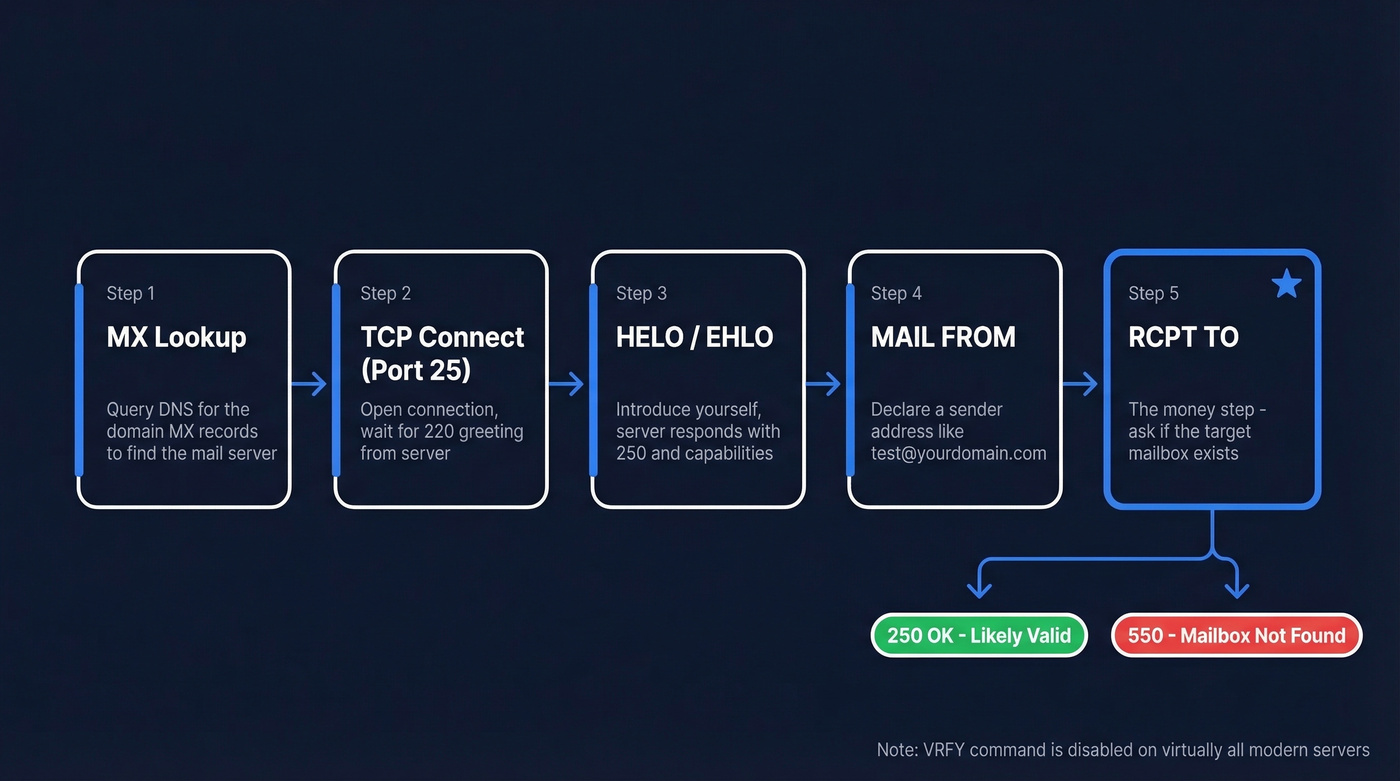
1. MX Lookup. Query DNS for the domain's MX records to find which server handles email for example.com.
2. TCP Connect. Open a connection on port 25. A 220 greeting means the server's accepting connections.
3. HELO/EHLO. Introduce yourself. The server responds with 250 and its capabilities.
4. MAIL FROM. Declare a sender address, often a dummy like test@yourdomain.com. Another 250 if accepted.
5. RCPT TO. This is the money step. Send RCPT TO:<target@example.com> and read the response code. An older command - VRFY - was designed exactly for this purpose, but it's disabled on virtually all modern servers because it was a gift to spammers. RCPT TO is the only viable approach left.
A typical SMTP dialogue looks like this:
S: 220 mx.example.com ESMTP ready

C: EHLO verify.mydomain.com

S: 250-mx.example.com Hello

C: MAIL FROM:<test@mydomain.com>

S: 250 OK

C: RCPT TO:<john.smith@example.com>

S: 250 2.1.5 OK              <- server accepted the recipient
Or, for a non-existent mailbox:
C: RCPT TO:<fakeperson99@example.com>

S: 550 5.1.1 No such user    <- mailbox doesn't exist
You then issue QUIT without sending any actual message data.
SMTP Response Codes
| Code | Meaning | Action |
|---|---|---|
| 250 | Accepted | Likely valid |
| 421 | Service unavailable | Retry later |
| 450 | Mailbox unavailable | Retry (greylisting) |
| 451 | Local error | Retry later |
| 550 | Mailbox not found | Mark invalid |
| 551 | User not local | Mark invalid |
| 553 | Mailbox name invalid | Mark invalid |
For catch-all detection, test a random nonsense address at the domain like xq7z9fake@example.com. If it also returns 250, the domain accepts everything - and your "valid" result means nothing.
Why SMTP Verification Fails
SMTP acceptance doesn't prove a human will ever see your email. The protocol has fundamental blind spots that no amount of clever probing can fix.
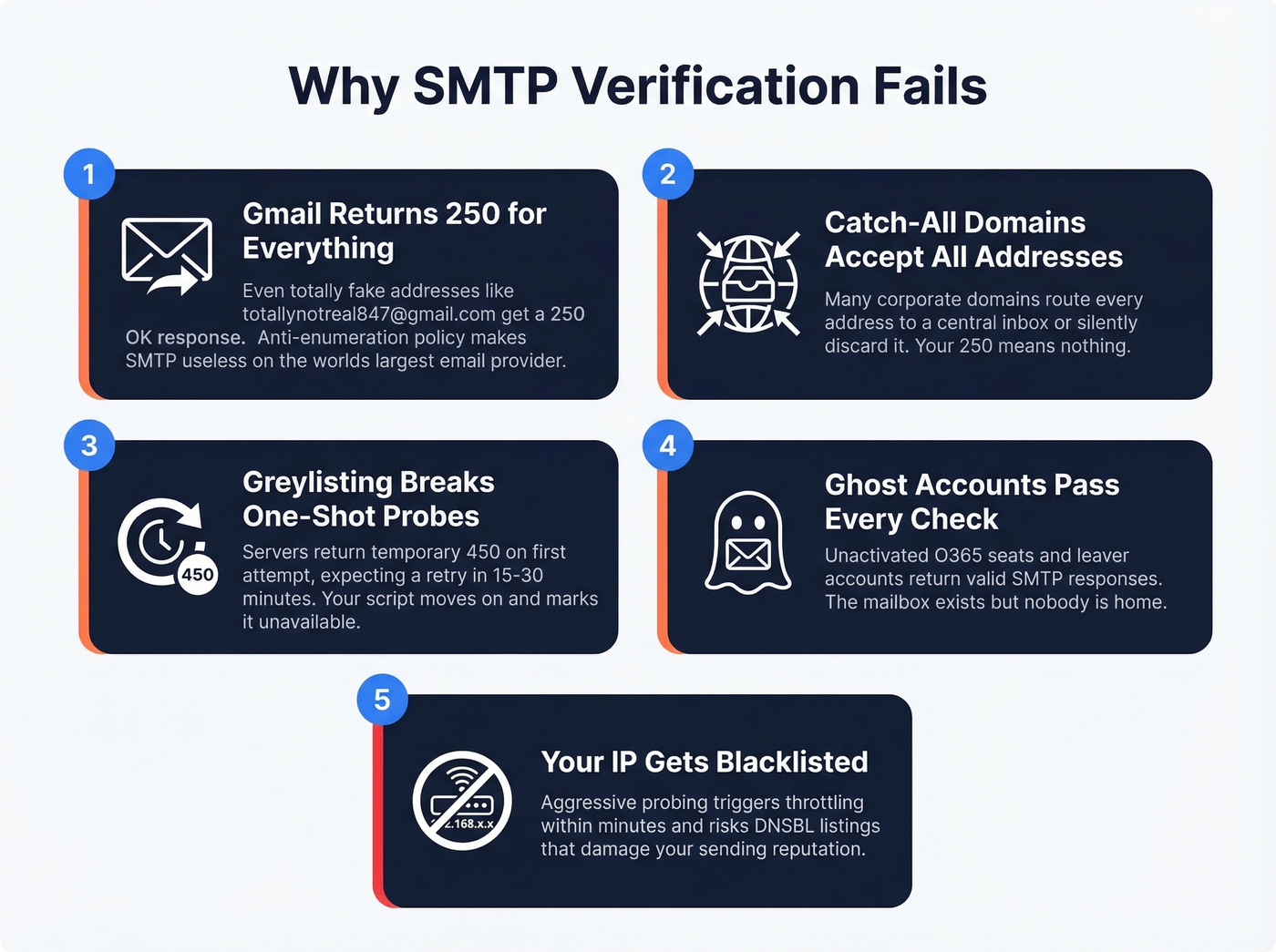
Gmail Returns 250 for Everything
Gmail returns 250 OK for fabricated addresses like totallynotreal847@gmail.com during SMTP recipient checks. This is a deliberate anti-enumeration policy. It makes SMTP-based mailbox existence checks completely unreliable on the world's largest email provider.
Catch-All Domains Accept All Addresses
Many corporate domains route mail for any address to a central inbox or silently discard it. Your 250 tells you nothing about whether john.smith@ is a real person or a black hole.
Greylisting Breaks One-Shot Probes
Servers using greylisting return a temporary 450 on the first attempt, expecting legitimate senders to retry in 15-30 minutes. A single probe interprets this as "unavailable" and moves on. Real mail servers retry. Your script doesn't.
Ghost Accounts Pass Every Check
As practitioners on r/coldemail have noted, unactivated O365 seats and leaver accounts retained for compliance return valid SMTP responses. The mailbox "exists" - but nobody's home. Role aliases like info@ have the same problem.
Your IP Gets Blacklisted
Aggressive probing triggers throttling within minutes. Sustained enumeration risks longer-term reputation damage across multiple DNSBLs, which can bleed into your actual sending infrastructure if you're not careful.
Here's the thing: SMTP was designed to deliver mail, not to answer existence queries. Treating it as a verification protocol is a hack that worked in 2005. It doesn't work now.

SMTP checks fail on Gmail, catch-alls, and ghost accounts. Prospeo's 5-step verification pipeline handles all three - combining SMTP probing with catch-all detection, spam-trap removal, and honeypot filtering to hit 98% email accuracy at $0.01 per email.
Skip the RCPT TO guesswork. Get emails that actually land.
DIY - Verify an Email via Python
If you want to see the mechanics firsthand, here's a minimal smtplib example:
def smtp_check(email):
    domain = email.split('@')[1]
    mx_records = dns.resolver.resolve(domain, 'MX')
    mx_host = str(mx_records[0].exchange)

    server = smtplib.SMTP(timeout=10)
    server.connect(mx_host, 25)
    server.helo('verify.mydomain.com')
    server.mail('test@mydomain.com')
    code, msg = server.rcpt(email)
    server.quit()

    return code == 250  # 250 = accepted, 550 = not found
Don't run this in production. Gmail will return 250 for every address, real or fake. Verification often runs 2-3 seconds per address, which is painfully slow at scale without connection pooling. You'll need STARTTLS for servers that require it, rate limiting to avoid bans (start at ~2 requests/second), and proper MX fallback logic. This is a learning exercise, not a production tool.
How Verification Tools Go Beyond SMTP
Commercial tools don't just run RCPT TO and call it a day. They layer multiple signals into a pipeline:
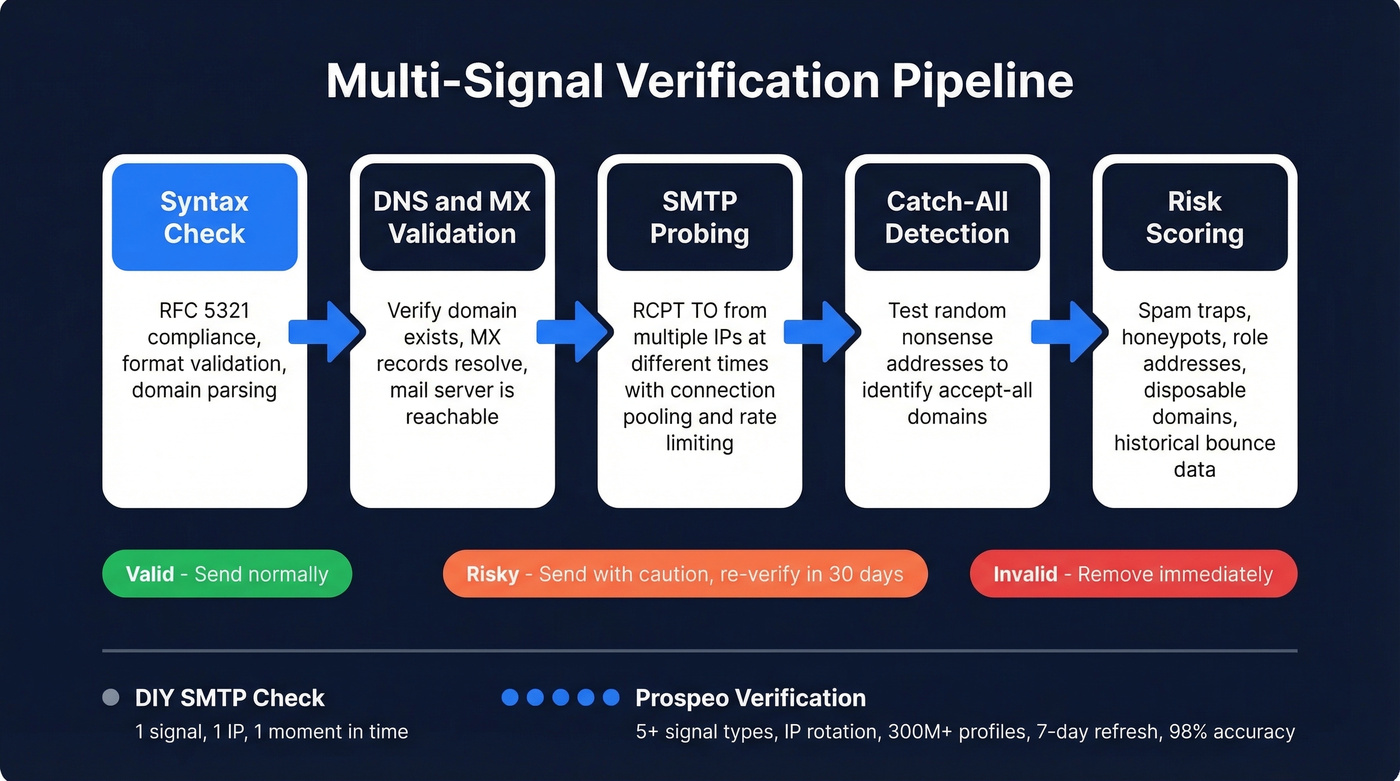
Syntax check -> DNS/MX validation -> SMTP probing from multiple IPs at different times -> Catch-all detection -> Risk scoring for spam traps, honeypots, role addresses, and disposable domains.
The syntax step alone goes beyond basic regex - libraries like Python's email-validator check RFC 5321 compliance and DNS resolution before any SMTP connection is attempted.
A single SMTP probe from one IP at one moment gives you one data point. The real value of a verification service isn't any single step - it's the orchestration, IP rotation, historical data, and risk classification that turns a binary yes/no into something you can actually act on. Some vendors advertise "30+ verification steps," but many of those are sub-checks within the same categories. What matters is coverage across fundamentally different signal types, not the step count. If you want a broader comparison, start with our email verification tools roundup.
| Tool | Price per 1K | Free Tier | Best For |
|---|---|---|---|
| Prospeo | ~$10 (~$0.01/email) | 75 emails/mo | Pre-verified B2B, top accuracy |
| Hunter | Paid plans from ~$49/mo | 100 checks/mo | Quick single-email lookups |
| NeverBounce | ~$8 | - | Bulk list cleaning |
| ZeroBounce | $15 per 2,000 min | 100/mo | Bulk cleaning + scoring |
| Bouncer | ~$7 | - | Budget bulk verification |
Building your own SMTP checker means fighting greylisting, IP blacklists, and Gmail's 250-for-everything policy. Prospeo runs proprietary multi-signal verification across 300M+ profiles with a 7-day data refresh - so you get pre-verified B2B emails without touching port 25.
Replace your Python script with 98% accuracy out of the box.
Why This Matters More in 2026
The stakes for sending to bad addresses have never been higher. Gmail and Yahoo enforce a 0.3% spam complaint cap for anyone sending 5,000+ emails per day, with a recommended target under 0.10%. Since mid-2025, Microsoft requires SPF, DKIM, and DMARC for bulk senders - non-compliant messages go to Junk now, with full rejection planned.
Email lists decay roughly 22.5% per year. A list that was 95% valid in January could be 73% valid by December without re-verification. We've seen teams burn through sender reputation in weeks by skipping this step - one client came to us after torching two domains in a month because they trusted a year-old list. If you're not re-verifying monthly for high-volume sending or quarterly for regular campaigns, you're accumulating dead weight that drags your sender reputation down. Keep bounce rates under 2%. Anything above that and you're in danger territory. For a practical workflow, see our guide on how to clean your email list and the broader playbook on email list hygiene.
Let's be honest: if your average deal size is under five figures, you almost certainly don't need to build SMTP verification infrastructure. The engineering time alone costs more than a year of any tool on this list. Buy, don't build.
What to Do With Results
Not every verification result deserves the same treatment.
Valid - send normally. These addresses passed all checks.
Risky - accept-all domains and role addresses like info@ fall here. Send with caution, re-verify in 30 days, and consider excluding role addresses from cold outreach entirely. In our experience, role addresses convert at roughly a third the rate of personal addresses for cold outbound, so they're rarely worth the deliverability risk. If you're building an outbound workflow, our guide to email verification for outreach pairs well with this.
Invalid - remove immediately. Don't "save them for later." They're dead weight. If you're seeing a lot of failures, it helps to understand invalid emails and run a dedicated bounce checker before your next send.
Skip SMTP-only verification if you're working with Gmail-heavy lists or domains you suspect are catch-alls. You'll get false positives that look like clean data but bounce when it counts.
Verification gives you probability, not certainty. The only true proof that a human owns and monitors an email address is double opt-in - they click a confirmation link. Everything else is inference. Good inference, but inference nonetheless. Using SMTP alone to check if an email address exists will always leave gaps, and layered verification is the only reliable approach in 2026. If you want the full breakdown, read how does email verification work and our email verification best practices.
FAQ
Can you check if a Gmail address exists via SMTP?
No. Gmail returns 250 OK for RCPT TO requests regardless of whether the mailbox exists. You need a verification tool that uses non-SMTP signals - pattern matching, historical delivery data, and behavioral heuristics.
Is SMTP email verification legal?
SMTP probing itself isn't illegal in most jurisdictions, but aggressive enumeration can get your IP blacklisted and violate ISP terms of service. For GDPR-covered data, you need a lawful basis before probing personal addresses. Commercial tools handle compliance and IP rotation far better than DIY scripts.
How accurate are email verification tools?
Top-tier tools hit 97-99% on standard corporate domains. Catch-all domains are materially less accurate - results come back as "risky" or "unknown" rather than definitive. Accuracy depends on layering multiple signal types beyond a single protocol check: DNS, SMTP from rotated IPs, pattern matching, and historical delivery data all working together.