

Email Verification Best Practices That Actually Protect Your Sender Reputation
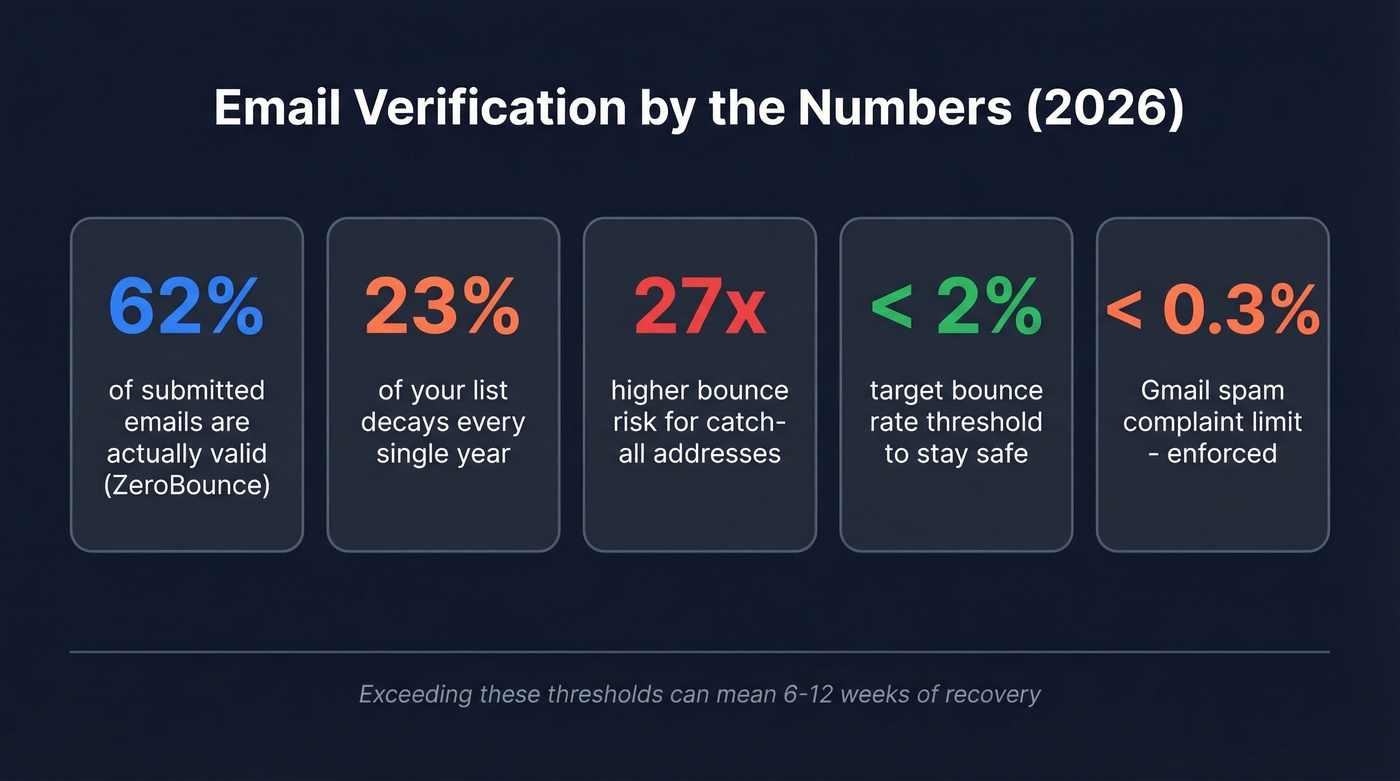
Invalid email addresses cost B2B companies an average of $847 per sales rep annually in wasted effort, reputation damage, and lost deliverability. ZeroBounce's data showed only 62% of submitted emails were valid - nearly 4 in 10 addresses were bad before anyone hit send. Meanwhile, at least 23% of your email list degrades every year, and 17.7% of legitimate, permission-based marketing emails never reach the inbox.
Fixing that gap alone could yield a ~20% lift in email ROI. The difference between "we verified our list once" and having real verification practices baked into your workflow? That's where sender reputations go to die.
The Non-Negotiables (Quick Version)
If you're short on time:
- Verify at capture - every new email gets checked via real-time API before it enters your CRM or sequencer.
- Re-verify before every major send - lists older than 60 days are already decaying. Don't trust them.
- Treat catch-all addresses separately - they aren't "valid." They're unresolved. Segment and test them in small batches. These addresses are 27 times more likely to bounce than standard verified ones.
- Monitor your thresholds - bounce rate at or below 2%, Gmail spam complaints under 0.3%. The 0.3% complaint line is part of Gmail's bulk-sender requirements, and it's enforced.
- Never send to purchased lists - in 2026, that's not just bad practice. It's a compliance liability.
Here's the thing: the best verification practice is to never need verification in the first place. Sourcing pre-verified data eliminates most of the remediation cycle before it starts.
The Full Verification Playbook
1. Real-time API verification at point of capture. Every form submission, every import, every manual entry should trigger an instant verification check. Catching typos and disposable addresses here prevents them from ever polluting your database - ZeroBounce reports typo detection prevented 10M+ bounces in a single year.
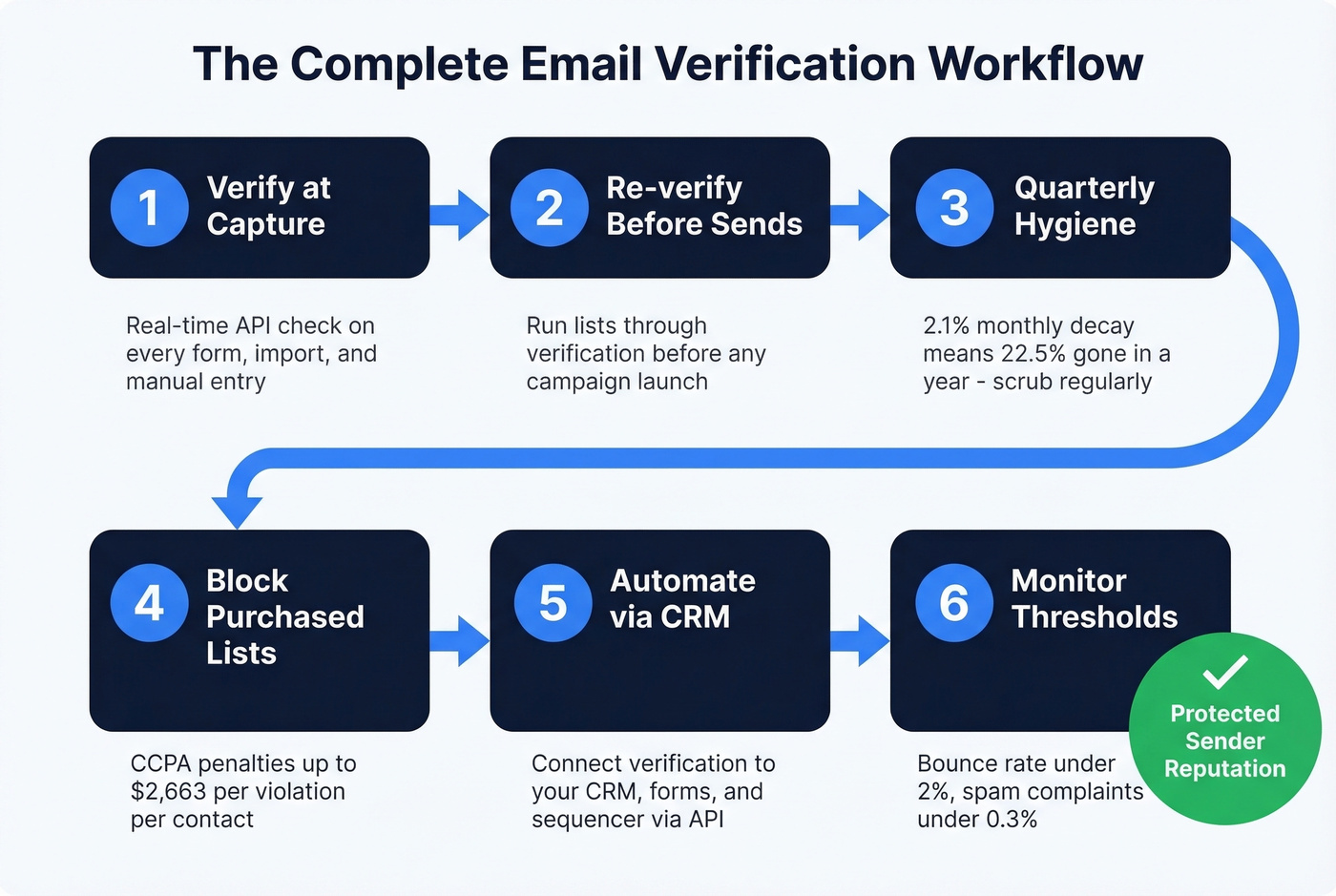
2. Re-verify before major sends. Even a list you verified three months ago has decayed. Hunter's internal testing found 2.3% of addresses went stale in just 8 weeks. Before any campaign launch, run the list through verification again. The credits cost less than a tanked domain reputation.
3. Quarterly hygiene for legacy lists. B2B data decays at roughly 2.1% per month - that's 22.5% annualized. If your CRM has contacts from last year's trade show that haven't been touched, they need a scrub before anyone sends to them. We've seen teams lose months of domain-warming progress because someone blasted a stale trade show list on a Friday afternoon. Consistent quarterly validation prevents legacy contacts from quietly destroying your deliverability.
4. Never send to purchased or scraped lists. Beyond the deliverability hit, CCPA penalties now run up to $2,663 per violation - per contact, not per campaign. We'll cover the compliance math below, but the short version: it's not worth it.
5. Automate via CRM and ESP integrations. Verification shouldn't depend on someone remembering to upload a CSV. Connect your verification tool to your CRM, your forms, and your sequencer via API. If verification isn't automatic, it doesn't happen. Full stop. (If you're standardizing your stack, start with contact management software that supports clean data workflows.)
6. Monitor bounce and complaint thresholds religiously. Keep bounce rate at or below 2% and spam complaint rate below 0.3%. Exceed those and you're looking at throttling, spam folder placement, or outright blocking. If your domain reputation tanks, recovery can take 6-12 weeks of perfect sending behavior, and that's assuming you fix the root cause immediately. (For deeper benchmarks and fixes, see our email bounce rate guide.)
How to Handle Catch-All Addresses
This is the part of verification most teams get wrong, and it's the part that matters most.
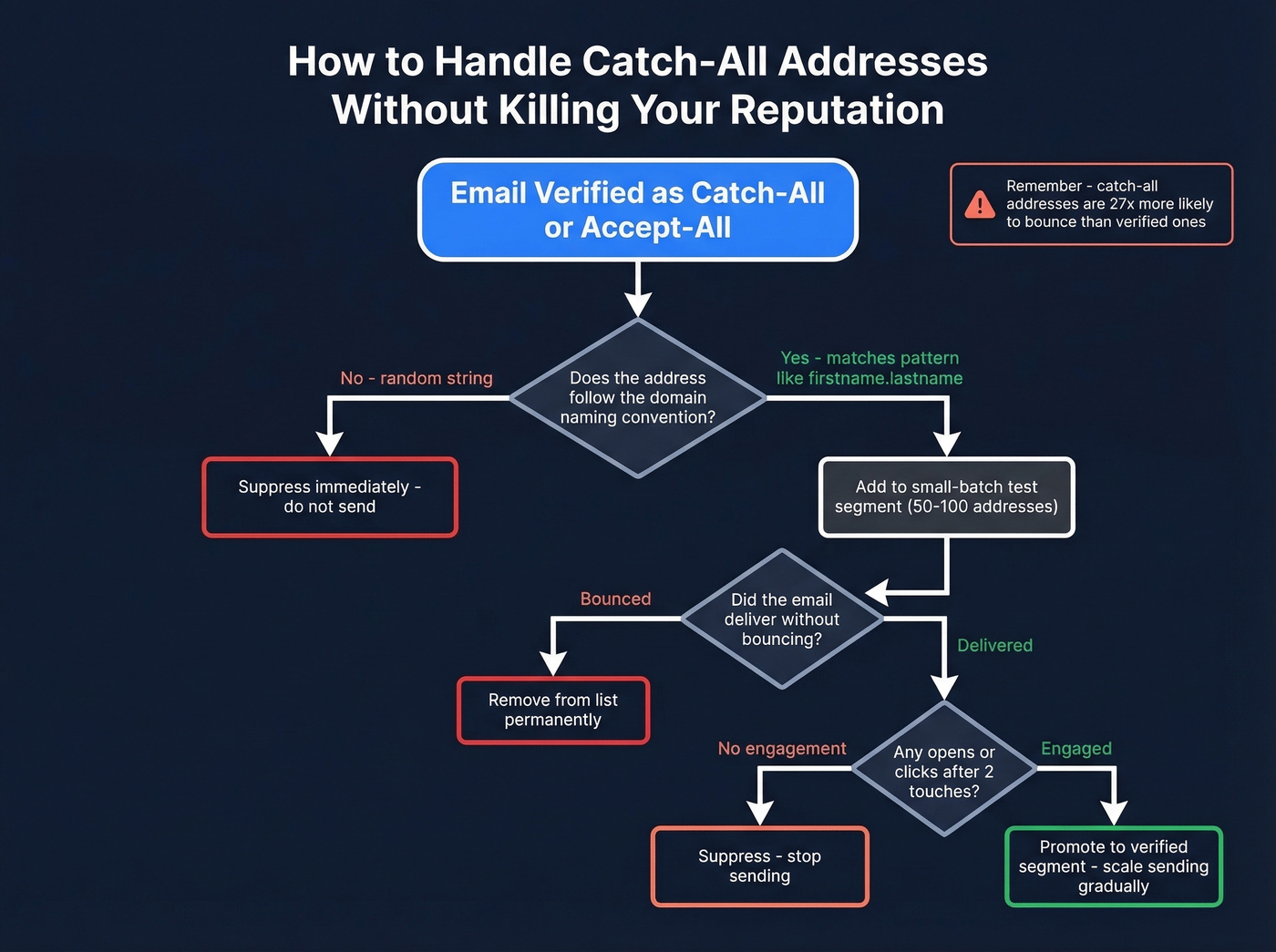
Around 25-35% of B2B domains use catch-all configurations, meaning the server accepts mail sent to any address at that domain - whether the mailbox exists or not. Depending on your ICP and enterprise mix, 10-30% of addresses in a typical B2B list come back as catch-all or unknown. Most tools just flag them as "risky" and leave you to figure it out, which isn't particularly helpful when a third of your target accounts are enterprise companies running catch-all servers. (If you're building lists at scale, pair this with a tighter ideal customer profile so you’re not verifying the wrong people.)
The risk is real. Accept-all addresses are 27 times more likely to bounce than standard verified addresses. And enterprise domains running Secure Email Gateways - Proofpoint, Mimecast, Barracuda - actively block verification probes, making the problem worse for exactly the accounts you most want to reach.
Let's be honest: catch-all handling is the only verification feature that actually separates good tools from mediocre ones in 2026. On standard corporate domains, most mainstream verifiers cluster between 95-99% accuracy. The real test is what happens with accept-all addresses - and that's where tools diverge dramatically.
Four tactics that work:
- Segment and test in small batches. Pull catch-all addresses into a separate list. Send to 50-100 at a time, monitor bounces, and scale only the addresses that deliver.
- Analyze naming conventions. If a domain uses firstname.lastname@ and your contact follows that pattern, confidence goes up. Random strings? Suppress them. (Related: name to email workflows.)
- Score by engagement. Any catch-all address that opens or clicks gets promoted to your verified segment. No engagement after two touches? Suppress. (You can also improve outcomes with personalized outreach instead of blasting.)
- Build engagement gradually. Start with low-volume, high-value content. Don't blast a catch-all segment with a 5-email sequence on day one. (More on safe pacing in email velocity.)

Prospeo's proprietary 5-step verification catches bad addresses before they reach your CRM - including catch-all handling, spam-trap removal, and honeypot filtering. With 98% email accuracy and a 7-day data refresh cycle, your lists stay clean without the quarterly scrub.
Stop re-verifying stale data. Start with emails that are accurate on day one.
Common Verification Mistakes
The most damaging mistake is treating verification as a one-time event. Data decays at 2.1% per month, so the list you verified in January is 12% degraded by July. Re-verify on a schedule - quarterly at minimum, before every send for outbound campaigns. (If you’re running outbound, align this with your B2B cold email sequence cadence.)
Second: lumping accept-all addresses in with verified ones. That 27x bounce risk isn't theoretical. Treat them as a separate, throttled segment with their own sending cadence and monitoring.
Third, too many teams wait for bounces to tell them something's wrong. By the time you see a 5% bounce rate, the reputation damage is already done. Verify proactively, not reactively. A solid list hygiene process catches problems before they surface in your analytics. (For the bigger picture, use an email deliverability guide alongside verification.)
Finally, centralize verification in one tool connected to your CRM. We've watched teams burn double the credits running the same contacts through unsynced tools across marketing and sales. Filter out inactive or unneeded contacts before spending verification credits on them.
Choosing a Verification Tool
In a 10,000-email test by LeadMagic, catch-all resolution rates ranged from just 8% to 15% across mainstream tools - meaning up to 92% of catch-all addresses remain unresolved. When evaluating, prioritize catch-all resolution accuracy first, then real-time API speed, integration depth, and price. (If you’re comparing vendors, start with Bouncer alternatives.)
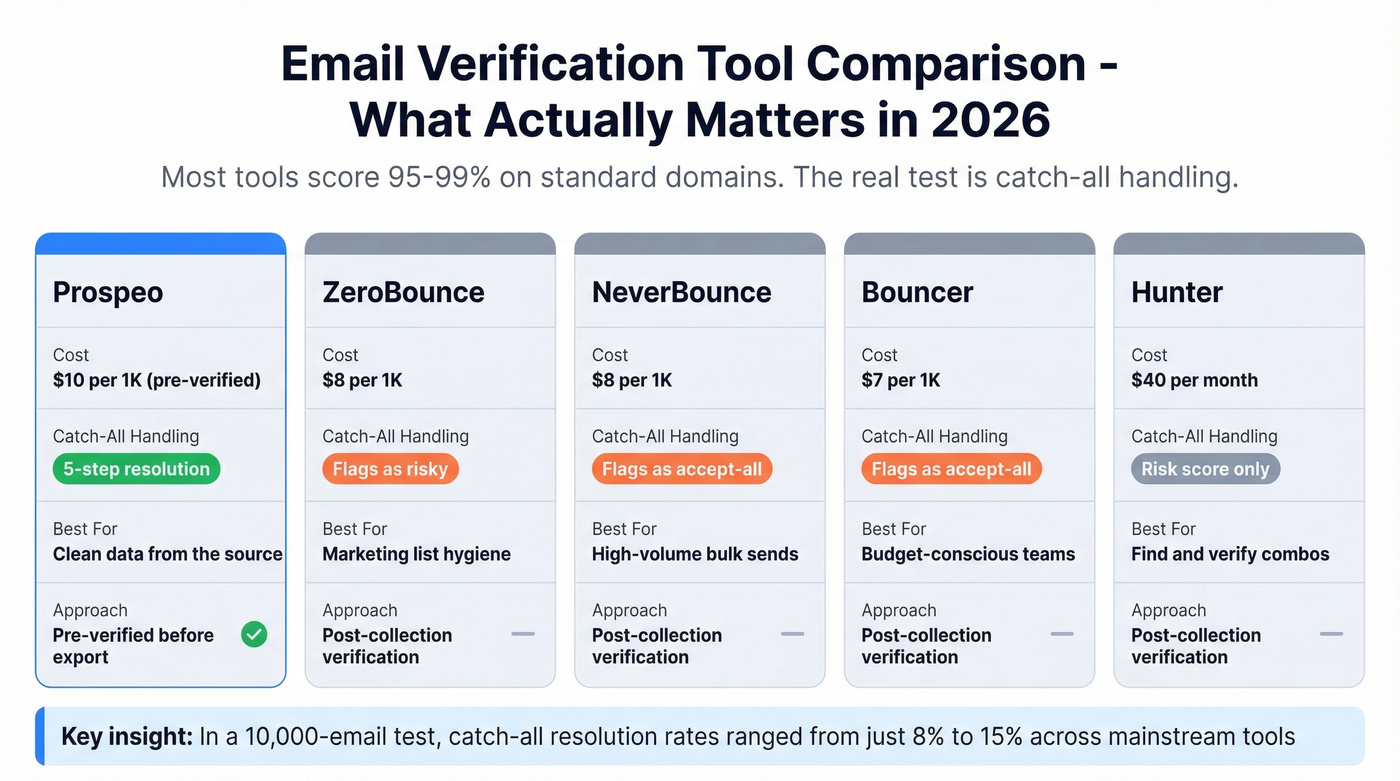
Prospeo takes a different approach. Instead of verifying emails after you've sourced them, its 5-step pipeline - catch-all handling, spam-trap removal, honeypot filtering - runs before you ever see an address. The database covers 143M+ verified emails at 98% accuracy, refreshed on a 7-day cycle. You start with clean data rather than cleaning dirty data after the fact. (If you’re evaluating data sources too, see data enrichment services.)
Skip tools that only flag catch-all addresses as "risky" without giving you resolution. If you're selling into enterprise accounts, that's half your list sitting in limbo.
| Tool | ~Cost per 1K | Catch-All Handling | Best For |
|---|---|---|---|
| Prospeo | ~$10 (pre-verified) | 5-step resolution | Clean data from source |
| ZeroBounce | ~$8 | Flags as risky | Marketing list hygiene |
| NeverBounce | ~$8 | Flags as accept-all | High-volume bulk |
| Bouncer | ~$7 | Flags as accept-all | Budget-conscious teams |
| Hunter | ~$40/mo | Risk score | Find + verify combos |
For teams already using Salesforce or HubSpot, check whether the tool offers native CRM integrations - manual CSV uploads don't scale, and they introduce human error at every step. The consensus on r/sales is that most verification tools perform similarly on standard domains; the real differentiator is how they handle the messy edge cases.
Compliance in 30 Seconds
Buying lists in 2026 isn't just bad practice - it's a compliance liability. CCPA penalties now hit $2,663 per violation, $7,988 for intentional violations, and statutory damages of $107-$799 per consumer per incident. GDPR's ceiling remains EUR 20M or 4% of global revenue. (If you need the legal breakdown, read is it illegal to buy email lists.)
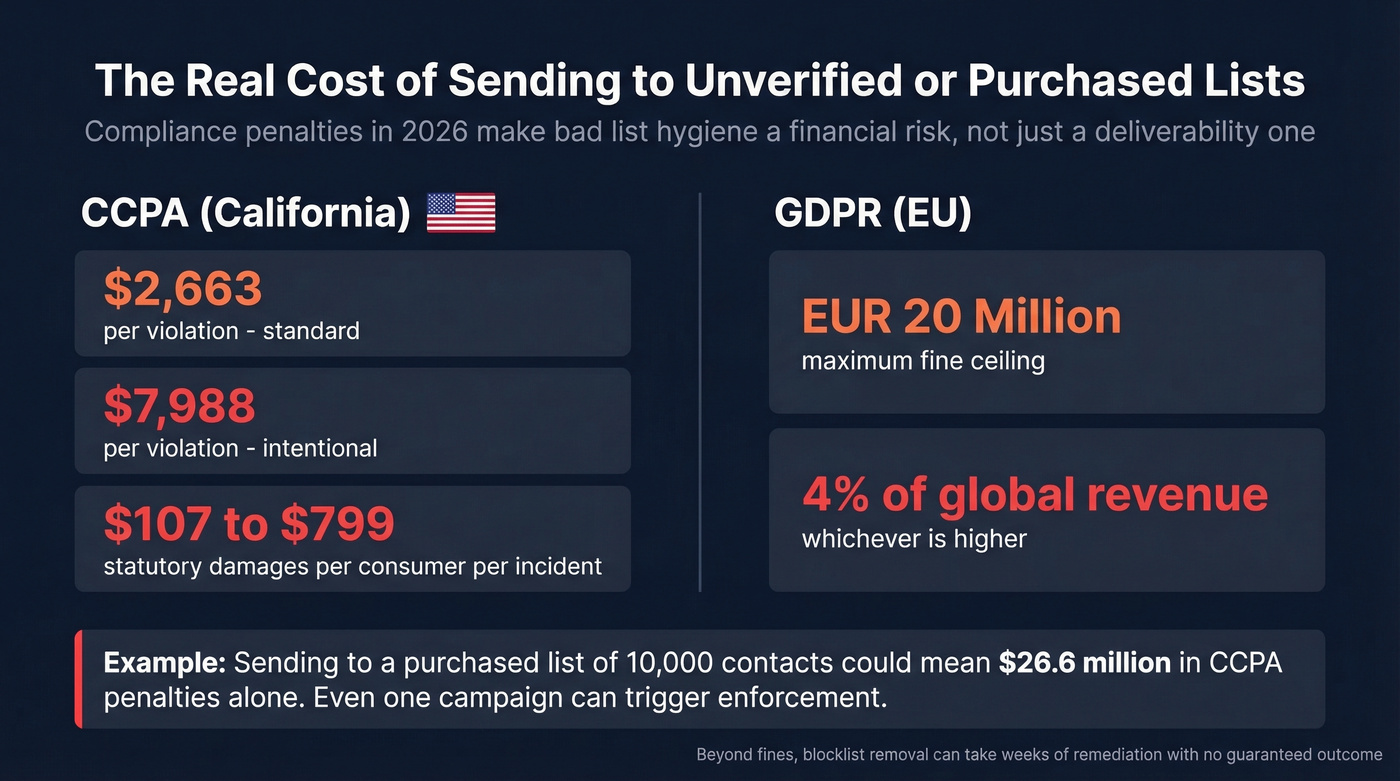
Even if you never get fined, sending to unverified purchased lists is the fastest way to land on a blocklist. And blocklist removal? That's its own special kind of misery - I've seen teams spend weeks on remediation requests that go nowhere. (If you’re already listed, start with Spamhaus blacklist removal.)
Most verification tools leave catch-all addresses as your problem. Prospeo's proprietary infrastructure resolves them before you ever export a list - no small-batch testing, no guesswork. Teams using Prospeo see bounce rates under 4%, down from 35%+.
The best verification practice is never needing to re-verify. That starts with better data.
FAQ
How often should I verify my email list?
Re-verify quarterly for marketing lists and before every send for outbound sequences. B2B data decays ~2.1% per month, so a list verified in January is 12% degraded by July. Lists older than 60 days should be re-verified immediately before use.
What's the difference between verification and authentication?
Verification checks whether an email address exists and can receive mail. Authentication (SPF, DKIM, DMARC) proves your sending domain is legitimate and not spoofed. You need both - verification protects your bounce rate, authentication protects your domain reputation.
Can I verify emails for free?
Yes, several tools offer free tiers. Prospeo provides 75 pre-verified emails per month at no cost with catch-all handling included. Hunter offers 25 free searches monthly. For larger lists, expect to pay $5-$15 per 1,000 verifications.
How should I handle catch-all addresses?
Segment them into a separate list and send in small batches of 50-100. Monitor bounce rates closely, promote addresses that show engagement, and suppress any that bounce or stay inactive after two touches. Never mix catch-all addresses into your main verified segment.