

How to Verify My Email Address: The Complete 2026 Guide
Someone signed up for PayPal with your email address. You're getting Netflix password resets you never requested. Your inbox is filling with verification codes for accounts you didn't create. That's one kind of "verify my email address" problem - and it's surprisingly common, based on sysadmin threads where people report services like PayPal and Peacock allowing functional accounts with unverified emails.
But there's a completely different reason you might be here. You've got a list of email addresses - prospects, leads, customers - and you need to know which ones are real, deliverable, and safe to send to. Most guides conflate these two problems. This one won't.
What You Need (Quick Version)
If you need to verify your own account email (Google, Microsoft, etc.), check your spam folder, request a new verification link, and make sure it hasn't expired. Jump to the account verification section below.
If you need to check whether a specific email address is real and deliverable, use a verification tool. The top three for 2026:
- Prospeo - 98% email accuracy, 5-step verification with catch-all handling. Free tier: 75 emails/month.
- Hunter - solid for quick single-email checks. Free: 50 verifications/month.
- ZeroBounce - best for bulk list cleaning at scale. Free: 100/month.
If your bounce rate is above 2%, you've got a data quality problem actively damaging your sender reputation. Keep reading.
How to Verify My Email Address for Account Access
If a service is asking you to confirm your email before you can use your account, check your spam and promotions folders first - verification emails land there more often than you'd think. Don't see it? Request a new verification link from the service's settings page. Most links expire within 24-72 hours, so if you waited too long, you'll need a fresh one.
For Google accounts, head to myaccount.google.com and follow the security prompts. For Microsoft, use account.microsoft.com - they also let you resend verification from the "Manage how you sign in to Microsoft" page, where a Verify button appears next to unverified aliases.
Now for the harder, more consequential question most professionals face: how do you verify that someone else's email address actually works before you send to it?
How Email Verification Works
Every verification tool - free or enterprise-grade - runs some version of the same underlying process. Understanding it helps you spot which tools are doing real work and which are cutting corners.
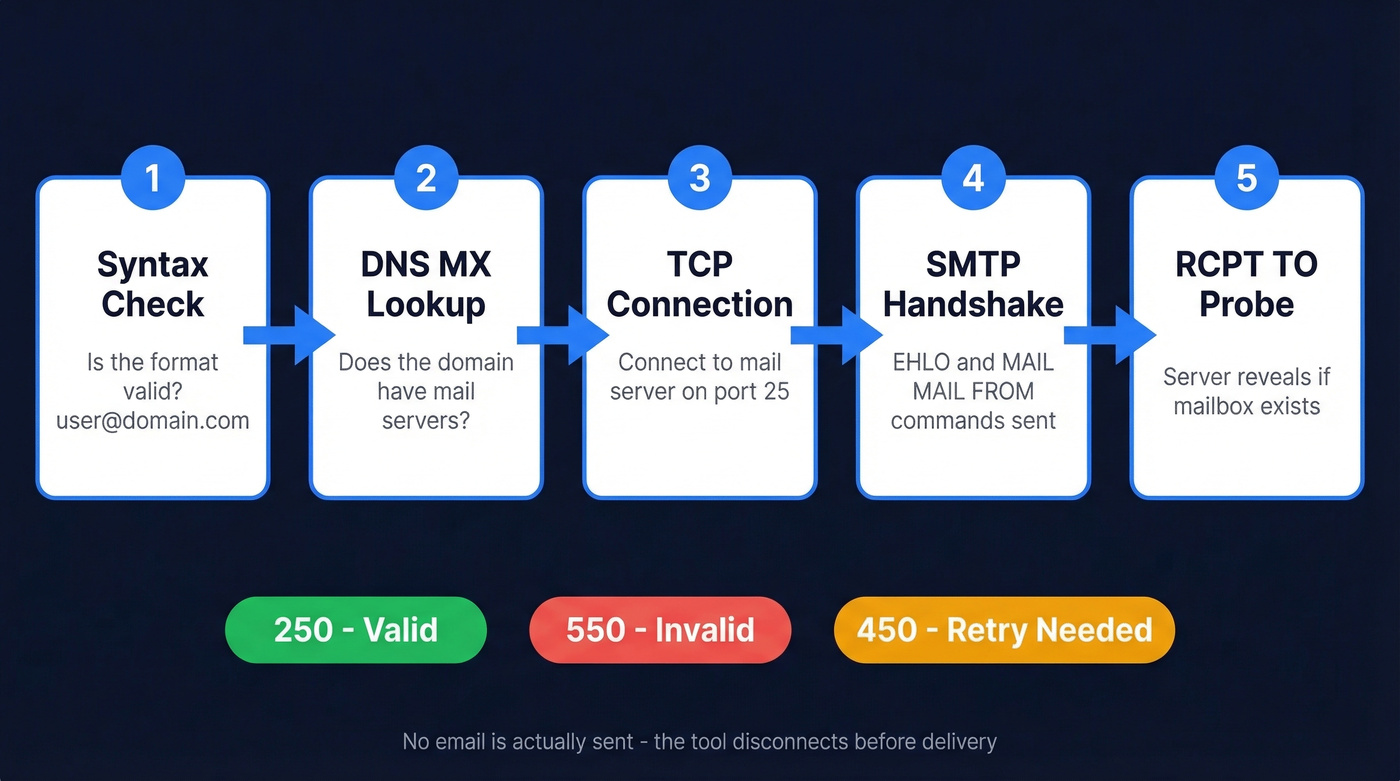
The process follows five steps:
DNS MX Lookup. The tool queries the domain's DNS records to find its mail exchange servers. No MX record means the domain can't receive email. One common mistake developers make is checking A/AAAA records instead of MX records. A domain can have email without having a website, so A-record checks are wrong for email validation.
TCP Connection. The tool connects to the highest-priority MX server on port 25 - the standard SMTP port.
SMTP Handshake. The tool initiates a conversation with the mail server using EHLO and MAIL FROM commands, mimicking the start of an email delivery.
RCPT TO Probe. This is where the real answer comes from. The tool sends a RCPT TO command with the target email address, and the server responds with a status code revealing whether the mailbox exists.
| SMTP Code | Meaning | What It Means for You |
|---|---|---|
| 250 | Mailbox accepted | Address likely valid |
| 550 | No such user | Address doesn't exist |
| 450/421 | Temporary failure | Retry needed (greylisting) |
This entire process happens without actually delivering a message. The tool hangs up before sending any content. That's how you check if an email exists without sending one.
But a single SMTP probe isn't enough. Modern mail servers increasingly obscure mailbox existence to prevent enumeration attacks. The best verification tools layer syntax checking, MX validation, SMTP probing, and behavioral/historical signals into a probability score rather than treating it as a binary yes/no.
If you want a deeper technical breakdown, see our guide on how to check valid email id.

Prospeo's 5-step verification goes beyond basic SMTP probes - it layers catch-all detection, spam-trap removal, and honeypot filtering to deliver 98% email accuracy. 75 free verifications per month, no credit card required.
Verify your first 75 emails free and see what 98% accuracy looks like.
Why Verification Matters
Validity's 2024 benchmark puts global inbox placement around 84% - roughly 1 in 6 emails never make it to the inbox. Email lists decay at roughly 23% per year. People change jobs, companies rebrand domains, inboxes get deactivated. An analysis of emails verified throughout 2025 found 2.6 billion invalid addresses - and that 23% figure is a low-end estimate because catch-all domains are impossible to validate without emailing and waiting to see if they bounce.
If you're trying to protect your domain long-term, pair verification with a real email deliverability guide (authentication, list hygiene, and sending practices).
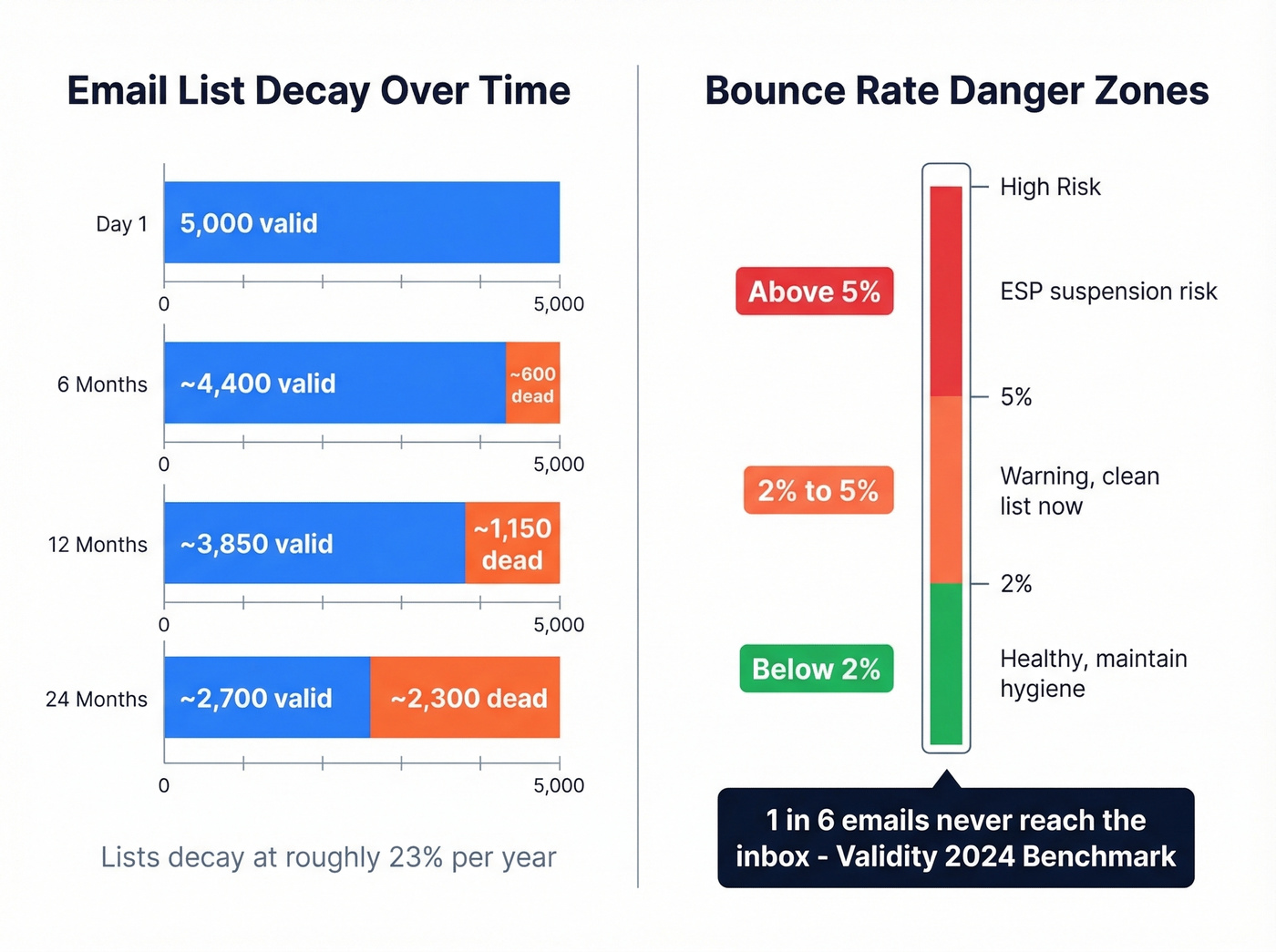
Here's what that looks like in practice. You've got a 5,000-contact list you built six months ago. At 23% annual decay, roughly 12% of those addresses - around 600 - are already dead. You launch a campaign. 400 hard bounces hit your sending domain in a single afternoon. Your ESP flags you. Your sender reputation tanks. Future emails, even to valid addresses, start landing in spam. We've seen teams lose months of sender reputation work from a single uncleaned campaign.
| Bounce Rate | Status | Action |
|---|---|---|
| Below 2% | Healthy | Maintain hygiene |
| 2-5% | Warning | Clean list immediately |
| Above 5% | Red flag | Risk of ESP suspension |
If you need a deeper dive on thresholds, codes, and remediation, see our email bounce rate guide.
Industry benchmarks tell the story. IT and software companies average 0.90% bounce rates. Financial services sit around 1.20%. Construction - where email databases tend to be less maintained - hits 2.20%. If you're above your industry average, verification isn't optional.
The Catch-All Problem
Look, this is the part most verification guides gloss over: more than 9% of business email addresses sit on catch-all domains. A catch-all server accepts mail to any address at that domain - ceo@company.com, asdfgh@company.com, literally-anything@company.com. They all return a 250 OK status code.
If you’re seeing lots of “risky” results, you’ll also want a plan for spam trap removal before your next send.
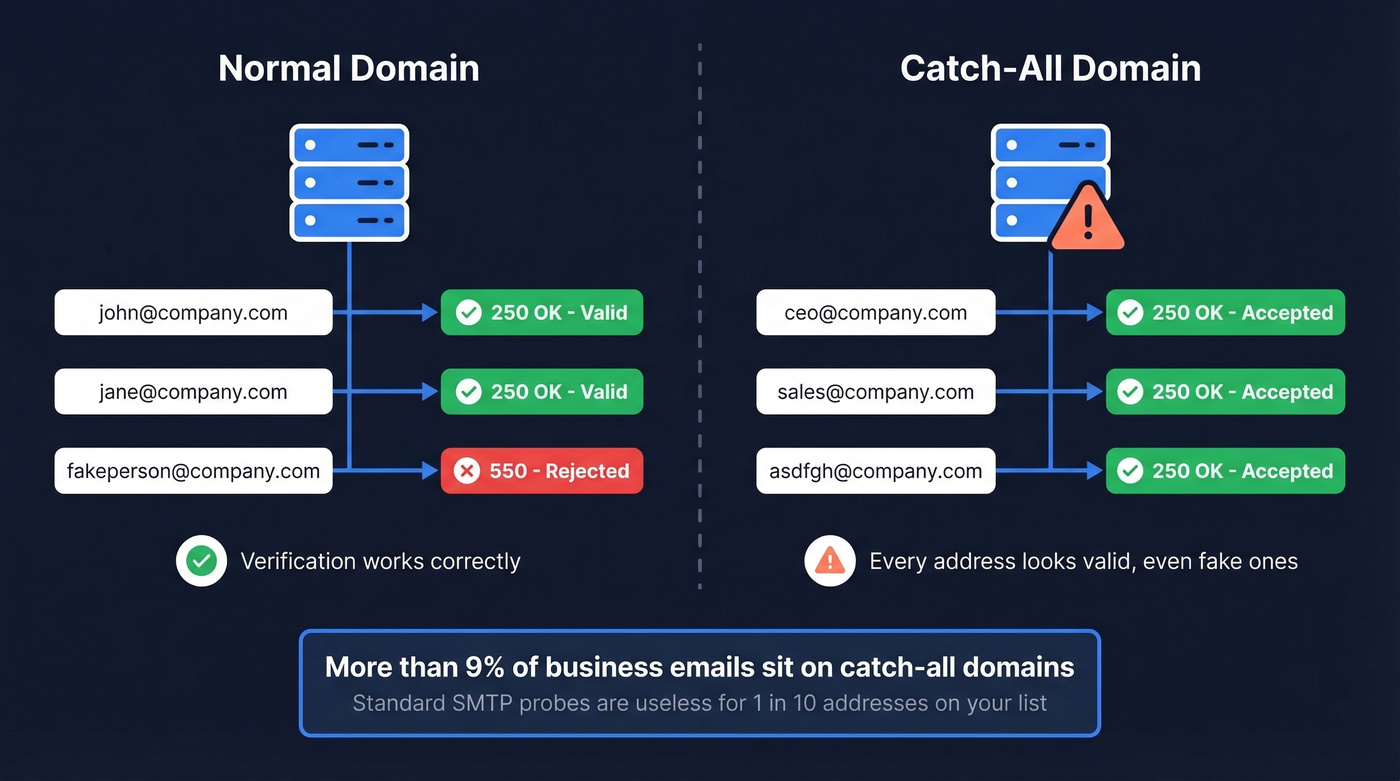
For roughly 1 in 10 addresses on your list, the standard SMTP probe is useless. The server says "valid" regardless.
Advanced tools solve this with additional layers - catch-all detection alongside spam-trap removal and honeypot filtering, going beyond the basic SMTP handshake to flag addresses that look "valid" but aren't trustworthy. The distinction matters: treat catch-all results as unverified, not invalid. You can still send to them, but segment them separately and monitor bounce rates closely.
If you're running deals under $10k and sending cold email, catch-all handling matters more than overall accuracy numbers. A 98% accuracy tool that punts on catch-alls will still wreck your domain on the 9% of addresses where it matters most.
Best Email Verification Tools
Every verification tool markets 99%+ accuracy. The reality is different. The only independent benchmark with published methodology - testing 15 tools against 3,000 real business emails - found Hunter leading at 70% overall accuracy, followed by Clearout at 68.37% and Kickbox at 67.53%. That's a massive gap between marketing claims and measured results. In our testing, this gap is the single biggest trap in the verification market.
If you’re comparing vendors, our roundup of Bouncer alternatives is a good starting point.
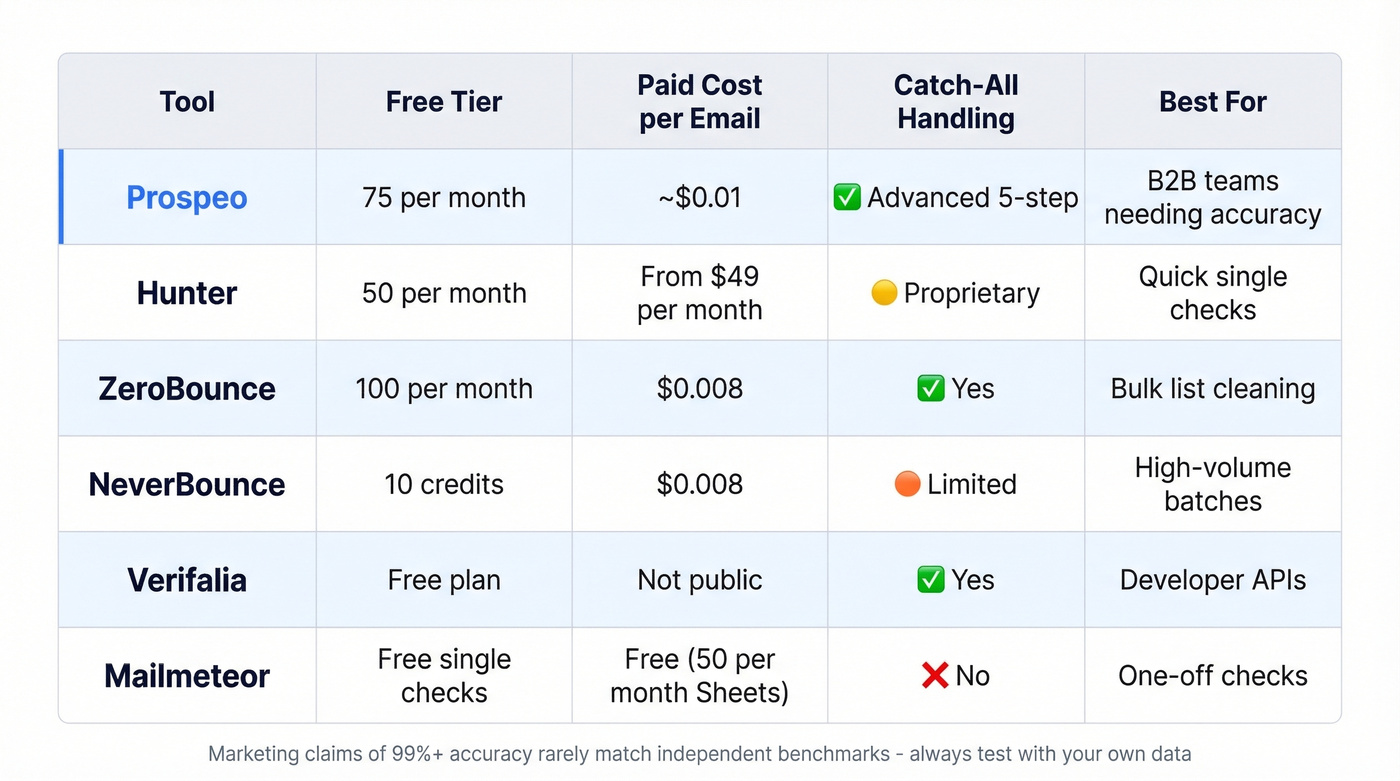
The benchmark used Hunter's own dataset, which introduces bias - but it's the most transparent test available.
| Tool | Free Tier | Cost/Email (Paid) | Catch-All Handling | Best For |
|---|---|---|---|---|
| Hunter | 50/month | From $49/mo | Proprietary | Quick single checks |
| ZeroBounce | 100/month | $0.008 | Yes | Bulk list cleaning |
| NeverBounce | 10 credits | $0.008 | Limited | High-volume batches |
| Verifalia | Free plan | Not public | Yes | Developer APIs |
| Mailmeteor | Free single checks | Free (50/mo Sheets) | No | One-off checks |
| Email Hippo | 100/day | Not public | Yes | Spot-checking |
Prospeo
Prospeo runs a 5-step verification pipeline: syntax validation, MX lookup, SMTP handshake, catch-all detection, and spam-trap/honeypot removal. The result is 98% email accuracy with data refreshing every 7 days, compared to the 6-week industry average. Snyk's outbound team saw bounce rates drop from 35-40% to under 5% after switching. Meritt went from 35% bounces to under 4%, tripling their pipeline from $100K to $300K per week.
If you’re building lists (not just cleaning them), pair verification with data enrichment services to keep records current.
The free tier gives you 75 verified emails plus 100 Chrome extension credits per month - enough to test accuracy before committing. Paid plans run about $0.01 per email with no contracts and no sales calls required. For B2B teams who can't afford bounces tanking their domain reputation, this is the strongest option on the list.
Hunter
You can verify a single email address on Hunter's site without creating an account - just type it in and get a result. For quick spot-checks, nothing is faster. The free tier gives you 50 verifications per month, and paid plans start at $49/month.

Hunter checks syntax, domain info, and server response, then cross-references against their own B2B database. They also have a proprietary catch-all verification solution with "several major email providers," though technical details aren't published. With 6M+ users, 4.6 on Capterra, and 4.4 on G2, it's a proven tool for lightweight B2B prospecting and one-off checks.
If you like Hunter but need more options, see our tested list of Hunter alternatives.
ZeroBounce
ZeroBounce is the workhorse for bulk list cleaning. Their free email verifier gives you 100 checks per month when you sign up with a business/premium domain, and pay-as-you-go pricing starts at $0.008 per email - one of the most affordable options for high-volume work.
Use this if you're cleaning lists of 10,000+ contacts regularly and need reliable bulk processing at a low per-email cost. Skip this if you need real-time single-email verification baked into a prospecting workflow - ZeroBounce is built for batch jobs, not inline checks.
NeverBounce
NeverBounce offers 10 free credits to start and bulk pricing from $0.008 per email. It's a solid, no-frills option for marketing teams running large list imports before campaign launches. Catch-all handling is limited compared to tools with multi-step verification, so expect some unresolved addresses on catch-all domains.
Verifalia
Verifalia stands out for developers who need granular API responses. Where most tools return simple valid/invalid flags, Verifalia breaks results into detailed categories - valid, invalid, risky, and unknown - each with sub-codes explaining why. If you're building verification into a signup flow or internal tool and need programmatic control over how different result types are handled, Verifalia's API is the most detailed in this list.
Mailmeteor
Free single-email checks with no signup at mailmeteor.com/email-checker. Also offers a Google Sheets add-on with 50 free verifications per month. Best for one-off checks when you just need a quick answer and don't want to create yet another account.
Email Hippo
Offers 100 free verifications per day - the most generous daily free tier on this list, resetting at midnight UTC. Their site also has a solid explanation of greylisting and why some verifications need retry logic. Good for casual spot-checking, not for production workflows.
Mistakes That Kill Deliverability
Treating verification as a one-time event. At 23% annual decay, a list you cleaned in January has ~12% dead addresses by July. Verification is recurring, not a project.
Skipping capture-point validation. Webform submissions, CSV imports, manual CRM entries - every new email entering your system should be verified on arrival, not during quarterly cleanups. Developers often point to Notion-like signup flows that block non-existent addresses before a confirmation email is even sent. Your system should do the same.
Ignoring catch-all results. Lumping catch-all addresses with verified ones inflates your "valid" count and sets you up for bounces. Segment them. Monitor them separately.
Trusting syntax-only checks. A well-formatted email address (john.smith@company.com) can be completely non-existent. If your tool stops at syntax and MX, it isn't actually verifying anything.
Not re-verifying on a cadence. For lists under 10,000 contacts, verify every 2-4 months minimum. For larger lists, every 2 weeks is ideal. The consensus on r/webscraping confirms what we've seen in practice: DIY SMTP checks at scale hit rate limits and timeouts fast. Use a tool with proper IP rotation and retry infrastructure.
If you’re sending cold outreach, also watch your email velocity so verification gains don’t get erased by throttling and spam signals.
Your list decays 23% per year. Prospeo refreshes its 143M+ verified emails every 7 days - not every 6 weeks like competitors. That means fewer bounces, cleaner sends, and a sender reputation that stays intact.
Clean your list before your next campaign wrecks your domain.
FAQ
How do I verify my email address without sending a message?
SMTP mailbox probing checks whether an address exists by initiating a partial handshake with the mail server - connecting, asking if the recipient exists, then disconnecting before delivering anything. Tools like Prospeo, Hunter, and ZeroBounce automate this at scale with IP rotation and retry logic. No message is ever sent.
What does "catch-all" mean in verification results?
A catch-all domain accepts mail to any address, returning "valid" even for fabricated ones like asdfgh@company.com. Over 9% of business emails sit on catch-all domains. Treat these results as unverified - not invalid, but not safe to trust without separate monitoring.
What's a good email bounce rate?
Below 2% is healthy across most industries. Between 2-5% signals list quality issues needing immediate attention. Above 5% risks ESP suspension and lasting sender reputation damage. IT/software companies average around 0.90%; construction averages 2.20%.
Is there a free tool to verify email addresses?
Yes - several offer generous free tiers. Prospeo gives 75 free verifications per month with full 5-step verification including catch-all handling. Hunter offers 50/month, ZeroBounce offers 100/month, and Email Hippo provides 100/day. For single one-off checks, Mailmeteor requires no signup at all.
How often should I re-verify my email list?
Every 2-4 months for lists under 10,000 contacts; every 2 weeks for larger lists. At roughly 23% annual decay - nearly 2% per month going stale - skipping verification for six months means you're sending to a list that's ~12% dead weight.