

Video Prospecting Best Practices That Actually Get Replies
An SDR team we worked with last year recorded 200 personalized videos in a single week. Reply rates didn't budge. They blamed video prospecting as a channel. The real problem? Half their emails bounced, and the other half rendered as broken thumbnails in Outlook. The tactic wasn't broken - the execution was.
Cold email reply rates sit around 3-5.1% on average. Practitioners using video in their sequences report 3x lifts on that baseline. The difference isn't the camera. It's the setup.
The Short Version
- Keep videos under 60 seconds and place them as Step 2 in your sequence, not Step 1.
- Never attach video files - use the thumbnail-link method and warm your domain first.
- Verify your prospect list before recording anything. Bounced emails waste your highest-effort outreach.
Does Video Prospecting Actually Work?
The most widely cited benchmark comes from SalesLoft research showing a 16% open bump, 26% increase in reply rates, and 4x higher click-through rates when video is embedded in outbound sequences. The original study is hard to track down, but the directional signal is consistent across practitioners.
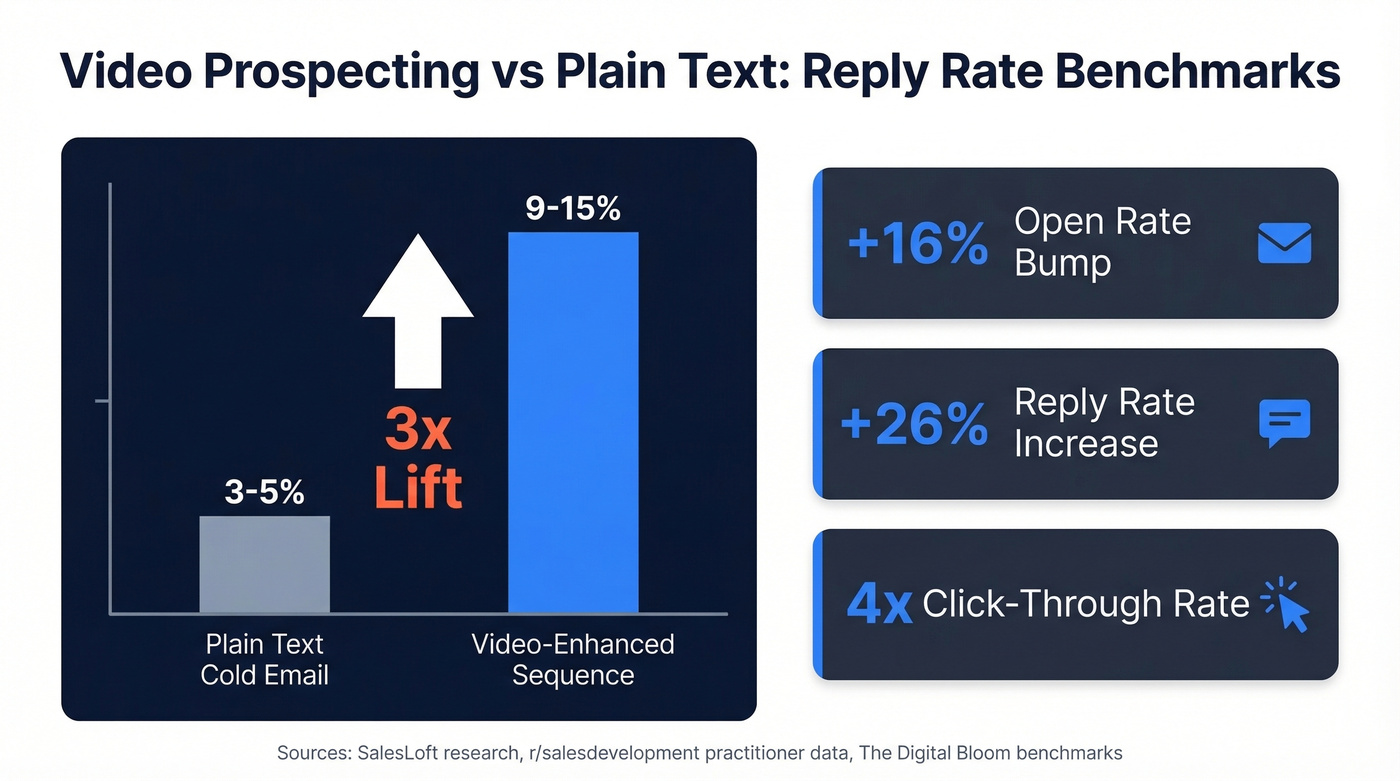
On r/salesdevelopment, one SDR shared that sequences with video performed 3x better on overall reply rate compared to plain text. Against a 3-5.1% baseline, that puts video-enhanced sequences in the 9-15% range. Not magic. But significant enough to justify the effort - if you do it right.
Sending Video Without Killing Deliverability
This is the section most guides skip, and it's the one that matters most.
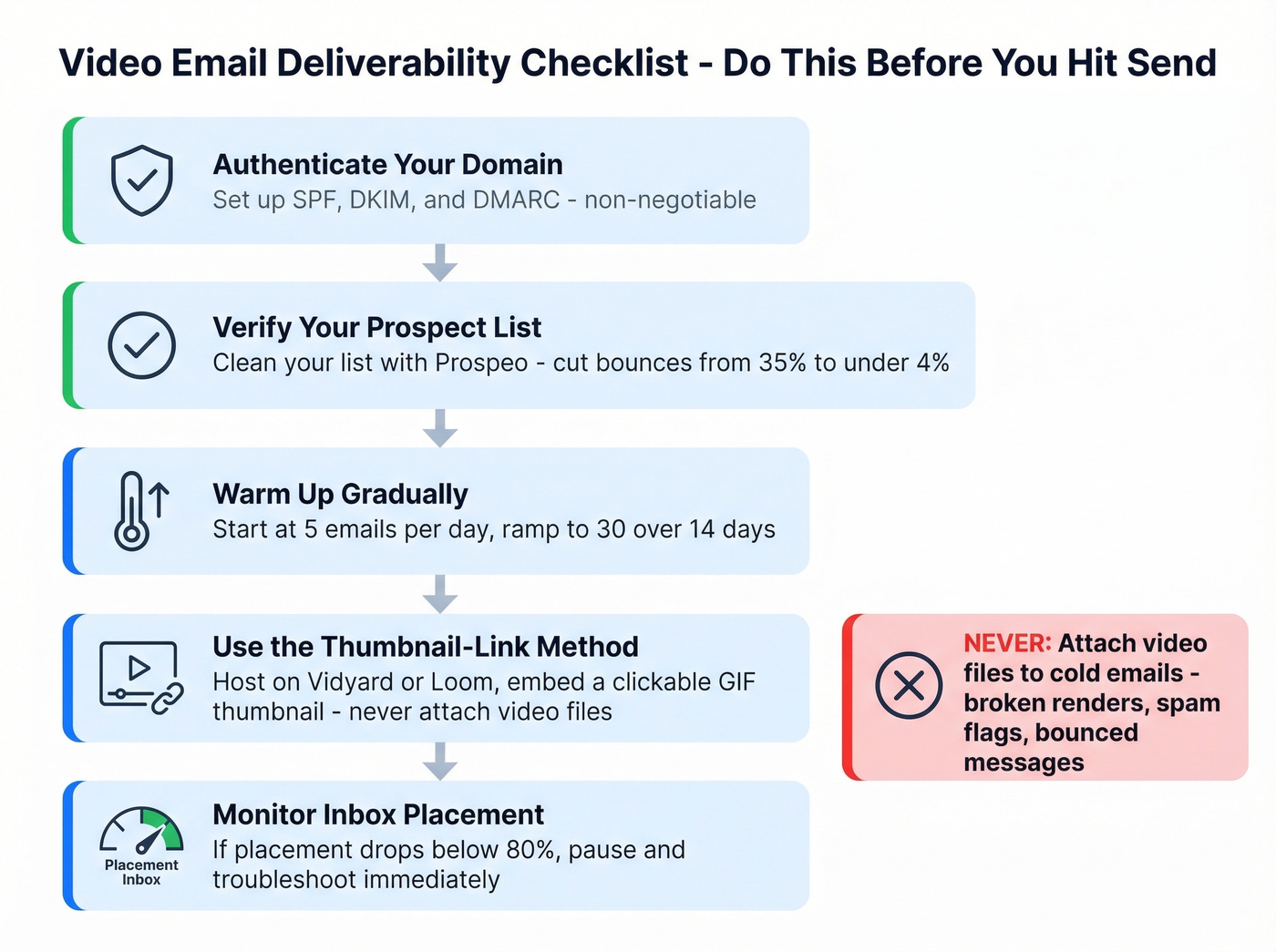
Use the thumbnail-link method. Gmail, Outlook, and Yahoo don't support inline video playback. Embedding a video file means broken renders and spam flags. Don't attach video files to cold emails - large attachments can bounce, and attachments from unknown senders hurt sender reputation. Host your video on Vidyard, Loom, or a custom subdomain, then drop a static or GIF thumbnail into your email body that links to the hosted version. This keeps your emails lightweight and renders cleanly across every major client.
Authenticate your domain. Set up SPF, DKIM, and DMARC before you send a single video email. Non-negotiable.
Warm up gradually. Start at 5 emails/day and ramp to 30 over 14 days. If inbox placement drops below 80%, pause and troubleshoot.
Verify your list. Authentication alone won't save you if you're sending to dead addresses. Run your prospect list through Prospeo's email verification before recording a single video - 98% accuracy means you're not wasting personalized effort on bounces. We've seen teams cut bounce rates from 35% to under 4% just by cleaning their lists first.


Every personalized video you send to a bounced address is wasted effort. Prospeo's 98% email accuracy and 7-day data refresh mean your highest-effort outreach actually lands in real inboxes - not the void.
Verify your prospect list before you hit record.
7 Practices That Separate Good from Wasted Effort
1. Keep it under 60 seconds. Vidyard's analysis of 943,305 videos found that 65% of viewers stay engaged through videos under one minute. For prospecting, shorter is always better. Aim for 30-45 seconds.
2. Personalize with prospect-specific triggers. Reference a recent funding round, a job change, a blog post they wrote. Generic "Hey, I noticed your company does X" isn't personalization - it's a template with a merge field. (If you need a system, start with sales prospecting techniques that scale.)
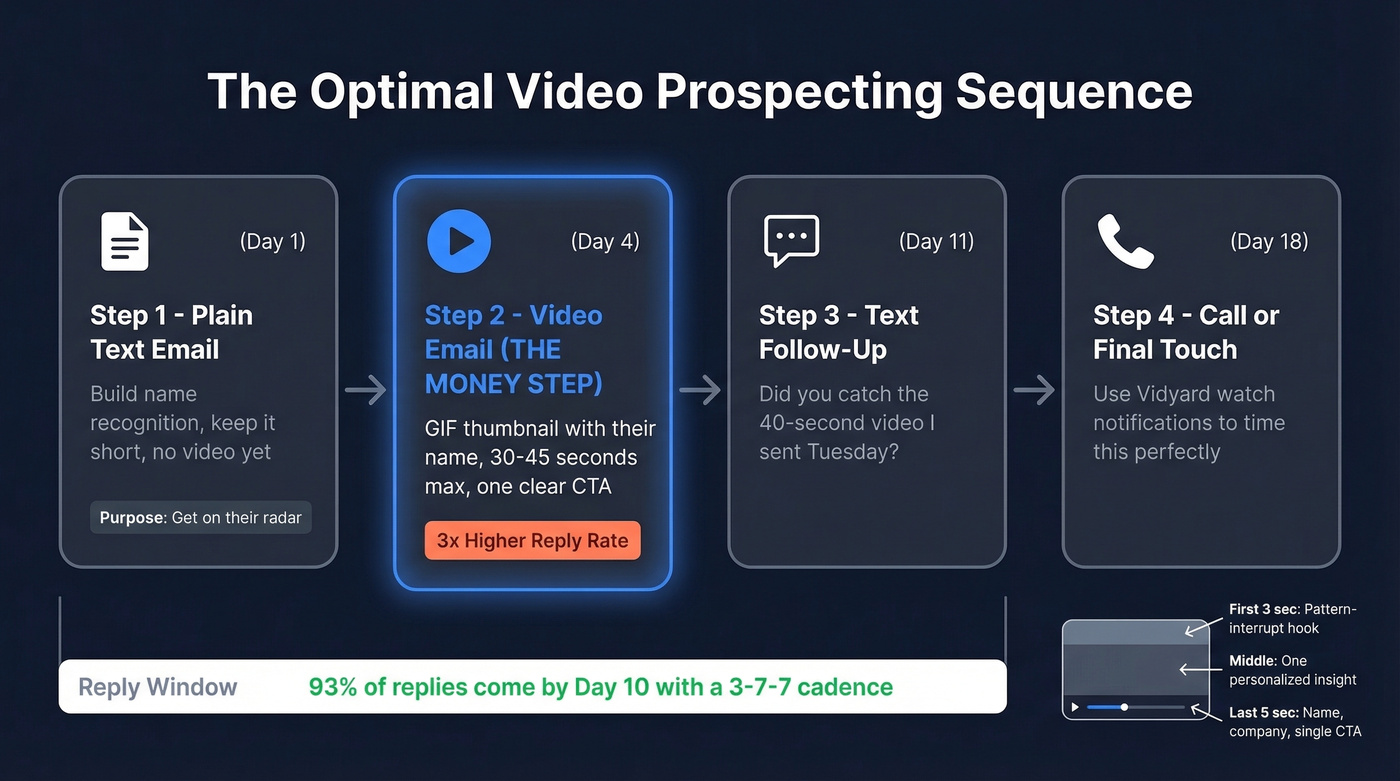
3. Place video as Step 2, not Step 1. In our testing, Step 2 consistently outperforms. Your first touch builds name recognition; the video capitalizes on it. This pattern holds whether you're selling to mid-market or enterprise.
4. Use pattern-interrupt hooks. Open with "No one's talking about this..." or "I hope I'm not the first person to say this..." - save your name and company for the end. The first three seconds determine whether they keep watching.
5. Optimize your thumbnail. A GIF thumbnail showing you waving or holding a whiteboard with their company name is a strong pattern-interrupt. Place it after your opening line but before the halfway point of your email. Burying it at the bottom as a text link kills click-through.
6. Include one clear CTA. "Book 15 minutes here" or "Reply with your thoughts." One action. Not three. (More examples: email call to action.)
7. Follow up with a short text. Your next sequence step should reference the video: "Did you catch the 40-second video I sent Tuesday?" Vidyard can notify you when a prospect watches - use that signal to time your follow-up call. In cold email benchmarks, a 3-7-7 day follow-up cadence captures 93% of replies by Day 10. (If you want copy you can paste, use these sales follow-up templates.)
Scaling with AI Personalization
Recording a unique video for every prospect is a 2021 tactic. In 2026, you record once and use AI to personalize at scale.
Vidyard reported a 12x increase in AI avatar adoption, with AI-generated videos automatically triggered by CRM actions. Sendspark supports the "record once, personalize many" workflow - you film a single template and the tool generates personalized versions for your entire list in minutes. AI-personalized campaigns show up to 35% higher open rates compared to generic sends.
Here's the thing: if you're sending more than 20 videos a week manually, you'll burn out your team before you see results. AI personalization isn't a nice-to-have anymore. It's the only way to maintain quality at volume. (Related: AI cold email outreach.)
Best Tools + Pricing
| Tool | Best For | Free Tier | Paid From |
|---|---|---|---|
| Vidyard | Analytics + CRM teams | $0 (limited, 30-min max) | $59/user/mo (annual) |
| Loom | Simplest setup | $0 (25 videos, 5-min cap) | $18/user/mo |
| Sendspark | AI personalization at scale | Free tier available | ~$29-49/user/mo |
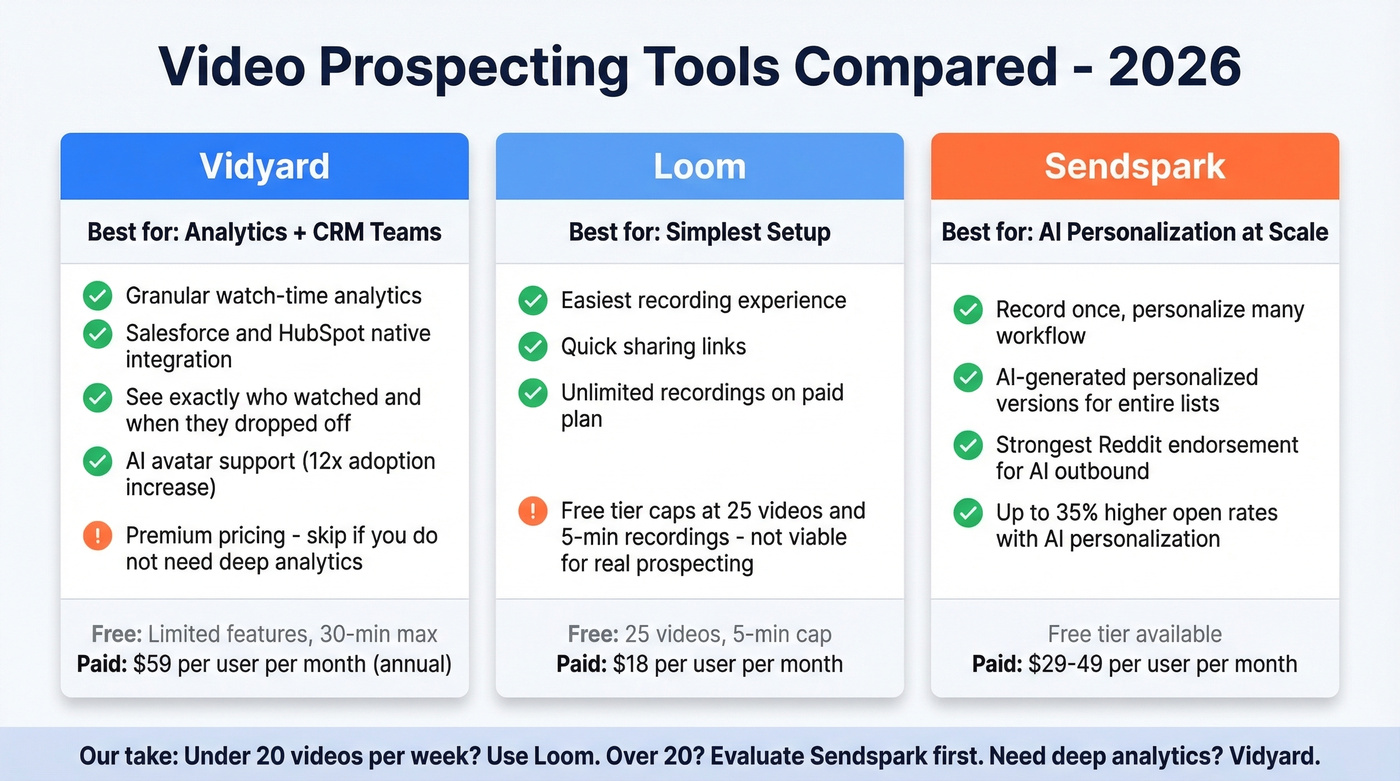
The free Loom tier caps you at 25 videos and 5 minutes per recording, which kills real prospecting use. The $18/mo Business plan unlocks unlimited recordings and is where Loom actually becomes viable for outbound. (If Loom is your stack, see the Loom video cold email playbook.)
Vidyard is the deepest platform for sales teams. Analytics show exactly who watched, how long, and when they dropped off, and it integrates with Salesforce and HubSpot natively. Skip this if your team doesn't need granular watch-time data - you're paying a premium for those analytics.
For volume outbound where you can't record 50 unique videos a week, Sendspark is the tool to evaluate first. It gets the strongest Reddit endorsement for AI-powered personalization.
The Mistake That Wastes It All
Let's be honest: most teams don't need better video scripts. They need cleaner data.
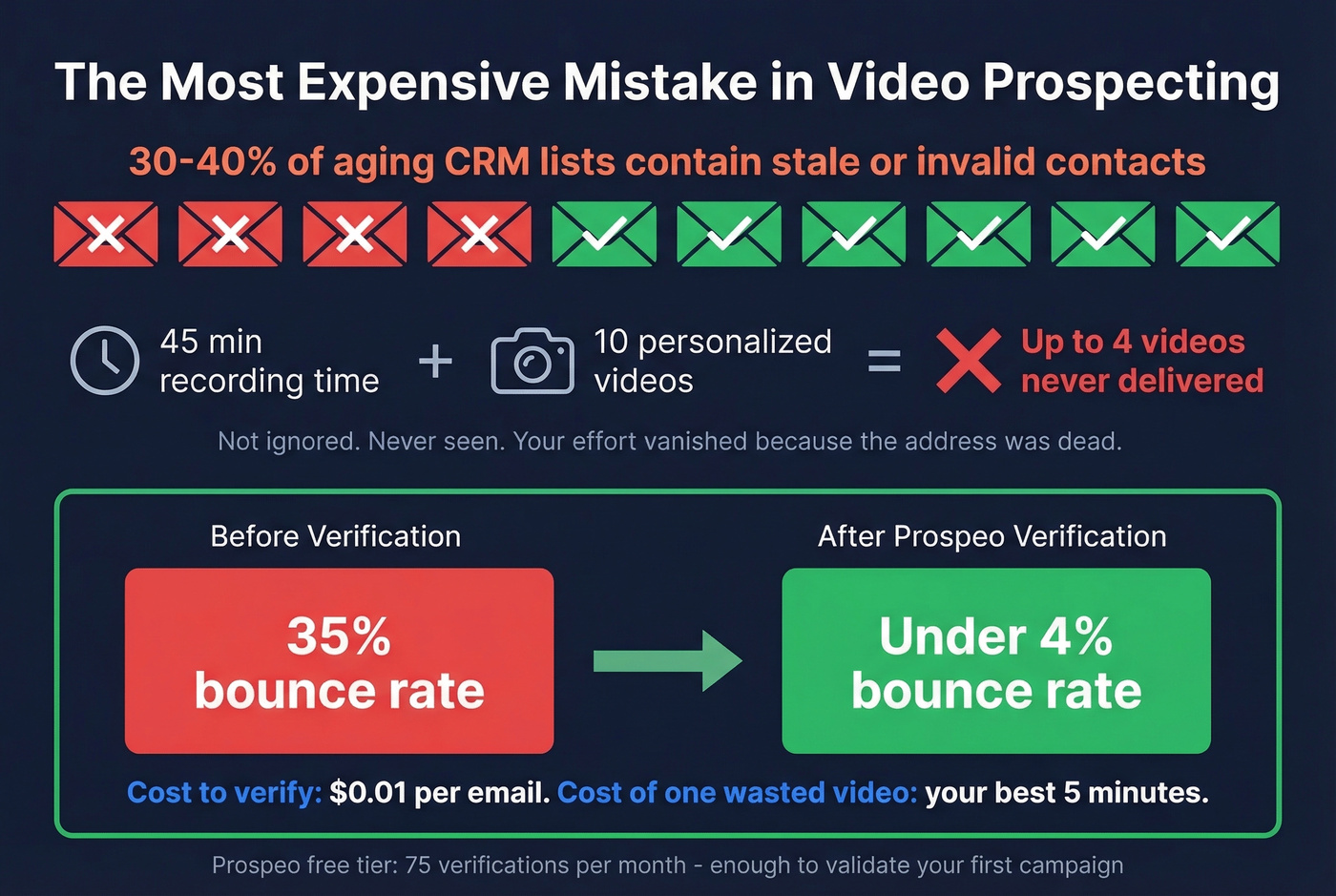
30-40% of aging CRM lists contain stale or invalid contacts. A bounced email means your personalized, 45-second video - the one where you held up a whiteboard with their company logo - was never delivered. Not ignored. Never seen. That's the most frustrating outcome in outbound: effort that vanishes into the void because the address was dead before you hit send. (Benchmarks and fixes: email bounce rate.)
We've watched teams burn through entire weeks of video production sending to dead addresses. Before you record a single video, verify your target list. Prospeo's free tier gives you 75 verifications per month - enough to validate your first campaign without spending a dollar. (If you’re auditing the whole stack, start with an email deliverability guide.)
Teams using Prospeo cut bounce rates from 35% to under 4%. At $0.01 per verified email, cleaning your entire video prospecting list costs less than one wasted hour of recording videos for dead addresses.
Stop losing personalized videos to invalid emails.
FAQ
How long should a prospecting video be?
Under 60 seconds. Vidyard's benchmark study of 943K+ videos found 65% of viewers stay engaged through sub-minute content. For cold outreach to strangers, aim for 30-45 seconds - enough to deliver one hook, one insight, and one CTA.
Should I attach a video file to my cold email?
Never. Gmail, Outlook, and Yahoo don't support inline video playback, so attachments render as broken files or trigger spam filters. Host on Vidyard or Loom and embed a clickable GIF thumbnail that links to the hosted version.
How do I prevent video emails from landing in spam?
Set up SPF, DKIM, and DMARC on your sending domain, then warm up from 5 to 30 emails/day over two weeks. Verify your prospect list before sending - catching invalid addresses that cause bounces is just as important as authentication.
What's the best sequence placement for a video?
Step 2 in a multi-touch sequence consistently outperforms Step 1. Your first touch (plain text) builds name recognition; the video in Step 2 capitalizes on that familiarity and drives 2-3x higher engagement than a cold video open.