

9 Best Video Prospecting Tools in 2026 (With What They Actually Cost)
Your SDR team recorded 200 personalized videos last month. Open rates looked great. Replies? Crickets. Then someone checked the bounce log - 34 of those videos went to dead email addresses. That's roughly two hours of recording time, gone.
Video in sales emails drives a 26% increase in replies and 4x higher click-through rates. Vidyard's benchmark study across 940,000+ business videos found BDRs using video for first touches see up to 5x more replies. Compare that to the cold email baseline - platform-wide reply rates average just 3.43% - and the case for video is clear. But here's the stat that should keep SDR managers up at night: 17% of cold emails never reach the inbox. Apply that failure rate to videos that took 3-5 minutes each to record, and you start to see the real problem.
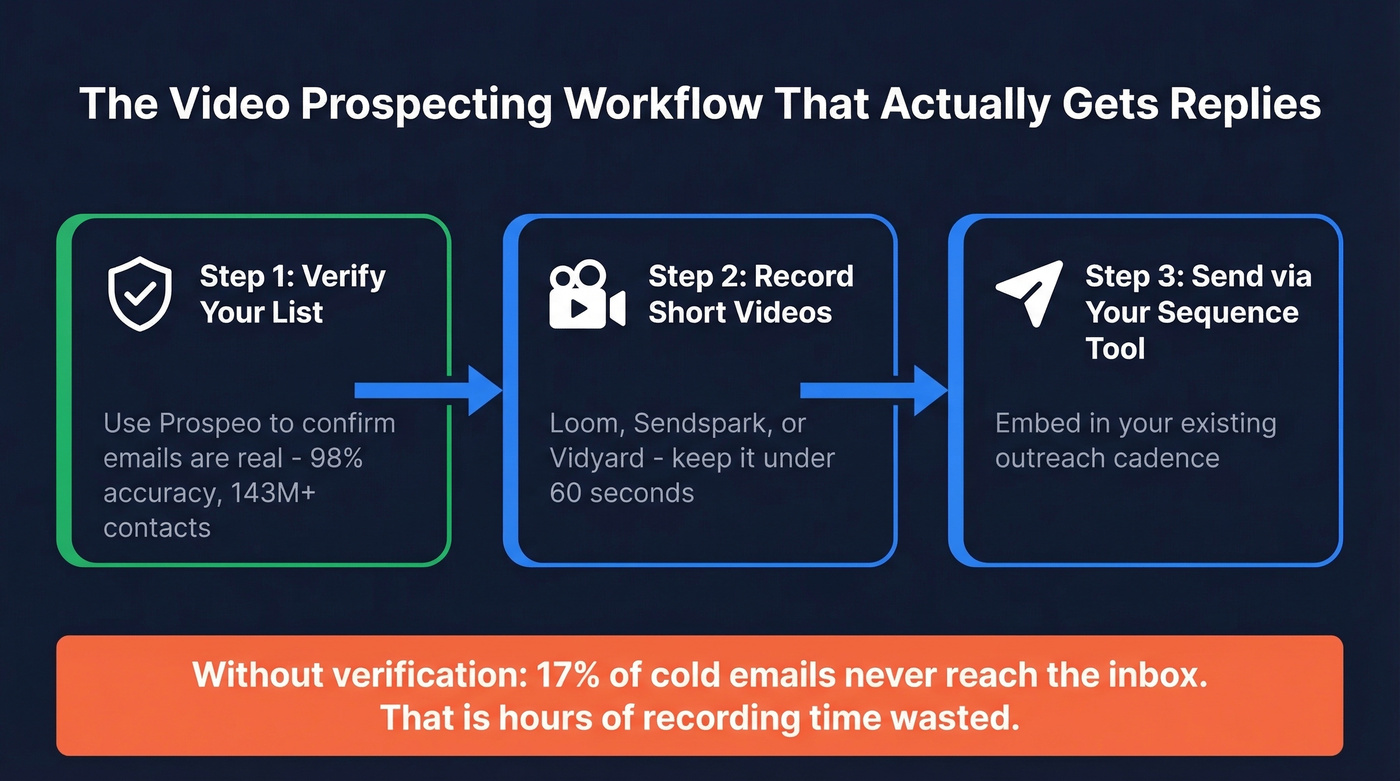
You don't need 13 tools. You need a workflow: verified contacts, a short video, and your existing sequence tool.
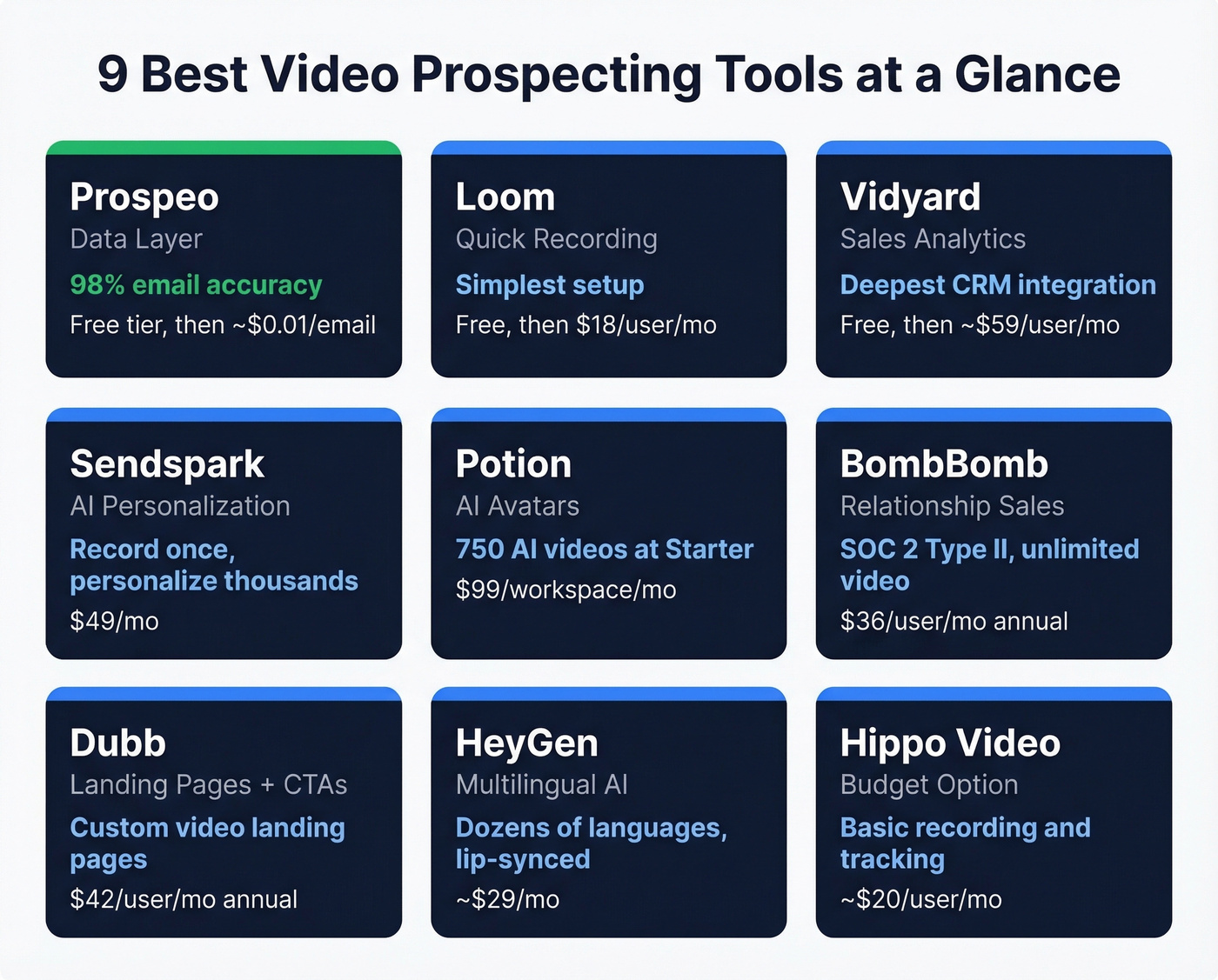
Our Picks (TL;DR)
| Use Case | Tool | Why |
|---|---|---|
| Verified prospect data (start here) | Prospeo | 98% email accuracy, 143M+ verified emails. No point recording videos for dead addresses. |
| Lightweight recording | Loom | Free tier, instant sharing, simple analytics. The default for a reason. |
| AI personalization at scale | Sendspark | Record once, personalize thousands with dynamic variables and AI voice. |
| Full sales analytics + CRM | Vidyard | Deepest analytics, Salesforce/HubSpot native. Enterprise-grade. |
The 9 Best Video Prospecting Tools
Prospeo - Your Data Layer
Verdict: The prerequisite before you pick any recording tool.
A personalized prospecting video takes 3-5 minutes to record. If 15% of your list bounces - common with unverified data - a 100-video campaign wastes 45-75 minutes of rep time on emails that never arrive. Video outreach is the highest-effort tactic per prospect, and sending to a bounced address is the most expensive mistake you can make.

Prospeo's database covers 143M+ verified emails at 98% accuracy, refreshed on a 7-day cycle versus the 6-week industry average. The Chrome extension pulls verified emails from any website or professional profile in one click. Before you record a single video, run your target list through verification - you'll know exactly which addresses are deliverable.
Use this if: You're investing real effort in personalized video and can't afford bounces.
Pricing: Free tier gives you 75 verified emails + 100 Chrome extension credits per month. Paid plans run ~$0.01/email with no contracts.
Loom - Getting Started Fast
Verdict: The fastest path from "never tried video" to "just sent my first one."
Loom is the default for a reason - it's dead simple. Record your screen, your face, or both. Share a link. Done. The free Starter plan gives you 25 videos per person with a 5-minute recording limit, which is fine for prospecting since you shouldn't be going past 60 seconds anyway.

You'll outgrow the free tier in a week if you're prospecting daily. That 25-video cap disappears fast. The Business + AI tier at $24/user/mo unlocks Auto CTA, video variables, filler word removal, and auto-generated summaries. One frustrating gate: Salesforce integration is Enterprise-only, which means custom pricing and a sales conversation you probably don't want to have.
Use this if: You want to test video prospecting this week with zero setup.
Skip this if: You need native Salesforce without an enterprise contract.
Pricing: Free ($0), Business $18/user/mo, Business + AI $24/user/mo, Enterprise custom.
Vidyard - Deepest Sales Analytics
Skip this if you're a solo rep. Vidyard is what you graduate to when you need to prove video ROI to leadership. The analytics go beyond "someone watched your video" - you get viewer-level engagement data, team performance dashboards, and CRM integration that logs video activity directly in Salesforce and HubSpot.

Verdict: The most complete analytics package in the category, wrapped in enterprise packaging.
The free plan includes 15 AI videos with stock avatars plus 3 custom AI avatars. Starter pricing sits around ~$59/user/mo. Teams and Enterprise are custom. The pricing opacity is frustrating, but the product justifies the conversation if you're running 5+ reps. G2 rating sits at 4.5 across 700+ reviews.
Pricing: Free ($0), Starter ~$59/user/mo, Teams and Enterprise custom.
Sendspark - AI Personalization at Scale
Verdict: The best option for one-to-many personalization without recording individual videos.
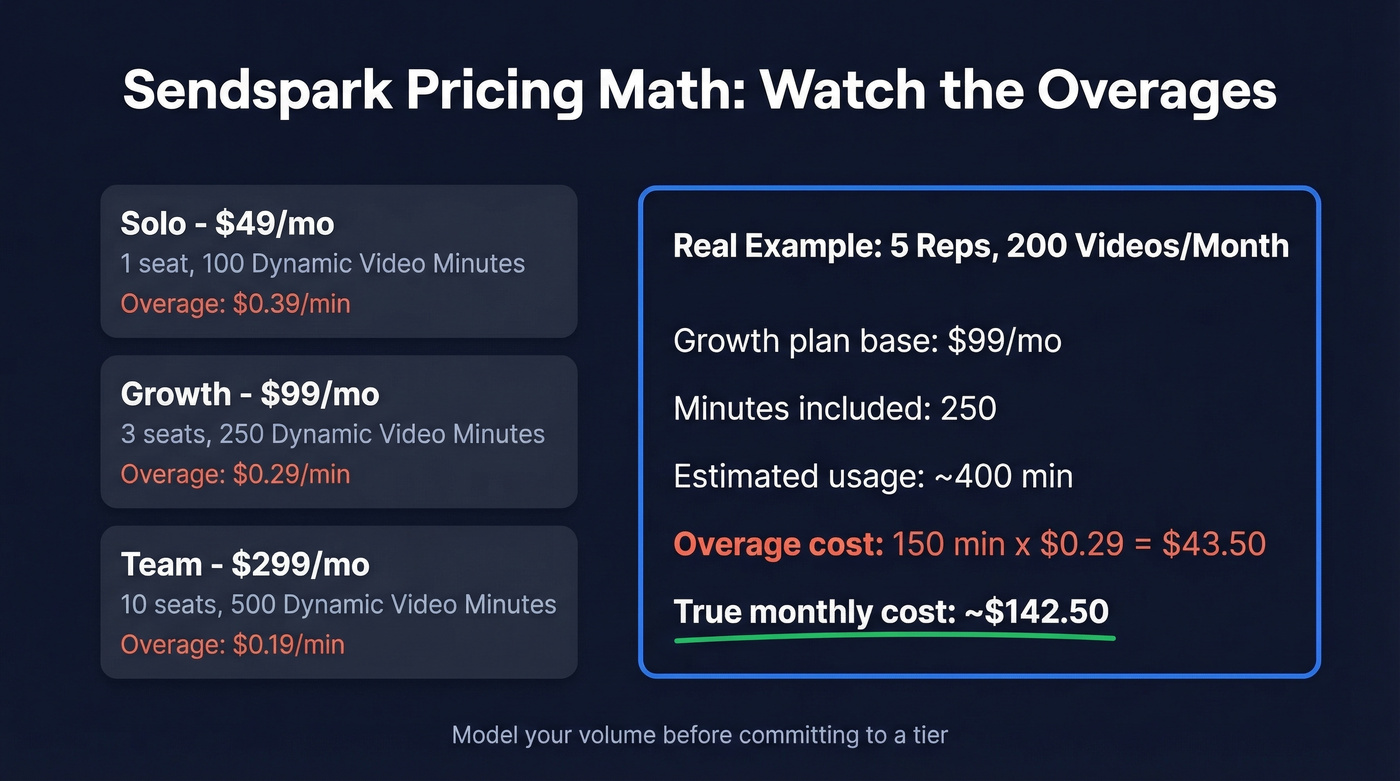
Here's what $49/mo actually gets you: record one video, then personalize it for thousands of prospects with dynamic variables, custom backgrounds, and AI voice. The dynamic variable system works well for high-volume outbound - Solo starts at $49/mo for one seat with 100 Dynamic Video Minutes, Growth is $99/mo for three seats with 250 minutes, and Team jumps to $299/mo for ten seats.
The math matters, though. Overages run $0.19-$0.39 per minute depending on your plan. A team of five reps doing 200 personalized videos per month could land in the $150-$250/mo range once overages kick in, so model your volume before committing to a tier.
Use this if: You want scale without recording every video individually.
Skip this if: Your targets are C-suite - AI personalization still reads slightly synthetic to savvy buyers.
Pricing: Solo $49/mo, Growth $99/mo, Team $299/mo, Business $699/mo. 7-day free trial.
Potion - AI Avatars Per Workspace
Verdict: Workspace pricing makes this the better AI avatar play for larger teams.
Starter runs $99/mo per workspace for 750 AI videos. Professional is $299/mo for unlimited AI videos. The free plan covers basic screen and camera recording with analytics and CRM integrations, and Potion supports 50+ CRM connections out of the box.
Let's be honest: prospects can tell it's an AI avatar. The technology is improving fast, but for VP-level targets and above, a real face still wins. Use Potion for scale campaigns where volume matters more than authenticity.
Use this if: You need AI-generated video at volume and your targets are mid-funnel or lower-seniority.
Skip this if: You're selling to C-suite buyers who'll spot the avatar immediately.
BombBomb - Relationship Selling
Verdict: The legacy player that owns regulated industries.
BombBomb has carved out a niche in real estate, financial services, and insurance - industries where trust and familiarity matter more than flash. Core runs $42/user/mo ($36 annual), Core + Copilot with AI features is $70/user/mo ($56 annual). Both include unlimited video messages, which is rare at this price point. SOC 2 Type II hosting matters if you're in a regulated industry. Not flashy, but reliable and purpose-built for sellers who build long-term relationships rather than churn through pipeline.
Dubb - Landing Pages + Video CTAs
Verdict: Treats video as one piece of a sales landing page, not a standalone recording.
Every video gets its own page with customizable CTAs, booking links, and tracking. Pro starts at $42/user/mo (annual) with unlimited HD video, email/SMS campaigns, and an AI Productivity Suite. Pro Plus at $90/user/mo adds automation workflows and ad retargeting. Free tier gives you 25 SD videos - enough for a week of testing.
HeyGen - Multilingual AI Avatars
The pick for teams selling internationally. AI avatars speak dozens of languages with lip-synced translations - impressive for EMEA and APAC outreach where recording in the prospect's native language isn't realistic. Free tier available, Creator around $29/mo, Team around $89/user/mo.
Hippo Video - Budget Option
A low-cost option for teams that just want recording, sharing, and tracking without heavy AI personalization. Paid plans start around $20/user/mo for entry tiers, with higher tiers for teams and enterprise needs. Nothing groundbreaking, but it gets the job done if budget is tight.

A 100-video campaign with 15% bounce rate wastes over an hour of recording time on dead addresses. Prospeo's 143M+ verified emails at 98% accuracy, refreshed every 7 days, ensure your personalized videos actually reach real inboxes.
Stop recording videos for email addresses that don't exist.
Pricing Comparison
Every tool on this list has a free tier or trial. Here's what you'll actually pay once you're serious.
| Tool | Free Tier | Paid From | Best For | CRM Integration |
|---|---|---|---|---|
| Loom | 25 videos, 5-min cap | $18/user/mo | Quick recording | Enterprise only (Salesforce) |
| Vidyard | 15 AI videos | ~$59/user/mo | Sales analytics | Salesforce, HubSpot |
| Sendspark | 7-day trial | $49/mo | AI personalization | Via integrations |
| Potion | Basic recording | $99/workspace/mo | AI avatars at scale | 50+ CRM integrations |
| BombBomb | None | $36/user/mo (annual) | Relationship sales | Gmail, Outlook |
| Dubb | 25 SD videos | $42/user/mo (annual) | Landing pages + CTAs | Enterprise tier |
| HeyGen | Yes | ~$29/mo | Multilingual AI | Via integrations |
| Hippo Video | Yes | ~$20/user/mo | Budget teams | Varies by plan |
How to Choose the Right Tool
Here's our take: most teams don't need a dedicated video platform. They need a workflow. The recording app matters far less than the data underneath it. If your average deal size is under five figures, Loom's free tier plus verified contacts will outperform any $299/mo AI avatar platform sending to a dirty list.
If you're still building your outbound motion, start with the fundamentals in sales prospecting techniques and then layer video on top.
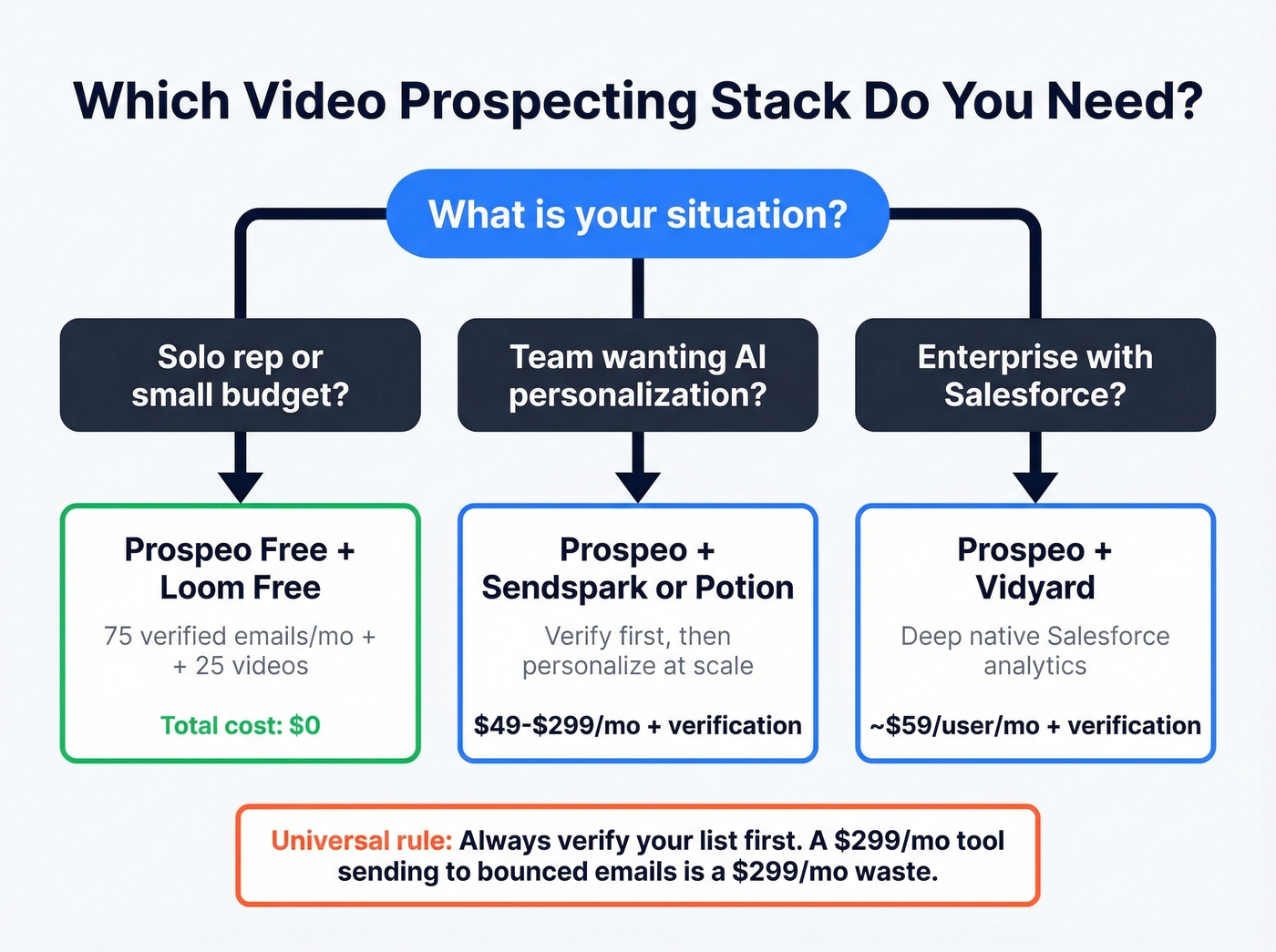
Three decision paths:
Solo reps on a budget: Pair Prospeo's free tier (75 verified emails/mo) with Loom's free plan. Verify your targets, record 30-second videos, send through your existing email tool. Total cost: $0.
Teams wanting AI personalization: Sendspark for dynamic variables at scale, or Potion if you prefer workspace-based pricing for larger teams. Either way, verify your list first - AI personalization on a bounced email is an expensive waste of credits.
Enterprise with Salesforce: Vidyard is the only tool here with deep, native Salesforce analytics out of the box. If that integration matters, the conversation is worth having.
The 5-Step Video Outreach Workflow
We've tested this with our own outbound, and the teams that get results follow this exact sequence:
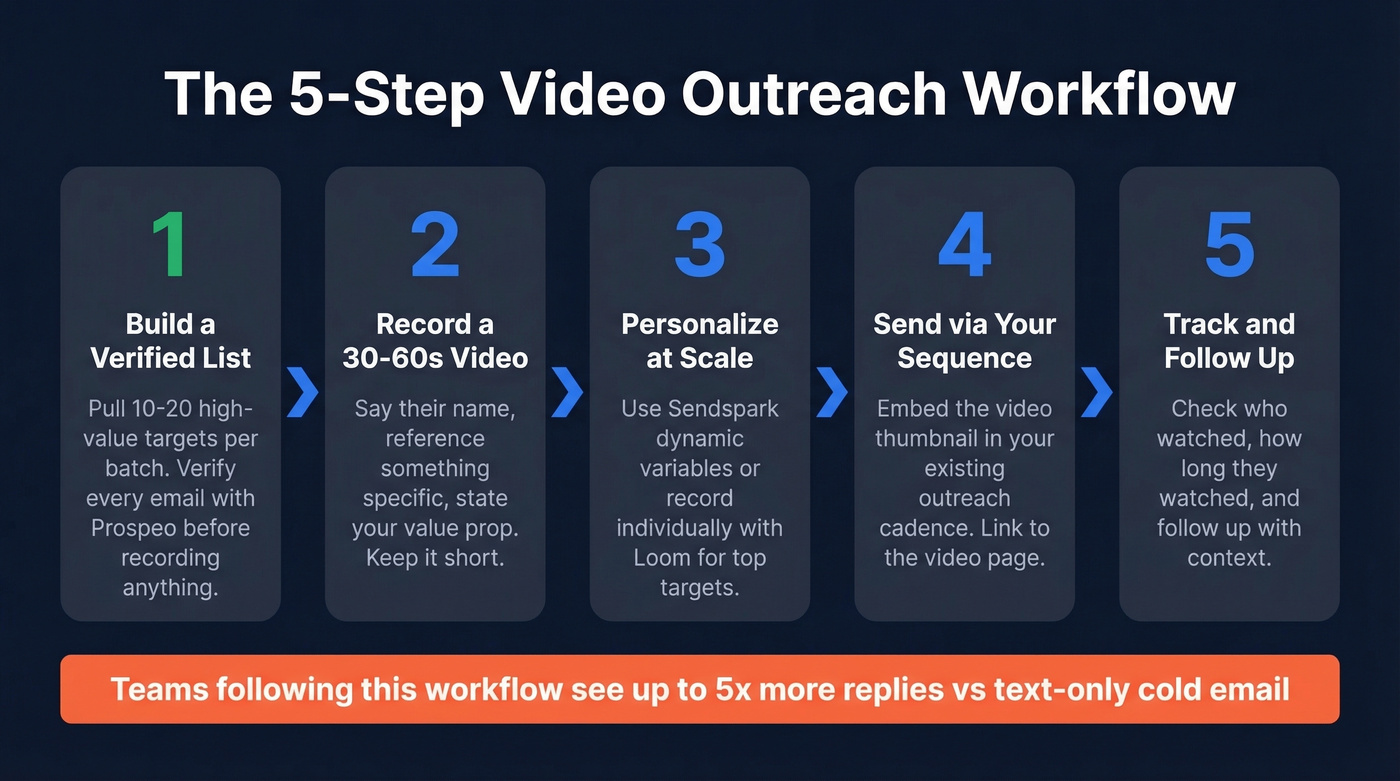
- Build a verified list. Pull 10-20 high-value targets per batch. Verify every email before recording anything. (If you need help sourcing targets, start with free lead generation tools.)
- Research each prospect. Spend 60 seconds on their company page. Find one specific detail to reference.
- Record a 30-45 second video. Say their name, reference the detail, state your value prop, end with a specific CTA.
- Embed in a 2-3 sentence email. Prospect's name, why you recorded this, and the video link. Nothing else. If you need copy, use these sales follow-up templates.
- Track and iterate. If viewers drop off at 20 seconds, your hook is weak. If they watch to the end but don't reply, your CTA needs work. (For deliverability and bounce troubleshooting, see email bounce rate.)
One SDR on r/LeadGeneration reported 3x more replies using this exact approach - 30-60 second personalized videos sent to 10-20 high-value leads per batch, rather than blasting hundreds of generic recordings. Volume isn't the lever. Relevance is.
Mistakes That Kill Results
Sending to unverified emails. A personalized video takes 3-5 minutes to record. If that email bounces, you've wasted more time per prospect than any other outbound channel. Verify every address before you hit record.
Videos over 60 seconds. Over 60% of viewers watch to the end when a video is under 60 seconds. Past a minute, drop-off accelerates sharply. Say the prospect's name, reference something specific, state your value prop, end with a CTA. That's 30-45 seconds.
Long accompanying email text. The email body should be 2-3 sentences max. Long text kills click-through rates because the reader never gets to the video. Your email exists to get the click, not to make the pitch. (If you want to tighten your copy, use this email copywriting guide.)
No clear CTA. "Let me know your thoughts" isn't a CTA. "Can we grab 15 minutes Thursday?" is. If you want more options, see email call to action.
Ignoring analytics. Most video prospecting tools on this list track watch percentage and click engagement. If you're not reviewing that data weekly, you're guessing instead of improving.
You chose the right video tool. Now make sure every recording lands. At $0.01 per verified email with a free tier of 75 lookups, Prospeo costs less than the 3 minutes you'd spend recording a video that bounces.
Verify 75 emails free before your next video campaign.
FAQ
Does video prospecting actually work?
Yes. Video in sales emails drives 26% more replies and 4x higher click-through rates compared to text-only outreach. Vidyard's benchmark study found BDRs using video get up to 5x more replies. With 41% of companies already using prospecting videos, this isn't experimental anymore - it's standard practice.
How long should a prospecting video be?
Keep it under 60 seconds. Over 60% of viewers watch to the end at that length. Aim for 30-45 seconds: say their name, reference something specific about their company, deliver your value prop, and close with a concrete CTA like a specific meeting time.
Do I need a paid tool or is a free tier enough?
Free tiers work for testing, but daily prospecting burns through limits within a week. Budget $18-$49/mo for a sustainable workflow - Loom Business at $18/user/mo or Sendspark Solo at $49/mo are the natural upgrades. Pair either with Prospeo's free tier for 75 verified emails monthly.
How do I make sure my video emails actually get delivered?
Verify every email address before recording. A bounced video email wastes 3-5 minutes of recording time - the most expensive failure mode in outbound. Prospeo verifies at 98% accuracy with a 7-day refresh cycle, so you're never sending to stale data.