

How to Write a Virtual Meeting Invitation Email (With Templates)
It's two minutes before the call. The invite has no passcode, the join link is buried in a forwarded thread, and someone's asking "wait, is this Zoom or Teams?" Your recipient got 100-120 other emails today, and yours didn't stand out.
With 86% of meetings now including at least one remote participant, a sloppy virtual meeting invitation email isn't just annoying - it's expensive. Meetings have tripled since 2020, costing roughly $29,000 per employee per year. A clear invite is the cheapest productivity fix you'll ever make.
What You Need (Quick Version)
Copy these three things and you're 80% there:
- Subject line formula: [Meeting type]: [Topic] - [Date, Time + TZ]. Under 60 characters.
- Join-instructions block: Link + meeting ID + passcode + dial-in backup, every time.
- Reminder sequence: 24-hour agenda, 30-minute nudge, reschedule fallback if no response.
The Invite Formula: 5Ws + Duration + Agenda
Every online meeting invite needs seven components. Miss one and you create confusion.
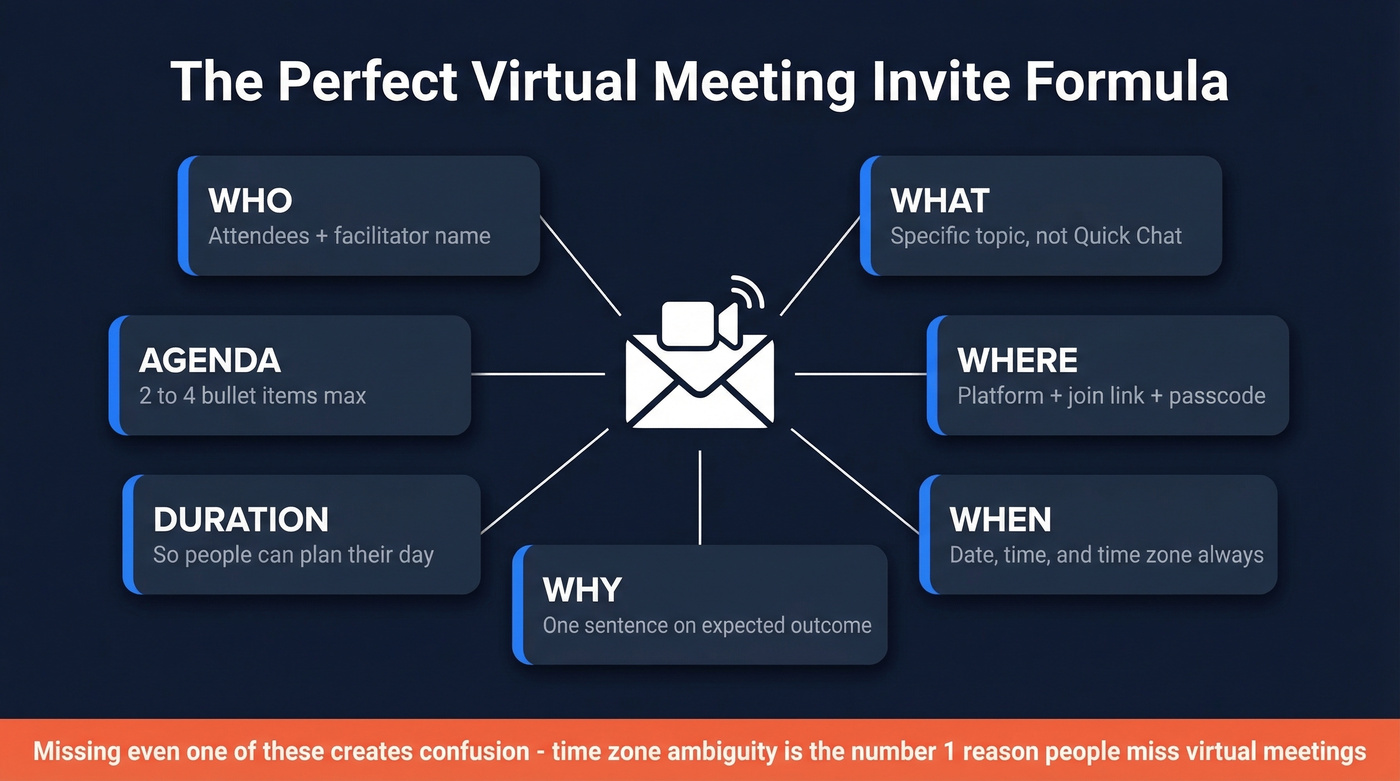
- Who - Names of attendees and who's facilitating
- What - The topic: not "Quick Chat" but "Q3 pipeline review"
- Where - Platform + join link: Zoom, Teams, Google Meet
- When - Date, time, and time zone, always explicit
- Why - One sentence on the purpose or expected outcome
- Duration - So people can plan their day
- Agenda - Bullet the topics. Two to four items max.
Time zone ambiguity is the #1 avoidable reason people miss virtual meetings. One-third of meetings span multiple time zones - write "2:00 PM ET / 11:00 AM PT" or you'll lose someone.
Jessica Gilmartin, Calendly's CRO, puts it bluntly: "If there's no agenda, cancel the meeting." She's right. An agenda forces you to justify the meeting's existence. Stop titling invites "Call with Sarah" - include the topic, both names, and who's initiating.
Subject Lines That Get Opened
Stop writing cute subject lines. Clarity beats cleverness for meetings.
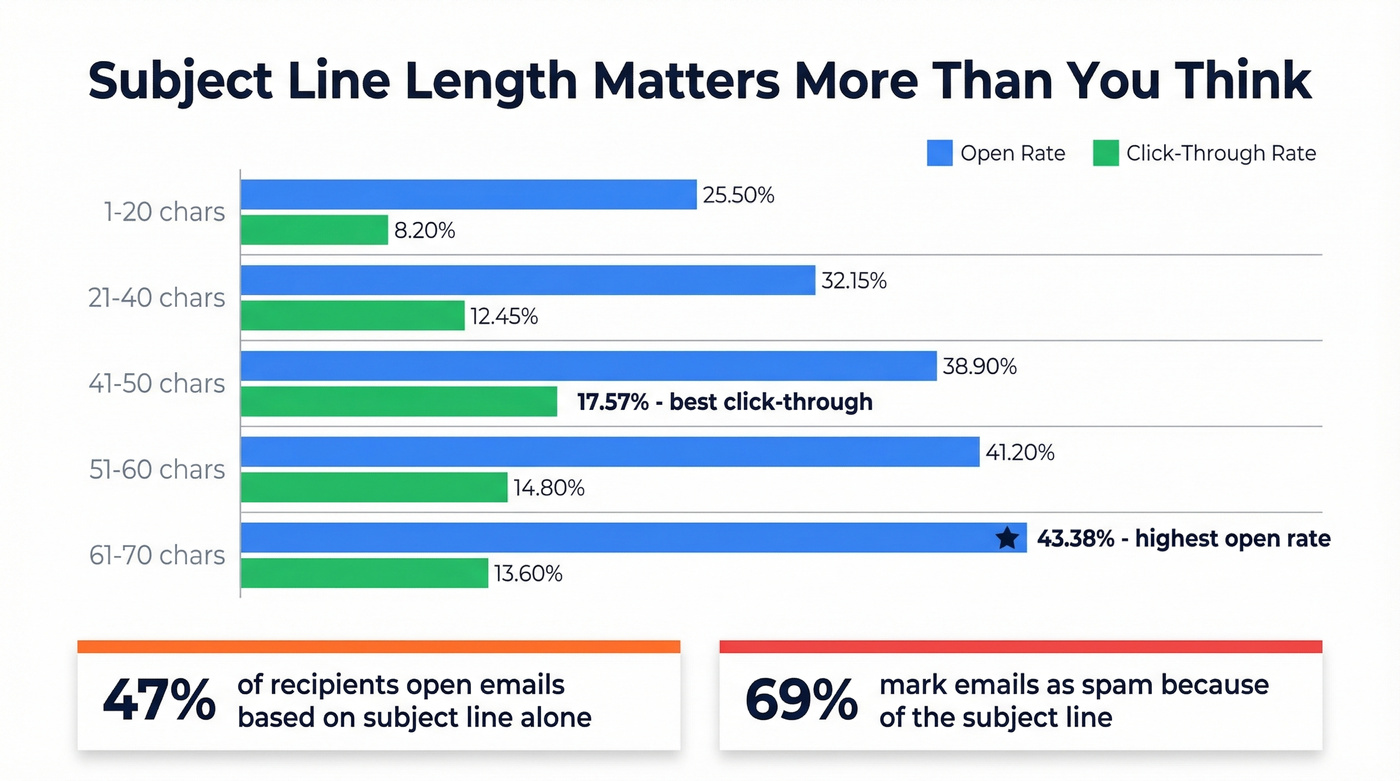
47% of recipients open an email based solely on the subject line, and 69% mark emails as spam because of it. In a 2024 analysis, subject lines of 61-70 characters hit the highest open rate at 43.38%, while 41-50 characters drove the best click-through at 17.57%.
| Scenario | Subject Line Example |
|---|---|
| Internal sync | "Weekly pipeline review - Tue 3 PM ET" |
| Client call | "Acme x YourCo: Q3 roadmap - Jun 12, 1 PM CT" |
| Interview | "Interview: Sr. AE role - Thu 10 AM PT" |
| Webinar | "Live demo: New dashboard features - Jun 18" |
| Reschedule | "Rescheduled: Pipeline review, Wed 2 PM ET" |
Most of these land under ~60 characters. No emojis, no "URGENT," no mystery. If you want more proven options, pull from these email subject line ideas and keep an eye on words to avoid.

You just crafted the perfect meeting invite - clear subject line, agenda, join link. But none of it matters if the email bounces. Prospeo verifies emails in real time with 98% accuracy, so your invites and reminder sequences actually reach the inbox.
Stop sending perfect invites to dead email addresses.
The Join-Instructions Block
Look, an invite without a backup join path is unprofessional. 77% of workers have lost meeting time to technical problems. Paste this block into every invite:
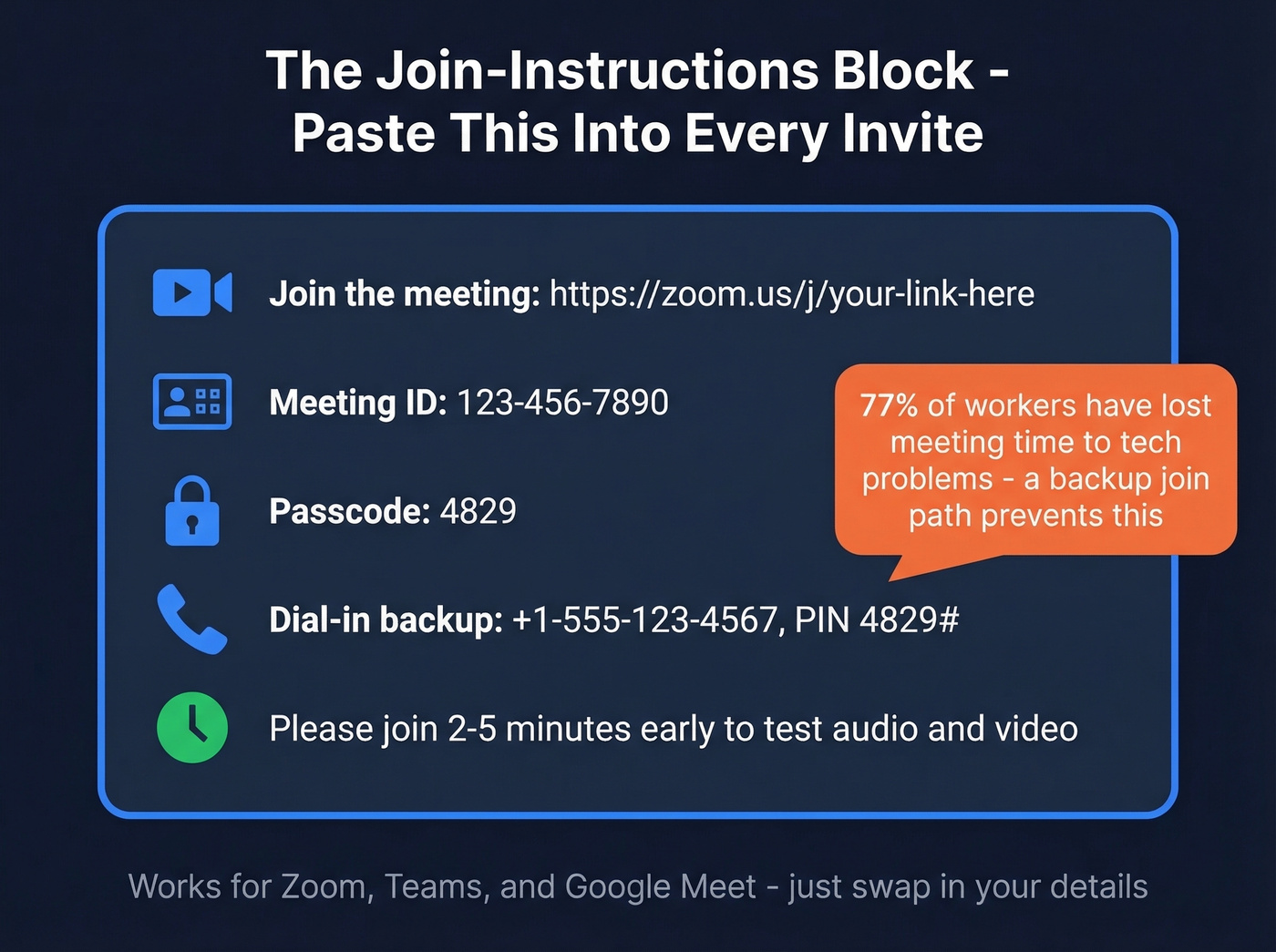
Join the meeting:
[Video link]: https://[platform-link]

Meeting ID: [XXX-XXX-XXXX]

Passcode: [XXXX]

Dial-in backup: [+1-XXX-XXX-XXXX], PIN [XXXX#]
Please join 2-5 minutes early to test audio/video.
Use this structure for Zoom, Teams, or Google Meet - just swap in the right link and ID details. If your org runs Zoom, their customizable meeting email templates can standardize this block at scale.
Copy-Paste Invite Templates
Most template lists skip reschedule and cancellation emails. Those are the ones people actually scramble to write. In our experience, the reschedule email gets more use than any other template below - we've sent enough of them to know. Each sample is ready to customize: swap in your details and send. (If you need more variations, these meeting invitation email examples and this business meeting email format are solid references.)
1:1 Internal
Subject: 1:1 check-in: [Topic] - [Day, Time + TZ]
Hi [Name], let's connect on [topic]. Agenda:
- [Item 1]
- [Item 2]
Duration: 30 min. [Join-instructions block].
Team Standup
Subject: Team standup - [Day, Time + TZ]
Team - quick sync. Blockers from last week, priorities this week, open floor. 25 min. [Join-instructions block]. Drop your updates in the thread beforehand if you can.
Client Call
Subject: [YourCo] x [ClientCo]: [Topic] - [Date, Time + TZ]
Hi [Name], looking forward to discussing [topic]. Agenda:
- [Item 1]
- [Item 2]
- Next steps
Duration: 45 min. [Join-instructions block].
Interview
Subject: Interview: [Role] - [Date, Time + TZ]
Hi [Name], we're excited to speak with you about the [Role] position. You'll meet with [Interviewer name, title].
What to prepare: A walkthrough of a recent project and any questions about the role.
Agenda: Role overview (10 min), your experience (20 min), Q&A (15 min). [Join-instructions block].
Reschedule
Subject: Rescheduled: [Original topic], [New date, Time + TZ]
Hi [Name], apologies - I need to move our [topic] meeting. New time: [Date, Time + TZ]. Same agenda applies. [Join-instructions block]. Let me know if this works.
Cancellation + Async Option
Subject: Cancelled: [Topic] - [Original date]
Hi [Name], I'm cancelling our [topic] meeting. I've shared [a doc/Loom/summary] covering what we planned to discuss: [link]. Reply with questions or let's reschedule if you'd prefer live.
The Reminder Sequence
Here's the thing: most template posts give you one email. That's not how meetings actually happen. Even accepted invites still no-show 10-30% of the time, and the rate climbs higher for external or sales meetings. You need a mini-sequence:
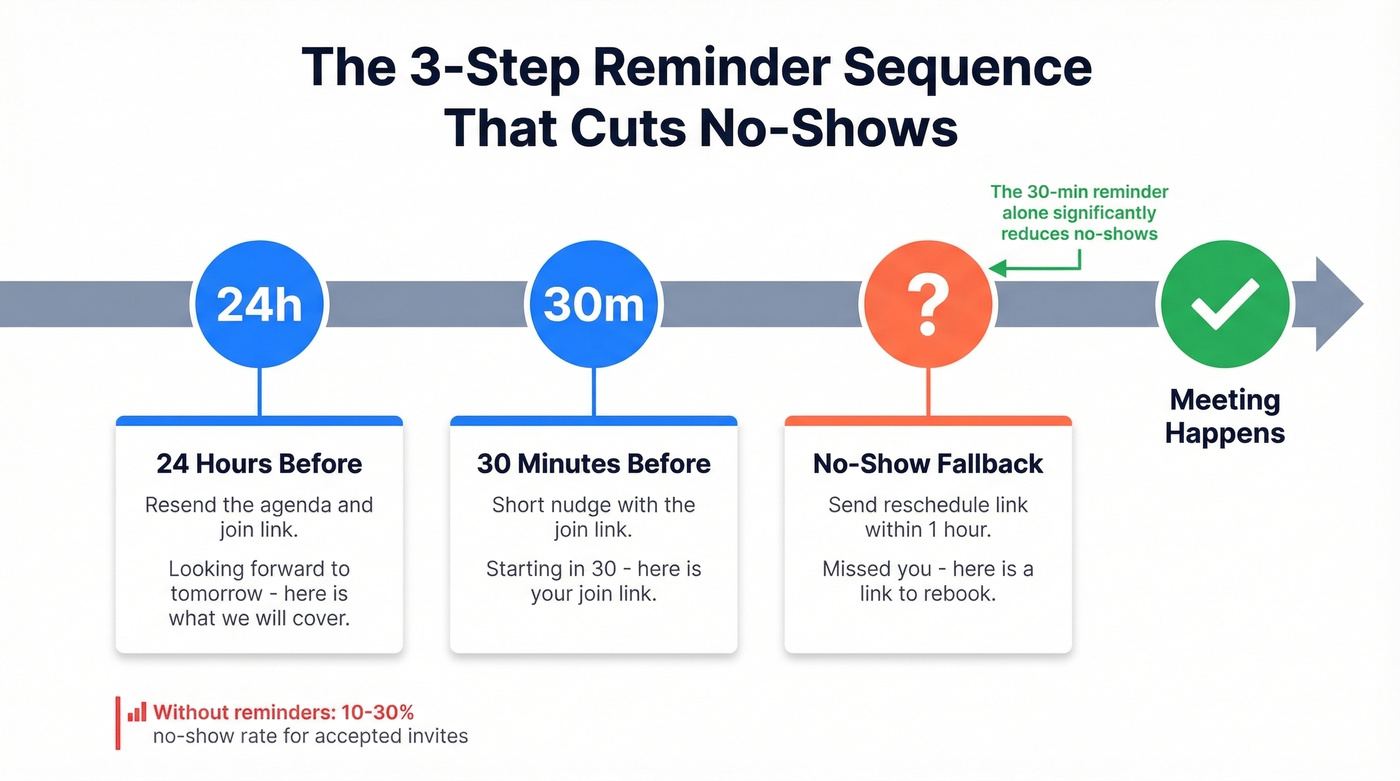
- 24 hours before: Resend the agenda + join link. "Looking forward to tomorrow - here's what we'll cover."
- 30 minutes before: Short nudge. "Starting in 30 - here's your join link: [link]."
- No-show: Send a reschedule option within 1 hour. "Missed you - here's a link to rebook: [scheduling link]."
We've seen teams cut no-shows significantly by adding that 30-minute reminder alone. If you're inviting prospects, verify their email first - Prospeo checks addresses in real time with 98% accuracy so your invite and reminders actually land instead of bouncing. For the follow-up itself, borrow language from a friendly reminder email template or a dedicated no-show follow-up email template.
Hybrid and Global Invite Rules
Hybrid and global meetings amplify every invite mistake. A colocated team can lean over and ask for the link. A remote attendee in another time zone can't. A few extra lines in the invite prevent most friction.
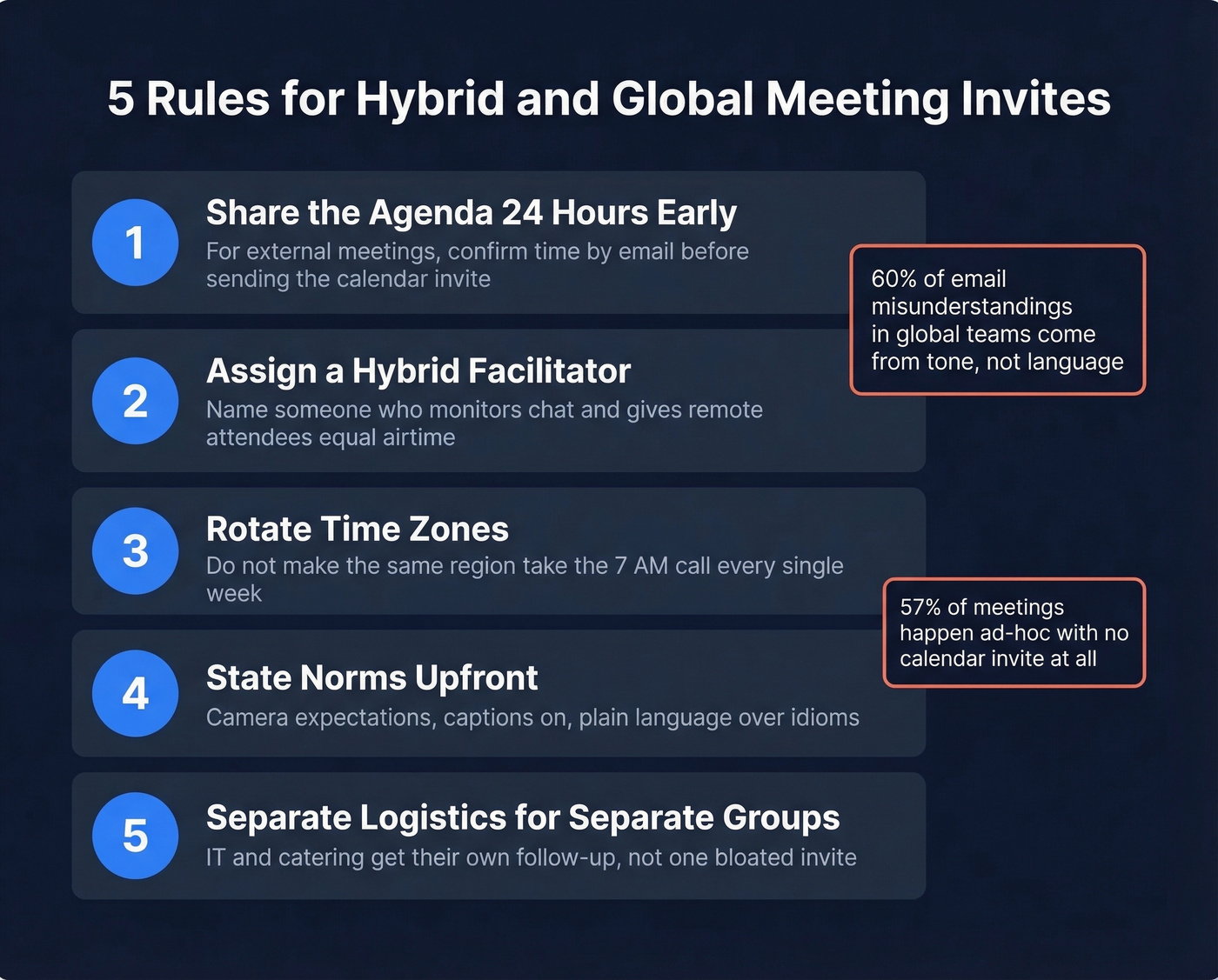
Share the agenda a full day before. For external meetings, confirm the time by email before sending the calendar invite - a surprise invite can feel presumptuous. If you need wording, use these templates to ask for meeting availability.
Assign a hybrid facilitator. Name someone in the invite who'll monitor chat and make sure remote attendees get equal airtime. This one change transforms the meeting dynamic more than any fancy tool.
Rotate time zones. Don't make the same region take the 7 AM call every week. Your Singapore team will thank you.
State norms upfront. Camera expectations, captions enabled, and plain language over idioms. 60% of email misunderstandings in global teams come from tone, not language - replace "circle back" with "revisit on [date]."
Send separate logistics to separate groups. If IT or catering needs different details, don't cram it all into one invite. Follow up directly with those teams.
Let's be honest: 57% of meetings happen ad-hoc with no calendar invite at all. The bar is underground. Follow even half the advice above and your invites will be better than almost everything in your recipient's inbox.
FAQ
Should I send a calendar invite or just an email?
Always send a calendar invite. It blocks time, includes the join link, and syncs reminders automatically. A standalone email gets buried. Send the calendar invite first, then use email for the agenda or pre-read materials.
How long should a meeting invite email be?
Under 150 words. Include the purpose, agenda bullets, join-instructions block, and duration. Cut everything else - recipients skim, so density beats length every time.
What's the best subject line format?
Use [Meeting type]: [Topic] - [Date, Time + TZ], kept under 60 characters. This format displays fully on mobile and tells the recipient exactly what to expect without opening the email.
How do I reduce no-shows for external meetings?
Send a 24-hour reminder with the agenda, a 30-minute nudge with the join link, and verify the recipient's address before sending. Invalid emails mean your entire reminder sequence bounces - skip this step and you're flying blind.
Should I include dial-in numbers for a video call?
Yes. Dial-in is the backup when internet drops. One line in the invite saves ten minutes of scrambling. Include the phone number and PIN directly in the join-instructions block.
Sending meeting invites to prospects? You need verified contact data first. Prospeo gives you 143M+ verified emails refreshed every 7 days - not the stale addresses that tank your deliverability and spike no-show rates.
Find verified prospect emails for $0.01 each - no bounces, no wasted meetings.