

Friendly Reminder Email Templates: 20 Copy-Paste Examples + Phrases to Avoid
It's 11:14 PM. You're drafting your fourth follow-up to someone who owes you a deliverable from last Tuesday. You type "friendly reminder" in the subject line, pause, and wonder if this phrase has ever actually worked on anyone - or if it just makes you sound like a passive-aggressive HR bot. The consensus on Reddit is blunt: "There are no friendly reminders." The phrase signals annoyance dressed up as politeness, and most recipients can smell it.
That's exactly why you need a better approach - one that gets replies without the baggage.
The problem isn't that you're following up. Following up is your job. The problem is the language defaults we all reach for when we don't know what else to say.
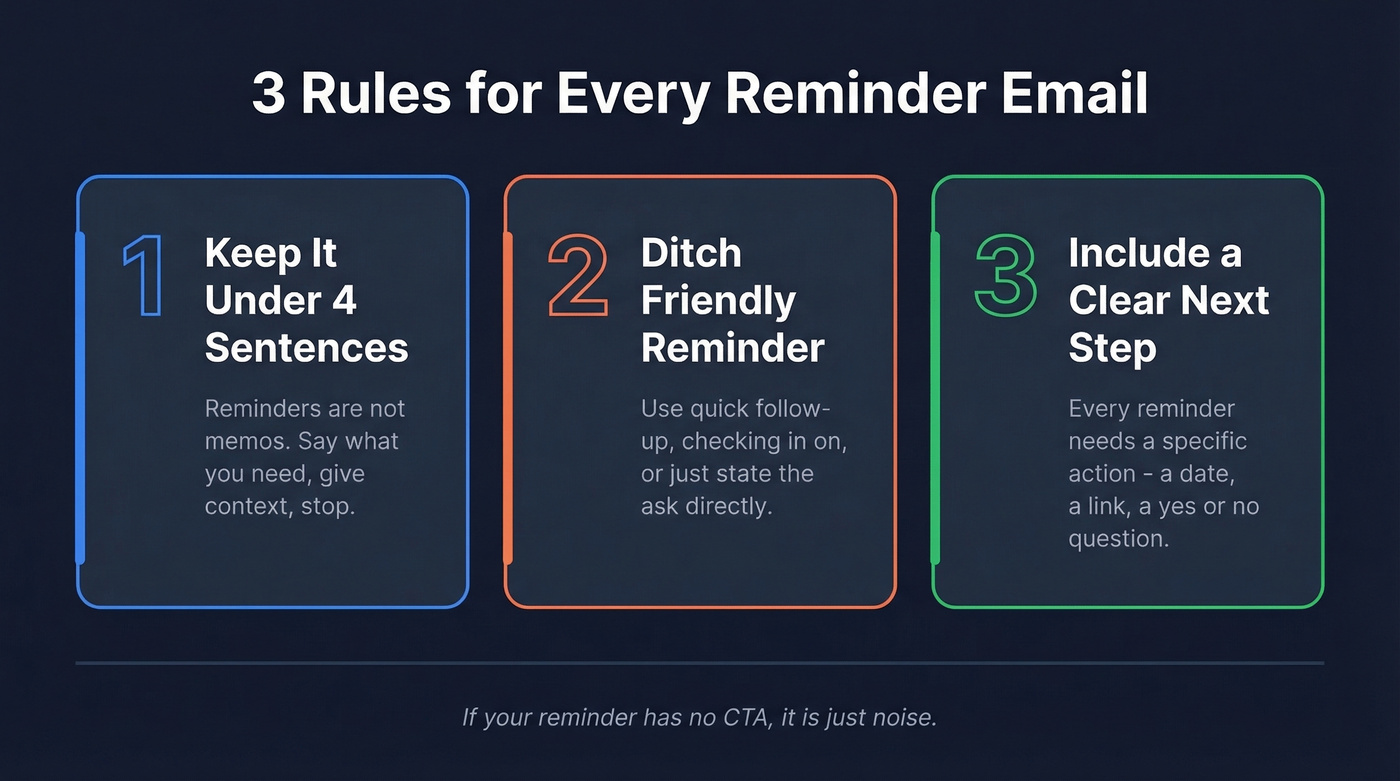
Three Rules for Every Reminder
- Keep it under 4 sentences. Reminder emails aren't memos. Say what you need, give context, stop.
- Ditch "friendly reminder." Swap it for "quick follow-up," "checking in on," or just state the ask directly.
- Include a clear next step. Every reminder needs a specific action - a date, a link, a yes/no question.
How to Write a Reminder Email
About one-third of workplace communication happens via email. That's a lot of noise. A polite follow-up needs to cut through it in under 10 seconds.
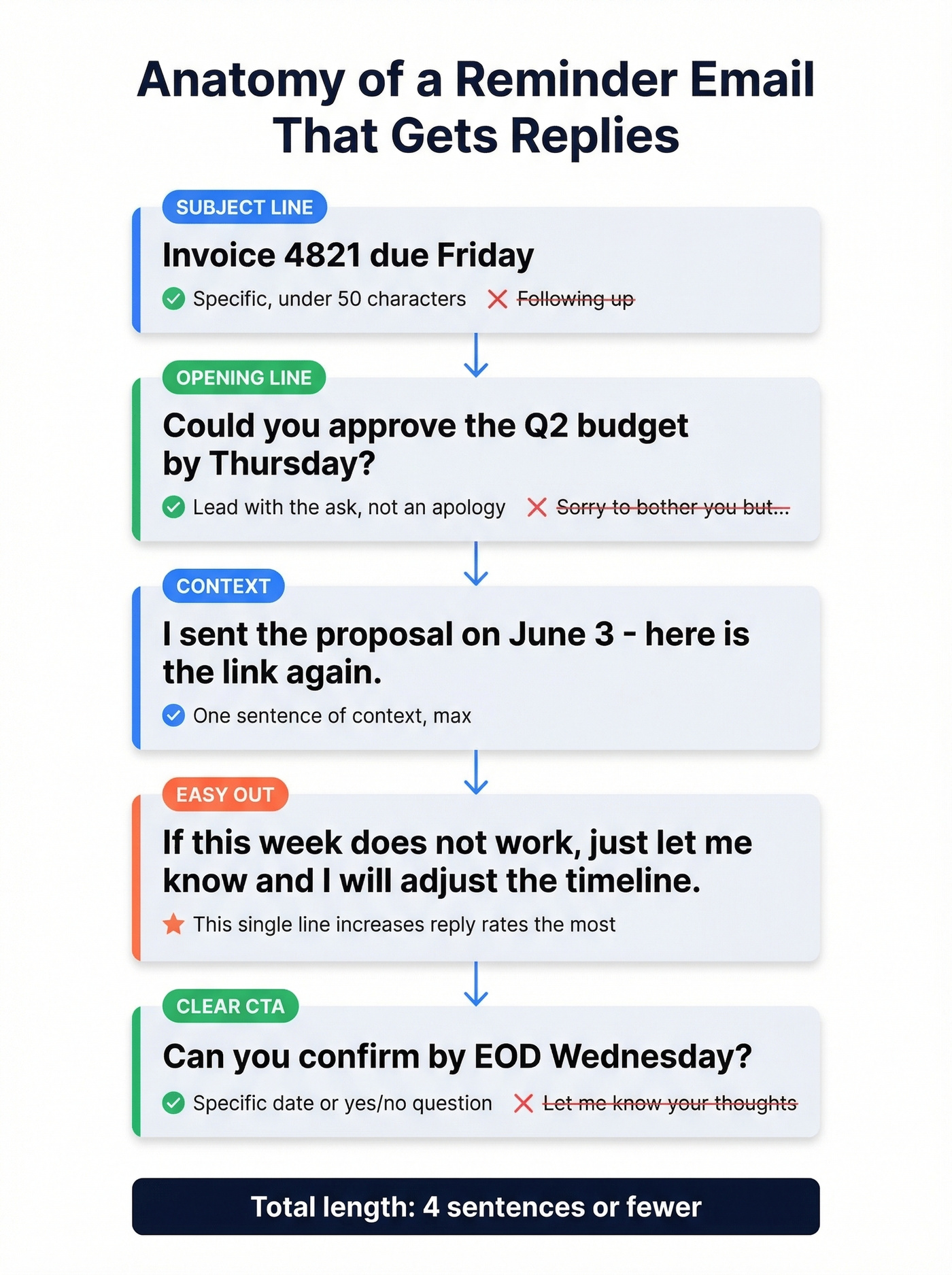
Write the subject line first. Keep it under ~50 characters. Be specific - "Invoice #4821 due Friday" beats "Following up" every time. Subject line phrasing can swing open rates by 2-10%. And with Apple Mail Privacy Protection inflating open numbers, click-through rate is the metric that actually matters. (If you want more ideas, steal from these email subject line examples.)
Lead with the ask, not the apology. Don't open with "Sorry to bother you." Open with what you need. "Could you approve the Q2 budget by Thursday?" That's your first sentence.
Add one line of context. Remind them why this matters or where the original request lives. "I sent the proposal on June 3 - here's the link again." One sentence, done.
Give them an easy out. "If this week doesn't work, just let me know and I'll adjust the timeline." In our experience, this single line increases reply rates more than any other technique. It removes the guilt that makes people avoid responding altogether.
Close with a specific CTA. Not "let me know your thoughts." Try "Can you confirm by EOD Wednesday?" or "Reply with a quick yes/no and I'll handle the rest." (More patterns here: sales follow-up templates.)
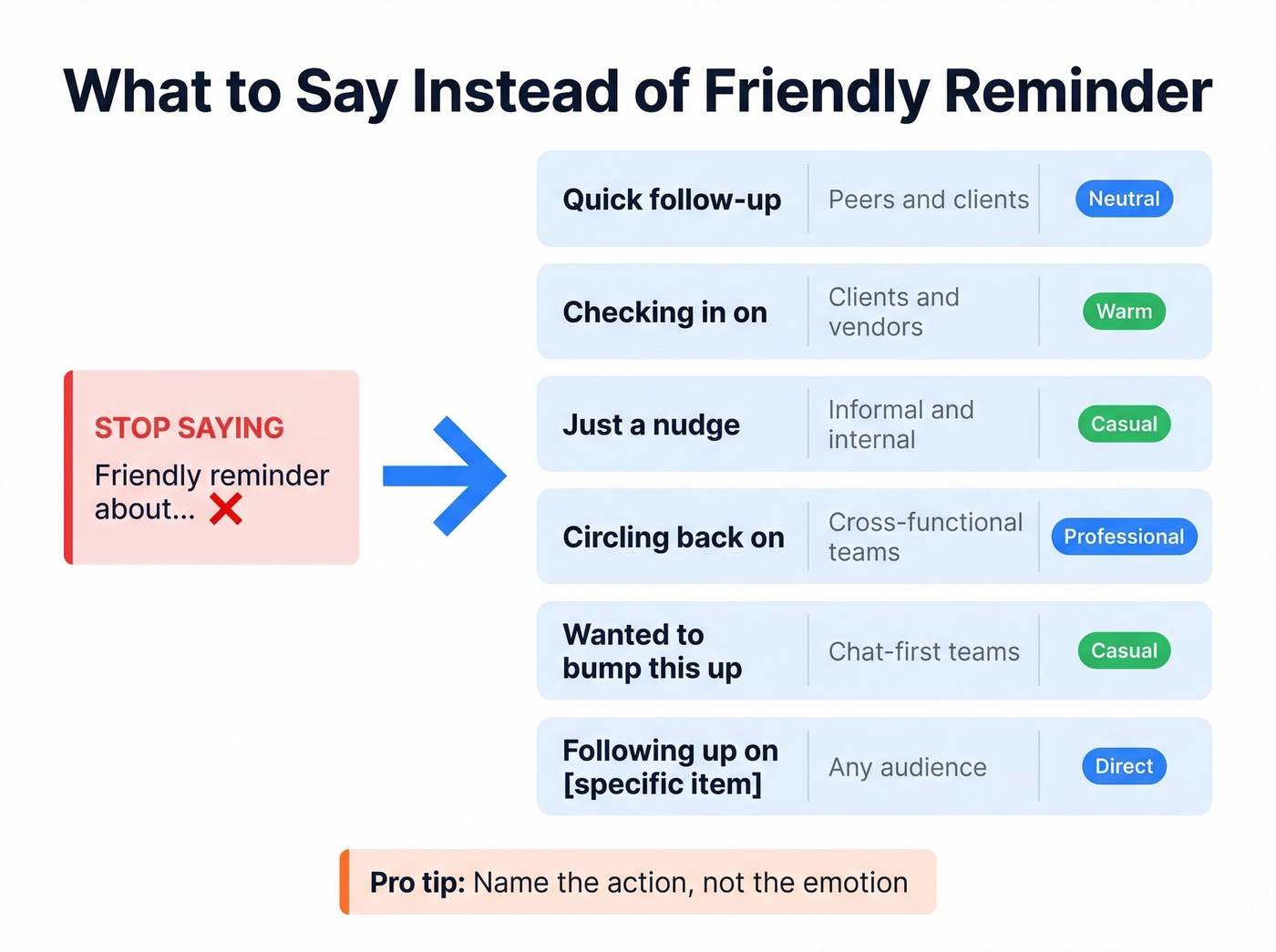
Phrases to Use Instead of "Friendly Reminder"
The nudge framing works because it reduces guilt and pressure - you're giving someone a push without pretending the push is "friendly."
| Phrase | When to Use It | Tone |
|---|---|---|
| Quick follow-up | Peers, clients | Neutral/professional |
| Checking in on | Clients, vendors | Warm but direct |
| Just a nudge | Informal, internal | Casual/light |
| Circling back on | Cross-functional teams | Business-standard |
| Wanted to bump this up | Teams that default to chat | Casual |
| Following up on [specific item] | Any audience | Direct/clear |
Here's the thing: name the action, not the emotion. "Quick follow-up on the contract" tells the reader exactly what you need. "Friendly reminder about the contract" tells them you're annoyed. If you want a warm tone, pair a direct subject line with a conversational opening - that's the real gentle reminder replacement.
20 Copy-Paste Reminder Email Templates
Every template below avoids "friendly reminder." Each one uses a clear CTA and matches the right level of formality.
No-Response Follow-Up
Template 1 - The Direct Bump
Subject: Quick follow-up on [topic]
Hi [Name],
I sent over [document/request] on [date] and wanted to make sure it didn't get buried. Could you take a look by [deadline]? Happy to hop on a quick call if it's easier to discuss live.
Thanks, [Your name]
No apology, no filler. States the ask and offers an alternative path.
Template 2 - The Easy Out
Subject: Still need your input on [topic]
Hi [Name],
Circling back on [request]. If the timing isn't right, just let me know and I'll adjust. Otherwise, could you send over [specific deliverable] by [date]?
Appreciate it, [Your name]
This is the most effective template we've used in practice. Giving someone permission to delay paradoxically makes them respond faster.
Template 3 - The Value Add
Subject: [Topic] - added context
Hi [Name],
Following up on my [date] email about [topic]. I've attached [new resource/updated info] that might help move this forward. Let me know if you can confirm by [date].
Best, [Your name]
Each follow-up should add something new. If your reminder is identical to the last one, it's just noise.
Meeting Reminder
Template 4 - Day-Before Nudge
Subject: Confirming tomorrow's call at [time]
Hi [Name],
Just confirming our meeting tomorrow at [time] [timezone]. Here's the [Zoom/Teams link]. I'll plan to cover [1-2 agenda items]. See you there.
Template 5 - Same-Day Reminder
Subject: See you at [time] today
Hi [Name],
Quick heads-up - we're on for [time] today. [Link]. Looking forward to it.
Same-day reminders should be almost absurdly short. The subject line does most of the work.
Payment / Invoice Reminder
The progression below mirrors the escalation framework later in this article - each step gets more direct without getting hostile.
Template 6 - First Nudge
Subject: Invoice #[number] - due [date]
Hi [Name],
Just a nudge that invoice #[number] for [amount] is due on [date]. I've reattached it here for convenience. Let me know if you need anything from my end to process it.
Template 7 - Second Nudge (Firmer)
Subject: Invoice #[number] - now past due
Hi [Name],
Following up on invoice #[number] for [amount], which was due [date]. Could you confirm when payment will be processed? Happy to connect with your AP team directly if that's easier.
Template 8 - Final Notice
Subject: Invoice #[number] - action needed
Hi [Name],
This is my third follow-up on invoice #[number] for [amount], originally due [date]. I'd appreciate confirmation of a payment date by [deadline]. If there's an issue, let's discuss - I'd rather resolve it than escalate.
Deadline Reminder
Template 9 - Advance Warning
Subject: [Deliverable] due [date] - any blockers?
Hi [Name],
Quick check-in: [deliverable] is due [date]. Are you on track, or is there anything I can help unblock? Let me know by [earlier date] so we can adjust if needed.
Template 10 - Day-Of Reminder
Subject: [Deliverable] due today
Hi [Name],
Just a heads-up that [deliverable] is due EOD today. If you need a short extension, let me know before [time] and I'll see what I can do.
Proposal / Quote Follow-Up
Template 11 - The Check-In
Subject: Checking in on the [project] proposal
Hi [Name],
I sent over the proposal for [project] on [date]. Have you had a chance to review? I'm happy to walk through the numbers on a quick call if that'd help move things along.
Template 12 - The Deadline Anchor
Subject: [Project] proposal - pricing holds until [date]
Hi [Name],
Wanted to flag that the pricing in our [date] proposal holds through [expiry date]. After that, I'd need to re-quote. Let me know if you'd like to move forward or if you have questions.
Creating a soft deadline gives the recipient a reason to act now without feeling pressured.
Appointment Reminder
Template 13 - Service Appointment
Subject: Your appointment on [date] at [time]
Hi [Name],
Reminder about your upcoming appointment on [date] at [time] at [location/link]. Please reply to confirm or let me know if you need to reschedule.
Template 14 - Confirmation Request
Subject: Please confirm: [date] at [time]
Hi [Name],
Checking in to confirm your [appointment type] on [date] at [time]. A quick "confirmed" reply is all I need. If something's changed, we can find a new time.
Internal / Colleague Reminder
Internal reminders should mirror your team culture. "Bumping this" works on Slack-native teams. "Circling back" works everywhere.
Template 15 - Peer Nudge
Subject: Bumping this - [task/topic]
Hey [Name],
Just bumping my earlier message about [task]. No rush if you're slammed, but could you get back to me by [date]? Need it for [reason].
Template 16 - Cross-Team Request
Subject: Still need [deliverable] for [project]
Hi [Name],
Circling back on [deliverable] for [project]. Our deadline is [date], so I'd need your piece by [earlier date] to stay on track. Let me know if there's a blocker I can help with.
Event RSVP Reminder
Template 17 - First RSVP Nudge
Subject: Have you RSVP'd? [Event name] on [date]
Hi [Name],
Quick follow-up on [event name] happening [date]. We'd love to have you there. Can you confirm by [RSVP deadline]? [RSVP link]
Template 18 - Final RSVP Call
Subject: Last call - [Event name] RSVP by [date]
Hi [Name],
Final reminder: RSVPs for [event name] close [date]. We're finalizing headcount, so please confirm here: [link].
Interview Follow-Up
Template 19 - Post-Interview Check-In
Subject: Following up on [role] interview
Hi [Name],
Thank you again for the conversation on [date] about the [role] position. I'm very interested and wanted to check if there are any updates on next steps. Happy to provide additional references or materials.
Template 20 - Timeline Inquiry
Subject: [Role] - checking on timeline
Hi [Name],
Following up on the [role] interview from [date]. Could you share an expected timeline for next steps? I'm balancing a couple of opportunities and want to make sure I'm prioritizing correctly.
Mentioning other opportunities isn't aggressive - it's honest, and it gives the hiring manager a reason to respond faster.
Filled-in example (Template 20 in practice):
Subject: Senior PM role - checking on timeline
Hi Sarah,
Following up on the Senior PM interview from January 15. Could you share an expected timeline for next steps? I'm balancing a couple of opportunities and want to make sure I'm prioritizing correctly.
Best, James

Your reminder templates are only as good as the email addresses behind them. Prospeo's 98% verified emails mean your follow-ups land in real inboxes - not bounce folders that torch your domain reputation.
Every bounced reminder is a wasted follow-up. Fix the data first.
When Polite Reminders Stop Working
One Reddit poster described preparing their seventh reminder for a "simple request," now CC'ing two managers and a VP, asking for something "more forceful but office politically correct." We've all been there.
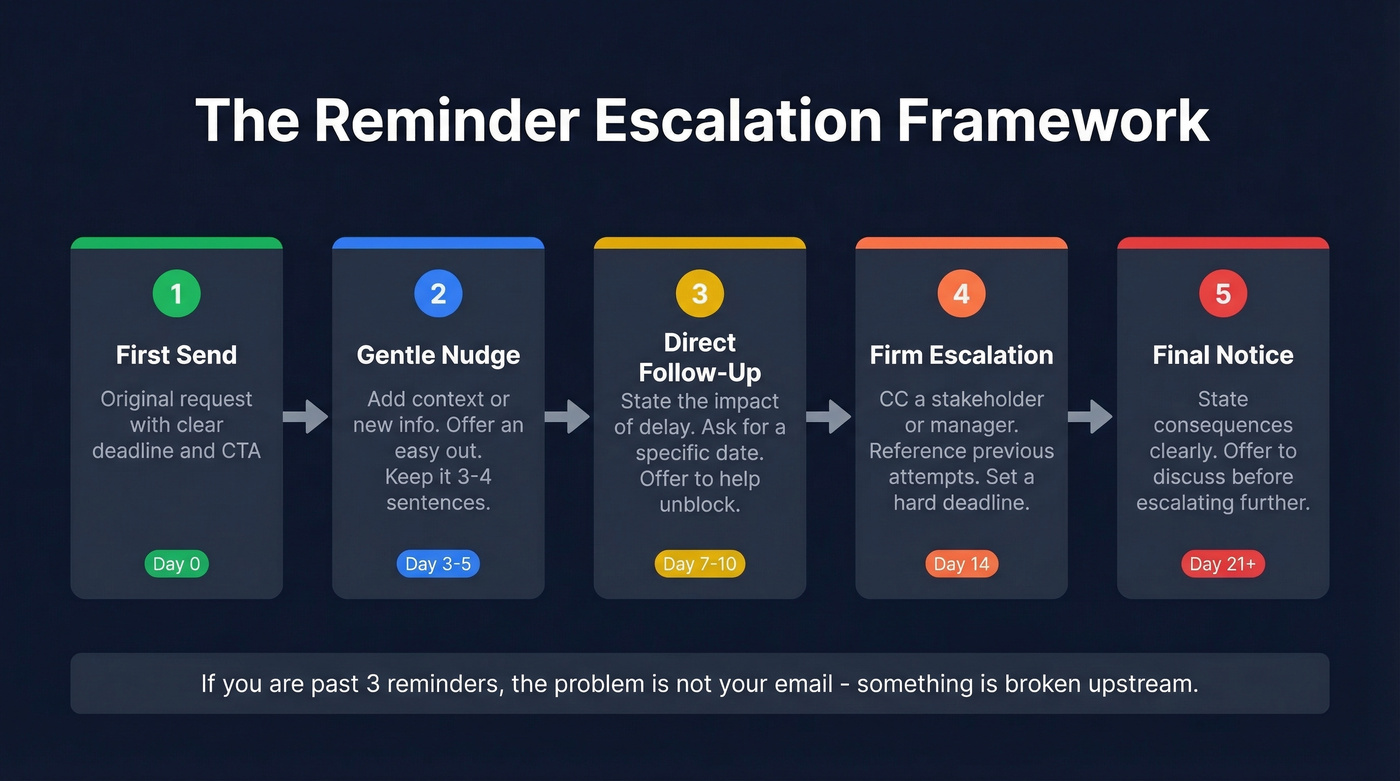
If you're past three reminders, the problem isn't your email. It's your process. Something is broken upstream - either the recipient doesn't have the authority, doesn't have the information, or doesn't consider this a priority. Your job shifts from reminding to escalating. (If you're running this in a sales motion, see AI sales follow-up for what to automate vs keep manual.)
Stage 1 - Soft escalation (reminder 3). Restate the ask with a firm deadline. "I need [deliverable] by [date] to keep [project] on track."
Stage 2 - Firm escalation (reminder 4). Add a consequence. "If I don't receive [deliverable] by [date], I'll need to [flag to leadership / adjust the timeline / proceed without input]."
Stage 3 - CC escalation (reminder 5+). Loop in their manager or your shared stakeholder. Keep the tone factual, not emotional. "Hi [Manager], adding you for visibility - I've followed up with [Name] on [deliverable] three times since [date]. Can you help unblock this?"
The CC isn't a threat. It's a process tool. Use it without guilt.
When to Switch Channels
Real talk: after three reminders, a fourth email usually won't help. Switch the medium.
Slack or Teams DM works for internal requests where email feels too formal. A quick "Hey, bumping the Q2 numbers - can you get those to me by Thursday?" cuts through inbox clutter instantly.
SMS or a phone call works for time-sensitive client follow-ups, especially payment reminders or same-day confirmations. A 15-second voicemail ("Hi Sarah, just following up on invoice 4821 - give me a call when you get a chance") often resolves what three emails couldn't. If you're building a multi-channel cadence, sequence management helps keep it consistent.
Match the urgency to the channel. Low urgency stays in email. High urgency moves to synchronous communication.
25 Reminder Email Subject Lines
Subject lines should be under ~50 characters. Specificity beats cleverness every time. (If you want a bigger swipe file, use these subject lines that get opened.)
Meeting:
- Confirming our call tomorrow
- See you at 2 PM today
- Meeting prep: [topic] agenda
- Quick sync - still on for [day]?
- [Date] meeting - any changes?
Payment:
- Invoice #[number] due [date]
- Payment reminder: [amount] due
- Past due: Invoice #[number]
- Quick follow-up on payment
- Invoice status check
Deadline reminders work best when they name the deliverable, not the deadline itself:
- [Deliverable] due this Friday
- Deadline check: [project name]
- Heads-up: [task] due tomorrow
- Any blockers on [deliverable]?
- Final reminder: due [date]
Follow-Up:
- Checking in on [topic]
- Quick follow-up from [date]
- Bumping this - [topic]
- Still need your input on [X]
- Any updates on [request]?
Internal:
- Need [X] by EOD [day]
- Nudge: [task] for [project]
- Circling back on [topic]
- [Project] - your piece needed
- Quick ask re: [deliverable]
5 Mistakes That Kill Reminder Emails
1. Writing a wall of text. Reminder emails aren't the place to re-explain the entire project. State the ask, add one line of context, done.
2. Interrogating the recipient. "Why haven't you responded?" puts people on the defensive. Assume good intent: "Wanted to make sure this didn't get buried."
3. Sending at the wrong time. A reminder at 5 PM Friday gets buried by Monday. Tuesday through Thursday, mid-morning (10 AM to 1 PM) in the recipient's time zone is the sweet spot for open rates and replies. If you're doing outbound, this pairs well with the best time to send cold emails data.
4. No clear CTA. "Let me know your thoughts" isn't a call to action. Ask a specific question with a specific deadline.
5. Using "friendly reminder" on autopilot. It's become code for "I'm annoyed and trying to hide it." Pick a phrase from the alternatives table above that matches your actual tone. The reminder emails that get replies skip the phrase entirely and lead with the ask.
How to Automate Reminder Emails
Manual follow-ups don't scale. Automated email flows get a 5.58% click rate versus 1.69% for one-off campaigns - more than 3x the engagement, based on data from 183,000+ brands. Businesses using automation generate twice as many leads as those without it.
| Tool | Starting Price | Free Tier | Best For |
|---|---|---|---|
| Brevo | $0 (free) | Yes (9K emails/mo) | Budget automation |
| HubSpot | $20/mo/seat | Free CRM | CRM-integrated flows |
| Saleshandy | $25/mo | 7-day trial | Outbound sequences |
| ActiveCampaign | $19/mo | 14-day trial | Marketing automation |
| Calendly | Free; paid from ~$10/mo | Yes | Meeting reminders |
Before you build any sequence, handle deliverability basics: authenticate your domain with SPF, DKIM, and DMARC records, warm up new sending addresses gradually, and verify your contact list so bounces don't tank your sender reputation. (If you need a deeper checklist, start with this email deliverability guide and then review email bounce rate benchmarks.) Prospeo catches bad addresses before they cause damage - 98% email accuracy, with a free tier of 75 emails/month to clean your list before you hit send.
FAQ
Is it OK to say "friendly reminder" in an email?
It's not grammatically wrong, but many recipients read it as passive-aggressive - especially after the first follow-up. Swap it for "quick follow-up" or "checking in on [topic]" for a more direct, less loaded tone. The best-performing reminder emails we've seen avoid the phrase altogether and lead with the ask.
How many reminders should you send before escalating?
Three is the practical ceiling for the same request before you change tactics. After three, escalate by looping in a manager, switching to Slack or phone, or reframing the ask entirely. A fifth identical email just trains people to ignore you.
What's the best time to send a reminder email?
Tuesday through Thursday, mid-morning (10 AM-1 PM) in the recipient's time zone consistently outperforms other windows. Monday inboxes are flooded, and Friday emails get buried over the weekend. For same-day meeting reminders, send 1-2 hours before the scheduled time.
How do you follow up without being annoying?
Keep each reminder under four sentences, add new context with every follow-up, and give the recipient an easy out. "If the timing doesn't work, just let me know" reduces guilt and increases reply rates. Let's be honest - the templates above are designed to be direct and warm without any passive-aggressive phrasing, and they work because they respect the reader's time.
How do I verify emails before sending reminder sequences?
Use a verification tool before loading contacts into any automation platform. Prospeo verifies addresses at 98% accuracy and offers 75 free checks per month - enough to clean a small list and protect your domain reputation from bounces.
Writing the perfect follow-up won't matter if you're emailing outdated contacts. Prospeo refreshes 300M+ profiles every 7 days - so the person you're nudging is still at that company, at that address.
Send reminders to people who can actually reply. Start at $0.01 per email.