

80+ Email Subject Line Ideas Backed by Real Data
Most email subject line ideas you'll find online are recycled from swipe files nobody has updated since 2019. You don't need 177 templates. You need five patterns that actually work - and the discipline to keep your subject lines short, specific, and boring enough to get opened. A study of 40 million emails found that straightforward subject lines hit 60-87% open rates. Clever gets ignored. Clear gets clicked.
Here's the thing: most subject line advice optimizes for the wrong variable. Writers obsess over word choice when the actual levers are length, personalization, and whether the email lands in the inbox at all.
The Cheat Sheet
Before you scroll through 80+ examples:
- Front-load your message in the first 33 characters. That's the safe zone that guarantees full visibility across major tested clients and devices.
- Boring beats clever. Straightforward subjects consistently outperform creative ones in large-scale tests.
- In cold email, personalization lifts open rates 26%+. Deep personalization - referencing something specific about the recipient - pushes that past 40%.
- If your open rate is below 15%, the subject line isn't your problem. It's list quality or sender reputation. Fix those first.
Psychology Behind High-Performing Subject Lines
Every effective subject line triggers at least one of four psychological levers. You don't need a psychology degree - you just need to recognize which lever you're pulling.
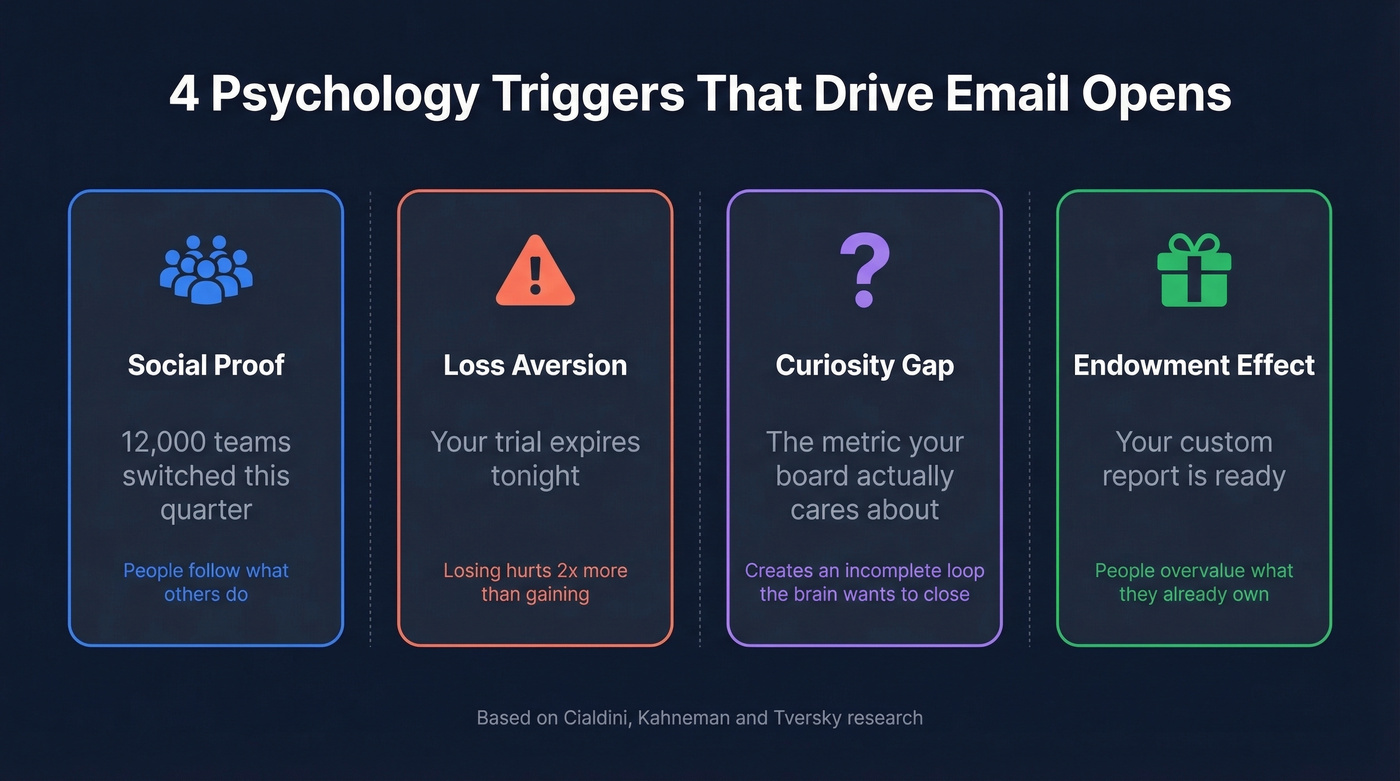
Social proof is Cialdini's most cited principle: people follow what others do. "12,000 teams switched this quarter" works because it signals consensus. The reader thinks, "If that many people moved, maybe I should pay attention."
Loss aversion is why breakup emails outperform everything else in cold sequences. The pain of losing something outweighs the joy of gaining it by roughly 2x, according to Kahneman and Tversky's original research. "Your trial expires tonight" hits harder than "Renew for another month" because the reader feels something slipping away.
Curiosity gap creates an incomplete loop the brain wants to close. "The metric your board actually cares about" builds tension that only opening resolves. Use this sparingly - overuse trains readers to distrust you.
Endowment effect makes people overvalue what they already have. "Your custom report is ready" implies ownership before the click. Welcome emails and onboarding sequences lean on this lever heavily.
Once you internalize these four triggers, you can generate your own ideas instead of relying on copy-paste templates.
Ideal Subject Line Length
Thirty-three characters is the universal safe zone. That's not a guideline - it's the tested display limit on Gmail's Android app, one of the most restrictive major inbox views.
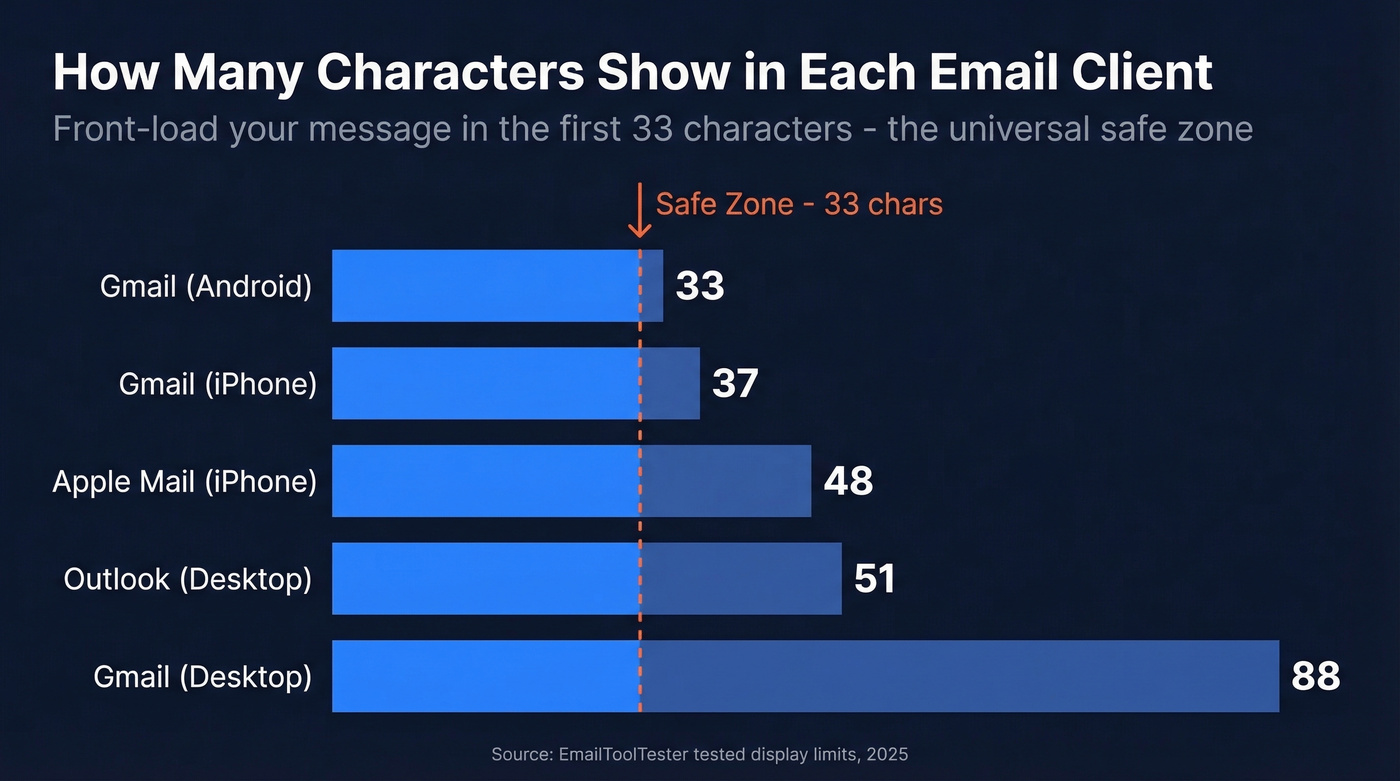
| Email Client | Max Subject Visible |
|---|---|
| Gmail (Android) | ~33 characters |
| Gmail (iPhone) | ~37 characters |
| Apple Mail (iPhone) | ~48 characters |
| Outlook (desktop) | ~51 characters |
| Gmail (desktop) | ~88 characters |
Put your key message in the first 33 characters, then add context after. Everything past that is bonus - nice if it shows, but your subject needs to work without it.
Twilio SendGrid's Cyber Week data reinforces this from a different angle. The average subject line was 6 words. The best-performing ones were 2-4 words. In a crowded inbox - especially during high-volume periods - shorter wins.
Don't Forget Preview Text
Your subject line doesn't appear alone. The preview text sits right next to it in most email clients, and it's the most underused piece of real estate in email marketing. The universal safe zone for preview text is about 37 characters - after that, different clients truncate differently. Treat it as a second subject line: extend the curiosity, add a specific detail, or deliver the payoff your subject line promised. Never leave it blank, because the email client will just pull in the first line of your body copy, which is usually "View in browser" or some other useless string.
80+ Subject Line Examples by Category
Cold Outreach
The best cold emailers hit 40-60% open rates consistently - not through tricks, but through research-based personalization. Generic subjects get deleted. Specific ones get opened.
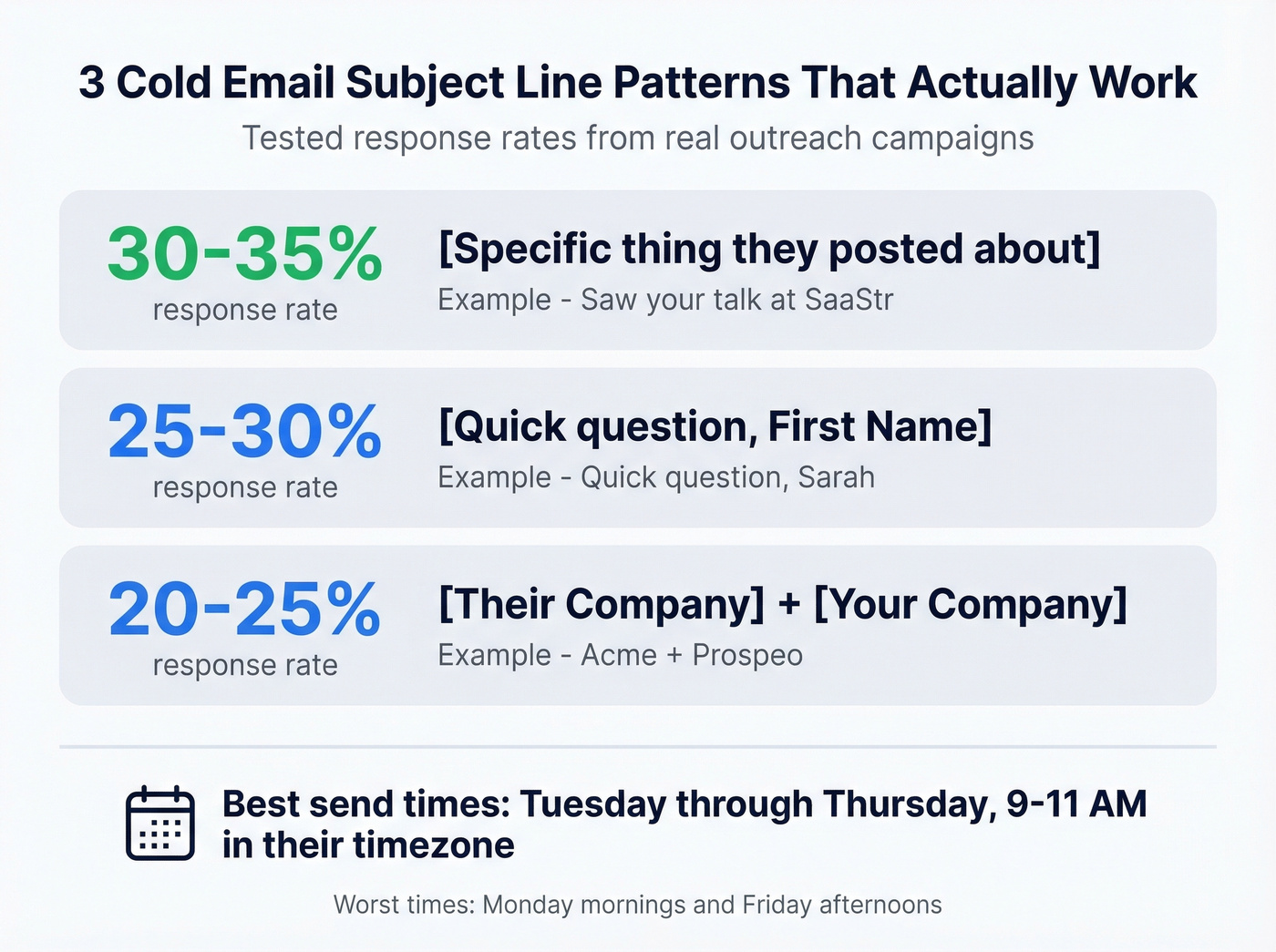
A Reddit practitioner shared three patterns with rough response rates that match what we've seen in our own campaigns:
- "[Specific thing they posted about]" - 30-35% response rate
- "[Their Company] + [Your Company]" - 20-25% response rate
- "Quick question, [First Name]" - 25-30% response rate
The same poster reported best responses Tuesday through Thursday, 9-11 AM in the recipient's timezone. Monday mornings and Friday afternoons performed worst.
More ideas that work:
- "Saw your talk at [Event]"
- "[Mutual connection] suggested I reach out"
- "Idea for [their specific initiative]"
- "[Their company]'s [metric] vs. industry avg"
- "For [First Name] - re: [company news]"
- "Thoughts on [their recent blog post]?"
- "[First Name], one question about [department]"
- "Congrats on [recent milestone]"
The pattern is obvious: research-based personalization crushes everything else. Anything that sounds like marketing copy - "Boost your ROI," "Transform your business" - gets filtered or ignored. Of course, personalization only works when your contact data is accurate. We use Prospeo's 7-day refresh cycle to make sure the company details and job titles we reference in outreach are current, not stale.
If you're building outbound sequences, pair these with a solid B2B cold email sequence so your subject line matches the message inside.
Follow-Up and Breakup
Loss aversion is the lever here. Breakup emails - "Should I close your file?" - consistently have the highest reply rate in cold sequences.
- "Should I stop reaching out?"
- "Closing the loop on [topic]"
- "One last thing, [First Name]"
- "Did this fall off your radar?"
- "Following up - [specific value prop in 3 words]"
- "Bumping this - [date of original email]"
- "3 options for [their problem]"
- "Permission to close your file?"
- "Still worth a conversation?"
Sequence-aware subjects that reference the previous email feel like a real conversation, not a drip campaign. That distinction matters. Recipients can smell automation, and they punish it.
If you want more reply-focused follow-ups, borrow a few patterns from these sales follow-up templates.
Newsletter and Content
Boring wins hardest here. Straightforward subjects describing exactly what's inside hit 60-87% open rates in large-scale tests. Clever wordplay underperforms every time.
- "[Newsletter Name] #47: The pricing study"
- "This week: 3 things about [topic]"
- "New post: [exact title of article]"
- "[Topic] benchmarks, updated for 2026"
- "The [metric] report you asked for"
- "What we learned from [specific data point]"
- "March update: [one-line summary]"
- "[Number] [topic] stats you'll reference all quarter"
- "The data behind [controversial take]"
If you want a bigger swipe file, see our full list of email subject line examples.
Ecommerce and Promotions
Urgency plus specificity. The Twilio SendGrid data showing 2-4 word subjects winning during Cyber Week makes sense - promotional inboxes are noisy, and brevity cuts through.
- "40% off ends tonight"
- "Back in stock: [product]"
- "Your cart misses you"
- "Free shipping - today only"
- "[First Name], your wishlist is on sale"
- "New drop: [collection name]"
- "Last chance: [specific offer]"
- "We saved one for you"
- "Price drop on [product they viewed]"
- "$15 off - just because"
If you're sending at scale, make sure you're following the best way to send bulk email without getting blacklisted.
Welcome and Onboarding
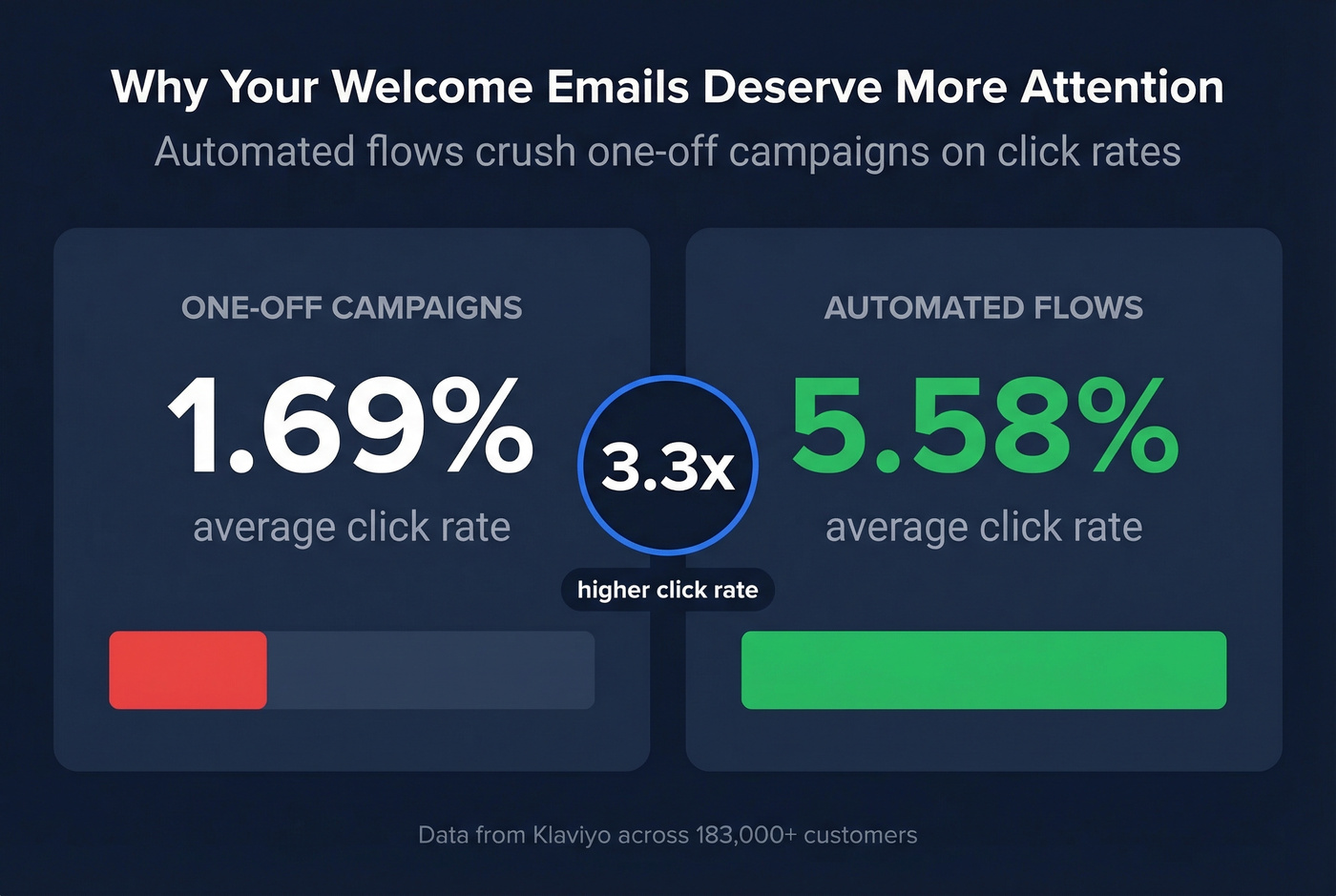
The endowment effect works perfectly here - the subscriber already took action, so reinforce what they now "own." Klaviyo's data across 183,000+ customers shows automated flows deliver 3x higher click rates than campaigns - 5.58% vs. 1.69%. That gap alone justifies investing time in your welcome subject lines.
- "You're in - here's what happens next"
- "Welcome to [Brand]. Start here."
- "Your account is ready, [First Name]"
- "[First Name], your first [benefit] is waiting"
- "3 things to do in your first 5 minutes"
- "Here's the [resource] we promised"
- "Quick setup: 2 minutes, 3 steps"
- "You just joined 15,000+ [type of user]"
- "One thing most new users miss"
To improve clicks (not just opens), use a stronger email call to action inside the message.
Re-Engagement
Loss aversion, pure and simple.
- "We haven't heard from you in a while"
- "[First Name], your [benefit] is expiring"
- "Things have changed since you left"
- "You're missing [specific feature/update]"
- "Still interested in [topic]?"
- "Your [unused credits/points] expire Friday"
- "Come back - here's 20% off"
- "What we've shipped since you left"
- "Your spot is still open"
Event and Webinar
Social proof plus urgency. In our campaigns, event subject lines with a specific speaker name outperform generic "Join our webinar" by a wide margin. Specificity about who's attending or what'll be covered always wins.
- "[Speaker Name] on [topic] - live Thursday"
- "500 seats left: [Event Name]"
- "Your seat for [Event] is confirmed"
- "[First Name], [Peer Name] is attending too"
- "Replay: [Event Name] recording"
- "Tomorrow: [specific takeaway] in 30 min"
- "The [topic] panel you asked for"
- "[Number] [role]s are joining - are you?"
- "Recording inside - [Event Name]"
Professional and Business
Short, direct, human-sounding. The anti-marketing-speak category. These work for internal comms, client updates, and B2B relationship emails. A personal sender address (firstname@company.com) outperforms role-based addresses like sales@ or info@ - so pair these subject lines with a real human name in the "from" field.
- "Quick update on [project]"
- "Agenda for Thursday"
- "[First Name] - feedback on [deliverable]"
- "Next steps from our call"
- "The [document] you requested"
- "Thoughts before Friday?"
- "One thing I forgot to mention"
- "Can we move this to Tuesday?"
- "Draft attached - your thoughts?"
- "Heads up on [upcoming change]"
If you're trying to book time, these pair well with better email wording to schedule a meeting.

Personalized subject lines only work when your contact data is right. Prospeo's 7-day refresh cycle keeps job titles, company details, and emails current - so the personalization you craft actually lands.
Stop personalizing subject lines with stale data. Start with 98% accuracy.
Should You Use Emojis?
The data is genuinely split. Experian found emojis boost opens by 56%. But ReturnPath's seasonal analysis found top seasonal emojis got 2-4x more spam complaints than average.
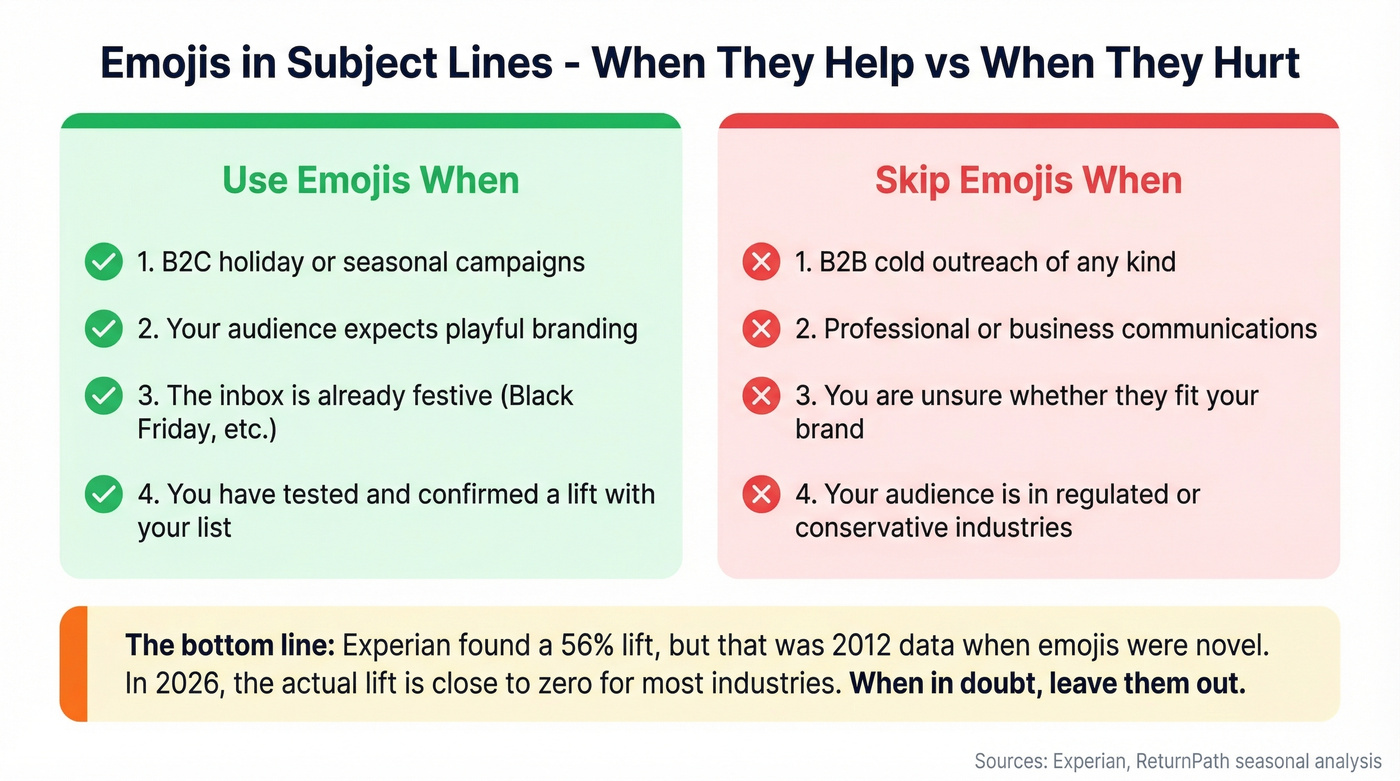
Context matters more than the emoji itself. In our experience, emojis work in B2C holiday campaigns and nowhere else. Use them when the inbox is already festive and your audience expects playful branding. Skip them entirely in B2B cold outreach - they signal "marketing email" and trigger the delete reflex. If you're unsure, leave them out. Nobody ever lost a deal because their subject line didn't have a party popper emoji.
I'll say it plainly: the 56% lift Experian found was from 2012 data, when emojis in subject lines were novel. In 2026, they're noise. The actual lift today is close to zero for most industries, and likely negative for B2B.
Open Rate Benchmarks by Industry
Before you panic about your open rates, check where you actually stand. We've seen teams rewrite subject lines for weeks when their real problem was a 30% bounce rate destroying sender reputation.
These are the latest public benchmarks from Mailchimp plus ActiveCampaign's shared 2026 customer averages from this benchmark thread:
| Industry | Avg Open Rate | Avg Click Rate |
|---|---|---|
| All Industries | 35.63-39.26% | 2.62-6.21% |
| Non-Profit | 40.04-42.68% | 3.27% |
| Education | 35.64% | 3.02% |
| Media/Publishing | 43.16% | 7.32% |
| Healthcare | 41.48% | - |
| Business/Finance | 31.35% | 2.78% |
| Ecommerce | 29.81% | 1.74% |
The range between Mailchimp's 35.63% average open and ActiveCampaign's 39.26% reflects different customer bases and measurement methods. Klaviyo's data adds another dimension: automated flows deliver 5.58% click rates vs. 1.69% for campaigns - reinforcing that timing and relevance matter as much as subject line copy.
One caveat worth knowing: Apple's Mail Privacy Protection inflates open rates by pre-loading tracking pixels. If a large chunk of your list uses Apple Mail, your "real" open rate is lower than reported. Click rate is a more reliable signal.
If you want a deeper breakdown, compare against a standard email open rate and what counts as a good email open rate.
Mistakes That Kill Open Rates
These aren't just "best practices to avoid." Several of these actively damage your sender reputation and inbox placement.
Fake Re: and Fwd: prefixes are the worst offenders. This violates CAN-SPAM's prohibition on misleading subject headings, and it's the fastest way to train recipients to mark you as spam. Even if it works once, you're poisoning your domain for every future send.
ALL CAPS and excessive punctuation are nearly as bad. A VerticalResponse analysis found they increase spam scores by 40-60%. Your email doesn't even reach the inbox.
Generic filler subjects like "Quick question," "Touching base," and "Checking in" are universally ignored. They signal "I have nothing specific to say." If you can't articulate a reason for the email in the subject line, the email probably shouldn't exist.
Broken merge tags deserve their own circle of hell. "Hi {first_name}" is worse than no personalization at all - it tells the recipient you're running a mass campaign and didn't bother to QA it. Always send a test email to yourself first.
Role-based sender addresses like sales@ or marketing@ tank open rates before the subject line even matters. The "from" field is the first thing people scan.
Certain words also trigger spam filters directly. Avoid "free" in all caps, "act now," "limited time offer," "congratulations," "click here," "no obligation," "winner," and "urgent" - especially in combination. One trigger word won't kill you, but stacking two or three will.
Let's be honest about the biggest one, though: none of this matters if you're emailing dead addresses. Bounces and spam complaints from invalid emails destroy sender reputation faster than any bad subject line. If your bounce rate is above 3-4%, fix the list before you rewrite a single subject.
To diagnose the real issue, start with email deliverability and your email bounce rate.
How to A/B Test Subject Lines
Testing doesn't need to be complicated. Send version A and version B to 20% of your list - 10% each. Wait 1-2 hours for results to stabilize, then send the winner to the remaining 80%.
The key discipline is testing one variable at a time: length, personalization, emoji, question vs. statement. Never stack changes, because you won't know which variable drove the result. Schedule tests for 8-11 AM when open rates peak, and run each test for at least 2-3 sends before drawing conclusions - a single test with a 2% difference means nothing. You need patterns across multiple sends before you change your playbook.
If more than 30-40% of your list uses Apple Mail, track click rate as your secondary metric. Opens alone are increasingly unreliable as a decision-making signal because of Apple's privacy pre-loading.
If you want to test the "second subject line" too, use a structured preview text A/B test.
You just learned that research-based personalization crushes generic subject lines. But referencing a prospect's role or company news falls flat when your data is 6 weeks old. Prospeo refreshes 300M+ profiles every 7 days - so your outreach references reality, not outdated records.
Great copy deserves great data. Emails start at $0.01 each.
FAQ
What's the ideal email subject line length?
Thirty-three characters is the universal safe zone across major tested mobile email clients. Desktop varies - 51 characters on Outlook, up to 88 on Gmail - but front-load the key message regardless. Twilio SendGrid's Cyber Week data shows 2-4 word subject lines outperform longer ones in high-volume periods.
Do personalized subject lines actually work?
Yes - personalized subject lines get 26% higher open rates on average in cold email. Deep personalization, like referencing a recipient's recent post or company milestone, pushes that past 40%. Research-based personalization consistently outperforms generic first-name tokens.
How do I know if my open rate is good?
Mailchimp's latest benchmark puts the all-industry average at 35.63%. ActiveCampaign's 2026 customer average is 39.26%. Below 15% usually signals a deliverability or list quality problem, not a subject line problem. Verify your list before rewriting subject lines - bad data is almost always the bigger issue.
What words trigger spam filters?
Avoid "free" in all caps, "act now," "limited time offer," "congratulations," "click here," and "urgent" - especially stacked together. Fake Re:/Fwd: prefixes, ALL CAPS, and excessive punctuation increase spam filter scores by 40-60% and can prevent inbox delivery entirely.
Where can I find fresh subject line ideas?
Start with your own data - identify which past sends had the highest open and click rates, then reverse-engineer the pattern. Subscribe to competitors' lists, check communities like Reddit's r/emailmarketing for practitioner results, and A/B test consistently. Swipe files are a starting point, not a strategy.