

Web Data Extraction: What Works, What Breaks, and What's Changed in 2026
Your price-monitoring scraper ran perfectly for three months. Then it went dark overnight - no errors, no warnings, just empty CSVs. The site deployed Cloudflare's latest challenge page, and your requests.get() call started returning a 403 before it even touched the HTML.
That's the gap between tutorial-land and production reality. Over 70% of modern websites load content dynamically with JavaScript, and the anti-bot arms race has made "just use BeautifulSoup" a punchline for anyone running scrapers at scale.
Web data extraction in 2026 isn't just harder than it was a few years ago. It's different. The tools are better, the defenses are smarter, and the legal terrain has shifted enough that "it's public data, so it's fine" doesn't hold up as a complete legal defense anymore.
What Is Web Data Extraction?
It's the process of pulling structured information from websites - automatically, at scale, in a format you can actually use. The pipeline is straightforward: fetch the page (HTTP request or headless browser), parse the HTML/DOM structure, extract the specific data points you need, and export to CSV, JSON, Excel, or directly into a database or ETL pipeline.
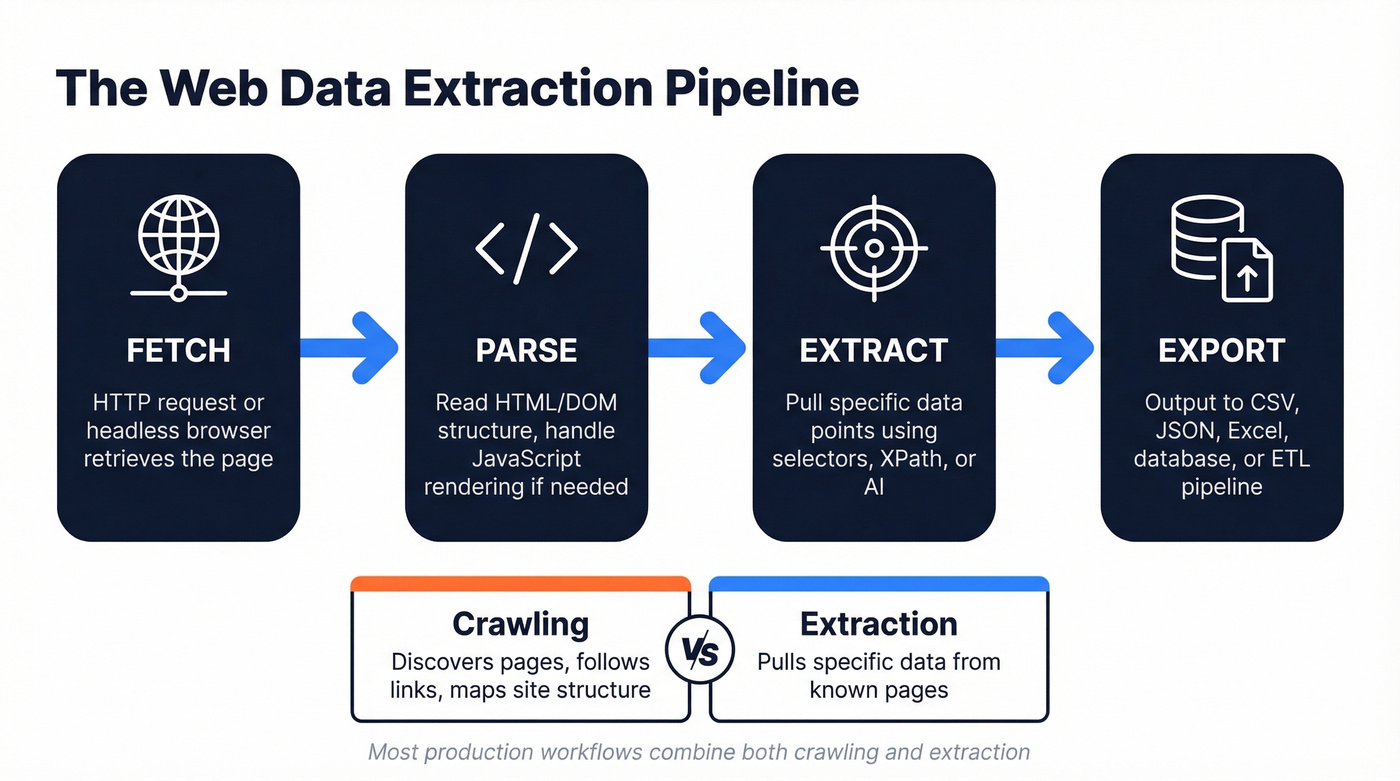
Extraction and crawling are different things. Crawling discovers pages - following links, mapping site structure, building an index. Extraction pulls specific data from those pages. Most production workflows combine both, but they require different tools.
The output format matters more than people think. JSON works well for APIs and downstream data warehouse ingestion. CSV is what most business users actually want. Excel is what they'll ask for even when they mean CSV. A good extraction workflow handles all three without manual conversion steps eating up your afternoon.
What You Need (Quick Version)
- Learning to scrape? Start with Python + BeautifulSoup on static sites, then graduate to Playwright for anything JavaScript-heavy.
- Need data without coding? Browse AI ($49/mo, self-healing selectors) or Octoparse (free plan exports up to 50K records/month) will cover most use cases.
How the Process Works
Every extraction project follows roughly the same six steps, whether you're writing Python or clicking through a no-code builder.
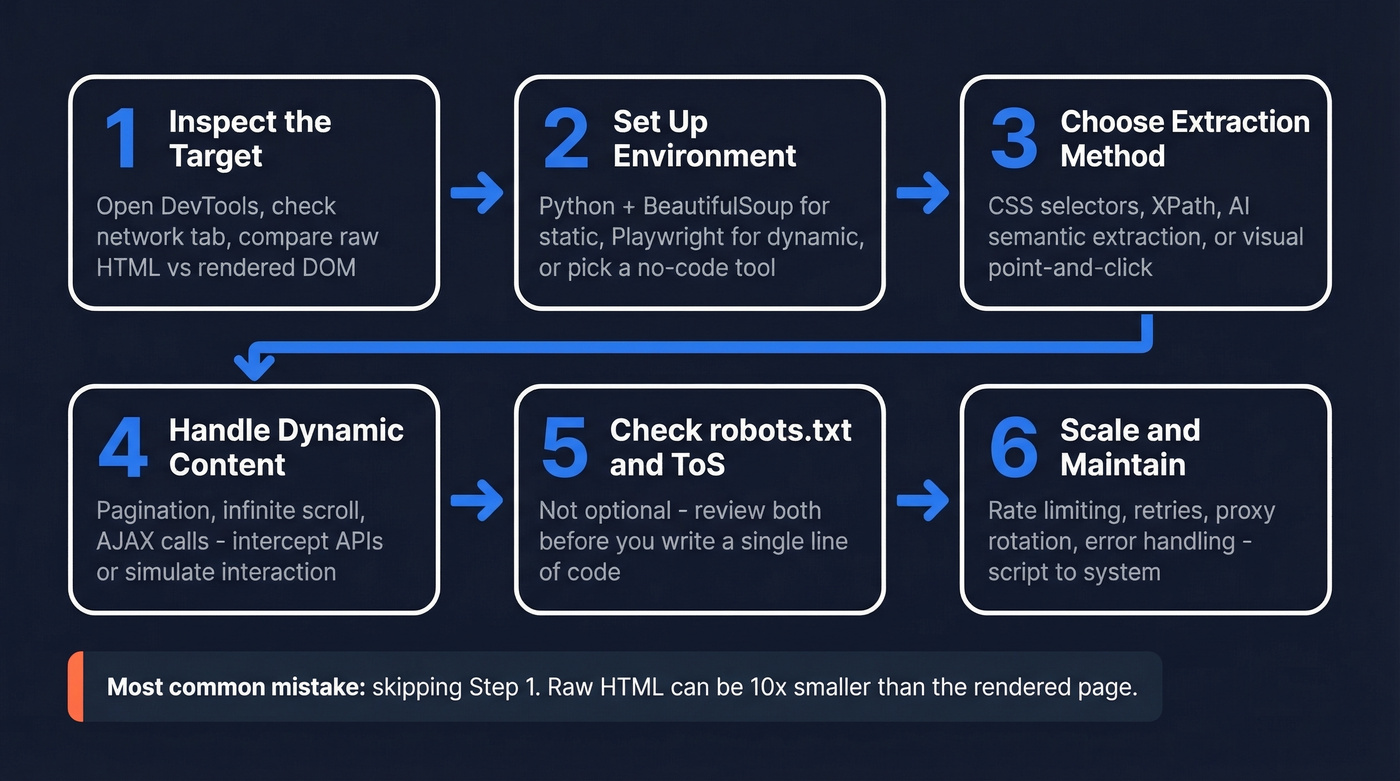
Inspect the target site. Open DevTools (F12), check the network tab, and figure out where the data actually lives. Compare the raw HTML source to the rendered DOM - if the rendered version has significantly more content, you're dealing with a dynamic site.
Set up your environment. For code-based scraping, that's Python with
requestsand BeautifulSoup for static sites, or Playwright for dynamic ones. For no-code, it's creating a project in your tool of choice.Choose your extraction method. CSS selectors and XPath for structured, predictable pages. AI-powered semantic extraction for messy or frequently-changing layouts. Visual point-and-click for one-off jobs.
Handle pagination and dynamic content. Infinite scroll, "load more" buttons, AJAX calls - these are where most beginner scrapers break. Intercept the underlying API calls when possible, or simulate user interaction in a headless browser.
Respect robots.txt and Terms of Service. Not optional. Check both before you start.
Scale and maintain. A scraper that works on 10 pages will break on 10,000. Rate limiting, retry logic, proxy rotation, and error handling separate a script from a system.
The biggest mistake beginners make is skipping step one. We've seen cases where the raw HTML response contains 15KB of content while the rendered page holds 180KB - if you're not rendering JavaScript, you're not getting the data.
Why Your Scraper Gets Blocked
Cloudflare protects roughly 20% of all websites. Add DataDome and PerimeterX, and a significant chunk of the web actively fights automated access.
Here's the thing: the common workarounds fail for specific reasons. Rotating IPs alone doesn't work because modern anti-bot systems fingerprint your TLS handshake, not just your IP address. Selenium is detectable out of the box - navigator.webdriver returns true, and that's just the most obvious tell. CAPTCHA solving services don't "unflag" your session; they solve one gate while the system continues scoring your behavior.
What actually works: real browser rendering with proper fingerprint management, large residential proxy pools with intelligent rotation, TLS fingerprint matching, and behavioral mimicry. Not vague "random delays" - we're talking Bezier-curve mouse movements, sub-pixel navigation precision, and targeting mobile endpoints where defenses tend to be lighter. Building all of this yourself is expensive and fragile.
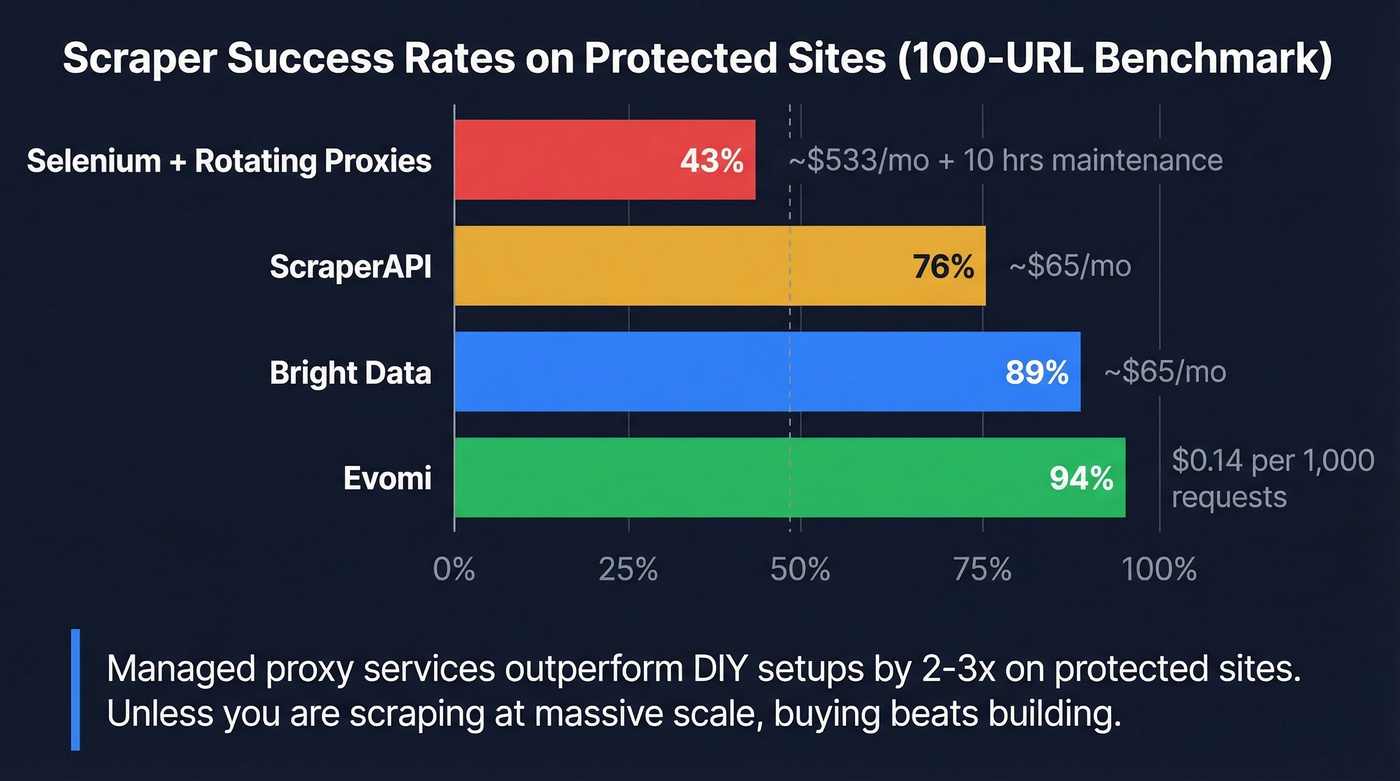
A 100-URL benchmark test across protected sites tells the story clearly:
| Approach | Success Rate | Monthly Cost |
|---|---|---|
| Selenium + rotating proxies | 43% | ~$533/mo + 10 hrs maintenance |
| ScraperAPI | 76% | ~$65/mo |
| Bright Data | 89% | ~$65/mo |
| Evomi | 94% | $0.14 per 1,000 requests |
In our testing, managed proxy services consistently outperformed DIY setups by 2-3x on protected sites. Unless you're scraping at massive scale with very specific requirements, buying beats building on anti-bot infrastructure.

Building scrapers to extract business contact data? You're solving the wrong problem. Prospeo's database has 143M+ verified emails at 98% accuracy and 125M+ verified mobiles - all accessible via 30+ search filters or API, with a 7-day refresh cycle.
Skip the anti-bot arms race. Get the B2B data directly.
Best Tools for Extracting Web Data in 2026
The web scraping market sits in the low single-digit billions USD and is growing fast. The tool landscape splits into three tiers: open-source frameworks for developers, no-code platforms for business users, and managed services that handle infrastructure.
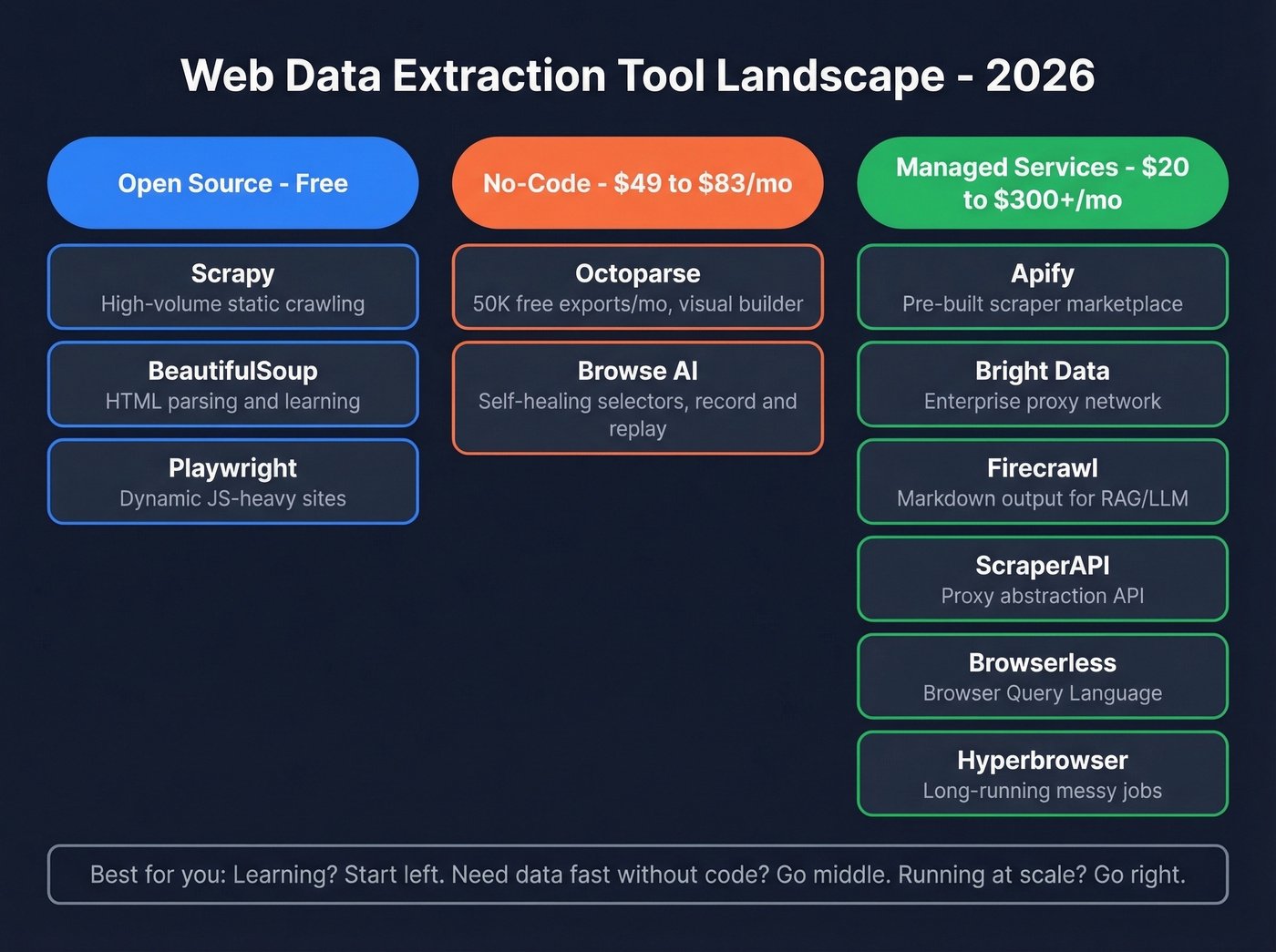
| Tool | Type | Best For | Free Tier | Paid From |
|---|---|---|---|---|
| Scrapy | Open-source | High-volume static | Yes (OSS) | Free |
| BeautifulSoup | Open-source | Parsing/learning | Yes (OSS) | Free |
| Playwright | Open-source | Dynamic sites | Yes (OSS) | Free |
| Octoparse | No-code | Volume extraction | 50K exports/mo | ~$83/mo |
| Browse AI | No-code | Self-healing jobs | 2 websites | $49/mo |
| Apify | Managed | Pre-built scrapers | $5 free/mo | $49/mo |
| Bright Data | Managed | Enterprise proxy | Limited | ~$300+/mo |
| Firecrawl | Managed | RAG/markdown output | 500 pages | ~$20/mo |
| ScraperAPI | Managed | Proxy abstraction | 5K calls | ~$49/mo |
| Browserless | Managed | Headless browser API | ~1,000 units/mo | ~$50/mo |
| Hyperbrowser | Managed | Long-running jobs | Limited | ~$40/mo |
JS rendering and anti-bot notes: Most managed platforms support JavaScript rendering and include some level of anti-bot handling. Octoparse and Browse AI render JS but offer only basic anti-bot handling. The three open-source frameworks have no built-in anti-bot - Playwright gets you real browser rendering, but you'll still need to layer on proxies and fingerprint work yourself for protected sites.
Open-Source Frameworks
Scrapy + BeautifulSoup remain the starting point for anyone learning extraction with Python. BeautifulSoup handles HTML parsing cleanly for static content, and Scrapy adds the crawling infrastructure - concurrency, middleware, pipelines - that turns a script into a production system. The limitation is JavaScript. Neither renders it natively, and bolting on Selenium or Splash adds complexity fast. The consensus on r/automation is consistent: Scrapy is "fast on static sites" but dynamic support "takes extra work."
Playwright is the best open-source option for dynamic sites in 2026. It renders JavaScript natively, supports Chromium/Firefox/WebKit, and its API is cleaner than Selenium's. If you're comfortable writing Python or TypeScript, Playwright is the right default for anything beyond static HTML.
Here's a minimal Playwright extraction in Python:
from playwright.sync_api import sync_playwright

with sync_playwright() as p:
    browser = p.chromium.launch()
    page = browser.new_page()
    page.goto("https://example.com/products")
    page.wait_for_selector(".product-card")
    items = page.query_selector_all(".product-card")
    for item in items:
        title = item.query_selector(".title").inner_text()
        price = item.query_selector(".price").inner_text()
        print(f"{title}: {price}")
    browser.close()

No-Code Tools
Octoparse is the volume play. Its free plan exports up to 50K records per month - generous enough for real work. The visual builder lets you point-and-click your way through extraction without writing code, and it handles JavaScript rendering and basic pagination out of the box. Paid plans start around $83/mo. Use this if you need to extract thousands of records regularly and don't want to maintain code. Skip it if you need serious anti-bot handling.
Browse AI takes a different approach: you record a browser session, and it builds the scraper from your actions. The "self-healing" feature is the real draw - when a site changes its layout, Browse AI adapts its selectors automatically instead of breaking silently. At $49/mo, it's positioned for teams that need reliability over volume.
Managed Platforms
Apify runs a marketplace of pre-built "Actors" - scrapers for specific sites and use cases. Need Amazon product data? There's an Actor for that. The infrastructure handles proxies, retries, and scheduling. Starts at $49/mo. Reddit users describe it as the "go-to when I don't want to think about infrastructure." If you're comparing no-code vs managed options, see Apify vs Octoparse.
Browserless deserves attention for its BQL (Browser Query Language) approach - a GraphQL-style syntax that lets you describe what you want extracted and get structured data back, without writing traditional scraping code. It's a genuinely different paradigm from CSS selectors and XPath. Free tier includes around 1,000 units/month; paid plans start around $50/mo.
Hyperbrowser is the dark horse. Reddit users praise it as "steadier on long runs" and handling "messy sites more gracefully" than alternatives. For jobs involving hundreds of pages per session with unpredictable layouts, it's worth a look. Paid plans start around $40/mo.
Bright Data is the enterprise option - massive residential proxy network, pre-built datasets, and scraping APIs. Expect $300+/mo for meaningful usage. Overkill for most teams, essential for large-scale competitive intelligence. If you're doing this for pricing and positioning, pair extraction with a competitive intelligence strategy.
Firecrawl outputs clean markdown and structured data, making it the obvious choice for RAG pipelines and LLM training workflows. Free tier gives you 500 pages; paid plans start around $20/mo.
ScraperAPI abstracts proxy management into a simple API call. Send a URL, get rendered HTML back. Starts at ~$49/mo after a 5,000-call free tier.
AI-Powered Extraction Methods
One Kadoa customer reported spending 40% of their data engineering time just fixing broken scrapers. Not building new ones. Fixing old ones.
That's the maintenance tax of CSS selectors and XPath - every time a site changes its layout, your scraper breaks. AI-powered extraction flips the model. Instead of telling a scraper where data lives (.product-title > span:nth-child(2)), you tell it what you want ("extract the product name, price, and rating"). The system figures out the selectors - and when the layout changes, it figures them out again.
A McGill University benchmark tested AI extraction across 3,000 pages from Amazon, Cars.com, and Upwork. The result: 98.4% accuracy even when page structures changed. Vision-based extraction cost fractions of a cent per page.
Three implementation patterns dominate right now:
- LLM code generation uses an AI to write a deterministic scraper once - low ongoing cost, but you lose the self-healing benefit.
- Direct LLM extraction sends each page through a language model - higher variable cost, maximum flexibility.
- Vision-based extraction treats the page as an image and extracts data from the visual layout - the gold standard for complex layouts, but slower and pricier per page.
We've found AI extraction pays for itself once you're maintaining more than five scrapers. Under a penny per page is typical for direct extraction, but if you're processing millions of pages daily, those fractions add up. The smart play: AI extraction for unstructured or frequently-changing sources, traditional methods for high-volume stable targets.
Let's be honest - if your average deal size is under $10k and you're spending more than 5 hours a month maintaining scrapers, you're losing money on the DIY approach. Switch to AI-powered extraction or a managed service and redeploy that engineering time.
Using Extracted Data for Market Research
The extraction is the easy part. What you do with the data is where ROI lives.
Price intelligence is the most proven use case. Enterprise case studies show 65% ROI within six months, with a 12% sales increase and 75% reduction in manual labor for teams tracking 10,000+ SKUs. If you're in e-commerce or travel, competitive pricing data is table stakes.
Market research and sentiment analysis deliver 58% ROI in as little as three months, with campaign effectiveness improvements around 20%. Scraping review sites, forums, and social platforms gives you real-time competitive intelligence that surveys can't match.
Lead generation is where extraction gets tricky - and where most teams waste time. The case studies show 70% ROI and 40% conversion increases, but scraped B2B contact data is useless if it's unverified. Bounce rates above 5% damage your domain reputation, and scraped emails are notoriously dirty. Scraping company data like firmographics, tech stacks, and headcount can be valuable for account-based targeting, but contact details require a verification layer. Tools like Prospeo eliminate the scraping step entirely for B2B contacts - 300M+ profiles with 98% email accuracy and a 7-day refresh cycle. If you're still set on scraping contacts, start with web scraping lead generation and then add data enrichment services to clean what you collect.
AI training data is the newest use case and the most legally fraught. Reddit's lawsuits against Anthropic and Perplexity AI should give anyone pause before scraping content for model training.
Is It Legal?
There's no single "web scraping law." Disputes play out across a patchwork of statutes - CFAA, copyright, contract law, GDPR, and now DMCA Section 1201.
The landmark case is still hiQ v LinkedIn. The Ninth Circuit reaffirmed in 2022 that scraping publicly available data doesn't necessarily constitute "unauthorized access" under the CFAA. Good news for scrapers of public data, but it's not a blanket permission slip.
More recent cases have shifted the terrain. X Corp v Bright Data (N.D. Cal.) saw the court dismiss ToS-based scraping claims as preempted by the Copyright Act - the court refused to let a platform create a "private copyright system" that conflicts with Congress's scheme. Reddit v Anthropic (filed June 2025, CA state court) pushes back hard, alleging breach of contract, trespass to chattels, and unfair competition related to AI training data scraping. As of early 2026, Reddit is seeking remand back to state court after Anthropic removed the case to N.D. California.
The most interesting legal development is the DMCA Section 1201 strategy. Reddit v Perplexity AI (filed October 2025, S.D.N.Y.) uses anti-circumvention claims - alleging that bypassing rate limits, CAPTCHAs, and robots.txt constitutes circumventing "technological protection measures." This theory is gaining traction across multiple cases and it should make anyone running large-scale scraping operations pay close attention.
On the privacy side, the CNIL fined KASPR EUR 240,000 for scraping professional data without appropriate consent. GDPR penalties can reach EUR 20M or 4% of global annual revenue.
Your compliance checklist: check robots.txt, read the ToS, handle PII carefully, understand GDPR/CCPA obligations for any personal data you collect, and consult legal counsel before large-scale projects. "It's public data" isn't a legal defense anymore. If you're using scraped data for outbound, also review email deliverability and email bounce rate basics.
Five Mistakes That Break Scrapers
1. Ignoring JavaScript rendering. A basic HTTP fetch on a dynamic site returns a skeleton HTML document. The actual content loads via JavaScript after the page renders. If your extracted dataset is suspiciously small, this is almost certainly why. Fix: use Playwright or a rendering API.
2. Using brittle absolute XPath selectors. /html/body/div[3]/div[2]/table/tr[5]/td[1] breaks the moment the site adds a banner or rearranges a div. Fix: use relative selectors, class-based targeting, or AI-powered semantic extraction.
3. Ignoring robots.txt. Beyond the legal implications, ignoring robots.txt is a fast path to getting your IP range permanently blocked. In Scrapy, set ROBOTSTXT_OBEY=True. In custom code, parse robots.txt before your first request.
4. No error handling or retries. Networks fail. Sites return 429s. Connections time out. A scraper without retry logic and exponential backoff will produce incomplete data and you won't know it until your dashboard shows gaps three days later. Implement retries with jitter, log failures, and validate output completeness.
5. No data validation post-extraction. Scraped data isn't clean data. Duplicates, malformed entries, and stale records are the norm. For B2B contacts specifically, verify before you send - a 10% bounce rate doesn't just waste sequences; it damages your sending domain for months. If you're building lists, a lead generation workflow helps prevent garbage-in/garbage-out.
Web extraction pipelines for B2B prospecting cost $300+/mo in proxy fees, break constantly, and still deliver unverified data. Prospeo delivers verified emails at $0.01 each with 98% accuracy - no scrapers, no maintenance, no 403s.
Trade your scraping stack for data that's already clean.
FAQ
Is web data extraction the same as web scraping?
Web data extraction is the broader term covering any method of pulling structured data from web sources - APIs, scraping, browser automation, even manual copy-paste. Web scraping is the most common technique and the one people usually mean. In practice, the terms are used interchangeably.
Can I scrape a website without getting blocked?
On unprotected sites, yes - trivially. On sites behind Cloudflare or DataDome, you'll need managed services with residential proxies and browser rendering. Benchmark tests show success rates from 43% (DIY Selenium) to 94% (managed platforms like Evomi at $0.14/1K requests). For most teams, outsourcing anti-bot handling to a managed service is cheaper than building it yourself.
Do I need to code to extract data from websites?
No. No-code tools like Octoparse (free plan, 50K exports/mo) and Browse AI ($49/mo, self-healing selectors) handle most use cases without a single line of code. That said, Python + Playwright gives you more control and lower per-page costs at scale. If you extract data regularly, learning basic Python pays for itself within weeks.
What's the best way to get B2B contact data?
Don't scrape for it. Scraped contact data requires verification, deduplication, and enrichment that eats engineering hours. Purpose-built B2B data platforms solve the data-quality problem that scraping creates - Prospeo, for example, provides 300M+ profiles with 98% email accuracy on a 7-day refresh cycle, starting with a free tier of 75 verified emails per month.
Is it legal to scrape publicly available data?
Generally yes for public, non-personal data - but GDPR, Terms of Service, and recent DMCA Section 1201 cases add real complexity. The hiQ v LinkedIn ruling supports scraping public data, while Reddit's 2025-2026 lawsuits against AI companies are testing new legal theories around anti-circumvention. Always check robots.txt, review ToS, and consult legal counsel for commercial projects.