

What Does CRM Stand For? The Honest, No-Pitch Guide
CRM stands for Customer Relationship Management. It's both a business strategy and a category of software - and the gap between those two things is where most confusion lives. Every other page ranking for this question is a CRM vendor trying to sell you their product. This one isn't.
We've spent years watching teams buy CRM software thinking it'll fix their sales process, only to realize six months later that the tool was never the problem. The strategy was. So let's break this down properly - what CRM actually means, when you need one, and when you don't.
The quick version:
- CRM = Customer Relationship Management - a strategy and a software category
- You need one when: 200-500+ active contacts, 2+ people updating records, or multiple pipeline stages
- You don't need one yet if: Solo founder with fewer than 50 contacts - a spreadsheet is fine
- Budget expectation: $15-$30/user/month for SMB, $50-$150/user/month for enterprise
- Biggest hidden cost: Bad data inside the CRM - 76% of CRM users say less than half their data is accurate
CRM Meaning in Business
The full form of CRM is Customer Relationship Management. As a strategy, it's the discipline of managing every interaction your company has with customers and prospects - the philosophy that says "we should know who our customers are, what they've told us, and what they need next," applied systematically rather than from memory.
As software, a CRM system is the tool that makes that philosophy possible at scale. It's the single source of truth for contact records, deal stages, communication history, and follow-up tasks. When someone says "check the CRM," they mean the software. When someone says "we need better CRM," they usually mean both.
The distinction matters because buying CRM software doesn't give you a customer relationship management strategy. We've seen teams spend $40k/year on Salesforce licenses and still lose deals because nobody logs calls or updates pipeline stages. The software is plumbing. The strategy is water pressure. You need both.
CRM by the Numbers
The CRM market isn't just big - it's one of the largest enterprise software categories in the world.
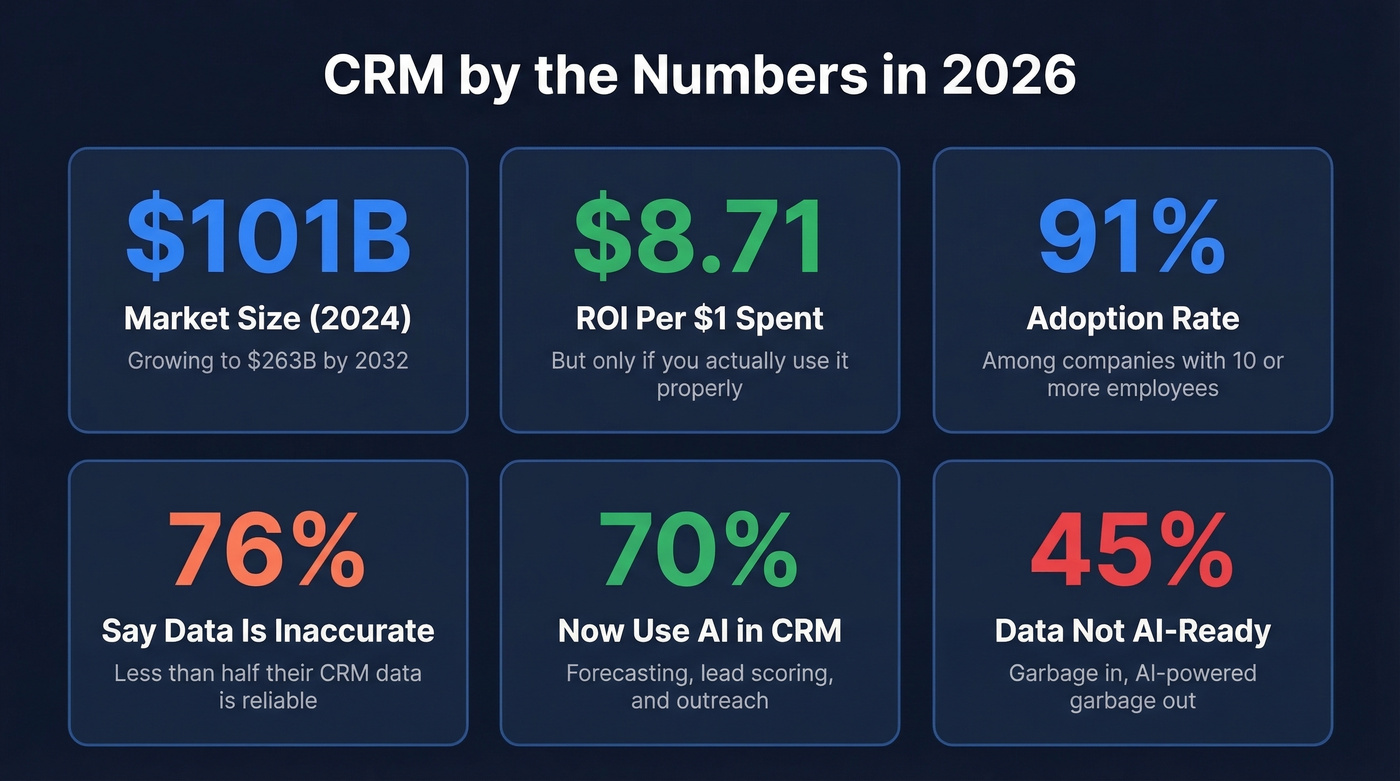
| Metric | Number |
|---|---|
| Market size (2024) | $101.41B |
| Projected (2032) | $262.74B |
| Growth rate (CAGR) | 12.6% |
| ROI per $1 spent | $8.71 |
| Companies using CRM (10+ employees) | 91% |
| Cloud-based deployments | 87% |
That $8.71 ROI figure gets repeated everywhere, and it deserves context. It doesn't mean every company gets a 771% return. It means the companies that implement CRM well and actually use it see outsized returns. The ones that don't are paying for expensive contact lists.
What CRM Software Actually Does
At its core, CRM software handles five things. Everything else is a feature built on top of these.
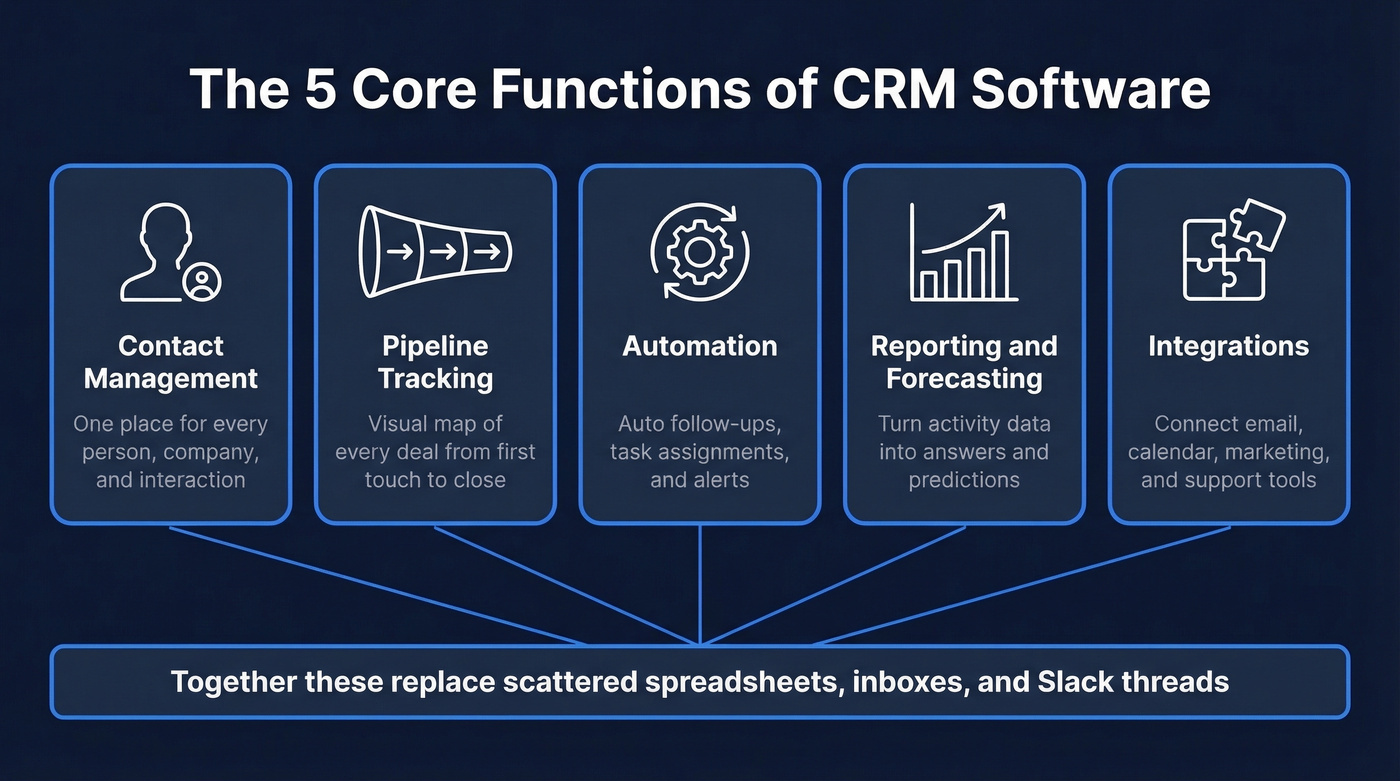
Contact management is the foundation. Every person and company you interact with lives in one place - with their email, phone, company, title, and full interaction history attached. CRM data typically falls into four buckets: identity data (name, email, phone), descriptive data (company size, industry), quantitative data (deal value, purchase frequency), and qualitative data (support satisfaction, communication preferences). No more digging through inboxes or asking "did anyone talk to this person?"
Pipeline tracking gives you a visual map of every deal in progress. You can see what stage each opportunity is in, what's expected to close this month, and where deals are stalling. This alone replaces the "where are we on that deal?" Slack messages that eat up everyone's afternoon.
Automation handles the repetitive work - follow-up emails after a demo, task assignments when a deal moves stages, alerts when a contact goes cold for 30 days. Most modern CRMs include drag-and-drop workflow builders, so you're configuring these in minutes, not writing code. If you want to tighten this part of your process, start with proven sales follow-up templates.
Reporting and forecasting turn your activity data into answers. How many deals did we close last quarter? What's our average sales cycle? Which rep has the highest win rate? Only 20% of small business owners use CRM analytics weekly - which means 80% are flying blind with a dashboard they're already paying for. If forecasting is a priority, compare sales forecasting solutions before you commit.
Integrations connect your CRM to everything else - email, calendar, marketing automation, accounting, support tickets. A CRM that doesn't talk to your other tools becomes another silo, which defeats the entire purpose. If you're wiring up your stack, use this guide to connect outreach tool to CRM.
Types of CRM
Not all CRMs solve the same problem. There are three broad categories, and most modern platforms blend elements of all three.
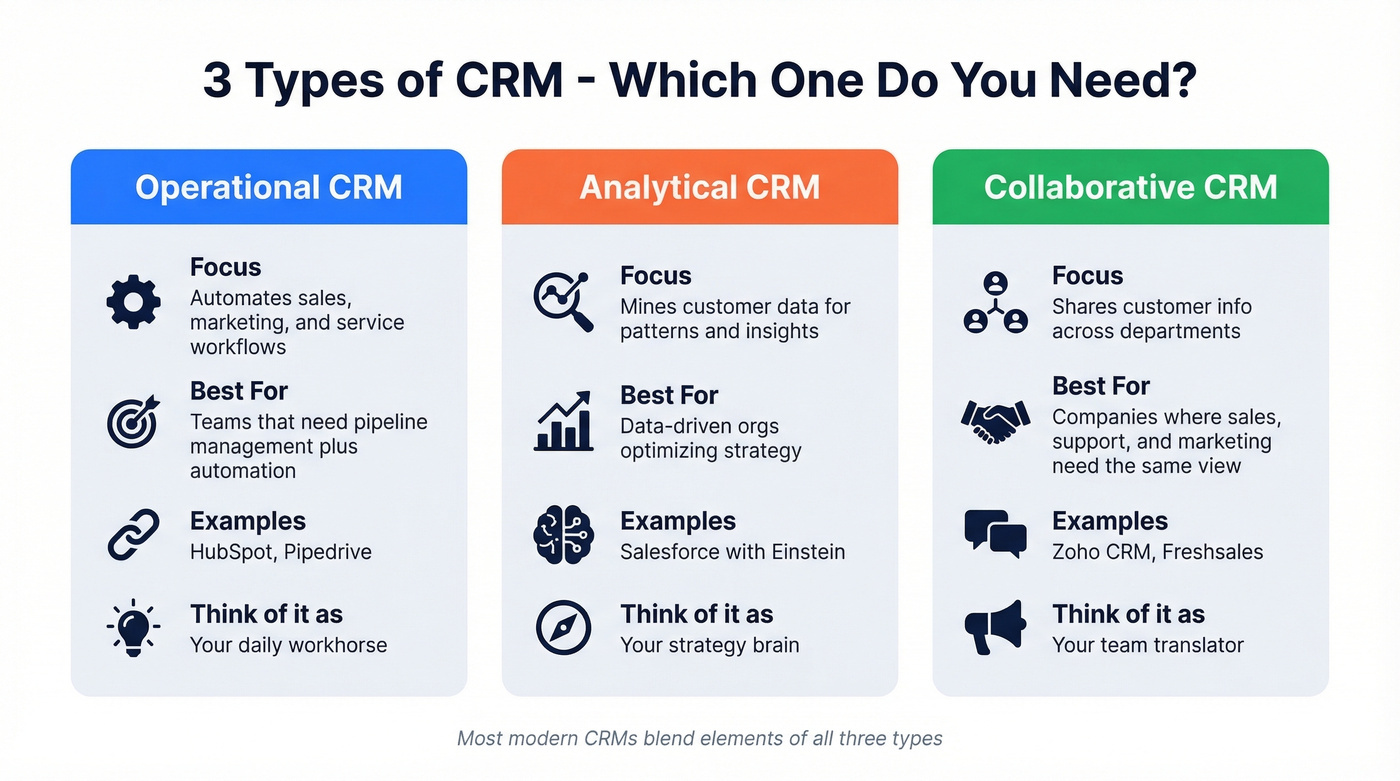
| Type | What It Does | Best For | Example |
|---|---|---|---|
| Operational | Automates sales, marketing, and service workflows | Teams that need pipeline + automation | HubSpot, Pipedrive |
| Analytical | Mines customer data for patterns and insights | Data-driven orgs optimizing strategy | Salesforce (with Einstein) |
| Collaborative | Shares customer info across departments | Companies where sales, support, and marketing need the same view | Zoho CRM, Freshsales |
A related term you'll encounter is Customer Data Platform (CDP). CDPs aggregate data from multiple sources into unified customer profiles, while CRMs focus on managing relationships and workflows. Some enterprises use both; most SMBs only need the CRM.
If you're evaluating your first system, don't overthink this taxonomy. Just make sure it handles contacts, pipeline, and basic automation. If you want a broader shortlist, see these examples of a CRM.
Benefits of Using a CRM
Companies using CRM well see meaningful gains in retention, productivity, and conversion rates. Common benchmarks include up to a 27% improvement in customer retention, a 21% rise in agent productivity, and a 17% increase in lead conversions.
The real benefit is time. A rep who doesn't have to search three tools to find a prospect's phone number, re-read an email thread to remember what was discussed, or manually update a spreadsheet after every call gets 30-60 minutes back per day. Multiply that across a team and you're looking at hundreds of hours per quarter redirected from admin work to selling.
Then there's retention. 47% of companies report higher customer retention after CRM adoption. When your support team can see every interaction a customer has had with sales and marketing, they don't ask the customer to repeat themselves. That alone reduces churn.
CRM vs. Spreadsheets
Here's the thing: a spreadsheet is a perfectly fine CRM for some businesses. The question is when it stops being fine.
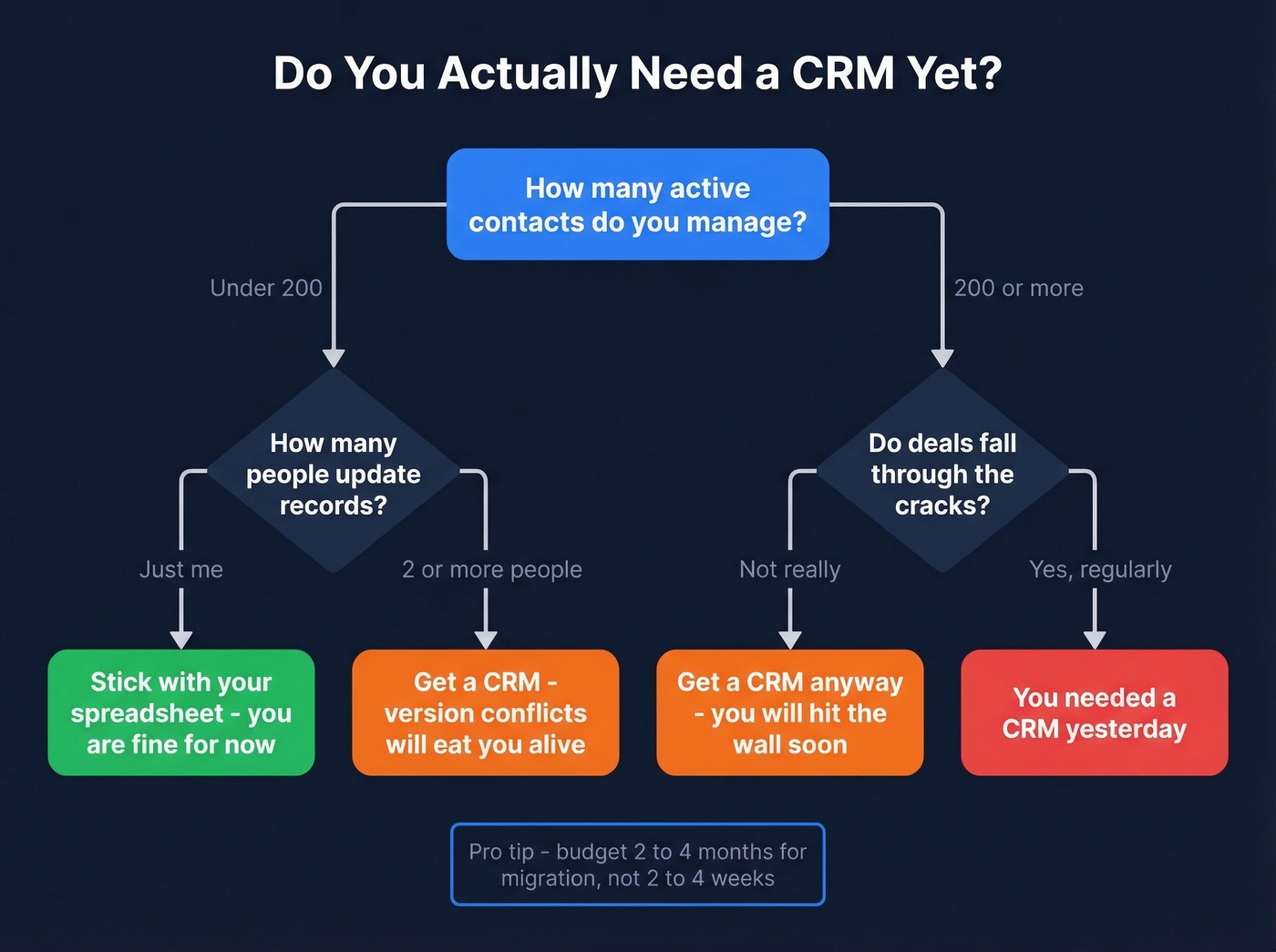
Keep your spreadsheet if:
- You have fewer than 200 active contacts
- One person manages all customer relationships
- Your "pipeline" is three or four deals at a time
Switch to a CRM when:
- You're past 200-500 contacts and can't find records quickly
- Two or more people are updating the same data (version conflicts will eat you alive)
- You have multiple pipeline stages and deals are falling through cracks
- You need automated reminders, task assignments, or email sequences
The migration itself is where teams get burned. Most estimate 2-4 weeks. The reality is 2-4 months for a proper implementation - data cleanup, field mapping, workflow setup, and training. Plan for that, and you won't panic when week three arrives and you're still cleaning up duplicate records.
One stat that should scare you: over 70% of CRM records become outdated annually. If your spreadsheet data was messy going in, your CRM data will be messy too - just in a more expensive container.

76% of CRM users say less than half their data is accurate. That's not a CRM problem - it's a data problem. Prospeo enriches your CRM with 50+ data points per contact at a 92% match rate, refreshed every 7 days. Native integrations with Salesforce and HubSpot mean your records stay clean without manual work.
Stop paying for a CRM full of dead emails and wrong numbers.
A Brief History of CRM
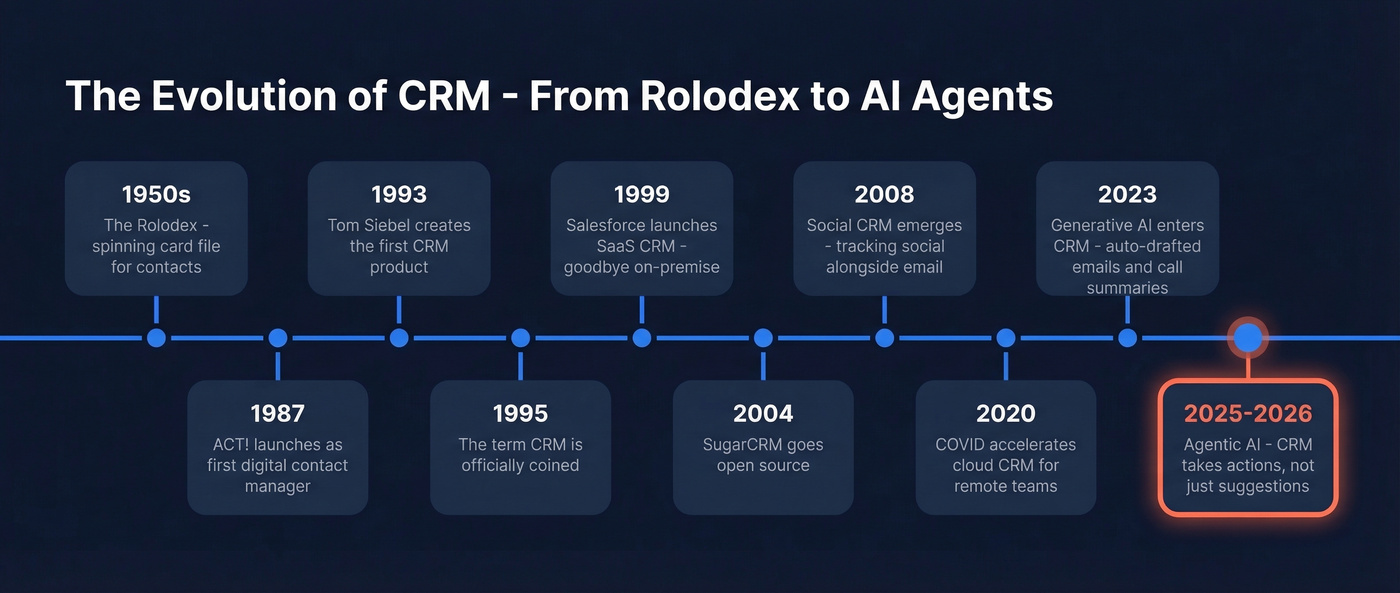
- 1950s - The Rolodex: a spinning card file for contacts, and arguably the first "CRM."
- 1987 - ACT! launches as an early digital contact manager.
- 1993 - Tom Siebel designs the first CRM product, Siebel Customer Relationship Management.
- 1995 - The term "CRM" is coined.
- 1997 - CRM is popularized through the work of Siebel, Gartner, and IBM.
- 1999 - Salesforce launches a SaaS CRM, accelerating the shift away from on-premise systems.
- 2004 - SugarCRM goes open-source, proving CRM doesn't have to cost a fortune.
- 2008 - Social CRM emerges. Companies start tracking social media interactions alongside email and phone.
- 2020 - COVID accelerates cloud CRM adoption as remote sales teams need centralized systems.
- 2023 - Generative AI enters CRM. Salesforce Einstein, HubSpot AI, and others start auto-drafting emails and summarizing calls.
- 2024-2026 - Agentic AI capabilities roll out across major CRMs, pushing automation beyond "suggestions" into real task execution.
CRM in 2026: AI and What's Next
AI isn't coming to CRM. It's already here. 70% of companies now use AI in their CRM, and 65% use generative AI specifically for forecasting, lead scoring, and personalized outreach.
The practical impact is real. Reps get AI-generated call summaries instead of typing notes. Managers get forecasts that adjust automatically based on deal velocity. Marketing teams get lead scores that actually reflect buying intent rather than arbitrary point systems. If you're building this into your process, start with a solid lead scoring model.
The agentic AI wave - AI that takes actions, not just makes suggestions - is the next frontier. An AI agent can automatically re-engage a stalled deal by drafting a follow-up email, scheduling a task for the rep, and updating the deal stage, all without anyone clicking a button. Salesforce's Agentforce and Microsoft's Copilot for Dynamics 365 are early examples, and expect every major CRM to ship autonomous agents by late 2026.
The catch? AI is only as good as the data it's trained on. And 45% of companies say their CRM data isn't prepared for AI. Garbage in, AI-powered garbage out.
Popular CRM Tools
| Tool | Best For | Starting Price | Key Tradeoff |
|---|---|---|---|
| Zoho CRM | Best overall value | Free tier; paid from ~$14/user/mo | Steep learning curve |
| HubSpot Smart CRM | Easiest to use | Free tier; paid from ~$20/user/mo | Price jumps at scale |
| Pipedrive | Sales-focused SMBs | From ~$14/user/mo | Gets pricey as you add features |
| Freshsales | Freshworks ecosystem | Free tier; paid from ~$15/user/mo | Smaller app marketplace |
| Salesforce | Enterprise path | From ~$25/user/mo (Essentials) | Overkill for small teams |
| Dynamics 365 | Enterprise + AI | From ~$65/user/mo | Complex, expensive |
Real talk: Salesforce is the right CRM for maybe 10% of the businesses that buy it. If you're a local plumbing company tracking 50 leads a month with a $250/month budget - a real scenario from r/CRM - Salesforce is overkill. Pipedrive or Zoho will do everything you need at a fraction of the cost.
Let's be honest about HubSpot too. Its free tier is the gateway drug of CRM - genuinely excellent for getting started with a visual pipeline, contact management, and basic email integration. But the pricing jumps hit hard once you need automation, custom reporting, or more than a handful of contacts. A common theme on r/CRM is people loving HubSpot's features and hating the invoice once they outgrow the free tier.
Skip enterprise CRMs if your average deal size is under $15k. The money you save on licensing is better spent on data quality and rep training - the two things that actually move pipeline. If you're trying to diagnose why deals stall, these sales pipeline challenges are a good checklist.
One factor that rarely appears in comparison guides but matters more every year: GDPR and data residency. If you sell into the EU or handle EU customer data, confirm your CRM vendor's data processing agreements and hosting locations before you sign.
The Data Problem Nobody Mentions
Here's the part every CRM vendor's "what is CRM" page conveniently skips: your CRM is only as good as the data inside it. And most CRM data is terrible.
76% of CRM users say less than half their data is accurate or complete. 37% report direct revenue loss from poor data quality. Over 70% of records become outdated annually - people change jobs, companies get acquired, phone numbers go stale.
Picture this: you just inherited a CRM with 10,000 contacts and no idea how many are still valid. Sound familiar? This is the real hidden cost of customer relationship management. Not the license fee. Not the implementation. It's the slow decay of your contact database turning your "single source of truth" into a single source of fiction.

Tools like Prospeo connect directly to Salesforce and HubSpot to tackle this. With 143M+ verified emails and a 7-day data refresh cycle, it enriches and verifies CRM records automatically - returning 50+ data points per contact at 98% email accuracy. The free tier lets you test on 75 emails per month, which is enough to audit whether your database is actually usable before committing to anything. If you're comparing options, start with these data enrichment services.
CRM Mistakes That Kill ROI
I've watched teams make the same mistakes for years. These seven destroy ROI fastest.
Skipping goal setting. "We need a CRM" isn't a goal. "We need to reduce lead response time from 4 hours to 30 minutes" is. Define what success looks like before you pick a tool.
Choosing the wrong complexity level. A 5-person sales team doesn't need Salesforce. A 200-person org doesn't need Pipedrive. Match the tool to your actual workflow, not your aspirational one.
Neglecting training. The fanciest CRM in the world is useless if reps don't log activities. Budget 2-3x more time for training than you think you'll need. A simple 30-60-90 day plan for sales reps helps adoption stick.
Ignoring data quality. Before blaming your CRM for poor results, check your data. Run a verification audit on a sample of your contacts - even 75 records will tell you whether your database is usable or just an expensive graveyard.
Overcomplicating setup. Start with contacts, pipeline, and basic automation. Add complexity as you learn what you actually need. Teams that build 47 custom fields on day one abandon the system by month three.
Forgetting integrations. Your CRM needs to talk to your email, calendar, and marketing tools. If it doesn't, reps will work around it - and "working around the CRM" means not using the CRM.
Not using reporting. Only 20% of small business owners use CRM analytics weekly. If you aren't looking at your pipeline reports, win rates, and activity metrics, you're paying for a database, not a management tool.
You just read that the biggest hidden CRM cost is bad data. Prospeo delivers 98% verified email accuracy and 125M+ verified mobile numbers - at roughly $0.01 per email. No contracts, no sales calls. Plug it directly into your CRM and start with 75 free emails.
Great CRM strategy starts with data you can actually trust.
CRM Questions, Answered
What does CRM mean?
CRM means Customer Relationship Management - both the strategy of systematically managing customer interactions and the software platforms that enable it. In everyday business conversation, "CRM" usually refers to the software, but the underlying concept covers any disciplined approach to tracking and improving customer relationships.
What is CRM used for beyond sales?
Marketing teams use it for campaign tracking and lead nurturing. Customer service teams use it for ticket management and full interaction history. Some companies use CRM for recruiting, fundraising, and real estate deal tracking. Any function that manages relationships with people benefits from a centralized system.
How much does a CRM cost?
Expect $15-$30/user/month for a solid SMB CRM like Zoho or Pipedrive. Enterprise platforms like Salesforce and Dynamics 365 often run $50-$150/user/month depending on modules and seats. HubSpot, Zoho, and Freshsales all offer free tiers worth testing before you commit.
What's the difference between CRM and ERP?
CRM manages customer-facing relationships - sales, marketing, and support. ERP manages internal operations like finance, inventory, HR, and supply chain. Some enterprises use both, with the CRM feeding customer data into the ERP for fulfillment and billing. They're complementary, not competing.
How do you keep CRM data accurate?
Run automated enrichment on a rolling basis - over 70% of records go stale annually without active maintenance. Assign a data quality owner on your team, build validation rules that prevent bad data from entering the system in the first place, and use enrichment tools that refresh contacts on a regular cycle rather than relying on one-time imports.