

What Is CRM Software (and What Every Vendor Page Won't Tell You)?
Every CRM vendor page gives you the same pitch: "Manage your customer relationships in one place." None of them give you a straight answer on pricing, a realistic timeline for ROI, or the fact that over half of implementations underdeliver. So what is CRM software, really - and how do you avoid buying the wrong one?
CRM Software Defined
CRM stands for Customer Relationship Management. It's software that tracks every interaction your team has with prospects and customers - emails, calls, deals, support tickets - in a single system. That's the textbook answer. The practical answer: it's the thing that stops your sales team from losing deals in spreadsheets. If you've ever heard a colleague mention "CRM" in a meeting and quietly searched the term afterward, you're not alone.
Quick picks if you're here to choose:
- Best value: Zoho CRM ($14/user/mo, Zia AI on paid plans)
- Best free start: HubSpot CRM (unlimited users, up to 1 million contacts - paid tiers get expensive fast)
- Best for sales teams: Pipedrive ($19/user/mo, visual pipeline, dead simple)
- Best for scale: Salesforce ($25/user/mo entry - many teams end up on $100+/user/mo tiers)
If you want more side-by-side options beyond the big names, start with these examples of a CRM and compare based on your workflow.
Why CRM Matters in 2026
The CRM market hits an estimated $126.17B in 2026, growing at a 12.4% CAGR toward $320.99B by 2034. Gartner predicted CRM would be the single largest revenue area of spending in enterprise software. That's not hype - it's infrastructure spend.
91% of companies with 10+ employees already use a CRM, and 87% run cloud-based systems. The numbers behind that adoption tell the story: teams using customer relationship management tools report 29% higher sales, 34% productivity gains, and 42% better forecast accuracy. Customer retention improves by 27%. The ROI benchmark that keeps getting cited - $8.71 back for every $1 spent - holds up even for small teams, as long as the tool actually gets used.
That last part is the catch.
What Does CRM Software Actually Do?
Picture a shared Google Sheet with 3,000 contacts. Five reps editing it. Nobody knows who called whom last Tuesday. Someone accidentally deletes the "Stage" column. That's the problem a CRM solves.
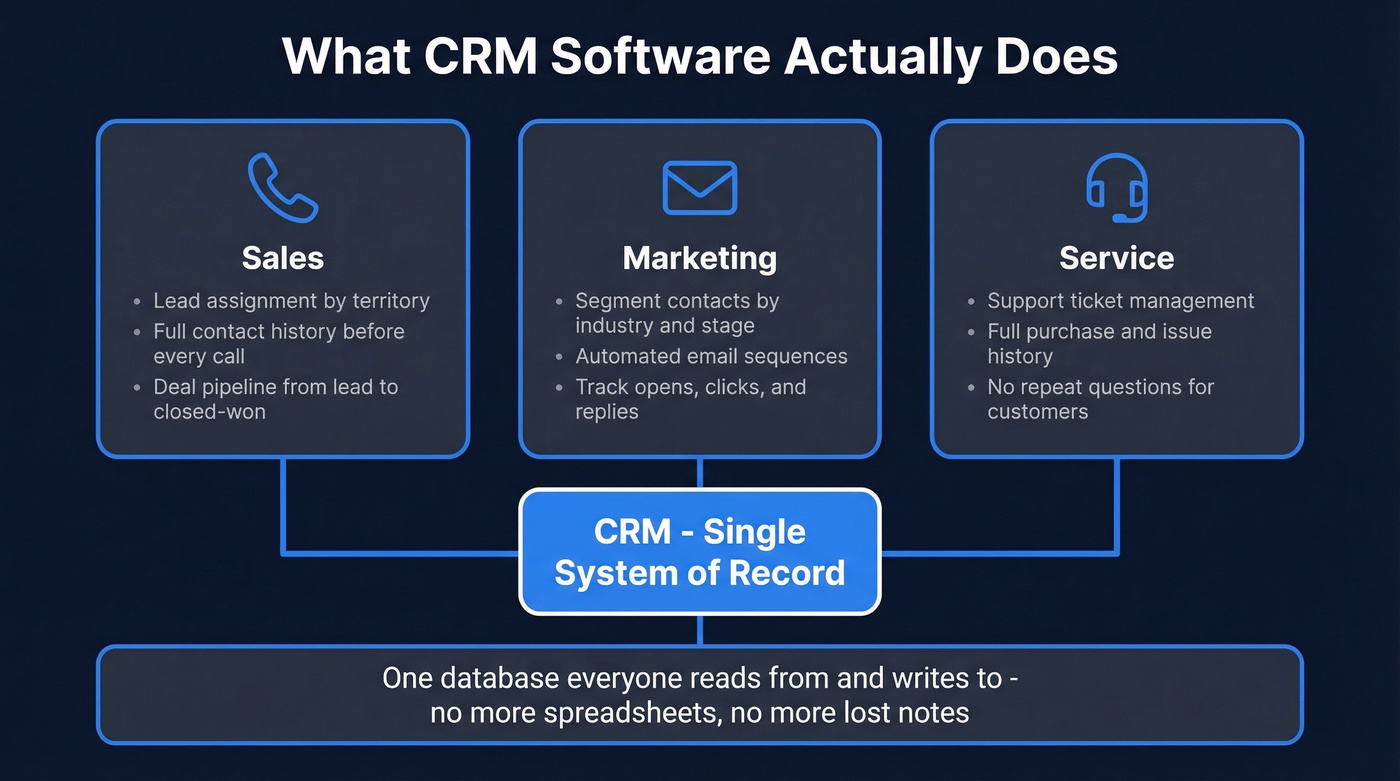
Sales: A lead fills out a form. The system logs it, assigns it to the right rep by territory, and triggers a follow-up task. The rep sees company size, tech stack, and every prior touchpoint before picking up the phone. If you need a starting point for what “good” follow-up looks like, use these sales follow-up templates.
Marketing: Your team segments contacts by industry and deal stage, then sends targeted email sequences. The CRM tracks opens, clicks, and replies - feeding that data back to sales so they know which leads are warm before they dial. If you’re building outbound alongside inbound, these sales prospecting techniques help you structure the top of funnel.
Service: A customer submits a support ticket. The platform pulls up their full history - purchase date, past issues, contract tier - so the support rep doesn't ask them to repeat everything.
One system of record that everyone reads from and writes to. No more "check the spreadsheet" or "ask Sarah, she has the notes."
Core Features to Evaluate
Not every feature matters for every team. Here's how to think about what you actually need.
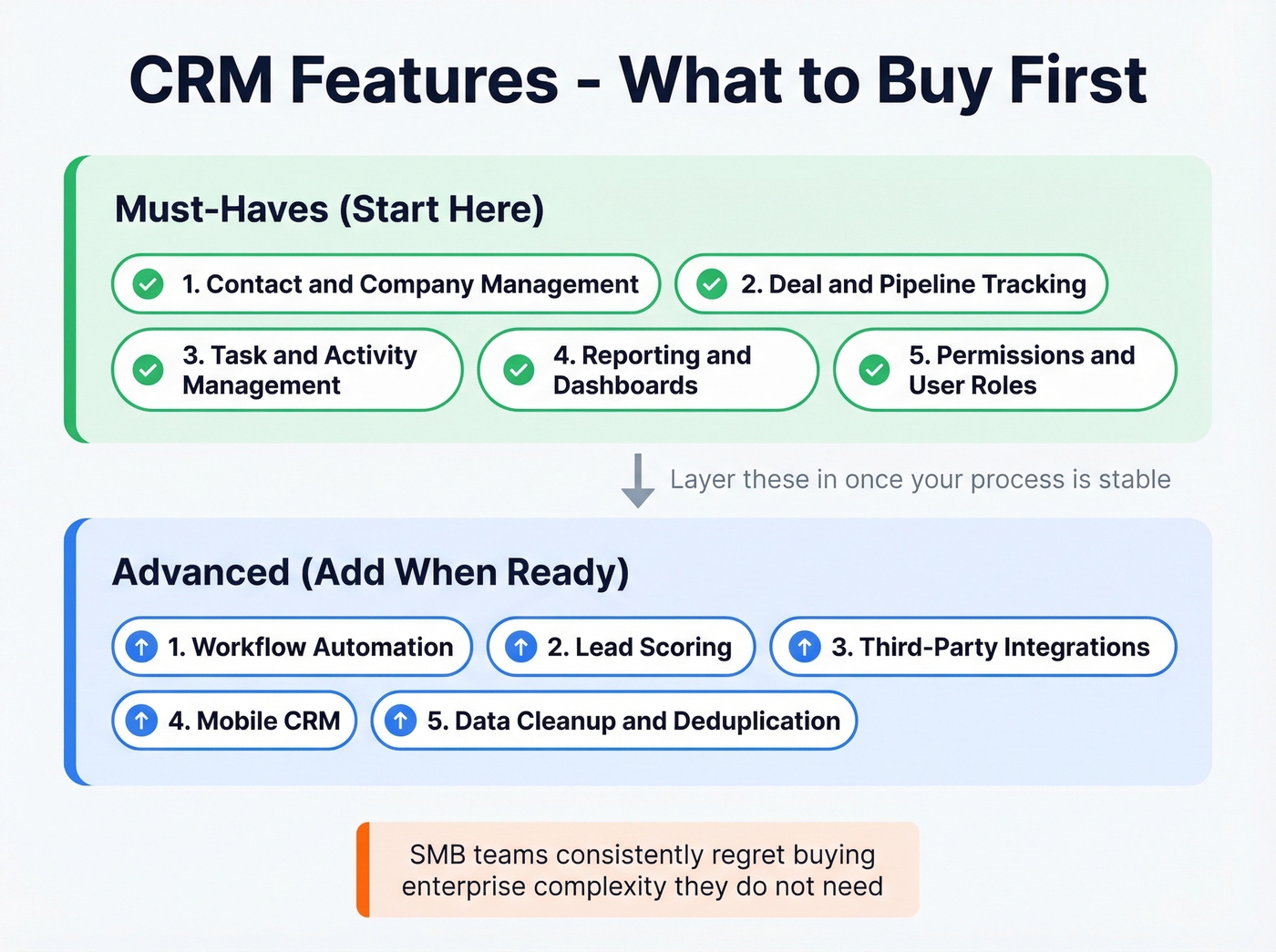
Must-haves (start here):
- Contact and company management - the complete profile for every person and org (if you’re mostly here for the “address book + notes” use case, compare contact management software)
- Deal and pipeline tracking - visual stages from lead to closed-won
- Task and activity management - follow-up reminders, call logging (here are practical sales activities examples you can map into tasks)
- Reporting and dashboards - pipeline value, conversion rates, rep activity
- Permissions and user roles - so your SDRs can't edit your VP's forecast
Advanced (add when you're ready):
- Workflow automation - auto-assign leads, trigger emails, update fields
- Lead scoring - prioritize based on engagement, fit, or intent signals (see a full lead scoring setup guide)
- Third-party integrations - connect your email, calendar, dialer, and marketing tools
- Mobile CRM - reps in the field need access from their phones
- Data cleanup and deduplication - critical once your database passes 5,000 records
If you're a small business, focus on the first five. We've watched SMB teams consistently regret buying enterprise complexity they don't need. Get the basics right, then layer in automation once your process is stable.
Types of CRM Systems
| Type | What It Does | Example |
|---|---|---|
| Operational | Automates sales, marketing, and service workflows | Salesforce, HubSpot |
| Analytical | Analyzes customer data for patterns and forecasting | Zoho Analytics, Microsoft Dynamics 365 |
| Collaborative | Shares customer data across departments | Freshsales, Copper |
Most modern CRMs blend all three. The distinction matters when you're evaluating enterprise platforms with modular pricing - Salesforce charges differently for Sales Cloud vs. Analytics vs. Service Cloud. For most teams, cloud is the default and the right call. On-premises deployments still exist in regulated industries, but 87% of businesses have already moved on.

A CRM without accurate contact data is just an expensive address book. Prospeo's CRM enrichment fills every record with 50+ verified data points - emails, direct dials, job titles, tech stack - at a 92% match rate. No manual research. No stale records.
Stop feeding your CRM bad data. Enrich it with Prospeo.
Real CRM Pricing
This is where vendor pages get deliberately vague. Here are real numbers:
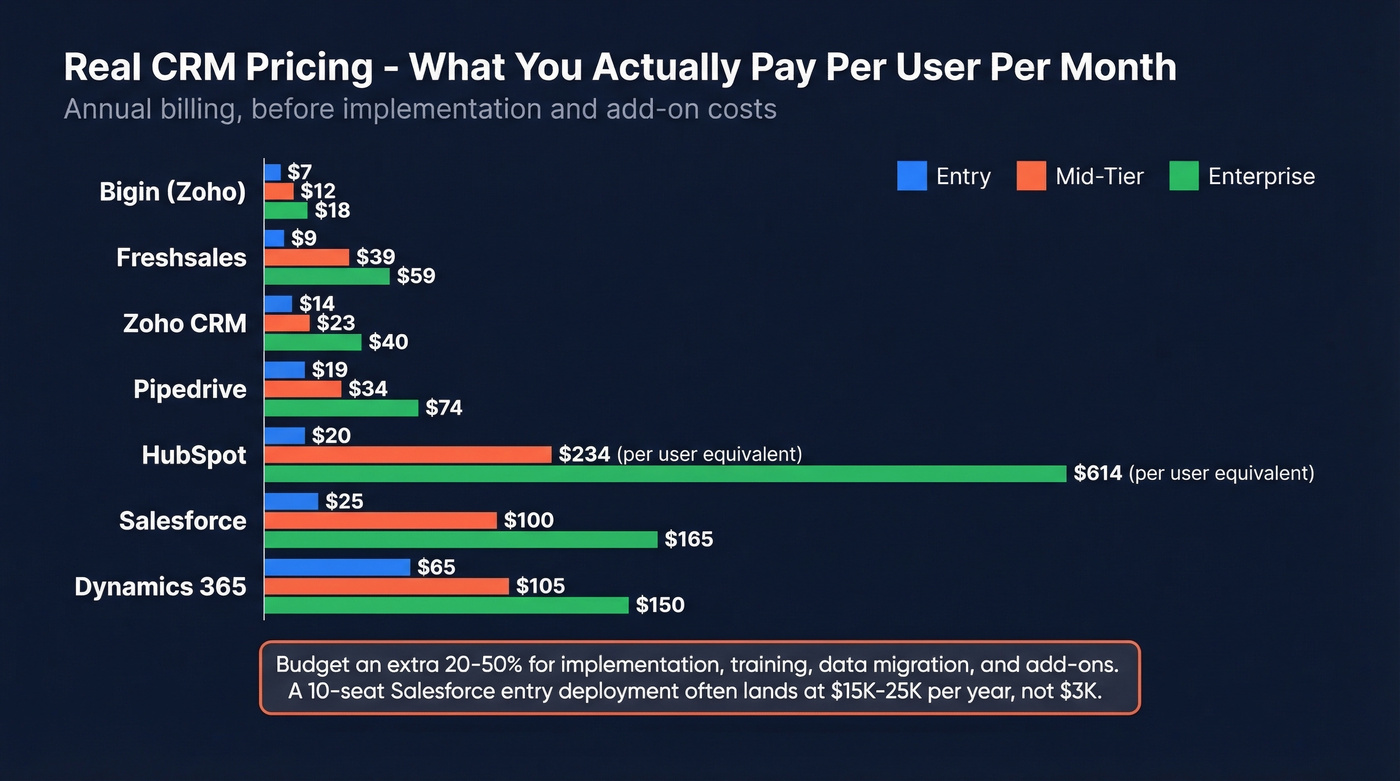
| Tool | Free Tier? | Entry | Mid-Tier | Enterprise |
|---|---|---|---|---|
| HubSpot | Yes | $20/user/mo | $1,170/mo (5 users) | $4,300/mo (7 users) |
| Salesforce | No | $25/user/mo | $100/user/mo | $165/user/mo |
| Zoho CRM | Yes | $14/user/mo | $23/user/mo | $40/user/mo |
| Pipedrive | No | $19/user/mo | $34/user/mo | $74/user/mo |
| Freshsales | Yes | $9/user/mo | $39/user/mo | $59/user/mo |
| Monday CRM | No | $15/user/mo | $20/user/mo | ~$33/user/mo |
| Dynamics 365 | No | $65/user/mo | $105/user/mo | $150/user/mo |
| Close | No | $29/user/mo | $109/user/mo | $149/user/mo |
| Less Annoying | No | $15/user/mo | - | - |
| Bigin (Zoho) | Yes | $7/user/mo | $12/user/mo | $18/user/mo |
All prices assume annual billing.
Entry-level plans average ~$15/user/mo. Mid-tier runs $50-100/user/mo. Enterprise starts at ~$150/user/mo and climbs from there.
Here's the thing: the sticker price isn't the real cost. Budget an extra 20-50% for implementation, training, data migration, and add-ons. A 10-seat Salesforce deployment at the entry tier looks like $3,000/year on paper but often lands at $15,000-25,000/year once you add integrations, admin time, and premium support. If you want a deeper breakdown, see our Salesforce pricing guide.
And HubSpot's free tier? It's a gateway drug. Unlimited users sounds great until you need automation, custom reporting, or advanced permissions. Then you're looking at $1,170/mo for the Professional tier.
Choosing by Team Size
Salesforce holds 21.7% market share. It's the default, not necessarily the best fit.
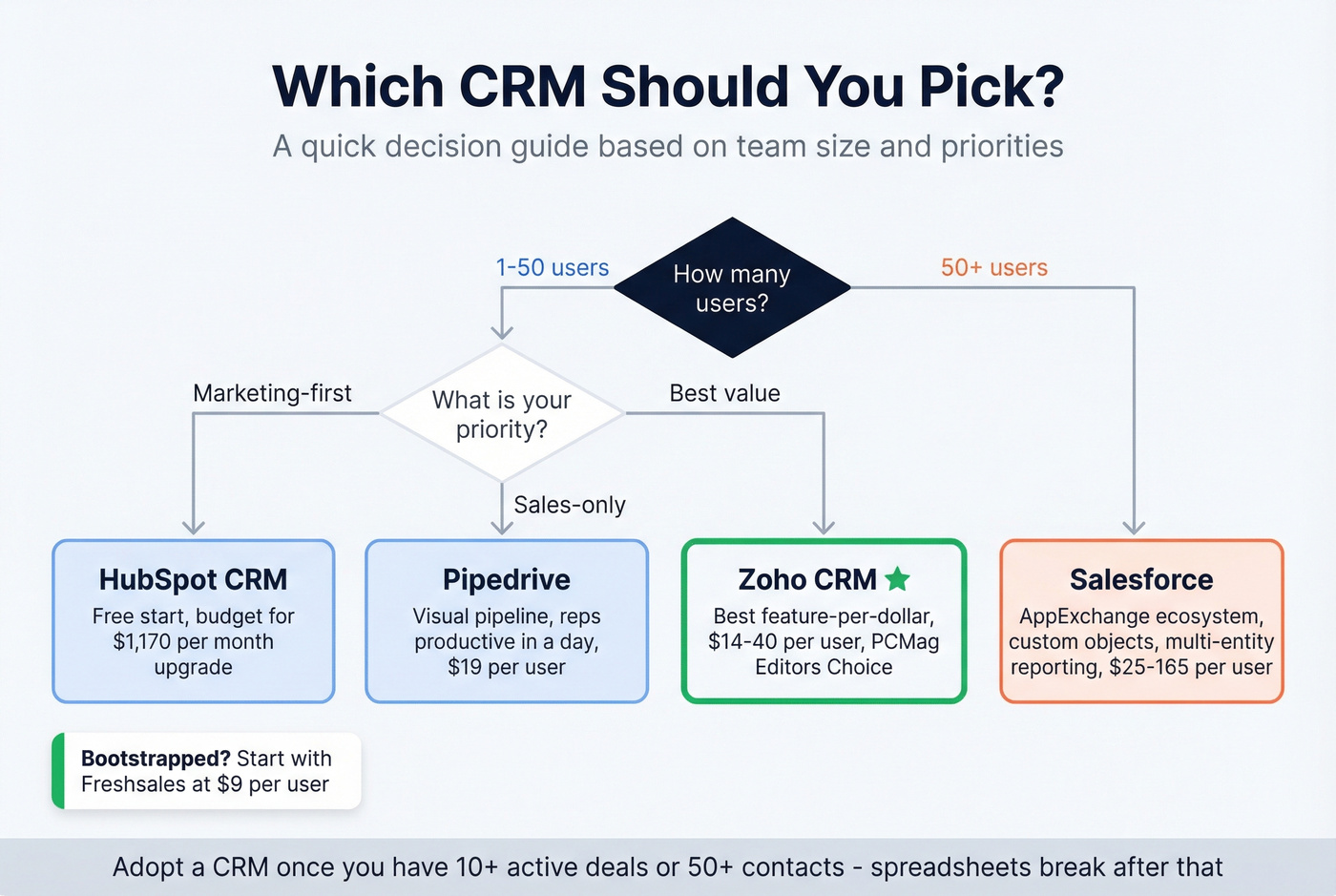
Look - if your average deal size is under $15k, you almost certainly don't need Salesforce. You're paying for an aircraft carrier when a speedboat will win the race.
Zoho CRM is the best feature-per-dollar ratio on the market. PCMag gave it Editors' Choice for deep customization, built-in AI, and enterprise-tier features at $14-40/user/mo. It's the CRM we recommend most often for teams under 50 people.
HubSpot makes sense if you're a marketing-first org that needs a CRM as an extension of your content and email engine. The free tier is genuinely useful for getting started. Just budget for the upgrade.
Skip Pipedrive unless your team is purely sales-led and wants reps productive in a day, not a quarter. The visual pipeline is the best in the category, but there's no real marketing automation to speak of.
Salesforce earns its keep once you're past 50 users and need the ecosystem - AppExchange, custom objects, multi-entity reporting. Below that threshold, you're paying for complexity you won't use.
Freshsales punches above its weight at $9/user/mo. For bootstrapped teams, start here.
When to adopt a CRM at all: Once you're juggling more than 10 active deals or 50 contacts, spreadsheets start breaking. That's your signal. The purpose of any CRM is to give every team member a single, reliable source of truth about every customer - and that need kicks in earlier than most founders expect. (If you’re still in the “how do we even get leads?” phase, start with free lead generation tools.)
CRM Data Quality: The Silent Killer
43% of CRM customers use fewer than half the features they're paying for. But the bigger problem isn't unused features - it's bad data.
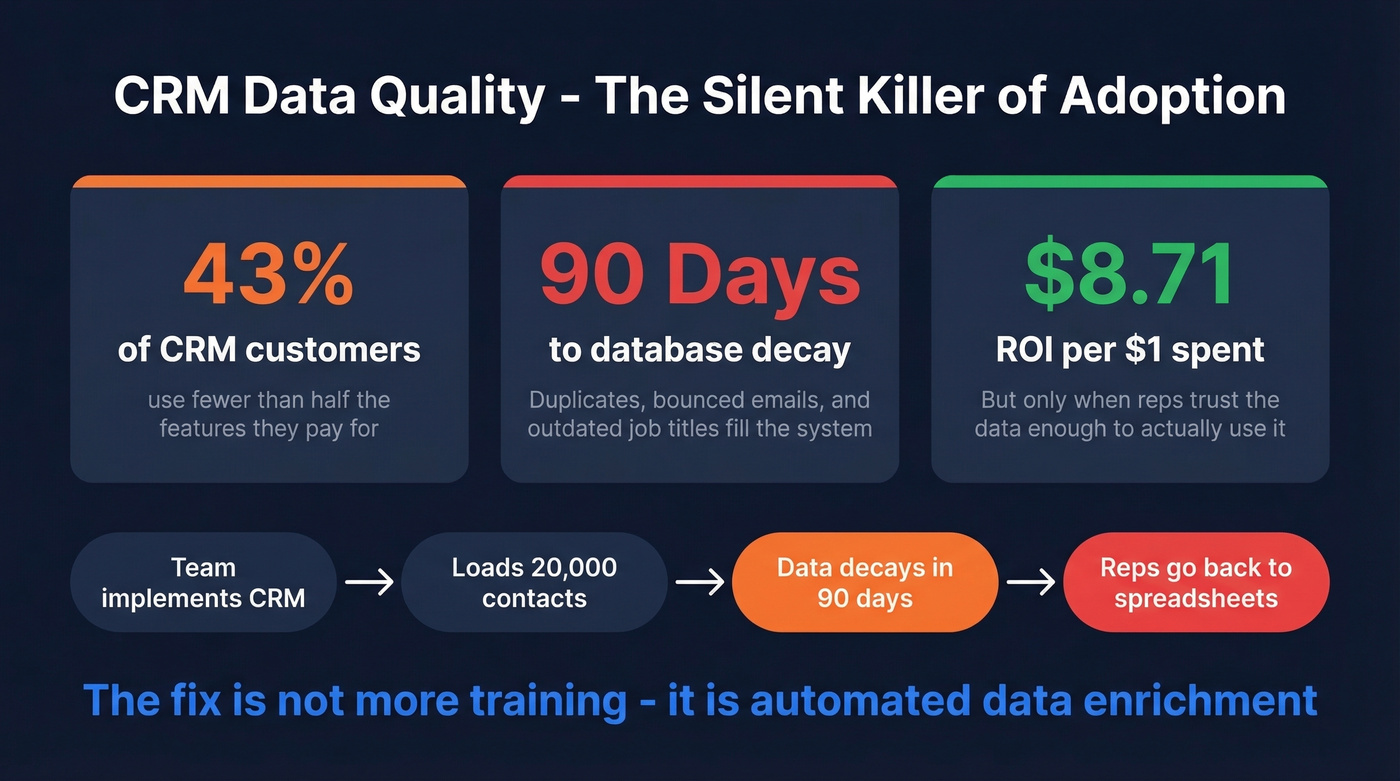
We've seen this pattern dozens of times: a team spends six months implementing Salesforce, loads 20,000 contacts, and within 90 days the database is full of duplicates, bounced emails, and outdated job titles. Reps stop trusting the data and go back to their spreadsheets. The consensus on r/sales backs this up - threads about "CRM adoption" almost always circle back to data quality as the root cause of failure, not the software itself. Knowing what CRM software is only matters if the data inside it is reliable enough to act on.
The fix isn't more training - it's automated enrichment. Prospeo connects natively to Salesforce and HubSpot and enriches CRM records with 98%-accurate verified emails, 125M+ verified mobile numbers, and 50+ data points per contact on a 7-day refresh cycle. That's roughly $0.01 per email and it solves the single biggest reason CRM adoption stalls: reps don't trust the data they're looking at. If you’re comparing vendors, start with these data enrichment services and work backward from your CRM use case.

You just budgeted $15K+ for a CRM. Don't let bounce rates destroy your ROI. Prospeo delivers 98% email accuracy with a 7-day refresh cycle, so the contacts in your pipeline are always current - at $0.01 per email. Native integrations with Salesforce and HubSpot mean setup takes minutes, not sprints.
Your CRM investment deserves data that actually connects you to buyers.
AI and the Future of CRM
Every major vendor shipped AI features in the last 18 months. Salesforce has Agentforce. Microsoft Dynamics 365 has Copilot. Zoho has Zia. The pitch is the same everywhere: "AI will automate your workflows and predict your pipeline."
Most of it is overhyped. The useful framing comes from DestinationCRM's 2026 trend analysis, which distinguishes between "self-driving" AI and "approval-based" AI. Self-driving means fully autonomous. Approval-based means AI prepares changes and humans approve them. The second model is the one that actually works in our experience. You want AI that drafts the follow-up email, suggests the next best action, and scores the lead - then lets a human hit send. CRMs that build trust and traceability into their AI will win. The ones that silently auto-update records without explanation will create more problems than they solve. (If you’re evaluating add-ons, these generative AI sales tools are the ones worth testing.)
Why Implementations Fail
Over 50% of CRM projects fail to deliver expected results. The mistakes are predictable:
- No clear objectives. "We need a CRM" isn't a goal. "Reduce lead response time from 4 hours to 15 minutes" is.
- Poor user adoption. If reps hate the interface, they won't use it. Pick a tool your team will actually open daily.
- Underestimating data migration. Moving 50,000 contacts takes weeks, not days. Budget for cleanup and field mapping.
- Automating broken processes. A bad sales process automated is still a bad sales process - just faster. (If you need a baseline, use a sales process optimization framework.)
- Skipping change management. Assign an internal champion, run training, and follow up at 30/60/90 days.
Let's be honest about that last point: most teams treat CRM rollout as an IT project when it's really a behavior-change project. The software only delivers ROI when the team trusts the system enough to make it their daily operating environment - not a chore they fill in before Friday standups.
FAQ
Is CRM software worth it for small businesses?
Yes - if you pick the right tier. Zoho CRM at $14/user/mo and Freshsales at $9/user/mo deliver real ROI at SMB budgets. The $8.71 return per $1 spent benchmark applies even at small scale, as long as your team uses the system daily instead of reverting to spreadsheets.
What's the difference between CRM and ERP?
CRM manages customer-facing relationships - sales, marketing, and service interactions. ERP manages internal operations like finance, inventory, and HR. They overlap at the customer order stage but serve different audiences. Most mid-market teams need a CRM long before they need an ERP.
What is a CRM used for beyond sales?
Beyond pipeline management, CRM systems power customer support ticketing, marketing campaign segmentation, partner relationship tracking, and internal project coordination. Any workflow that revolves around managing relationships with external contacts benefits from a centralized system of record.
How do I keep CRM data accurate over time?
Automate enrichment instead of relying on manual entry, which decays fast as contacts change jobs and emails bounce. Tools like Prospeo refresh CRM records automatically on a 7-day cycle with 50+ data points per contact at 98% email accuracy - keeping your database current without manual effort.