

Why Is My Email Undeliverable? How to Diagnose and Fix It
You sent an email. It came back - or worse, you woke up to 250 "Mail Delivery Failure" notifications for messages you never sent. The error message says your email is undeliverable, and it reads like it was written by a robot having a bad day.
Here's the thing: those two scenarios are completely different problems. If you're getting bounces for emails you didn't send, that's usually backscatter) - spoofed mail bouncing to a forged sender address. If your outbound email bounced, the cause is often simpler than you think. Read the bounce code, check your authentication records, and run your sending IP through MXToolbox. Those three steps diagnose most cases.
For outbound sales teams, the single most effective fix isn't a DNS change or a blacklist removal - it's verifying addresses before you send. Bad addresses are the #1 cause of bounced email, and they're entirely preventable.
Hard Bounce vs. Soft Bounce
The distinction determines what you do next.
| Hard Bounce | Soft Bounce | |
|---|---|---|
| Type | Permanent failure | Temporary failure |
| Causes | Invalid address, dead domain | Full inbox, server down |
| SMTP codes | 550, 551, 553 | 421, 450, 452 |
| Action | Remove immediately | Wait 24-72 hrs for retry |
Hard bounces demand instant action. Soft bounces get retried automatically over 24-72 hours, and many ESPs auto-suppress hard-bounced addresses for a period of time. But if the same address soft-bounces repeatedly, treat it like a hard bounce. Repeated deferrals erode your sender reputation just as badly as a permanent failure, and most receiving servers won't tell you when they've quietly downgraded your domain's trust score.
Common Causes of Undeliverable Email
Eight reasons your email came back - and what to do about each.
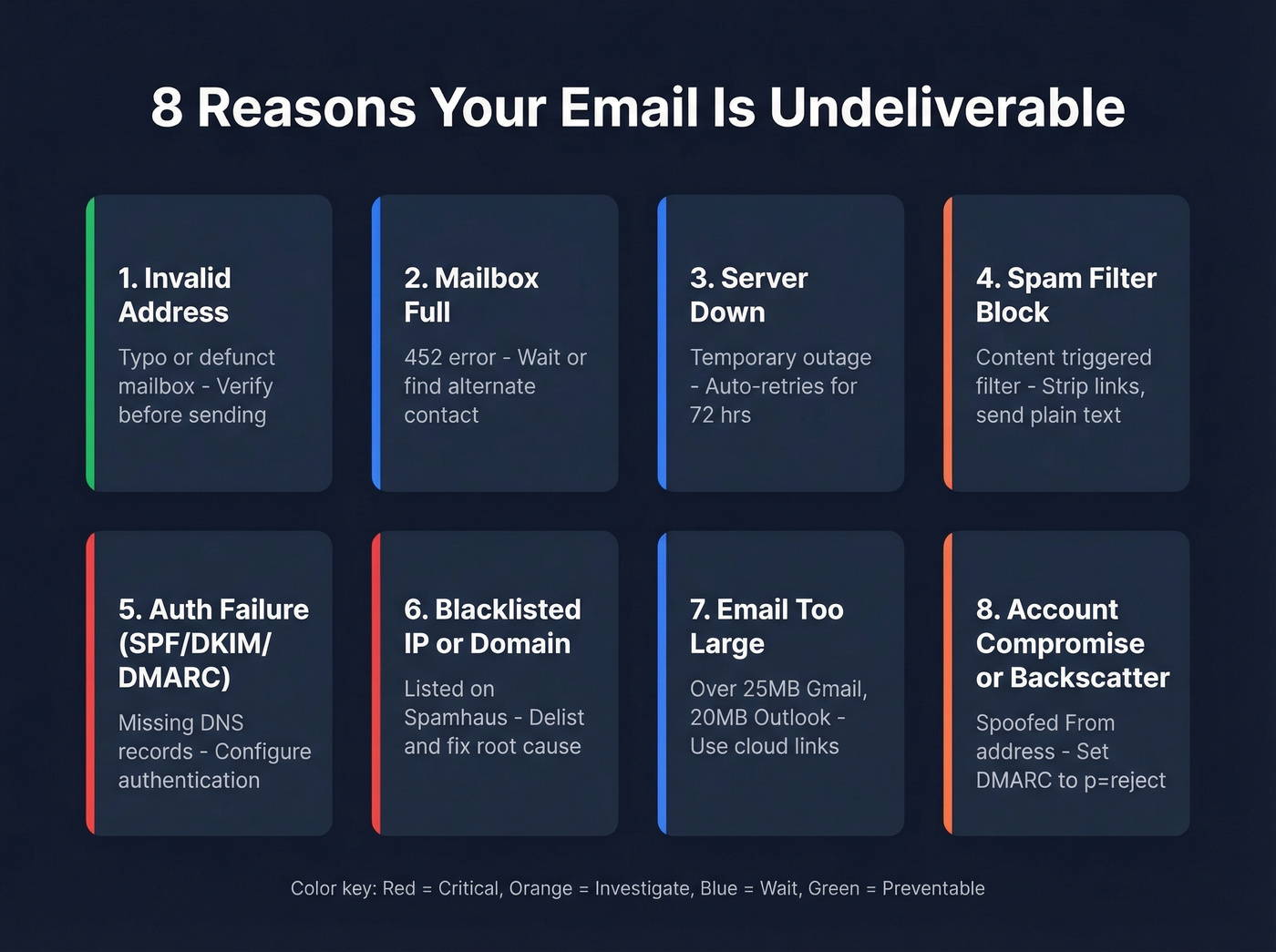
1. Invalid address. The #1 cause, full stop. A typo, a defunct mailbox, an employee who left six months ago. We've seen teams cut their bounce rate from 15% to under 2% just by verifying addresses before sending.
2. Mailbox full. The recipient hit their storage quota (452 error). Nothing to do except wait or find an alternate contact.
3. Recipient server down. Temporary outage. Your server retries automatically. If it persists beyond 72 hours, most systems stop retrying and mark the delivery attempt as failed.
4. Spam filter or content blocking. Too many links, suspicious attachments, or phrases that trip spam heuristics. The bounce message rarely tells you which content triggered it - frustrating, we know. Start by stripping links and resending plain text to isolate the problem.
5. Authentication failure (SPF/DKIM/DMARC). Since 2024, Gmail, Microsoft, and Yahoo have enforced authentication requirements for bulk senders, escalating from temporary deferrals to outright rejections. In our experience, this is the most overlooked cause of delivery failures. If your DNS records aren't configured, your message won't even get a chance to be read.
6. Blacklisted IP or domain. Your sending IP landed on Spamhaus or SpamCop. Receiving servers check these lists and reject mail from listed IPs without hesitation.
7. Email too large. Gmail caps outbound attachments at 25MB. Outlook blocks direct attachments over 20MB. Exceeding the limit triggers an immediate bounce.
8. Account compromise or forwarding rules. Check your Sent folder and mail rules. If they're clean, you're probably dealing with backscatter - not a hack. Reddit threads on r/sysadmin are full of people running malware scans when the real answer is three DNS records.
How to Read Your Bounce Code
The bounce code is the most useful piece of information in a delivery failure notification. Every bounce includes a 3-digit code and often an enhanced status code like 5.1.1, following a class.subject.detail structure structure.
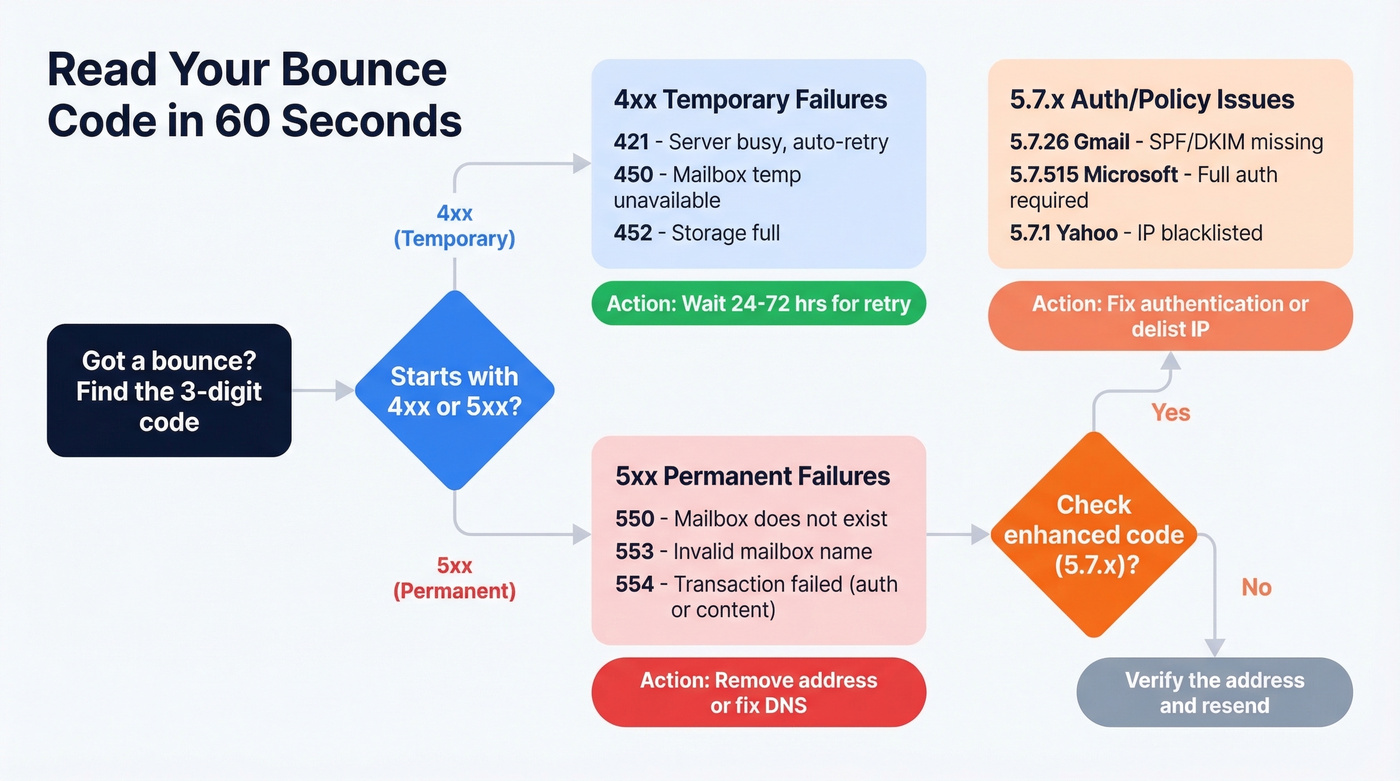
| Code | Meaning | Action |
|---|---|---|
421 |
Service temporarily unavailable | Auto-retry |
450 |
Mailbox temporarily unavailable | Auto-retry |
550 |
Mailbox doesn't exist | Remove address |
552 |
Storage exceeded | Wait or find alternate |
553 |
Invalid mailbox name | Check for typos |
554 |
Transaction failed | Check content/auth |
Provider Enforcement Codes You'll Actually See
These are the codes that trip up most senders in 2026:
| Provider | Key Code | What It Means |
|---|---|---|
| Gmail | 550 5.7.26 |
Unauthenticated mail - SPF/DKIM required. Starts as 421 4.7.26 warning, then escalates. Treat any 4.7.x from Gmail as urgent. |
| Microsoft | 550 5.7.515 |
SPF + DKIM + DMARC required for bulk senders (enforced since May 2025). |
| Yahoo | 553 5.7.1 [BL21/BL23] |
IP blocked via Spamhaus SBL/XBL. 553 5.7.2 [TSS11] means permanently deferred - retrying won't help. |
To find these codes, look for the Diagnostic-Code field in your bounce message. In Gmail, click the three-dot menu and select "Show original."

Every undeliverable email damages your sender reputation. Prospeo's 5-step verification - catch-all handling, spam-trap removal, honeypot filtering - delivers 98% email accuracy across 300M+ profiles. Teams using Prospeo cut bounce rates from 35% to under 4%.
Stop diagnosing bounces. Start preventing them at the source.
Getting Bounces You Didn't Send?
Hundreds of "Mail Undeliverable" messages for emails you never sent? Don't panic.
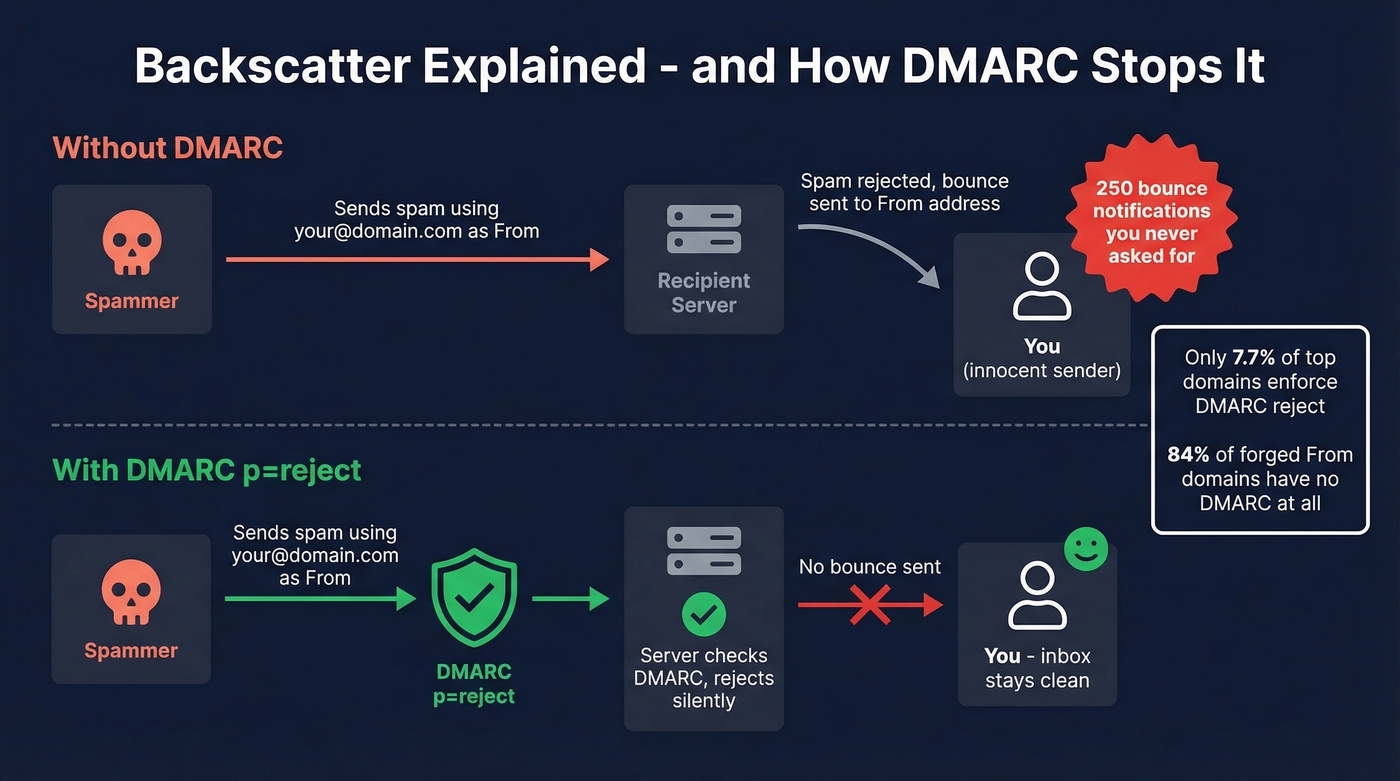
This is backscatter. Spammers forged your address in the "From" field, and their rejected spam bounces back to you. Changing your password won't stop it. Only 7.7% of top email domains enforce DMARC with p=reject, and 84% of domains used in forged From addresses lack a DMARC record entirely.
The fix: implement SPF + DKIM + set DMARC to p=reject. This tells receiving servers to reject - not bounce - email that fails authentication, killing backscatter at the source. It's one DNS change that solves a problem people spend weeks troubleshooting.
How to Fix Blacklists
If your bounce references "blocked" or names like Spamhaus, your IP is listed.
Check it. Run your IP through MXToolbox's blacklist checker - it queries dozens of lists at once.
Delist it. Use the Spamhaus blacklist removal process, or BarracudaCentral.
Fix the root cause first. Every blacklist operator says the same thing: request removal without fixing the underlying problem, and you'll get re-listed within days. Usually the root cause is a dirty list sending to too many invalid addresses or spam traps.
How to Ensure Emails Reach the Inbox
Verify addresses before sending. Bad addresses are the #1 cause, and the easiest to prevent. Prospeo runs a 5-step verification process - catch-all handling, spam-trap removal, honeypot filtering - with 98% email accuracy across 300M+ profiles. The free tier gives you 75 verifications per month, enough to clean a small campaign list before you hit send.
Authenticate your domain. SPF, DKIM, and DMARC aren't optional after the 2025-2026 enforcement rollouts from Gmail, Microsoft, and Yahoo. They're table stakes. If you need a quick sanity check, start with an SPF record review and confirm DKIM is working.
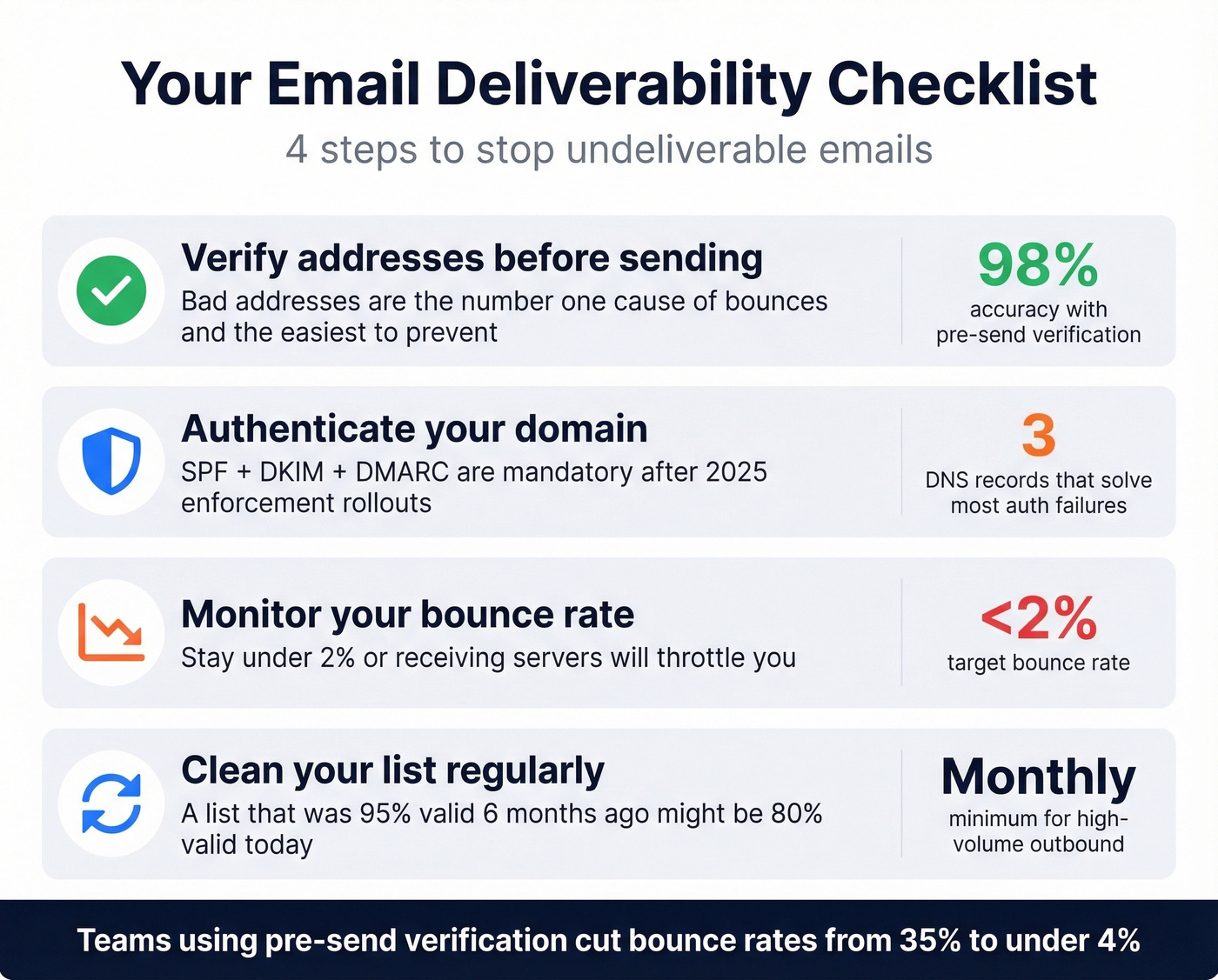
Monitor your bounce rate. Keep it under 2%. If you're consistently above that, receiving servers will throttle or block you. Let's be honest - most teams don't check this number until something breaks. (If you want benchmarks and what “good” looks like by channel, see email bounce rate.)
Clean your list regularly. A list that was 95% valid six months ago might be 80% valid today. People change jobs, companies shut down mailboxes, domains expire. Run verification quarterly at minimum - monthly if you're doing high-volume outbound. If you're scaling outreach, pair list hygiene with a broader email deliverability checklist.
Your list decays every week. Prospeo refreshes data every 7 days - not the 6-week industry average - so you're never sending to addresses that went invalid last month. At $0.01 per email, cleaning your list costs less than a single blacklist removal.
Fix the #1 cause of undeliverable email for a penny per address.
FAQ
What does "Mailer-Daemon" mean?
Mailer-Daemon is the automated system that generates bounce-back messages - it's not a person. It's the recipient's mail server reporting what went wrong. Check the Diagnostic-Code field inside the message for the actual SMTP error code and enhanced status code.
How long should I wait before resending a soft-bounced email?
Most providers auto-retry for 24-72 hours. Don't manually resend during that window - you'll create duplicates and risk triggering spam filters. If it still fails after 72 hours, verify the address before trying again.
Can I prevent bounces when sending outbound sales emails?
Yes. Verify every address before sending, authenticate your domain with SPF/DKIM/DMARC, and keep your bounce rate under 2%. Meritt went from 35% bounce rates to under 4% with pre-send verification - and once list hygiene and authentication were dialed in, their pipeline tripled.
Why is my email undeliverable even though the address looks correct?
The address might belong to a catch-all domain that silently discards unknown mailboxes, or the recipient's server is rejecting mail because your SPF/DKIM records are missing. Run the address through an email verification tool and check your DNS authentication - those two steps resolve most "mystery" bounces.