


9 Best Zapier Alternatives That Won't Drain Your Budget
You just opened your Zapier invoice and the number doesn't match what you remember signing up for. One Reddit user watched their bill go from $10/month to over $750 for basic automations. You don't need 15 logos and a feature matrix - you need the right Zapier alternatives with real pricing and honest opinions.
Here's the shortlist.
Our Top Picks (TL;DR)
| Category | Tool | Why | Value (1-5) |
|---|---|---|---|
| Best overall | Make | Visual builder, fair pricing, 3,000+ apps | ★★★★★ |
| Best for technical teams | n8n | Self-host on a $5 VPS, execution-based billing | ★★★★☆ |
| Best on a budget | Pabbly Connect | $349 lifetime deal, triggers don't count as tasks | ★★★★★ |
| Best for data accuracy | Prospeo | 98% email accuracy, integrates with Make and n8n | ★★★★★ |
| Best for Microsoft shops | Power Automate | $15/user/mo, included in some M365 plans | ★★★★☆ |
Make is the best all-around alternative to Zapier for most teams. But the right pick depends on your volume, your stack, and whether you care about self-hosting.
Why People Leave Zapier
The #1 complaint on Reddit isn't features - it's price. A user on r/nocode put it bluntly: $49/month for 750 tasks for "basic stuff" like forms → sheets → email. Another thread on r/automation describes Zapier as having "doubled their prices overnight."
The second complaint is reliability. "My Zaps ALWAYS BREAK" is a direct quote from a frustrated user running over a million automations per month. When you're paying premium prices, broken workflows feel personal.
Zapier isn't a bad product. It holds a 4.5/5 on G2 across 1,861 reviews, and its 8,000+ integrations are genuinely hard to beat. The AI builder is legitimately good - Reddit users in a March 2026 thread called it the easiest way to get started with automation. But "easy" and "affordable" aren't the same thing. Once you scale past a few hundred tasks per month, the math stops working for most small and mid-size teams.
Billing Models Compared
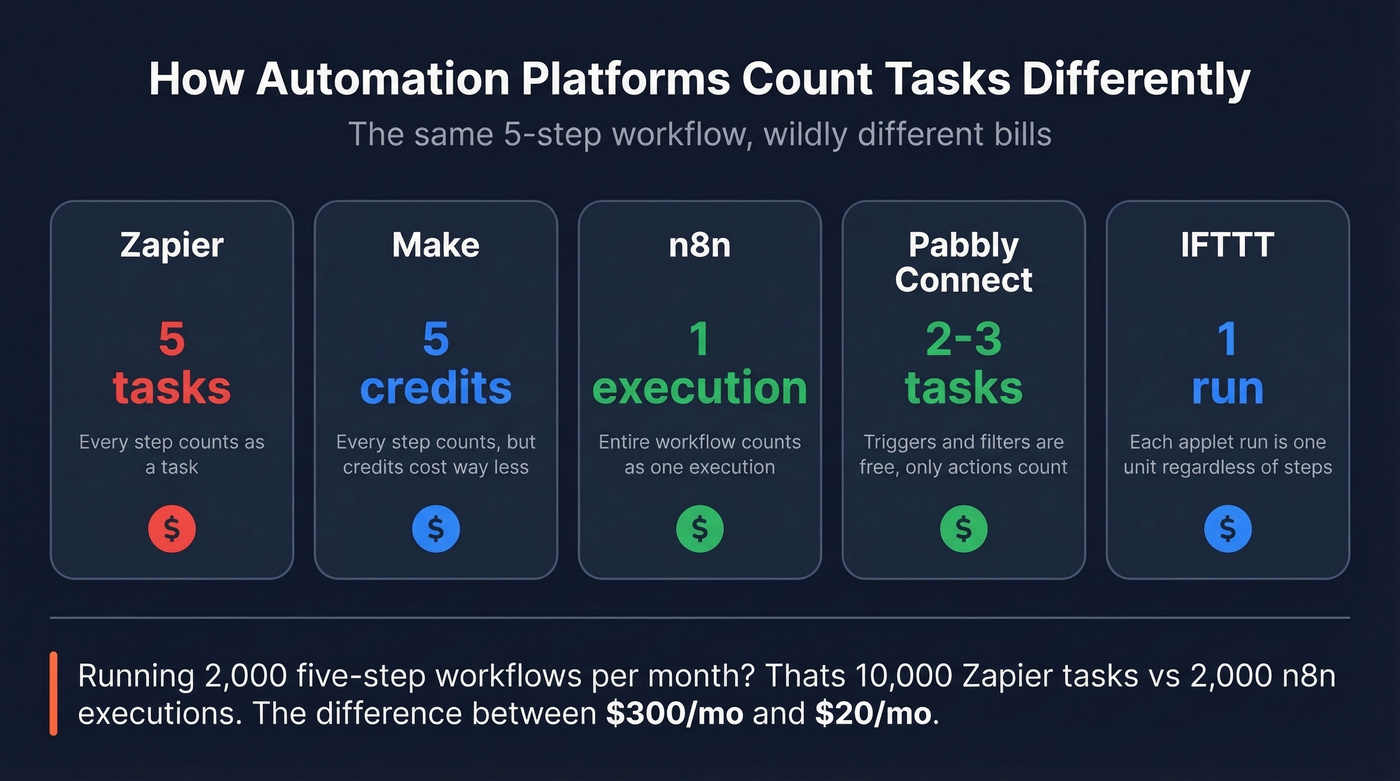
Most comparison articles skip this entirely, and it's the single most important thing to understand: these platforms don't count "tasks" the same way. A 5-step Zap on Zapier costs you 5 tasks. That same workflow on n8n? One execution. On Make? Five credits, but at a fraction of the per-unit cost. On Pabbly? Only the action steps count - triggers and internal logic are free.
If you're building automations for outbound or RevOps workflows, the billing model matters even more once you start layering in data enrichment and verification steps.
Raw task counts on pricing pages are almost meaningless without this context.
| Platform | Unit Name | 5-Step Workflow Cost | Triggers Count? |
|---|---|---|---|
| Zapier | Tasks | 5 tasks | Yes |
| Make | Credits | 5 credits | Yes |
| n8n | Executions | 1 execution | No |
| Pabbly Connect | Tasks | ~2-3 tasks | No |
| IFTTT | Applet runs | 1 run | N/A* |
*IFTTT doesn't break workflows into steps - each applet run is one unit regardless of complexity.
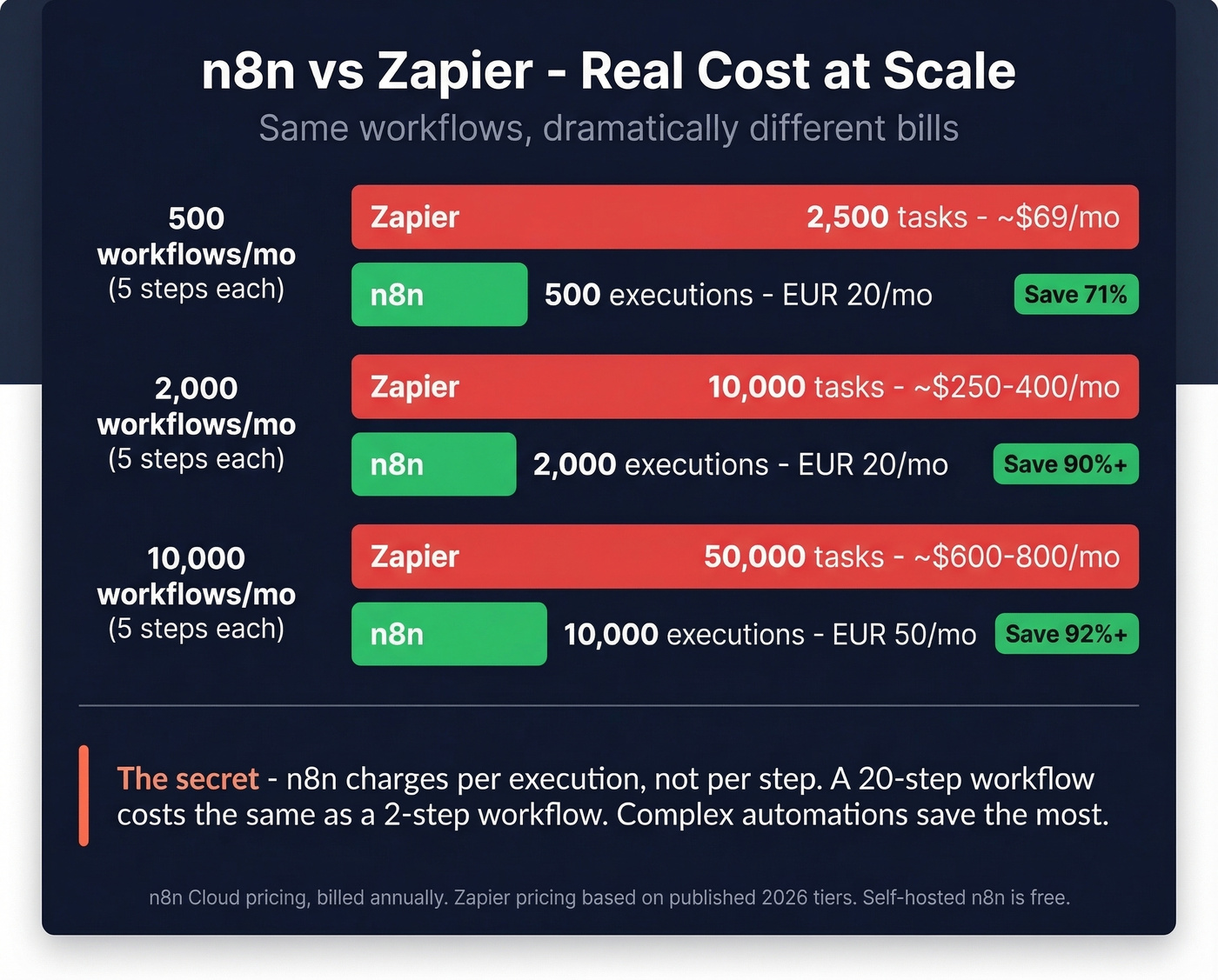
A team running 2,000 five-step workflows per month uses 10,000 Zapier tasks but only 2,000 n8n executions. That's the difference between a $250-400/month Zapier bill and a EUR 20/month n8n Starter plan. Pabbly's model is even more aggressive - one user testimonial describes running ~1.6M tasks per month with only 150K billable.
Understanding this table will save you more money than any coupon code.

Your automation is only as good as the data flowing through it. Prospeo integrates natively with Make, n8n, Zapier, and Clay - feeding 98% accurate emails and verified mobiles directly into your workflows at $0.01/lead.
Stop automating bad data. Start with contacts that actually connect.
The 9 Best Automation Tools to Replace Zapier
1. Make
Make is the default recommendation across Reddit, review sites, and every automation community we've spent time in - and it deserves to be. The visual scenario builder is the best in the business. You drag modules onto a canvas, connect them, and see your entire workflow as a flowchart. Debugging is visual too, which matters when you're troubleshooting a 15-step scenario at 11pm.
If you're using Make to power outbound workflows, pair it with a clean lead generation workflow so you don't automate chaos.
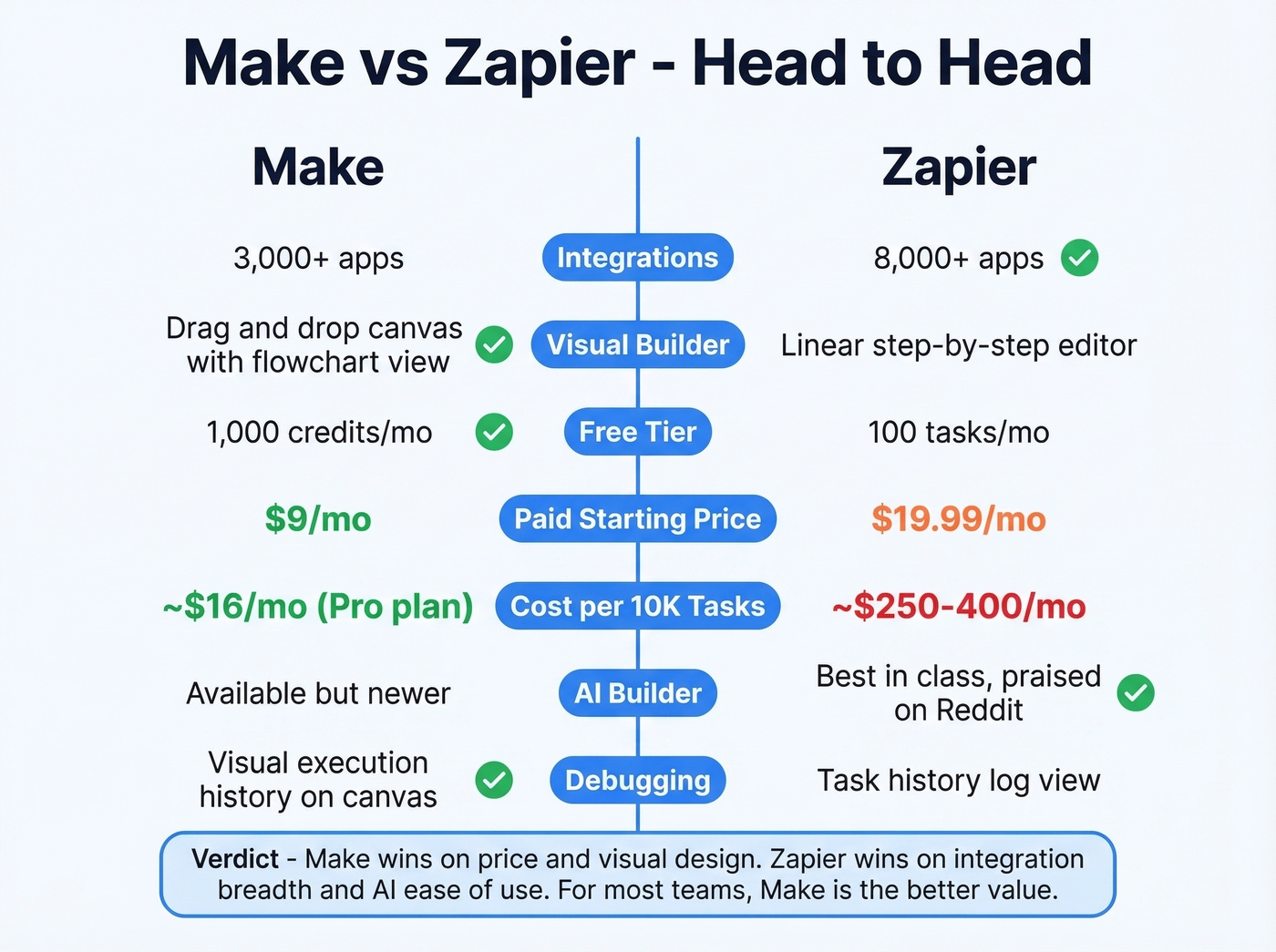
The app library covers 3,000+ integrations - fewer than Zapier's 8,000+, but enough for the vast majority of business workflows. Some Reddit users note Make can slow down with heavier automations, and a few call it "glitchy for real complex stuff," but the price-to-value ratio still wins by a wide margin.
One thing to watch: since November 2025, Make charges 25% more for extra credits beyond your plan limit. If you're consistently blowing past your credit cap, upgrade your tier rather than relying on overages.
Use this if: You want Zapier's ease of use with dramatically better pricing and a visual builder that helps you think through complex logic.
Skip this if: You need 8,000+ integrations or your workflows are so simple that Zapier's free tier covers them.
Pricing: Free (1,000 credits/mo) → Core $9/mo → Pro $16/mo → Teams $29/mo (10K credits tier).
2. n8n
The billing advantage in one sentence: n8n charges per execution, not per step. A 20-step workflow costs the same as a 2-step workflow. For complex automations with lots of branching logic, this is a massive cost advantage.
If you're building a prospecting stack around n8n, it's worth mapping it to your sales prospecting techniques so the automations support the motion (not the other way around).
The Community Edition is free and open-source on GitHub. We've seen DevOps engineers spin up n8n on a $5/month DigitalOcean droplet and replicate 40+ Zapier workflows in a weekend. The AI agent node is arguably n8n's most powerful feature, letting you build AI-driven workflows that'd require expensive add-ons on other platforms. The integration library covers ~400 core integrations plus 600+ community-built ones - smaller than Make or Zapier, but extensible through custom HTTP nodes.
The tradeoff is real, though. n8n's learning curve is steeper than Make or Zapier. The self-hosted option is free but you're responsible for hosting, updates, and uptime. Cloud plans start at EUR 20/month billed annually for 2,500 executions, with Pro at EUR 50/month and Business at EUR 667/month for 40K executions.
| Pros | Cons |
|---|---|
| Execution-based billing saves 5-10x at scale | Steeper learning curve than Make |
| Free self-hosted option | Smaller native integration library |
| AI agent node is best-in-class | Cloud pricing jumps sharply at Business tier |
Pricing: Community Edition free (self-hosted) → Starter EUR 20/mo → Pro EUR 50/mo → Business EUR 667/mo. All EUR, billed annually.
3. Pabbly Connect
Pabbly Connect is the budget king. Not close. The lifetime deal at $349 is the most aggressive pricing in the automation space. Pay once, automate forever. Monthly plans start around $19/month if you'd rather not commit upfront.

Triggers and internal steps are free - only action steps consume your task count. A workflow with one trigger, three filters, and two actions costs you two tasks, not six. For high-volume teams running thousands of workflows, this adds up to enormous savings. The integration library covers 2,000+ apps, smaller than Make or Zapier but growing. The interface is straightforward, closer to Zapier's simplicity than Make's visual complexity.
If you're using Pabbly for outbound, make sure you're tracking lead generation metrics so you can see whether the automation is actually improving pipeline.
Use this if: Budget is your primary constraint. The lifetime deal is a no-brainer for bootstrapped teams.
Skip this if: You need niche integrations that only Zapier or Make support, or you want the most polished visual builder.
Pricing: ~$19/mo monthly → $349 lifetime deal.
4. Power Automate
If your company runs on Microsoft 365, Power Automate is already in your stack - you just might not know it. A basic version comes bundled with many M365 plans. Premium runs $15/user/mo, which is competitive for teams already paying for the Microsoft ecosystem.
The sweet spot is Microsoft-to-Microsoft workflows: Outlook → SharePoint → Teams → Dynamics 365. For those, Power Automate is faster to set up and more reliable than routing through a third-party tool. It also supports desktop automation (RPA) at $150-215/month per bot, which none of the other tools on this list offer natively. The connector library covers 1,000+ apps - solid, but a fraction of Zapier's. Outside the Microsoft ecosystem, the experience gets clunky fast.
Use this if: You're a Microsoft shop and most of your automations stay within that ecosystem.
Skip this if: You're connecting non-Microsoft SaaS tools. Make or n8n will serve you better.
Pricing: $15/user/mo (Premium). Included at a basic level in some M365 plans. RPA bots $150-215/mo.
5. Prospeo
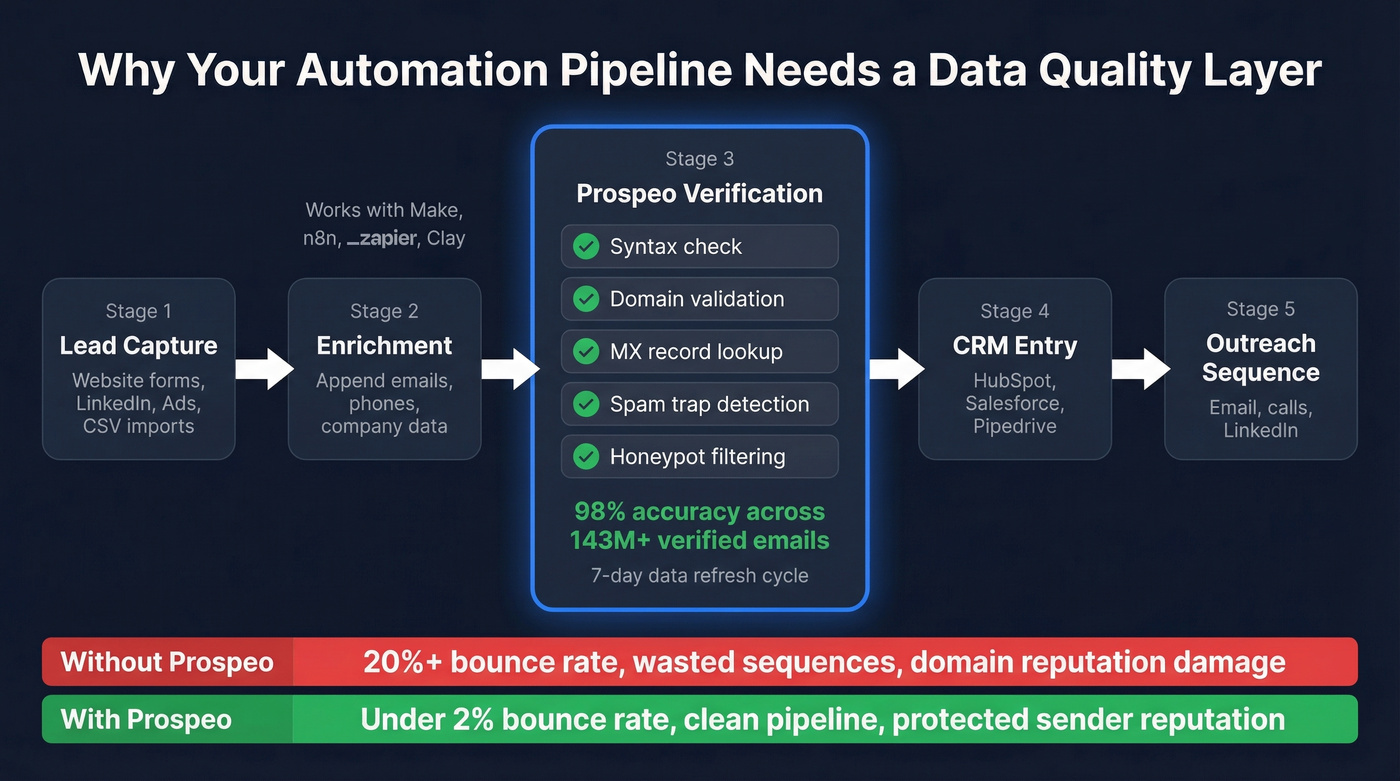
Let's be honest: automation platforms are plumbing. They move data between apps. None of them verify whether the email addresses, phone numbers, or company data flowing through your workflows are actually accurate. We've watched teams spend weeks building beautiful automation pipelines - lead capture → enrichment → CRM → sequencer - only to see their bounce rate hit 20% on the first campaign. The automation worked perfectly. The data was garbage.
If you're seeing bounces, start by understanding your email bounce rate and what it signals about list quality.

Prospeo solves this with a 5-step verification process that catches invalid emails, spam traps, and honeypots before they enter your CRM. With 98% email accuracy across 143M+ verified emails and 125M+ verified mobile numbers, it's the data quality layer that makes your automations actually work. The 7-day data refresh cycle means you're not enriching leads with contact info that went stale six weeks ago. Prospeo integrates natively with Zapier, Make, and n8n, so you add a verification step to any existing workflow without rebuilding anything.
If you want to compare verification options before committing, see our roundup of Bouncer alternatives.
Use this if: Your outbound campaigns suffer from bounces, bad numbers, or stale data - regardless of which automation platform you're on.
Skip this if: You're automating purely internal workflows with no contact data involved.
Pricing: Credit-based, ~$0.01/email. Free tier: 75 emails + 100 Chrome extension credits/month. No contracts.
6. Gumloop
Gumloop is the AI-native entry on this list. It's built around the idea that your automations should be powered by LLMs - not just triggered by them. Think AI-driven document processing, content generation pipelines, and intelligent routing that adapts based on context. Gumloop supports LLMs like ChatGPT, Claude, Gemini, and Grok, and it can integrate with apps that have an MCP server.
It's still early-stage compared to Make or Zapier, and the integration library is smaller. But if you're building AI-first workflows - summarizing support tickets, classifying inbound leads, generating personalized outreach - Gumloop's architecture is purpose-built for it rather than bolted on.
Use this if: AI is the core of your automation strategy, not an add-on.
Skip this if: You need broad app integrations and proven reliability at scale.
Pricing: Free plan available. Solo $37/month. Team $244/month. Enterprise is custom.
7. Activepieces
Activepieces is the open-source alternative for teams that want n8n's self-hosting philosophy with a friendlier interface. It's newer and less battle-tested, but the community is growing fast and the piece (integration) library expands weekly. The UI is cleaner than n8n's, which makes it more approachable for semi-technical teams who don't want to stare at a node graph.
Use this if: You want open-source without n8n's learning curve.
Skip this if: You need enterprise support or a massive integration catalog.
Pricing: Free (self-hosted). Paid cloud plans available.
8. IFTTT
IFTTT is a consumer automation tool that occasionally gets listed as a Zapier alternative. It's not a serious business tool. The free plan gives you 2 applets. Pro is $2.99/month for 20 applets, Pro+ is $8.99/month for unlimited. Fine for "if my Ring doorbell detects motion, turn on the porch light." Not fine for business workflows.
9. Workato
Workato is the enterprise iPaaS that G2 calls the best overall Zapier alternative. It's also priced like an enterprise tool - procurement benchmarks show Business Edition deals around $61K-78K/year after discounts, with Enterprise Edition running $84K-128K/year. Entry-level contracts start around $10K/year. If you have the budget, it's phenomenal. Most readers of this article don't.
Honorable Mentions
A few tools that didn't make the cut: Relay.app is promising but too early-stage for most production workflows. Tray.ai is enterprise-only and priced accordingly. Latenode is gaining traction in developer communities but lacks the integration depth of our top picks. Node-RED is solid for IoT-heavy use cases but isn't designed for SaaS-to-SaaS business automation.
Cost at Scale
Here's where the numbers get uncomfortable for Zapier loyalists:
| Volume/Month | Zapier | Make | n8n (cloud) | Pabbly Connect |
|---|---|---|---|---|
| Free tier | 100 tasks | 1,000 credits | Self-hosted free | - |
| ~10K tasks | ~$250-400 | $9-16/mo | EUR 20/mo | ~$19/mo |
| ~50K tasks | ~$289+ | $29-50/mo | EUR 50/mo | ~$40-60/mo |
| ~100K tasks | ~$1,200-1,500 | $100-200/mo | EUR 667/mo | Lifetime covers it |
The gap is staggering at scale. A team running 100K tasks per month pays 10-60x more on Zapier than on Make or Pabbly. Even n8n's pricing at EUR 667/month for 40K executions looks reasonable when you remember that 40K executions could represent 200K+ individual steps. And remember Make's +25% overage surcharge - it's almost always cheaper to upgrade your plan tier than to let overages accumulate.
Two notes: n8n prices are in EUR and billed annually. Pabbly's lifetime deal at $349 effectively makes high-volume costs zero after the initial purchase.
Our take: If your average deal size is under $5K, you almost certainly don't need Zapier-level pricing. Make or Pabbly will handle everything you throw at them, and the money you save is better spent on tools that improve your data quality - which is where most outbound pipelines actually break down.
If you're scaling outbound, it's also worth tightening your email deliverability so the extra volume doesn't turn into spam placement.
When to Stay on Zapier
Zapier isn't the villain here. For simple, low-volume automations, it's still the easiest option. The 8,000+ integration library is genuinely unmatched - if you need a connector for an obscure HR tool or a niche CRM, Zapier probably has it. The AI builder makes creating workflows almost conversational.
Stay on Zapier if:
- You run 100 tasks/month or fewer (free tier covers it)
- You need integrations that only Zapier supports
- Your team is non-technical and values simplicity above all
- You're already embedded and migration cost outweighs savings
For everyone else - especially teams hitting 1,000+ tasks per month - the alternatives on this list will save you real money without sacrificing much.
Which Alternative Should You Pick?
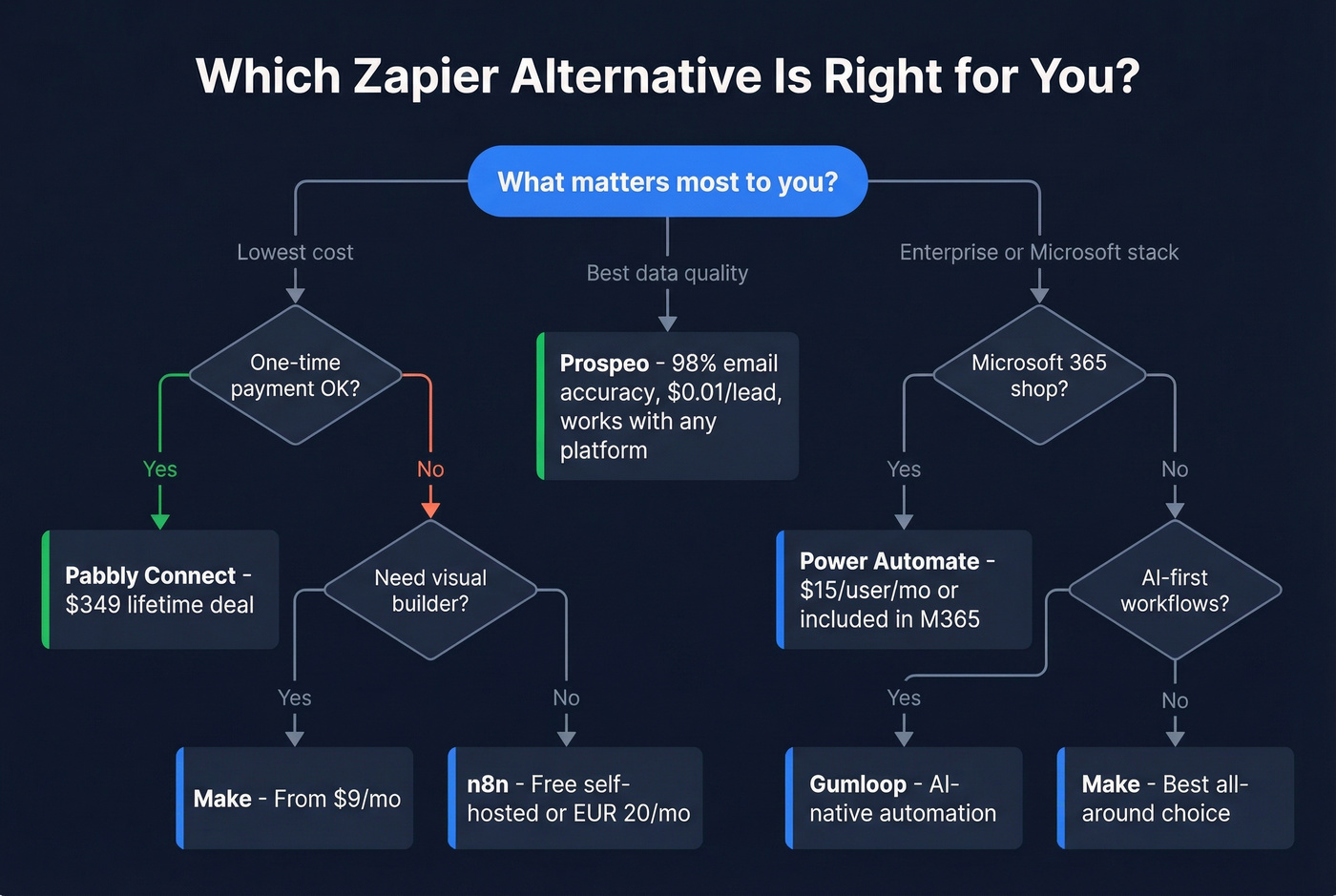
The decision tree is simpler than most guides make it:
- Budget-conscious SMB → Start with Make. If even $9/month feels like too much, grab Pabbly's lifetime deal at $349 and never think about it again.
- Technical team → n8n, self-hosted. You'll spend a weekend setting it up and save thousands per year.
- Microsoft shop → Power Automate. It's already in your stack.
- AI-first workflows → Gumloop. It's early, but the architecture is right.
- Open-source purist → Activepieces for a friendlier UI, n8n for maximum power.
Most teams should start with Make and only look at n8n or Pabbly if they outgrow that setup or need to cut costs further. And regardless of which platform you pick, layer in a data verification step - bad data will tank your sequences no matter how elegant your workflows are.
If you're automating cold outreach, make sure your sequencing fundamentals are solid (see our guide to a B2B cold email sequence).
Switching automation platforms saves you money on tasks. Switching to Prospeo saves you from bounces. 143M+ verified emails, 125M+ direct dials, refreshed every 7 days - piped straight into your workflows via API, Make, or n8n.
Fix the data layer and every automation downstream gets better.
FAQ
Is Make the best Zapier alternative?
For most teams scaling past 1,000 tasks per month, yes. Make's credit-based billing and visual builder deliver more value per dollar than Zapier. Zapier wins on simplicity and integration count - 8,000+ apps versus Make's 3,000+. If you need a niche connector, check Make's library first. If it's there, Make is the better deal.
Can I self-host n8n for free?
Yes. n8n's Community Edition is free and open-source on GitHub. Run it on a $5/month VPS with basic server management skills. You handle updates, backups, and uptime - but for technical teams, that's a trivial tradeoff for unlimited free executions.
What's the cheapest automation tool to replace Zapier?
Pabbly Connect's $349 lifetime deal is the cheapest long-term option by a wide margin. For monthly plans, Make starts at $9/month and IFTTT Pro at $2.99/month (though IFTTT isn't suited for serious business workflows). n8n's self-hosted Community Edition is free if you have the technical skills.
How do I migrate from Zapier to another tool?
There's no one-click migration path. Rebuild each Zap manually in your new platform, starting with your highest-volume workflows - those save the most money. Test thoroughly before switching off Zapier. Most teams run both platforms in parallel for 2-4 weeks during the transition.
How do I prevent bad data from flowing through my automations?
Add a real-time verification layer between your data source and your CRM. A 5-step email verification process catches invalid addresses, spam traps, and honeypots before they enter your pipeline. A 5-minute integration step prevents the 20%+ bounce rates that destroy sender reputation.